opal-start
 Diya Trivedi
start a project to build a simple single page design of the calculator

Comments (0)
Sign in to leave a comment
System Requirements
System Requirements Document for opal-start
1. Introduction
opal-start is a simple calculator delivered as a single page design. A visitor opens the page, enters numbers and arithmetic operators, and sees the current calculation and its result in an oversized readout. A clear control lets them start over. The product is deliberately minimal: one page, one keypad, one display, no navigation, no accounts, and no marketing sections.
The audience is anyone who needs quick everyday arithmetic — a person who wants a dependable, legible calculator that feels hand-made rather than corporate. The design language is "charming clarity": pixel-perfect, friendly symbols in the spirit of Susan Kare, with the numbers as the hero and every key reading instantly.
2. System Overview
opal-start is a single-page web application. The frontend is a React application that renders the one Calculator page. The shared FastAPI backend process provides the application API surface, and MariaDB is provisioned as the application-owned persistent store. The calculator's arithmetic entry, display, and clearing behavior is a client-side interaction on the single page; the provisioned backend and database are infrastructure available to the application and do not by themselves introduce accounts, saved history, or domain entities.
Actors:
- Calculator User — the only active human persona. They open the page anonymously, enter digits and operators, read the result, and clear the calculation to start over.
Current accepted behavior:
- A simple calculator delivered as a single page design.
- Entry of numbers and arithmetic operators to compute a result.
- Viewing the current calculation and its result on the page.
- Clearing the calculation to start over.
Ownership: the Calculator page is the anonymous public entry surface and owns all accepted human interaction — digit and operator entry, result display, and clearing. No provider or external destination owns any accepted behavior.
Removed from scope
- None. No concept was explicitly removed from the authoritative requirement thread.
2a. Product Interpretation and Delivery Boundary
opal-start is delivered as one first-party page, reachable anonymously with no sign-in, no account, and no persisted user state. The page is both the entry point and the entire product: there is no separate landing page, no navigation menu, and no second destination. All accepted work — entering numbers and operators, computing and viewing a result, and clearing to start over — happens within the Calculator page.
The backend and database are provisioned infrastructure for the application; the current accepted calculator behavior does not require server-side persistence, identity, or history, and none is introduced. Future ideas are kept out of the current page and acceptance criteria.
2c. Page Content and Component Coverage
Calculator
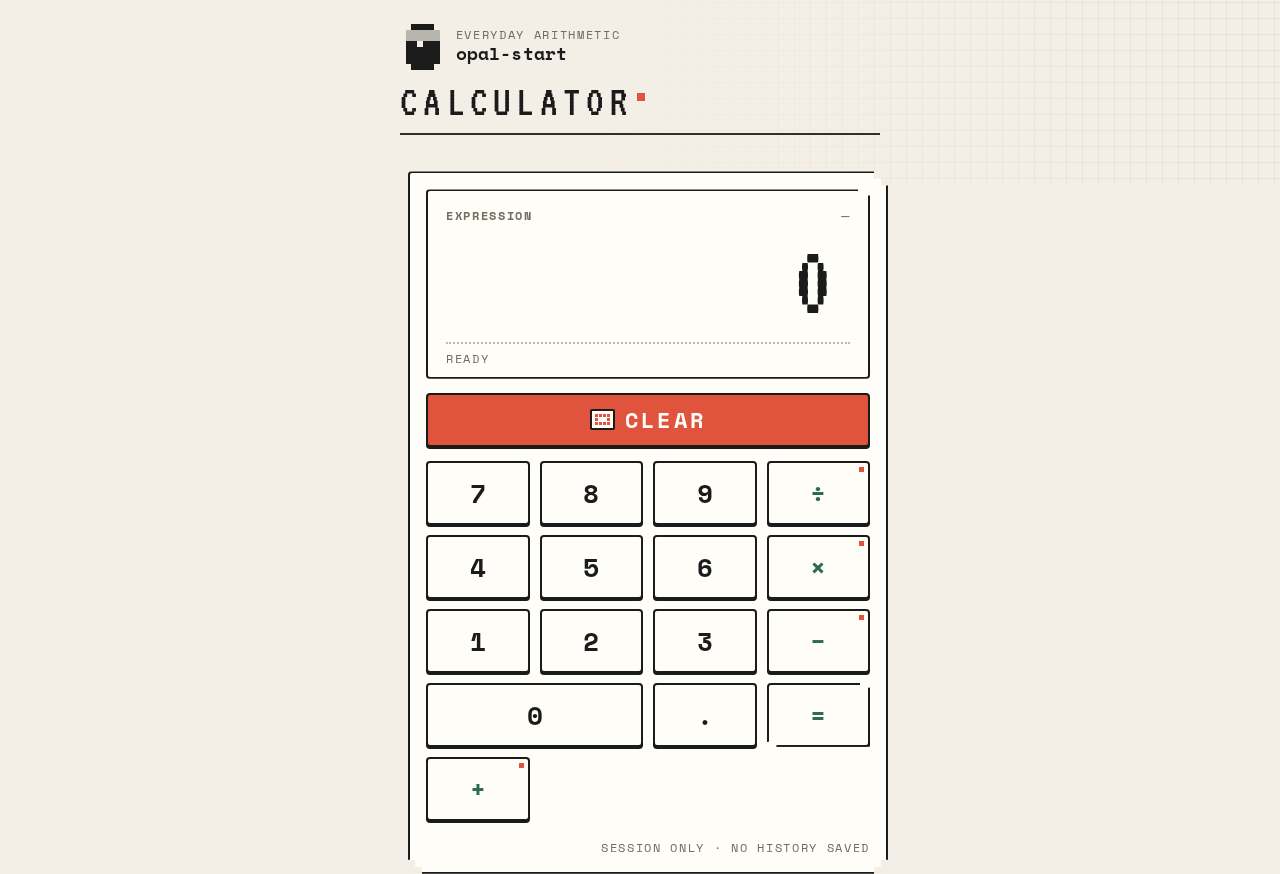
The single page of the product, and its anonymous public entry. A warm paper ground holds a compact wordmark, a small tracked page title, and one oversized off-white keypad panel slightly offset from centre, containing the readout and the key grid.
Information and state
- Current calculation expression (the sequence of entered numbers and operators).
- Current result / readout value, right-aligned in the display.
- Live operator indicator: the most recently selected operator key shows a blinking pixel cursor-style indicator (static when reduced motion is preferred).
- Pressed state of a key (2px depressed, hard shadow collapsed) while it is being pressed.
- Empty/initial state: readout shows a starting zero with no pending expression.
Primary actions
- Press a digit key (0–9) to append a digit to the current number entry.
- Press an operator key (+, −, ×, ÷) to record the operator and begin the next number entry; the operator key becomes the live operator indicator.
- Press the equals key to compute and show the result of the current calculation.
- Press the full-width coral clear key to clear the calculation and return to the initial state.
Supporting actions and components
- Wordmark: pixel calculator glyph beside the product name, with uppercase Space Mono micro-labels tracked wide.
- Page title: small, tracked, above the panel.
- Readout panel: oversized VT323 numerals filling the top third of the panel, with stepped pixel corners on the bezel.
- Keypad grid: strict 4-column grid with even gutters; digits and operators share the grid; the clear key sits as its own full-width row above the keypad in coral.
- Decorative pixel-grid texture bleeding off the right edge of the paper ground, never under text or keys.
Domain entities
- Calculation: the in-progress expression and its displayed result. It exists only for the current page session; no durable record is created.
States
- Loading: not applicable to the calculator interaction; the page renders its initial state directly.
- Empty: initial zero readout, no pending expression, no live operator indicator.
- Success: the readout shows the computed result after equals; the expression remains visible as the current calculation.
- Error: an invalid or incomplete calculation (for example, an operator with no following number, or division by zero) does not produce a misleading result; the readout communicates that the calculation cannot be completed, and the user can clear to start over.
- Recovery: the clear key always returns the page to the initial empty state from any state.
3. Functional Requirements
FR-1 — Single-page calculator delivery (explicit) As a Calculator User I should get the calculator as a simple single page design so that I can do arithmetic without navigating anywhere.
- Trigger: the user opens the product.
- Observable result: one page renders containing the wordmark, title, readout, and keypad; there is no navigation menu, no second page, and no marketing section.
- Access: anonymous; no sign-in required.
- Failure/recovery: not applicable; the page is the only destination.
- Continuation: the user proceeds directly to entering a calculation.
FR-2 — Enter numbers and arithmetic operators (explicit) As a Calculator User I should enter numbers and arithmetic operators so that I can build the calculation I want to compute.
- Trigger: the user presses digit keys and operator keys on the keypad.
- Observable result: entered digits appear in the readout as the current number; pressing an operator records it and marks that operator key as the live operator indicator; the user can continue entering the next number.
- Access: anonymous.
- Failure/recovery: if an entry sequence is invalid or incomplete, the readout communicates that the calculation cannot be completed, and the user can clear to start over.
- Continuation: the user presses equals to compute, or continues entering the expression.
FR-3 — View the current calculation and its result (explicit) As a Calculator User I should view the current calculation and its result on the page so that I can see what I entered and what it evaluates to.
- Trigger: the user enters digits and operators and presses equals.
- Observable result: the readout shows the computed result in oversized numerals, right-aligned, while the current calculation remains visible on the page.
- Access: anonymous.
- Failure/recovery: an invalid or incomplete calculation shows a non-misleading readout state instead of a result; clearing recovers.
- Continuation: the user reads the result, or clears to start a new calculation.
FR-4 — Clear the calculation to start over (explicit) As a Calculator User I should clear the calculation so that I can start over with a fresh calculation.
- Trigger: the user presses the full-width coral clear key.
- Observable result: the readout returns to the initial zero state, the pending expression is removed, and no operator indicator remains live.
- Access: anonymous.
- Failure/recovery: the clear key works from any state, including after an invalid calculation.
- Continuation: the user begins a new calculation.
FR-5 — Key press feedback (required_inference) As a Calculator User I should see each key respond when I press it so that I know my input registered.
- Trigger: the user presses any key.
- Observable result: the key depresses 2px with an instant snap and its hard shadow collapses; the readout digits swap with a 60ms step change; the live operator indicator blinks like a cursor.
- Access: anonymous.
- Failure/recovery: with reduced motion preferred, the pressed state is shown statically with no blink.
- Continuation: the user continues entering the calculation.
4. User Personas
Calculator User
Product context. A person who needs quick everyday arithmetic and opens opal-start's single page directly. They arrive anonymously — no account, no profile, no saved history — and expect the calculator to be immediately usable.
Primary goal. Get an accurate result for a simple calculation on one page, without navigating elsewhere or learning an interface.
Distinct accepted responsibilities.
- Enter numbers and arithmetic operators on the keypad.
- Read the current calculation and its result in the oversized readout.
- Clear the calculation to start over.
Relevant inputs and decisions. Which digits and operators to enter, when to press equals to compute, and when to clear and begin again. The user decides when a calculation is complete and when to discard it.
Interactions with other participants. None. The Calculator User is the only active human participant; no counterparty, recipient, or provider is affected by the calculation.
Observable success. The readout shows the correct result for the entered calculation, the current calculation remains visible, and clearing returns the page to a fresh initial state — all within the single page.
5. Core User Flows
Flow 1 — Perform a calculation
- The Calculator User opens opal-start and lands on the Calculator page (anonymous; no sign-in).
- The page shows the wordmark, the small tracked title, and the keypad panel with the readout at its initial zero state.
- The user presses digit keys; the digits appear in the readout as the current number, with each key depressing 2px on press.
- The user presses an operator key (+, −, ×, ÷); that key becomes the live operator indicator, blinking like a cursor.
- The user presses digit keys for the next number; the readout shows the new entry.
- The user presses equals; the readout shows the computed result in oversized VT323 numerals, right-aligned, and the current calculation remains visible.
- The user reads the result. To start a new calculation, they continue with Flow 2.
Flow 2 — Clear and start over
- From any state of the Calculator page — mid-entry, after a result, or after an invalid calculation — the Calculator User presses the full-width coral clear key.
- The readout returns to the initial zero state, the pending expression is removed, and no operator indicator remains live.
- The user begins a new calculation following Flow 1.
Flow 3 — Recover from an invalid calculation
- The Calculator User enters an incomplete or invalid calculation (for example, an operator with no following number, or division by zero) and presses equals.
- The readout communicates that the calculation cannot be completed rather than showing a misleading result.
- The user presses the clear key; the page returns to the initial empty state.
- The user re-enters the calculation following Flow 1.
6. Visuals Colors and Theme
The creative direction is authoritative: "Charming clarity" — a calculator built from pixel-perfect, friendly symbols, in the spirit of Susan Kare. The emotional register is calm, trustworthy, and quietly delightful; the numbers are the hero and every key reads instantly.
Palette (light mode)
| Role | Hex | Use |
|---|---|---|
| Background (paper) | #F4EFE6 | Warm paper ground, ~60% of the surface |
| Surface (keys/panel) | #FFFDF8 | Off-white keypad panel and key tiles, ~30% |
| Text (ink) | #1B1B1B | Display digits, key labels, outlines |
| Primary (pine green) | #2F6B4F | Operator keys and the equals key |
| Accent (coral) | #E0533D | The clear key and the single live operator indicator only |
| Muted | #8A8272 | Secondary labels and hairline pixel rules |
Roughly 60% paper, 30% off-white keys, 10% green/coral signal.
Typography
- Headings and readout: VT323 — large display sizes for the calculator readout and page title; crisp terminal-pixel voice with generous tracking; uppercase for micro-labels; numerals set big and confident.
- Body and key labels: Space Mono, medium weight, tabular figures, tight but readable.
- Scale: 1.25 modular for UI, with a display jump — readout
clamp(48px, 12vw, 104px); titleclamp(28px, 5vw, 44px); key labelsclamp(20px, 3.2vw, 26px); micro-labels 12px uppercase tracked +0.14em; helper text 14px.
Shape language. Chunky pixel-friendly tiles with hard 4px radii and 2px ink outlines. A stepped "pixel corner" treatment — small square notches cut from corners — on the display bezel and the equals key, so edges feel drawn on a grid, not smoothed. Keys are square-ish and uniform, with a 2px bottom shadow that reads as a physical press rather than a soft float.
Layout. Single centred column on the paper ground: compact wordmark top-left, oversized readout panel spanning the column width, then a strict 4-column keypad grid with even gutters. The clear key sits as its own full-width row above the keypad in coral; digits and operators share the grid below. One page, no scrolling required on desktop, stacking cleanly to a narrower keypad at 375px with keys fully inside the viewport.
Imagery. No photography. The visual content is the interface itself plus a few pixel pictograms: a small pixel calculator glyph in the wordmark, a tiny pixel "AC" badge, and a faint pixel-grid texture in the paper ground at very low contrast. Everything is drawn from squares and symbols.
Avoid. Rounded pill buttons or soft offset drop shadows; gradient blobs, glass panels, or blurred surfaces; photography or 3D renders; Bootstrap blue or indigo accents; Inter, Roboto, Poppins, or system-ui type; identical hover-lift card grids; decorative animation beyond key-press and cursor blink; any second page, nav menu, or marketing sections.
Readability constraint. Headlines, wordmarks, labels, numbers, and controls stay entirely inside the viewport and their container at 375px, 768px, and 1280px, wrapping or scaling to fit, with no other element covering them. Decoration may bleed off edges; readable text and controls may not.
7. Signature Design Concept
The hero is the calculator itself, not a marketing banner. A warm paper field (#F4EFE6) holds a single oversized off-white keypad panel (#FFFDF8), slightly offset from centre, with the readout filling its top third in huge VT323 numerals (clamp 48–104px), right-aligned to a blinking pixel cursor. Beneath it, the 4-column key grid sits in ink-outlined tiles with stepped pixel corners and a 2px hard shadow that snaps down on press — a physical, drawn-on-a-grid keypad. The page title sits small and tracked above the panel; the full-width coral clear key (#E0533D) is the one hot block on the screen, sitting above the digit grid. A printed pixel-grid texture bleeds off the right edge as decoration only. There is no centred headline-plus-subtext-plus-button composition anywhere.
8. Interaction Model & Motion Direction
Interaction Model: Animated Motion Tempo: restrained Hero Dimensionality: flat
Landing Hero Motion Brief
- Focal subject: the oversized readout and the ink-outlined keypad panel — the calculator itself as the hero.
- Input → transformation → outcome thesis: a key press depresses the tile 2px with an instant snap and collapses its hard shadow; the readout digits swap with a 60ms step change; the selected operator key blinks its indicator like a cursor — so every input is visibly registered and the result lands with pixel clarity.
- Motion vocabulary: frame-by-frame micro feedback only — instant key depression, 60ms digit step change, cursor-style operator blink. No easing theatrics, no decorative animation.
- Composed first frame: paper ground with the faint pixel-grid texture bleeding off the right edge; wordmark top-left with its pixel calculator glyph; small tracked title; the off-white panel slightly offset from centre with a large zero in the readout and the coral clear key as the single saturated block above the key grid.
- Reduced-motion state: the static pressed state is shown with no blink; all keys, labels, and the readout remain fully readable and usable.
9. Non-Functional Requirements
- Single page (explicit): the product must be a single page; no second page, navigation menu, or marketing section exists.
- Simplicity (explicit): the design must be simple — one readout, one keypad, one clear control.
- Readability at every viewport (explicit, from design constraints): readable text and controls stay whole and inside the viewport and their container at 375px, 768px, and 1280px; decoration may bleed but never covers readable text or controls.
- Reduced motion (explicit, from creative direction): with
prefers-reduced-motion, the pressed state is static with no blink, and the page remains fully usable. - Accessibility of controls (required_inference): keys are operable and labeled so that each digit, operator, equals, and clear control is identifiable; the readout is legible at the specified display sizes.
- No identity or persistence requirement (explicit boundary): the calculator is anonymous and stateless across sessions; no account, history, or saved calculation is required.
10. Tech Stack
- Frontend: React application rendering the single Calculator page.
- Backend: shared FastAPI process for application APIs and domain modules (provisioned; the current calculator interaction does not require server-side computation or persistence).
- Database: MariaDB, provisioned as application-owned persistent storage (no domain entities are required by the current accepted behavior).
- Containerization: Docker / docker-compose for the frontend, backend, and database services.
- Typography: VT323 (headings and readout) and Space Mono (body and key labels), as specified by the creative direction.
11. Assumptions and Constraints
- Assumption (narrow): arithmetic is standard everyday arithmetic on entered numbers and operators; no scientific functions, memory, or history are implied by the source.
- Assumption (narrow): the calculator operates on the single page without requiring a backend round-trip for computation; the provisioned backend and database remain available infrastructure.
- Constraint (explicit): exactly one page — the Calculator — is the entire product and its anonymous public entry.
- Constraint (explicit): the design must be simple and single-page.
- Constraint (explicit): the visual direction, palette, typography, shape language, layout, and motion rules in Sections 6–8 are binding; the generic indigo/blue-on-white SaaS template is forbidden.
- Constraint (explicit): no second page, nav menu, or marketing sections.
12. Glossary
- Calculator page — the single page of opal-start; the anonymous public entry that hosts the readout, keypad, and clear control.
- Readout — the oversized VT323 display at the top third of the keypad panel showing the current number or result.
- Keypad — the strict 4-column grid of ink-outlined digit and operator keys, with the full-width coral clear key above it.
- Live operator indicator — the blinking cursor-style mark on the most recently selected operator key.
- Clear key — the full-width coral control that resets the calculation to its initial state.
- Pixel corner — the stepped treatment of small square notches cut from the corners of the display bezel and equals key.
Calculator
Display 0
Session only · no history saved
Calculator
Display 0
Session only · no history saved
No comments yet. Be the first!