opal-gym
 Harshil Chavda
build me website for gym

Comments (0)
Sign in to leave a comment
System Requirements
System Requirements Document (SRD) for Opal-Gym
1. Introduction
Welcome to the System Requirements Document (SRD) for Opal-Gym, a project envisioned by Harshil Chavda to create a modern, user-friendly website for a gym. This document outlines the functional and non-functional requirements, user personas, design concepts, and technical specifications necessary to bring the vision of Opal-Gym to life. The website will cater to both current gym members and potential new customers, offering features like class schedules, membership plans, and booking systems.
This document assumes an Indian locale, with considerations for local currency (INR), time zones (IST), and user preferences.
2. System Overview
The Opal-Gym website will serve as a digital hub for gym members and prospective clients. It will provide a seamless experience for users to explore gym facilities, book sessions, view class schedules, and sign up for memberships. The system will be designed to be responsive, ensuring accessibility across devices, including desktops, tablets, and smartphones.
Key objectives:
- Attract new members by showcasing gym facilities and services.
- Provide current members with tools to manage their memberships and bookings.
- Offer a professional, visually appealing, and easy-to-navigate website.
3. Functional Requirements
Story Points:
- As a User, I should be able to view the gym's facilities and services.
- As a User, I should be able to book gym sessions or classes online.
- As a User, I should be able to view and download the class schedule.
- As a User, I should be able to sign up for a membership plan.
- As an Admin, I should be able to manage class schedules and bookings.
- As an Admin, I should be able to update membership plans and pricing.
- As a Guest, I should be able to explore the website and contact the gym for inquiries.
4. User Personas
1. Guest
- Description: A visitor exploring the website for the first time.
- Goals: Learn about the gym, view facilities, and inquire about memberships.
- Key Features: Access to general information, contact form, and facility gallery.
2. Member
- Description: A registered gym member with an active subscription.
- Goals: Book sessions, view class schedules, and manage their membership.
- Key Features: Login access, personalized dashboard, and booking tools.
3. Admin
- Description: Gym staff responsible for managing the website and operations.
- Goals: Update schedules, manage bookings, and oversee memberships.
- Key Features: Admin dashboard with content management tools.
5. Visuals Colors and Theme
Color Palette:
- Background: #F5F5F5 (Light Gray)
- Surface: #FFFFFF (White)
- Text: #333333 (Dark Gray)
- Accent: #FF6F61 (Vibrant Coral)
- Muted Tones: #B0BEC5 (Soft Blue-Gray)
This palette reflects a clean, professional aesthetic with a touch of vibrancy to convey energy and fitness.
6. Signature Design Concept
Interactive Fitness Journey Homepage
The homepage will feature an interactive fitness journey map. Users will be greeted with a dynamic, animated path that represents their fitness journey. This path will have clickable milestones, such as "Explore Facilities," "View Classes," "Book a Session," and "Join Now." Each milestone will expand into an engaging micro-interaction, such as:
- Facilities: A 360-degree virtual tour of the gym.
- Classes: A carousel of animated class cards with hover effects.
- Booking: A sleek, calendar-based booking interface.
- Membership: A pricing table with animated transitions.
The background will feature subtle animations of gym equipment (e.g., dumbbells, treadmills) moving in and out of view, creating a sense of motion and energy. The transitions between sections will use smooth scrolling with parallax effects, enhancing the immersive experience.
7. Non-Functional Requirements
- Performance: The website should load within 3 seconds on a standard 4G connection.
- Scalability: The system should support up to 10,000 concurrent users.
- Accessibility: The website must comply with WCAG 2.1 Level AA standards.
- Security: User data must be encrypted and comply with GDPR and local data protection laws.
- Responsiveness: The design must adapt seamlessly to various screen sizes and devices.
8. Tech Stack
Frontend:
- React for Web
Backend:
- Python
- FastAPI
Database:
- MySQL (with Alembic for migrations)
AI Models:
- GPT 5.4 for user-friendly responses
- Claude 4.6 Opas for academic or coding work
AI Tools:
- Litellm for LLM Routing
- Langchain
Orchestration:
- Docker
- Kubernetes
9. Assumptions and Constraints
Assumptions:
- Users will primarily access the website from India.
- The website will support English as the primary language.
- Payment gateways will support INR transactions.
Constraints:
- The system must be deployed within 3 months.
- Budget constraints may limit the use of premium third-party tools.
10. Glossary
- WCAG: Web Content Accessibility Guidelines.
- GDPR: General Data Protection Regulation.
- LLM: Large Language Model.
- IST: Indian Standard Time.
- RDBMS: Relational Database Management System.

Your Fitness Journey Starts Here
Discover world-class facilities, expert-led classes, and a community that empowers you to reach your peak potential. Your transformation begins today.
Your Fitness Journey Starts Here
Follow four simple milestones to unlock your full potential at Opal-Gym. Click each step to learn more.
Explore Facilities
Discover our world-class gym equipment and training spaces.
Tap to exploreView Classes
Browse our curated selection of group and personal training classes.
Tap to exploreBook a Session
Reserve your spot with our easy online booking system.
Tap to exploreJoin Now
Choose a membership plan that fits your goals and budget.
Tap to exploreOur World-Class Facilities
Explore our premium facilities designed to support every aspect of your fitness journey at Opal-Gym.

Cardio Zone
State-of-the-art treadmills, ellipticals, and rowing machines with personal entertainment screens.
Explore→
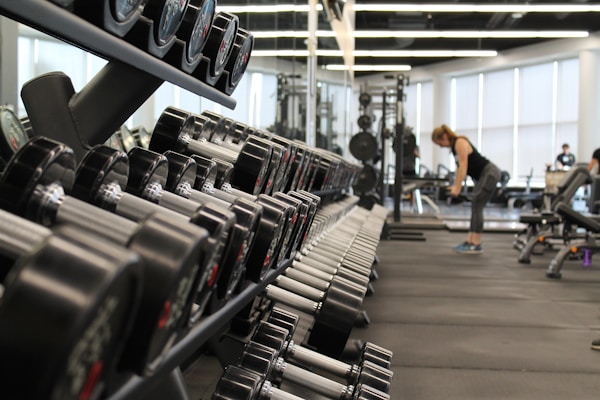
Strength Training
Full range of free weights, machines, and power racks for every fitness level.
Explore→
Yoga & Meditation Studio
Serene, temperature-controlled studio with bamboo flooring and ambient lighting for mindful workouts.
Explore→
Swimming Pool
Olympic-standard 25m heated pool with dedicated lanes for lap swimming and aqua fitness.
Explore→
Group Fitness Arena
Spacious arena for Zumba, HIIT, spin classes and more, equipped with professional audio and lighting.
Explore→
Recovery & Spa
Sauna, steam room, and massage therapy to help you recover and rejuvenate after intense sessions.
Explore→Explore & View Classes
From high-intensity interval training to calming yoga flows, our expert-led classes are designed to push your limits and transform your fitness journey.
 Beginner
Power Yoga Flow
 Intense
HIIT Burn
 Intermediate
Spin Cycle Pro
 Beginner
Boxing Fundamentals
 Intense
CrossFit Elite
 Beginner
Zumba Fiesta
Book a Session
Choose your date, pick a time slot, and reserve your spot in just a few clicks.
HIIT Bootcamp
with Coach Arjun Mehta
High-intensity interval training combining cardio bursts with strength exercises. Designed to maximise calorie burn and build endurance in a fun, motivating group setting.
Choose Your Perfect Plan
Flexible membership options designed to fit your fitness goals and budget. All plans include access to our state-of-the-art facilities.
Starter
Perfect for beginners exploring fitness
- ✓Access to gym floor
- ✓Locker room access
- ✓2 group classes/month
- ✕Fitness assessment
- ✕Personal trainer sessions
- ✕Spa & sauna access
- ✕Nutrition consultation
Basic
Great for regular gym-goers
- ✓Full gym equipment access
- ✓Locker room & showers
- ✓8 group classes/month
- ✓Quarterly fitness assessment
- ✕Personal trainer sessions
- ✕Spa & sauna access
- ✕Nutrition consultation
Premium
Our most popular membership plan
- ✓Unlimited gym access 24/7
- ✓Premium locker & amenities
- ✓Unlimited group classes
- ✓Monthly fitness assessment
- ✓4 personal trainer sessions
- ✓Spa & sauna access
- ✕Nutrition consultation
Elite
The ultimate fitness experience
- ✓Unlimited 24/7 all-location access
- ✓VIP locker & towel service
- ✓Unlimited classes + priority booking
- ✓Weekly fitness assessment
- ✓Unlimited personal training
- ✓Full spa, sauna & recovery zone
- ✓Monthly nutrition consultation
What Our Members Say
Real stories from real members who transformed their lives at Opal-Gym.
Ready to Transform Your Fitness?
Join the Opal-Gym community today. Whether you're a beginner or a seasoned athlete, we have the facilities, classes, and support to help you reach your goals.
No comments yet. Be the first!