opal-calculator
 Diya Trivedi
start a project to build single simple calculator

Comments (0)
Sign in to leave a comment
System Requirements
System Requirements Document for opal-calculator
1. Introduction
opal-calculator is a single, simple calculator delivered as a web application. Its product intent is narrow and explicit: give anyone a quick, correct answer to basic arithmetic, with no account, no dashboard, and no brand story. The audience is literally everyone — a person who needs to add, subtract, multiply, or divide a couple of numbers and see the result immediately.
The product is one calculator. It performs basic arithmetic calculations and displays the result to the user. Nothing else is in scope.
2. System Overview
opal-calculator is a small first-party web application with two pages: a public Landing page that explains what the calculator is and does, and the Calculator page that owns arithmetic entry, computation, result display, and clearing for a new calculation. Both pages are anonymously reachable; there is no account, no sign-in, and no persisted user state.
The sole active human actor is the Calculator User. There are no other human personas, no administrators, no providers acting on the user's behalf, and no external destinations in the accepted journeys. Computation is performed by the application itself and is not delegated to a third-party service.
2a. Product Interpretation and Delivery Boundary
The accepted product is a single simple calculator. The delivery boundary is correspondingly tight:
- Current: a public Landing page introducing the calculator, and a Calculator page where a user enters operands and an operation, sees the computed result, and can clear the calculator to start a new calculation.
- Access: both pages are public and anonymous. No identity, session, or account is established or required, because no accepted journey needs durable actor-specific state, a commitment, a decision, or a value transfer bound to a participant.
- Explicit exclusion: scope is limited to a single simple calculator; no additional product areas are requested. There is no history, no memory, no scientific mode, no unit conversion, no graphing, no accounts, and no sharing.
- Future: none stated. No future requirements are recorded in the authoritative source.
2b. Source Content Inventory
Not applicable — no reference directive declares a content_source.
2c. Page Content and Component Coverage
Landing
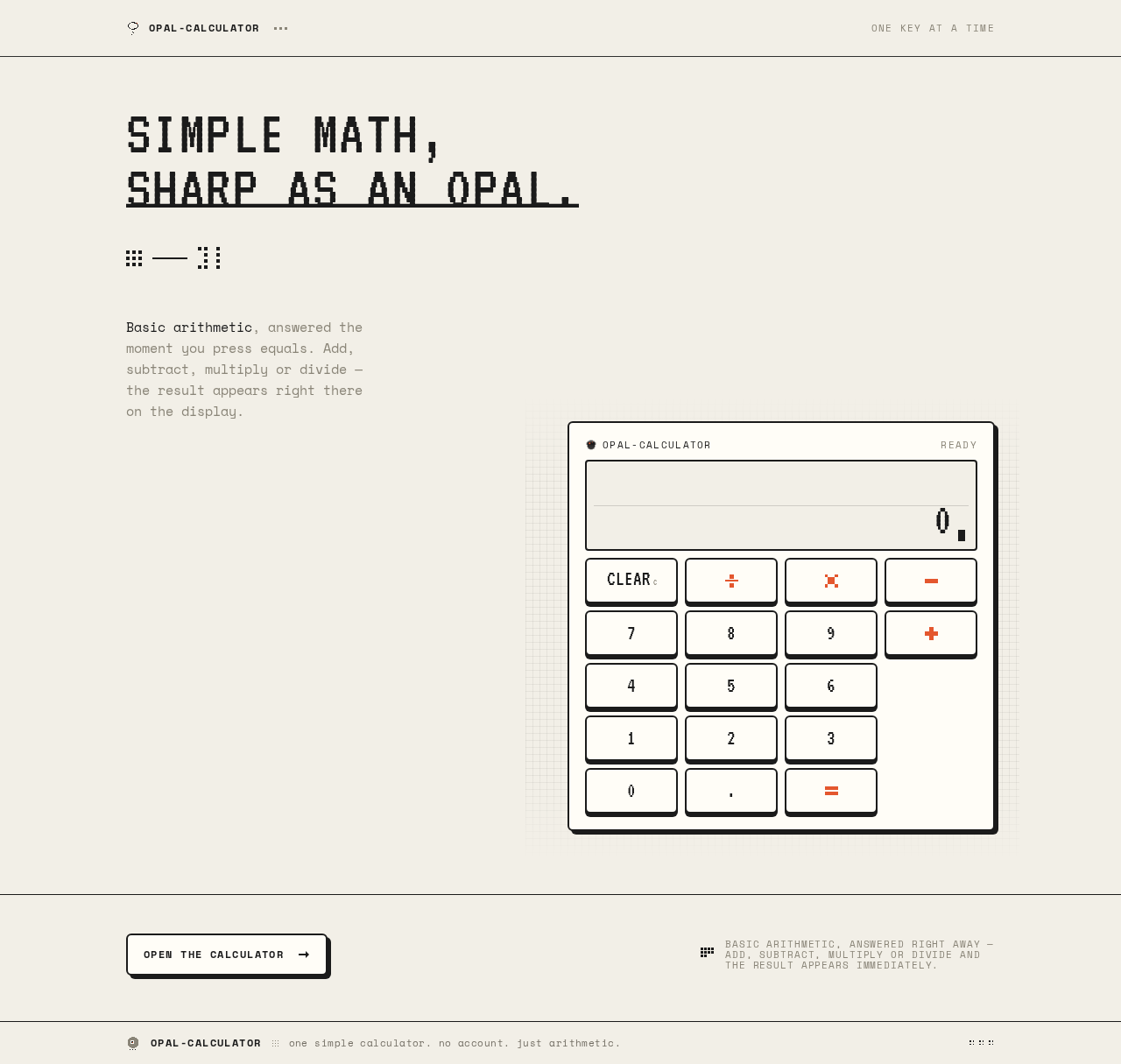
- Purpose and information: the anonymous public entry that explains what the single simple calculator is and does before use. It presents an oversized pixel headline, a short two-line explainer, and the calculator rendered as a hero object.
- Primary action: proceed to the Calculator page to perform a calculation.
- Supporting actions: none beyond navigation into the calculator.
- Domain entities: none persisted; the page is informational plus a navigation entry point.
- Component responsibilities:
- Wordmark glyph (small pixel opal mark) with the product name.
- Oversized all-caps VT323 headline, flush left, allowed to break across two lines.
- Short Space Mono explainer (two lines) describing basic arithmetic and immediate results.
- Calculator hero object: off-white body, 2px ink outline, 4px solid offset shadow, vermilion equals key as the single hot point; the object overlaps the headline's lower right corner at desktop and stacks below the explainer on mobile.
- Faint 8px grid texture behind the calculator object only.
- Dot-cluster dividers as decoration.
- A clear entry control into the Calculator page.
- States:
- Loading: static content; no data fetch, so no loading state is required.
- Empty: not applicable — the page has fixed content.
- Success: the page renders fully and the entry control into the Calculator is available.
- Error: not applicable — no remote data or computation on this page.
- Recovery: not applicable.
Calculator
- Purpose and information: owns the accepted arithmetic entry, computation, result display, and clear/reset for a new calculation. The calculator object sits vertically centred with a thin ruled header carrying the wordmark and a "new calculation" control.
- Primary action: enter operands and an operation, then compute and display the result.
- Supporting actions: clear/reset to start a new calculation; return to the Landing page via the wordmark.
- Domain entities: the current operand entry, the selected operation, and the displayed result. All are transient in-page state; nothing is persisted.
- Component responsibilities:
- Ruled header with wordmark and "new calculation" control.
- Display panel: inset "screen" spanning all four keypad columns, with a hairline inner rule and a blinking block cursor that steps rather than fades; shows the current entry and, after computation, the result.
- Keypad: strict 4-column grid with 8px gutters; digit keys 0–9, decimal point, operation keys (plus, minus, multiply, divide) drawn as 16×16 pixel pictograms, a clear key, and an equals key.
- Equals key rendered in vermilion as the only coloured control; operator column also carries the vermilion accent.
- Key press behaviour: instant 4px downward translate with shadow removal, snap back, and an 80ms ink-on-paper inversion.
- States:
- Loading: not applicable — computation is local and immediate.
- Empty: the display shows an initial zero/blank entry with the blinking cursor ready for input.
- Success: the computed result appears in the display with a single-step blink.
- Error: invalid input (for example, division by zero or a malformed expression) is surfaced in the display rather than silently ignored; the user can clear and retry.
- Recovery: the clear key and the "new calculation" control reset the display and entry so the user can start again.
3. Functional Requirements
FR-1 — Perform a basic arithmetic calculation and display the result
- As a Calculator User I should enter operands and an operation and see the computed result displayed so that I get a quick correct answer.
- Provenance: explicit.
- Lifecycle: the user initiates on the Calculator page by entering numbers and choosing an operation; the application computes locally; the result is shown in the display panel. No other participant is affected.
- Access state: public, anonymous.
- Failure/recovery: invalid input (such as division by zero) is shown in the display; the user clears and retries.
- Continuation: the user may perform another calculation or clear the calculator.
- Observable acceptance: after entering operands and an operation and confirming, the display shows the correct arithmetic result.
FR-2 — Start a new calculation (clear/reset)
- As a Calculator User I should clear the current entry and result so that I can start a fresh calculation.
- Provenance: required_inference (indispensable to the accepted "single simple calculator" lifecycle — a calculator that cannot be reset cannot be reused).
- Lifecycle: the user activates the clear key or the "new calculation" control; the display resets to its initial empty state with the cursor ready.
- Access state: public, anonymous.
- Failure/recovery: not applicable — reset is always available.
- Continuation: the user enters a new calculation.
- Observable acceptance: after clearing, the display shows the initial empty state and accepts new input.
FR-3 — Understand what the calculator is before using it
- As a Calculator User I should see a short explanation of the single simple calculator on the Landing page so that I know immediately what it does and how to start.
- Provenance: required_inference (the accepted public entry surface).
- Lifecycle: the user arrives anonymously on the Landing page, reads the headline and two-line explainer, and proceeds to the Calculator.
- Access state: public, anonymous.
- Failure/recovery: not applicable — static content.
- Continuation: the user enters the Calculator page.
- Observable acceptance: the Landing page presents the headline, explainer, and a clear entry into the Calculator.
FR-4 — Scope limited to a single simple calculator
- As a product owner I should keep the product limited to one simple calculator so that no additional product areas are introduced.
- Provenance: explicit constraint.
- Observable acceptance: the delivered product contains only the Landing and Calculator pages and the arithmetic capabilities above; no history, accounts, scientific functions, or other product areas are present.
4. User Personas
Calculator User
- Product context: a person who needs a quick, correct answer to basic arithmetic. They arrive anonymously, with no account and no prior state, and expect the calculator to be immediately usable.
- Primary goal: enter a couple of numbers and an operation, and see the correct result right away.
- Distinct accepted responsibilities: entering operands and an operation; confirming the calculation; reading the displayed result; clearing the calculator to start a new calculation; understanding from the Landing page what the calculator does before using it.
- Relevant inputs or decisions: the numbers to compute, the operation to apply (add, subtract, multiply, divide), and when to clear and start over.
- Interactions with other accepted participants: none — the Calculator User is the sole active human actor, and computation is performed by the application itself.
- Observable success: the display shows the correct result immediately after the calculation, and the user can clear and repeat.
- Constraints: no account, no dashboard, no persisted history; the experience must read instantly at a glance and feel like a delightful physical keypad.
5. Core User Flows
Flow A — First visit and orientation (Calculator User)
- The Calculator User opens the application anonymously and lands on the Landing page.
- They read the oversized headline ("SIMPLE MATH, SHARP AS AN OPAL.") and the short two-line Space Mono explainer describing basic arithmetic and immediate results.
- They see the calculator rendered as a physical hero object with the vermilion equals key as the single hot point.
- They activate the entry control into the Calculator.
- Result: the Calculator page opens with the display in its initial empty state and the blinking cursor ready.
- Next step: they begin a calculation (Flow B).
Flow B — Perform a calculation (Calculator User)
- The Calculator User is on the Calculator page with the display in its initial empty state.
- They press digit keys to enter the first operand; each key depresses 4px, snaps back, and briefly inverts for 80ms, and the display updates with a single-step blink.
- They press an operation key (plus, minus, multiply, or divide), drawn as a 16×16 pixel pictogram in the vermilion operator column.
- They enter the second operand.
- They press the vermilion equals key.
- Result: the application computes locally and the display shows the correct arithmetic result with a single-step blink.
- Next step: they either continue with another calculation or clear the calculator (Flow C).
Flow C — Clear and start a new calculation (Calculator User)
- The Calculator User has a result or partial entry on the Calculator page.
- They press the clear key, or the "new calculation" control in the ruled header.
- Result: the display resets to its initial empty state with the cursor ready.
- Next step: they begin a new calculation (Flow B).
Flow D — Recover from invalid input (Calculator User)
- The Calculator User enters an expression that cannot be computed (for example, division by zero).
- They press equals.
- Result: the display surfaces the invalid-input condition rather than silently ignoring it.
- Recovery: they press the clear key or the "new calculation" control to reset.
- Next step: they re-enter a valid calculation (Flow B).
6. Visuals Colors and Theme
Muse: Susan Kare — Charming clarity, one key at a time.
Headline: "SIMPLE MATH, SHARP AS AN OPAL."
Mode: light only.
Colour tokens (exact hex by role):
| Role | Hex | Usage |
|---|---|---|
| Background (paper) | #F2EFE7 | Warm paper ground filling the page |
| Surface (key face / calculator body) | #FFFDF7 | Off-white calculator body and key faces |
| Text / ink | #1B1B1B | All numerals, labels, outlines, 2px strokes, 4px offset shadows |
| Primary | #1B1B1B | Ink black for primary controls and outlines |
| Accent (vermilion) | #E4572E | Equals key and operator column only |
| Muted | #8A8578 | Secondary labels and keypad grid rules |
Proportion: roughly 80% paper and ink, 15% off-white key faces, 5% vermilion. The accent stays scarce to keep its signal power; no second saturated colour competes with the vermilion equals key.
Typography:
- Headings: VT323, all-caps, one weight, never italic, tracked slightly wide.
- Body: Space Mono, small sizes with generous letterspacing for labels and key legends.
- Scale: 1.25 modular on a 4px baseline — display
clamp(40px, 9vw, 112px); section heading 24/32; key legend 20/24; label 12/12 uppercase tracked +0.12em; body 15/16; caption 11/12. - Forbidden: Inter, Roboto, Arial, Helvetica, or system-ui for headings or body.
Shape language: chunky-outline rectangles with 6px radii — closer to a physical keycap than a card. Every interactive element has a hard 2px ink stroke with a 4px solid ink offset shadow beneath it; pressing translates the key 4px down and removes the shadow. Purely square pixel ornaments (3×3 and 4×4 dot clusters) act as bullets and dividers. No blobs, no soft gradients, no glass.
Layout: a single centred column on a 12-column grid, maximum width 560px for the calculator at desktop, inside a wider editorial frame. The Landing page stacks an oversized pixel headline flush left, a short two-line explainer, then the calculator as a hero object with its own hard-edged shadow. The Calculator page is the object alone, vertically centred, with a thin ruled header carrying the wordmark and a "new calculation" control. The keypad is a strict 4-column grid with 8px gutters; the display spans all four columns as a single inset panel with a hairline inner rule.
Imagery: no photography. The imagery is the interface itself — pixel pictograms for each operation (plus, minus, multiply, divide, clear, equals) drawn on a 16×16 grid, plus a small pixel opal mark used as the wordmark glyph. Decoration is limited to dot-cluster dividers and a faint 8px grid texture used only behind the calculator object.
Avoid: rounded glass cards, blur, or gradient blobs; blue or indigo as the accent; Inter/Roboto/Arial/Helvetica/system-ui for headings or body; soft drop shadows or hover-lift transitions on keys; photography, 3D renders, or stock imagery of people; any second saturated colour; decorative animation beyond the 80ms press inversion and the display cursor; a centred headline-plus-subtext-plus-button SaaS hero structure.
Readability: headlines, wordmarks, labels, numbers, and controls stay entirely inside the viewport and their container at 375px, 768px, and 1280px, wrapping or scaling to fit, with no other element covering them. Decoration may be cropped or bled as the direction asks, but never over readable text or controls.
7. Signature Design Concept
The Landing page is a drafting-board composition, not a SaaS hero. A warm paper field (#F2EFE7) carries a faint 8px grid. An oversized VT323 headline — "SIMPLE MATH, SHARP AS AN OPAL." — runs flush left across roughly nine columns at 112px on desktop, set all-caps and allowed to break across two lines. Beneath and overlapping its lower right corner sits the calculator itself, rendered as a physical object: off-white body (#FFFDF7), 2px ink outline, 4px solid offset shadow, with the vermilion equals key (#E4572E) as the single hot point in the composition. A short Space Mono explainer sits to the left of the object at desktop and stacks above it on mobile. The whole product reads as a keycap sitting on the page — the interface is the imagery.
8. Interaction Model & Motion Direction
Interaction Model: Animated Motion Tempo: restrained Hero Dimensionality: flat
Landing Hero Motion Brief
- Focal subject: the calculator rendered as a physical object — off-white body, 2px ink outline, 4px solid offset shadow — overlapping the lower right corner of the oversized VT323 headline, with the vermilion equals key as the single hot point.
- Input → transformation → outcome thesis: as the user presses a key on the hero object, the key translates 4px down, its shadow disappears, and it briefly inverts to ink-on-paper for 80ms; the display value changes with a single-step blink. The outcome is the tactile, mechanical feel of a real keypad — no easing theatrics, no bounces, no floating.
- Motion vocabulary: frame-by-frame micro motion only — instant 4px key depression and snap-back, 80ms press inversion, single-step display blink, and a blinking block cursor that steps rather than fades.
- Composed first frame: warm paper field with faint 8px grid; oversized all-caps VT323 headline flush left; calculator object overlapping its lower right corner; vermilion equals key as the only colour accent; short Space Mono explainer to the left at desktop, stacked above on mobile.
- Reduced-motion state: under
prefers-reduced-motion, all of this collapses to plain instantaneous state changes — no press inversion, no cursor blink, no display blink; the static arrangement remains fully usable and readable.
9. Non-Functional Requirements
- NFR-1 — Single simple calculator scope. The product is limited to a single simple calculator; no additional product areas are requested. (explicit)
- NFR-2 — Immediate, local computation. Basic arithmetic results are computed and displayed immediately, without a network round-trip or perceptible delay. (required_inference — supports the accepted "displays the result to the user" outcome)
- NFR-3 — Anonymous, no-account access. Both pages are publicly reachable with no identity, session, or account. (explicit via Planning Scope access contract)
- NFR-4 — Readability at every viewport. Headlines, wordmarks, labels, numbers, and controls stay entirely inside the viewport and their container at 375px, 768px, and 1280px, wrapping or scaling to fit, with no other element covering them. (explicit design constraint)
- NFR-5 — Reduced-motion support. Under
prefers-reduced-motion, all micro motion collapses to plain instantaneous state changes while the static arrangement remains usable. (explicit design constraint) - NFR-6 — Palette and typography fidelity. The specified palette, fonts, surfaces, tone, and layout are preserved; the generic indigo/blue-on-white SaaS template is forbidden. (explicit design constraint)
10. Tech Stack
- Frontend: React (single-page web application) with two routes — Landing and Calculator.
- Styling: CSS with the specified tokens (palette, VT323 and Space Mono fonts, 4px baseline, 6px radii, 2px ink strokes, 4px offset shadows).
- Computation: client-side arithmetic in the frontend; no backend service is required for the accepted behavior.
- Storage: none — no persisted state, history, or accounts.
- Deployment: static hosting of the built frontend.
11. Assumptions and Constraints
- A-1: The calculator supports the four basic operations (add, subtract, multiply, divide) on numeric operands, consistent with "basic arithmetic calculations." (required_inference)
- A-2: The calculator supports decimal input via a decimal point key. (required_inference — supports basic arithmetic on numbers)
- A-3: No calculation history, memory, scientific functions, unit conversion, graphing, accounts, or sharing are in scope. (explicit constraint)
- A-4: Both pages are anonymous and public; no identity is established because no accepted journey requires durable actor-specific state. (explicit via Planning Scope access contract)
- A-5: No future requirements are recorded; the current scope is the complete scope. (explicit)
- A-6: The Landing page is a required public entry that explains the calculator before use; the Calculator page owns all arithmetic behavior. (required_inference)
12. Glossary
- Calculator User: the sole active human persona — a person who opens the calculator to perform basic arithmetic and view the result.
- Landing: the anonymous public entry page that explains the calculator and leads into it.
- Calculator: the page that owns arithmetic entry, computation, result display, and clear/reset.
- Operand: a number entered by the user as input to an operation.
- Operation: one of add, subtract, multiply, or divide.
- Display panel: the inset "screen" showing the current entry and the computed result, with a blinking block cursor.
- New calculation: the clear/reset action that returns the display to its initial empty state.
- Vermilion: the single accent colour
#E4572E, reserved for the equals key and operator column.
Simple math,sharp as an opal.
Basic arithmetic, answered the moment you press equals. Add, subtract, multiply or divide — the result appears right there on the display.
Start a calculation
Open the calculatorBasic arithmetic, answered right away — add, subtract, multiply or divide and the result appears immediately.
Simple math,sharp as an opal.
Basic arithmetic, answered the moment you press equals. Add, subtract, multiply or divide — the result appears right there on the display.
Start a calculation
Open the calculatorBasic arithmetic, answered right away — add, subtract, multiply or divide and the result appears immediately.
No comments yet. Be the first!