opal-ai
 Priyanshi Pal
Build an ai app for me worth $2000

Comments (0)
Sign in to leave a comment
System Requirements
System Requirements Document (SRD) for opal-ai
1. Introduction
This document outlines the system requirements for opal-ai, a business automation application designed to streamline operations and enhance productivity. The project is tailored for Priyanshi Pal, based in India, and aims to deliver a robust AI-powered solution within a budget of $2000. The system will focus on automating key business processes, ensuring efficiency, and providing a user-friendly experience.
2. System Overview
opal-ai is envisioned as a cutting-edge AI application that leverages advanced machine learning models and automation tools to optimize business workflows. The system will cater to small and medium-sized enterprises (SMEs) by automating repetitive tasks, improving decision-making, and reducing operational overhead. The application will be accessible via both web and mobile platforms, ensuring flexibility and ease of use.
Key features include:
- Workflow automation for repetitive tasks.
- Integration with existing business tools and APIs.
- AI-driven insights and analytics for better decision-making.
- Scalable architecture to accommodate future growth.
The system will be developed using modern technologies, ensuring reliability, security, and scalability.
3. Functional Requirements
- As a User, I should be able to automate repetitive business tasks.
- As a User, I should be able to integrate the app with existing business tools via APIs.
- As a User, I should be able to access AI-driven insights and analytics for decision-making.
- As a User, I should be able to customize workflows based on my business needs.
- As a User, I should be able to monitor and track the performance of automated processes.
- As an Admin, I should be able to manage user roles and permissions.
- As an Admin, I should be able to oversee system performance and logs.
- As a User, I should be able to interact with the AI system for recommendations and support.
4. User Personas
4.1 Business Owner (Primary User)
- Role: Oversees business operations and seeks to automate workflows.
- Goals: Save time, reduce costs, and improve efficiency.
- Technical Proficiency: Moderate; familiar with basic business tools.
- Needs: Intuitive interface, reliable automation, and actionable insights.
4.2 Admin
- Role: Manages the system, user roles, and permissions.
- Goals: Ensure smooth operation and security of the platform.
- Technical Proficiency: High; capable of handling system configurations.
- Needs: Comprehensive admin dashboard and system monitoring tools.
4.3 Team Member
- Role: Uses the system for specific tasks assigned by the Business Owner.
- Goals: Complete tasks efficiently using automated workflows.
- Technical Proficiency: Low to moderate.
- Needs: Simple and guided workflows.
5. Visuals Colors and Theme
Color Palette
- Background: #F5F9FF (Soft Sky Blue)
- Surface: #FFFFFF (Pure White)
- Text: #2C3E50 (Deep Charcoal)
- Accent: #FF6F61 (Vivid Coral)
- Muted Tones: #B0BEC5 (Cool Gray)
Theme Description
The theme for opal-ai is modern and professional, with a focus on clarity and usability. The soft sky blue background provides a calming effect, while the vivid coral accent adds energy and draws attention to key elements. The deep charcoal text ensures readability, and the cool gray muted tones are used for secondary elements.
6. Signature Design Concept
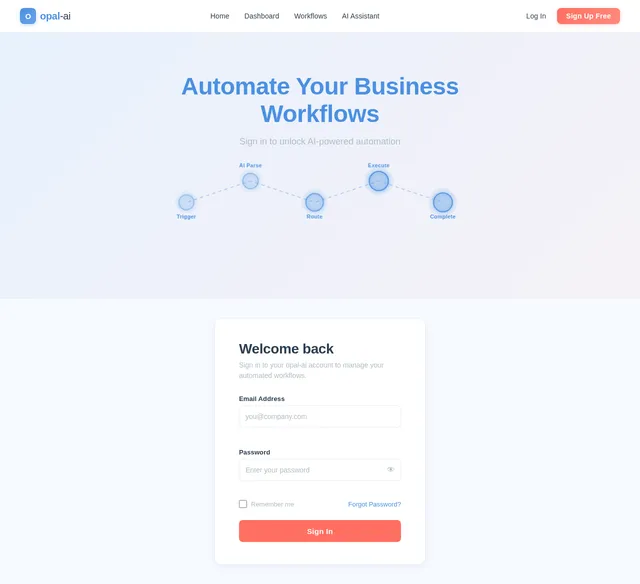
Dynamic Workflow Canvas
The homepage of opal-ai will feature an interactive workflow canvas that visually represents automated processes. Users will see a dynamic flowchart where each node represents a task or action. These nodes will animate subtly, pulsating or glowing to indicate activity. Users can:
- Drag and drop nodes to customize workflows.
- Click on nodes to view detailed analytics or modify settings.
- Watch real-time updates as the AI processes tasks.
The canvas will have a 3D parallax effect, giving it depth and making it feel alive. Transitions between sections will be smooth, with micro-interactions like hover effects and tooltips guiding the user. The design will make automation tangible, engaging, and intuitive.
7. Non-Functional Requirements
- Performance: The system should handle up to 10,000 concurrent users with minimal latency.
- Scalability: The architecture must support future feature expansions and increased user load.
- Security: Ensure data encryption (at rest and in transit) and compliance with GDPR and local regulations.
- Availability: The system should maintain 99.9% uptime.
- Localization: Support for Indian time zones (IST) and currency (INR).
8. Tech Stack
Frontend
- React for Web
- React Native for Mobile App
Backend
- Python
- FastAPI
Database
- MySQL (with Alembic for migrations)
AI Models
- GPT 5.4 for user-friendly responses
- Claude 4.6 Opas for academic or coding work
- Gemini 3.1 Pro for friendly responses
AI Tools
- Litellm for LLM Routing
- Langchain
Orchestration
- Docker and docker-compose for local development
- Kubernetes for server-side orchestration
9. Assumptions and Constraints
- The budget for the project is capped at $2000.
- The system will primarily target SMEs in India.
- The application must be delivered within a 6-month timeline.
- Integration with third-party APIs will depend on their availability and documentation.
10. Glossary
- AI: Artificial Intelligence.
- API: Application Programming Interface.
- SME: Small and Medium-sized Enterprises.
- GDPR: General Data Protection Regulation.
- IST: Indian Standard Time.
- LLM: Large Language Model.

Automate Your Business,
Amplify Your Growth
AI-powered workflow automation designed for SMEs. Reduce manual tasks, unlock insights, scale effortlessly.
The Challenge
Growing businesses face operational bottlenecks that drain time, money, and momentum.
Manual, Repetitive Tasks
Teams waste hours on data entry, report generation, and routine operations that should be automated.
Disconnected Tool Silos
Critical business data is scattered across dozens of apps with no unified integration layer.
Slow, Uninformed Decisions
Without real-time analytics and AI-driven insights, decisions lag behind market demands.
Scaling Friction
Processes that work for a 5-person team break down at 50. Growth exposes every inefficiency.
Dynamic Workflow Canvas
See your automated processes come to life. Each node represents a task in your workflow, connected and orchestrated by AI.
Why Choose opal-ai
Powerful features designed to streamline your operations, reduce costs, and accelerate growth for small and medium-sized enterprises.
Automate repetitive business tasks with intelligent triggers and actions. Save hours every week and let your team focus on what matters.
Connect with your existing business tools via robust APIs. Sync data across platforms without manual effort or code changes.
Get actionable insights powered by advanced machine learning models. Make smarter, data-backed decisions in real time.
Design and customize workflows tailored to your unique business needs with an intuitive drag-and-drop canvas.
Track the performance of every automated process. Get live dashboards and alerts to stay on top of operations.
GDPR-compliant data handling with role-based access control. Your business data stays protected at every layer.
Get Started in 3 Steps
Transform your business operations in minutes with our simple onboarding process.
Sign Up & Connect
Create your free account in seconds and connect your existing business tools through our seamless API integrations. No coding required.
Build Your Workflow
Use our intuitive drag-and-drop canvas to design custom automation workflows tailored to your business processes and goals.
Automate & Monitor
Activate your workflows and let AI handle the heavy lifting. Track performance with real-time analytics and optimize as you grow.
Use Cases
Built for Your Business
opal-ai adapts to every role in your organization, from leadership to development, empowering everyone to work smarter.
- Automate repetitive tasks and save 10+ hours per week
- Get AI-driven insights to make smarter business decisions
- Reduce operational costs with streamlined processes
- Manage user roles and permissions from a central dashboard
- Monitor system performance with real-time logs and alerts
- Ensure platform security and GDPR compliance at scale
- Follow simple, guided workflows to complete tasks faster
- Receive automated task assignments with clear instructions
- Track personal progress and contribute to team goals
- Integrate opal-ai with existing tools via robust REST APIs
- Build custom workflows using extensible automation hooks
- Access detailed API docs and sandbox for rapid prototyping
AI-Powered Insights
Harness the intelligence of three cutting-edge AI models working in harmony to automate, analyze, and optimize your business workflows.
Powers natural language interactions and user-friendly responses for intuitive workflow configuration and business communication.
Handles deep analytical tasks, complex code generation, and academic-grade reasoning for advanced automation logic.
Delivers conversational AI support and friendly, context-aware recommendations to optimize your daily operations.
What Our Users Say
Trusted by SMEs across India to automate workflows and accelerate growth.
opal-ai cut our invoice processing time by 70%. What used to take our team hours every week now runs automatically. The AI insights also helped us identify bottlenecks we never even noticed.
Setting up workflow automations was incredibly intuitive. We integrated opal-ai with our existing tools in under a day, and our team adopted it without any training sessions needed.
The API integrations are rock-solid, and the multi-model AI approach means we always get the best response quality. Our decision-making speed has improved dramatically since onboarding.
Transparent Pricing
Choose the plan that fits your business. Start free, upgrade when you grow. No hidden fees, no surprises.
- ✓Up to 5 automated workflows
- ✓Basic AI-driven insights
- ✓Single user access
- ✓Community support
- ✓100 API calls per month
- ✓Standard integrations
- ✓Unlimited automated workflows
- ✓Advanced AI analytics & recommendations
- ✓Up to 10 team members
- ✓Priority email & chat support
- ✓10,000 API calls per month
- ✓Custom integrations & webhooks
- ✓Role-based permissions
- ✓GPT 5.4 & Claude 4.6 access
- ✓Everything in Professional
- ✓Unlimited team members
- ✓Dedicated account manager
- ✓Custom AI model training
- ✓Unlimited API calls
- ✓SSO & advanced security
- ✓SLA with 99.99% uptime
- ✓On-premise deployment option
Ready to Transform Your Workflow?
Join over 1,000 SMEs already saving hours every week with AI-powered automation. Start free — no credit card required.
Schedule a Demo
No comments yet. Be the first!