opal-1
1

Comments (0)
Sign in to leave a comment
System Requirements
System Requirements Document for opal-1
1. Introduction
opal-1 is a single-page personal to-do application. Its product intent is deliberately narrow: one person, one screen, one list. The user types a task into an input field, sees it appear in a list, ticks it off when done, and deletes it when it is no longer needed. The interface must be 简洁好看 — calm, spare, and quietly beautiful, closer to a stationery object on a desk than to a productivity dashboard.
The audience is a single anonymous user at a time. There are no accounts, no marketing surface, no data density, and no collaboration. The product exists to make three actions — add, complete, delete — feel fast and considered.
2. System Overview
opal-1 is delivered as a single custom page, 待办事项, which is both the anonymous entry surface and the entire working surface of the application. The page contains:
- A small uppercase wordmark and a display line.
- A bare underlined input field with an "添加" action for adding a task.
- A list of tasks, each row offering a completion control and a delete control.
- A single metadata footer line reporting remaining and completed counts.
The only active human actor is the 待办事项使用者 (to-do user). There are no other human participants, no counterparties, and no recipients of state changes. The application itself owns task state and its presentation.
Current scope is limited to adding, listing, completing, and deleting tasks, presented in a clean, attractive single-page layout. Nothing else is in scope.
2a. Product Interpretation and Delivery Boundary
The application is a first-party, single-page web experience. It is reachable anonymously: there is no sign-in, no account creation, and no identity establishment of any kind. The single page 待办事项 is the anonymous entry surface and the complete working surface; no protected destination exists, and no access boundary separates entry from use.
Task state is owned by the application and lives within the single page session. The user's tasks are created, completed, and deleted through the page's own controls, and the page reflects each change immediately. There is no cross-device sync, no sharing, and no server-side account model implied by the requirements.
Everything described in this document is current. No future-horizon capabilities are accepted; suggestions that would add adjacent features (categories, priorities, reminders, collaboration, analytics) are out of scope and are not part of this delivery.
2b. Source Content Inventory
Not applicable. No reference directive supplies a content_source.
2c. Page Content and Component Coverage
待办事项
Information and state
- The page presents a single centred column (max-width 640px) with generous top air, opening like a gallery wall label.
- Persistent elements: the wordmark, the display line, the input row, the hairline rule, the task list, and the metadata footer.
- Task state per item: text, completion status (incomplete / complete).
- Aggregate state: remaining count and completed count, shown in the footer.
- Empty state: when no tasks exist, the list area is empty and the footer reflects zero counts; the display line and input remain fully usable.
Primary actions
- Enter task text in the input field and submit via the "添加" action to add a task to the list.
- Toggle a task's completion by activating its circular completion control.
- Delete a task by activating its delete glyph.
Supporting actions
- Focus the input field to type; the caret and input underline carry the spot colour while active.
- Hover or focus a row to reveal the delete glyph at full ink.
Domain entities
- Task: a single to-do item with text and a completion flag.
- Task list: the ordered collection of tasks shown on the page.
- Counts: derived remaining and completed totals.
Component responsibilities
- Wordmark: small uppercase "OPAL-1" with a 6px spot-red square before it; identifies the artefact, no navigation.
- Display line: oversized "今天要做的" heading; sets tone, carries no interaction.
- Input row: bare underlined text field spanning the column with the "添加" text action anchored at the right of the rule; captures new task text and submits it.
- Hairline rule: 1px ink rule separating input from list.
- Task list: renders each task as a 56px grid row — [22px completion ring] [task text] [delete glyph].
- Completion control: 22px circle drawn as a 1.5px ink ring; fills solid spot red with a white tick when complete.
- Delete glyph: thin "×" at the far right of the row, at full ink on hover/focus.
- Metadata footer: single uppercase tracked line, e.g. "剩余 3 · 已完成 2", with tabular numerals.
States
- Loading: not applicable in a meaningful sense; the page renders its static structure immediately.
- Empty: no tasks; list area empty; footer shows zero counts; input remains the focal action.
- Success (add): the new task appears in the list; the input clears and remains focused for the next entry.
- Success (complete): the row's ring fills spot red with a white tick; the task text drops to muted colour with a red strikethrough; counts update.
- Success (delete): the row is removed from the list; counts update.
- Error / recovery: submitting empty or whitespace-only input does not add a task; the input retains focus so the user can correct it. No other error states are accepted.
3. Functional Requirements
FR-1 — Single-page application As a 待办事项使用者, I should use the entire application on one single page, so that I never navigate away from my list.
- Provenance: explicit
- Lifecycle: the page loads directly into the working surface; there is no navigation, no secondary route, and no separate screen.
- Access: anonymous; no identity required.
- Observable acceptance: the application presents exactly one page containing the input, the list, and the controls; no links or menus lead elsewhere.
- Failure/recovery: not applicable.
- Continuation: the user remains on the page for every subsequent action.
FR-2 — Add a task via input field As a 待办事项使用者, I should type a task into an input field and submit it, so that it appears in my list.
- Provenance: explicit
- Lifecycle: the user focuses the input, types text, and activates "添加"; the task is appended to the list and the input clears for the next entry.
- Access: anonymous.
- Observable acceptance: after submission, the typed text appears as a new row in the list; the input is empty and focused.
- Failure/recovery: empty or whitespace-only submissions add nothing; the input keeps focus so the user can type a valid task.
- Continuation: the user can immediately add another task or act on the new row.
FR-3 — Display tasks as a list As a 待办事项使用者, I should see all my tasks presented as a list, so that I can review what remains and what is done.
- Provenance: explicit
- Lifecycle: every task in the current session is rendered as a row in the list, in the order added.
- Access: anonymous.
- Observable acceptance: each task appears exactly once as a row with its text, completion control, and delete glyph; the footer reports remaining and completed counts.
- Failure/recovery: when no tasks exist, the list area is empty and the footer shows zero counts.
- Continuation: the list updates immediately after every add, complete, or delete.
FR-4 — Mark a task complete by checking it As a 待办事项使用者, I should tick a task's completion control, so that I can record it as done.
- Provenance: explicit
- Lifecycle: the user activates the 22px ring on a row; the ring fills solid spot red with a white tick; the task text drops to muted colour with a red strikethrough; the counts update.
- Access: anonymous.
- Observable acceptance: the row visibly shows the completed state, and the footer's completed count increases while the remaining count decreases.
- Failure/recovery: activating the control again returns the task to incomplete, restoring the ring outline, the ink text, and the prior counts.
- Continuation: the user can continue ticking other tasks or delete the completed one.
FR-5 — Delete a task As a 待办事项使用者, I should delete a task I no longer need, so that my list stays clean.
- Provenance: explicit
- Lifecycle: the user reveals the delete glyph on a row (hover or focus) and activates it; the row is removed from the list; the counts update.
- Access: anonymous.
- Observable acceptance: the deleted task no longer appears in the list, and the footer counts reflect its removal.
- Failure/recovery: no confirmation step is accepted; the removal is immediate. If the list becomes empty, the empty state applies.
- Continuation: the user can continue adding, completing, or deleting other tasks.
FR-6 — Clean and attractive presentation As a 待办事项使用者, I should experience a simple, beautiful interface, so that using the app feels calm and considered.
- Provenance: explicit
- Lifecycle: every state of the page — empty, populated, completed, hovered — adheres to the austere visual language defined in Sections 6–8.
- Access: anonymous.
- Observable acceptance: the page uses the specified palette, typography, sharp-cornered shape language, hairline rules, and restrained motion; no rounded cards, pills, shadows, gradients, or second accent colour appear.
- Failure/recovery: not applicable.
- Continuation: the visual language holds across all interactions.
4. User Personas
待办事项使用者 (To-do User)
Product context. A single anonymous person using opal-1 for themselves, one at a time. They arrive at the page with a small set of things they want to remember to do, and they want to record, track, and clear them without ceremony. There is no team, no shared workspace, and no account.
Primary goal. Quickly capture tasks, see at a glance what remains and what is done, and remove items that no longer matter — all within a single, calm, beautiful screen.
Distinct accepted responsibilities.
- Entering task text into the input field and submitting it to add a task.
- Reviewing the list of all current tasks.
- Ticking a task's completion control to mark it done, and unticking to reverse it.
- Deleting a task via its delete glyph.
Relevant inputs and decisions.
- The text of each task.
- The decision of whether a task is complete.
- The decision to remove a task.
Interactions with other accepted participants. None. The 待办事项使用者 is the only active human actor; no counterparty, recipient, or beneficiary exists. The application itself holds and reflects task state.
Observable success. The user can add a task in one motion, see it appear immediately, tick it off with a single click that visibly paints the row, and delete it with a single click — all on one page that feels spare and considered.
5. Core User Flows
Flow A — Add a task
- The 待办事项使用者 opens opal-1 and lands directly on the 待办事项 page (anonymous; no sign-in).
- The page shows the wordmark, the display line "今天要做的", the bare underlined input with the "添加" action, and the list (empty on first use).
- The user clicks the input field; the caret and underline carry the spot colour.
- The user types the task text.
- The user activates "添加".
- Observable result: the task appears as a new row in the list; the input clears and remains focused.
- Failure/recovery: if the input is empty or whitespace-only, nothing is added and the input keeps focus.
- Continuation: the user can add another task immediately, or move on to ticking or deleting.
Flow B — Mark a task complete
- The 待办事项使用者 is on the 待办事项 page with at least one task in the list.
- The user locates the task row and activates its 22px completion ring.
- Observable result: the ring fills solid spot red with a white tick; the task text drops to muted colour with a red strikethrough; the footer's completed count increases and remaining count decreases.
- Recovery: activating the ring again returns the task to incomplete, restoring the outline ring, ink text, and prior counts.
- Continuation: the user can tick further tasks or delete the completed one.
Flow C — Delete a task
- The 待办事项使用者 is on the 待办事项 page with at least one task in the list.
- The user hovers or focuses a row; the delete glyph at the far right reaches full ink.
- The user activates the delete glyph.
- Observable result: the row is removed from the list; the footer counts update.
- Recovery: if the list becomes empty, the empty state applies — the list area is empty and the footer shows zero counts, while the input remains the focal action.
- Continuation: the user can add, complete, or delete further tasks.
Flow D — Review the list
- The 待办事项使用者 is on the 待办事项 page.
- The user reads the list top to bottom, noting which rows are complete (muted text, red strikethrough, filled red ring) and which remain.
- The user reads the footer line ("剩余 N · 已完成 M") for the aggregate counts.
- Continuation: the user acts on any row — tick, untick, or delete — or adds a new task.
6. Visuals Colors and Theme
Muse and headline. Peter Saville — one exact spot colour carries the whole identity. The list is the artefact; the empty space is the interface; one exact colour codes completion.
Mode. Light mode only.
Colour tokens (exact hex by role)
| Role | Hex | Use |
|---|---|---|
| Background | #F2F0EB | Warm paper-white ground |
| Surface | #FAF9F6 | Slightly lighter card |
| Text | #111110 | Near-black ink for all type and the primary action |
| Primary | #111110 | Primary action ink |
| Accent | #D93A1E | Single spot red — completion tick, active input caret/underline, count numeral, delete glyph on hover |
| Muted | #8A857B | Metadata and completed-task strikethrough |
Proportion. ~85% paper, 13% ink, 2% red. No second accent colour. No gradients.
Typography. Archivo throughout.
- Headings: Archivo 700, tracking
-0.03em, near-flush-left. - Body: Archivo 400/500.
- Labels ("待办", "已完成", counts): uppercase 11px Archivo, tracking
+0.18em. - Scale (1.333 modular): display
clamp(40px, 9vw, 72px); section label 11px uppercase tracked; task text 17px / 1.5; metadata 12px; control 14px.
Shape language. Sharp corners everywhere — 0px radius on input, rows, buttons, and count chip. Structure from hairline 1px rules in ink at 12% opacity, plus one full-width 1px rule under the header spanning the column edge to edge. The only round element is the 22px completion ring (1.5px ink ring; fills solid #D93A1E with a white tick when done). No shadows, no blobs, no pills.
Layout. Single centred column, max-width 640px, generous top air (~18vh). Order: wordmark "OPAL-1" top-left of the column; large display line "今天要做的"; bare underlined input with right-aligned "添加" text button; hairline rule; list. Each row is a 56px grid: [22px tick] [task text, flush left] [delete glyph, flush right, on hover/focus]. Completed rows drop to muted colour with a 1px red strikethrough. Footer is a single metadata line: "剩余 3 · 已完成 2" in tracked uppercase. Mobile: edge-to-edge with 20px gutters. Desktop: wide margins so the silence reads as intentional.
Imagery. No photography, no illustration. The visual artefact is the typography and the colour code itself — a thin horizontal rule system like the grid on a Factory Records sleeve. Optional single decorative element: a 1px vertical rule with a small spot-red square at its base as a section marker beside the list.
7. Signature Design Concept
The first screen is a quiet editorial wall, not a SaaS hero. Top-left of a 640px column sits the tiny tracked wordmark OPAL-1 with a 6px spot-red square before it. Below, a single oversized display line 今天要做的 set at clamp(40px, 9vw, 72px) in Archivo 700 with tight tracking, left-aligned, allowed to sit on one line at desktop and wrap to two at 375px. Under it, a bare underlined input spanning the full column with the 添加 text button anchored to the right of the rule; beneath that the list begins immediately.
The dominant element is the whitespace and the display line; the only colour on screen is the red square and the caret. The signature moves are: the 6px spot-red square as the entire brand mark (a colour swatch); the input as a printed line to fill in rather than a box; 56px grid-locked rows with a 22px ink ring that fills solid #D93A1E on completion — the only saturated colour event in the interface; a thin "×" delete glyph that only reaches full ink on hover/focus; and a single uppercase tracked metadata footer treating counts as catalogue data.
8. Interaction Model & Motion Direction
Interaction Model: Static (direction) Motion Tempo: still Hero Dimensionality: flat
Landing Hero Motion Brief
- Focal subject. The display line "今天要做的" and the bare underlined input beneath it, framed by the wordmark and its spot-red square.
- Input → transformation → outcome thesis. On load, the display line fades in slowly (400ms opacity); as the user types, the input underline and caret carry the spot red; on submission, the new row fades in (180ms ease-out) and the input clears — the page accumulates the user's tasks as a printed record.
- Motion vocabulary. 180ms ease-out fades for row add/remove; 120ms scale-down on the tick ring when checked; 400ms opacity fade of the display line on load. No bounce, no slide-ins from the side, no parallax.
- Composed first frame. Wordmark with red square top-left; display line large and left-aligned; bare underlined input with "添加" at the right of the rule; hairline rule; empty list area; footer at zero counts.
- Reduced-motion state. All transitions collapse to instant state changes; the composed first frame is unchanged.
9. Non-Functional Requirements
- NFR-1 — Single-page constraint. The application must be a single page; no additional routes, screens, or navigation are permitted. (Provenance: explicit; rationale: hard constraint "应用为单页形式".)
- NFR-2 — Visual simplicity. The interface must be 简洁好看 — clean and attractive — adhering to the austere visual language in Sections 6–8. (Provenance: explicit; rationale: hard constraint "界面需简洁好看".)
- NFR-3 — Readable text and controls at every viewport. Headlines, wordmarks, labels, numbers, and controls must stay entirely inside the viewport and their container at 375px, 768px, and 1280px, wrapping or scaling (e.g.
clamp(...)) to fit; no other element may cover any part of them. (Provenance: explicit design constraint.) - NFR-4 — No forbidden visual patterns. No rounded cards, pill buttons, soft shadows, hover-lift tiles, blue/indigo accents, gradients, multiple accent colours, illustrations, emoji, mascots, centred hero compositions, bouncy micro-interactions, progress rings, streak counters, or extra panels/sidebars/tips. (Provenance: explicit design constraint — "Avoid" list.)
- NFR-5 — Reduced motion. With
prefers-reduced-motion, all motion collapses to instant state changes while the layout remains fully usable. (Provenance: explicit design constraint.)
10. Tech Stack
- Frontend: React single-page application.
- Styling: CSS with the exact tokens in Section 6 (Archivo via web font;
clamp()for the display line). - State: in-page React state for the task list.
- Backend / storage: none required by the accepted requirements; the application is a single anonymous page with no accounts and no cross-device sync.
11. Assumptions and Constraints
- A-1. The application is anonymous and single-user-at-a-time; no identity, account, or sign-in is established. (Consistent with the page contract's
access_requirement: none.) - A-2. Task state lives within the page session; no persistence beyond the page session is accepted by the authoritative requirements. (No persistence capability is stated by the user.)
- A-3. The single page is named exactly 待办事项 and is both the anonymous entry surface and the complete working surface.
- A-4. The only active human persona is 待办事项使用者; no other human participants exist.
- A-5. The visual direction in Sections 6–8 is authoritative for presentation; it introduces no product behaviour.
- A-6. No future-horizon capabilities are accepted; adjacent features (categories, priorities, reminders, collaboration, analytics, sync) are out of scope.
12. Glossary
- 待办事项 (To-do). A single task item with text and a completion flag.
- 待办事项使用者 (To-do User). The single anonymous human actor who uses opal-1.
- Completion ring. The 22px circular control on each row that toggles a task's completion state.
- Delete glyph. The thin "×" at the far right of a row that removes the task.
- Spot red. The single accent colour
#D93A1E, used only as a code for completion, active input, count numeral, and delete-on-hover. - Metadata footer. The single uppercase tracked line reporting remaining and completed counts.
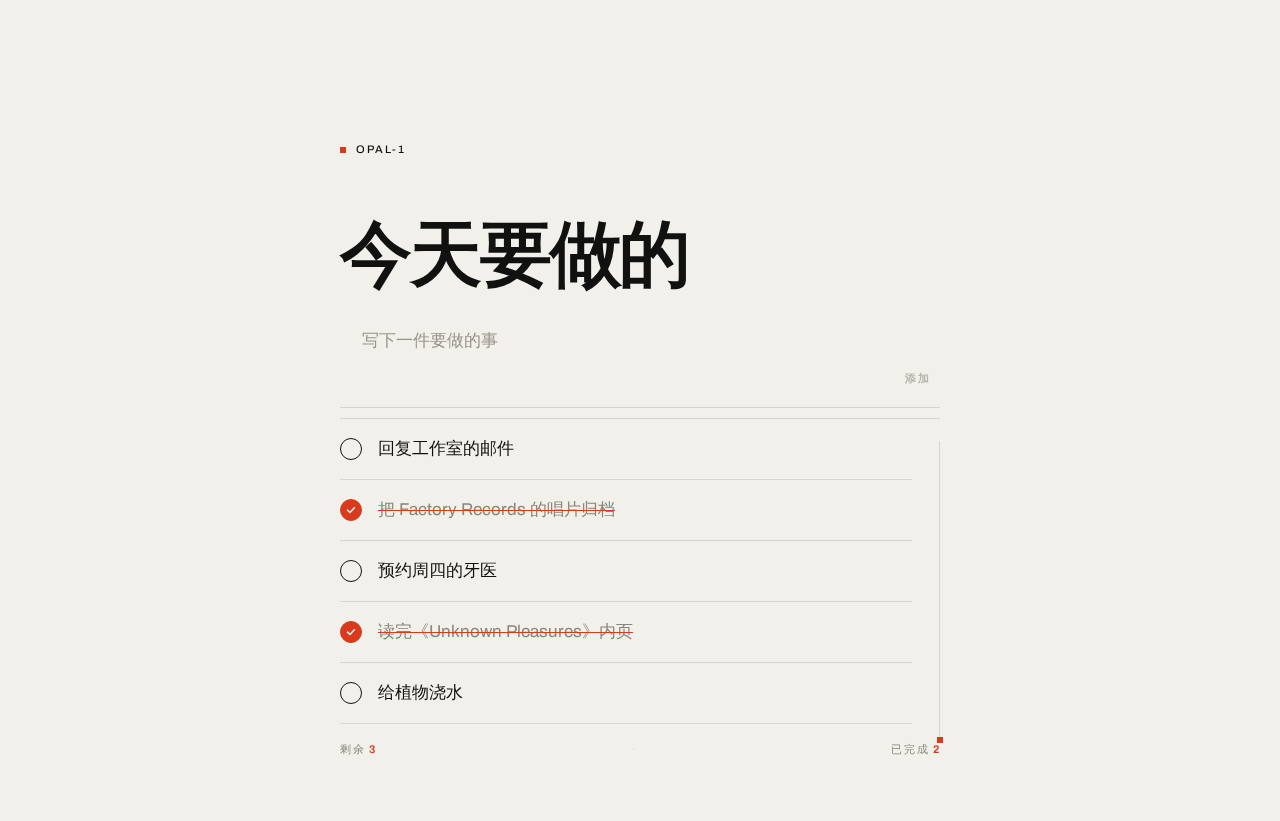
OPAL-1
今天要做的
回复工作室的邮件
把 Factory Records 的唱片归档
预约周四的牙医
读完《Unknown Pleasures》内页
给植物浇水
OPAL-1
今天要做的
回复工作室的邮件
把 Factory Records 的唱片归档
预约周四的牙医
读完《Unknown Pleasures》内页
给植物浇水
No comments yet. Be the first!