onyx-xxxxxxxxxxxxxxxxxxxxxxxxxxxxxxxxxxxxxxxxxxxxxxxxx


Comments (0)
Sign in to leave a comment
System Requirements
System Requirements Document for onyx-xxxxxxxxxxxxxxxxxxxxxxxxxxxxxxxxxxxxxxxxxxxxxxxxx
1. Introduction
XXXXXXXXXXXXXXXXXXXXXXXXXXXXXXXXXXXXXXXXXXXXXXXXXXXXXXXXXXXXXXXXXXXXXXXXXXXXXXXXXXXXXXXXXXXXXXXXXXXXXXXXXXXXXXXXXXXXXXXXXXXXXXXXXXXXXXXXXXXXXXXXXXXXXXXXXXXXXXXXXXXXXXXXXXXXXXXXXXXXXXXXXXXXXXXXXXXXXXXXXXXXXXXXXXXXXXXXXXXXXXXXXXXXXXXXXXXXXXXXXXXXXXXXXXXXXXXXXXXXXXXXXXXXXXXXXXXXXXXXXXXXXXXXXXXXXXXXXXXXXXXXXXXXXXXXXXXXXXXXXXXXXXXXXXXXXXXXXXXXXXXXXXXXXXXXXXXXXXXXXXXXXXXXXXXXXXXXXXXXXXXXXXXXXXXXXXXXXXXXXXXXXXXXXXXXXXXXXXXXXXXXXXXXXXXXXXXXXXXXXXXXXXXXXXXXXXXXXXXXXXXXXXXXXXXXXXXXXXXXXXXXXXXXXXXXXXXXXXXXXXXXXXXXXXXXXXXXXXXXXXXXXXXXXXXXXXXXXXXXXXXXXXXXXXXXXXXXXXXXXXXXXXXXXXXXXXXXXXXXXXXXXXXXXXXXXXXXXXXXXXXXXXXXXXXXXXXXXXXXXXXXXXXXXXXXXXXXXXXXXXXXXXXXXXXXXXXXXXXXXXXXXXXXXXXXXXXXXXXXXXXXXXXXXXXXXXXXXXXXXXXXXXXXXXXXXXXXXXXXXXXXXXXXXXXXXXXXXXXXXXXXXXXXXXXXXXXXXXXXXXXXXXXXXXXXXXXXXXXXXXXXXXXXXXXXXXXXXXXXXXXXXXXXXXXXXXXXXXXXXXXXXXXXXXXXXXXXXXXXXXXXXXXXXXXXXXXXXXXXXXXXXXXXXXXXXXXXXXXXXXXXXXXXXXXXXXXXXXXXXXXXXXXXXXXXXXXXXXXXXXXXXXXXXXXXXXXXXXXXXXXXXXXXXXXXXXXXXXXXXXXXXXXXXXXXXXXXXXXXXXXXXXXXXXXXXXXXXXXXXXXXXXXXXXXXXXXXXXXXXXXXXXXXXXXXXXXXXXXXXXXXXXXXXXXXXXXXXXXXXXXXXXXXXXXXXXXXXXXXXXXXXXXXXXXXXXXXXXXXXXXXXXXXXXXXXXXXXXXXXXXXXXXXXXXXXXXXXXXXXXXXXXXXXXXXXXXXXXXXXXXXXXXXXXXXXXXXXXXXXXXXXXXXXXXXXXXXXXXXXXXXXXXXXXXXXXXXXXXXXXXXXXXXXXXXXXXXXXXXXXXXXXXXXXXXXXXXXXXXXXXXXXXXXXXXXXXXXXXXXXXXXXXXXXXXXXXXXXXXXXXXXXXXXXXXXXXXXXXXXXXXXXXXXXXXXXXXXXXXXXXXXXXXXXXXXXXXXXXXXXXXXXXXXXXXXXXXXXXXXXXXXXXXXXXXXXXXXXXXXXXXXXXXXXXXXXXXXXXXXXXXXXXXXXXXXXXXXXXXXXXXXXXXXXXXXXXXXXXXXXXXXXXXXXXXXXXXXXXXXXXXXXXXXXXXXXXXXXXXXXXXXXXXXXXXXXXXXXXXXXXXXXXXXXXXXXXXXXXXXXXXXXXXXXXXXXXXXXXXXXXXXXXXXXXXXXXXXXXXXXXXXXXXXXXXXXXXXXXXXXXXXXXXXXXXXXXXXXXXXXXXXXXXXXXXXXXXXXXXXXXXXXXXXXXXXXXXXXXXXXXXXXXXXXXXXXXXXXXXXXXXXXXXXXXXXXXXXXXXXXXXXXXXXXXXXXXXXXXXXXXXXXXXXXXXXXXXXXXXXXXXXXXXXXXXXXXXXXXXXXXXXXXXXXXXXXXXXXXXXXXXXXXXXXXXXXXXXXXXXXXXXXXXXXXXXXXXXXXXXXXXXXXXXXXXXXXXXXXXXXXXXXXXXXXXXXXXXXXXXXXXXXXXXXXXXXXXXXXXXXXXXXXXXXXXXXXXXXXXXXXXXXXXXXXXXXXXXXXXXXXXXXXXXXXXXXXXXXXXXXXXXXXXXXXXXXXXXXXXXXXXXXXX
XXXXXXXXXXXXXXXXXXXXXXXXXXXXXXXXXXXXXXXXXXXXXXXXXXXXXXXXXXXXXXXXXXXXXXXXXXXXXXXXXXXXXXXXXXXXXXXXXXXXXXXXXXXXXXXXXXXXXXXXXXXXXXXXXXXXXXXXXXXXXXXXXXXXXXXXXXXXXXXXXXXXXXXXXXXXXXXXXXXXXX END_OK
Project name: onyx-xxxxxxxxxxxxxxxxxxxxxxxxxxxxxxxxxxxxxxxxxxxxxxxxx.
2. System Overview
The product is delivered under the project name onyx-xxxxxxxxxxxxxxxxxxxxxxxxxxxxxxxxxxxxxxxxxxxxxxxxx. This name is the single confirmed identifier for the system and should be used consistently across documentation, configuration, and user-facing references.
No further scope, actors, capabilities, or boundaries have been established in the evidence available to this chapter. Where later chapters require a project identifier, they should reference the name above rather than restating it.
2.1 Defaults
- Naming convention: The project name is recorded verbatim as supplied, including its placeholder-style suffix. No normalization or abbreviation is applied unless a later explicit decision defines one.
- Scope statement: Absent additional accepted evidence, the system overview is limited to the project identity above; no functional scope is asserted here.
3. Functional Requirements
No additional details specified.
4. User Personas
No additional details specified.
5. Core User Flows
No additional details specified.
6. Visuals Colors and Theme
[Design proposal; unspecified choices are defaults.]
Onyx is a private workspace for a single user. The public surface is a cover page for a coded artefact: black ground, paper-white type, one acid-lime spot. Nothing is borrowed from the SaaS template — no indigo, no blue, no glass.
Palette by role (dark mode)
| Role | Token | Hex |
|---|---|---|
| Background | --bg | #0B0B0C |
| Surface | --surface | #141416 |
| Text | --text | #F2F0EA |
| Primary (links, focus, active) | --primary | #F2F0EA |
| Accent (codes, marks, rules of state) | --accent | #D6FF3F |
| Muted (metadata, captions) | --muted | #7A7A78 |
Black holds roughly 80% of every page; white carries all reading text; lime appears on under 5% of the surface — a hairline edge, a rule opener, a state code. No second accent exists, so lime always means this is a code.
Typography
- Headings: Archivo Medium, uppercase, letter-spacing
0.08em, flush left, set very large. - Body: IBM Plex Mono, with
font-variant-numeric: tabular-numswherever numbers appear in the workspace. - Modular scale 1.5: display
clamp(40px, 9vw, 132px); body steps 28 / 20 / 16 / 14; labels 11px uppercase mono with0.08emtracking. - Line length held near 60 characters; 1px rules sit above, never between, reading blocks.
Shape and spacing
All corners are 0px — no radii, no shadows, no glass. Boundaries are 1px hairlines in #2A2A2C. The workspace replaces card grids with hairline-divided rows on a spacing rhythm of 8 / 16 / 24 / 48 / 96. A 12-column grid with a wide left margin frames the page; margins stay generous, gallery-like, and never tighten to fill space.
Default, labelled: the hairline colour #2A2A2C and the 8px spacing unit are catalogue defaults — the direction specifies rules and 1px strokes but not their exact value or rhythm.
Every headline, wordmark, label, number and control stays whole inside its container at 375px, 768px and 1280px — scaling through clamp() or wrapping, never clipped or covered. Decoration and imagery may bleed and overlap freely; readable text may not.
7. Signature Design Concept
[Design proposal; unspecified choices are defaults.]
One artefact carries the identity. A single onyx-like square, 320px on desktop, is the only image on the public entry. Its face is matte near-black #0B0B0C on #141416, broken by a fine engraved line pattern and one lit edge — a 1px lime #D6FF3F hairline tracing a single side.
Public entry composition — a full-viewport black ground. The 320px square artefact sits left of centre; the headline ONYX / A PRIVATE WORKSPACE is set in Archivo Medium uppercase at display scale and spans the lower viewport in paper white, flush left; the subline One coded mark, one quiet surface. Your work stays in one place. sits beneath the headline; Open workspace is a hard-edged, unbordered text control on the primary white with a 1px lime underline that fills on focus. A mono metadata column holds the right edge, listing coded labels such as REF / 001 and STATE / PRIVATE at 11px in --muted. Small scientific diagrams and lime/white colour-code swatches fill the emptier areas.
Section openers on interior pages repeat the logic without a heading band: a 1px lime rule, then an 11px uppercase code label. The workspace itself uses tabular mono numerals and 1px hairline dividers instead of cards. No rounded corners, no shadows, no glass, no gradient blobs, no stock photography, no centred headline-with-button stack.
8. Interaction Model & Motion Direction
[Design proposal; unspecified choices are defaults.]
Interaction Model: Static (direction) Motion Tempo: still Hero Dimensionality: flat
Landing Hero Motion Brief
Focal subject: the single onyx square artefact with its engraved line pattern and lime hairline edge.
Thesis: the page arrives already composed — no entrance choreography. Input is a page load; transformation is one slow reveal of the artefact, its lime edge drawing on last; outcome is the fully legible cover, headline and metadata present, artefact lit.
Motion vocabulary: precise 200ms fades on state only — focus underline, link and control states. One slow reveal of the artefact, roughly 900ms, linear, no easing overshoot. No bounce, no parallax, no scroll-linked depth, no hover-lift.
Composed first frame: black ground, headline set and fully legible at its final position, metadata column present, artefact at rest with its lime edge already drawn. The reveal is additive at most; the frame reads correctly if motion never begins.
Reduced motion: prefers-reduced-motion: reduce suppresses both fades and the artefact reveal — the static cover as described is the delivered state. No content depends on motion to become readable.
9. Non-Functional Requirements
No additional details specified.
10. Tech Stack
The supplied evidence establishes no layer-specific technology choices, whether required or suggested. The only confirmed project-level fact is the project name, onyx-xxxxxxxxxxxxxxxxxxxxxxxxxxxxxxxxxxxxxxxxxxxxxxxxx.
10.1 Defaults for unspecified layers
The following defaults are proposed only to fill layers that are required but unspecified. Each is a default, not a user decision, and is superseded if a later decision names a technology at that layer.
| Layer | Default (proposed) | Status |
|---|---|---|
| Client delivery | Responsive web application | Default — no native mobile application is implied |
| Front end | To be selected | Default — unspecified |
| Back end | To be selected | Default — unspecified |
| Data storage | To be selected | Default — unspecified |
10.2 Notes
- Responsive web access does not require a native mobile application; no native mobile client is assumed.
- No hosting, framework, language, database, or integration technology is asserted, because none appears in the evidence.
- Any future stack decision is recorded at its own layer and supersedes the corresponding default above.
11. Assumptions and Constraints
XXXXXXXXXXXXXXXXXXXXXXXXXXXXXXXXXXXXXXXXXXXXXXXXXXXXXXXXXXXXXXXXXXXXXXXXXXXXXXXXXXXXXXXXXXXXXXXXXXXXXXXXXXXXXXXXXXXXXXXXXXXXXXXXXXXXXXXXXXXXXXXXXXXXXXXXXXXXXXXXXXXXXXXXXXXXXXXXXXXXXXXXXXXXXXXXXXXXXXXXXXXXXXXXXXXXXXXXXXXXXXXXXXXXXXXXXXXXXXXXXXXXXXXXXXXXXXXXXXXXXXXXXXXXXXXXXXXXXXXXXXXXXXXXXXXXXXXXXXXXXXXXXXXXXXXXXXXXXXXXXXXXXXXXXXXXXXXXXXXXXXXXXXXXXXXXXXXXXXXXXXXXXXXXXXXXXXXXXXXXXXXXXXXXXXXXXXXXXXXXXXXXXXXXXXXXXXXXXXXXXXXXXXXXXXXXXXXXXXXXXXXXXXXXXXXXXXXXXXXXXXXXXXXXXXXXXXXXXXXXXXXXXXXXXXXXXXXXXXXXXXXXXXXXXXXXXXXXXXXXXXXXXXXXXXXXXXXXXXXXXXXXXXXXXXXXXXXXXXXXXXXXXXXXXXXXXXXXXXXXXXXXXXXXXXXXXXXXXXXXXXXXXXXXXXXXXXXXXXXXXXXXXXXXXXXXXXXXXXXXXXXXXXXXXXXXXXXXXXXXXXXXXXXXXXXXXXXXXXXXXXXXXXXXXXXXXXXXXXXXXXXXXXXXXXXXXXXXXXXXXXXXXXXXXXXXXXXXXXXXXXXXXXXXXXXXXXXXXXXXXXXXXXXXXXXXXXXXXXXXXXXXXXXXXXXXXXXXXXXXXXXXXXXXXXXXXXXXXXXXXXXXXXXXXXXXXXXXXXXXXXXXXXXXXXXXXXXXXXXXXXXXXXXXXXXXXXXXXXXXXXXXXXXXXXXXXXXXXXXXXXXXXXXXXXXXXXXXXXXXXXXXXXXXXXXXXXXXXXXXXXXXXXXXXXXXXXXXXXXXXXXXXXXXXXXXXXXXXXXXXXXXXXXXXXXXXXXXXXXXXXXXXXXXXXXXXXXXXXXXXXXXXXXXXXXXXXXXXXXXXXXXXXXXXXXXXXXXXXXXXXXXXXXXXXXXXXXXXXXXXXXXXXXXXXXXXXXXXXXXXXXXXXXXXXXXXXXXXXXXXXXXXXXXXXXXXXXXXXXXXXXXXXXXXXXXXXXXXXXXXXXXXXXXXXXXXXXXXXXXXXXXXXXXXXXXXXXXXXXXXXXXXXXXXXXXXXXXXXXXXXXXXXXXXXXXXXXXXXXXXXXXXXXXXXXXXXXXXXXXXXXXXXXXXXXXXXXXXXXXXXXXXXXXXXXXXXXXXXXXXXXXXXXXXXXXXXXXXXXXXXXXXXXXXXXXXXXXXXXXXXXXXXXXXXXXXXXXXXXXXXXXXXXXXXXXXXXXXXXXXXXXXXXXXXXXXXXXXXXXXXXXXXXXXXXXXXXXXXXXXXXXXXXXXXXXXXXXXXXXXXXXXXXXXXXXXXXXXXXXXXXXXXXXXXXXXXXXXXXXXXXXXXXXXXXXXXXXXXXXXXXXXXXXXXXXXXXXXXXXXXXXXXXXXXXXXXXXXXXXXXXXXXXXXXXXXXXXXXXXXXXXXXXXXXXXXXXXXXXXXXXXXXXXXXXXXXXXXXXXXXXXXXXXXXXXXXXXXXXXXXXXXXXXXXXXXXXXXXXXXXXXXXXXXXXXXXXXXXXXXXXXXXXXXXXXXXXXXXXXXXXXXXXXXXXXXXXXXXXXXXXXXXXXXXXXXXXXXXXXXXXXXXXXXXXXXXXXXXXXXXXXXXXXXXXXXXXXXXXXXXXXXXXXXXXXXXXXXXXXXXXXXXXXXXXXXXXXXXXXXXXXXXXXXXXXXXXXXXXXXXXXXXXXXXXXXXXXXXXXXXXXXXXXXXXXXXXXXXXXXXXXXXXXXXXXXXXXXXXXXXXXXXXXXXXXXXXXXXXXXXXXXXXXXXXXXXXXXXXXXXXXXXXXXXXXXXXXXXXXXXXXXXXXXXXXXXXXXXXXXXXXXXXX
12. Glossary
No additional details specified.
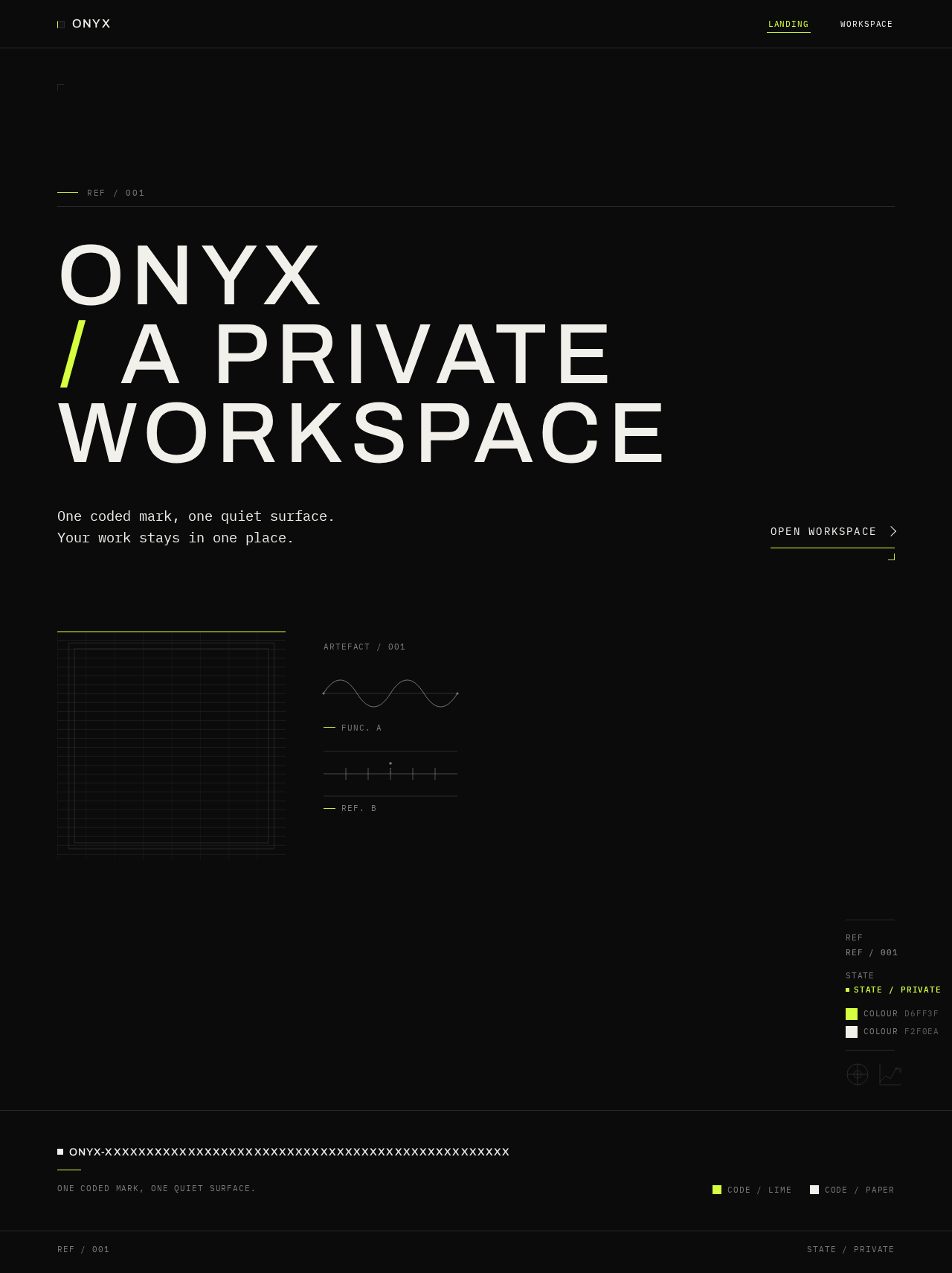
Onyx A Private Workspace
One coded mark, one quiet surface. Your work stays in one place.
Open workspaceOnyx A Private Workspace
One coded mark, one quiet surface. Your work stays in one place.
Open workspace
No comments yet. Be the first!