onyx-prototype
need to build a prototype for a social media website like facebook, with following basic features. - connectng members and buildin tree based on attribute like friend, family, colleague , or school, college mate This will be initial and we will build on this once its added. Solution should be generic and loosely coupled.
Comments (0)
Sign in to leave a comment
System Requirements
System Requirements Document (SRD) for Onyx-Prototype
1. Introduction
The Onyx-Prototype is a social media platform designed to connect individuals and build dynamic relationship trees based on attributes such as friend, family, colleague, or school/college mate. This document outlines the system requirements for the initial prototype, which will serve as the foundation for future expansions. The solution will be generic, scalable, and loosely coupled to ensure flexibility and adaptability as the platform evolves.
This document is tailored for the Australian context, considering locale-specific defaults such as time zones (AEST/AEDT), currency (AUD), and cultural nuances.
2. System Overview
The Onyx-Prototype aims to provide a social media platform where users can:
- Connect with other members.
- Define relationships (e.g., friend, family, colleague, school/college mate).
- Visualize connections as a dynamic, interactive tree structure.
- Filter connections by relationship type or view all connections.
- Ensure the system is modular and scalable for future feature additions.
The platform will prioritize user experience, data security, and performance while maintaining a loosely coupled architecture to support seamless integration of new features.
3. Functional Requirements
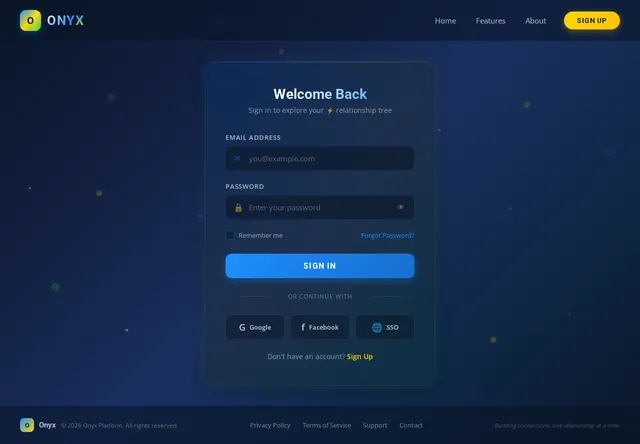
- As a User, I should be able to create a profile with basic details (name, email, profile picture, etc.).
- As a User, I should be able to search for other members by name or email.
- As a User, I should be able to send connection requests to other members.
- As a User, I should be able to accept or decline connection requests.
- As a User, I should be able to define the relationship type (friend, family, colleague, school/college mate) when connecting with another member.
- As a User, I should be able to view my connections in a tree-based structure.
- As a User, I should be able to filter my connections by relationship type (e.g., friend, family, colleague, school/college mate) or view all connections.
- As a User, I should be able to remove or edit connections.
- As a User, I should be able to update my profile details.
4. User Personas
4.1 Regular User
- Description: A general user who creates a profile, connects with others, and manages their relationship tree.
- Key Actions: Profile creation, searching for members, sending/accepting connection requests, defining relationships, and managing connections.
4.2 Guest
- Description: A visitor who can browse public profiles or explore the platform without creating an account.
- Key Actions: Limited access to public profiles and platform features.
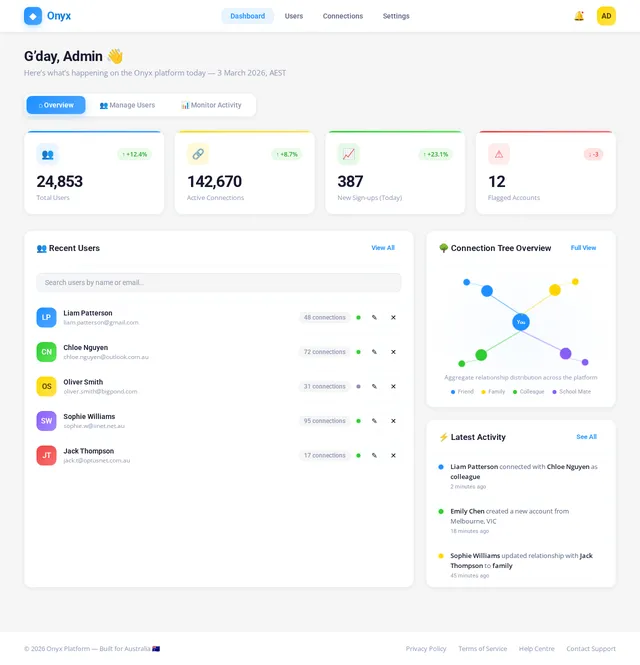
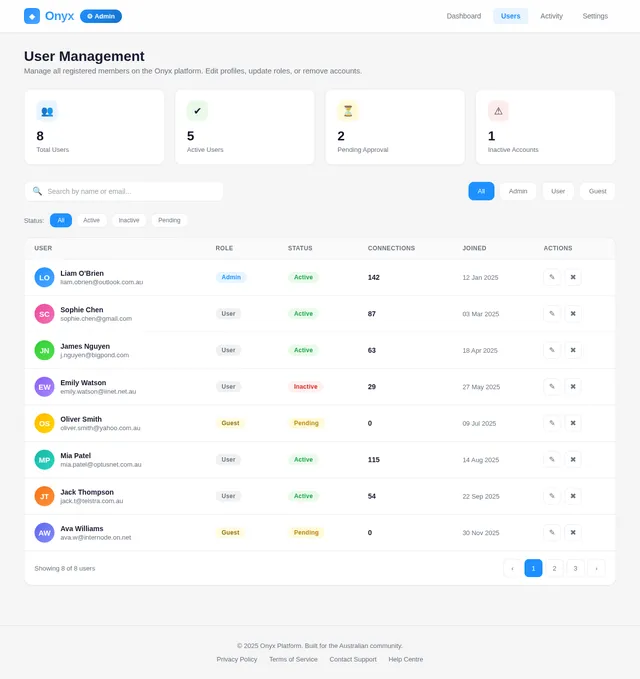
4.3 Admin
- Description: A system administrator responsible for managing user accounts, monitoring activity, and ensuring platform security.
- Key Actions: User management, content moderation, and system monitoring.
5. Visuals Colors and Theme
Color Palette
- Primary Color: #1E90FF (Dodger Blue) – Represents trust and connectivity.
- Secondary Color: #FFD700 (Gold) – Adds warmth and vibrancy.
- Background Color: #F5F5F5 (Light Gray) – Clean and modern aesthetic.
- Accent Color: #32CD32 (Lime Green) – Highlights interactive elements.
Typography
- Primary Font: Roboto (Sans-serif) – Clean and modern.
- Secondary Font: Open Sans (Sans-serif) – Readable and professional.
Icons and Graphics
- Use flat, minimalistic icons to maintain a clean interface.
- Incorporate subtle animations for transitions and interactions.
6. Signature Design Concept
Interactive Relationship Tree Visualization
The homepage will feature a dynamic, interactive relationship tree as its centerpiece. Users will see a visually stunning, animated tree that grows and branches out as they add connections. Each branch will represent a relationship type (e.g., friend, family, colleague), with unique colors and icons for easy identification.
Key Features:
- 3D Animation: The tree will have a 3D effect, with branches that expand and contract smoothly as users interact with it.
- Hover Effects: Hovering over a branch will display the connected member's profile picture and relationship type.
- Drag-and-Drop: Users can rearrange connections by dragging and dropping branches.
- Zoom and Pan: Users can zoom in and out or pan across the tree for better navigation.
- Filter by Relationship Type: Users can filter the tree to show only specific relationship types (e.g., only friends, only family) or view all connections at once.
- Micro-Interactions: Subtle animations, such as leaves rustling or branches swaying, will make the tree feel alive.
This design will create an unforgettable first impression, emphasizing the platform's focus on relationships and connectivity.
7. Non-Functional Requirements
- Scalability: The system must handle up to 1 million users in the initial phase.
- Performance: Average response time for user actions should not exceed 2 seconds.
- Security: Implement robust authentication and authorization mechanisms to protect user data.
- Availability: Ensure 99.9% uptime for the platform.
- Localization: Support Australian English as the default language, with options for future localization.
- Data Privacy: Comply with Australian data protection laws (e.g., Privacy Act 1988).
8. Tech Stack
Frontend
- React for Web
Backend
- Python
- FastAPI
Database
- MySQL (with Alembic for migrations)
AI Models
- GPT 5.2 for user-friendly responses.
AI Tools
- Langchain for conversational AI integration.
Orchestration
- Docker for local development.
- Kubernetes for server-side orchestration.
9. Assumptions and Constraints
- The platform will initially target Australian users, with potential expansion to other regions.
- The system will support desktop and mobile web browsers; native mobile apps are out of scope for the prototype.
- The relationship tree visualization will be optimized for modern browsers (e.g., Chrome, Firefox, Edge).
- The initial user base is expected to grow gradually, allowing for incremental scaling.
10. Glossary
- Connection Request: A request sent by one user to another to establish a relationship.
- Relationship Tree: A visual representation of a user's connections, organized by relationship type.
- Loosely Coupled: A system design principle where components have minimal dependencies on each other.
- Localization: Adapting the platform to meet the language and cultural preferences of a specific region.
This document provides a comprehensive foundation for the development of the Onyx-Prototype. Let me know if you need further refinements, User!
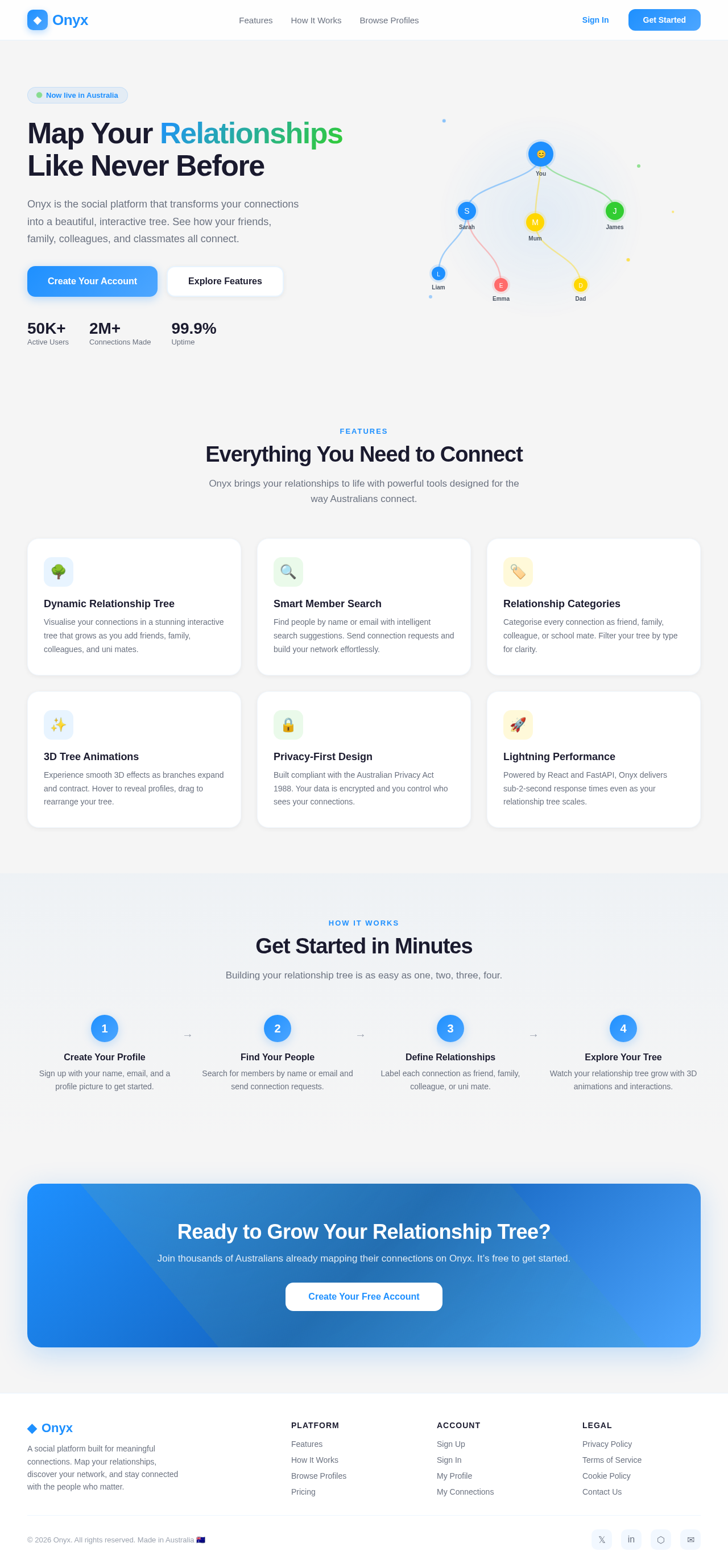
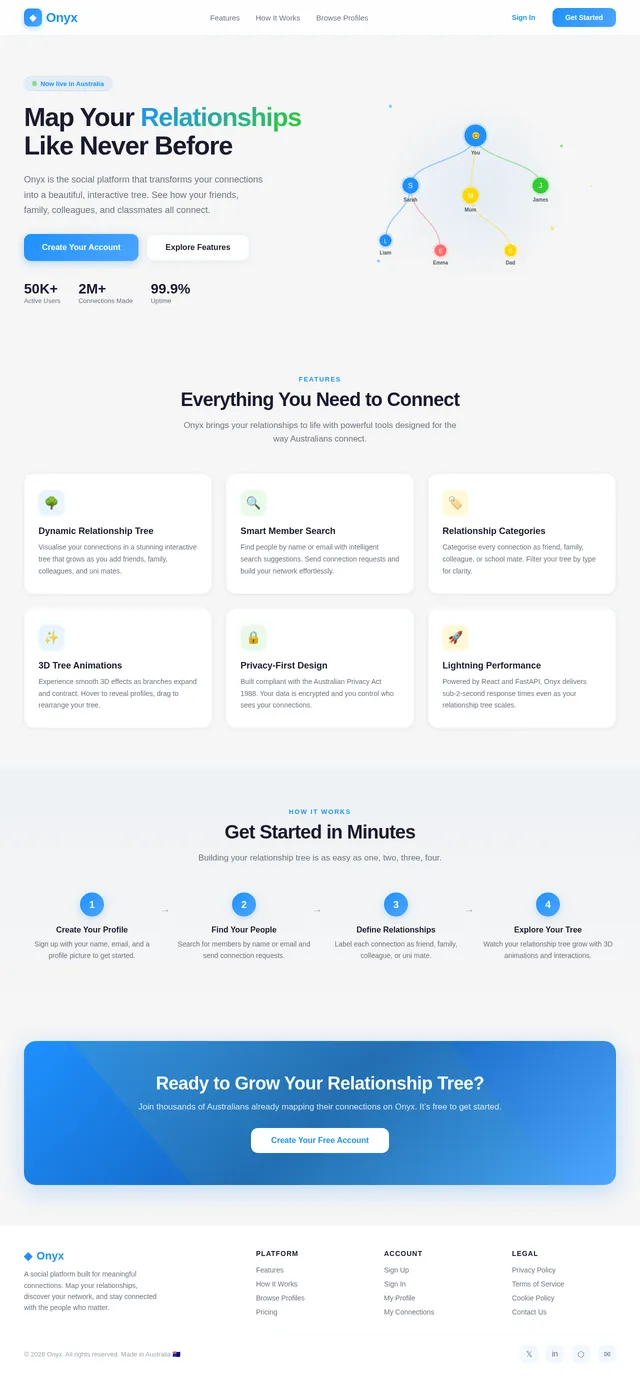
Map Your Relationships Like Never Before
Onyx is the social platform that transforms your connections into a beautiful, interactive tree. See how your friends, family, colleagues, and classmates all connect.
Features
Everything You Need to Connect
Onyx brings your relationships to life with powerful tools designed for the way Australians connect.
Dynamic Relationship Tree
Visualise your connections in a stunning interactive tree that grows as you add friends, family, colleagues, and uni mates.
Smart Member Search
Find people by name or email with intelligent search suggestions. Send connection requests and build your network effortlessly.
Relationship Categories
Categorise every connection as friend, family, colleague, or school mate. Filter your tree by type for clarity.
3D Tree Animations
Experience smooth 3D effects as branches expand and contract. Hover to reveal profiles, drag to rearrange your tree.
Privacy-First Design
Built compliant with the Australian Privacy Act 1988. Your data is encrypted and you control who sees your connections.
Lightning Performance
Powered by React and FastAPI, Onyx delivers sub-2-second response times even as your relationship tree scales.
How It Works
Get Started in Minutes
Building your relationship tree is as easy as one, two, three, four.
Create Your Profile
Sign up with your name, email, and a profile picture to get started.
→Find Your People
Search for members by name or email and send connection requests.
→Define Relationships
Label each connection as friend, family, colleague, or uni mate.
→Explore Your Tree
Watch your relationship tree grow with 3D animations and interactions.
No comments yet. Be the first!