Page 1 of 17
System Requirements Document for onyx-project
1. Introduction
onyx-project is an application that lets a user create videos using artificial intelligence. The user supplies an idea or prompt, the application runs AI video generation, and the user receives a generated video they can review and use.
The product intent is a single, focused creative tool: turn an idea into a video. The audience is the AI video creator — content makers, designers, marketers, and early adopters who want to type an idea and get a finished generated video back. The interface itself is part of the product experience: it is designed as a cinematic future-tech laboratory rather than an administrative dashboard, because the application produces motion and generated imagery and should feel like it does.
This document defines the current delivery: the public entry, self-service identity establishment and returning verification, the creator's video workspace, the video creation surface, and the generated-video review surface.
Page 2 of 17
2. System Overview
onyx-project is a web application with a custom first-party interface and a backend that performs AI video generation. The current delivery consists of:
- A public Landing entry that explains the AI video creation application before sign-in.
- Self-service Sign Up for a video creator who starts video projects and keeps their projects and results.
- Login verification for a returning user accessing their saved projects and videos.
- A Videos workspace, revisitable, for browsing the user's projects and generated videos.
- Create Video, where the user starts a project, supplies inputs, and runs AI video generation.
- Video Review, a dedicated surface for viewing and reviewing the generated video after generation completes.
The single accepted active human actor is the AI video creator (منشئ الفيديو بالذكاء الاصطناعي). The AI video generation engine is a backend capability of the application, not a human participant.
Current scope: creating AI-generated videos from user inputs, with self-service identity, saved projects, background/continuous generation, and post-completion review of the result.
Narrow exclusions: no editing suite, no social publishing or sharing network, no team/role administration, no billing or subscription management, and no account-management capabilities beyond self-service sign-up and returning login are part of this delivery. These are not accepted capabilities and must not be added.
Page 3 of 17
2a. Product Interpretation and Delivery Boundary
The application owns the entire creator journey. Identity is application-owned: the creator establishes access themselves through self-service sign-up and verifies identity on return through login. The protected surfaces — Videos, Create Video, and Video Review — require a signed-in creator, because projects, inputs, generation state, and generated videos are durable, creator-specific state that must remain bound to the correct person and be resumable across visits.
The public entry (Landing) and the two identity-access surfaces (Sign Up, Login) are reachable without being signed in. The Landing surface cannot own the interaction that establishes access to the protected surfaces; that interaction lives on Sign Up and Login.
Video generation itself is a backend/continuous process owned by the application: once the creator starts generation, it runs to completion so the result can be shown afterward. The creator's interaction with that process — starting it, observing its progress, and reviewing the finished result — is owned by first-party pages.
Everything described in this document is current. No future-horizon capabilities are defined.
2b. Source Content Inventory
Not applicable. No reference directive in this project declares a content_source, so no source content inventory is produced.
2c. Page Content and Component Coverage
Page 4 of 17
Landing
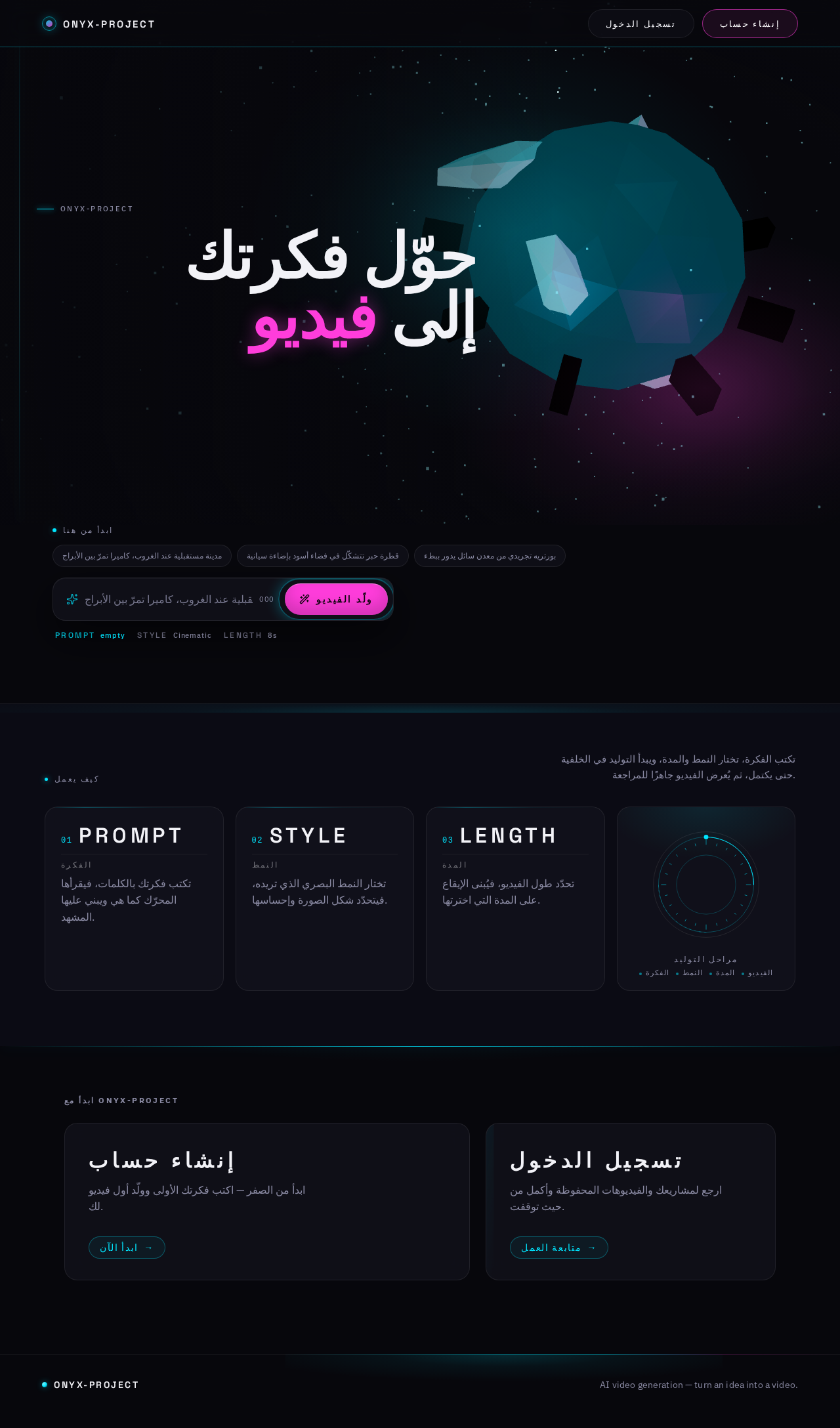
- Information/state: Public entry surface, reachable without sign-in. Full-viewport dark scene with a single glowing 3D subject floating center-right, rotating slowly, with cyan and magenta edges. On the left, a Space Grotesk headline at 96px spanning seven columns — «حوّل فكرتك إلى فيديو» — with one word in magenta mid-sentence, white on near-black. Below it, a floating glass input bar 520px wide with a magenta capsule button «ولّد الفيديو». Below the bar, three small uppercase HUD labels with wide tracking: PROMPT / STYLE / LENGTH.
- Primary actions: Enter an idea/prompt in the glass input bar; press the magenta capsule «ولّد الفيديو» button; navigate to Sign Up; navigate to Login.
- Supporting actions: Read the headline and HUD labels to understand what the application does.
- Domain entities: Idea/prompt text; style label; length label.
- Component responsibilities: WebGL/R3F hero scene (single abstract crystalline/liquid-metal glowing 3D body, cyan and magenta edges, slow continuous orbit); headline block; floating glass prompt bar with 1px luminous border and a cyan scan sweep on focus; magenta capsule CTA with a cyan glow ring; HUD label row; vertical cyan scan transition that divides the screen before revealing the next page.
- States:
- Loading: hero scene initializes; glass panels receive a scan sweep on load.
- Empty: prompt bar empty with placeholder guidance; CTA available.
- Success: prompt captured and carried into the creation journey after identity is established.
- Error: if the prompt is empty or unusable, the CTA does not advance and the bar indicates that an idea is required.
- Recovery: the creator can retype the idea and press the CTA again.
Page 5 of 17
Sign Up
- Information/state: Identity-access surface, reachable without sign-in. Self-service registration for a video creator who wants to start creating videos and keep projects and results.
- Primary actions: Provide the required registration information; submit to create the creator's access.
- Supporting actions: Navigate to Login if the creator already has access; return to Landing.
- Domain entities: Creator identity record; creator's private workspace ownership.
- Component responsibilities: Registration form as a glass panel; capsule submit button with cyan glow ring; link to Login; validation messaging.
- States:
- Loading: submission in progress; submit control shows a restrained in-progress state.
- Empty: blank form with field guidance.
- Success: access established; the creator is taken into the protected creation journey.
- Error: missing or invalid required information, or an identity that already exists; the form reports the problem without losing entered values.
- Recovery: correct the indicated fields and resubmit; or switch to Login.
Page 6 of 17
Login
- Information/state: Identity-access surface, reachable without sign-in. Verification for a returning creator accessing their saved projects and videos.
- Primary actions: Provide returning credentials; submit to verify identity.
- Supporting actions: Navigate to Sign Up if the creator has no access yet; return to Landing.
- Domain entities: Creator identity record; creator's saved projects and videos.
- Component responsibilities: Credential form as a glass panel; capsule submit button with cyan glow ring; link to Sign Up; error messaging.
- States:
- Loading: verification in progress.
- Empty: blank credential fields.
- Success: identity verified; the creator reaches their workspace.
- Error: credentials do not match; the form reports the failure without revealing which part was wrong.
- Recovery: retry credentials, or switch to Sign Up.
Videos
- Information/state: Protected workspace, requires sign-in. Revisitable space showing the creator's projects and generated videos. Asymmetric grid of video cards with uneven card heights; a very thin icon-only sidebar.
- Primary actions: Browse the creator's generated videos and projects; open a video to review it; start a new video creation.
- Supporting actions: Read per-card HUD data (duration, style, date) in IBM Plex Mono; identify which items are still generating.
- Domain entities: Video project; generated video; generation status; duration; style; creation date.
- Component responsibilities: Icon-only sidebar; asymmetric video card grid; video card that on hover becomes an animated preview with a HUD data layer (duration, style, date) in IBM Plex Mono; in-progress indicator for items still generating; entry point to Create Video.
- States:
- Loading: cards load with a scan sweep across the glass surfaces.
- Empty: no videos yet; the workspace invites the creator to start their first video.
- Success: the creator's videos and projects are listed and openable.
- Error: the list fails to load; a retry is offered.
- Recovery: retry loading; or start a new video.
Page 7 of 17
Create Video
- Information/state: Protected surface, requires sign-in. Split into two unequal columns: left (60%) the input form as one large glass panel; right (40%) the live preview queue with centered rings.
- Primary actions: Enter the idea/prompt; choose style; choose length; start AI video generation with the capsule generate button.
- Supporting actions: Observe generation progress as HUD data; leave the surface while generation continues.
- Domain entities: Idea/prompt; style; length; video project; generation job; generation progress percentage.
- Component responsibilities: Large glass input panel (60% column) with 1px luminous border and cyan scan sweep on focus; style and length controls; capsule generate button with a slowly pulsing cyan glow ring; radial rings around the button showing progress percentage as HUD data; live preview queue (40% column) with centered rings; ascending numeric counter during generation.
- States:
- Loading: the surface and preview queue initialize with a scan sweep.
- Empty: no inputs yet; the form guides the creator to supply an idea, style, and length.
- Success: generation starts and progress is shown; on completion the creator is taken to Video Review.
- Error: required inputs are missing, or generation cannot start; the surface reports the problem and keeps the entered inputs.
- Recovery: correct the inputs and start generation again.
Page 8 of 17
Video Review
- Information/state: Protected surface, requires sign-in. Dedicated presentation and review of the generated video after generation completes.
- Primary actions: Play/watch the generated video; review it against the submitted idea, style, and length; return to the workspace; start another video.
- Supporting actions: Read the video's HUD data (duration, style, date) in IBM Plex Mono.
- Domain entities: Generated video; source idea/prompt; style; length; duration; creation date; generation status.
- Component responsibilities: Video presentation area as a glass panel; HUD data layer; controls to return to Videos and to start a new video.
- States:
- Loading: the generated video loads.
- Empty: not applicable — this surface is reached after a generation completes; if the video is unavailable, an error state is shown instead.
- Success: the generated video plays and its details are shown.
- Error: the generated video cannot be loaded or played; the surface reports the failure.
- Recovery: retry loading the video; or return to the workspace and open it again.
Page 9 of 17
3. Functional Requirements
FR-1 — Create AI-generated videos from an idea
- As the AI video creator, I should be able to create a video using artificial intelligence from an idea I supply, so that I get a usable generated video.
- Provenance: explicit
- Lifecycle: The creator initiates on Create Video by entering an idea/prompt and choosing style and length, then starts generation. The application runs AI video generation as a background/continuous process. The observable result is a generated video presented on Video Review. Material failure: generation cannot start or does not complete; the creator is informed and can retry with corrected inputs. Continuation: the creator can return to Videos and start another video.
- Acceptance: Given a signed-in creator on Create Video with a supplied idea, when they start generation, then generation runs and a generated video is produced and presented for review.
FR-2 — Self-service registration for the video creator
- As the AI video creator, I should be able to register myself, so that I can start creating videos and keep my projects and results.
- Provenance: required_inference
- Lifecycle: The creator initiates on Sign Up without being signed in, supplies the required registration information, and submits. The observable result is that the creator's access is established and their workspace ownership exists. Material failure: required information is missing/invalid or the identity already exists; the form reports it without losing entered values. Continuation: the creator proceeds into the protected creation journey.
- Acceptance: Given an unauthenticated visitor on Sign Up, when they submit valid registration information, then access is established and they can reach their protected workspace.
FR-3 — Verify identity on return
- As the AI video creator, I should be able to verify my identity when I come back, so that I can reach my saved projects and videos.
- Provenance: required_inference
- Lifecycle: The creator initiates on Login without being signed in, supplies returning credentials, and submits. The observable result is verified identity and access to their saved projects and videos. Material failure: credentials do not match; the failure is reported without revealing which part was wrong. Continuation: the creator reaches their workspace.
- Acceptance: Given a returning creator on Login, when they submit valid credentials, then they reach their saved projects and videos.
FR-4 — Background/continuous generation so the result can be shown after completion
- As the AI video creator, I should have video generation run in the background or continuously until it completes, so that the generated result can be shown to me after completion.
- Provenance: required_inference
- Lifecycle: The creator initiates generation on Create Video. The application continues the generation process until it completes, independently of the creator remaining on the surface. The observable result is a completed generated video available for review. Material failure: generation does not complete; the creator can see the state and retry. Continuation: the creator opens the completed video on Video Review.
- Acceptance: Given a started generation, when the creator leaves Create Video, then generation continues and the completed video is available afterward.
FR-5 — Browse saved projects and generated videos
- As the AI video creator, I should be able to browse my projects and generated videos in a revisitable workspace, so that I can find and reopen my results.
- Provenance: required_inference
- Lifecycle: The creator initiates on Videos after signing in. The observable result is a listing of their projects and generated videos with per-item HUD data (duration, style, date) and in-progress indication for items still generating. Material failure: the list fails to load; a retry is offered. Continuation: the creator opens a video for review or starts a new video.
- Acceptance: Given a signed-in creator with saved videos, when they open Videos, then their projects and generated videos are listed and openable.
FR-6 — Review the generated video after completion
- As the AI video creator, I should be able to view and review the generated video after generation completes, so that I can confirm the result and use it.
- Provenance: required_inference
- Lifecycle: The creator initiates by opening a completed video from Videos or by completing a generation on Create Video. The observable result is the generated video presented with its details. Material failure: the video cannot be loaded or played; the failure is reported. Continuation: the creator returns to the workspace or starts another video.
- Acceptance: Given a completed generation, when the creator opens Video Review, then the generated video plays and its details are shown.
Page 10 of 17
4. User Personas
منشئ الفيديو بالذكاء الاصطناعي (AI Video Creator)
- Product context: The creator wants an application that enables them to create videos with artificial intelligence. They arrive with an idea and expect the application to turn it into a finished generated video. They are content makers, designers, marketers, or early adopters trying AI tools, and they expect the interface itself to feel like a future laboratory rather than an administrative dashboard.
- Primary goal: Produce a ready, usable video from their input (text/idea).
- Distinct accepted responsibilities: Starting a new video project; supplying the required inputs (idea/prompt, style, length); running generation; observing generation progress; reviewing the generated output; and using it. They also keep their projects and results, which is why they establish their own access and verify it on return.
- Relevant inputs or decisions: The idea/prompt text; the style choice; the length choice; the decision to start generation; the decision to reopen a saved video or start another.
- Interactions with other accepted participants: There is no other accepted human participant. The creator's counterpart in the lifecycle is the application's AI video generation process, which runs in the background/continuously and returns a completed video for the creator to review.
- Observable success: A generated video exists, is presented for review, and is usable; the creator's projects and results remain available in their workspace on return.
- Source-backed constraints: The creator's work is bound to their own identity — projects and results are theirs and must be reachable again after returning. No permissions, roles, or administrative capabilities are part of this role.
5. Core User Flows
Flow A — First-time creator: from idea to first generated video
- The creator arrives at Landing without being signed in. The full-viewport dark scene shows the glowing 3D subject rotating slowly; the headline «حوّل فكرتك إلى فيديو» and the HUD labels PROMPT / STYLE / LENGTH explain what the application does.
- The creator types their idea into the floating glass prompt bar. On focus, a cyan scan sweep passes through the bar.
- The creator presses the magenta capsule button «ولّد الفيديو». Because the protected creation surfaces require a signed-in creator, the application routes the creator to Sign Up rather than starting generation anonymously.
- On Sign Up, the creator supplies the required registration information and submits. The form shows a restrained in-progress state.
- Observable result: the creator's access is established and their workspace ownership exists. If required information is missing or invalid, or the identity already exists, the form reports the problem without losing entered values, and the creator corrects the fields and resubmits.
- Continuation: the creator is taken into the protected creation journey with their idea carried forward, landing on Create Video.
Page 11 of 17
Flow B — Returning creator: verifying identity and resuming work
- The creator arrives at Landing without being signed in and navigates to Login.
- The creator supplies returning credentials and submits.
- Observable result: identity is verified and the creator reaches their saved projects and videos. If credentials do not match, the form reports the failure without revealing which part was wrong; the creator retries or switches to Sign Up.
- Continuation: the creator lands on Videos and can reopen a saved video or start a new one.
Flow C — Creating a video
- The signed-in creator opens Create Video. The surface initializes with a scan sweep; the left 60% column holds the large glass input panel and the right 40% column holds the live preview queue with centered rings.
- The creator enters the idea/prompt in the glass input panel. A cyan scan sweep passes through the panel on focus.
- The creator chooses the style and the length.
- The creator presses the capsule generate button. Its cyan glow ring begins to pulse slowly, and the radial rings around it display the progress percentage as HUD data; an ascending numeric counter runs during generation.
- Observable result: generation starts and runs as a background/continuous process. The creator may leave the surface; generation continues until it completes.
- If required inputs are missing or generation cannot start, the surface reports the problem and keeps the entered inputs; the creator corrects them and starts generation again.
- Continuation: when generation completes, the creator is taken to Video Review.
Flow D — Reviewing the generated video
- The creator arrives at Video Review after a generation completes, or by opening a completed video from Videos.
- The generated video loads into the presentation area as a glass panel, with its HUD data (duration, style, date) in IBM Plex Mono.
- The creator plays and reviews the video against the idea, style, and length they submitted.
- Observable result: the creator confirms the generated video is usable. If the video cannot be loaded or played, the surface reports the failure; the creator retries loading, or returns to the workspace and opens it again.
- Continuation: the creator returns to Videos or starts another video on Create Video.
Page 12 of 17
Flow E — Browsing and reopening saved work
- The signed-in creator opens Videos. The asymmetric grid of video cards loads with a scan sweep across the glass surfaces; the thin icon-only sidebar is present.
- The creator scans the cards. Hovering a card turns it into an animated preview with a HUD data layer showing duration, style, and date in IBM Plex Mono. Items still generating are indicated as in progress.
- Observable result: the creator's projects and generated videos are listed and openable. If the list fails to load, a retry is offered; the creator retries, or starts a new video instead.
- Continuation: the creator opens a video to review it on Video Review, or starts a new video on Create Video.
Page 13 of 17
6. Visuals, Colors and Theme
Muse and headline: Gleb Kuznetsov — cinematic future tech, motion as the hero. The application should look like a future laboratory, not an administrative dashboard. The visual celebration is the product.
Mode: dark mode only.
Color tokens (exact hex by role):
| Role | Token | Value |
|---|
| Background (deep indigo-black, ~70% of screen) | --bg | #07070C |
| Surface (glass panels, ~20% of screen) | --surface | #12121C |
| Text | --text | #F2F2F7 |
| Primary (interaction, focus, glow) | --primary | #00E5FF |
| Accent (rare signal, ~5% — primary CTA and "generating" state) | --accent | --FF3DDB → #FF3DDB |
| Muted | --muted | #8A8AA3 |
| Glass border | --border | rgba(255,255,255,0.08) |
Text #F2F2F7 on background #07070C exceeds 15:1 contrast. No blue-violet-on-white, no blob gradients.
Typography:
- Headings: Space Grotesk, weights 500–700. Main headlines uppercase at a huge scale (
clamp(40px, 8vw, 96px)), tracking -0.02em. Secondary headings uppercase with wide tracking 0.18em as HUD labels.
- Body: IBM Plex Sans.
- Tabular/numeric data: IBM Plex Mono.
- Type scale (1.25 ratio, wider headings): 96 / 72 / 48 / 32 / 20 / 16 / 14; micro-labels 12px uppercase with
0.2em tracking.
- Forbidden: Inter, Roboto, Arial, Helvetica,
system-ui for headings or body.
Shape language: Glass panels with 20px radius and 1px luminous borders; capsule buttons with inner glow; circular rings around the generate button; thin glowing lines separating sections; radial arc gauges representing generation stages. No sharp edges, no strict squares — everything is curved or circular.
Spacing rhythm: generous, cinematic; full-bleed sections with floating glass panels layered above the scene; asymmetric two-column split on Create Video (60% / 40%); asymmetric card grid on Videos.
Imagery style: One abstract 3D body in the hero (crystalline/liquid-metal glowing form with cyan and magenta edges) built with Three.js / React Three Fiber; light particle fields; generated-video thumbnails as dark cinematic stills; thin glowing line icons. No flat illustrations, no photographs of people.
Page 14 of 17
7. Signature Design Concept
The future laboratory entry. The first screen is not a centered title with a blue button. It is a full-bleed scene: a 100vw × 100vh deep indigo-black background holding a single glowing 3D body floating center-right, rotating slowly, edged in cyan and magenta. On the left, a Space Grotesk headline at 96px spans seven columns — «حوّل فكرتك إلى فيديو» — white on black, with one word in magenta mid-sentence. Beneath it floats a 520px glass input bar with a 1px luminous border and a magenta capsule button «ولّد الفيديو». Below the bar sit three small uppercase HUD labels with wide tracking: PROMPT / STYLE / LENGTH.
The concept recomposes only accepted content and controls: the headline states the accepted outcome, the input bar captures the accepted idea/prompt, the capsule button is the accepted entry into the creation journey, and the HUD labels name the accepted inputs (prompt, style, length). No blob gradients, no floating icons, no card grid on this surface.
Page 15 of 17
8. Interaction Model & Motion Direction
Interaction Model: Animated
Motion Tempo: cinematic
Hero Dimensionality: webgl
Landing Hero Motion Brief
- Focal subject: the single abstract 3D body — a crystalline/liquid-metal glowing form with cyan and magenta edges — floating center-right in the full-viewport scene.
- Input → transformation → outcome thesis: the creator's typed idea enters the glass prompt bar (input); the scene's motion vocabulary carries that idea forward through the cyan scan sweep and the pulsing glow ring (transformation); the creator is delivered into the creation journey where the idea becomes a generated video (outcome). Every element of the thesis uses only accepted behavior.
- Motion vocabulary: slow continuous orbit of the 3D body; a cyan scan sweep passing across glass panels on load and on focus; an ascending numeric counter during generation; scroll-scrubbed transitions between sections; a slowly pulsing cyan glow ring around the generate button with radial rings showing progress percentage as HUD data; a vertical cyan scan that divides the screen before the next page is revealed. No bounce, no spring, no playful micro-interactions — only slow, confident flow.
- Composed first frame: deep indigo-black field; the glowing 3D body center-right mid-orbit; the 96px headline occupying the left seven columns with one magenta word; the 520px glass prompt bar beneath it with the magenta capsule CTA; the three HUD labels below the bar.
- Reduced-motion state: the 3D body holds a static composed pose instead of orbiting; scan sweeps and scroll-scrubbed transitions are removed; the glow ring holds a steady glow instead of pulsing; progress is shown as static HUD numerals. All content, controls, and states remain identical.
Landing Hero 3D Scene Brief — DIRECTION-DERIVED
- Object: one crafted real-time abstract body — a crystalline/liquid-metal form with cyan (
#00E5FF) and magenta (#FF3DDB) rim lighting — floating center-right, slowly orbiting on a continuous loop.
- Defining state shown: the transformation of an idea into motion — the body's slow orbit and its cyan/magenta edges are the visual statement that this application produces motion and generated imagery.
- Scene composition: full-viewport dark field (
#07070C), light particle field at low density, no blob gradients, no floating icons, no card grid. The glass prompt bar and headline layer above the scene as floating glass.
- Implementation: Three.js / React Three Fiber, real-time, with a reduced-motion fallback that renders the composed static pose.
9. Non-Functional Requirements
- NFR-1 — Background/continuous generation: Video generation must run as a background or continuous process so that the generated result can be shown after completion, independently of whether the creator remains on the Create Video surface. Provenance: required_inference. Rationale: required to make the accepted creation journey executable.
- NFR-2 — Durable creator-bound state: Projects, inputs, generation state, and generated videos must persist and remain bound to the correct creator so they can be resumed and revisited after returning. Provenance: required_inference. Rationale: the accepted journey requires saved projects and results reachable on return.
- NFR-3 — Access boundary: Videos, Create Video, and Video Review require a signed-in creator. Landing, Sign Up, and Login are reachable without being signed in. Provenance: required_inference. Rationale: creator-specific durable state must remain bound to the correct participant.
- NFR-4 — Text contrast: Text
#F2F2F7 on background #07070C must maintain contrast exceeding 15:1. Provenance: explicit (creative direction).
- NFR-5 — Motion restraint: Motion must be slow and confident — no bounce, no spring, no playful micro-interactions — and must provide a reduced-motion state. Provenance: explicit (creative direction).
- NFR-6 — Backend integration: The application requires backend integration to perform AI video generation. Provenance: explicit (planning scope:
requires_backend_integration: true).
Page 16 of 17
10. Tech Stack
- Frontend: React (custom first-party UI).
- 3D/hero: Three.js with React Three Fiber for the real-time WebGL hero subject.
- Backend: Python / FastAPI, providing the AI video generation capability and the creator's durable project/video state.
- Storage: appropriate persistent storage for creator identities, video projects, generation state, and generated videos.
- Containerization: Docker / docker-compose for local and deployment packaging.
- Kubernetes: only if deployment requires it.
No source-specified technology is replaced or substituted.
11. Assumptions and Constraints
- A-1: The application owns identity. Self-service sign-up and returning login are the only identity interactions in scope; no invitation, provisioning, or deployment bootstrap is used. [Required inference from the accepted journey.]
- A-2: The protected surfaces (Videos, Create Video, Video Review) require a signed-in creator; the public entry and identity-access surfaces do not. [Required inference.]
- A-3: The AI video generation engine is a backend capability of the application, not a separate human-facing product surface. [Required inference.]
- A-4: The creator supplies an idea/prompt, a style, and a length as the inputs to generation. [Derived from the accepted creation journey and the creative direction's HUD labels PROMPT / STYLE / LENGTH.]
- A-5: No editing suite, social publishing or sharing network, team/role administration, billing or subscription management, or account-management capabilities beyond self-service sign-up and returning login are in scope. [Narrow exclusion.]
- A-6: All capabilities in this document are current. No future-horizon capabilities are defined.
- A-7: Dark mode only; the palette, typography, shape language, layout, and motion described in sections 6–8 are binding. [Explicit user design constraints.]
- A-8: Presentation, design, and technology details not specified by the user are filled with the coherent defaults in sections 6 and 10 and are labeled as defaults where they appear.
Page 17 of 17
12. Glossary
- AI video creator (منشئ الفيديو بالذكاء الاصطناعي): The single accepted active human actor of onyx-project; the user who supplies an idea and receives a generated video.
- Prompt / idea: The text input the creator supplies as the basis for AI video generation.
- Style: The creator's selection that shapes the look of the generated video.
- Length: The creator's selection of the generated video's duration.
- Generation: The AI video creation process that runs in the background/continuously from the creator's inputs until it completes.
- Video project: The creator-owned record of a video creation, including its inputs and generation state.
- Generated video: The finished output of a completed generation, presented for review on Video Review.
- HUD data: The small uppercase, wide-tracked labels and IBM Plex Mono numeric readouts (duration, style, date, progress percentage) that present state as data.
- Glass panel: A
#12121C surface with 20px radius and a 1px rgba(255,255,255,0.08) luminous border, floating above the dark scene.
- Scan sweep: The cyan (
#00E5FF) light pass that crosses glass surfaces on load and on focus, and the vertical cyan scan that divides the screen before revealing the next page.
 Mohamed Hassan
No comments yet. Be the first!