onyx-learning
 Thanush H
You are an expert full-stack developer and ML engineer. I am building a hackathon project called *"AI Personalized Learning Assistant"* and I need a COMPLETE working solution using: * Frontend: React (modern UI) * Backend: Python Flask * Machine Learning: scikit-learn * Dataset: Student performance dataset (CSV) ⚠️ IMPORTANT CONSTRAINTS: * This is a 6-hour hackathon project * Keep implementation SIMPLE but IMPRESSIVE * Avoid unnecessary complexity * Everything must WORK without errors * No external paid APIs * Use dataset-based ML (not just prompts) --- # 🎯 PROJECT GOAL Build a system that: 1. Takes student marks subject wise and analysis it csv file should contain below headings: 1.student name 2.subject and its marks 3.study time 4.attendance 2. Uses ML to classify student level: * Beginner * Intermediate * Advanced 3. Provides: * Personalized recommendations * Simple study plan 4. Displays results in a modern UI dashboard 5. --- # 🧠 TECHNIQUES TO INCLUDE Explicitly implement and explain: 1. Recommendation System * Based on weak subjects 2. Classification Model * Use ML (RandomForest or similar) 3. NLP (basic) * Generate study plan using rule-based or simple logic * Use NLP to analyze student responses, detect key concepts, identify misconceptions, and provide targeted feedback based on answer quality and sentiment --- # 📁 OUTPUT REQUIREMENTS Give FULL code for: ## 1. Dataset * Provide sample CSV (students.csv) ## 2. ML Model (model.py) * Load dataset * Create labels * Train model * Predict function ## 3. Backend (Flask) * app.py with: * /analyze endpoint * JSON input/output * Integration with ML model ## 4. Frontend (React) * Modern UI (dark theme) * Components: * Form (input marks) * Dashboard * Result display * Use axios for API calls ## 5. Styling * Clean, modern, hackathon-winning UI * Cards, buttons, layout --- # 🏗️ ARCHITECTURE Include a clear explanation of: Frontend → Backend → ML Model → Dataset → Output --- # 🚀 EXECUTION STEPS Provide step-by-step instructions: * Install dependencies * Run backend * Run frontend * Test API --- # 🎤 HACKATHON EXPLANATION Also include: 1. How to explain project in 1 minute 2. Where each technique is used: * Recommendation system * Classification * NLP 3. Expected judge questions + answers --- # ⚠️ ERROR HANDLING Ensure: * No missing imports * No broken code * Works on Windows * Clear instructions --- # 🏆 FINAL OUTPUT The result should be: * Fully working ML-based web app * Clean UI * Real ML usage * Easy to demo in hackathon --- Now generate the COMPLETE solution step-by-step.



Comments (0)
Sign in to leave a comment
System Requirements
System Requirements Document (SRD)
Project Name: onyx-learning
1. Introduction
The onyx-learning project aims to create an "AI Personalized Learning Assistant" that leverages machine learning to classify students into performance levels (Beginner, Intermediate, Advanced) and provides personalized study recommendations. This system is designed for a hackathon environment, with a focus on simplicity, functionality, and an impressive user experience.
This document outlines the system requirements, including functional and non-functional requirements, user personas, visual design elements, architecture, flow charts, and a comprehensive report generation capability.
2. System Overview
The onyx-learning system is a web-based application that integrates a modern React frontend, a Python Flask backend, and a scikit-learn machine learning model. The system processes student performance data (marks, study time, attendance) to classify students into performance levels and generate personalized study plans.
Key features include:
- A user-friendly interface for data input and result visualization.
- A robust backend for data processing and ML model integration.
- A machine learning model for classification and recommendation generation.
- Architecture and flow chart designs for better system understanding.
- A report generation feature for presenting results and insights.
3. Functional Requirements
- As a User, I should be able to input student marks, study time, and attendance via a form.
- As a User, I should be able to view the predicted performance level (Beginner, Intermediate, Advanced) on a dashboard.
- As a User, I should be able to receive personalized study recommendations based on weak subjects.
- As a User, I should be able to download a report summarizing the analysis and recommendations.
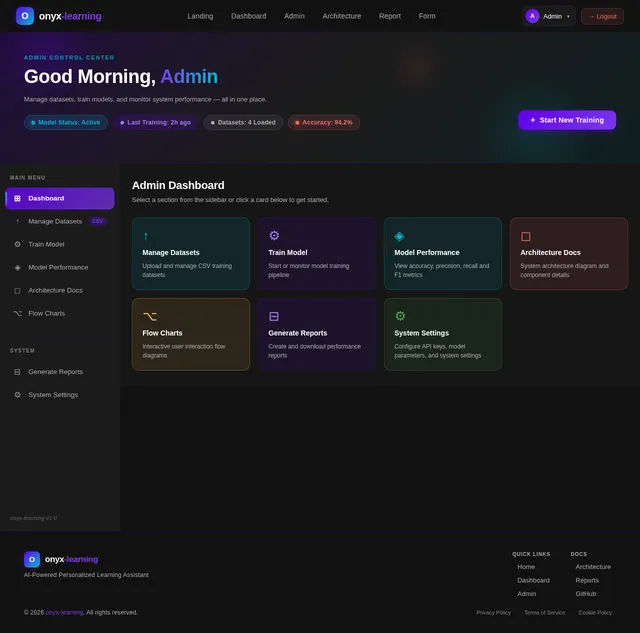
- As an Admin, I should be able to upload a CSV dataset for model training.
- As an Admin, I should be able to view system architecture and flow chart designs for documentation purposes.
- As a User, I should be able to navigate between pages (Landing, Dashboard, Form, Admin, Report) seamlessly.
- As a User, I should be able to trigger selective re-runs of the analysis and regenerate reports.
4. User Personas
-
Student:
- Inputs personal academic data (marks, study time, attendance).
- Views performance classification and recommendations.
-
Admin:
- Manages the system, uploads datasets, and monitors performance.
- Accesses architecture and flow chart designs for documentation.
5. Visuals Colors and Theme
Color Palette
The onyx-learning project adopts a modern, professional theme with a focus on accessibility and readability.
| Element | Hex Code | Description |
|---|---|---|
| Background | #0D1117 | Dark background for modern UI. |
| Surface | #161B22 | Slightly lighter tone for cards. |
| Text | #C9D1D9 | Light gray text for high contrast. |
| Accent | #58A6FF | Blue for buttons and highlights. |
| Muted Tones | #8B949E | Gray for secondary text and borders. |
6. Signature Design Concept
Interactive Learning Dashboard with Dynamic Animations
The homepage will feature a dynamic, interactive dashboard that combines data visualization and animations to engage users.
- 3D Card Animations: Each student’s performance level will be displayed on a card that flips dynamically when hovered over, revealing personalized recommendations on the back.
- Progress Rings: Circular progress bars will visually represent attendance, study time, and marks.
- Animated Transitions: Smooth transitions between sections, with subtle scaling effects on buttons and cards.
- Dark Mode Aesthetic: A sleek, dark-themed interface with glowing accent colors for a futuristic feel.
- Selective Re-run Button: A prominent button on the dashboard allows users to re-run the analysis for updated results.
This design ensures the system is not only functional but also visually captivating, leaving a lasting impression on users and hackathon judges.
7. Architecture Design
System Architecture
Frontend (React) → Backend (Flask) → ML Model (scikit-learn) → Dataset (CSV) → Output (JSON)
Components:
-
Frontend:
- Collects user inputs and displays results.
- Communicates with the backend via API calls.
-
Backend:
- Processes requests and integrates with the ML model.
- Returns predictions and recommendations to the frontend.
-
ML Model:
- Trains on the dataset and predicts performance levels.
- Generates personalized recommendations.
-
Dataset:
- CSV file containing student performance data.
8. Flow Chart Design
User Interaction Flow
[Start]
   ↓
[User Inputs Data] → [Validate Input] → [Send to Backend]
   ↓
[Backend Processes Data] → [Call ML Model] → [Generate Predictions]
   ↓
[Return Results to Frontend] → [Display on Dashboard]
   ↓
[Generate Report (Optional)]
   ↓
[Selective Re-run (Optional)]
   ↓
[End]
9. Non-Functional Requirements
- Performance: The system must process inputs and return results within 2 seconds.
- Scalability: The architecture should support additional features like advanced NLP and larger datasets.
- Usability: The UI must be intuitive and accessible, adhering to WCAG standards.
- Reliability: The system must handle invalid inputs gracefully without crashing.
- Portability: The system should run seamlessly on Windows and Linux environments.
10. Tech Stack
Frontend
- React for modern UI development.
Backend
- Python Flask for lightweight API development.
Machine Learning
- scikit-learn for classification and recommendation generation.
Database
- CSV for initial dataset storage.
Tools
- Docker for containerization.
11. Assumptions and Constraints
Assumptions
- Users will input valid numerical data for marks, study time, and attendance.
- The dataset will be preprocessed and clean.
Constraints
- The system must be developed within a 6-hour hackathon timeframe.
- No external paid APIs can be used.
12. Glossary
- Frontend: The user interface of the system.
- Backend: The server-side logic that processes data.
- ML Model: A machine learning algorithm used for classification.
- Dataset: A structured file containing student performance data.
- API: Application Programming Interface for communication between frontend and backend.
- Selective Re-run: A feature allowing users to re-run the analysis for updated results.
This document provides a comprehensive overview of the onyx-learning project, ensuring clarity and alignment with the project goals. Let me know if you’d like further refinements, Thanush!

AI-Powered Learning, Personalized For You
Classify students into performance levels and generate personalized study recommendations using machine learning. Input your marks, study time, and attendance to unlock a smarter path to academic success.
Everything You Need to Succeed
Onyx Learning combines intelligent classification, personalized study paths, and real-time analytics to transform how students learn and grow.
Smart Classification
Our ML model automatically classifies students into Beginner, Intermediate, and Advanced levels based on marks, study time, and attendance data.
ML-PoweredPersonalized Paths
Receive tailored study recommendations and learning plans that adapt to each student's weak subjects and unique performance profile.
AdaptiveData-Driven Insights
Visualize progress through interactive dashboards with progress rings, performance trends, and downloadable reports for actionable analysis.
Analytics3D Card Animations + Progress Rings
Experience an interactive dashboard where student performance comes alive through dynamic card flips and real-time animated progress visualizations.
Amara Patel
AdvancedPersonalized Recommendations
Each student profile is rendered as a dynamic 3D card that reveals personalized AI-generated recommendations on flip. Progress rings animate in real-time to visualize attendance, study habits, and academic performance — giving students and admins an instant, intuitive snapshot of learning progress.
Two Paths, One Platform
Whether you are a student seeking personalized learning insights or an admin managing the system, onyx-learning guides you every step of the way.
Student Journey
Enter marks, study time, and attendance data through the intuitive form interface.
The ML model analyzes your data and classifies you as Beginner, Intermediate, or Advanced.
Get personalized study recommendations based on identified weak subjects and patterns.
Access a tailored study plan on your dashboard with actionable steps to improve.
Generate and download a comprehensive report summarizing your analysis and next steps.
Admin Journey
Authenticate with admin credentials to access the system management console.
Upload a CSV dataset containing student performance records for model training.
Initiate model training with scikit-learn to classify student performance levels.
Review model accuracy, precision, and recall metrics on the analytics dashboard.
Track system health, API performance, and user activity in real time.
Your Intelligent Dashboard
See how Onyx Learning classifies students, generates AI-powered recommendations, and builds personalized study plans — all in one view.
Student Performance Overview
Showing classification results for 247 students across 3 performance levels
Beginner Level
87 Students
Intermediate Level
118 Students
Advanced Level
42 Students
AI Recommendations
Focus on Mathematics fundamentals for Beginner-level students with low marks
Increase study time allocation for Science subjects by 2 hours/week
Attendance below 75% correlates with lower performance — prioritize engagement
Personalized Study Plan
Everything You Need to Transform Learning
From real-time classification to detailed reports, onyx-learning equips students and admins with powerful AI-driven tools.
Real-Time Analysis
Instantly process student marks, study time, and attendance data to classify performance levels with our trained ML model.
ML-PoweredPersonalized Recommendations
Generate tailored study plans and recommendations targeting weak subjects, adapting to each student’s unique learning profile.
AdaptiveReport Generation
Download comprehensive PDF reports summarizing performance analysis, classification results, and actionable study recommendations.
ExportableSystem Architecture Insights
Explore interactive architecture diagrams and flow charts that document the entire system pipeline from input to prediction.
DocumentationA Robust, Modern Stack
Built with industry-leading technologies to deliver a fast, intelligent, and reliable learning experience from input to insight.
React
Frontend
Powers the interactive dashboard with dynamic 3D card animations, progress rings, and smooth transitions for an engaging learning experience.
Flask
Backend
Lightweight Python framework handling API endpoints, data validation, CSV uploads, and seamless communication between the frontend and ML model.
scikit-learn
Machine Learning
Classifies students into Beginner, Intermediate, and Advanced levels using performance data to generate personalized study recommendations.
Docker
Deployment
Containerizes the entire application stack for consistent deployment, ensuring the system runs identically across development and production.
Ready to Transform Learning?
Harness the power of machine learning to classify student performance, generate personalized study plans, and unlock data-driven insights — all in one intuitive platform.
No comments yet. Be the first!