onyx-healthcare
 Deekshith R
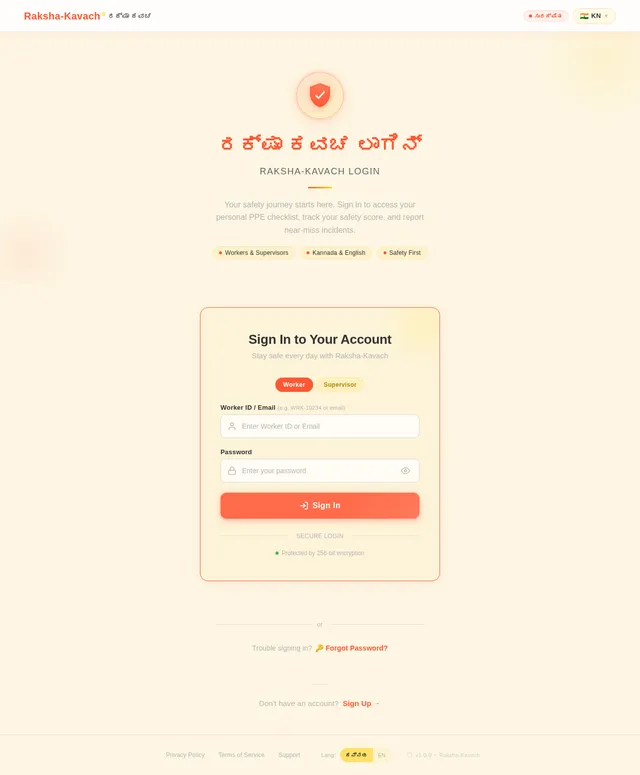
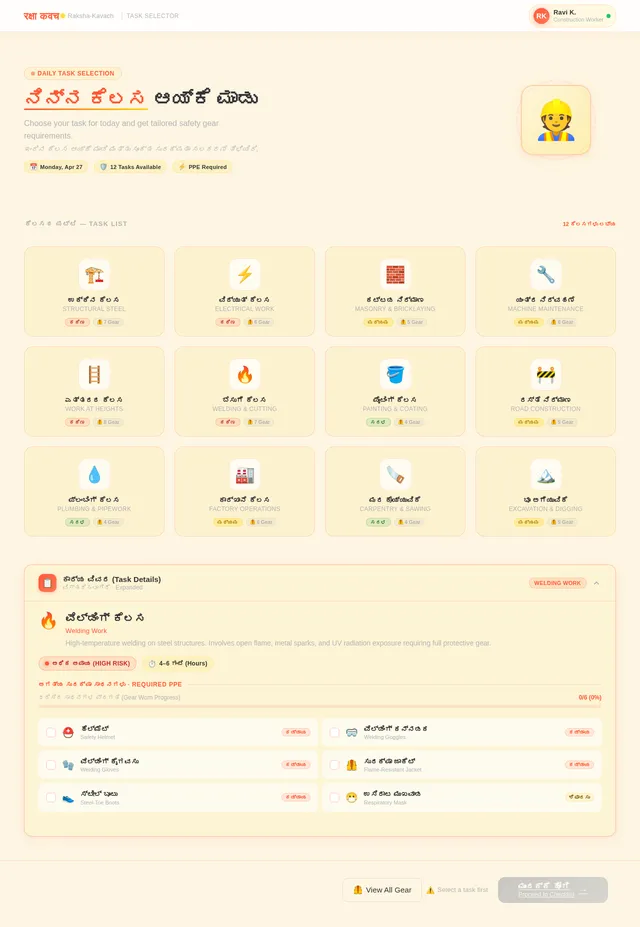
Project Title :42 Android App Development using GenAI- Raksha-Kavach (Healthcare) 1. The Problem Statement: Construction and factory workers in small towns often neglect "Safety Gear" (PPE) because they find it cumbersome or think they are "Safe enough." There is no visual way to show them the "Risk Level" of their specific task. 2. Detailed Description (The Vision) Raksha-Kavach is a "Worker Safety Auditor." It is a visual tool used by a site supervisor or the worker themselves. By selecting their "Task" (e.g., Welding, Height Work), the app shows a "3D Avatar" (simulated) wearing the mandatory gear. It also includes a "Daily Safety Quiz" to build a culture of caution. 3. App Usage & User Flow ● Task Selector: Choose the job for the day (e.g., "Digging Trench"). ● Safety Gear Checklist: Helmet, Gloves, Boots, Goggles – with "Check" buttons. ● Risk Meter: Shows the "Likely Injury" if gear is ignored (Visual education). ● Incident Log: Report "Near Misses" to prevent future accidents. 4. Technical Implementation & Hints ● UI: Use Lottie Animations or high-quality icons for safety gear. ● Database: Room DB for "Near Miss" logs. ● Logic: A "Safety Score" that increases asthe worker completes consecutive days without accidents. 5. Impact Goals ● Occupational Health: Reducing workplace fatalitiesin the unorganized sector. ● Worker Dignity: Ensuring the safety of the labor force is prioritized. ● Industrial Safety: Building a "Safety-First" mindset in India's growing factories 6. Success Criteria for Students ● The "Safety Checklist" must be specific to the task selected. ● The app mustsend a "Start-of-Day" safety reminder. ● The UI must be high-visibility (Yellow/Black) forindustrial use App name should be ರಕ್ಷಾ ಕವಚ (in kannada only) with app icon as raksha-kavach image Application should have responsive ui with stunning animations and colorful and beautiful with quick response Android studio kotlin Working app
Comments (0)
Sign in to leave a comment
System Requirements
System Requirements Document (SRD)
Project Name: onyx-healthcare
1. Introduction
The onyx-healthcare project, envisioned by Deekshith R, aims to revolutionize workplace safety for construction and factory workers in India. By addressing the neglect of safety gear (PPE) and fostering a "Safety-First" mindset, this project will provide an interactive and engaging mobile application named "ರಕ್ಷಾ ಕವಚ" (Raksha-Kavach). The app will empower workers to visualize risks, track their safety behavior, and report incidents, all through a stunning, responsive, and culturally resonant interface.
This document outlines the system requirements for the onyx-healthcare project, incorporating worker-facing features, fully interactive 3D model visualization, and gamified safety tracking.
2. System Overview
The onyx-healthcare system is a mobile application designed to enhance occupational safety in India's unorganized sectors. It provides workers with tools to:
- Select their daily tasks and view tailored safety gear requirements.
- Visualize themselves in mandatory safety gear using interactive 3D avatars.
- Understand the risks of non-compliance through a dynamic risk meter.
- Build a culture of safety through daily quizzes and gamified safety scores.
- Report near-miss incidents to prevent future accidents.
The app will be developed using Android Studio (Kotlin) and will feature high-quality animations, responsive UI, and localized content to ensure accessibility and engagement for workers across India.
3. Functional Requirements
- As a Worker, I should be able to select my daily task from a predefined list.
- As a Worker, I should see an interactive 3D avatar wearing the required safety gear for my selected task.
- As a Worker, I should be able to log near-miss incidents with details like date, time, and description.
- As a Worker, I should be able to track my personal safety score, which increases with consistent safe behavior.
- As a Worker, I should receive a start-of-day safety reminder with my task-specific checklist.
- As a Worker, I should be able to take a daily safety quiz to improve my knowledge and safety score.
- As a Worker, I should see a dynamic risk meter that visually represents the injury risk if safety gear is ignored.
- As a Worker, I should be able to view my safety history and progress over time.
4. User Personas
4.1 Worker
- Description: Primary user of the app. Typically a construction or factory worker in small towns or unorganized sectors.
- Goals: Ensure personal safety, understand risks, and build a safety-first mindset.
- Key Features: Task selection, 3D avatar visualization, risk meter, safety score tracking, incident logging, and daily quiz participation.
4.2 Supervisor
- Description: Oversees worker safety and ensures compliance with safety protocols.
- Goals: Monitor worker safety behavior and address recurring safety issues.
- Key Features: Access to incident logs and aggregated safety scores for teams.
5. Visuals Colors and Theme
The visual identity of "ರಕ್ಷಾ ಕವಚ" will reflect safety, urgency, and cultural relevance. The color palette is designed to be high-visibility and industrial-friendly.
- Background: #FDF6E3 (Soft Beige)
- Surface: #FFE066 (Bright Yellow)
- Text: #333333 (Deep Charcoal)
- Accent: #FF5733 (Safety Orange)
- Muted Tones: #B3B3B3 (Neutral Gray)
This palette ensures the app is visually striking while maintaining readability and accessibility in industrial environments.
6. Signature Design Concept
"Immersive Safety Hub"
The home page of the app will feature a fully interactive 3D construction site. Workers will see a digital representation of their workspace, complete with animated avatars performing tasks like welding, digging, or working at heights.
- Interactive 3D Avatar: Users can rotate, zoom, and interact with their avatar to see how safety gear fits and protects them. Missing gear will trigger visual warnings (e.g., flashing red zones on the avatar).
- Dynamic Risk Meter: A glowing, animated risk meter will hover next to the avatar, changing colors (green to red) based on compliance.
- Gamified Safety Score: A progress bar at the top of the screen will show the worker's safety score, with celebratory animations for milestones.
- Micro-Interactions: Buttons and icons will feature subtle animations, such as a helmet icon that "bounces" when tapped.
- Localized Content: The app will display Kannada text prominently, ensuring accessibility for the target audience.
This design will make safety education engaging, memorable, and culturally relevant, leaving a lasting impression on users.
7. Non-Functional Requirements
- The app must support Android devices running Android 8.0 (Oreo) and above.
- The app must load interactive 3D models within 2 seconds on mid-range devices.
- The UI must be responsive and optimized for various screen sizes.
- The app must support Kannada as the primary language, with an option for English.
- The database must handle up to 10,000 incident logs without performance degradation.
- The app must ensure data security and comply with relevant privacy laws in India.
8. Tech Stack
Frontend
- React Native for mobile app development.
Backend
- Python with FastAPI for API development.
Database
- MySQL for structured data (e.g., user profiles, safety scores).
- MongoDB for unstructured data (e.g., incident logs).
AI Models
- Google Nano Banana for generating 3D avatars and animations.
- GPT 5.4 for user-friendly responses in Kannada and English.
AI Tools
- Langchain for integrating AI-driven features like the daily quiz.
Orchestration
- Docker and docker-compose for local development.
- Kubernetes for server-side orchestration.
9. Assumptions and Constraints
- Workers will have access to Android smartphones with internet connectivity.
- The app will primarily target users in India, with Kannada as the default language.
- The interactive 3D models will be pre-downloaded to minimize runtime latency.
- Supervisors will use the app less frequently than workers, focusing on monitoring and reporting.
10. Glossary
- PPE: Personal Protective Equipment, such as helmets, gloves, and goggles.
- Near Miss: An incident that could have resulted in injury but did not.
- Risk Meter: A visual indicator of injury likelihood based on task and gear compliance.
- Safety Score: A gamified metric to encourage consistent safe behavior.
- Interactive 3D Avatar: A digital representation of the worker wearing safety gear.
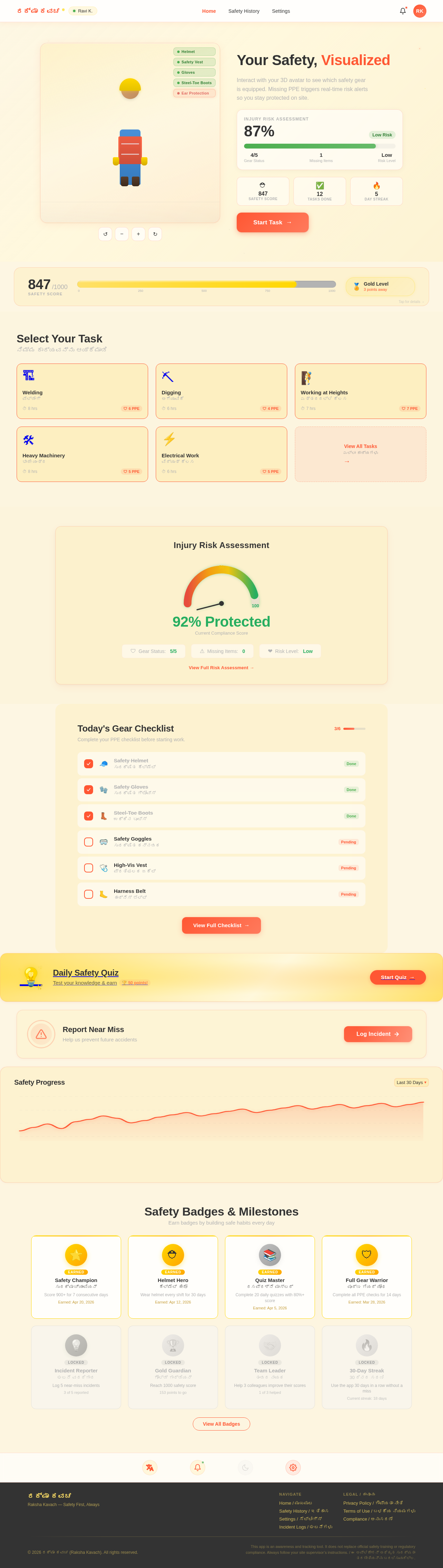
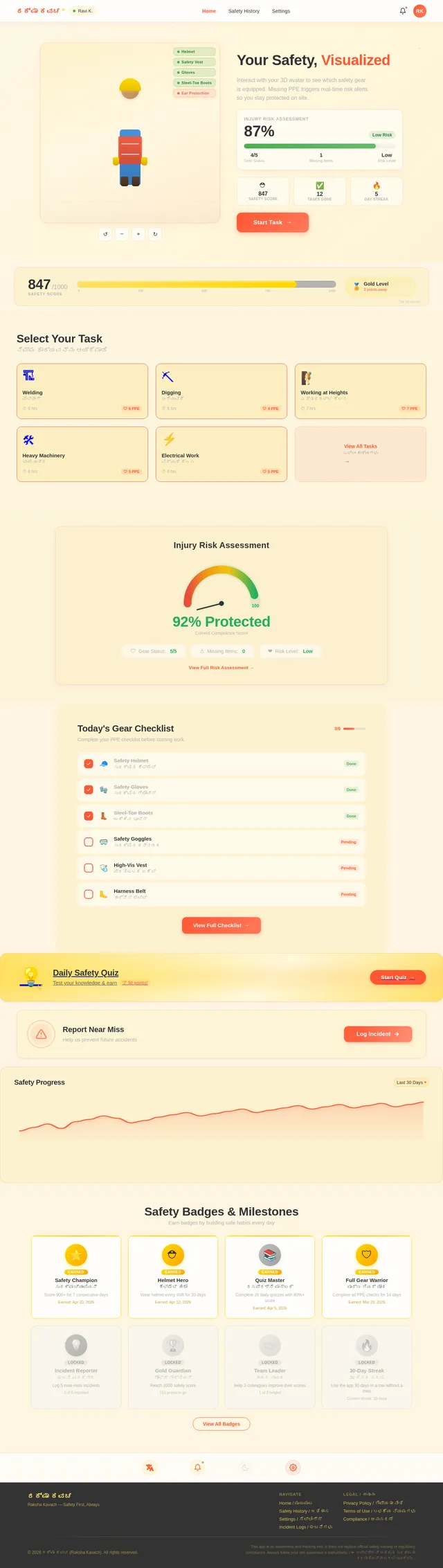
Your Safety, Visualized
Interact with your 3D avatar to see which safety gear is equipped. Missing PPE triggers real-time risk alerts so you stay protected on site.
Injury Risk Assessment
Today's Gear Checklist
Complete your PPE checklist before starting work.
- Safety Helmetಸುರಕ್ಷಿತ ಹೆಲ್ಮೆಟ್Done
- Safety Glovesಸುರಕ್ಷಿತ ಗ್ಲೋವ್ಸ್Done
- Steel-Toe Bootsಉಕ್ಕಿನ ಬೂಟ್ಸ್Done
- Safety Gogglesಸುರಕ್ಷಿತ ಕನ್ನಡಕPending
- High-Vis Vestಪ್ರತಿಫಲಕ ಜಕೆಟ್Pending
- Harness Beltಹಾರ್ನೆಸ್ ಬೆಲ್ಟ್Pending
Daily Safety Quiz
Test your knowledge & earn 🏆 50 points!
Report Near Miss
Help us prevent future accidents
Safety Progress
Safety Badges & Milestones
Earn badges by building safe habits every day
Safety Champion
ಸುರಕ್ಷಾ ಚ್ಯಾಂಪಿಯನ್
Score 900+ for 7 consecutive days
Earned: Apr 20, 2026
Helmet Hero
ಹೆಲ್ಮೆಟ್ ಹೀರೋ
Wear helmet every shift for 30 days
Earned: Apr 12, 2026
Quiz Master
ರಸಪ್ರಶ್ನೆ ಮಾಸ್ಟರ್
Complete 20 daily quizzes with 80%+ score
Earned: Apr 5, 2026
Full Gear Warrior
ಪೂರ್ಣ ಗಿಯರ್ ಯೋಧ
Complete all PPE checks for 14 days
Earned: Mar 28, 2026
Incident Reporter
ಘಟನೆ ವರದಿಗಾರ
Log 5 near-miss incidents
3 of 5 reported
Gold Guardian
ಗೋಲ್ಡ್ ಗಾರ್ಡಿಯನ್
Reach 1000 safety score
153 points to go
Team Leader
ತಂಡದ ನಾಯಕ
Help 3 colleagues improve their scores
1 of 3 helped
30-Day Streak
30 ದಿನದ ಸರಣಿ
Use the app 30 days in a row without a miss
Current streak: 18 days
No comments yet. Be the first!