onyx-advisor
 Jasmel Sangha
MyDopeAdvisor
Comments (0)
Sign in to leave a comment
System Requirements
System Requirements Document (SRD)
Project Name: onyx-advisor
1. Introduction
The onyx-advisor project is a sleek and modern platform designed to provide personalized cannabis strain referrals based on desired effects. This system leverages advanced APIs and user-friendly interfaces to deliver tailored recommendations, ensuring users can make informed decisions about their cannabis experiences.
This document outlines the system requirements for onyx-advisor, focusing on its core functionality, user personas, design aesthetics, and technical specifications. Developed with Jasmel Sangha's vision in mind, the platform aims to cater to a growing need for personalized cannabis advice in the U.S. market.
2. System Overview
onyx-advisor is a web and mobile application that connects users with cannabis strains tailored to their desired effects. The system integrates with an API supervisor to pre-resolve strain recommendations, ensuring accuracy and reliability.
Key features include:
- A streamlined user interface for inputting desired effects.
- Integration with a backend API for real-time strain recommendations.
- User profiles for tracking preferences and past recommendations.
- A visually appealing design that reflects the modern and natural essence of the cannabis industry.
The platform is designed to operate in the U.S., adhering to local regulations and standards. It supports both casual users seeking quick recommendations and enthusiasts looking for detailed insights.
3. Functional Requirements
- As a User, I should be able to input my desired effects (e.g., relaxation, focus, creativity).
- As a User, I should receive cannabis strain recommendations based on my input, pre-resolved by the API supervisor.
- As a User, I should be able to create a profile to save my preferences and past recommendations.
- As a User, I should be able to browse a library of cannabis strains with detailed descriptions.
- As an Admin, I should be able to manage the strain database, including adding, updating, or removing strains.
- As an Admin, I should be able to monitor API performance and resolve any issues.
4. User Personas
1. Casual User
- Description: A user seeking quick and easy cannabis strain recommendations for specific effects.
- Goals: Find a strain that matches their desired experience without needing extensive research.
- Tech Proficiency: Moderate.
2. Enthusiast
- Description: A user deeply interested in cannabis, looking for detailed strain information and personalized recommendations.
- Goals: Explore new strains, save preferences, and track past recommendations.
- Tech Proficiency: High.
3. Admin
- Description: A system administrator responsible for managing the strain database and ensuring API functionality.
- Goals: Maintain data accuracy, monitor system performance, and resolve technical issues.
- Tech Proficiency: Expert.
5. Visuals Colors and Theme
Color Palette
The onyx-advisor color palette reflects a modern, natural aesthetic with a hint of luxury:
- Background: #1A1A1D (Deep Charcoal)
- Surface: #2E2E33 (Slate Gray)
- Text: #E8E8E8 (Soft White)
- Accent: #6A994E (Earthy Green)
- Muted Tones: #A5A58D (Olive Beige)
This palette creates a calming and professional atmosphere, aligning with the project's focus on wellness and personalization.
6. Signature Design Concept
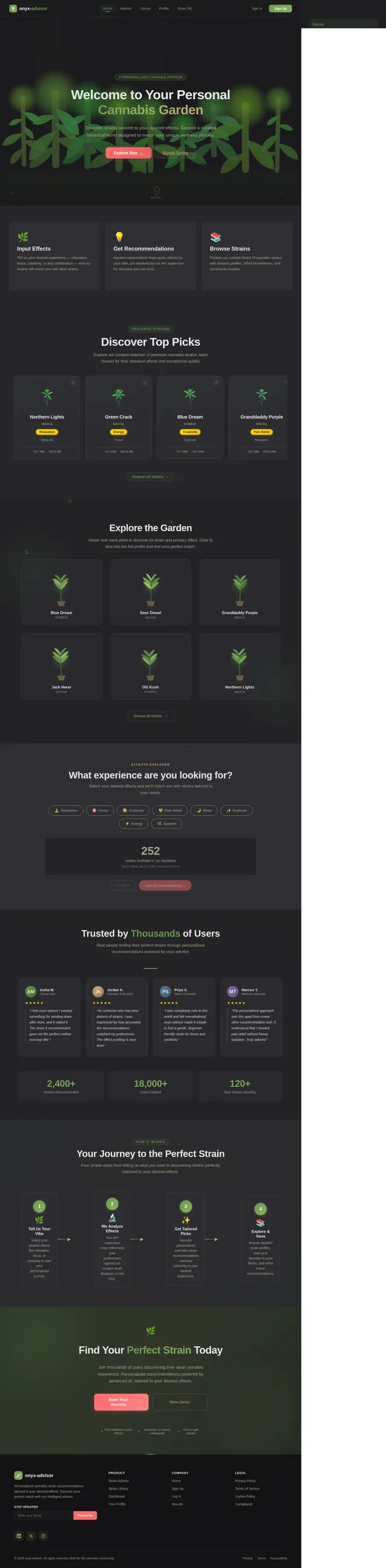
Interactive Botanical Garden Homepage
The homepage of onyx-advisor will feature an interactive botanical garden. Users will be greeted by a serene, animated garden where cannabis plants grow and sway gently in the breeze.
- Interaction: Users can hover over plants to reveal strain names and their primary effects (e.g., relaxation, focus). Clicking on a plant will open a detailed strain profile.
- Animation: Subtle animations include leaves rustling, sunlight shifting, and dew drops forming on leaves.
- Transitions: Smooth transitions between sections, with a "zoom-in" effect when navigating from the garden to strain details.
- Micro-interactions: Buttons and icons will have soft, glowing effects when hovered over, enhancing the user experience.
This design concept creates an immersive and memorable first impression, setting onyx-advisor apart from competitors.
7. Non-Functional Requirements
- The system must respond to user queries within 2 seconds.
- The platform must support at least 10,000 concurrent users.
- Data storage must comply with U.S. regulations for cannabis-related information.
- The system must be accessible on both web and mobile platforms.
- The design must adhere to WCAG 2.1 accessibility standards.
8. Tech Stack
Frontend
- React for Web
- React Native for Mobile App
Backend
- Python
- FastAPI
Database
- MySQL (with Alembic for migrations)
AI Models
- GPT 5.4 for user-friendly responses
- Claude 4.6 Opas for academic or coding work
AI Tools
- Litellm for LLM Routing
- Langchain
Orchestration
- Docker for local orchestration
- Kubernetes for server-side orchestration
9. Assumptions and Constraints
- The API supervisor will handle all strain recommendation logic, ensuring accuracy and consistency.
- The platform will initially target the U.S. market, with potential for expansion based on demand.
- User data will be stored securely, with encryption for sensitive information.
- The system will rely on internet connectivity for real-time recommendations.
10. Glossary
- API Supervisor: A backend system responsible for resolving strain recommendations based on user input.
- Cannabis Strain: A specific variety of cannabis plant with unique effects and characteristics.
- Desired Effects: The specific outcomes a user seeks from consuming cannabis (e.g., relaxation, focus).
- WCAG 2.1: Web Content Accessibility Guidelines, ensuring digital accessibility for all users.
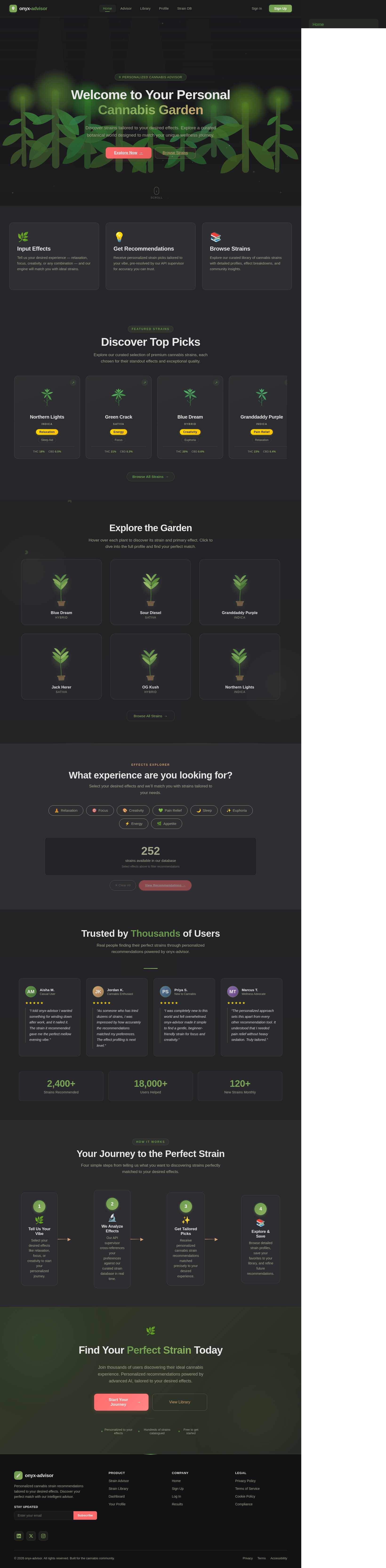
Welcome to Your Personal Cannabis Garden
Discover strains tailored to your desired effects. Explore a curated botanical world designed to match your unique wellness journey.
Input Effects
Tell us your desired experience — relaxation, focus, creativity, or any combination — and our engine will match you with ideal strains.
Explore →Get Recommendations
Receive personalized strain picks tailored to your vibe, pre-resolved by our API supervisor for accuracy you can trust.
Explore →Browse Strains
Explore our curated library of cannabis strains with detailed profiles, effect breakdowns, and community insights.
Explore →Discover Top Picks
Explore our curated selection of premium cannabis strains, each chosen for their standout effects and exceptional quality.
Northern Lights
IndicaRelaxationSleep AidGreen Crack
SativaEnergyFocusBlue Dream
HybridCreativityEuphoriaGranddaddy Purple
IndicaPain ReliefRelaxationJack Herer
SativaFocusCreativityOG Kush
HybridEuphoriaAppetiteExplore the Garden
Hover over each plant to discover its strain and primary effect. Click to dive into the full profile and find your perfect match.
Blue Dream
Hybrid
Sour Diesel
Sativa
Granddaddy Purple
Indica
Jack Herer
Sativa
OG Kush
Hybrid
Northern Lights
Indica
What experience are you looking for?
Select your desired effects and we’ll match you with strains tailored to your needs.
252
strains available in our database
Select effects above to filter recommendations
Trusted by Thousands of Users
Real people finding their perfect strains through personalized recommendations powered by onyx-advisor.
“I told onyx-advisor I wanted something for winding down after work, and it nailed it. The strain it recommended gave me the perfect mellow evening vibe.”
“As someone who has tried dozens of strains, I was impressed by how accurately the recommendations matched my preferences. The effect profiling is next level.”
“I was completely new to this world and felt overwhelmed. onyx-advisor made it simple to find a gentle, beginner-friendly strain for focus and creativity.”
“The personalized approach sets this apart from every other recommendation tool. It understood that I needed pain relief without heavy sedation. Truly tailored.”
Your Journey to the Perfect Strain
Four simple steps from telling us what you want to discovering strains perfectly matched to your desired effects.
Tell Us Your Vibe
Select your desired effects like relaxation, focus, or creativity to start your personalized journey.
We Analyze Effects
Our API supervisor cross-references your preferences against our curated strain database in real time.
Get Tailored Picks
Receive personalized cannabis strain recommendations matched precisely to your desired experience.
Explore & Save
Browse detailed strain profiles, save your favorites to your library, and refine future recommendations.
Find Your Perfect Strain Today
Join thousands of users discovering their ideal cannabis experience. Personalized recommendations powered by advanced AI, tailored to your desired effects.
No comments yet. Be the first!