
onyx-a

byAshutosh Badade

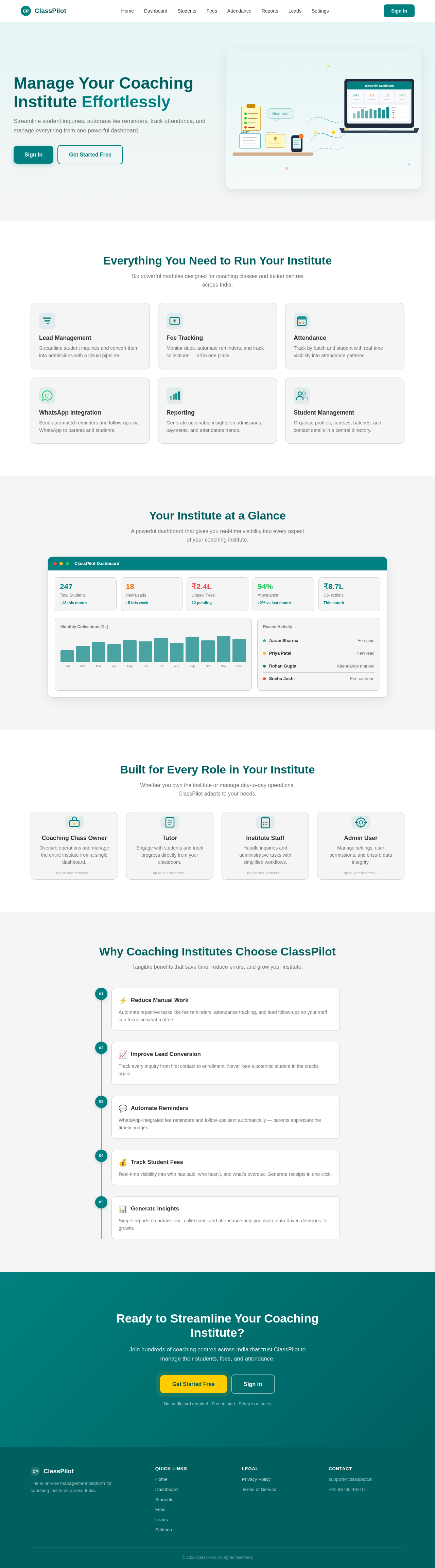
Build a responsive SaaS web app called “ClassPilot” for coaching classes and tutors in India. Purpose: This app helps coaching institutes manage student inquiries, admissions, fee reminders, attendance, and WhatsApp communication from one dashboard. Target users: - Coaching class owners - Tutors - Small institute staff - Admin users Main goal: Reduce manual work, improve lead conversion, track student fees, and automate reminders. Core features: 1. Admin login and secure authentication 2. Dashboard with total students, new leads, unpaid fees, attendance rate, and monthly collections 3. Lead management system for student inquiries 4. Student management with profile, course, batch, contact details, and admission status 5. Fee tracking with due dates, paid/unpaid status, and reminder history 6. Attendance tracking by batch and student 7. WhatsApp reminder module for fee due reminders and follow-ups 8. Simple reports page for admissions, payments, and attendance 9. Settings page for institute profile, courses, batches, and message templates Screens: - Landing page - Login page - Main dashboard - Leads page - Students page - Fees page - Attendance page - Reports page - Settings page Design style: - Clean modern SaaS dashboard - Professional and minimal - Light and dark mode - Sidebar navigation on desktop - Mobile-friendly responsive layout - Soft card-based UI - Use teal or blue as primary accent color - Clear typography and strong spacing - Do not use flashy gradients or overly decorative visuals Important UI requirements: - Show KPI cards at the top of dashboard - Use tables for students, fees, and leads - Add status badges like Paid, Unpaid, New Lead, Follow-up, Active, Inactive - Include filters and search on list pages - Add modal forms for create/edit actions - Add charts for monthly collections and attendance trend - Make navigation simple and beginner-friendly Data structure: - Students - Leads - Courses - Batches - Payments - Attendance records - Message templates App behavior: - Admin can add, edit, delete, and search records - Fee reminder actions should be easy to trigger - Dashboard should show real-time summary cards - Reports should be visual and easy to understand - Forms should have validation and helpful error messages Technical requirements: - Build as a web app - Use a clean component-based structure - Make it fast and mobile responsive - Use dummy sample data for now - Prepare the UI so backend/API integration can be added later Output: Generate a polished MVP with all screens connected through navigation, realistic sample data, clean UX, and production-quality UI.

Landing
Landing

Comments (0)

No comments yet. Be the first!

System Requirements

System Requirement Document
Page 1 of 5

System Requirements Document for onyx-a

Introduction

The project "onyx-a" involves the development of a responsive SaaS web application named "ClassPilot" designed specifically for coaching classes and tutors in India. The primary objective of this application is to streamline the management of student inquiries, admissions, fee reminders, attendance, and WhatsApp communication from a unified dashboard.

System Overview

ClassPilot aims to reduce manual work, improve lead conversion, track student fees, and automate reminders for coaching institutes. The application will cater to various user personas, including coaching class owners, tutors, small institute staff, and admin users. The system will be built as a web app with a clean component-based structure, ensuring it is fast, mobile-responsive, and ready for backend/API integration.

Page 2 of 5

Functional Requirements as Story Points

  • As a Coaching Class Owner, I should be able to log in securely to access the dashboard.
  • As an Admin, I should be able to view a dashboard with total students, new leads, unpaid fees, attendance rate, and monthly collections.
  • As a Tutor, I should be able to manage student inquiries through a lead management system.
  • As an Admin, I should be able to manage student profiles, courses, batches, contact details, and admission status.
  • As a Staff Member, I should be able to track fees with due dates, paid/unpaid status, and reminder history.
  • As a Tutor, I should be able to track attendance by batch and student.
  • As an Admin, I should be able to send WhatsApp reminders for fee due reminders and follow-ups.
  • As a Coaching Class Owner, I should be able to generate simple reports for admissions, payments, and attendance.
  • As an Admin, I should be able to configure settings for institute profile, courses, batches, and message templates.
  • As a User, I should be able to navigate through the app easily with sidebar navigation and responsive layout.

User Personas

  • Coaching Class Owner: Responsible for overseeing the entire operation, managing staff, and ensuring the smooth running of the institute.
  • Tutor: Engages directly with students, manages classes, and tracks student progress.
  • Small Institute Staff: Assists in administrative tasks, manages student records, and handles inquiries.
  • Admin User: Manages the application settings, user permissions, and oversees data integrity.

Core User Flows

  • Admin logs in -> views dashboard -> manages student inquiries -> updates student profiles -> tracks fees and attendance -> sends reminders -> generates reports.
  • Tutor checks schedule -> updates attendance -> reviews student progress -> communicates with students via WhatsApp.
  • Staff handles inquiries -> updates lead status -> assists in fee collection -> updates student records.
Page 3 of 5

Visuals Colors and Theme

  • primary: #008080 (Teal)
  • primary_light: #66b2b2 (Light Teal)
  • secondary: #005f5f (Dark Teal)
  • accent: #ffcc00 (Gold)
  • highlight: #ff6600 (Orange)
  • bg: #f5f5f5 (Light Gray)
  • surface: #ffffff (White)
  • text: #333333 (Dark Gray)
  • text_muted: #777777 (Gray)
  • border: #cccccc (Light Gray)

Signature Design Concept

Interactive Dashboard Experience: The landing page will feature an interactive dashboard that visually represents the core functionalities of ClassPilot. Users can hover over different sections of the dashboard to see real-time updates and animations that illustrate data changes, such as student enrollment numbers and fee collection trends. The dashboard will use a combination of motion/react for smooth transitions and animations, providing an engaging and informative experience.

Page 4 of 5

Landing Hero Motion Brief

The landing page will feature a dynamic illustration of a classroom environment where inputs like student inquiries and fee reminders transform into organized data on the dashboard. The animation will loop every 10 seconds, showing the seamless transition from manual tasks to automated processes. Users can interact with elements to see detailed information pop-ups, enhancing the understanding of ClassPilot's capabilities.

Interaction Model & Motion Direction

  • Interaction Model: Animated
  • The landing page will feature moderate scroll-triggered reveals and hover transitions, with spring physics on interactive elements to enhance user engagement. This approach will ensure a feature-rich presentation while maintaining clarity and usability.

Non-Functional Requirements

  • The application must be responsive and accessible on both desktop and mobile devices.
  • It should support light and dark modes for user preference.
  • The system must ensure data security and user privacy, particularly for sensitive student information.

Tech Stack

  • Frontend: React for Web
  • Backend: Python with FastAPI
  • Database: MySQL or MariaDB, using Alembic for migrations
  • AI Tools: Not specified
  • Orchestration: Docker and docker-compose for local development
Page 5 of 5

Assumptions and Constraints

  • The application will initially use dummy sample data, which will be replaced with real data upon backend integration.
  • The system will be designed to handle a moderate number of users typical for small to medium-sized coaching institutes in India.
  • The application will comply with local data protection regulations.

Glossary

  • KPI: Key Performance Indicator
  • UI: User Interface
  • UX: User Experience
  • API: Application Programming Interface
  • SaaS: Software as a Service

This document outlines the comprehensive requirements for the development of the ClassPilot application, ensuring all user needs and technical specifications are addressed.

Landing design preview
Landing: View Info
Login: Sign In
Dashboard: View Stats
Students: Manage Profiles
Students: Update Admission Status
Fees: Track Status
Fees: Send WhatsApp Reminder
Attendance: View Records
Reports: Generate Reports
Settings: Configure Institute
Settings: Manage Templates
Landing design preview
Landing: View Info
Login: Sign In
Dashboard: View Stats
Students: Manage Profiles
Students: Update Admission Status
Fees: Track Status
Fees: Send WhatsApp Reminder
Attendance: View Records
Reports: Generate Reports
Settings: Configure Institute
Settings: Manage Templates