omega-start
 Diya Trivedi
start a project to build a simple single page design of calculator

Comments (0)
Sign in to leave a comment
System Requirements
System Requirements Document for omega-start
1. Introduction
omega-start is a simple calculator delivered as a single-page design. The product exists so that anyone doing quick everyday arithmetic can enter numbers and arithmetic operators, see the current entry and the computed result on the page, and clear the calculator to begin a new calculation. The audience is the general Calculator User: a person who wants a fast, exact arithmetic surface with no account, no setup, and no surrounding application.
This document is the System Requirements Document for omega-start. It specifies the single page, the calculator behavior, the visual system, and the delivery boundary for the current release.
2. System Overview
omega-start is a one-page web calculator. The page is anonymously reachable and hosts the entire product experience: a display showing the current entry and the computed result, a keypad for entering numbers and arithmetic operators, and a clear control that resets the calculator to begin a new calculation. There is no navigation beyond this page, no account, and no persisted history.
The current delivery comprises a React frontend that renders the Calculator page, a shared FastAPI backend process for application APIs and domain modules, and a MariaDB database provisioned as application-owned persistent storage. The calculator's arithmetic and display state are a client-side interaction on the single page; the provisioned backend and database are available infrastructure and do not by themselves introduce domain entities, authentication, or stored calculation history.
Actors: the Calculator User (the only active human persona) interacts with the Calculator page. The backend and database are non-persona system services.
Removed from scope
- None.
2a. Product Interpretation and Delivery Boundary
The product is a single, publicly reachable page. A visitor opens the Calculator page and immediately has a working calculator: no sign-in, no onboarding, no account creation, and no personal data. Because no accepted behavior requires durable actor-specific state, private ownership, or a commitment bound to an identified participant, the product establishes no application identity and no session continuity. The calculator's working state (current entry, pending expression, computed result) lives for the duration of the visit and is reset by the clear control.
Everything the Calculator User does — entering digits and operators, reading the result, clearing — happens on the one Calculator page. The backend and database are provisioned infrastructure for the application; they do not add user-facing surfaces, and no current requirement depends on server-side persistence of calculations. Future extensions are out of scope for this release and are not represented on the page.
2c. Page Content and Component Coverage
Calculator
The single page of the product, anonymously reachable, hosting the complete calculator experience.
- Information and state
- The current entry (the number being typed) and the pending expression (the arithmetic entered so far), shown above the result.
- The computed result, shown as the dominant numeral on the page.
- The active operator state, reflected in the operator column.
- Idle/initial state: display shows a starting value (0) with an empty pending expression.
- Entering state: digits accumulate in the current entry.
- Computed state: a result is displayed after an equals action.
- Cleared state: the clear control returns the page to the idle/initial state.
- Primary actions
- Enter digits (0–9) and a decimal point into the current entry.
- Enter arithmetic operators (add, subtract, multiply, divide).
- Evaluate the expression with the equals control.
- Clear the calculator to begin a new calculation.
- Supporting actions and controls
- Operator column shows which operator is currently active.
- The clear control is visually distinct (yellow field) and the equals control is visually distinct (red field).
- Domain entities
- Calculation state: current entry, pending expression, active operator, computed result. This is transient page state, not a persisted record.
- Component responsibilities
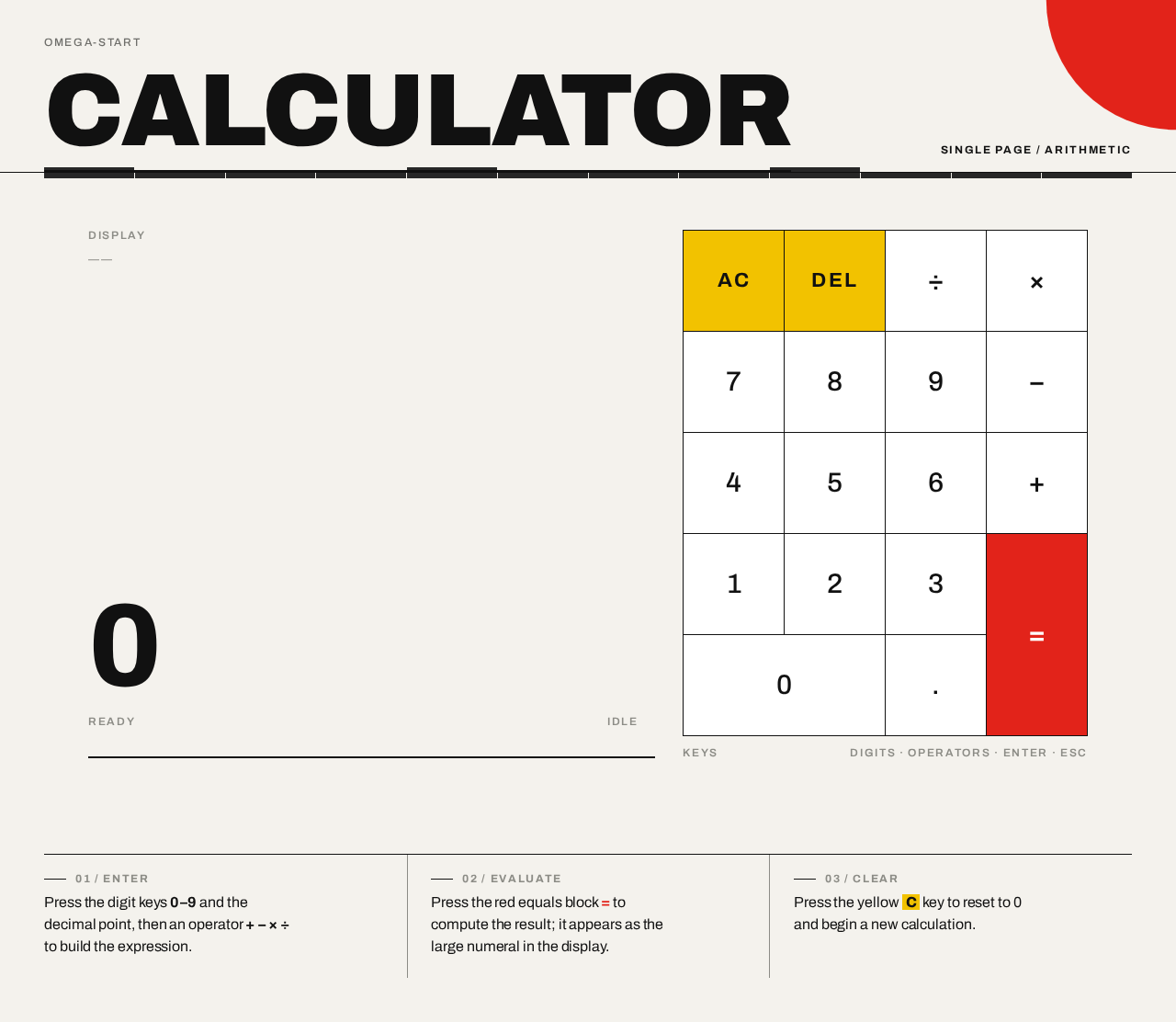
- Header band: wordmark "CALCULATOR" flush left, uppercase label flush right, hairline rule.
- Display panel: pending expression in small tracked caps; result numeral in heavy tabular type; 2px rule beneath.
- Keypad: strict 4-column grid of square white tiles with 1px black gaps; digit keys, operator keys, decimal key, equals block (red, spanning two rows), clear block (yellow).
- Footer strip: hairline-ruled columns with short plain-language instructions.
- Decorative element: quarter-cut red circle bleeding off the top-right viewport edge, never covering readable text or controls.
- States
- Loading: not applicable; the page renders its initial calculator state immediately.
- Empty: initial display shows 0 with no pending expression.
- Success: a valid computation displays its result.
- Error: an invalid operation (for example division by zero) shows an error indication in the display rather than a numeric result; the user can clear to recover.
- Recovery: the clear control always returns the page to the idle state from any state.
3. Functional Requirements
FR-1 — Single-page calculator delivery (explicit) As a Calculator User, I should reach the entire calculator on one page, so that I can do arithmetic without navigating anywhere else.
- Trigger: opening the product.
- Observable result: the Calculator page renders with display, keypad, and clear control.
- Access: anonymous; no account required.
- Failure/recovery: if the page fails to load, reloading returns the same single page.
- Continuation: the user proceeds directly to entering numbers.
FR-2 — Enter numbers and arithmetic operators (explicit) As a Calculator User, I should enter numbers and arithmetic operators, so that I can build the calculation I want to compute.
- Trigger: pressing digit keys, the decimal key, and operator keys.
- Observable result: the current entry and pending expression update on the display; the active operator is reflected in the operator column.
- Access: anonymous.
- Failure/recovery: an unintended key press can be corrected by clearing and re-entering.
- Continuation: the user presses equals to compute.
FR-3 — View current entry and computed result (explicit) As a Calculator User, I should view the current entry and the computed result on the page, so that I can confirm what I have entered and what the calculator computed.
- Trigger: any entry or equals action.
- Observable result: the display shows the pending expression above and the result numeral below.
- Access: anonymous.
- Failure/recovery: an invalid operation shows an error indication instead of a result; clearing recovers.
- Continuation: the user reads the result or continues calculating.
FR-4 — Clear to begin a new calculation (explicit) As a Calculator User, I should clear the calculator, so that I can start a fresh calculation.
- Trigger: pressing the clear control.
- Observable result: the display returns to the idle state (0, empty pending expression, no active operator).
- Access: anonymous.
- Failure/recovery: not applicable; clear always succeeds.
- Continuation: the user begins a new calculation.
4. User Personas
Calculator User
- Product context: A person doing quick everyday arithmetic who wants an exact, immediate answer on a single page. They arrive with no account and no expectation of saved history; the calculator is a utility, closer to signage than to software.
- Primary goal: Enter a calculation and read a correct result quickly, then clear and start again.
- Distinct accepted responsibilities: Entering digits, decimal points, and arithmetic operators; evaluating with equals; reading the current entry and computed result; clearing to begin a new calculation.
- Relevant inputs or decisions: Which numbers and operators to enter; when to evaluate; when to clear.
- Interactions with other accepted participants: None beyond the calculator itself; the Calculator User is the only active human participant, and no other persona is affected by the calculation.
- Observable success: The displayed result is correct for the entered expression, and the clear control reliably returns the page to a fresh state.
5. Core User Flows
Flow 1 — Perform a calculation
- The Calculator User opens the Calculator page. The page renders anonymously in its idle state: display shows 0, pending expression empty.
- The user presses digit keys to enter the first number; the current entry updates on the display.
- The user presses an arithmetic operator; the operator column reflects the active operator and the pending expression shows the first number and operator.
- The user enters the second number; the current entry updates.
- The user presses the equals control; the computed result appears as the dominant numeral on the display.
- The user reads the result. Success: the result is correct for the entered expression.
- Continuation: the user may clear to begin a new calculation (Flow 2) or continue entering a new expression.
Flow 2 — Clear and start over
- From any state, the Calculator User presses the clear control (yellow field).
- The display returns to the idle state: 0, empty pending expression, no active operator.
- The user begins a new calculation (Flow 1).
Flow 3 — Recover from an invalid operation
- The Calculator User enters an expression that cannot be computed (for example division by zero) and presses equals.
- The display shows an error indication instead of a numeric result.
- The user presses the clear control; the page returns to the idle state.
- The user re-enters a valid calculation (Flow 1).
6. Visuals Colors and Theme
The visual system follows the supplied creative direction: Swiss geometric rigour, one grid, one pure accent, numbers as poster. Muse: Josef Müller-Brockmann.
- Mode: Light mode only.
- Colour tokens (exact hex by role):
- Background:
#F4F2ED(warm paper-white ground) - Surface:
#FFFFFF(keypad tiles) - Text:
#111111(black type at full strength) - Primary:
#E2231A(signal red — equals key and active operator state only) - Accent:
#F2C200(pure yellow — clear/all-clear key and the single horizontal rule marking the display) - Muted:
#8C8C86(secondary labels and thin grid rules)
- Background:
- Proportions: ~80% neutral ground and white, 12% black type and rules, 8% red/yellow signal.
- Typography:
- Headings: Archivo, grotesque, flush-left ragged-right, tight tracking (-0.02em) on the wordmark, uppercase micro-labels with 0.14em letterspacing.
- Body: Archivo.
- Display numerals: Archivo at very heavy weight with tabular figures.
- Type scale (1.5 modular rhythm): wordmark
clamp(40px, 9vw, 112px); display resultclamp(48px, 13vw, 128px)tabular; key labelsclamp(20px, 4.5vw, 30px); section labels 12px uppercase tracked; helper copy 16/24. Only four sizes in use; hierarchy carried by weight and rules. - No italics, no centred headline. Inter, Roboto, Poppins, and system-ui are forbidden for any type.
- Shape language: Hard edges only. Zero border-radius on keys and panels; 1px black hairline rules separate display from keypad and divide rows; a 2px black rule under the wordmark. Keys are square white tiles in a strict 4-column grid with 1px black gaps. The equals key is a solid red rectangle spanning two rows; the clear key is a solid yellow rectangle. No shadows, no gradients, no blobs.
- Layout: One page, asymmetric Swiss grid on a 12-column system. Top band: uppercase wordmark "CALCULATOR" flush left, thin rule, right-aligned uppercase label "SINGLE PAGE / ARITHMETIC". Middle: display in the left 7 columns with pending expression above and oversized flush-left result below; keypad in the right 5 columns as a square 4×5 grid. On mobile the keypad stacks full-width under the display. Footer strip of hairline-ruled columns holds three short lines of plain-language instructions. Everything aligns to the visible grid; nothing floats.
- Imagery: No photography, no illustration. The imagery is the grid itself: hairline rules, geometric colour blocks, and numerals as the only ornament. A single decorative red quarter-circle bleeds off the top-right viewport edge, drawn in CSS, never covering text.
- Readability: Headlines, wordmarks, labels, numbers, and controls stay entirely inside the viewport and their container at 375px, 768px, and 1280px, wrapping or scaling with
clamp(...)to fit; no other element covers any part of them. Decoration may be cropped or bled off an edge but never covers readable text or controls.
7. Signature Design Concept
The first screen is a printed poster, not an app hero. A warm paper ground (#F4F2ED) carries a full-width hairline-ruled header band: "CALCULATOR" in heavy Archivo flush left spanning roughly 40% of the viewport width, with a small uppercase label pinned to the right edge of the same rule. Beneath it, the composition splits asymmetrically: the live display occupies the left seven columns with the running expression in small tracked caps and the result in enormous tabular Archivo (clamp(48px, 13vw, 128px)) flush left, underlined by a 2px black rule; the square keypad fills the right five columns as a visible grid of white tiles with 1px black gaps, the red equals block and yellow clear block the only colour. A quarter-circle of signal red bleeds off the top-right viewport edge as the single geometric gesture. No centred stack, no gradient, no button pill. The number is the poster image.
8. Interaction Model & Motion Direction
Interaction Model: Animated Motion Tempo: restrained Hero Dimensionality: flat
Landing Hero Motion Brief
- Focal subject: The oversized tabular result numeral on the display, flush left against the grid, with the pending expression above it and the red quarter-circle bleeding off the top-right edge.
- Input → transformation → outcome thesis: A key press (input) flips the pressed key's background to red or yellow for 90ms and the digit snaps into the display with a 120ms opacity change (transformation), producing an updated current entry or computed result as the poster's dominant numeral (outcome). Only accepted calculator behavior is used.
- Motion vocabulary: Minimal and mechanical — instant key press state, 120ms opacity change on digits, no easing theatrics, no scroll animation, no bounces.
- Composed first frame: Warm paper ground; hairline-ruled header band with "CALCULATOR" flush left and "SINGLE PAGE / ARITHMETIC" flush right; display at left showing 0 with empty pending expression; keypad at right as a 4×5 grid of white tiles with 1px black gaps, red equals block spanning two rows, yellow clear block; red quarter-circle cropped by the top-right viewport edge.
- Reduced-motion state: With
prefers-reduced-motion, the press flash is removed entirely and state colour alone communicates the press; digits update without the opacity transition. The static poster arrangement remains fully usable.
9. Non-Functional Requirements
- Single-page constraint (explicit): The product is delivered as exactly one page; no additional routes or destinations are introduced.
- Simplicity (explicit): The design is a simple single-page calculator; no adjacent capabilities (history, memory, scientific functions, accounts) are added.
- Anonymous access (required_inference): The Calculator page is reachable without identity; no account, sign-in, or session continuity is required because no accepted behavior needs durable actor-specific state.
- Readability and responsiveness (explicit, from creative direction): Readable text and controls remain whole and inside the viewport and their container at 375px, 768px, and 1280px; decoration may be cropped but never covers readable text or controls.
- Reduced motion (explicit, from creative direction):
prefers-reduced-motionremoves the press flash and relies on state colour only. - Accessibility of controls (required_inference): Keypad controls are operable and labeled so the Calculator User can identify digits, operators, equals, and clear.
10. Tech Stack
- Frontend: React application UI rendering the single Calculator page.
- Backend: Shared FastAPI process for application APIs and domain modules (provisioned; the calculator's arithmetic and display state are client-side on the single page).
- Database: MariaDB, provisioned as application-owned persistent storage (no current requirement stores calculation history or user data).
- Infrastructure: docker-compose with the
frontend,backend, anddatabaseservices.
11. Assumptions and Constraints
- Assumption (required_inference): The calculator performs the four basic arithmetic operations (add, subtract, multiply, divide) with a decimal point, consistent with "numbers and arithmetic operators."
- Assumption (required_inference): Calculation state is transient page state; no calculation history is persisted, because no accepted requirement asks for it and the provisioned database alone does not justify domain entities.
- Constraint (explicit): The design is a single page; the page count is exactly one.
- Constraint (explicit): The product is a simple single-page calculator; no adjacent capabilities are added.
- Constraint (explicit, from creative direction): The generic indigo/blue-on-white SaaS template is forbidden; only the red and yellow signal colours are used beyond the neutral palette.
12. Glossary
- Calculator User: The single active human persona who enters numbers and operators, reads results, and clears the calculator.
- Current entry: The number currently being typed into the display.
- Pending expression: The arithmetic entered so far, shown above the result.
- Computed result: The numeric outcome displayed after an equals action.
- Clear control: The yellow key that resets the calculator to its idle state.
- Equals control: The red key that evaluates the pending expression.
- Idle state: The initial display state showing 0 with an empty pending expression.
omega-start
Calculator
Type digits, decimal point, plus, minus, asterisk or slash to calculate. Press Enter to evaluate, Backspace to delete, Escape or C to clear.
omega-start
Calculator
Type digits, decimal point, plus, minus, asterisk or slash to calculate. Press Enter to evaluate, Backspace to delete, Escape or C to clear.
No comments yet. Be the first!