omega-opspilot
 Harshal Meshram
create the OpsPilot AI — Multi-Tenant AI Business Operations SaaS product

Comments (0)
Sign in to leave a comment
System Requirements
System Requirements Document for omega-opspilot
Introduction
This document outlines the system requirements for OpsPilot AI, a multi-tenant AI-powered SaaS platform designed to streamline business operations for small businesses. OpsPilot AI integrates various business functions into a single intelligent dashboard, leveraging AI to automate repetitive tasks and improve operational efficiency.
System Overview
OpsPilot AI aims to consolidate disparate business tools into a unified platform, addressing the inefficiencies caused by scattered data and duplicated efforts. The platform provides modules for customer relationship management, task management, document handling, financial tracking, and reporting, all enhanced by AI capabilities.
Product Interpretation and Delivery Boundary
OpsPilot AI is delivered as a SaaS platform with a focus on small businesses. It provides a comprehensive suite of tools to manage various business operations through a single dashboard. The platform ensures secure multi-tenant data isolation and role-based access control to protect user data. Future expansions may include additional integrations and advanced AI capabilities.
Page Content and Component Coverage
Dashboard
- Information/State: Overview of CRM, tasks, documents, finance, reports, and AI insights.
- Primary Actions: Navigate to CRM, Task Manager, Document Manager, Finance Dashboard, Reports.
- Components: Notifications, Revenue Analytics, AI Insights.
- States: Loading, Empty, Success, Error, Recovery.
CRM Module
- Information/State: Customer details, interactions, follow-ups.
- Primary Actions: Manage customers, leads, contacts, companies, deals, interactions, follow-ups.
- Components: Customer list, Interaction history, Follow-up reminders.
- States: Loading, Empty, Success, Error, Recovery.
Task Manager
- Information/State: Task details, priorities, deadlines, dependencies.
- Primary Actions: Create tasks, assign tasks, manage task dependencies.
- Components: Task list, Subtask management, Notifications.
- States: Loading, Empty, Success, Error, Recovery.
Document Manager
- Information/State: Document types, summaries, analyses.
- Primary Actions: Upload documents, analyze documents, manage document storage.
- Components: Document list, AI analysis tools, Expiry alerts.
- States: Loading, Empty, Success, Error, Recovery.
Finance Dashboard
- Information/State: Income, expenses, budgets, invoices, payments.
- Primary Actions: Track financial data, generate financial reports.
- Components: Financial charts, Budget management, Invoice tracking.
- States: Loading, Empty, Success, Error, Recovery.
Reports
- Information/State: Business, sales, finance, customer, productivity reports.
- Primary Actions: Generate reports, view executive summaries.
- Components: Report templates, AI-generated insights.
- States: Loading, Empty, Success, Error, Recovery.
Functional Requirements
AI CRM
- As a user, I want to manage customers, leads, contacts, companies, deals, interactions, and follow-ups, so that I can streamline my CRM processes.
- As a user, I want to identify customers who haven't been contacted in the last 30 days, so that I can prioritize follow-ups.
- As a user, I want to view high-value customers who haven't purchased recently, so that I can re-engage them.
- As a user, I want the system to draft follow-up emails for customers, so that I can save time on communication.
AI Task Manager
- As a user, I want to create tasks manually or using natural language, so that I can efficiently manage my workload.
- As a user, I want to manage tasks, subtasks, priorities, deadlines, dependencies, recurring tasks, notifications, and team assignments, so that I can organize my team's work effectively.
AI Document Manager
- As a user, I want to upload various document types (PDFs, Word, Excel, CSV) and manage company policies, contracts, SOPs, and invoices, so that I can centralize document storage.
- As a user, I want AI capabilities like document summarization, question answering, contract analysis, document comparison, expiry detection, and information extraction, so that I can quickly access and analyze document content.
Company Knowledge AI
- As a user, I want to create a company-specific AI assistant using RAG, so that I can leverage my organization's knowledge base for quick answers.
Finance Dashboard
- As a user, I want to track income, expenses, budgets, invoices, payments, outstanding amounts, monthly revenue, and cash flow, so that I can maintain financial oversight.
- As a user, I want to ask AI questions about financial data, such as expense increases and top expense categories, so that I can gain insights into financial trends.
AI Reports
- As a user, I want to generate monthly business reports, sales reports, finance reports, customer reports, productivity reports, and AI-generated executive summaries, so that I can keep stakeholders informed.
AI Agent Architecture
- As a user, I want specialized agents coordinated by a Manager Agent to handle CRM, finance, documents, reports, communication, tasks, and analytics, so that I can automate business operations.
Natural Language to SQL
- As a user, I want to ask questions about business data using natural language and receive safe read-only SQL queries, so that I can access data insights without technical expertise.
Dashboard
- As a user, I want a main dashboard with sections for CRM, tasks, documents, finance, reports, and AI insights, so that I can have a comprehensive view of my business operations.
Security and Production Requirements
- As a user, I want secure authentication, role-based access control, multi-tenant data isolation, and other security measures, so that my data is protected.
Additional Functional Requirements
- As a user, I want to use AI Chat to interact with the system using natural language, so that I can perform tasks more intuitively.
- As a user, I want AI prompt-injection defenses to ensure the security and integrity of AI interactions.
- As a user, I want to manage AI requests within my subscription limits, so that I can optimize usage.
- As a developer, I want API integration capabilities, so that I can connect OpsPilot AI with other systems.
- As a developer, I want API rate limiting to prevent abuse and ensure fair usage.
- As a developer, I want to conduct API testing to ensure the reliability and performance of integrations.
- As a user, I want to manage expenses using accounting software, so that I can keep accurate financial records.
- As an admin, I want an admin dashboard to oversee system operations and user activities.
- As a user, I want to use advanced agents for complex tasks and automation, so that I can enhance productivity.
- As a user, I want to leverage agentic AI for dynamic task management and decision-making.
- As a user, I want audit logging to track system activities and ensure accountability.
- As a user, I want to access audit logs for compliance and security reviews.
- As a user, I want a CRM UI that is intuitive and easy to navigate, so that I can manage customer relationships effectively.
- As a user, I want to use CRM systems for customer management, so that I can maintain comprehensive customer records.
- As a user, I want to upload and manage CSV files for data import and export, so that I can handle large datasets efficiently.
- As a developer, I want column allowlists to restrict data access and enhance security.
- As a user, I want to view customer details comprehensively, so that I can provide personalized service.
- As a developer, I want database backups to ensure data recovery in case of failures.
- As a developer, I want to implement encryption at rest where supported, so that data is protected even when stored.
- As a developer, I want encryption in transit to secure data during transmission.
- As a developer, I want error handling mechanisms to manage and log system errors effectively.
- As a user, I want example AI questions to guide my interactions with the system, so that I can utilize AI capabilities effectively.
- As a user, I want to upload and manage Excel files for data analysis and reporting, so that I can leverage familiar tools.
- As a user, I want to use Excel/Google Sheets for data management, so that I can work with data in a familiar format.
- As a developer, I want to choose between FastAPI and Django for backend development, so that I can use the most suitable framework.
- As a developer, I want file type and size validation to ensure only appropriate files are uploaded.
- As a user, I want to use Google Calendar for scheduling and reminders, so that I can manage my time effectively.
- As a user, I want to use Google Drive for document storage and sharing, so that I can access files from anywhere.
User Personas
- Small Business Owner: Manages overall business operations and decision-making.
- Operations Manager: Oversees day-to-day business activities and ensures efficient workflow.
- Finance Officer: Manages financial records, budgets, and reporting.
- Customer Service Representative: Handles customer interactions and follow-ups.
Core User Flows
-
Customer Management Flow:
- Log in to the dashboard.
- Access the CRM module.
- View and manage customer interactions and follow-ups.
-
Task Management Flow:
- Log in to the dashboard.
- Access the Task Manager.
- Create and assign tasks using natural language.
-
Document Management Flow:
- Log in to the dashboard.
- Access the Document Manager.
- Upload and analyze documents using AI capabilities.
-
Financial Tracking Flow:
- Log in to the dashboard.
- Access the Finance Dashboard.
- Track and analyze financial data.
Visuals Colors and Theme
- Muse: Gleb Kuznetsov
- Palette (dark mode):
- Background: #0A0A0A
- Surface: #1A1A1A
- Text: #FFFFFF
- Primary: #00FFFF
- Accent: #FF00FF
- Muted: #333333
- Typography:
- Headings: Orbitron — Wide geometric sans, all caps, tight tracking
- Body: Space Grotesk
- Scale: 1.5 modular, 64/42/28/18/14
- Shape Language: Floating glass panels with thin luminous strokes and radial layouts
- Layout: Full-bleed 3D scene with floating glass elements and HUD-like data overlays
- Motion: Continuous slow orbit/parallax with light sweeps and data streams
Signature Design Concept
- Design Concept: A modern, intuitive interface that emphasizes ease of use and accessibility for small business users.
- Hero Direction: A full-bleed dimensional scene with a floating 3D data object glowing in electric cyan against a dark void, creating a sense of depth and futuristic intrigue.
Interaction Model & Motion Direction
- Interaction Model: Animated
- Motion Tempo: Cinematic
- Hero Dimensionality: WebGL
- Landing Hero Motion Brief: A floating 3D data object glowing in electric cyan against a dark void, with continuous parallax movement creating an immersive depth effect. Kinetic hover effects on interactive elements enhance engagement.
Non-Functional Requirements
- Scalability: The system must support multiple tenants and scale with user growth.
- Performance: The platform should provide fast response times and handle concurrent users efficiently.
- Reliability: Ensure high availability and minimal downtime.
Tech Stack
- Backend: Python, FastAPI, SQLAlchemy, PostgreSQL
- AI: OpenAI, Anthropic, LangChain, LlamaIndex, RAG, Vector Search
- Frontend: Next.js, React, TypeScript, Tailwind CSS
- Infrastructure: Docker, GitHub, Vercel, AWS/Render, Redis, Celery
Assumptions and Constraints
- Assumptions: Users have basic technical proficiency and access to the internet.
- Constraints: Adherence to data privacy regulations and secure handling of user data.
Glossary
- AI: Artificial Intelligence
- CRM: Customer Relationship Management
- RAG: Retrieval-Augmented Generation
- LLM: Large Language Model
- SaaS: Software as a Service
This document serves as a comprehensive guide for the development and deployment of the OpsPilot AI platform, ensuring alignment with business goals and user needs.
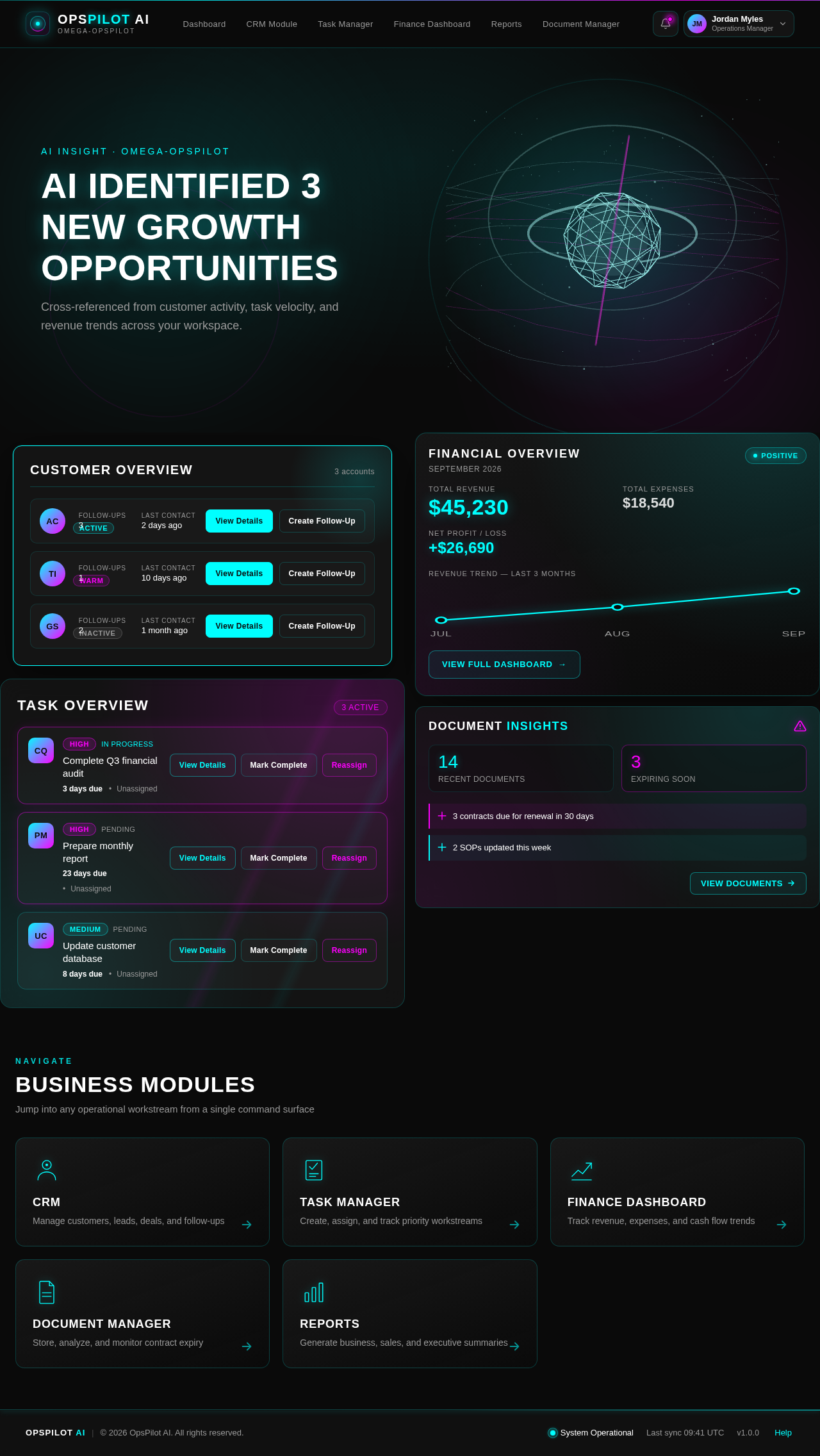
AI identified 3 new growth opportunities
Cross-referenced from customer activity, task velocity, and revenue trends across your workspace.
Customer Overview
3 accounts- Acme CorpActive
- TechFlow IncWarm
- Global Services LtdInactive
Task Overview
3 Active- HighIn Progress
Complete Q3 financial audit
- HighPending
Prepare monthly report
- MediumPending
Update customer database
Financial Overview
September 2026Document Insights
AI identified 3 new growth opportunities
Cross-referenced from customer activity, task velocity, and revenue trends across your workspace.
Customer Overview
3 accounts- Acme CorpActive
- TechFlow IncWarm
- Global Services LtdInactive
Task Overview
3 Active- HighIn Progress
Complete Q3 financial audit
- HighPending
Prepare monthly report
- MediumPending
Update customer database
No comments yet. Be the first!