Lahore
The dashboard caught a string drop-off before my monthly bill did. A verified technician arrived with the replacement part already in hand.
Residential homeownerRooftop array
 Farhan Lashari
these are the full instructions of the project . let build this


Sign in to leave a comment
Document Version: 2.0.0
Target Audience: AI Models, Full-Stack Architects, and MERN Developers
Purpose: Comprehensive, turnkey technical documentation describing the entire Solar Care platform from start to finish. Any AI model or engineering team reading this document will have complete context to replicate, maintain, or extend every feature, design token, data schema, and workflow with 100% fidelity.
[ 👤 Client View | 🛡️ Admin Portal ]
Allows immediate toggling between what the client sees and what the administrator manages.
Solar Care (styled with an explicit space: Solar Care) is an enterprise-grade CleanTech solar performance monitoring, AI telemetry diagnostic, and after-sales maintenance platform. It addresses the real-world gap between solar installation and post-commissioning maintenance.
Four primary React Contexts manage the global application state:
For Solar System Owners (Clients): Real-time generation telemetry, automatic string-level fault diagnosis (shading, soiling, inverter clipping), net-metering billing audits, and one-tap booking of verified solar technicians.
For System Administrators / Platform Owners: A distinct Admin Control Center to manage the technician fleet, register new certified technicians via comprehensive modal forms, review live database collections, and dispatch field service tickets.
For Prospects: A modern, high-conversion landing page with Dark/Half-Light modes, interactive telemetry simulations, and a live Solar ROI/Savings estimator.
├── components/

│   ├── admin/

│   │   └── AdminPortal.tsx       # Admin Control Center (Technicians, DB Live, Tickets, Fleet)

│   ├── alerts/

│   │   └── AlertsView.tsx        # System alert list with severity filters & action triggers

│   ├── assistant/

│   │   └── SolarAssistantChatbot.tsx # Floating AI chat modal with quick prompts

│   ├── auth/

│   │   └── AuthFlow.tsx          # 5-screen login/signup/verify/reset authentication

│   ├── common/

│   │   ├── Header.tsx            # Sticky header with Portal Switcher & System dropdown

│   ├── common/

│   │   └── Sidebar.tsx           # Collapsible sidebar navigation for Client/Admin modes

│   ├── dashboard/

│   │   └── DashboardView.tsx     # Hero KPIs, generation charts, weather sync, savings
│   ├── landing/

│   │   └── LandingPage.tsx       # Landing page (Dark/Half-Light, Simulator, ROI slider)

│   ├── maintenance/

│   │   └── MaintenanceHub.tsx    # Request service form, tracking timeline & job reports

│   ├── onboarding/

│   │   ├── OnboardingModal.tsx   # Modal to add another solar array

│   │   └── SolarSetupScreen.tsx  # Mandatory wizard for newly registered accounts

│   ├── performance/

│   │   └── PerformanceView.tsx   # String DC voltage, MPPT analysis, irradiance tracking

│   ├── profile/

│   │   └── ProfileSettingsView.tsx # Account credentials, inverter IP, language preferences

│   ├── systems/

│   │   └── MySolarSystemsView.tsx # Detailed view of user's registered solar arrays

│   └── technicians/

│       └── TechniciansView.tsx   # Directory of verified technicians with filters & booking

└── utils/
    ├── diagnosticEngine.ts       # Mathematical rules for calculating string deviations

└── utils/

    └── solarCalculations.ts      # Financial ROI, carbon offset, and yield formulas
Solar Care features full bilingual support: English, native Urdu (Nastaliq script), and Roman Urdu.
LanguageContext dynamically sets <html dir="rtl"> for Urdu and <html dir="ltr"> for English/Roman Urdu.Four primary React Contexts manage the global application state:
LanguageContext (src/context/LanguageContext.tsx)Manages language: 'en' | 'ur' | 'ur-roman' and boolean isRtl.
Manages language: 'en' | 'ur' | 'ur-roman' and boolean isRtl.
Exposes t dictionary containing translated labels for navigation, buttons, alerts, and dashboard stats.
AuthContext (src/context/AuthContext.tsx)Manages currentUser: User | null, isAuthenticated: boolean, and currentAuthScreen.
Session persistence in localStorage under key solarcare_user_session.
Handles communication with Express backend endpoints (/api/auth/*).
SolarContext (src/context/SolarContext.tsx)Stores user's solar arrays (systems: SolarSystem[]).
Tracks activeSystem: SolarSystem (e.g., 10 kW DHA Rooftop array).
Computes real-time telemetry, mock irradiance, string DC voltages, and unreadAlertCount.
MaintenanceContext (src/context/MaintenanceContext.tsx)Manages serviceRequests: ServiceRequest[] with persistence in solarcare_maintenance_requests.
Manages dynamic fleet technicians: Technician[] with persistence in solarcare_technicians_list.
Provides CRUD operations:
addTechnician(techData): Registers a new technician into state and storage.
updateTechnician(id, updates): Updates status, rates, or verification badges.
deleteTechnician(id): Removes a technician.
assignTechnicianToRequest(requestId, techId, techName): Dispatches tickets.
advanceRequestStatus(requestId, status, note): Progresses tickets through Requested → Accepted → In Progress → Completed.
Sticky Header:
Left: Solar Care logo with slow-spinning sun icon and spacing.
Center: Smooth scroll navigation links (Features, How It Works, FAQ).
Right: Dark / Half-Light Toggle, Language Dropdown, Log In button, and Sign Up CTA button.
Hero Section:
Shimmer gradient headline: "Your Solar System, Always at Peak."
Concise 1-sentence value proposition.
Dual CTAs: "Get Started Free" (opens Sign Up) + "Log In to Account".
Gradient banner with "Sign Up Free" and "Log In" buttons.
Trust micro-badges: No credit card, 95% inverter compatibility, bilingual.
Stat Bar:
Core Capabilities (Features):
How It Works:
Live Telemetry Cockpit Preview:
Social Proof & Testimonials:
Interactive FAQ Accordion:
Landing[Landing Page] -->|Click Log In| LoginScreen[Screen D: Login]

LoginScreen -->|Authenticated| MainApp[Client Dashboard / Admin Portal]

Landing -->|Click Sign Up| SignUpEmail[Screen A: Email OTP Request]

SignUpEmail -->|Sends 6-digit OTP| VerifyCode[Screen B: Email Verification]

VerifyCode -->|Valid Code| CreatePassword[Screen C: Set Password & Name]

CreatePassword -->|Success| SolarSetup[First-Time Solar Setup Wizard]

LoginScreen -->|Forgot Password| ForgotSend[Screen E1: Forgot OTP]

ForgotSend -->|Verifies OTP| ForgotReset[Screen E2: Set New Password]

ForgotReset --> LoginScreen

SolarSetup -->|Setup Completed| MainApp
- **Top Bar Feature:** Includes a **"← Back to Home"** button allowing visitors to return to the landing page at any point.

- **Verification Rule:** Registration cannot be bypassed without email code verification.

- **Password Strength:** Enforces minimum 8 characters with uppercase, lowercase, number, and special character.
When authenticated as a customer (portalMode === 'client'), the user accesses:
DashboardView: Live kW generation ticker, daily generation curve, solar savings (USD/PKR), carbon offset, and weather sync.
PerformanceView: String-level voltage comparison (MPPT 1 vs MPPT 2), detecting clipping, partial shading, or dirt accumulation.
MySolarSystemsView: Panel specifications (e.g. 585W TOPCon), inverter connection credentials, and cloud API link.
AlertsView: Diagnostic alerts categorized as Critical, Warning, or Info with actionable recommendations.
TechniciansView: Interactive directory with city search, inverter brand filter, ratings, and one-tap booking.
MaintenanceHub: Submitted requests tracker with visual progress milestones (Requested → Accepted → In Progress → Completed) and before/after production recovery reports.
SolarAssistantChatbot: Floating AI assistant with pre-populated questions and real-time generation troubleshooting.
Positioned prominently in both Header.tsx and Sidebar.tsx:
Fleet Technicians Management:
Fleet Technicians Management:
Fleet Technicians Management:
Fleet Technicians Management:
"+ Add New Technician" Modal Form:
Full Name, Phone / WhatsApp (+92 format).
Service Area & City.
Hourly Rate (PKR) and Experience (Years).
Multi-select Inverter Checkboxes: Huawei, Growatt, Sungrow, Solis, GoodWe, Inverex, Knox, Fronius, Sofar, Crown.
Certifications (PEC Engineer, HCIA-Solar, etc.).
Bio & Specialization.
Verified Partner checkbox.
MaintenanceContext and localStorage, immediately rendering in both Admin and Client views.Database Live Section:
Cluster Connection Ticker: Status (Active), RAM usage, Query Latency (11ms).
Interactive Collection Explorer: Tabs for Users, Solar Systems, Service Requests, and Technicians.
Formatted JSON records view for direct data inspection.
"Export JSON" button to download full database snapshots.
Client Service Tickets Hub:
Complete queue of client service requests.
Action buttons to Accept, Dispatch, and Resolve tickets with timestamped audit notes.
Client Solar Fleet Overview:
| Method | Endpoint | Description |
|---|---|---|
| GET | /api/health | Service health check |
| POST | /api/auth/check-email | Check if email is registered |
| POST | /api/auth/send-code | Generate & send 6-digit OTP via Nodemailer |
| POST | /api/auth/verify-code | Verify OTP code |
| POST | /api/auth/register | Register user with password complexity checks |
| POST | /api/auth/login | Authenticate user credentials against DB |
| POST | /api/auth/forgot-password/send-code | Send password reset OTP |
| POST | /api/auth/forgot-password/verify | Verify reset OTP |
| POST | /api/auth/forgot-password/reset | Update password in database |
| GET | /api/systems/user/:userId | Get solar arrays for specific user |
| POST | /api/systems | Add new solar array |
| PUT | /api/systems/:id | Update solar array configuration |
| DELETE | /api/systems/:id | Remove solar array |
| GET | /api/requests/user/:userId | Get maintenance tickets for user |
| POST | /api/requests | Create new maintenance ticket |
| PATCH | /api/requests/:id | Update ticket status and dispatch notes |
| GET | /api/database/overview | Return collection counts and raw records |
| POST | /api/database/reset | Reset database to seed data |
| POST | /api/chat | AI Brain query endpoint |
Rejects queries outside solar engineering (general knowledge, coding, recipes). Valid queries must match photovoltaic domain keywords (inverters, kW, irradiance, net metering, LiFePO4 batteries, shading, AC sizing).
Per project standards, all generated AI responses are strictly sanitized of:
* (asterisks, markdown bold/italic tags)
# (markdown header tags)
, (commas in sentences and numbers)
A dedicated cleanText sanitizer enforces this before returning replies:
function cleanText(str) {

  if (typeof str !== 'string') return str;

  return str.replace(/[*#,،]/g, '');

}
export interface User {

  id: string;

  name: string;

  email: string;

  isVerified: boolean;

  avatar?: string;

  preferredLanguage: Language;

  createdAt: string;

  role?: 'admin' | 'customer';

}
export interface Technician {

  id: string;

### Solar Care — Complete System Specification & Architecture Blueprint (A to Z) / Data Models & TypeScript Interfaces / ServiceRequest
export interface ServiceRequest {

  id: string;

  systemId: string;

  technicianId?: string;

  technicianName?: string;

  problemCategory: string;

  description: string;

  preferredDate: string;

  photoUrl?: string;

  photoName?: string;

  createdAt: string;

  status: 'Requested' | 'Accepted' | 'In Progress' | 'Completed';

  statusTimeline: {

    status: ServiceStatus;

    timestamp: string;

  }[];

    note: string;

  workReport?: {

    completedDate: string;

    technicianNotes: string;

    workPerformed: string;

    partsReplaced?: string;

    beforeKwhDaily: number;

    afterKwhDaily: number;

    improvementPct: number;

  };
Solar Care serves three active human roles. The User model carries role?: 'admin' | 'customer'; prospects are unauthenticated visitors. This is not a closed persona catalog.
| Role | Responsibilities & Goals | Inputs | Decisions | Observable Success | Access |
|---|---|---|---|---|---|
| Solar System Owner (Client) | Monitor real-time generation telemetry, act on automatic string-level fault diagnosis (shading, soiling, inverter clipping), audit net-metering billing, book verified technicians | Plant telemetry, fault alerts, billing data, technician directory (city, inverter brand, ratings) | Whether and whom to book | Faults diagnosed and resolved; booking completed in one tap | Authenticated Client Portal (Solar Cockpit), portalMode === 'client'; TechniciansView |
| System Administrator / Platform Owner | Manage the technician fleet, register certified technicians, review live database collections, dispatch field service tickets | Technician records (name, phone, city/area, inverter brands, hourly rate PKR, rating, jobs completed, availability), database collections, tickets | Grant/revoke Solar Care Certified Partner badge; dispatch tickets | Fleet verified and current; tickets dispatched | Admin Control Center (AdminPortal.tsx) |
| Prospect | Evaluate solar viability before committing | Landing page content, interactive telemetry simulations, Solar ROI/Savings estimator | Whether to proceed | Engagement with estimator and simulations | Public landing page (Dark/Half-Light modes); no account |
Client: authenticate into the Solar Cockpit → review generation telemetry and fault diagnoses → check net-metering billing → open TechniciansView, filter by city and inverter brand, compare ratings → book a technician in one tap.
Administrator: open the Admin Control Center → register a technician via the comprehensive modal form → toggle the Certified Partner badge → review the fleet summary table and live database collections → dispatch field service tickets.
Prospect: land on the page → switch Dark/Half-Light mode → run the ROI/Savings estimator and telemetry simulations → read testimonials from Lahore, Islamabad, and CleanTech PK owners.
Telemetry and fault-diagnosis services, the database, and the booking/ticketing system act on behalf of the roles above. Technician records (Technician interface: serviceArea, distanceKm, supportedInverters, verificationBadge, availability, rating, completedJobsCount, hourlyRatePkr, certifications) are managed objects, not a login role in this evidence.
Actors: Prospect, AuthFlow, SolarSetupScreen. Trigger: Prospect selects Get Started Free or Sign Up Free.
POST /api/auth/check-email) and sends a 6-digit code through POST /api/auth/send-code (Nodemailer).POST /api/auth/register on Screen C.SolarContext.systems, sets activeSystem, and opens the Client Dashboard.Continuation: Additional arrays can later be added through OnboardingModal. Log In opens Screen D; ← Back to Home returns to the landing page.
Actors: Client or System Administrator, AuthFlow. Trigger: User selects Log In.
POST /api/auth/login.AuthContext sets currentUser and isAuthenticated, persisting the session under solarcare_user_session.POST /api/auth/forgot-password/send-code; the user verifies it through POST /api/auth/forgot-password/verify, sets a new password, and returns to Screen D.Actors: Client, DashboardView, PerformanceView, MySolarSystemsView. Trigger: Client opens the Solar Cockpit.
Actors: Client, AlertsView. Trigger: Client opens Alerts or unreadAlertCount increases.
Actors: Client, TechniciansView, MaintenanceHub, System Administrator, Technician. Trigger: Client needs field service.
assignTechnicianToRequest(requestId, techId, techName).advanceRequestStatus(requestId, status, note).Actors: System Administrator, AdminPortal, MaintenanceContext. Trigger: Administrator opens Fleet Technicians or the Client Service Tickets Hub.
+92 format, service area and city, hourly PKR rate, experience in years, supported inverter brands (Huawei, Growatt, Sungrow, Solis, GoodWe, Inverex, Knox, Fronius, Sofar, Crown), certifications, bio, specialization, and Verified Partner status.MaintenanceContext and localStorage, immediately rendering in Admin and Client views.solarcare_technicians_list.Actors: System Administrator, AdminPortal. Trigger: Administrator opens DB Live.
Users, Solar Systems, Service Requests, or Technicians collection.GET /api/health remains available for service health checking.Actors: User, ProfileSettingsView, LanguageContext, SolarAssistantChatbot. Trigger: User opens Profile Settings or the floating chat modal.
<html dir="rtl">; English and Roman Urdu set <html dir="ltr">.POST /api/chat and responds in the modal.[Design proposal; unspecified choices are defaults.]
Muse: Rasmus Andersson — Instrument-panel craft for Solar Care
Solar Care uses a calm, technical CleanTech telemetry language for solar owners, technicians, and administrators. The public entry is a dark instrument frame rather than a marketing image: a 12-column grid with an 8-point spacing rhythm, a split hero, dense ruled data rows, schematic string diagrams, inverter line art, and monospaced data labels. No stock photography, gradient blobs, blue or indigo primary, playful bounce, or heavy shadows.
Concrete design tokens
#07101A covering approximately 70% of each screen; elevated surface #101E2C; sub-panel #0D1824; primary/action emerald #059669; hover #047857; glow #10B981; live-value amber #F59E0B; amber soft #FEF3C7; amber dark #B45309; primary text #E6EDF3.#F1F5F9; elevated cards #FFFFFF; borders #E2E8F0; headings #0F172A; body text #334155 and #475569; sub-panels #E2E8F0 at 60% opacity; accent text #047857 on #ECFDF5; maximum shadow 0 2px 12px rgba(15,23,42,0.06).-0.02em tracking; Inter Tight for body and controls; JetBrains Mono for telemetry numbers, tabular numerals, status labels, and numbered FAQ markers; Noto Nastaliq Urdu for Urdu content. Type scale: 64 / 48 / 36 / 28 / 20 / 16 / 14px, using responsive clamp() sizing so readable text and controls remain whole at 375px, 768px, and 1280px. Urdu uses line-height: 2.4 and word-spacing: 0.05em; language direction switches between RTL and LTR.Solar Care, never SolarCare.Implementable public-entry visual
Build the hero as a dark, two-column instrument frame. Place the responsive Space Grotesk headline and accepted value proposition on the left with the Sign Up Free CTA and trust micro-badges. On the right, compose a JetBrains Mono telemetry stack showing Current Output 8.42 kW, Inverter Health 98.8%, Yield 44.1 kWh, and Sync <30s; mark Current Output with an amber live dot. A thin emerald rule runs beneath the sticky header, whose left side contains the slow-spinning sun icon and Solar Care wordmark, while the right side contains the Half-Light toggle, language dropdown, Log In, and Sign Up controls. Use only schematic solar/inverter line art and data labels as supporting imagery.
Brand Primary: #059669 (Forest Emerald) / Hover #047857 / Glow #10B981
Solar Energy Accent: #F59E0B (Solar Amber) / Soft #FEF3C7 / Dark #B45309
Dark Mode Surfaces:
Page Background: #07101A (Obsidian Navy)
Elevated Cards: #101E2C with border rgba(255, 255, 255, 0.08)
Sub-panels: #0D1824
"Half-Light" Executive Palette (Never Blinding Paper White):
Page Background: #F1F5F9 (Cool Slate-100) — easy on the eyes during prolonged review
Elevated Cards: #FFFFFF with border #E2E8F0 and subtle shadow 0 2px 12px rgba(15,23,42,0.06)
Sub-panels & Tickers: #E2E8F0 (Slate-200 / 60% opacity)
Headings: Deep Obsidian Slate #0F172A (Slate-900)
Body Text: #334155 (Slate-700) and #475569 (Slate-600)
Accent Text: #047857 (Deep Emerald-700) on #ECFDF5 pills
Across all headers, footers, and sidebars, the brand identity must always render with an explicit space:
Solar <span className="...">Care</span>
(Never SolarCare without spacing).
In src/index.css and tailwind.config.js:
Normal Latin fonts clip Nastaliq ascenders/descenders if standard line-heights are used.
Urdu layout enforces line-height: 2.4 and word-spacing: 0.05em on elements with .font-urdu or [dir="rtl"].
Bottom Call-to-Action Banner:
Professional Footer:
[Design proposal; unspecified choices are defaults.]
Signature Design Concept: Solar Care Instrument Frame
Solar Care presents solar monitoring as a composed operational instrument: trustworthy, dense, and immediately legible. The public entry headline is “Your Solar System, Always at Peak.” with the subline “Solar Care monitors your array, finds faults and sends verified technicians.” The left side establishes the promise and conversion path; the right side proves it through live-looking telemetry surfaces rather than decorative imagery.
The landing page organizes the accepted public-entry content into a sticky header, hero, four-metric stat bar, four capability cards—AI Diagnostics, Live Telemetry, Net-Metering Audit, and Certified Technicians—a Live Telemetry Cockpit preview, interactive FAQ accordion, bottom CTA banner, and professional footer. The stat bar uses 12,000+ Systems, 99.4% Fault Precision, <15 min Dispatch, and 41 GWh Monitored. The cockpit preview pairs a telemetry feature checklist with the specified output, health, yield, and sync values. The FAQ covers inverter compatibility, the free residential tier, and booking flow, with numbered mono labels and hairline rules.
The sticky header carries the explicitly spaced Solar Care logo, navigation links for Features, How It Works, and FAQ, the Dark/Half-Light toggle, language dropdown, Log In, and Sign Up CTA. The footer retains the “🟢 All Systems Operational” badge, copyright, and clean links. The bottom banner retains “Sign Up Free” and “Log In” buttons. Trust micro-badges communicate no credit card, 95% inverter compatibility, and bilingual support.
Dark ground remains dominant while Half-Light provides an executive mode that is never blinding paper white. Emerald signals actions and system pathways; amber signals live energy values. Components should use the accepted React 19, Vite 5, TypeScript 6, Tailwind CSS 3, Lucide React, and local asset architecture. Authentication retains the ← Back to Home return control, while authenticated areas retain the SolarAssistantChatbot and the admin portal switcher with its two-segment control and emerald active state.
The application avoids generic flat themes and implements a tailored CleanTech visual language.
[Design proposal; unspecified choices are defaults.]
Interaction Model: Animated Motion Tempo: restrained Hero Dimensionality: flat
Current Output 8.42 kW, with the emerald rule and schematic line work as quiet framing.Sign Up Free decision. Existing accepted controls retain their state changes: the theme toggle switches Dark/Half-Light, the language control switches the page between accepted LTR and RTL direction, and the FAQ expands or collapses.The hero remains a flat CSS/UI composition; Canvas, R3F, Drei, and WebGL are not required.
No additional details specified.
Framework: React 19 (react ^19.2.8, react-dom ^19.2.8) with Vite 5 (vite ^5.4.14)
Language: TypeScript 6 (typescript ~6.0.2)
Styling: Tailwind CSS 3 (tailwindcss ^3.4.17) with PostCSS and Autoprefixer
Iconography: Lucide React (lucide-react ^1.55.0)
Typography: Inter (Latin, body/headings), Noto Nastaliq Urdu (Urdu Nastaliq font), JetBrains Mono (monospaced telemetry)
Runtime: Node.js (ES Module syntax: "type": "module")
Server: Express 5 (express ^5.3.0)
CORS: Enabled (cors ^2.8.6)
Email Delivery: Nodemailer (nodemailer ^10.1.7) for real OTP delivery via Gmail SMTP
Environment Management: Dotenv (dotenv ^18.0.7)
Database Engine: File-backed local JSON cluster (server/data/solarcare_db.json) accessed via an atomic read/write abstraction layer (server/db.js), compatible with MongoDB Document API standards.
Solar performance/

├── .env                              # Backend configuration (SMTP credentials, PORT=5000)

├── .env.example                      # Template environment variables

├── index.html                        # HTML entry point with preconnected Google Fonts

├── package.json                      # NPM dependencies and scripts

├── postcss.config.js                 # PostCSS setup with Tailwind & Autoprefixer

├── tailwind.config.js                # Custom color palettes, shadows, fonts & animations

├── tsconfig.json                     # TypeScript root configuration

├── tsconfig.app.json                 # TypeScript client compiler options

├── tsconfig.node.json                # TypeScript node environment

├── vite.config.ts                    # Vite build configuration with React plugin

│

├── public/                           # Static assets

├── server/                           # Express backend service

│   ├── aiBrain.js                    # Solar engineering AI classifier & sanitized generator

│   ├── db.js                         # Database controller, user store & seed records

│   ├── index.js                      # Express 5 server routes & static dist serving

│   ├── mailer.js                     # Nodemailer OTP email transporter

│   └── data/

│       └── solarcare_db.json         # Persistent JSON database (Users, Systems, Requests)

│

└── src/

    ├── App.css                       # Minimal supplementary utility CSS

    ├── App.tsx                       # Main router, auth guard & portal switcher

    ├── index.css                     # Tailwind layers, Nastaliq font styles & animations

    ├── main.tsx                      # React 19 root DOM mount

    │

    ├── assets/                       # Local images and hero artwork

    ├── context/

    │   ├── AuthContext.tsx           # Authentication state, login, registration, OTP handlers

    │   ├── LanguageContext.tsx       # i18n localization state, RTL direction toggle

    │   ├── MaintenanceContext.tsx    # Service requests & dynamic technician fleet state

    │   └── SolarContext.tsx          # Solar systems, active array selector, mock telemetry

    │

    ├── data/

    │   ├── mockAlerts.ts             # Default mock anomaly and maintenance alerts

    │   ├── mockChatbot.ts            # Client-side chatbot knowledge base & fallbacks

    │   ├── mockMaintenance.ts        # Pre-seeded maintenance tickets and status logs

    │   ├── mockSolarData.ts          # Hourly, daily, and monthly generation curves

    │   └── mockTechnicians.ts        # Baseline certified solar engineers in Pakistan

    │

    ├── i18n/

    │   ├── en.ts                     # English UI dictionary

    │   ├── index.ts                  # Language bundle selector

    │   ├── ur.ts                     # Native Urdu (Nastaliq script) UI dictionary

    │   └── urRoman.ts                # Roman Urdu (Latin transliteration) UI dictionary

    │
├── services/

│   └── api.ts                    # REST client with automatic localhost fallback

├── types/

│   └── index.ts                  # Central TypeScript definitions (User, System, Technician, etc.)
Located at src/components/landing/LandingPage.tsx.
Located at src/components/auth/AuthFlow.tsx.
flowchart TD

### Solar Care — Complete System Specification & Architecture Blueprint (A to Z) / Admin Control Center (Technicians & Database Live Section)

Located at `src/components/admin/AdminPortal.tsx`.

### Solar Care — Complete System Specification & Architecture Blueprint (A to Z) / Backend Express 5 Server & REST Endpoints

Located at `server/index.js` (listening on port 5000).

### Solar Care — Complete System Specification & Architecture Blueprint (A to Z) / AI Brain (Domain Classification & Sanitized Output)

Located at `server/aiBrain.js`.
Located at src/types/index.ts.
name: string;
initials: string;
avatar?: string;
phone: string;
serviceArea: string;
distanceKm: number;
supportedInverters: string[];
isVerified: boolean;
verificationBadge: string;
availability: 'Available Today' | 'Next Available: Tomorrow' | 'Booked This Week';
experienceYears: number;
rating: number;
completedJobsCount: number;
specialization: string;
hourlyRatePkr: number;
bio: string;
certifications: string[];
}
}
### Solar Care — Complete System Specification & Architecture Blueprint (A to Z) / Data Models & TypeScript Interfaces / SolarSystem

```typescript

export interface SolarSystem {

  id: string;

  name: string;

  location: string;

  capacityKw: number;

  inverterBrand: string;

  inverterModel: string;

  installationDate: string;

  connectionMethod: string;

  connectionStatus: 'demo' | 'connected' | 'unavailable';

  panelCount: number;

  panelType: string;

  batteryCapacityKwh?: number;

}
npm install
In separate terminal windows:
### Terminal 1: Start Express 5 Backend (Port 5000)

npm run server

### Terminal 2: Start Vite Dev Server (Port 5173)

npm run dev
Or run the combined startup batch script:
start.bat
npm run build
Build output is emitted to dist/. The Express backend is configured to statically serve dist/ with single-page application (SPA) fallback routing when accessed on http://localhost:5000.
Build output is emitted to dist/. The Express backend is configured to statically serve dist/ with single-page application (SPA) fallback routing when accessed on http://localhost:5000.
Node.js 18+ (tested on Node v24)
npm 9+
Solar Care — the product name, styled with an explicit space; an enterprise-grade CleanTech platform for solar performance monitoring, AI telemetry diagnostics, and after-sales maintenance, addressing the gap between solar installation and post-commissioning maintenance.
Language — the active interface language, typed as 'en' | 'ur' | 'ur-roman': English, native Urdu (Nastaliq script), and Roman Urdu. Each User records a preferredLanguage of this type.
isRtl — boolean flag exposed by LanguageContext (src/context/LanguageContext.tsx) alongside language; indicates whether the interface renders right-to-left.
t — the translation dictionary exposed by LanguageContext, holding translated labels for navigation, buttons, alerts, and dashboard stats.
User — an account holder with id, name, email, isVerified, optional avatar, preferredLanguage, createdAt, and optional role of 'admin' or 'customer'.
Technician — a service provider record identified by id (further fields per the Technician interface).
ServiceRequest — a maintenance request carrying id, systemId, optional technicianId and technicianName, problemCategory, description, preferredDate, optional photoUrl and photoName, createdAt, and status.
ServiceStatus — the lifecycle state of a ServiceRequest: 'Requested' | 'Accepted' | 'In Progress' | 'Completed'.
statusTimeline — an ordered array of { status: ServiceStatus; timestamp: string } entries recording each status transition of a request; the request also carries a note.
workReport — the optional completion record on a ServiceRequest: completedDate, technicianNotes, workPerformed, optional partsReplaced, beforeKwhDaily, afterKwhDaily, and improvementPct.
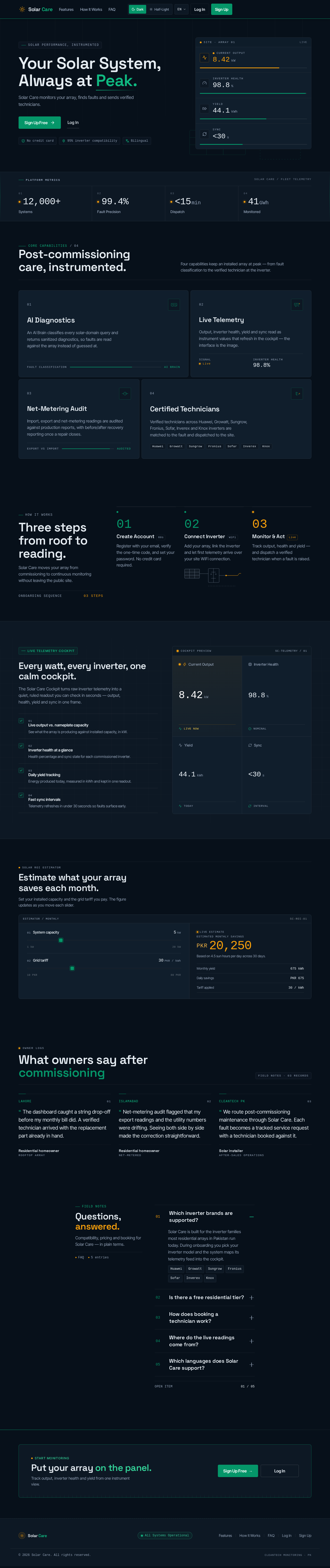
Solar Care monitors your array, finds faults and sends verified technicians.
Core Capabilities/ 04
Four capabilities keep an installed array at peak — from fault classification to the verified technician at the inverter.
An AI Brain classifies every solar-domain query and returns sanitized diagnostics, so faults are read against the array instead of guessed at.
Output, inverter health, yield and sync read as instrument values that refresh in the cockpit — the interface is the image.
Import, export and net-metering readings are audited against production reports, with before/after recovery reporting once a repair closes.
Verified technicians across Huawei, Growatt, Sungrow, Fronius, Sofar, Inverex and Knox inverters are matched to the fault and dispatched to the site.
Solar Care moves your array from commissioning to continuous monitoring without leaving the public site.
Register with your email, verify the one-time code, and set your password. No credit card required.
Add your array, link the inverter and let first telemetry arrive over your site WiFi connection.
Track output, health and yield — and dispatch a verified technician when a fault is raised.
The Solar Care Cockpit turns raw inverter telemetry into a quiet, ruled readout you can check in seconds — output, health, yield and sync in one frame.
See what the array is producing against installed capacity, in kW.
Health percentage and sync state for each commissioned inverter.
Energy produced today, measured in kWh and kept in one readout.
Telemetry refreshes in under 30 seconds so faults surface early.
Set your installed capacity and the grid tariff you pay. The figure updates as you move each slider.
Owner Logs
The dashboard caught a string drop-off before my monthly bill did. A verified technician arrived with the replacement part already in hand.
Net-metering audit flagged that my export readings and the utility numbers were drifting. Seeing both side by side made the correction straightforward.
We route post-commissioning maintenance through Solar Care. Each fault becomes a tracked service request with a technician booked against it.
Compatibility, pricing and booking for Solar Care — in plain terms.
Solar Care is built for the inverter families most residential arrays in Pakistan run today. During onboarding you pick your inverter model and the system maps its telemetry feed into the cockpit.
Yes. Homeowners start on a free residential tier for monitoring a single array, viewing live output and health, and receiving fault alerts in the cockpit.
When a fault is flagged, open the technician directory from your cockpit, compare verified specialists by service area and inverter support, and book a visit. The request then moves through a tracked milestone timeline.
Readings are pulled from your inverter feed and shown as Current Output, Inverter Health, Yield and Sync latency in the cockpit telemetry tiles.
The interface is bilingual: English, native Urdu in Nastaliq script with full right-to-left layout, and Roman Urdu. Switch languages from the header at any time.
Solar Care monitors your array, finds faults and sends verified technicians.
Core Capabilities/ 04
Four capabilities keep an installed array at peak — from fault classification to the verified technician at the inverter.
An AI Brain classifies every solar-domain query and returns sanitized diagnostics, so faults are read against the array instead of guessed at.
Output, inverter health, yield and sync read as instrument values that refresh in the cockpit — the interface is the image.
Import, export and net-metering readings are audited against production reports, with before/after recovery reporting once a repair closes.
Verified technicians across Huawei, Growatt, Sungrow, Fronius, Sofar, Inverex and Knox inverters are matched to the fault and dispatched to the site.
Solar Care moves your array from commissioning to continuous monitoring without leaving the public site.
Register with your email, verify the one-time code, and set your password. No credit card required.
Add your array, link the inverter and let first telemetry arrive over your site WiFi connection.
Track output, health and yield — and dispatch a verified technician when a fault is raised.
The Solar Care Cockpit turns raw inverter telemetry into a quiet, ruled readout you can check in seconds — output, health, yield and sync in one frame.
See what the array is producing against installed capacity, in kW.
Health percentage and sync state for each commissioned inverter.
Energy produced today, measured in kWh and kept in one readout.
Telemetry refreshes in under 30 seconds so faults surface early.
Set your installed capacity and the grid tariff you pay. The figure updates as you move each slider.
Owner Logs
The dashboard caught a string drop-off before my monthly bill did. A verified technician arrived with the replacement part already in hand.
Net-metering audit flagged that my export readings and the utility numbers were drifting. Seeing both side by side made the correction straightforward.
We route post-commissioning maintenance through Solar Care. Each fault becomes a tracked service request with a technician booked against it.
Compatibility, pricing and booking for Solar Care — in plain terms.
Solar Care is built for the inverter families most residential arrays in Pakistan run today. During onboarding you pick your inverter model and the system maps its telemetry feed into the cockpit.
Yes. Homeowners start on a free residential tier for monitoring a single array, viewing live output and health, and receiving fault alerts in the cockpit.
When a fault is flagged, open the technician directory from your cockpit, compare verified specialists by service area and inverter support, and book a visit. The request then moves through a tracked milestone timeline.
Readings are pulled from your inverter feed and shown as Current Output, Inverter Health, Yield and Sync latency in the cockpit telemetry tiles.
The interface is bilingual: English, native Urdu in Nastaliq script with full right-to-left layout, and Roman Urdu. Switch languages from the header at any time.
No comments yet. Be the first!