omega-e
 Akinyemi Oluwaferanmi olamiposi
Build a e commerce website for my handmade fashion brand and products pages, Google login a shopping online payment and an admin dashboard

Comments (0)
Sign in to leave a comment
System Requirements
System Requirements Document for omega-e
1. Introduction
The omega-e project aims to create an e-commerce website for a handmade fashion brand. The website will feature product pages, support Google login, facilitate online shopping and payment, and include an admin dashboard for store management. The target audience includes shoppers interested in handmade fashion and administrators responsible for managing the store's operations.
2. System Overview
The omega-e e-commerce platform will provide a vibrant and engaging online presence for a handmade fashion brand. It will support user authentication via Google login, allow users to browse products, manage shopping carts, complete purchases, and track orders. An admin dashboard will enable administrators to oversee product and order management. The system will ensure secure and persistent handling of user data, shopping carts, payments, and orders.
2a. Product Interpretation and Delivery Boundary
The system will deliver a custom UI for both shoppers and administrators, with Google-managed authentication for user identity. The platform will integrate with a payment provider for secure transactions. The current scope includes all functionalities necessary for a complete e-commerce experience, excluding any future enhancements or adjacent capabilities not explicitly stated in the requirements.
2b. Source Content Inventory
Not applicable as no content_source directive was provided.
2c. Page Content and Component Coverage
Landing
- Information/State: Introduction to the brand, featured products, and shopping experience.
- Primary Actions: Navigate to Products page.
- Components: Hero image, brand description, featured products section.
- States: Loading, success, error.
Products
- Information/State: List of products with details such as name, price, and description.
- Primary Actions: View product details, add to cart.
- Components: Product grid, filters, search bar.
- States: Loading, empty, success, error.
Cart
- Information/State: Selected products for purchase.
- Primary Actions: Update quantities, proceed to Checkout.
- Components: Cart item list, total price calculation.
- States: Loading, empty, success, error.
Checkout
- Information/State: Shopper details, order summary, payment options.
- Primary Actions: Confirm order, complete payment.
- Components: Order summary, payment form, confirmation button.
- States: Loading, success, error.
Orders
- Information/State: Past and current orders with status updates.
- Primary Actions: View order details, track shipment.
- Components: Order list, order detail view.
- States: Loading, empty, success, error.
Admin Dashboard
- Information/State: Overview of store performance, access to management tools.
- Primary Actions: Navigate to Product Management, Order Management.
- Components: Performance metrics, navigation links.
- States: Loading, success, error.
Product Management
- Information/State: Product catalog with editing capabilities.
- Primary Actions: Add, edit, delete products.
- Components: Product list, product form.
- States: Loading, empty, success, error.
Order Management
- Information/State: List of orders with management options.
- Primary Actions: Update order status, view order details.
- Components: Order list, status update form.
- States: Loading, empty, success, error.
3. Functional Requirements
- As a Shopper, I should be able to browse products on the Products page. (explicit)
- As a Shopper, I should be able to add products to my cart and view them on the Cart page. (explicit)
- As a Shopper, I should be able to proceed to Checkout and complete my purchase using an online payment method. (explicit)
- As a Shopper, I should be able to log in using Google to access my cart, checkout, and order history. (required_inference)
- As an Administrator, I should be able to access the Admin Dashboard to manage products and orders. (explicit)
- As an Administrator, I should be able to log in using Google to access administrative functionalities. (required_inference)
- The system should persist carts, payments, orders, and product records. (required_inference)
- The system should handle payment processing through a payment provider. (required_inference)
4. User Personas
- Shopper: Browses products, adds items to cart, completes purchases, and tracks orders.
- Administrator: Manages product catalog and order processing through the Admin Dashboard.
5. Core User Flows
Shopper Flow
- Visit the Landing page to learn about the brand.
- Navigate to the Products page to browse available items.
- Add desired products to the Cart.
- Log in using Google to access the Cart and proceed to Checkout.
- Enter payment details and confirm the order.
- View order confirmation and track order status on the Orders page.
Administrator Flow
- Log in using Google to access the Admin Dashboard.
- Navigate to Product Management to add or edit products.
- Navigate to Order Management to update order statuses and view order details.
6. Visuals Colors and Theme
- Muse: Jessica Walsh
- Palette: Background #F7F5F2, Surface #FFFFFF, Text #333333, Primary #FF69B4, Accent #F39C12, Muted #B3B3B3
- Typography: Headings Syne, Body Archivo, Scale 1.25 modular
- Shape Language: Bold color fields, overlapping shapes, sticker-like elements
- Layout: Asymmetric editorial grids, large color blocks
- Imagery: Surreal art-directed photography and 3D props
7. Signature Design Concept
The Landing page will feature a large, playful collage of bright images and bold type, dominated by hot pink. This will create a lively first impression, with oversized, layered hero images and surreal props. Playful hover states will animate with bouncy scale-ins, and marquee-style scrolling text banners will add dynamic engagement.
8. Interaction Model & Motion Direction
- Interaction Model: Animated
- Motion Tempo: Expressive
- Hero Dimensionality: Layered_2d
- Landing Hero Motion Brief: A large collage of images and text fills the screen. On hover, elements scale in with a bouncy effect, and text banners scroll marquee-style. In reduced-motion mode, animations are replaced with static transitions.
9. Non-Functional Requirements
- The system must ensure secure handling of user data and transactions. (required_inference)
- The website should be responsive and accessible across devices. (basic_default)
10. Tech Stack
- Frontend: React
- Backend: Python/FastAPI
- Authentication: Google OAuth
- Payment Processing: Integration with a payment provider
- Storage: Appropriate database for persisting user data, carts, and orders
11. Assumptions and Constraints
- Google login is the only authentication method supported.
- Payment processing will rely on an external provider.
- The system will not include features beyond those explicitly stated in the requirements.
12. Glossary
- Cart: A feature allowing users to store selected products for purchase.
- Checkout: The process of providing payment and shipping information to complete a purchase.
- Admin Dashboard: An interface for administrators to manage products and orders.
- Google OAuth: A protocol for secure user authentication using Google accounts.
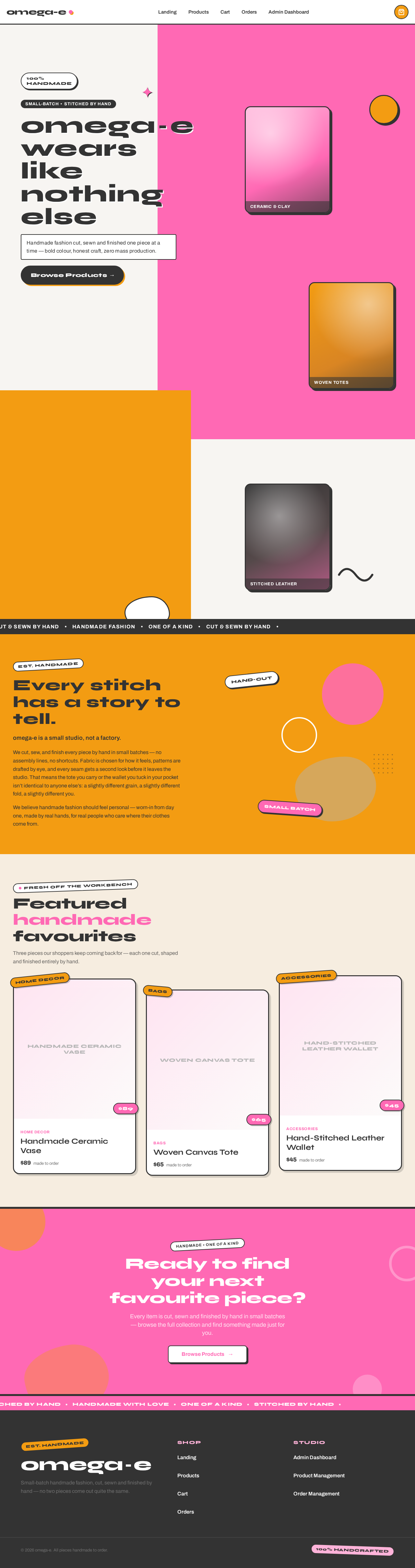
omega‑e wears
like nothing else
Handmade fashion cut, sewn and finished one piece at a time — bold colour, honest craft, zero mass production.
Browse ProductsEvery stitch has a story to tell.
omega-e is a small studio, not a factory.
We cut, sew, and finish every piece by hand in small batches — no assembly lines, no shortcuts. Fabric is chosen for how it feels, patterns are drafted by eye, and every seam gets a second look before it leaves the studio. That means the tote you carry or the wallet you tuck in your pocket isn’t identical to anyone else’s: a slightly different grain, a slightly different fold, a slightly different you.
We believe handmade fashion should feel personal — worn-in from day one, made by real hands, for real people who care where their clothes come from.
Featured handmade favourites
Three pieces our shoppers keep coming back for — each one cut, shaped and finished entirely by hand.
omega‑e wears
like nothing else
Handmade fashion cut, sewn and finished one piece at a time — bold colour, honest craft, zero mass production.
Browse ProductsEvery stitch has a story to tell.
omega-e is a small studio, not a factory.
We cut, sew, and finish every piece by hand in small batches — no assembly lines, no shortcuts. Fabric is chosen for how it feels, patterns are drafted by eye, and every seam gets a second look before it leaves the studio. That means the tote you carry or the wallet you tuck in your pocket isn’t identical to anyone else’s: a slightly different grain, a slightly different fold, a slightly different you.
We believe handmade fashion should feel personal — worn-in from day one, made by real hands, for real people who care where their clothes come from.
Featured handmade favourites
Three pieces our shoppers keep coming back for — each one cut, shaped and finished entirely by hand.
No comments yet. Be the first!