omaroggame-mart
 opopopo popopo
Create a modern, professional, fast, mobile-first gaming top-up website named OMAR OG GAME MART with a completely original gaming logo and branding. Use https://riogameshop.com/ only for general shopping-flow inspiration. Do NOT copy its logo, branding, layout, colors, text, images, code, or copyrighted assets. Core Features * Games: Free Fire Top Up and eFootball Coin only. * Modular system so Admin can add future games/products without changing the core structure. * Customer registration/login, profile, order history and account dashboard. * Secure wallet system with balance, deposits and transaction history. * Payment method: bKash only — 01996358306 * WhatsApp Support: 01996358306 * Product/package prices, images, visibility and ordering must be manageable from Admin Panel. * Customers can select a package, enter required game ID/UID and WhatsApp number, pay from wallet and receive a unique Order ID. * Order statuses: Pending, Processing, Completed, Cancelled. * Admin can manage users, games, products, deposits, orders, refunds and settings. * Completed orders show a lightweight celebration animation with optional sound/mute control. * Optional Recent Orders section with fully masked customer information. Admin Panel Include: * Dashboard statistics * Game Management * Product/Package Management * Order Management * User Management * Wallet/Deposit Management * Website Settings * Admin Action Audit Logs Admin credentials must use secure environment variables/server-side authentication and must NEVER be exposed in frontend/source code. Security Implement: * Secure authentication and password hashing * Server-side authorization and ownership checks * Customer privacy protection * Rate limiting and abuse protection * Server-side wallet validation * Duplicate-order/double-deduction protection * Database transactions for wallet/order operations * Input validation and error handling * Protected Admin routes * Immutable Admin Audit Logs A customer must NEVER access another customer’s orders, wallet, transactions or personal information. Wallet balances and payments must be controlled only by the secure backend. Design Premium dark gaming theme, clean UI, fast loading and fully responsive on iPhone, Android, iPad, tablet and desktop. Mobile bottom navigation: Home | Games | Orders | Wallet | Account Homepage should clearly show: OMAR OG GAME MART, Free Fire, eFootball, Wallet, Orders, WhatsApp Support and bKash payment information. Do not collect or store unnecessary sensitive information such as passwords, OTPs or verification codes for game accounts. Production Requirement This must be a functional production-ready architecture, not just a UI/demo. Provide Customer Frontend + Secure Backend + Database + Admin Panel + Authentication + Wallet + Payment Verification + Orders + Transactions + Audit Logs + Rate Limiting + Privacy Protection. Brand: OMAR OG GAME MART bKash: 01996358306 WhatsApp: 01996358306 Build everything with an original design, clean code, scalable database structure and secure server-side business logic.

Comments (0)
Sign in to leave a comment
System Requirements
System Requirements Document for omaroggame-mart
1. Introduction
OMAR OG GAME MART is a production-ready, mobile-first gaming top-up platform for Bangladeshi gamers. It sells exactly two game products — Free Fire Top Up and eFootball Coin — through a secure wallet funded by bKash only (01996358306), with WhatsApp Support at 01996358306. The product intent is a premium dark gaming storefront that feels like a game client rather than a generic commerce template: UID entry, instant wallet debit, a unique Order ID, and a reward ping when the top-up lands.
The audience is phone-first, bKash-native, price-literate gamers (roughly 16–30) who need a fast, trustworthy top-up with a traceable order and a wallet they can top up and audit. The secondary audience is the operator (Admin) who manages the catalog, orders, deposits, refunds, users, settings, and an immutable audit trail through protected, server-authenticated admin routes.
The system is delivered as a Customer Frontend + Secure Backend + Database + Admin Panel, with authentication, wallet, payment verification, orders, transactions, audit logs, rate limiting, and privacy protection as first-class production concerns — not a UI/demo.
2. System Overview
OMAR OG GAME MART is a single first-party application with two access planes:
- Customer plane — anonymous browsing of Home and Games, self-service Sign Up, shared Login, and protected Top Up, Orders, Order Details, Wallet, Transactions, and Account surfaces. Every customer-facing state is scoped to the signed-in customer only.
- Admin plane — protected, server-authenticated administrative surfaces: Admin Dashboard, Game Management, Product Management, Order Management, User Management, Wallet Management, Website Settings, and Audit Logs. Admin credentials live in secure environment variables and are never exposed in frontend or source code.
Actors. Two accepted human personas: Customer and Admin. bKash is an external payment channel referenced by number only (no provider API integration is specified); WhatsApp is an outbound support channel at 01996358306. The backend is a non-persona system actor that owns all wallet balance and payment state.
Accepted behavior. Customers browse the two games and their packages, select a package, enter the required game ID/UID and WhatsApp number, pay from wallet, and receive a unique Order ID. Orders move through Pending → Processing → Completed → Cancelled. Completed orders show a lightweight celebration animation with optional sound/mute control. The Home page optionally shows a Recent Orders section with fully masked customer information. Admin manages users, games, products (prices, images, visibility, ordering), deposits, orders, refunds, and settings, and reviews dashboard statistics and immutable audit logs. The catalog is modular so Admin can add future games/products without changing the core structure.
Ownership and exclusions. Wallet balances and payments are controlled only by the secure backend. A customer must never access another customer's orders, wallet, transactions, or personal information. The system does not collect or store unnecessary sensitive information such as passwords, OTPs, or verification codes for game accounts. The reference site https://riogameshop.com/ is used only for general shopping-flow inspiration — its logo, branding, layout, colors, text, images, code, and copyrighted assets are not copied.
2a. Product Interpretation and Delivery Boundary
Delivery ownership. OMAR OG GAME MART is a first-party web application. The customer frontend, the admin panel, the backend business logic, the database, authentication, wallet, order lifecycle, transaction ledger, audit logs, and rate limiting are all owned and operated by this project. There is no third-party storefront, marketplace, or hosted commerce platform in the delivery path.
Access ownership. Identity is application-owned. Customers establish identity themselves through Sign Up and verify it through Login; Admin identity is provisioned server-side and verified through the same Login surface, with admin routes protected by server-side authorization. Anonymous visitors can reach Home, Games, Login, and Sign Up. Every surface that exposes customer-specific state — Top Up, Orders, Order Details, Wallet, Transactions, Account — requires an authenticated customer session and enforces ownership server-side. Every admin surface requires an authenticated admin session.
Payment and support ownership. bKash is the only accepted payment method, referenced by the number 01996358306. Deposit verification is performed by the backend against the recorded bKash deposit reference; the wallet is credited only by the secure backend. WhatsApp Support is an outbound contact channel at 01996358306 — the platform surfaces the number and hands the conversation to WhatsApp; it does not host the conversation.
Current vs. future boundary. Current scope is exactly the two games (Free Fire Top Up, eFootball Coin), the wallet, bKash-only deposits, the order lifecycle, the admin panel, and the security controls listed above. The modular catalog is a current structural requirement: Admin can add future games/products without changing the core structure. Those future games/products are not current catalog content and are not part of current acceptance; only the modular capability to add them is current.
2b. Source Content Inventory
Not applicable — the only reference directive declares uses: ["structure_reference"] with authority: "inspiration_only" and no content_source. No factual entities, collections, fields, values, dates, contacts, links, or media from the reference site are carried into this product.
2c. Page Content and Component Coverage
Home
- Information/state: Brand wordmark OMAR OG GAME MART; the two supported games (Free Fire, eFootball); Wallet and Orders entry points; WhatsApp Support number 01996358306; bKash payment information with number 01996358306; optional Recent Orders section with fully masked customer information.
- Primary actions: Enter Games to browse packages; go to Wallet; go to Orders; open WhatsApp Support; open Login or Sign Up.
- Supporting actions: Toggle the Recent Orders section visibility (optional section); read the bKash payment pill.
- Domain entities: Game (Free Fire, eFootball), Product/Package (public, visible only), Order (masked public projection), Brand/Support configuration.
- Component responsibilities: Hero with brand wordmark and HUD micro-strip (game names, bKash number, WhatsApp number as one ruled uppercase data line); game entry tiles for Free Fire and eFootball; wallet/orders entry cards; bKash payment pill; WhatsApp Support link; optional masked Recent Orders ticker; mobile bottom navigation (Home | Games | Orders | Wallet | Account).
- States: Loading — skeleton for game tiles and Recent Orders ticker. Empty — Recent Orders hidden or showing "No recent orders yet" when the optional section is enabled but has no eligible masked records. Success — brand, games, wallet, orders, support, and bKash information all visible. Error — if catalog fetch fails, show a retry affordance and keep static brand/support/bKash information visible. Recovery — retry reloads catalog and ticker without losing the page.
Login
- Information/state: Shared returning-verification surface for Customer and Admin; email/identifier and password fields; error and rate-limit messaging.
- Primary actions: Submit credentials; navigate to Sign Up.
- Supporting actions: Show/hide password; recover from invalid-credential and rate-limit errors.
- Domain entities: User account (Customer or Admin), session.
- Component responsibilities: Credential form; server-side authentication call; post-login routing to the correct plane (customer surfaces or admin surfaces); protected-route guard.
- States: Loading — submit button in pending state. Empty — initial form. Success — session established, redirect to the intended protected surface. Error — invalid credentials, rate-limited, or server error, each with a distinct message. Recovery — user can correct input and resubmit; rate-limit message states when to retry.
Sign Up
- Information/state: Customer self-service enrollment form; password requirements; confirmation of successful enrollment.
- Primary actions: Create customer account; navigate to Login.
- Supporting actions: Show/hide password; correct validation errors inline.
- Domain entities: Customer account, hashed password credential.
- Component responsibilities: Enrollment form; server-side validation; password hashing on the backend; duplicate-account detection; post-enrollment routing to Login or to the customer's first protected surface.
- States: Loading — submit pending. Empty — initial form. Success — account created, customer can proceed to Login or continue signed in. Error — validation failure, duplicate account, or rate-limited. Recovery — inline correction and resubmit. Admin accounts are not created here; admin access is provisioned and server-authorized.
Games
- Information/state: The two current games — Free Fire Top Up and eFootball Coin — each with its visible packages, prices, and images as configured by Admin.
- Primary actions: Open a game's packages; select a package to start a Top Up.
- Supporting actions: Filter/scan by game; view package price and image.
- Domain entities: Game, Product/Package (price, image, visibility, ordering).
- Component responsibilities: Game list; package matrix rendered as loadout tiles with price, diamond/coin amount, and a cyan edge sweep; visibility and ordering respected exactly as configured by Admin.
- States: Loading — package tile skeletons. Empty — no visible packages for a game shows an explicit empty state. Success — visible packages listed in Admin-configured order. Error — catalog fetch failure with retry. Recovery — retry reloads the catalog.
Top Up
- Information/state: Selected package summary (game, package, price); required game ID/UID field; required WhatsApp number field; wallet balance readout; unique Order ID on submission.
- Primary actions: Enter game ID/UID and WhatsApp number; confirm and pay from wallet; receive the unique Order ID.
- Supporting actions: Change selected package; review wallet balance before paying; recover from insufficient balance.
- Domain entities: Product/Package, Order, Wallet, Wallet transaction.
- Component responsibilities: Package summary; UID input as a hard-edged data chip; WhatsApp number input; wallet balance instrument readout; Pay from Wallet CTA; server-side wallet validation; duplicate-order/double-deduction protection; database transaction wrapping the wallet debit and order creation; Order ID issuance.
- States: Loading — submission pending with the wallet debit not yet committed. Empty — no package selected prompts package selection. Success — order created with a unique Order ID and wallet debited exactly once. Error — insufficient balance, invalid UID/WhatsApp input, duplicate submission, or server failure, each with a distinct message and no partial debit. Recovery — failed submissions leave the wallet unchanged; the customer can correct input or top up the wallet and retry. This surface requires an authenticated customer session.
Orders
- Information/state: The signed-in customer's own order history with status (Pending, Processing, Completed, Cancelled), package, and Order ID.
- Primary actions: Open an order's Order Details; start a new Top Up.
- Supporting actions: Scan/filter own orders by status.
- Domain entities: Order, Product/Package.
- Component responsibilities: Own-orders list scoped server-side to the authenticated customer; status rail per order; navigation to Order Details.
- States: Loading — order row skeletons. Empty — "No orders yet" with a path to Games. Success — own orders listed with current statuses. Error — fetch failure with retry. Recovery — retry reloads own orders. This surface requires an authenticated customer session and never returns another customer's orders.
Order Details
- Information/state: One customer order: unique Order ID in monospace on a dark inset panel, package, game ID/UID, WhatsApp number, amount, and the four statuses as a stepped progress rail (Pending → Processing → Completed → Cancelled).
- Primary actions: Track status; on Completed, view the celebration and control sound/mute.
- Supporting actions: Toggle mute for the completion chime; return to Orders.
- Domain entities: Order, Product/Package, Wallet transaction.
- Component responsibilities: HUD receipt panel; stepped status rail; completion celebration (ring pulse + particle burst + optional chime) with a persistent mute toggle; reduced-motion fallback to static glow and a plain success checkmark.
- States: Loading — receipt skeleton. Empty — not applicable for a valid order reference. Success — order rendered with current status; Completed triggers the celebration once. Error — order not found or not owned returns a non-disclosing error. Recovery — return to Orders. This surface requires an authenticated customer session and enforces ownership server-side.
Wallet
- Information/state: Wallet balance as a circular cyan gauge with tabular numerals; bKash deposit instructions with number 01996358306; deposit submission and pending-verification state.
- Primary actions: Submit a bKash deposit for verification; view balance.
- Supporting actions: Copy the bKash number; open Transactions; open WhatsApp Support.
- Domain entities: Wallet, Deposit, Wallet transaction.
- Component responsibilities: Balance gauge; bKash deposit form with the supplied number; server-side deposit recording; backend-only balance mutation; link to Transactions.
- States: Loading — balance gauge skeleton. Empty — zero balance with a clear deposit prompt. Success — balance shown and deposit recorded as pending verification. Error — invalid deposit input or server failure with no balance change. Recovery — resubmit or contact WhatsApp Support. This surface requires an authenticated customer session; balances are controlled only by the secure backend.
Transactions
- Information/state: The signed-in customer's own wallet transaction history — deposits, order debits, and refunds — with amounts, timestamps, and references.
- Primary actions: Scan own transactions; open the related order where applicable.
- Supporting actions: Filter by type.
- Domain entities: Wallet transaction, Deposit, Order, Refund.
- Component responsibilities: Own-transactions ledger scoped server-side to the authenticated customer; tabular numerals for amounts.
- States: Loading — ledger row skeletons. Empty — "No transactions yet". Success — own transactions listed. Error — fetch failure with retry. Recovery — retry reloads own transactions. This surface requires an authenticated customer session and never returns another customer's transactions.
Account
- Information/state: Customer account dashboard and profile — identity details, wallet summary, order summary, and links to Orders, Wallet, and Transactions.
- Primary actions: Update profile details; sign out.
- Supporting actions: Navigate to Orders, Wallet, Transactions.
- Domain entities: Customer account, Wallet, Order.
- Component responsibilities: Profile form; dashboard summary cards; sign-out control; server-side ownership enforcement.
- States: Loading — dashboard skeletons. Empty — new account with no orders or transactions shows zero-state summaries. Success — profile and summaries rendered. Error — update or fetch failure with inline messaging. Recovery — correct and resubmit. This surface requires an authenticated customer session.
Admin Dashboard
- Information/state: Dashboard statistics — order counts by status, deposit volume, wallet activity, user counts, and recent administrative activity.
- Primary actions: Open each management surface; review statistics.
- Supporting actions: Navigate the admin rail.
- Domain entities: Order, Deposit, Wallet transaction, User, Audit log entry.
- Component responsibilities: Statistics tiles; left rail of log-style nav items; entry points to Game Management, Product Management, Order Management, User Management, Wallet Management, Website Settings, and Audit Logs.
- States: Loading — statistic tile skeletons. Empty — zero-state tiles for a fresh deployment. Success — statistics rendered. Error — fetch failure with retry. Recovery — retry reloads statistics. This surface requires an authenticated admin session on a protected route.
Game Management
- Information/state: Current games (Free Fire Top Up, eFootball Coin) and the modular structure for adding future games/products without changing the core structure.
- Primary actions: Add a game; edit a game; set visibility and ordering.
- Supporting actions: Review existing games.
- Domain entities: Game.
- Component responsibilities: Game list; create/edit form; modular catalog extension; audit-log emission for every change.
- States: Loading — list skeleton. Empty — no games configured. Success — game saved and reflected in the customer catalog. Error — validation or server failure with no partial write. Recovery — correct and resubmit. This surface requires an authenticated admin session on a protected route.
Product Management
- Information/state: Packages per game with price, image, visibility, and ordering.
- Primary actions: Create, edit, reorder, and set visibility of packages; upload package images.
- Supporting actions: Preview how a package appears in the customer catalog.
- Domain entities: Product/Package, Game.
- Component responsibilities: Package list per game; price/image/visibility/ordering controls; audit-log emission for every change.
- States: Loading — list skeleton. Empty — no packages for a game. Success — package saved and reflected in Games and Top Up. Error — validation or upload failure with no partial write. Recovery — correct and resubmit. This surface requires an authenticated admin session on a protected route.
Order Management
- Information/state: All customer orders with status, customer, package, game ID/UID, WhatsApp number, amount, and Order ID.
- Primary actions: Move an order through Pending → Processing → Completed → Cancelled; issue a refund.
- Supporting actions: Search/filter orders; open an order's detail.
- Domain entities: Order, Refund, Wallet transaction, Customer.
- Component responsibilities: Order table with monospace audit rows; status transition controls; refund action that credits the wallet through the secure backend inside a database transaction; audit-log emission for every action.
- States: Loading — table skeleton. Empty — no orders. Success — status change or refund committed and visible to the customer. Error — invalid transition or server failure with no partial write. Recovery — retry the action. This surface requires an authenticated admin session on a protected route.
User Management
- Information/state: Customer users with account details and status.
- Primary actions: Review and manage customer users through protected administrative controls.
- Supporting actions: Search/filter users; open a user's orders and wallet activity.
- Domain entities: Customer account, Order, Wallet.
- Component responsibilities: User list; management controls; audit-log emission for every action.
- States: Loading — list skeleton. Empty — no users. Success — action committed. Error — server failure with no partial write. Recovery — retry. This surface requires an authenticated admin session on a protected route.
Wallet Management
- Information/state: Wallet and bKash deposit operations — pending deposits, verified deposits, balances, and adjustments.
- Primary actions: Verify a bKash deposit and credit the wallet; review wallet activity.
- Supporting actions: Search/filter deposits; open the related customer.
- Domain entities: Wallet, Deposit, Wallet transaction, Customer.
- Component responsibilities: Deposit queue; verification action that credits the wallet through the secure backend inside a database transaction; audit-log emission for every action.
- States: Loading — queue skeleton. Empty — no pending deposits. Success — deposit verified and balance updated. Error — verification failure with no balance change. Recovery — retry. This surface requires an authenticated admin session on a protected route.
Website Settings
- Information/state: Operational configuration — brand display, bKash number 01996358306, WhatsApp Support number 01996358306, and site-level settings.
- Primary actions: Update settings.
- Supporting actions: Review current settings.
- Domain entities: Site settings.
- Component responsibilities: Settings form; validation; audit-log emission for every change.
- States: Loading — form skeleton. Empty — defaults shown. Success — settings saved and reflected across the customer frontend. Error — validation failure with no partial write. Recovery — correct and resubmit. This surface requires an authenticated admin session on a protected route.
Audit Logs
- Information/state: Immutable administrative action audit records — actor, action, target, timestamp, and outcome.
- Primary actions: Review audit records.
- Supporting actions: Search/filter by actor, action, or date.
- Domain entities: Audit log entry.
- Component responsibilities: Monospace audit rows; read-only rendering with no edit or delete affordance; immutability enforced server-side.
- States: Loading — row skeletons. Empty — no recorded actions. Success — records listed. Error — fetch failure with retry. Recovery — retry. This surface requires an authenticated admin session on a protected route.
3. Functional Requirements
FR-01 — Brand and original identity (explicit) As a visitor, I should see the OMAR OG GAME MART brand with a completely original gaming logo and branding, so that I recognize the operator as a distinct, premium storefront.
- Trigger/input: page load.
- Observable result: the brand wordmark and original logo mark render on Home.
- Access state: anonymous.
- Failure/recovery: if brand assets fail to load, the wordmark text still renders.
- Continuation: visitor proceeds to Games, Login, or Sign Up.
FR-02 — Reference used for inspiration only (explicit) As the product owner, I should have the reference site used only for general shopping-flow inspiration, so that no copied logo, branding, layout, colors, text, images, code, or copyrighted assets appear in this product.
- Constraint: no copied assets, layout, colors, text, images, or code from https://riogameshop.com/.
- Observable result: all visual and textual content is original to OMAR OG GAME MART.
FR-03 — Two games only (explicit) As a customer, I should see exactly Free Fire Top Up and eFootball Coin as the current games, so that I browse a focused catalog.
- Trigger/input: opening Games or Home.
- Observable result: only Free Fire Top Up and eFootball Coin are listed as current games.
- Access state: anonymous.
- Failure/recovery: catalog fetch failure shows a retry affordance.
- Continuation: customer opens a game's packages.
FR-04 — Modular catalog extension (explicit) As an Admin, I should be able to add future games/products without changing the core structure, so that the catalog can grow without re-engineering.
- Trigger/input: creating a game or package in Game Management or Product Management.
- Observable result: the new game/product appears in the customer catalog through the same structure.
- Access state: authenticated admin session on a protected route.
- Failure/recovery: validation failure leaves the catalog unchanged.
- Continuation: Admin reviews the new entry in the customer-facing catalog.
FR-05 — Customer registration (explicit) As a customer, I should be able to register an account, so that I can own a wallet, orders, and a dashboard.
- Trigger/input: submitting the Sign Up form.
- Observable result: a customer account is created with a hashed password.
- Access state: anonymous.
- Failure/recovery: validation failure, duplicate account, or rate limit is reported inline with no partial account.
- Continuation: customer signs in through Login.
FR-06 — Customer login (explicit) As a customer, I should be able to log in, so that I can reach my protected surfaces.
- Trigger/input: submitting credentials on Login.
- Observable result: an authenticated customer session is established.
- Access state: anonymous entry, protected state after success.
- Failure/recovery: invalid credentials or rate limit reported distinctly; the customer can retry.
- Continuation: customer lands on the intended protected surface.
FR-07 — Customer profile (explicit) As a customer, I should be able to view and update my profile, so that my account details stay correct.
- Trigger/input: editing profile fields on Account.
- Observable result: updated profile is persisted and shown.
- Access state: authenticated customer session; ownership enforced server-side.
- Failure/recovery: validation failure leaves the previous profile intact.
- Continuation: customer returns to the dashboard summary.
FR-08 — Order history (explicit) As a customer, I should see my own order history, so that I can track every top-up I placed.
- Trigger/input: opening Orders.
- Observable result: only the signed-in customer's orders are listed with their statuses.
- Access state: authenticated customer session; ownership enforced server-side.
- Failure/recovery: fetch failure shows retry; another customer's orders are never returned.
- Continuation: customer opens an order's Order Details.
FR-09 — Account dashboard (explicit) As a customer, I should have an account dashboard, so that I can see my profile, wallet, and order summaries in one place.
- Trigger/input: opening Account.
- Observable result: profile, wallet summary, and order summary render.
- Access state: authenticated customer session.
- Failure/recovery: fetch failure shows retry.
- Continuation: customer navigates to Orders, Wallet, or Transactions.
FR-10 — Secure wallet with balance (explicit) As a customer, I should have a secure wallet with a balance, so that I can pay for top-ups without leaving the platform.
- Trigger/input: opening Wallet.
- Observable result: the current balance is shown, controlled only by the secure backend.
- Access state: authenticated customer session; ownership enforced server-side.
- Failure/recovery: fetch failure shows retry; the client can never set the balance.
- Continuation: customer deposits or pays for an order.
FR-11 — Wallet deposits (explicit) As a customer, I should be able to deposit into my wallet, so that I can fund top-ups.
- Trigger/input: submitting a bKash deposit for verification.
- Observable result: the deposit is recorded and, once verified by Admin, the wallet is credited by the backend.
- Access state: authenticated customer session.
- Failure/recovery: invalid input or server failure leaves the balance unchanged.
- Continuation: customer sees the credited balance and proceeds to Top Up.
FR-12 — Wallet transaction history (explicit) As a customer, I should see my wallet transaction history, so that I can audit every deposit, debit, and refund.
- Trigger/input: opening Transactions.
- Observable result: only the signed-in customer's transactions are listed.
- Access state: authenticated customer session; ownership enforced server-side.
- Failure/recovery: fetch failure shows retry; another customer's transactions are never returned.
- Continuation: customer opens the related order where applicable.
FR-13 — bKash only (explicit) As a customer, I should pay using bKash only at 01996358306, so that I use the operator's accepted payment channel.
- Trigger/input: funding the wallet.
- Observable result: bKash is the only payment method presented, with number 01996358306.
- Access state: authenticated customer session for deposit submission.
- Failure/recovery: no alternative payment method is offered.
- Continuation: customer submits the deposit for verification.
FR-14 — WhatsApp Support (explicit) As a customer, I should reach WhatsApp Support at 01996358306, so that I can get help with deposits or orders.
- Trigger/input: opening the WhatsApp Support link.
- Observable result: the WhatsApp conversation opens at 01996358306.
- Access state: anonymous or authenticated.
- Failure/recovery: if WhatsApp is unavailable, the number remains visible to dial manually.
- Continuation: customer returns to the platform to continue.
FR-15 — Admin-managed package prices, images, visibility, and ordering (explicit) As an Admin, I should manage package prices, images, visibility, and ordering, so that the customer catalog reflects current offers.
- Trigger/input: editing a package in Product Management.
- Observable result: the change is reflected in Games and Top Up.
- Access state: authenticated admin session on a protected route.
- Failure/recovery: validation or upload failure leaves the previous package intact.
- Continuation: Admin verifies the change in the customer catalog.
FR-16 — Package selection and required inputs (explicit) As a customer, I should select a package and enter the required game ID/UID and WhatsApp number, so that the operator can fulfill my top-up.
- Trigger/input: selecting a package and submitting the UID and WhatsApp number on Top Up.
- Observable result: the order is prepared with the exact package, UID, and WhatsApp number.
- Access state: authenticated customer session.
- Failure/recovery: invalid UID or WhatsApp input is rejected inline with no order created.
- Continuation: customer pays from wallet.
FR-17 — Pay from wallet and receive a unique Order ID (explicit) As a customer, I should pay from my wallet and receive a unique Order ID, so that I have a traceable purchase.
- Trigger/input: confirming payment on Top Up.
- Observable result: the wallet is debited exactly once and a unique Order ID is issued.
- Access state: authenticated customer session; server-side wallet validation and ownership checks.
- Failure/recovery: insufficient balance, duplicate submission, or server failure leaves the wallet unchanged and issues no Order ID.
- Continuation: customer tracks the order in Orders.
FR-18 — Order statuses (explicit) As a customer, I should see my order move through Pending, Processing, Completed, or Cancelled, so that I know its current state.
- Trigger/input: Admin status transitions and customer order views.
- Observable result: the order displays exactly one of the four statuses at a time.
- Access state: authenticated customer session for the customer view; authenticated admin session for transitions.
- Failure/recovery: an invalid transition is rejected with no status change.
- Continuation: customer continues tracking until Completed or Cancelled.
FR-19 — Admin manages users, games, products, deposits, orders, refunds, and settings (explicit) As an Admin, I should manage users, games, products, deposits, orders, refunds, and settings, so that I can operate the storefront end to end.
- Trigger/input: actions across the admin management surfaces.
- Observable result: each action is committed and reflected in the customer-facing state where applicable.
- Access state: authenticated admin session on protected routes.
- Failure/recovery: failed actions leave state unchanged and are reported.
- Continuation: Admin reviews the result and the audit log entry.
FR-20 — Completed-order celebration with sound/mute (explicit) As a customer, I should see a lightweight celebration animation with optional sound/mute control when my order completes, so that success feels rewarding without being intrusive.
- Trigger/input: an order reaching Completed.
- Observable result: a single celebration burst plays once, with a persistent mute toggle controlling the chime.
- Access state: authenticated customer session on Order Details.
- Failure/recovery: reduced-motion users get static glows and a plain success checkmark; muting suppresses sound only.
- Continuation: customer returns to Orders or starts a new Top Up.
FR-21 — Optional masked Recent Orders (explicit) As a visitor, I should optionally see a Recent Orders section with fully masked customer information, so that activity is visible without exposing anyone's data.
- Trigger/input: Home page load with the optional section enabled.
- Observable result: masked handles and package/status only; no wallet balances, UIDs, or customer data.
- Access state: anonymous.
- Failure/recovery: if the section is disabled or empty, it is hidden or shows an empty state.
- Continuation: visitor proceeds to Games or Sign Up.
FR-22 — Admin Panel surface set (explicit) As an Admin, I should have Dashboard statistics, Game Management, Product/Package Management, Order Management, User Management, Wallet/Deposit Management, Website Settings, and Admin Action Audit Logs, so that every operational responsibility has a home.
- Trigger/input: navigating the admin rail.
- Observable result: each listed surface is reachable and functional.
- Access state: authenticated admin session on protected routes.
- Failure/recovery: unauthorized access is denied server-side.
- Continuation: Admin completes the task and returns to the dashboard.
FR-23 — Admin credentials in environment variables (explicit) As the product owner, I should have admin credentials stored in secure environment variables with server-side authentication, so that they are never exposed in frontend or source code.
- Constraint: admin credentials must never appear in frontend bundles or source code.
- Observable result: admin authentication is performed server-side against environment-provided credentials.
- Failure/recovery: missing configuration fails closed and denies admin access.
FR-24 — Secure authentication and password hashing (explicit) As the product owner, I should have secure authentication and password hashing, so that credentials are never stored or compared in plaintext.
- Observable result: passwords are hashed at rest and verified server-side.
- Failure/recovery: authentication failures do not reveal whether an account exists.
FR-25 — Server-side authorization and ownership checks (explicit) As the product owner, I should have server-side authorization and ownership checks, so that every protected resource is validated on the server.
- Observable result: each request is authorized server-side against the authenticated identity and resource ownership.
- Failure/recovery: unauthorized requests are denied without disclosing resource existence.
FR-26 — Customer privacy protection (explicit) As a customer, I should have my privacy protected, so that my data is never exposed to other customers.
- Observable result: customer-specific data is returned only to its owner; public surfaces show masked data only.
- Failure/recovery: any leak path is denied server-side.
FR-27 — Rate limiting and abuse protection (explicit) As the product owner, I should have rate limiting and abuse protection, so that the platform resists brute force and automated abuse.
- Observable result: excessive requests are throttled with a clear retry message.
- Failure/recovery: legitimate users can retry after the window.
FR-28 — Server-side wallet validation (explicit) As the product owner, I should have server-side wallet validation, so that balances and payments are controlled only by the secure backend.
- Observable result: every debit and credit is validated and applied server-side; the client cannot set a balance.
- Failure/recovery: invalid operations are rejected with no balance change.
FR-29 — Duplicate-order/double-deduction protection (explicit) As a customer, I should be protected from duplicate orders and double deductions, so that I am charged exactly once per order.
- Observable result: a repeated submission does not create a second order or a second debit.
- Failure/recovery: the duplicate is rejected and the original order remains intact.
FR-30 — Database transactions for wallet/order operations (explicit) As the product owner, I should have database transactions for wallet and order operations, so that wallet and order state never diverge.
- Observable result: wallet debit and order creation commit atomically or not at all.
- Failure/recovery: a failed transaction rolls back completely.
FR-31 — Input validation and error handling (explicit) As a customer, I should receive clear validation and error handling, so that I can correct mistakes without losing work.
- Observable result: invalid input is rejected with a specific, actionable message.
- Failure/recovery: the form retains valid input for correction.
FR-32 — Protected Admin routes (explicit) As the product owner, I should have protected admin routes, so that only authenticated admins reach administrative surfaces.
- Observable result: unauthenticated or non-admin requests to admin routes are denied server-side.
- Failure/recovery: denial routes the requester to Login without exposing admin data.
FR-33 — Immutable Admin Audit Logs (explicit) As an Admin, I should have immutable Admin Action Audit Logs, so that every administrative action is traceable and cannot be altered.
- Observable result: each administrative action appends an audit record that cannot be edited or deleted.
- Failure/recovery: audit write failure blocks the underlying action rather than proceeding untraced.
FR-34 — No cross-customer access (explicit) As a customer, I should never be able to access another customer's orders, wallet, transactions, or personal information, so that my data and theirs stay private.
- Constraint: cross-customer access is prohibited for orders, wallet, transactions, and personal information.
- Observable result: every customer-scoped query is filtered by the authenticated customer server-side.
- Failure/recovery: attempts return a non-disclosing error.
FR-35 — Backend-only wallet and payment control (explicit) As the product owner, I should have wallet balances and payments controlled only by the secure backend, so that no client can manipulate money.
- Observable result: all balance and payment mutations originate server-side.
- Failure/recovery: client-originated balance changes are rejected.
FR-36 — Premium dark gaming theme, fast, fully responsive (explicit) As a customer, I should get a premium dark gaming theme with clean UI, fast loading, and full responsiveness on iPhone, Android, iPad, tablet, and desktop, so that the storefront feels native on my device.
- Observable result: the dark theme renders correctly and responsively across the listed device classes.
- Failure/recovery: degraded networks show skeletons rather than blank screens.
FR-37 — Mobile bottom navigation (explicit) As a customer, I should have mobile bottom navigation Home | Games | Orders | Wallet | Account, so that I can move between core surfaces with one thumb.
- Observable result: the five-item bottom navigation is present on mobile with the active indicator on the current tab.
- Failure/recovery: protected tabs route to Login when unauthenticated.
- Continuation: customer switches tabs without losing context.
FR-38 — Homepage required content (explicit) As a visitor, I should see OMAR OG GAME MART, Free Fire, eFootball, Wallet, Orders, WhatsApp Support, and bKash payment information on the homepage, so that I immediately understand what is sold and how to pay.
- Observable result: all seven items are clearly visible on Home.
- Failure/recovery: static brand, support, and bKash information remains visible even if dynamic sections fail.
- Continuation: visitor proceeds to Games or Sign Up.
FR-39 — No unnecessary sensitive game-account data (explicit) As a customer, I should not have to provide unnecessary sensitive information such as passwords, OTPs, or verification codes for game accounts, so that my game accounts stay secure.
- Constraint: the platform does not collect or store game-account passwords, OTPs, or verification codes.
- Observable result: Top Up collects only the required game ID/UID and WhatsApp number.
- Failure/recovery: no field solicits prohibited data.
FR-40 — Production-ready architecture (explicit) As the product owner, I should have a functional production-ready architecture — Customer Frontend + Secure Backend + Database + Admin Panel + Authentication + Wallet + Payment Verification + Orders + Transactions + Audit Logs + Rate Limiting + Privacy Protection — so that the platform operates in production, not as a demo.
- Observable result: every listed component exists and functions together.
- Failure/recovery: component failure is surfaced and recoverable without data loss.
FR-41 — Original design, clean code, scalable database, secure server-side logic (explicit) As the product owner, I should have an original design, clean code, a scalable database structure, and secure server-side business logic, so that the platform can grow safely.
- Observable result: the schema supports modular catalog growth and the business logic is enforced server-side.
- Failure/recovery: schema changes for new games/products do not require core restructuring.
FR-42 — Customer self-service enrollment before first protected use (required_inference) As a customer, I should be able to establish my own account before using protected surfaces, so that my wallet, orders, and profile are bound to me.
- Trigger/input: completing Sign Up.
- Observable result: an application-owned customer identity exists and can be verified at Login.
- Access state: anonymous entry.
- Failure/recovery: enrollment failure leaves no partial account.
- Continuation: customer signs in and reaches protected surfaces.
FR-43 — Returning verification through Login (required_inference) As a Customer or Admin, I should verify my identity at Login before protected work, so that protected state stays bound to the correct participant.
- Trigger/input: submitting credentials.
- Observable result: a session is established and protected routes become reachable.
- Access state: anonymous entry; protected state after success.
- Failure/recovery: invalid credentials or rate limit are reported distinctly.
- Continuation: the actor reaches the intended protected surface.
FR-44 — Admin provisioning and secure server-side authentication (required_inference) As the product owner, I should have admin access provisioned and server-authenticated rather than publicly enrolled, so that administrative control cannot be self-granted.
- Observable result: admin identity is provisioned server-side and verified at Login; Sign Up creates customers only.
- Access state: protected admin routes.
- Failure/recovery: unprovisioned or invalid admin credentials are denied.
FR-45 — Backend wallet validation, transactions, ownership checks, and duplicate protection before wallet-funded completion (required_inference) As a customer, I should have my wallet-funded order validated, transacted, ownership-checked, and duplicate-protected before it completes, so that my money and order state are always correct.
- Trigger/input: confirming payment on Top Up.
- Observable result: the order commits with exactly one debit, or nothing commits.
- Access state: authenticated customer session.
- Failure/recovery: any failed check rolls back the transaction and reports the reason.
- Continuation: customer tracks the resulting order.
4. User Personas
Customer
Product context. A Bangladeshi gamer, typically 16–30, phone-first and bKash-native, who tops up Free Fire diamonds or eFootball coins. They are price-literate and compare package value quickly, and they expect WhatsApp to be a real support channel rather than a form.
Primary goal. Complete a top-up fast — pick a package, enter the game ID/UID and WhatsApp number, pay from wallet, and get a unique Order ID they can track to completion.
Distinct accepted responsibilities. The Customer owns their own identity (Sign Up, Login), their own profile and dashboard (Account), their own wallet balance and deposits (Wallet), their own transaction history (Transactions), their own order history and tracking (Orders, Order Details), and the top-up submission itself (Top Up). They are the only persona who funds a wallet, selects a package, supplies a game ID/UID and WhatsApp number, and experiences the completion celebration.
Relevant inputs and decisions. Which game and package to buy; the correct game ID/UID; the WhatsApp number to be contacted on; whether their wallet balance covers the package; whether to deposit more via bKash at 01996358306; whether to mute the completion chime.
Interactions with other accepted participants. The Customer's deposit is verified by the Admin, who credits the wallet. The Customer's order is moved through Pending → Processing → Completed or Cancelled by the Admin. The Customer can escalate to WhatsApp Support at 01996358306. The Customer never sees another customer's orders, wallet, transactions, or personal information.
Observable success. A completed top-up order with a unique Order ID, a wallet debited exactly once, a transaction recorded, and a single celebration burst with an optional chime they can mute.
Admin
Product context. The operator of OMAR OG GAME MART, working from a protected admin plane that reuses the same dark HUD system as the customer frontend. They are accountable for the catalog, the money, and the audit trail.
Primary goal. Keep the catalog accurate and the order/wallet pipeline moving, with every action traceable.
Distinct accepted responsibilities. The Admin owns dashboard statistics; Game Management (including adding future games/products through the modular structure without changing the core structure); Product/Package Management (prices, images, visibility, ordering); Order Management (status transitions and refunds); User Management; Wallet/Deposit Management (bKash deposit verification); Website Settings; and review of immutable Admin Action Audit Logs. The Admin is the only persona who verifies deposits, transitions order statuses, issues refunds, and changes catalog or site configuration.
Relevant inputs and decisions. Which bKash deposits to verify against the recorded reference; which order status transition is correct; whether a refund is warranted; which packages to publish, price, reorder, or hide; which settings to change.
Interactions with other accepted participants. The Admin acts on Customer-originated deposits and orders, and every action they take is written to the immutable audit log. The Admin's changes become visible to Customers in Games, Top Up, Wallet, and Order Details.
Observable success. A managed catalog and order/wallet operation set with a complete, immutable audit trail, reached only through protected routes with server-side authentication.
5. Core User Flows
Flow 1 — Customer discovers the storefront and enrolls
- The Customer opens Home anonymously and sees the OMAR OG GAME MART wordmark, Free Fire, eFootball, Wallet, Orders, WhatsApp Support (01996358306), and bKash payment information (01996358306), plus the optional masked Recent Orders ticker.
- The Customer opens Games and sees only Free Fire Top Up and eFootball Coin with their visible packages, prices, and images in the Admin-configured order.
- The Customer taps Sign Up and completes Sign Up with their details.
- The backend validates input, hashes the password, and creates the customer account. On validation failure, duplicate account, or rate limit, the form reports the specific reason and no account is created.
- The Customer proceeds to Login, submits credentials, and an authenticated session is established.
- Next step: the Customer lands on the intended protected surface (Games, Wallet, or Account).
Flow 2 — Customer funds the wallet via bKash
- The signed-in Customer opens Wallet and sees the balance as a circular cyan gauge with tabular numerals.
- The Customer sends the amount to bKash at 01996358306 outside the platform, then submits the deposit details on Wallet for verification.
- The backend records the deposit as pending verification. The balance does not change at this point.
- The Admin opens Wallet Management, reviews the pending deposit, verifies it against the recorded bKash reference, and credits the wallet. The credit is applied by the secure backend inside a database transaction, and an audit record is appended.
- The Customer returns to Wallet and sees the updated balance; the corresponding entry appears in Transactions.
- Failure/recovery: if the deposit input is invalid or the server fails, the balance is unchanged and the Customer can resubmit or contact WhatsApp Support at 01996358306.
- Next step: the Customer proceeds to Top Up.
Flow 3 — Customer places a wallet-funded top-up order
- The signed-in Customer opens Games, chooses Free Fire Top Up or eFootball Coin, and selects a package.
- On Top Up, the Customer sees the package summary, the wallet balance readout, and the required fields.
- The Customer enters the required game ID/UID and WhatsApp number. No game-account password, OTP, or verification code is requested or stored.
- The Customer taps Pay from Wallet. The backend validates the wallet server-side, checks ownership, applies duplicate-order/double-deduction protection, and wraps the wallet debit and order creation in a single database transaction.
- On success, the wallet is debited exactly once and a unique Order ID is issued and shown on the HUD receipt.
- Failure/recovery: insufficient balance, invalid UID or WhatsApp input, a duplicate submission, or a server failure leaves the wallet unchanged and creates no order; the Customer corrects the input or tops up the wallet and retries.
- Next step: the Customer opens Orders to track the order.
Flow 4 — Customer tracks an order to completion
- The signed-in Customer opens Orders and sees only their own orders with their current statuses.
- The Customer opens Order Details for one order and sees the unique Order ID in monospace on a dark inset panel and the four statuses as a stepped progress rail: Pending → Processing → Completed → Cancelled.
- The Admin moves the order through Pending → Processing → Completed (or Cancelled) in Order Management; each transition is committed and audit-logged.
- When the order reaches Completed, Order Details plays a single lightweight celebration — a magenta particle burst from the wallet gauge plus an optional chime — with a persistent mute toggle.
- Failure/recovery: if the order is not found or not owned, a non-disclosing error is shown and the Customer returns to Orders. Reduced-motion users see static glows and a plain success checkmark instead of the burst.
- Next step: the Customer returns to Orders or starts a new Top Up.
Flow 5 — Customer reviews wallet and transaction history
- The signed-in Customer opens Transactions and sees only their own wallet transactions — deposits, order debits, and refunds — with amounts in tabular numerals.
- The Customer opens the related order where applicable.
- Failure/recovery: a fetch failure shows a retry; another customer's transactions are never returned.
- Next step: the Customer returns to Wallet or Account.
Flow 6 — Customer manages profile and dashboard
- The signed-in Customer opens Account and sees their profile, wallet summary, and order summary.
- The Customer updates profile details and saves; the backend validates and persists the change.
- Failure/recovery: a validation failure leaves the previous profile intact and reports the reason inline.
- Next step: the Customer navigates to Orders, Wallet, or Transactions, or signs out.
Flow 7 — Admin signs in and reviews operations
- The Admin opens Login and submits provisioned credentials. Credentials are verified server-side against secure environment variables and are never exposed in frontend or source code.
- On success, the Admin reaches Admin Dashboard and sees dashboard statistics — order counts by status, deposit volume, wallet activity, user counts, and recent administrative activity.
- Failure/recovery: invalid credentials or a rate limit are reported distinctly; unauthenticated requests to admin routes are denied server-side and routed to Login without exposing admin data.
- Next step: the Admin opens a management surface.
Flow 8 — Admin manages the catalog
- The Admin opens Game Management and reviews the current games (Free Fire Top Up, eFootball Coin).
- The Admin adds a future game or product through the modular structure without changing the core structure, and sets its visibility and ordering.
- The Admin opens Product Management and sets package prices, images, visibility, and ordering for a game.
- Each change is committed and an immutable audit record is appended. On validation or upload failure, the previous state is preserved.
- Next step: the Admin verifies the change in the customer-facing Games and Top Up surfaces.
Flow 9 — Admin processes orders and refunds
- The Admin opens Order Management and sees all customer orders with status, customer, package, game ID/UID, WhatsApp number, amount, and Order ID.
- The Admin moves an order through Pending → Processing → Completed or Cancelled. The Customer sees the new status on Orders and Order Details.
- Where warranted, the Admin issues a refund; the wallet is credited by the secure backend inside a database transaction and the Customer sees the credit in Wallet and Transactions.
- Every action appends an immutable audit record. An invalid transition or a failed transaction leaves state unchanged.
- Next step: the Admin returns to the dashboard.
Flow 10 — Admin verifies deposits and manages users
- The Admin opens Wallet Management and reviews pending bKash deposits.
- The Admin verifies a deposit against the recorded reference and credits the wallet through the secure backend inside a database transaction. The Customer's Wallet balance and Transactions update.
- The Admin opens User Management and reviews and manages customer users through protected administrative controls.
- Every action appends an immutable audit record. A verification failure leaves the balance unchanged.
- Next step: the Admin returns to the dashboard.
Flow 11 — Admin configures the site and reviews the audit trail
- The Admin opens Website Settings and updates operational configuration, including the brand display, the bKash number 01996358306, and the WhatsApp Support number 01996358306.
- The change is committed and reflected across the customer frontend; an immutable audit record is appended.
- The Admin opens Audit Logs and reviews immutable administrative action records — actor, action, target, timestamp, and outcome — in read-only monospace rows with no edit or delete affordance.
- Failure/recovery: a settings validation failure leaves the previous configuration intact; an audit fetch failure shows a retry.
- Next step: the Admin returns to the dashboard.
6. Visuals Colors and Theme
Muse and headline. Gleb Kuznetsov — Cinematic future tech for a Bangladesh game top-up arcade. The register is arcade adrenaline, not calm commerce: dark voids, luminous data, motion as the hero, HUD-like numerals. Trust must read as "premium operator", not "cheap reseller".
Color tokens (dark mode).
| Role | Token | Value |
|---|---|---|
| Background (void) | --bg-void | #07060F |
| Surface (glass panel) | --surface | #12101F at 72% opacity |
| Surface border | --surface-edge | rgba(0, 229, 255, 0.22) 1px |
| Text (primary) | --text | #EDEBFF |
| Primary (instrument cyan) | --primary | #00E5FF |
| Accent (magenta) | --accent | #FF2E88 |
| Muted (labels, timestamps, masked data) | --muted | #8B87B8 |
Color rules. The near-black violet void #07060F covers roughly 70% of every screen; floating glass panels (#12101F at 72% opacity with a 1px rgba(0,229,255,.22) border) hold all content. Electric cyan #00E5FF is the instrument colour: wallet balance, UID readouts, focus rings, and the primary CTA "Pay from Wallet". Magenta #FF2E88 is reserved for exactly two jobs — the bKash payment badge/pill and the completed-order celebration burst — so it never dilutes. Muted #8B87B8 carries labels, timestamps, and masked data. Body text #EDEBFF on #07060F is approximately 17:1 contrast; muted labels appear only on surface panels, never on raw void. Blue–indigo (#2563EB, #4F46E5, #6366F1) is forbidden as primary or accent, and no white or near-white ground is permitted. Cyan and magenta are the only two luminous hues permitted; bright rainbow/multicolour gradients are excluded.
Typography. Headings: Space Grotesk 600/700, tight -0.02em tracking, sentence case for section heads and ALL-CAPS with +0.16em tracking for HUD micro-labels. Body: Manrope. Headline scale is deliberately oversized — the brand wordmark and package prices are the loudest type on the page. Modular scale 1.25 on mobile / 1.333 on desktop: 64 / 48 / 32 / 22 / 17 / 14 / 12. Prices and UID strings are set in tabular numerals; HUD labels at 12px uppercase; body 17px mobile / 16px desktop with 1.65 line-height. Inter, Roboto, Arial, Helvetica, Open Sans, Lato, Poppins, and system-ui are excluded for headings and body text.
Shape language. Glass slabs with 18–22px radii and a single luminous 1px edge; hard-edged 4px "data chips" for UID and Order ID readouts so machine data never looks like a soft button; thin 1px cyan hairlines as section rules; a circular wallet gauge (ring, not bar) for balance; pill CTAs only for the two hero actions. No blobs and no soft drop shadows — depth comes from glow and border, not from blur.
Layout. Mobile-first single column, 16px gutters, 44px+ touch targets, sticky bottom nav (Home | Games | Orders | Wallet | Account) with a cyan active indicator that slides between tabs. Desktop expands to a 12-column asymmetric grid: left 7 columns for the game/package matrix, right 5 columns as a sticky "Operator Panel" holding wallet balance, UID entry, and the Pay button. The admin panel reuses the same grid with a left rail of log-style nav items and monospace audit rows.
Imagery style. No stock people and no clip art. The hero visual is a procedural cyan particle/grid field (CSS + canvas, or a single low-poly Three.js scene) standing in for "data flowing into a game account". Game identity is carried by two abstract, original glyphs — a diamond-cut shard for Free Fire and a coin-hex for eFootball — drawn as luminous line icons, plus macro product-card crops of the two packages. The live Recent Orders feed reads as a data ticker, not as photos. Photographs of people, generic esports stock art, and copied game publisher assets and logos are excluded.
7. Signature Design Concept
The Operator Panel over a drifting data void.
The public entry is a full-bleed dark void (#07060F). Top-left sits the OMAR OG GAME MART wordmark in Space Grotesk 700 at 64px mobile / 96px desktop, with "OG" cut out as a cyan-outlined shard mark — the original logo. Beneath it runs a horizontal HUD strip reading FREE FIRE · eFOOTBALL · bKASH 01996358306 · WHATSAPP 01996358306 in 12px uppercase cyan-on-void with hairline dividers — one ruled, uppercase, hairline-divided data line instead of a nav bar or a features row.
On the right (below the wordmark on mobile) floats a glass Operator Panel: the wallet balance rendered as a circular cyan gauge with large tabular numerals inside the ring, a UID input set as a hard-edged 4px data chip, and a magenta-trimmed bKash pill. Behind everything, a slowly drifting cyan particle grid.
The signature move is the circular wallet gauge as the hero's dominant instrument — the balance visibly depletes and fills on every transaction, so the wallet reads as a live instrument rather than a number. Package cards are loadout tiles: hard 4px-edged data chips carrying price, diamond/coin amount, and a hover/tap sweep of cyan light across the tile edge — never identical rounded hover-lift cards. Order confirmation is a full-screen HUD receipt: the Order ID in monospace on a dark inset panel with the four statuses (Pending → Processing → Completed → Cancelled) as a stepped progress rail, magenta only on the final node. The single celebratory motion in the entire product is the completed-order burst — a magenta particle burst from the wallet gauge plus an optional chime, with a persistent mute toggle.
There is no centred headline, no subtext paragraph, and no blue button. The concept recomposes only accepted content, states, and controls — brand, games, wallet, orders, support, bKash information, and the optional masked Recent Orders ticker.
8. Interaction Model & Motion Direction
Interaction Model: Animated Motion Tempo: cinematic Hero Dimensionality: webgl
Landing Hero Motion Brief. The focal subject is the procedural cyan particle/grid field standing in for "data flowing into a game account", with the circular wallet gauge as the dominant instrument in the foreground Operator Panel. The input→transformation→outcome thesis: as the visitor's pointer or scroll position moves, the particle grid drifts and the gauge ring's luminous arc responds, transforming a static void into a live instrument readout — the outcome is that the wallet reads as an active, trustworthy device before any transaction occurs. Motion vocabulary: one continuous slow parallax drift on the hero's grid/particle field, scroll-scrubbed horizontal sweep on the package matrix, 180ms functional transitions on all controls, and one choreographed moment — the completed-order celebration (ring pulse + particle burst + optional chime, with a persistent mute toggle). The composed first frame shows the wordmark top-left with the "OG" shard mark, the HUD micro-strip beneath it, the glass Operator Panel with the cyan gauge and magenta bKash pill on the right, and the particle grid already drifting behind. The reduced-motion state replaces the drift and burst with static glows and a plain success checkmark, keeping the gauge, HUD strip, and Operator Panel fully legible.
Landing Hero 3D Scene Brief — DIRECTION-DERIVED. A single crafted real-time WebGL scene: a low-poly cyan particle/grid field representing data flowing into a game account, rendered as a shallow volumetric plane that drifts slowly and reacts subtly to pointer position and scroll. The scene shows the product's defining state — a wallet instrument at rest, ready to receive a top-up — and stays behind the Operator Panel so the gauge, UID chip, and bKash pill remain the readable foreground. It must degrade gracefully: on low-power devices it reduces particle count, and under reduced-motion it renders a single static frame.
Motion rules. Bouncy spring easing, confetti spam, and celebration animation on anything other than a Completed order are excluded. The completed-order celebration is the only celebratory motion in the entire product. Light-mode-only components and admin screens that break from the dark HUD system are excluded.
9. Non-Functional Requirements
NFR-01 — Secure authentication and password hashing (explicit). Passwords are hashed at rest and verified server-side; plaintext credentials are never stored, logged, or compared. Rationale: the brief requires secure authentication and password hashing.
NFR-02 — Server-side authorization and ownership checks (explicit). Every protected request is authorized server-side against the authenticated identity and the ownership of the requested resource. Rationale: the brief requires server-side authorization and ownership checks.
NFR-03 — Customer privacy protection (explicit). Customer-specific data is returned only to its owner; public surfaces expose masked data only. Rationale: the brief requires customer privacy protection and prohibits cross-customer access.
NFR-04 — Rate limiting and abuse protection (explicit). Authentication, deposit submission, and order submission are rate-limited with clear retry messaging. Rationale: the brief requires rate limiting and abuse protection.
NFR-05 — Server-side wallet validation (explicit). All balance and payment mutations are validated and applied server-side; the client cannot set a balance. Rationale: the brief requires server-side wallet validation and backend-only wallet control.
NFR-06 — Duplicate-order/double-deduction protection (explicit). Repeated submissions do not create a second order or a second debit. Rationale: the brief requires duplicate-order/double-deduction protection.
NFR-07 — Database transactions for wallet/order operations (explicit). Wallet debit, order creation, deposit credit, and refund credit commit atomically or not at all. Rationale: the brief requires database transactions for wallet and order operations.
NFR-08 — Input validation and error handling (explicit). All inputs are validated server-side with specific, actionable error messages. Rationale: the brief requires input validation and error handling.
NFR-09 — Protected admin routes (explicit). Admin routes are protected by server-side authentication and authorization. Rationale: the brief requires protected admin routes.
NFR-10 — Immutable Admin Audit Logs (explicit). Administrative actions append audit records that cannot be edited or deleted; an audit write failure blocks the underlying action. Rationale: the brief requires immutable Admin Action Audit Logs.
NFR-11 — Admin credentials in environment variables (explicit). Admin credentials are supplied through secure environment variables and verified server-side; they never appear in frontend bundles or source code. Rationale: the brief requires this explicitly.
NFR-12 — No cross-customer access (explicit). A customer can never access another customer's orders, wallet, transactions, or personal information. Rationale: explicit hard constraint.
NFR-13 — No unnecessary sensitive game-account data (explicit). The platform does not collect or store game-account passwords, OTPs, or verification codes. Rationale: explicit hard constraint.
NFR-14 — Performance and responsiveness (explicit). Fast loading and full responsiveness on iPhone, Android, iPad, tablet, and desktop, with 44px+ touch targets and skeletons instead of blank screens on slow networks. Rationale: the brief requires fast loading and full responsiveness across those device classes.
NFR-15 — Production readiness (explicit). The delivered system is a functional production-ready architecture, not a UI/demo. Rationale: explicit hard constraint.
NFR-16 — Scalable database and modular catalog (explicit). The schema supports adding future games/products without changing the core structure. Rationale: the brief requires a modular system and a scalable database structure.
NFR-17 — Original design and clean code (explicit). All design and code are original; no copied logo, branding, layout, colors, text, images, code, or copyrighted assets from the reference site. Rationale: explicit hard constraint.
NFR-18 — Accessible motion (required_inference). Reduced-motion users receive static glows and a plain success checkmark instead of the celebration burst. Rationale: the celebration is the only celebratory motion and must remain usable without motion.
10. Tech Stack
- Customer Frontend and Admin Panel: React (web), mobile-first, responsive across iPhone, Android, iPad, tablet, and desktop. (Default — not specified by user; the brief specifies a web storefront with a mobile bottom navigation and an admin panel, and React is the default web framework for this delivery.)
- Backend: Python with FastAPI, owning authentication, authorization, wallet validation, order lifecycle, deposit verification, refunds, rate limiting, and audit logging. (Default — not specified by user; the brief requires secure server-side business logic and a secure backend.)
- Database: Relational storage with transactional support for wallet and order operations, and a schema that supports modular catalog growth. (Default — not specified by user; the brief requires database transactions and a scalable database structure.)
- Containerization: Docker with docker-compose for local and single-host deployment. (Default — not specified by user.)
- Orchestration: Kubernetes only if the deployment requires it. (Default — not specified by user.)
- Payments: bKash only, referenced by number 01996358306; deposit verification is performed by the backend against the recorded reference. No third-party payment API is specified.
- Support channel: WhatsApp at 01996358306, surfaced as an outbound link.
11. Assumptions and Constraints
Assumptions.
- (Assumption) Customer identity is application-owned: customers self-enroll through Sign Up and verify through Login; admin identity is provisioned server-side and verified through the same Login surface.
- (Assumption) bKash deposits are verified by the Admin against the recorded deposit reference; no automated bKash API integration is specified, so verification is an administrative action.
- (Assumption) The optional Recent Orders section is a configuration choice; when enabled it shows only masked handles, package, and status.
- (Assumption) The completion celebration is triggered once per order when it reaches Completed, and the mute preference persists for the customer.
- (Assumption) Future games/products added through the modular system are not current catalog content; only the capability to add them is current.
Constraints.
- (Explicit) Games are limited to Free Fire Top Up and eFootball Coin only.
- (Explicit) Payment method is bKash only — 01996358306.
- (Explicit) WhatsApp Support is 01996358306.
- (Explicit) Admin credentials must use secure environment variables/server-side authentication and must never be exposed in frontend or source code.
- (Explicit) A customer must never access another customer's orders, wallet, transactions, or personal information.
- (Explicit) Wallet balances and payments must be controlled only by the secure backend.
- (Explicit) Do not collect or store unnecessary sensitive information such as passwords, OTPs, or verification codes for game accounts.
- (Explicit) Admin Action Audit Logs must be immutable.
- (Explicit) Admin routes must be protected.
- (Explicit) This must be a functional production-ready architecture, not just a UI/demo.
- (Explicit) https://riogameshop.com/ is used only for general shopping-flow inspiration; its logo, branding, layout, colors, text, images, code, and copyrighted assets must not be copied.
- (Explicit) The mobile bottom navigation is Home | Games | Orders | Wallet | Account.
- (Explicit) The homepage must clearly show OMAR OG GAME MART, Free Fire, eFootball, Wallet, Orders, WhatsApp Support, and bKash payment information.
- (Explicit) The theme is premium dark gaming, clean UI, fast loading, and fully responsive on iPhone, Android, iPad, tablet, and desktop.
12. Glossary
- OMAR OG GAME MART — the brand and product name of this gaming top-up platform.
- Free Fire Top Up — one of the two current games; customers buy diamond packages for a Free Fire account identified by game ID/UID.
- eFootball Coin — one of the two current games; customers buy coin packages for an eFootball account identified by game ID/UID.
- Game ID/UID — the in-game account identifier the customer supplies so the operator can deliver the top-up. It is the only game-account identifier collected.
- Package — a purchasable product entry for a game, with price, image, visibility, and ordering managed by Admin.
- Wallet — the customer's platform balance, controlled only by the secure backend, funded by bKash deposits and debited by orders.
- Deposit — a customer-submitted bKash payment record that the Admin verifies before the wallet is credited.
- Order — a wallet-funded purchase of a package, identified by a unique Order ID and tracked through Pending, Processing, Completed, or Cancelled.
- Order ID — the unique identifier issued to the customer when an order is created.
- Transaction — a wallet ledger entry recording a deposit, order debit, or refund.
- Refund — an Admin-issued credit returning funds to a customer's wallet.
- bKash — the only accepted payment method, at 01996358306.
- WhatsApp Support — the outbound support channel at 01996358306.
- Audit Log — an immutable record of an administrative action, capturing actor, action, target, timestamp, and outcome.
- Recent Orders — an optional Home section showing masked customer activity without exposing wallet balances, UIDs, or customer data.
- Modular catalog — the structure that lets Admin add future games/products without changing the core structure.
- HUD receipt — the Order Details presentation of the Order ID in monospace with the four statuses as a stepped progress rail.
- Operator Panel — the sticky desktop panel holding wallet balance, UID entry, and the Pay button.
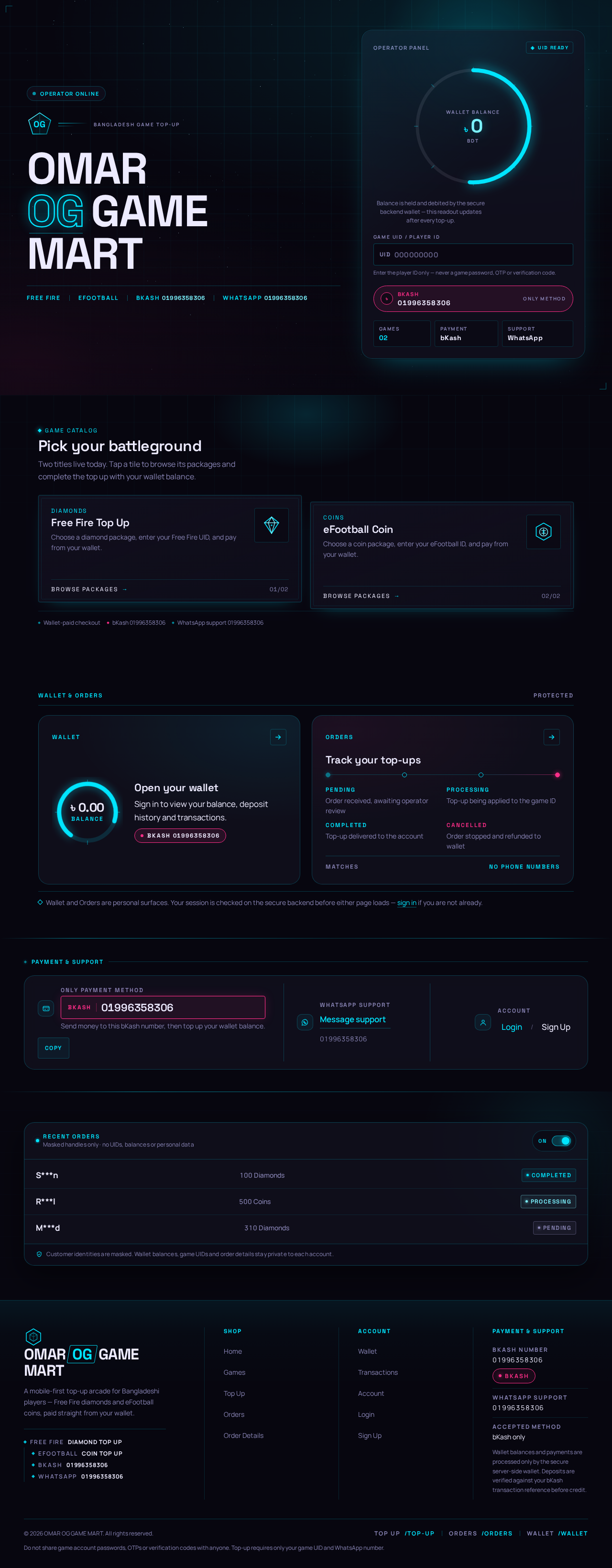
OmarOGGameMart
Game catalog
Pick your battleground
Two titles live today. Tap a tile to browse its packages and complete the top up with your wallet balance.
Diamonds
Free Fire Top Up
Choose a diamond package, enter your Free Fire UID, and pay from your wallet.
Coins
eFootball Coin
Choose a coin package, enter your eFootball ID, and pay from your wallet.
Wallet & Orders
ProtectedTrack your top-ups
- PendingOrder received, awaiting operator review
- ProcessingTop-up being applied to the game ID
- CompletedTop-up delivered to the account
- CancelledOrder stopped and refunded to wallet
Wallet and Orders are personal surfaces. Your session is checked on the secure backend before either page loads — sign in if you are not already.
Payment & support
- S***n100 DiamondsCompleted
- R***l500 CoinsProcessing
- M***d310 DiamondsPending
OmarOGGameMart
Game catalog
Pick your battleground
Two titles live today. Tap a tile to browse its packages and complete the top up with your wallet balance.
Diamonds
Free Fire Top Up
Choose a diamond package, enter your Free Fire UID, and pay from your wallet.
Coins
eFootball Coin
Choose a coin package, enter your eFootball ID, and pay from your wallet.
Wallet & Orders
ProtectedTrack your top-ups
- PendingOrder received, awaiting operator review
- ProcessingTop-up being applied to the game ID
- CompletedTop-up delivered to the account
- CancelledOrder stopped and refunded to wallet
Wallet and Orders are personal surfaces. Your session is checked on the secure backend before either page loads — sign in if you are not already.
Payment & support
- S***n100 DiamondsCompleted
- R***l500 CoinsProcessing
- M***d310 DiamondsPending
No comments yet. Be the first!