office-ecom
 Jatin Yadav
create e-com app specific for stationary products

Comments (0)
Sign in to leave a comment
System Requirements
office-ecom
Introduction
The "office-ecom" project is an e-commerce platform specifically designed for stationary products, targeting office environments. This document outlines the system requirements for the development and implementation of the office-ecom platform, ensuring it meets the needs of its intended users.
System Overview
The office-ecom platform will provide a streamlined shopping experience for office supplies, focusing on bulk orders without subscription models. The platform will cater to businesses looking to efficiently purchase stationary products in large quantities.
Functional Requirements
- As a Business User, I should be able to browse a catalog of stationary products.
- As a Business User, I should be able to search for specific stationary items.
- As a Business User, I should be able to add products to a shopping cart.
- As a Business User, I should be able to place bulk orders for stationary products.
- As a Business User, I should be able to view order history and track order status.
- As a Business User, I should be able to manage billing and shipping information.
- As a Business User, I should be able to receive notifications for order confirmations and shipping updates.
- As an Admin, I should be able to manage product listings and inventory.
- As an Admin, I should be able to process and manage orders.
- As an Admin, I should be able to generate sales and inventory reports.
User Personas
- Business User: Typically office managers or procurement officers responsible for purchasing stationary supplies for their organization.
- Admin: Individuals responsible for managing the e-commerce platform, including product listings, inventory, and order processing.
Core User Flows
- Business User browses catalog -> adds items to cart -> places bulk order -> receives order confirmation -> tracks order status.
- Admin updates product listings -> manages inventory levels -> processes incoming orders -> generates sales reports.
Visuals Colors and Theme
- primary: #2A9D8F (teal)
- primary_light: #A8DADC (light teal)
- secondary: #E63946 (crimson)
- accent: #F4A261 (orange)
- highlight: #E9C46A (gold)
- bg: #F1FAEE (light cream)
- surface: rgba(255, 255, 255, 0.8)
- text: #1D3557 (dark blue)
- text_muted: #457B9D (muted blue)
- border: rgba(38, 70, 83, 0.2)
Signature Design Concept
The homepage of office-ecom will feature an interactive "Stationary Desk" concept. Users will navigate a virtual office desk where each stationary item is represented as a clickable 3D object. Using @react-three/fiber and @react-three/drei, users can rotate and zoom into the desk to explore products. Hovering over an item will display detailed information, and clicking will add it to the cart. This immersive experience will make the shopping process engaging and intuitive.
Interaction Model & Motion Direction
The landing page will utilize a "parallax" interaction model, creating a layered depth effect as users scroll through the page. Stationary items will subtly animate into view, enhancing the storytelling aspect of the platform. Internal pages will adopt a "static" model for clarity and ease of use, focusing on efficient navigation and quick access to information.
Non-Functional Requirements
- The system should support high concurrency to handle multiple users simultaneously.
- The platform must ensure data security and privacy for all transactions.
- The website should be responsive and accessible across various devices and screen sizes.
Tech Stack
- Frontend: React for Web
- Backend: FastAPI
- Database: MySQL or MariaDB, using Alembic for migrations
- Local Orchestration: Docker, docker-compose
- Server-side Orchestration: Kubernetes
Assumptions and Constraints
- The platform will not include a subscription model but will support bulk ordering.
- The system will primarily target businesses in India, considering local currency (INR) and timezone (IST).
Glossary
- Bulk Order: Purchasing large quantities of products in a single transaction.
- Stationary Products: Items such as pens, paper, notebooks, and other office supplies.
- Admin: A user with privileges to manage the platform's backend operations.
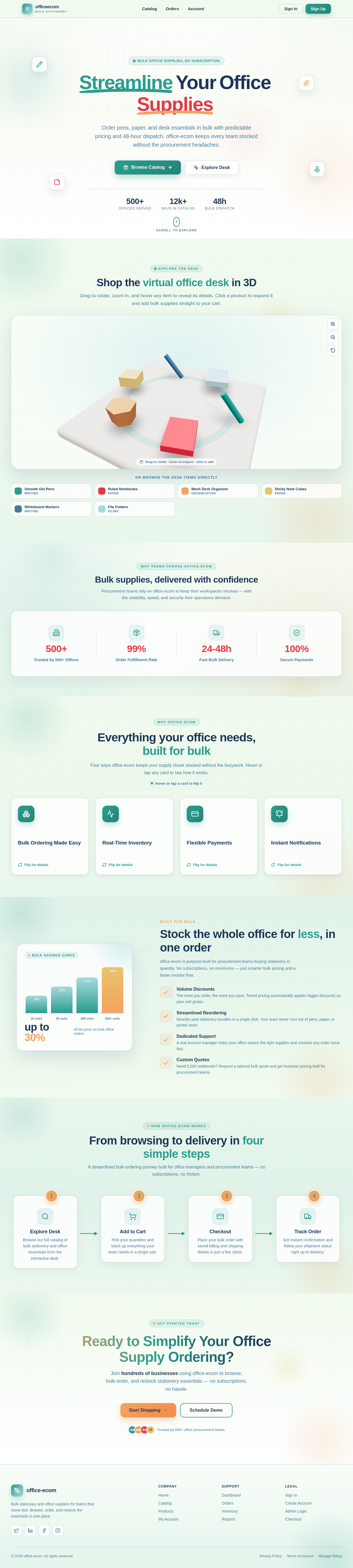
StreamlineYourOfficeSupplies
Order pens, paper, and desk essentials in bulk with predictable pricing and 48-hour dispatch. office-ecom keeps every team stocked without the procurement headaches.
Shop the virtual office desk in 3D
Drag to rotate, zoom in, and hover any item to reveal its details. Click a product to expand it and add bulk supplies straight to your cart.
Or browse the desk items directly
Bulk supplies, delivered with confidence
Procurement teams rely on office‑ecom to keep their workspaces stocked — with the reliability, speed, and security their operations demand.
Everything your office needs, built for bulk
Four ways office-ecom keeps your supply closet stocked without the busywork. Hover or tap any card to see how it works.
Hover or tap a card to flip itBulk Ordering Made Easy
Flip for detailsBulk Ordering Made Easy
Order stationery by the case, not the unit. Set quantities across your whole team in one cart and check out in seconds — no subscriptions, no minimums to memorize.
Real-Time Inventory
Flip for detailsReal-Time Inventory
See live stock counts before you commit. office-ecom syncs warehouse levels instantly so you never place an order on items that have already sold out.
Flexible Payments
Flip for detailsFlexible Payments
Pay your way with cards, purchase orders, or saved billing profiles. Manage shipping and invoicing details once, then reuse them for every future bulk order.
Instant Notifications
Flip for detailsInstant Notifications
Get confirmations the moment an order is placed and shipping updates as it moves. Your whole office stays in the loop from checkout to the supply closet.
Stock the whole office for less, in one order
office‑ecom is purpose‑built for procurement teams buying stationery in quantity. No subscriptions, no minimums — just smarter bulk pricing and a faster reorder flow.
Volume Discounts
The more you order, the more you save. Tiered pricing automatically applies bigger discounts as your cart grows.
Streamlined Reordering
Reorder past stationery bundles in a single click. Your team never runs out of pens, paper, or printer toner.
Dedicated Support
A real account manager helps your office source the right supplies and resolves any order issue fast.
Custom Quotes
Need 5,000 notebooks? Request a tailored bulk quote and get business pricing built for procurement teams.
From browsing to delivery in four simple steps
A streamlined bulk-ordering journey built for office managers and procurement teams — no subscriptions, no friction.
Explore Desk
Browse our full catalog of bulk stationery and office essentials from the interactive desk.
Add to Cart
Pick your quantities and stack up everything your team needs in a single cart.
Checkout
Place your bulk order with saved billing and shipping details in just a few clicks.
Track Order
Get instant confirmation and follow your shipment status right up to delivery.
Ready to Simplify Your Office Supply Ordering?
Join hundreds of businesses using office‑ecom to browse, bulk-order, and restock stationery essentials — no subscriptions, no hassle.
No comments yet. Be the first!