ocean-web
 Sandes V. S
create a web sit


Comments (0)
Sign in to leave a comment
System Requirements
ocean-web System Requirements Document
Introduction
The purpose of this document is to outline the system requirements for the "ocean-web" project. This project aims to create a simple website for storing personal details for a single user, Sandes V S, in India. The website will focus on ease of use and straightforward data management without the need for complex features like user authentication or data encryption.
System Overview
The "ocean-web" project is a personal web application designed to store and display personal details in a straightforward list format. The system will be developed with simplicity in mind, ensuring that the user can easily input and view their personal information without the need for additional features such as tags or categories. The homepage will feature the user's name, "Sandes V S", and a caption, with an elegant design that allows scrolling for more information.
Functional Requirements
- As an Admin, I should be able to upload images using file browser, drag-and-drop, camera capture, and URL input.
- As a User, I should be able to input personal details into the website.
- As a User, I should be able to view my personal details in a straightforward list format.
- As an Admin, I should be able to edit personal details.
- As a User, I should be able to optionally add details such as experience, hobby, and other interests.
- As a User, I should be able to add educational qualifications with subcategories for high school, higher secondary, undergraduate, postgraduate, and more.
- As a User, I should be able to add projects and certificates and achievements.
- As an Admin, I should be able to upload files along with images.
User Personas
- User: The sole user of the website, who will input and manage their personal details.
- Admin: The user with the ability to edit personal details and manage uploads.
Visuals Colors and Theme
The color palette for the "ocean-web" project will adopt a tech-based or artificial intelligence-themed aesthetic, providing a modern and innovative look.
- primary: #1A1F36 (a deep indigo)
- primary_light: #2A2F48 (a lighter indigo for hover states)
- secondary: #FF6F61 (a vibrant coral for headlines and emphasis)
- accent: #4CAF50 (a lively green for CTAs and active states)
- highlight: #FFC107 (a warm amber for hover states and notifications)
- bg: #F4F7FA (a soft off-white for the page background)
- surface: rgba(255, 255, 255, 0.95) (a soft white for card/panel backgrounds)
- text: #1A1F36 (a deep indigo for primary text)
- text_muted: #7A869A (a muted blue-grey for secondary text and labels)
- border: rgba(0, 0, 0, 0.1) (a subtle grey for borders)
Signature Design Concept
The homepage of "ocean-web" will feature an interactive "Ocean Wave" animation. As the user scrolls, gentle waves will move across the screen, creating a calming effect reminiscent of the ocean. This animation will be created using framer-motion for smooth transitions and spring physics. The waves will subtly change color based on the time of day, providing a dynamic and engaging user experience. Users can click on the waves to reveal hidden personal details, adding an element of discovery and interaction.
Interaction Model & Motion Direction
The intended interaction model for the "ocean-web" landing page is "parallax". The ocean wave animation will create a layered depth effect as the user scrolls, with the waves moving at different speeds to enhance the visual storytelling. This approach provides a visually rich first impression while maintaining a natural flow for content scrolling.
Non-Functional Requirements
- The website should load quickly and efficiently on standard internet connections.
- The design should be responsive and accessible on various devices, including desktops, tablets, and smartphones.
- The website should be easy to maintain and update with new personal details.
Tech Stack
- Frontend: React for Web
- Backend: Python with FastAPI
- Database: MySQL for storing personal details
- Local Orchestration: Docker and docker-compose
Assumptions and Constraints
- The website is intended for use by a single individual, and thus does not require multi-user support or authentication features.
- The website will not include complex data encryption, as it is designed for personal use only.
- The project will adhere to local Indian standards for web development and design.
Glossary
- Frontend: The part of the website that users interact with directly.
- Backend: The server-side logic and database management.
- Parallax: A design technique where background images move slower than foreground images, creating an illusion of depth.
- Responsive Design: An approach to web design that makes web pages render well on a variety of devices and window or screen sizes.
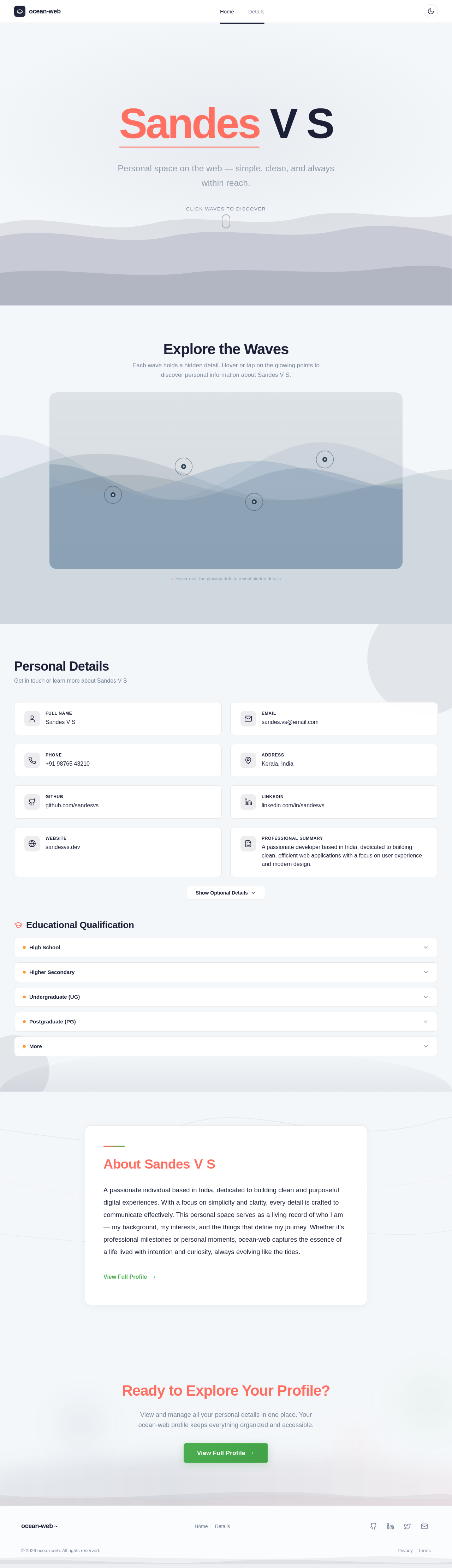
Sandes V S
Personal space on the web — simple, clean, and always within reach.
Explore the Waves
Each wave holds a hidden detail. Hover or tap on the glowing points to discover personal information about Sandes V S.
Tap the glowing dots to reveal details
Personal Details
Get in touch or learn more about Sandes V S
Educational Qualification
AboutSandesVS
ApassionateindividualbasedinIndia,dedicatedtobuildingcleanandpurposefuldigitalexperiences.Withafocusonsimplicityandclarity,everydetailiscraftedtocommunicateeffectively.ThispersonalspaceservesasalivingrecordofwhoIam—mybackground,myinterests,andthethingsthatdefinemyjourney.Whetherit'sprofessionalmilestonesorpersonalmoments,ocean-webcapturestheessenceofalifelivedwithintentionandcuriosity,alwaysevolvinglikethetides.
Ready to Explore Your Profile?
View and manage all your personal details in one place. Your ocean-web profile keeps everything organized and accessible.
No comments yet. Be the first!