ocean-e
 Mahesh Savkar
Build a complete, modern, responsive AI-powered e-commerce website named **SmartCart AI** with a working frontend, backend, database, and AI recommendation engine. Do not build only a static UI. All major features must work end to end. ## 1. Technology Stack **Frontend:** React, Vite, JavaScript, React Router, Axios, Context API, Lucide React, responsive CSS. **Backend:** Java 21, Spring Boot 3.x, Maven, Spring Web, Spring Data JPA, Spring Security, JWT, MySQL, Flyway, Bean Validation, Swagger/OpenAPI, JUnit, Mockito. **AI service:** Python, FastAPI, LLM API, LangChain where useful, embeddings, semantic search, RAG, ChromaDB. **Deployment:** Docker, Docker Compose, environment variables, Git, README. Use compatible dependency versions. Never expose API keys or credentials in frontend code. ## 2. UI/UX Design Create a premium shopping experience with clean layouts, professional typography, attractive product cards, consistent colors, subtle shadows, smooth animations, responsive navigation, and mobile-friendly pages. Use Lucide icons, reusable components, loading skeletons, empty states, validation messages, and toast notifications. Avoid generic templates and excessive gradients. ## 3. Customer Features **Home page** - Navbar with logo, search, categories, login, and cart. - Hero section, featured categories, trending products, top-rated products, personalized recommendations, recently viewed products, and AI assistant. **Product listing** - Product grid, search, category and brand filters, price range, rating, stock availability, sorting, and server-side pagination. **Product details** - Images, description, specifications, price, stock, ratings, reviews, quantity selector, add to cart, buy now, similar products, and AI recommendation explanations. **AI shopping assistant** Allow users to ask: - Recommend a Java development laptop under ₹60,000. - Find running shoes under ₹3,000. - Compare two smartphones. - Find similar products. - Recommend products based on my preferences. Retrieve actual products from the catalog, enforce budget and availability constraints, explain recommendations, and display clickable product cards. Support follow-up questions and clearly handle empty results. Never invent products, prices, ratings, specifications, or stock. **Cart and checkout** - Add, update, and remove items. - Calculate subtotals, shipping, and totals. - Validate stock and prices on the backend. - Support guest carts and persistent customer carts. - Collect shipping addresses and create orders transactionally. - Provide order confirmation, order history, details, status, and eligible cancellations. - Use simulated payment or a payment sandbox. Never store card details. **Authentication and profile** - Registration, login, logout, profile management, BCrypt password hashing, JWT, protected routes, and CUSTOMER/ADMIN roles. - Customer preferences for budget, favorite categories, and brands. - Customers can access only their own profiles, carts, preferences, and orders. **Reviews** Allow authenticated users to submit, edit, and delete reviews. Enforce ownership and only label a review as a verified purchase when supported by an actual order. ## 4. AI Recommendation Engine Implement a real hybrid recommendation pipeline using: 1. Content-based filtering. 2. Embedding-based semantic retrieval. 3. User preferences and browsing history. 4. Popularity and rating signals. 5. Product diversity. 6. Evidence-based recommendation explanations. Use RAG to index product descriptions and specifications, generate embeddings, retrieve relevant products through ChromaDB, rank candidates, and generate grounded explanations. Apply deterministic filters for mandatory requirements such as budget and stock. Validate every recommended product against the real catalog. Do not claim collaborative filtering works without sufficient interaction data. ## 5. Spring Boot Backend Use layered architecture: controller, service, repository, entity, dto, mapper, security, config, exception. Create entities for User, Product, Category, Cart, CartItem, Order, OrderItem, Review, UserPreference, and ProductInteraction. Use appropriate JPA relationships, foreign keys, indexes, DTOs, validation, transactions, centralized exception handling, and database migrations. Preserve product name and price snapshots in order items. Implement these APIs: - Authentication: `/api/auth/register`, `/api/auth/login`, `/api/auth/logout`, `/api/auth/me` - Products: `/api/products`, `/api/products/{id}`, `/api/products/search`, `/api/products/{id}/similar` - Categories: `/api/categories` - Cart: `/api/cart`, `/api/cart/items`, `/api/cart/items/{itemId}` - Orders: `/api/orders`, `/api/orders/{id}`, `/api/orders/{id}/cancel` - Reviews: `/api/products/{id}/reviews`, `/api/reviews/{id}` - Preferences: `/api/users/me/preferences` - Recommendations: `/api/recommendations/personalized`, `/api/recommendations/query`, `/api/recommendations/similar` - Admin: `/api/admin/products`, `/api/admin/orders`, `/api/admin/analytics` Use correct HTTP methods, status codes, pagination, validation, authorization, and consistent error responses. Document endpoints using Swagger UI. ## 6. Python AI Service Create: ai-service/ app/main.py app/config.py app/api/ app/schemas/ app/services/ app/retrieval/ app/embeddings/ app/ranking/ app/llm/ tests/ requirements.txt .env.example Dockerfile Implement: - `GET /health` - `POST /ai/search` - `POST /ai/recommendations` - `POST /ai/chat` - `POST /ai/compare` Spring Boot remains the source of truth for products, prices, inventory, users, carts, and orders. FastAPI handles embeddings, semantic retrieval, LLM orchestration, and recommendation explanations. Secure internal communication. Keep API keys in environment variables. Add input validation, timeouts, rate limits, structured output validation, error handling, and a graceful fallback when the AI service is unavailable. ## 7. Admin Dashboard Create a protected dashboard with product CRUD, category management, inventory, order management, sales summaries, top-selling products, and recommendation analytics. Use actual database data and enforce ADMIN authorization on the backend. ## 8. Database and Sample Data Use MySQL and Flyway migrations. Seed at least 30 realistic products across laptops, smartphones, accessories, home appliances, and fitness. Include INR prices, specifications, categories, and suitable image URLs. Identify demo reviews and interactions clearly. Provide safe development-only admin initialization and a way to rebuild the vector index. ## 9. Testing and Security Implement unit tests, API integration tests, authentication tests, ownership and role checks, cart calculations, inventory safeguards, recommendation ranking tests, AI output validation, and AI failure tests. Mock paid LLM calls in automated tests. Protect secrets, validate inputs, configure CORS, enforce resource ownership, calculate prices on the backend, and avoid logging sensitive data. ## 10. Project Structure smartcart-ai/ - frontend/ - backend/ - ai-service/ - docker-compose.yml - .env.example - README.md Provide Dockerfiles for each service and Docker Compose for the application and MySQL. Include health checks, persistent storage, startup commands, port configuration, environment setup, Swagger instructions, and deployment guidance. Use service names instead of localhost for internal Docker communication. ## 11. Implementation Instructions Build incrementally: 1. Architecture, folder structure, database relationships, and request flows. 2. Spring Boot configuration, entities, migrations, and product APIs. 3. Authentication and security. 4. React pages and API integration. 5. Cart, checkout, orders, and inventory. 6. FastAPI, embeddings, ChromaDB, RAG, and recommendations. 7. AI chat integration. 8. Admin dashboard and analytics. 9. Testing, bug fixing, Docker, and documentation. After each phase, show changed files, provide complete working code, explain important logic in beginner-friendly language, run available builds and tests, fix errors, and provide exact verification commands. Inspect the existing workspace before changing files. Preserve working code. Do not generate disconnected files, leave core functionality as placeholders, or claim tests passed without running them. Start with Phase 1 and present the architecture, database relationships, folder structure, API contracts, and end-to-end flows. Then implement each phase in order. The final result must be a functional, secure, maintainable portfolio project suitable for Java Full Stack and GenAI interviews.


Comments (0)
Sign in to leave a comment
System Requirements
System Requirements Document for ocean-e
1. Introduction
ocean-e is the project name for SmartCart AI, a complete, modern, responsive AI-powered e-commerce website with a working frontend, backend, database, and AI recommendation engine. The product is not a static UI: all major features must work end to end — browsing and searching a real catalog, a grounded AI shopping assistant, guest and persistent carts, transactional checkout with simulated payment, order history and cancellations, reviews, customer preferences, and a protected admin dashboard backed by real database data.
The audience is Indian online shoppers (laptops, smartphones, accessories, home appliances, fitness) who need to trust an AI that recommends real, in-stock, in-budget products, and the store operator (Admin) who manages that catalog and its orders. The final result must be a functional, secure, maintainable portfolio project suitable for Java Full Stack and GenAI interviews.
2. System Overview
SmartCart AI is delivered as a multi-service application:
- Frontend — React, Vite, JavaScript, React Router, Axios, Context API, Lucide React, responsive CSS. Renders the storefront, AI assistant, cart/checkout, orders, preferences, login, and admin dashboard.
- Backend — Java 21, Spring Boot 3.x, Maven, Spring Web, Spring Data JPA, Spring Security, JWT, MySQL, Flyway, Bean Validation, Swagger/OpenAPI, JUnit, Mockito. It is the source of truth for products, prices, inventory, users, carts, and orders, and exposes all
/api/**endpoints. - AI service — Python, FastAPI, LLM API, LangChain where useful, embeddings, semantic search, RAG, ChromaDB. It handles embeddings, semantic retrieval, LLM orchestration, and recommendation explanations, and exposes
GET /health,POST /ai/search,POST /ai/recommendations,POST /ai/chat,POST /ai/compare. - Database — MySQL with Flyway migrations, seeded with at least 30 realistic products.
- Deployment — Docker, Docker Compose, environment variables, Git, README, with Dockerfiles per service, health checks, persistent storage, and service names (not localhost) for internal Docker communication.
Provisioned infrastructure in the scaffold also includes a LiteLLM gateway (the backend's model-provider call path) backed by its own PostgreSQL instance, which is separate from application-owned storage. These services support the AI pipeline and add no product requirements of their own.
Actors: Customer (shopping, AI assistant, cart/checkout, orders, reviews, preferences) and Admin (protected dashboard: product CRUD, categories, inventory, orders, sales summaries, top-selling products, recommendation analytics). Access is governed by JWT authentication, BCrypt password hashing, CUSTOMER/ADMIN roles, and backend-enforced resource ownership.
Removed from scope
- None.
2a. Product Interpretation and Delivery Boundary
SmartCart AI is a first-party, application-owned storefront with application-owned identity. Customers self-register and sign in through a first-party Login surface; the Home page, Product listing, Product details, AI Assistant, and Cart and checkout are reachable without signing in (guest carts are supported), while Orders, Preferences, and the Admin Dashboard require an authenticated session, with the Admin Dashboard additionally requiring the ADMIN role enforced on the backend. Customers can access only their own profiles, carts, preferences, and orders.
The AI service is a supporting internal service, not a separate user-facing destination: customers interact with it through the AI Assistant page, product-detail AI explanations, and personalized recommendation surfaces, all of which are served through the Spring Boot backend. Spring Boot remains the source of truth for catalog, price, inventory, user, cart, and order data; the AI service never becomes authoritative for those facts. When the AI service is unavailable, the product degrades gracefully rather than failing.
All current requirements are in the current delivery horizon. No future-horizon features are defined by the source.
2c. Page Content and Component Coverage
Home page
- Information/state: navbar (logo, search, categories, login, cart), hero section, featured categories, trending products, top-rated products, personalized recommendations, recently viewed products, AI assistant entry.
- Primary actions: search, open a category, open a product, open the AI assistant, sign in, open cart.
- Supporting actions: view personalized recommendations (signed-in), view recently viewed products (device/session), navigate to listing.
- Domain entities: Product, Category, UserPreference, ProductInteraction (recently viewed), recommendation results.
- Component responsibilities: navbar, hero, category tiles, product card rails (trending, top-rated, personalized, recently viewed), AI assistant entry panel.
- States: loading skeletons for each rail; empty state for personalized recommendations when signed out or no data; empty state for recently viewed when none; error state with retry when a rail fails; success when rails populate.
Product listing
- Information/state: product grid, search, category filter, brand filter, price range, rating filter, stock availability filter, sorting control, pagination controls.
- Primary actions: apply/clear filters, sort, change page, open a product.
- Supporting actions: search within listing, reset filters.
- Domain entities: Product, Category.
- Component responsibilities: filter rail (desktop) / bottom sheet (mobile), sort control, product grid, pagination.
- States: loading skeleton grid; empty state when no products match with a clear-filters action; success grid; error state with retry; server-side pagination state (page, total).
Product details
- Information/state: images, description, specifications, price, stock, ratings, reviews, quantity selector, add to cart, buy now, similar products, AI recommendation explanations.
- Primary actions: select quantity, add to cart, buy now, submit/edit/delete own review (authenticated).
- Supporting actions: view similar products, read AI explanation, open review form.
- Domain entities: Product, Review, Order (verified-purchase check), recommendation explanation.
- Component responsibilities: image gallery, spec table, rating summary, review list and form, quantity control, cart actions, similar-products rail, AI explanation panel.
- States: loading skeleton; out-of-stock state disabling purchase; empty reviews state; validation messages on review form; success toast on add to cart; error state when AI explanation is unavailable (graceful fallback, no invented content).
AI Assistant
- Information/state: conversation thread, user messages, assistant messages with grounded explanations, clickable product cards, empty-result notices, follow-up context.
- Primary actions: ask a question (e.g., Java development laptop under ₹60,000; running shoes under ₹3,000; compare two smartphones; find similar products; recommend based on preferences), ask follow-ups, open a recommended product card.
- Supporting actions: start a new conversation, retry a failed request.
- Domain entities: Product (validated against real catalog), UserPreference, ProductInteraction.
- Component responsibilities: message composer, message list, product card renderer, empty-result notice, fallback notice.
- States: loading indicator while the assistant responds; empty conversation state with example prompts; success with grounded cards; empty-result state clearly stated; error/fallback state when the AI service is unavailable.
Cart and checkout
- Information/state: line items, quantity controls, subtotal, shipping, total, shipping address form, payment step (simulated/sandbox), order confirmation.
- Primary actions: add, update, remove items; enter shipping address; place order; complete simulated payment.
- Supporting actions: continue shopping, review backend-validated totals.
- Domain entities: Cart, CartItem, Order, OrderItem, Product.
- Component responsibilities: line-item list, order summary, address form, payment step, confirmation panel.
- States: loading; empty cart state; validation messages on address form; stock/price change error surfaced from backend validation; success confirmation; payment failure recovery.
Orders
- Information/state: order history, order details, status, eligible cancellation action.
- Primary actions: open an order, cancel an eligible order.
- Supporting actions: return to shopping.
- Domain entities: Order, OrderItem (with preserved product name and price snapshots).
- Component responsibilities: order list, order detail panel, status display, cancellation control.
- States: loading; empty order history; success detail; cancellation-ineligible state; error state with retry.
Preferences
- Information/state: budget, favorite categories, favorite brands.
- Primary actions: save preferences.
- Supporting actions: reset form.
- Domain entities: UserPreference, Category.
- Component responsibilities: preference form, category/brand selectors.
- States: loading; validation messages; success toast; error state with retry.
Admin Dashboard
- Information/state: product CRUD, category management, inventory, order management, sales summaries, top-selling products, recommendation analytics — all from actual database data.
- Primary actions: create/edit/delete products, manage categories, adjust inventory, manage orders, view analytics.
- Supporting actions: filter and inspect analytics.
- Domain entities: Product, Category, Order, OrderItem, ProductInteraction, analytics aggregates.
- Component responsibilities: product management table/form, category manager, inventory controls, order manager, sales summary, top-selling list, recommendation analytics panel.
- States: loading; empty states per panel; validation messages; success toasts; authorization error state for non-admin access; error state with retry.
Login
- Information/state: registration form, login form, current session state.
- Primary actions: register, log in, log out.
- Supporting actions: view profile management entry after sign-in.
- Domain entities: User (BCrypt-hashed credentials, CUSTOMER/ADMIN role).
- Component responsibilities: registration form, login form, session/logout control.
- States: validation messages; loading; success redirect to intended destination; authentication error; logout confirmation.
3. Functional Requirements
FR-1 (explicit). As a visitor, I should browse a complete, modern, responsive AI-powered e-commerce website with working frontend, backend, database, and AI recommendation engine, so that all major features work end to end rather than as a static UI. Acceptance: every major feature is functional against real services.
FR-2 (explicit). As a visitor, I should use a frontend built with React, Vite, JavaScript, React Router, Axios, Context API, Lucide React, and responsive CSS. Acceptance: the frontend uses these technologies and is responsive.
FR-3 (explicit). As the system, I should run a backend on Java 21, Spring Boot 3.x, Maven, Spring Web, Spring Data JPA, Spring Security, JWT, MySQL, Flyway, Bean Validation, Swagger/OpenAPI, JUnit, and Mockito. Acceptance: these technologies are present and compatible.
FR-4 (explicit). As the system, I should run an AI service on Python, FastAPI, an LLM API, LangChain where useful, embeddings, semantic search, RAG, and ChromaDB. Acceptance: these technologies are present and compatible.
FR-5 (explicit). As the operator, I should deploy with Docker, Docker Compose, environment variables, Git, and a README using compatible dependency versions, and API keys and credentials must never be exposed in frontend code. Acceptance: no secrets in frontend; deployment artifacts present.
FR-6 (explicit). As a visitor, I should experience a premium shopping experience with clean layouts, professional typography, attractive product cards, consistent colors, subtle shadows, smooth animations, responsive navigation, and mobile-friendly pages, using Lucide icons, reusable components, loading skeletons, empty states, validation messages, and toast notifications, avoiding generic templates and excessive gradients. Acceptance: these UI qualities and components are present.
FR-7 (explicit). As a visitor, I should see a Home page with a navbar containing logo, search, categories, login, and cart, plus a hero section, featured categories, trending products, top-rated products, personalized recommendations, recently viewed products, and an AI assistant. Acceptance: all listed elements render with real data where applicable.
FR-8 (explicit). As a visitor, I should use a Product listing with a product grid, search, category and brand filters, price range, rating, stock availability, sorting, and server-side pagination. Acceptance: filters, sorting, and pagination operate server-side.
FR-9 (explicit). As a visitor, I should view Product details with images, description, specifications, price, stock, ratings, reviews, a quantity selector, add to cart, buy now, similar products, and AI recommendation explanations. Acceptance: all listed elements are present and functional.
FR-10 (explicit). As a customer, I should ask the AI shopping assistant to recommend a Java development laptop under ₹60,000, find running shoes under ₹3,000, compare two smartphones, find similar products, and recommend products based on my preferences. Acceptance: each request type is supported.
FR-11 (explicit). As a customer, I should receive AI assistant answers that retrieve actual products from the catalog, enforce budget and availability constraints, explain recommendations, display clickable product cards, support follow-up questions, and clearly handle empty results, and the assistant must never invent products, prices, ratings, specifications, or stock. Acceptance: every recommendation is validated against the real catalog; empty results are stated clearly.
FR-12 (explicit). As a customer, I should add, update, and remove cart items; see subtotals, shipping, and totals calculated; have stock and prices validated on the backend; use guest carts and persistent customer carts; provide shipping addresses; and create orders transactionally. Acceptance: backend validation and transactional order creation occur.
FR-13 (explicit). As a customer, I should receive order confirmation, view order history, details, and status, and perform eligible cancellations. Acceptance: confirmation, history, details, status, and eligible cancellation work.
FR-14 (explicit). As a customer, I should pay via simulated payment or a payment sandbox, and card details must never be stored. Acceptance: no card details persisted.
FR-15 (explicit). As a user, I should register, log in, log out, and manage my profile, with BCrypt password hashing, JWT, protected routes, and CUSTOMER/ADMIN roles. Acceptance: authentication and protected routes function.
FR-16 (explicit). As a customer, I should set preferences for budget, favorite categories, and brands. Acceptance: preferences persist and are used by personalization.
FR-17 (explicit). As a customer, I should access only my own profile, cart, preferences, and orders. Acceptance: cross-customer access is denied by the backend.
FR-18 (explicit). As an authenticated user, I should submit, edit, and delete reviews, with ownership enforced and a review labeled as a verified purchase only when supported by an actual order. Acceptance: ownership enforced; verified-purchase label only with a real order.
FR-19 (explicit). As the system, I should implement a real hybrid recommendation pipeline using content-based filtering, embedding-based semantic retrieval, user preferences and browsing history, popularity and rating signals, product diversity, and evidence-based recommendation explanations. Acceptance: all six signals are implemented.
FR-20 (explicit). As the system, I should use RAG to index product descriptions and specifications, generate embeddings, retrieve relevant products through ChromaDB, rank candidates, and generate grounded explanations. Acceptance: RAG pipeline operates over the catalog.
FR-21 (explicit). As the system, I should apply deterministic filters for mandatory requirements such as budget and stock, validate every recommended product against the real catalog, and not claim collaborative filtering works without sufficient interaction data. Acceptance: filters and validation enforced; no unsupported collaborative-filtering claims.
FR-22 (explicit). As the system, I should use a layered Spring Boot backend architecture: controller, service, repository, entity, dto, mapper, security, config, exception. Acceptance: layers present.
FR-23 (explicit). As the system, I should create entities for User, Product, Category, Cart, CartItem, Order, OrderItem, Review, UserPreference, and ProductInteraction with appropriate JPA relationships, foreign keys, indexes, DTOs, validation, transactions, centralized exception handling, and database migrations. Acceptance: entities and migrations exist.
FR-24 (explicit). As the system, I should preserve product name and price snapshots in order items. Acceptance: snapshots stored on order creation.
FR-25 (explicit). As the system, I should implement authentication APIs /api/auth/register, /api/auth/login, /api/auth/logout, /api/auth/me. Acceptance: endpoints function.
FR-26 (explicit). As the system, I should implement product APIs /api/products, /api/products/{id}, /api/products/search, /api/products/{id}/similar. Acceptance: endpoints function.
FR-27 (explicit). As the system, I should implement categories API /api/categories. Acceptance: endpoint functions.
FR-28 (explicit). As the system, I should implement cart APIs /api/cart, /api/cart/items, /api/cart/items/{itemId}. Acceptance: endpoints function.
FR-29 (explicit). As the system, I should implement order APIs /api/orders, /api/orders/{id}, /api/orders/{id}/cancel. Acceptance: endpoints function.
FR-30 (explicit). As the system, I should implement review APIs /api/products/{id}/reviews, /api/reviews/{id}. Acceptance: endpoints function.
FR-31 (explicit). As the system, I should implement preferences API /api/users/me/preferences. Acceptance: endpoint functions.
FR-32 (explicit). As the system, I should implement recommendation APIs /api/recommendations/personalized, /api/recommendations/query, /api/recommendations/similar. Acceptance: endpoints function.
FR-33 (explicit). As the system, I should implement admin APIs /api/admin/products, /api/admin/orders, /api/admin/analytics. Acceptance: endpoints function with ADMIN authorization.
FR-34 (explicit). As the system, I should use correct HTTP methods, status codes, pagination, validation, authorization, and consistent error responses, and document endpoints using Swagger UI. Acceptance: Swagger UI documents all endpoints.
FR-35 (explicit). As the system, I should structure the AI service with app/main.py, app/config.py, app/api/, app/schemas/, app/services/, app/retrieval/, app/embeddings/, app/ranking/, app/llm/, tests/, requirements.txt, .env.example, and Dockerfile. Acceptance: structure present.
FR-36 (explicit). As the system, I should implement GET /health, POST /ai/search, POST /ai/recommendations, POST /ai/chat, POST /ai/compare. Acceptance: endpoints function.
FR-37 (explicit). As the system, Spring Boot should remain the source of truth for products, prices, inventory, users, carts, and orders, while FastAPI handles embeddings, semantic retrieval, LLM orchestration, and recommendation explanations. Acceptance: authority boundaries respected.
FR-38 (explicit). As the system, I should secure internal communication, keep API keys in environment variables, and add input validation, timeouts, rate limits, structured output validation, error handling, and a graceful fallback when the AI service is unavailable. Acceptance: all safeguards present.
FR-39 (explicit). As an admin, I should use a protected dashboard with product CRUD, category management, inventory, order management, sales summaries, top-selling products, and recommendation analytics, using actual database data with ADMIN authorization enforced on the backend. Acceptance: dashboard functions; non-admin access denied.
FR-40 (explicit). As the system, I should use MySQL and Flyway migrations and seed at least 30 realistic products across laptops, smartphones, accessories, home appliances, and fitness, with INR prices, specifications, categories, and suitable image URLs. Acceptance: seed data present.
FR-41 (explicit). As the system, I should identify demo reviews and interactions clearly and provide safe development-only admin initialization and a way to rebuild the vector index. Acceptance: demo data labeled; admin init dev-only; vector index rebuild available.
FR-42 (explicit). As the system, I should implement unit tests, API integration tests, authentication tests, ownership and role checks, cart calculations, inventory safeguards, recommendation ranking tests, AI output validation, and AI failure tests, mocking paid LLM calls in automated tests. Acceptance: tests exist and pass when run.
FR-43 (explicit). As the system, I should protect secrets, validate inputs, configure CORS, enforce resource ownership, calculate prices on the backend, and avoid logging sensitive data. Acceptance: safeguards present.
FR-44 (explicit). As the operator, I should have a project structure smartcart-ai/ containing frontend/, backend/, ai-service/, docker-compose.yml, .env.example, and README.md. Acceptance: structure present.
FR-45 (explicit). As the operator, I should have Dockerfiles for each service and Docker Compose for the application and MySQL, including health checks, persistent storage, startup commands, port configuration, environment setup, Swagger instructions, and deployment guidance, using service names instead of localhost for internal Docker communication. Acceptance: deployment artifacts complete.
FR-46 (explicit). As the builder, I should build incrementally in the nine specified phases, and after each phase show changed files, provide complete working code, explain important logic in beginner-friendly language, run available builds and tests, fix errors, and provide exact verification commands. Acceptance: each phase delivers these artifacts.
FR-47 (explicit). As the builder, I should inspect the existing workspace before changing files, preserve working code, not generate disconnected files, not leave core functionality as placeholders, and not claim tests passed without running them. Acceptance: workspace inspected; no placeholders; tests actually run.
FR-48 (explicit). As the builder, I should start with Phase 1 presenting architecture, database relationships, folder structure, API contracts, and end-to-end flows, then implement each phase in order. Acceptance: Phase 1 delivered first.
FR-49 (explicit). As the operator, I should receive a functional, secure, maintainable portfolio project suitable for Java Full Stack and GenAI interviews. Acceptance: project meets these qualities.
FR-50 (required_inference). As a visitor, I should self-register with BCrypt-hashed credentials and receive a JWT, so that accepted authenticated journeys are executable. Acceptance: registration creates a hashed credential and issues a token.
FR-51 (required_inference). As a returning Customer or Admin, I should verify my identity at login, so that role-scoped journeys resume. Acceptance: login issues a JWT carrying the correct role.
FR-52 (required_inference). As the system, I should enforce ADMIN role authorization on the backend for the Admin Dashboard, so that only Admins reach admin data. Acceptance: non-admin requests are rejected.
FR-53 (required_inference). As a guest, I should have my cart persisted on my local device before sign-in, so that guest carts survive navigation. Acceptance: guest cart persists locally and is usable at checkout.
FR-54 (required_inference). As the system, I should validate stock and price on the backend before order creation, so that orders reflect real inventory and pricing. Acceptance: invalid stock/price blocks order creation.
FR-55 (required_inference). As a customer, I should complete a simulated payment or payment sandbox step without storing card details, so that checkout completes safely. Acceptance: payment step completes; no card details stored.
FR-56 (required_inference). As a customer, I should receive a graceful fallback when the AI service is unavailable, so that shopping continues. Acceptance: fallback message shown; no invented content.
4. User Personas
Customer
The Customer shops across the SmartCart AI catalog — laptops, smartphones, accessories, home appliances, and fitness. Their primary goal is to find the right product at the right price with confidence that the AI's recommendations are real, in stock, and within budget.
Distinct responsibilities: browsing the Home page (hero, featured categories, trending, top-rated, personalized recommendations, recently viewed, AI assistant); searching and filtering on the Product listing with server-side pagination; evaluating Product details (images, specs, price, stock, ratings, reviews, similar products, AI explanations); conversing with the AI Assistant for budget-constrained recommendations (e.g., a Java development laptop under ₹60,000, running shoes under ₹3,000), smartphone comparisons, similar products, and preference-based recommendations, including follow-ups; managing a cart (add/update/remove) and completing checkout with a shipping address and simulated payment; viewing order confirmation, history, details, status, and performing eligible cancellations; submitting, editing, and deleting their own reviews; and maintaining preferences for budget, favorite categories, and brands.
Inputs and decisions: search terms, filters, quantity, shipping address, payment confirmation, review content, preference values, and AI prompts. Interactions: with the AI Assistant (as a grounded advisor), with the Admin (whose catalog and order management shape what the Customer sees), and with the system's ownership enforcement (the Customer can access only their own profile, cart, preferences, and orders). Observable success: relevant in-budget, in-stock products found; a completed order with confirmation; accurate order status; reviews published under their ownership; preferences reflected in personalized recommendations.
Admin
The Admin operates the protected Admin Dashboard. Their primary goal is to keep the catalog, inventory, and orders accurate so that Customers and the AI assistant operate on truthful data.
Distinct responsibilities: product CRUD; category management; inventory management; order management; reviewing sales summaries, top-selling products, and recommendation analytics — all from actual database data, with ADMIN authorization enforced on the backend.
Inputs and decisions: product fields, category assignments, inventory levels, order actions, and analytics review. Interactions: with the Customer indirectly (through catalog and order state) and with the system's role enforcement. Observable success: catalog changes reflected on the storefront; inventory accurate; orders manageable; analytics populated from real data; non-admin access denied.
5. Core User Flows
Flow 1 — Customer discovers products from the Home page
- Customer opens the Home page (no sign-in required).
- Navbar shows logo, search, categories, login, and cart; hero, featured categories, trending products, top-rated products, personalized recommendations, recently viewed products, and the AI assistant entry render with loading skeletons first.
- Customer selects a category or a product card, or uses search.
- Result: the Customer lands on the Product listing or Product details; if a rail fails, an error state with retry appears; if personalized or recently viewed data is empty, a clear empty state appears.
Flow 2 — Customer searches and filters on the Product listing
- Customer opens the Product listing.
- Customer enters search text, selects category and brand filters, sets a price range, rating, and stock availability, and chooses a sort order.
- The backend returns a server-side paginated grid; the Customer changes pages.
- Result: matching products render; if no products match, an empty state with a clear-filters action appears; the Customer opens a product.
Flow 3 — Customer evaluates a product on Product details
- Customer opens Product details.
- Customer reviews images, description, specifications, price, stock, ratings, and reviews; reads AI recommendation explanations; views similar products.
- Customer selects a quantity and chooses add to cart or buy now.
- Result: a success toast confirms the cart action; if the item is out of stock, purchase controls are disabled; if the AI explanation is unavailable, a graceful fallback appears without invented content.
Flow 4 — Customer asks the AI Assistant for a budget-constrained recommendation
- Customer opens the AI Assistant.
- Customer asks, for example, "Recommend a Java development laptop under ₹60,000."
- The backend routes the request to the AI service, which retrieves actual catalog products, applies deterministic budget and stock filters, ranks candidates, and generates a grounded explanation.
- Result: the assistant displays an explanation and clickable product cards validated against the real catalog. If no product satisfies the constraints, the assistant clearly states the empty result. If the AI service is unavailable, a graceful fallback message appears.
Flow 5 — Customer compares two smartphones and asks follow-ups
- Customer asks the AI Assistant to compare two smartphones.
- The assistant returns a grounded comparison with clickable product cards.
- Customer asks a follow-up question; the assistant retains context and answers from the real catalog.
- Result: follow-up answers remain grounded; no invented products, prices, ratings, specifications, or stock.
Flow 6 — Customer requests similar products or preference-based recommendations
- Customer asks the AI Assistant to find similar products or to recommend based on preferences.
- For preference-based requests, the assistant uses the Customer's saved budget, favorite categories, and brands (when signed in).
- Result: grounded recommendations with explanations and clickable cards; empty results are stated clearly.
Flow 7 — Guest builds a cart and checks out
- Guest adds items from Product details; the guest cart persists on the local device.
- Guest opens Cart and checkout, updates quantities, and removes items; subtotal, shipping, and total are calculated.
- Guest enters a shipping address and proceeds to simulated payment.
- The backend validates stock and prices; the order is created transactionally.
- Result: order confirmation appears. If stock or price changed, the backend validation surfaces an error and the Guest corrects the cart. No card details are stored.
Flow 8 — Customer signs in and completes a persistent cart checkout
- Customer opens Login, registers or logs in; BCrypt-hashed credentials are verified and a JWT is issued.
- Customer returns to Cart and checkout with a persistent cart.
- Customer enters a shipping address, completes simulated payment, and places the order.
- Result: order confirmation; the Customer can continue to Orders.
Flow 9 — Customer reviews order history, details, status, and cancels an eligible order
- Customer opens Orders (protected).
- Customer views order history, opens an order for details and status.
- If the order is eligible, the Customer cancels it.
- Result: status updates and the cancellation is reflected. If the order is not eligible, the cancellation control is unavailable. If the list is empty, an empty state appears.
Flow 10 — Customer submits, edits, and deletes a review
- Signed-in Customer opens Product details and submits a review.
- The system enforces ownership and labels the review as a verified purchase only when supported by an actual order.
- Customer edits or deletes their own review.
- Result: the review updates or is removed; validation messages appear for invalid input; other users' reviews cannot be edited or deleted.
Flow 11 — Customer maintains preferences
- Signed-in Customer opens Preferences (protected).
- Customer sets budget, favorite categories, and brands and saves.
- Result: a success toast confirms; preferences feed personalized recommendations on the Home page and in the AI Assistant. Validation messages appear for invalid input; an error state with retry appears on failure.
Flow 12 — Customer logs out
- Signed-in Customer selects logout from Login/session control.
- Result: the session ends and protected routes become inaccessible until sign-in.
Flow 13 — Admin manages the catalog, inventory, and orders
- Admin signs in through Login; the JWT carries the ADMIN role.
- Admin opens the Admin Dashboard (protected; ADMIN authorization enforced on the backend).
- Admin performs product CRUD, manages categories, adjusts inventory, and manages orders.
- Result: changes persist to the database and appear on the storefront. Non-admin access is denied by the backend.
Flow 14 — Admin reviews sales summaries, top-selling products, and recommendation analytics
- Admin opens the Admin Dashboard analytics panels.
- The dashboard loads sales summaries, top-selling products, and recommendation analytics from actual database data.
- Result: analytics render; empty states appear when data is insufficient; error states offer retry.
6. Visuals Colors and Theme
The creative direction is authoritative: Catalog data as a living sculpture — Refik Anadol for SmartCart AI. The emotional register is quiet technological confidence: the catalog itself becomes a data sculpture, and the assistant is a lens into it.
Palette (dark mode):
- Background:
#08090C(ink black, ~70% of every screen) - Surface:
#12141A(raised panels for product cards, filters, forms) - Text:
#F2F0EA(body and headings; ≈17:1 on background) - Primary:
#E8E4D8(warm bone for large display type and primary buttons; dark text on bone) - Accent:
#5BE0C8(luminous aqua "data glow", reserved for AI-attributed elements only: recommendation explanations, assistant messages, active filter chip, price-change highlights) - Muted:
#8A8F9C(metadata, stock counts, specs; ≈5.2:1 on surface)
Typography:
- Headings: Instrument Serif at light optical weight, tight
-0.02emtracking, sentence case, very large — museum wall text. - Body/UI: Space Grotesk, medium weight, tabular numerals for prices and metadata.
- Micro-labels: uppercase 11px with
0.14emtracking for section eyebrows ("TRENDING", "AI PICKS", "RECENTLY VIEWED"). - Scale (1.5 modular): display
clamp(2.75rem, 7vw, 6rem)(44px mobile → 96px desktop); h2 30→52px; h3 20→28px; body 15→17px; micro-label 11px; price 22→30px tabular. Line-height 1.05 for display, 1.55 for body.
Shape language: Sharp-cornered panels (2px radius max); hairline 1px borders in rgba(242,240,234,0.10). Product cards are flat ink plates with a top-aligned product image on a slightly lighter plate, price in tabular numerals bottom-left, stock as a 6px dot + label. AI-attributed components get a 1px aqua left rule and a faint 4% aqua wash — the only tinted surface in the system.
Layout: Full-bleed generative hero, then a strict 12-column grid at 1280px (24px gutters, 64px margins), 8 columns at 768px, single column at 375px. Sections separated by a 1px rule that fades into a thin 1px generative gradient strip on scroll. Product listing uses a 4-up grid desktop / 2-up tablet / 1-up mobile with a persistent left filter rail on desktop that collapses to a bottom sheet on mobile. Cart and checkout are two-column (line items left, order summary pinned right) collapsing to stacked.
Imagery: One full-bleed generative canvas in the hero, derived from the catalog's own embedding colors — flowing particulate fields in aqua, bone, and deep ink, never rainbow confetti. Product photography isolated on #12141A plates with soft top-light, consistent angle per category. Category tiles use monochrome product silhouettes over faint generative texture. No stock lifestyle people, no gradient blobs, no glassmorphism.
Avoid: Blue-indigo primary or accent anywhere; centred SaaS hero with subtext and a single coloured CTA over a gradient blob; glassmorphism, frosted panels, or translucent cards; grids of identical hover-lift cards with drop shadows; rainbow or multi-hue generative confetti; generative texture behind readable product names, prices, or form labels; stock lifestyle photography of people shopping; bouncy or springy micro-interactions on commerce controls.
Readability constraint: Readable text and controls stay whole at every viewport (375px, 768px, 1280px), wrapping or scaling to fit, with no other element covering them. Imagery, decoration, and motion may be cropped, bled, rotated, overlapped, or cut as the direction asks, as long as they cover no readable text or control. Moving and scrollable content (marquees, tickers, carousels, horizontally scrollable rows) may cross the viewport or container edge by design and is judged by whether it actually moves or scrolls and whether every item becomes fully readable as it passes. With prefers-reduced-motion, provide a usable static arrangement: wrap items into rows or allow horizontal scrolling so each item can be brought fully into view.
7. Signature Design Concept
The public entry is the Home page, whose hero is a full-viewport ink-black canvas (#08090C) running a slow generative particle flow in aqua (#5BE0C8) and bone (#E8E4D8), densest in the right 55% of the frame and dissolving to pure black on the left. Overlaid on the left third, flush to the 64px margin: an eyebrow "SMARTCART AI · GROUNDED RECOMMENDATIONS" in 11px uppercase muted, then an Instrument Serif display headline set 44px mobile → 96px desktop across three tight lines ("Every pick / traced back / to the shelf."), with a single bone primary button ("Ask the assistant") and a ghost secondary ("Browse the catalog") beneath. The bottom edge of the hero carries a thin horizontal live strip of real catalog product names and INR prices in Space Grotesk tabular numerals, subtly scrolling, reading as data rather than a promo bar. No centred headline, no gradient blob, no floating UI card.
The signature moves that carry through the product: AI-attributed surfaces marked by a 1px aqua left rule and a 4% aqua wash (recommendation explanations, assistant messages, "why this?" price lines); section transitions as 1px generative gradient rules that wipe in on scroll; Instrument Serif display type at museum scale against Space Grotesk tabular-numeral prices; product cards as flat ink plates with a crossfade second image and an aqua "why this?" explanation line revealed in place of a hover-lift shadow.
8. Interaction Model & Motion Direction
Interaction Model: Animated Motion Tempo: cinematic Hero Dimensionality: webgl
Landing Hero Motion Brief
- Focal subject: a real-time generative particulate field derived from the catalog's own embedding colors — aqua, bone, and deep ink — densest in the right 55% of the frame, dissolving to pure black on the left.
- Input → transformation → outcome thesis: as the visitor scrolls, the hero canvas moves at 0.4× page speed while overlay type stays fixed; the generative flow runs continuously at low luminance (a slow 40s fluid drift, never strobing); the bottom live strip scrolls real catalog product names and INR prices. The outcome is a storefront that reads as a data sculpture with the catalog as its material, while all commerce surfaces remain on solid ink panels.
- Motion vocabulary: slow 40s fluid drift; scroll-linked parallax at 0.4× page speed; 600ms gradient wipes on section rules at intersection; product-card image crossfade to a second product image with an aqua "why this?" line revealed in place of a hover-lift; no bouncy or springy micro-interactions on commerce controls.
- Composed first frame: ink-black canvas with the particulate field densest right, eyebrow and three-line Instrument Serif headline flush left at the 64px margin, bone primary button and ghost secondary beneath, and the thin live data strip along the bottom edge.
- Reduced-motion state: the canvas freezes to a single still frame; wipes become instant reveals; the live strip wraps into rows or allows horizontal scrolling so each item can be brought fully into view.
Landing Hero 3D Scene Brief — DIRECTION-DERIVED
A single crafted real-time WebGL/R3F scene: a slow-drifting particulate field in aqua and bone over ink black, densest in the right 55% of the frame, dissolving to pure black on the left, with the catalog's embedding colors as its material. The scene shows the product's defining state — a catalog rendered as a living data sculpture — and never covers readable text or controls. Under prefers-reduced-motion, the scene renders a single still frame.
9. Non-Functional Requirements
- NFR-1 (explicit). All major features must work end to end; the product must not be only a static UI.
- NFR-2 (explicit). API keys and credentials must never be exposed in frontend code; API keys are kept in environment variables.
- NFR-3 (explicit). Card details must never be stored; payment is simulated or via a payment sandbox.
- NFR-4 (explicit). Customers can access only their own profiles, carts, preferences, and orders; resource ownership is enforced on the backend.
- NFR-5 (explicit). CUSTOMER/ADMIN role authorization is enforced on the backend, including ADMIN authorization for the admin dashboard.
- NFR-6 (explicit). The AI assistant must never invent products, prices, ratings, specifications, or stock, and must clearly handle empty results.
- NFR-7 (explicit). Every recommended product is validated against the real catalog; deterministic filters apply for mandatory requirements such as budget and stock.
- NFR-8 (explicit). Collaborative filtering must not be claimed to work without sufficient interaction data.
- NFR-9 (explicit). Spring Boot remains the source of truth for products, prices, inventory, users, carts, and orders.
- NFR-10 (explicit). Prices are calculated on the backend; stock and prices are validated on the backend.
- NFR-11 (explicit). A review is labeled a verified purchase only when supported by an actual order.
- NFR-12 (explicit). A graceful fallback is provided when the AI service is unavailable.
- NFR-13 (explicit). Paid LLM calls are mocked in automated tests.
- NFR-14 (explicit). Sensitive data is not logged.
- NFR-15 (explicit). Internal Docker communication uses service names instead of localhost.
- NFR-16 (explicit). Admin initialization is safe and development-only.
- NFR-17 (explicit). Demo reviews and interactions are clearly identified.
- NFR-18 (explicit). Inputs are validated; CORS is configured; secrets are protected.
- NFR-19 (explicit). The existing workspace is inspected before changes; working code is preserved; no disconnected files; no placeholders; tests are not claimed passed without being run.
- NFR-20 (explicit). The final result is functional, secure, and maintainable, suitable for Java Full Stack and GenAI interviews.
- NFR-21 (explicit). The AI service adds input validation, timeouts, rate limits, structured output validation, error handling, and secure internal communication.
- NFR-22 (explicit). The UI provides loading skeletons, empty states, validation messages, and toast notifications, and is responsive and mobile-friendly.
10. Tech Stack
- Frontend: React, Vite, JavaScript, React Router, Axios, Context API, Lucide React, responsive CSS.
- Backend: Java 21, Spring Boot 3.x, Maven, Spring Web, Spring Data JPA, Spring Security, JWT, MySQL, Flyway, Bean Validation, Swagger/OpenAPI, JUnit, Mockito.
- AI service: Python, FastAPI, LLM API, LangChain where useful, embeddings, semantic search, RAG, ChromaDB.
- Deployment: Docker, Docker Compose, environment variables, Git, README; Dockerfiles per service; health checks; persistent storage; service names for internal communication.
- Provisioned infrastructure (scaffold): a shared backend process for application APIs and domain modules; a database service for application-owned persistent data; the React frontend; a LiteLLM gateway for the backend's model-provider calls; and a PostgreSQL instance supporting LiteLLM, separate from application-owned storage. The requested MySQL/Flyway application store is provided as the application-owned database service; the LiteLLM PostgreSQL remains distinct and is not used for domain entities.
11. Assumptions and Constraints
- A-1 (explicit). The project is named ocean-e; the product is SmartCart AI.
- A-2 (explicit). The project structure is
smartcart-ai/withfrontend/,backend/,ai-service/,docker-compose.yml,.env.example, andREADME.md. - A-3 (explicit). Build order is the nine specified phases, starting with Phase 1 (architecture, database relationships, folder structure, API contracts, end-to-end flows).
- A-4 (explicit). After each phase, changed files, complete working code, beginner-friendly explanations, run builds and tests, fixes, and exact verification commands are provided.
- A-5 (explicit). The workspace is inspected before changes; working code is preserved.
- A-6 (explicit). Seed data includes at least 30 realistic products across laptops, smartphones, accessories, home appliances, and fitness, with INR prices, specifications, categories, and suitable image URLs.
- A-7 (explicit). Demo reviews and interactions are clearly identified; admin initialization is development-only; the vector index can be rebuilt.
- A-8 (required_inference). Application-owned identity is used: self-service registration and returning login through the Login surface; guest carts persist on the local device before sign-in.
- A-9 (required_inference). The AI service is reached through the Spring Boot backend; the LiteLLM gateway is the backend's model-provider call path, and its PostgreSQL is separate from application-owned storage.
- A-10 (explicit). No future-horizon features are defined by the source.
12. Glossary
- SmartCart AI — the product name for the AI-powered e-commerce website delivered under project name ocean-e.
- Customer — the shopping persona who browses, uses the AI assistant, manages a cart, checks out, tracks orders, reviews products, and maintains preferences.
- Admin — the operator persona who manages products, categories, inventory, orders, and analytics through the protected Admin Dashboard.
- Hybrid recommendation pipeline — the combination of content-based filtering, embedding-based semantic retrieval, user preferences and browsing history, popularity and rating signals, product diversity, and evidence-based explanations.
- RAG — retrieval-augmented generation: indexing product descriptions and specifications, generating embeddings, retrieving through ChromaDB, ranking candidates, and generating grounded explanations.
- ChromaDB — the vector store used for semantic retrieval.
- LiteLLM gateway — the provisioned model-provider gateway used by the backend for LLM calls, backed by its own PostgreSQL instance.
- Verified purchase — a review label applied only when supported by an actual order.
- Guest cart — a cart persisted on the local device before sign-in.
- Persistent customer cart — a signed-in customer's cart stored with their account.
- Order item snapshot — the preserved product name and price stored on an order item at order creation.
- Graceful fallback — the degraded but usable behavior shown when the AI service is unavailable.
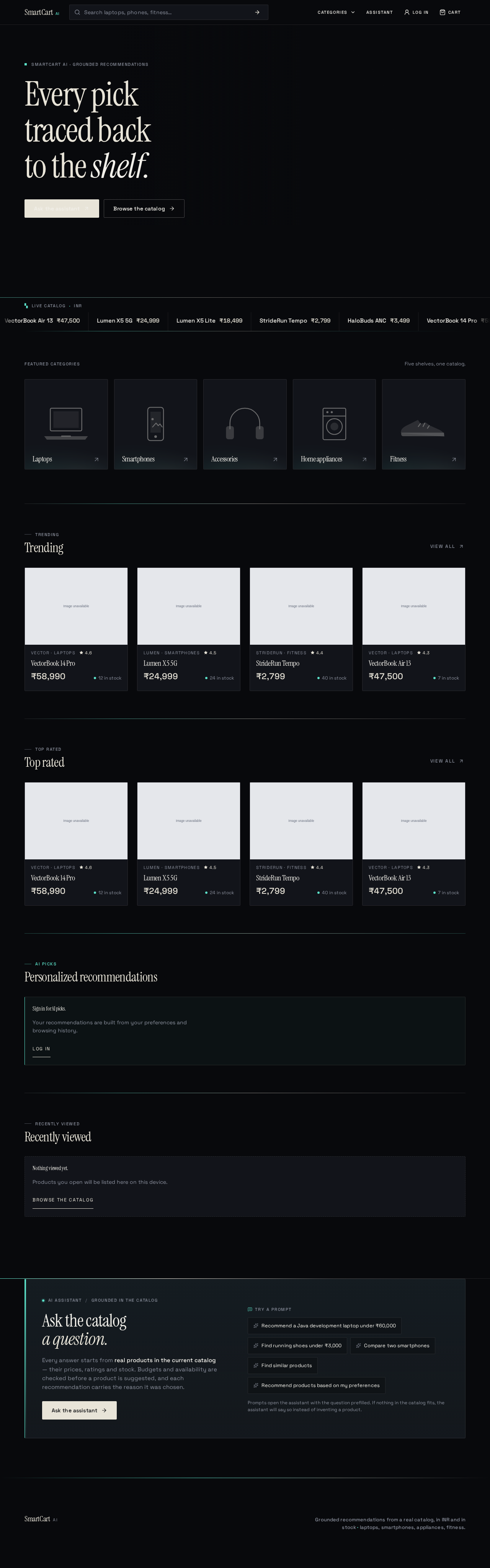
SmartCart AI · Grounded recommendations
Every picktraced backto the shelf.
Featured categories
Five shelves, one catalog.
TRENDING
Trending
 VectorBook 14 Pro₹58,99012 in stock16GB RAM and a 12th-gen H-class CPU meet the Java build requirement under ₹60,000.Open product details
- Lumen X5 5G₹24,99924 in stockHighest rated 5G phone under ₹25,000 in the current catalog.Open product details
- StrideRun Tempo₹2,79940 in stockRunning shoe under ₹3,000 with a cushioned midsole.Open product details
- VectorBook Air 13₹47,5007 in stockLightest in-budget laptop with 16GB RAM for IDE and container work.Open product details
TOP RATED
Top rated
- VectorBook 14 Pro₹58,99012 in stock16GB RAM and a 12th-gen H-class CPU meet the Java build requirement under ₹60,000.Open product details
- Lumen X5 5G₹24,99924 in stockHighest rated 5G phone under ₹25,000 in the current catalog.Open product details
- StrideRun Tempo₹2,79940 in stockRunning shoe under ₹3,000 with a cushioned midsole.Open product details
- VectorBook Air 13₹47,5007 in stockLightest in-budget laptop with 16GB RAM for IDE and container work.Open product details
AI PICKS
Personalized recommendations
Sign in for AI picks.
Your recommendations are built from your preferences and browsing history.
Log inRECENTLY VIEWED
Recently viewed
AI assistantGrounded in the catalog
Ask the catalog a question.
Every answer starts from real products in the current catalog — their prices, ratings and stock. Budgets and availability are checked before a product is suggested, and each recommendation carries the reason it was chosen.
Ask the assistantTry a prompt
- Recommend a Java development laptop under ₹60,000
- Find running shoes under ₹3,000
- Compare two smartphones
- Find similar products
- Recommend products based on my preferences
Prompts open the assistant with the question prefilled. If nothing in the catalog fits, the assistant will say so instead of inventing a product.
SmartCart AI · Grounded recommendations
Every picktraced backto the shelf.
Featured categories
Five shelves, one catalog.
TRENDING
Trending
- VectorBook 14 Pro₹58,99012 in stock16GB RAM and a 12th-gen H-class CPU meet the Java build requirement under ₹60,000.Open product details
- Lumen X5 5G₹24,99924 in stockHighest rated 5G phone under ₹25,000 in the current catalog.Open product details
- StrideRun Tempo₹2,79940 in stockRunning shoe under ₹3,000 with a cushioned midsole.Open product details
- VectorBook Air 13₹47,5007 in stockLightest in-budget laptop with 16GB RAM for IDE and container work.Open product details
TOP RATED
Top rated
- VectorBook 14 Pro₹58,99012 in stock16GB RAM and a 12th-gen H-class CPU meet the Java build requirement under ₹60,000.Open product details
- Lumen X5 5G₹24,99924 in stockHighest rated 5G phone under ₹25,000 in the current catalog.Open product details
- StrideRun Tempo₹2,79940 in stockRunning shoe under ₹3,000 with a cushioned midsole.Open product details
- VectorBook Air 13₹47,5007 in stockLightest in-budget laptop with 16GB RAM for IDE and container work.Open product details
AI PICKS
Personalized recommendations
Sign in for AI picks.
Your recommendations are built from your preferences and browsing history.
Log inRECENTLY VIEWED
Recently viewed
AI assistantGrounded in the catalog
Ask the catalog a question.
Every answer starts from real products in the current catalog — their prices, ratings and stock. Budgets and availability are checked before a product is suggested, and each recommendation carries the reason it was chosen.
Ask the assistantTry a prompt
- Recommend a Java development laptop under ₹60,000
- Find running shoes under ₹3,000
- Compare two smartphones
- Find similar products
- Recommend products based on my preferences
Prompts open the assistant with the question prefilled. If nothing in the catalog fits, the assistant will say so instead of inventing a product.
No comments yet. Be the first!