ocean-e
 Mahesh Savkar
Build a complete, modern, responsive AI-powered e-commerce website named **SmartCart AI** with a working frontend, backend, database, and AI recommendation engine. Do not build only a static UI. All major features must work end to end. ## 1. Technology Stack **Frontend:** React, Vite, JavaScript, React Router, Axios, Context API, Lucide React, responsive CSS. **Backend:** Java 21, Spring Boot 3.x, Maven, Spring Web, Spring Data JPA, Spring Security, JWT, MySQL, Flyway, Bean Validation, Swagger/OpenAPI, JUnit, Mockito. **AI service:** Python, FastAPI, LLM API, LangChain where useful, embeddings, semantic search, RAG, ChromaDB. **Deployment:** Docker, Docker Compose, environment variables, Git, README. Use compatible dependency versions. Never expose API keys or credentials in frontend code. ## 2. UI/UX Design Create a premium shopping experience with clean layouts, professional typography, attractive product cards, consistent colors, subtle shadows, smooth animations, responsive navigation, and mobile-friendly pages. Use Lucide icons, reusable components, loading skeletons, empty states, validation messages, and toast notifications. Avoid generic templates and excessive gradients. ## 3. Customer Features **Home page** - Navbar with logo, search, categories, login, and cart. - Hero section, featured categories, trending products, top-rated products, personalized recommendations, recently viewed products, and AI assistant. **Product listing** - Product grid, search, category and brand filters, price range, rating, stock availability, sorting, and server-side pagination. **Product details** - Images, description, specifications, price, stock, ratings, reviews, quantity selector, add to cart, buy now, similar products, and AI recommendation explanations. **AI shopping assistant** Allow users to ask: - Recommend a Java development laptop under ₹60,000. - Find running shoes under ₹3,000. - Compare two smartphones. - Find similar products. - Recommend products based on my preferences. Retrieve actual products from the catalog, enforce budget and availability constraints, explain recommendations, and display clickable product cards. Support follow-up questions and clearly handle empty results. Never invent products, prices, ratings, specifications, or stock. **Cart and checkout** - Add, update, and remove items. - Calculate subtotals, shipping, and totals. - Validate stock and prices on the backend. - Support guest carts and persistent customer carts. - Collect shipping addresses and create orders transactionally. - Provide order confirmation, order history, details, status, and eligible cancellations. - Use simulated payment or a payment sandbox. Never store card details. **Authentication and profile** - Registration, login, logout, profile management, BCrypt password hashing, JWT, protected routes, and CUSTOMER/ADMIN roles. - Customer preferences for budget, favorite categories, and brands. - Customers can access only their own profiles, carts, preferences, and orders. **Reviews** Allow authenticated users to submit, edit, and delete reviews. Enforce ownership and only label a review as a verified purchase when supported by an actual order. ## 4. AI Recommendation Engine Implement a real hybrid recommendation pipeline using: 1. Content-based filtering. 2. Embedding-based semantic retrieval. 3. User preferences and browsing history. 4. Popularity and rating signals. 5. Product diversity. 6. Evidence-based recommendation explanations. Use RAG to index product descriptions and specifications, generate embeddings, retrieve relevant products through ChromaDB, rank candidates, and generate grounded explanations. Apply deterministic filters for mandatory requirements such as budget and stock. Validate every recommended product against the real catalog. Do not claim collaborative filtering works without sufficient interaction data. ## 5. Spring Boot Backend Use layered architecture: controller, service, repository, entity, dto, mapper, security, config, exception. Create entities for User, Product, Category, Cart, CartItem, Order, OrderItem, Review, UserPreference, and ProductInteraction. Use appropriate JPA relationships, foreign keys, indexes, DTOs, validation, transactions, centralized exception handling, and database migrations. Preserve product name and price snapshots in order items. Implement these APIs: - Authentication: `/api/auth/register`, `/api/auth/login`, `/api/auth/logout`, `/api/auth/me` - Products: `/api/products`, `/api/products/{id}`, `/api/products/search`, `/api/products/{id}/similar` - Categories: `/api/categories` - Cart: `/api/cart`, `/api/cart/items`, `/api/cart/items/{itemId}` - Orders: `/api/orders`, `/api/orders/{id}`, `/api/orders/{id}/cancel` - Reviews: `/api/products/{id}/reviews`, `/api/reviews/{id}` - Preferences: `/api/users/me/preferences` - Recommendations: `/api/recommendations/personalized`, `/api/recommendations/query`, `/api/recommendations/similar` - Admin: `/api/admin/products`, `/api/admin/orders`, `/api/admin/analytics` Use correct HTTP methods, status codes, pagination, validation, authorization, and consistent error responses. Document endpoints using Swagger UI. ## 6. Python AI Service Create: ai-service/ app/main.py app/config.py app/api/ app/schemas/ app/services/ app/retrieval/ app/embeddings/ app/ranking/ app/llm/ tests/ requirements.txt .env.example Dockerfile Implement: - `GET /health` - `POST /ai/search` - `POST /ai/recommendations` - `POST /ai/chat` - `POST /ai/compare` Spring Boot remains the source of truth for products, prices, inventory, users, carts, and orders. FastAPI handles embeddings, semantic retrieval, LLM orchestration, and recommendation explanations. Secure internal communication. Keep API keys in environment variables. Add input validation, timeouts, rate limits, structured output validation, error handling, and a graceful fallback when the AI service is unavailable. ## 7. Admin Dashboard Create a protected dashboard with product CRUD, category management, inventory, order management, sales summaries, top-selling products, and recommendation analytics. Use actual database data and enforce ADMIN authorization on the backend. ## 8. Database and Sample Data Use MySQL and Flyway migrations. Seed at least 30 realistic products across laptops, smartphones, accessories, home appliances, and fitness. Include INR prices, specifications, categories, and suitable image URLs. Identify demo reviews and interactions clearly. Provide safe development-only admin initialization and a way to rebuild the vector index. ## 9. Testing and Security Implement unit tests, API integration tests, authentication tests, ownership and role checks, cart calculations, inventory safeguards, recommendation ranking tests, AI output validation, and AI failure tests. Mock paid LLM calls in automated tests. Protect secrets, validate inputs, configure CORS, enforce resource ownership, calculate prices on the backend, and avoid logging sensitive data. ## 10. Project Structure smartcart-ai/ - frontend/ - backend/ - ai-service/ - docker-compose.yml - .env.example - README.md Provide Dockerfiles for each service and Docker Compose for the application and MySQL. Include health checks, persistent storage, startup commands, port configuration, environment setup, Swagger instructions, and deployment guidance. Use service names instead of localhost for internal Docker communication. ## 11. Implementation Instructions Build incrementally: 1. Architecture, folder structure, database relationships, and request flows. 2. Spring Boot configuration, entities, migrations, and product APIs. 3. Authentication and security. 4. React pages and API integration. 5. Cart, checkout, orders, and inventory. 6. FastAPI, embeddings, ChromaDB, RAG, and recommendations. 7. AI chat integration. 8. Admin dashboard and analytics. 9. Testing, bug fixing, Docker, and documentation. After each phase, show changed files, provide complete working code, explain important logic in beginner-friendly language, run available builds and tests, fix errors, and provide exact verification commands. Inspect the existing workspace before changing files. Preserve working code. Do not generate disconnected files, leave core functionality as placeholders, or claim tests passed without running them. Start with Phase 1 and present the architecture, database relationships, folder structure, API contracts, and end-to-end flows. Then implement each phase in order. The final result must be a functional, secure, maintainable portfolio project suitable for Java Full Stack and GenAI interviews.


Comments (0)
Sign in to leave a comment
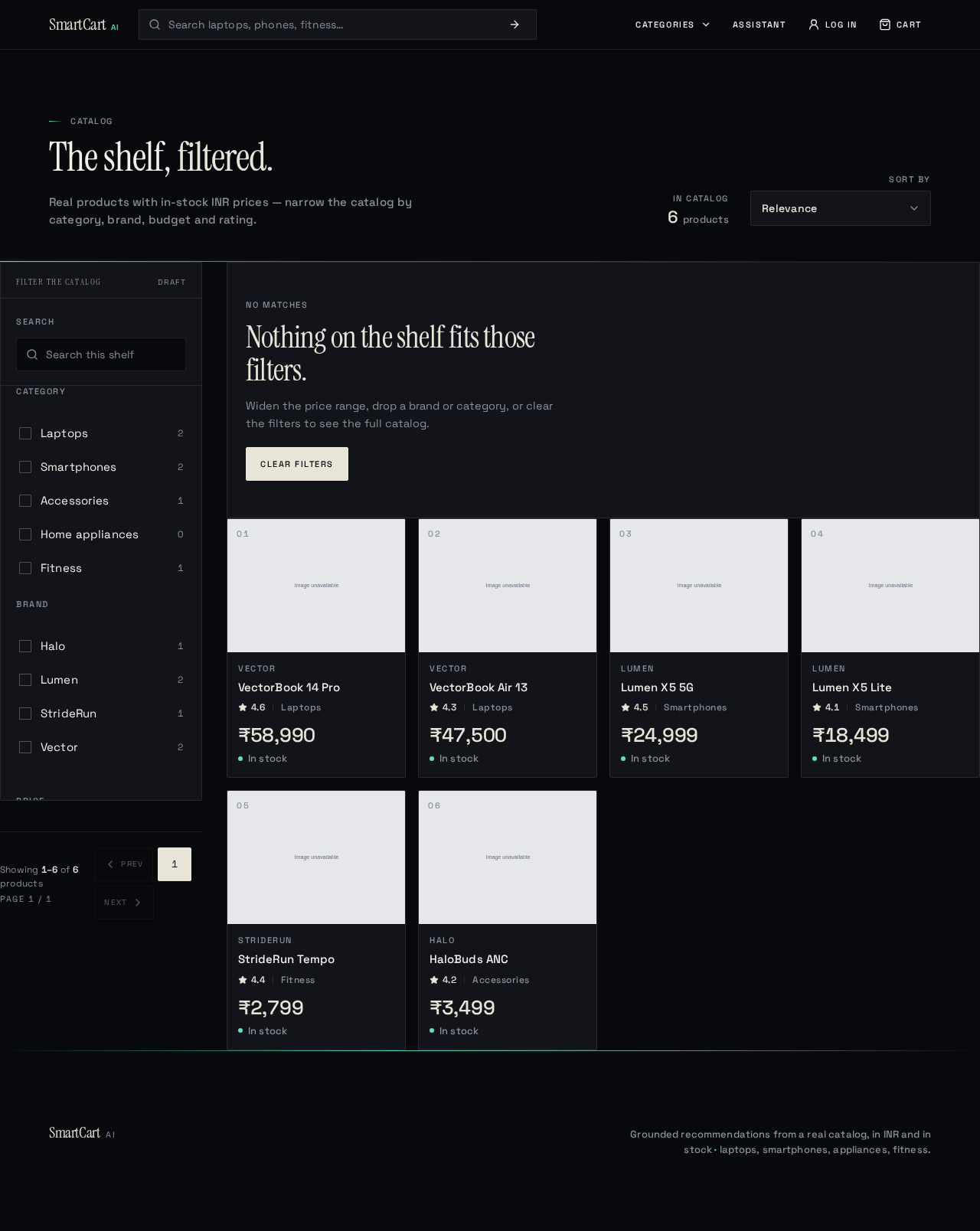
Catalog
The shelf, filtered.
Real products with in-stock INR prices — narrow the catalog by category, brand, budget and rating.
Filters
₹0 – ₹2,00,000 · INR, tabular
Filters match the results
Showing 1–6 of 6 products
Page 1 / 1
No matches
Nothing on the shelf fits those filters.
Widen the price range, drop a brand or category, or clear the filters to see the full catalog.

Vector
VectorBook 14 Pro
₹58,990In stockWhy this?16GB RAM and a 12th-gen H-class CPU meet the Java build requirement under ₹60,000.Vector
VectorBook Air 13
₹47,500In stockWhy this?Lightest in-budget laptop with 16GB RAM for IDE and container work.Lumen
Lumen X5 5G
₹24,999In stockWhy this?Highest rated 5G phone under ₹25,000 in the current catalog.Lumen
Lumen X5 Lite
₹18,499In stockWhy this?Same 5G band support at a lower price; smaller battery.StrideRun
StrideRun Tempo
₹2,799In stockWhy this?Running shoe under ₹3,000 with a cushioned midsole.Halo
HaloBuds ANC
₹3,499In stockWhy this?Active noise cancellation at an accessory price point.
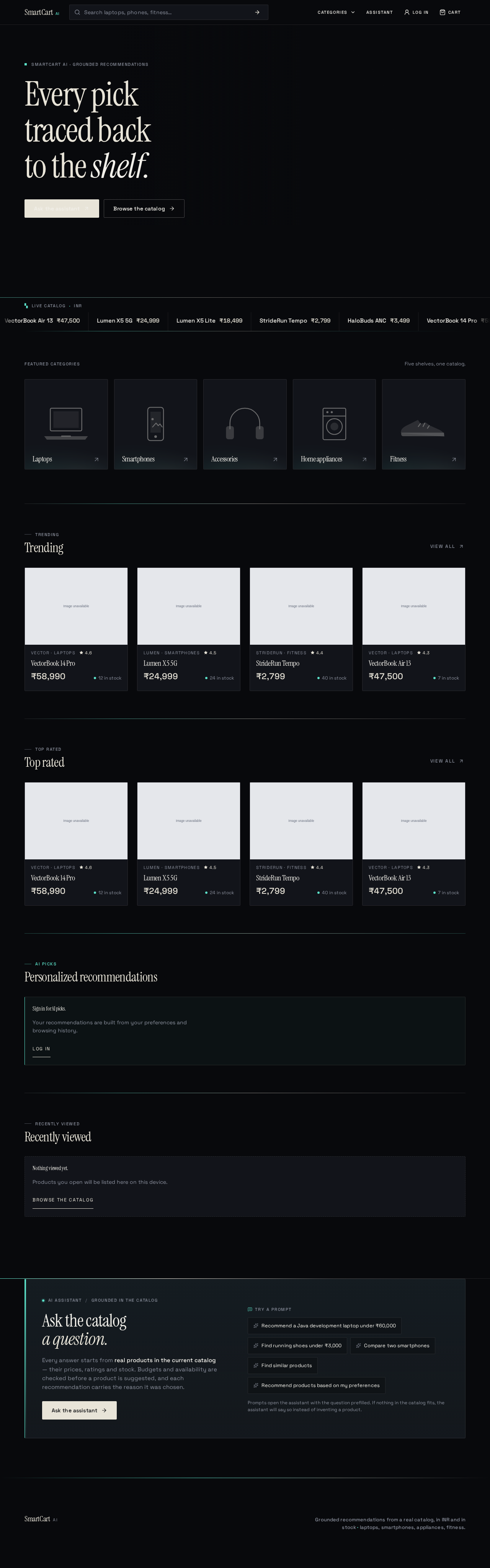
SmartCart AI · Grounded recommendations
Every picktraced backto the shelf.
Featured categories
Five shelves, one catalog.
TRENDING
Trending
- VectorBook 14 Pro₹58,99012 in stock16GB RAM and a 12th-gen H-class CPU meet the Java build requirement under ₹60,000.Open product details
- Lumen X5 5G₹24,99924 in stockHighest rated 5G phone under ₹25,000 in the current catalog.Open product details
- StrideRun Tempo₹2,79940 in stockRunning shoe under ₹3,000 with a cushioned midsole.Open product details
- VectorBook Air 13₹47,5007 in stockLightest in-budget laptop with 16GB RAM for IDE and container work.Open product details
TOP RATED
Top rated
- VectorBook 14 Pro₹58,99012 in stock16GB RAM and a 12th-gen H-class CPU meet the Java build requirement under ₹60,000.Open product details
- Lumen X5 5G₹24,99924 in stockHighest rated 5G phone under ₹25,000 in the current catalog.Open product details
- StrideRun Tempo₹2,79940 in stockRunning shoe under ₹3,000 with a cushioned midsole.Open product details
- VectorBook Air 13₹47,5007 in stockLightest in-budget laptop with 16GB RAM for IDE and container work.Open product details
AI PICKS
Personalized recommendations
Sign in for AI picks.
Your recommendations are built from your preferences and browsing history.
Log inRECENTLY VIEWED
Recently viewed
AI assistantGrounded in the catalog
Ask the catalog a question.
Every answer starts from real products in the current catalog — their prices, ratings and stock. Budgets and availability are checked before a product is suggested, and each recommendation carries the reason it was chosen.
Ask the assistantTry a prompt
- Recommend a Java development laptop under ₹60,000
- Find running shoes under ₹3,000
- Compare two smartphones
- Find similar products
- Recommend products based on my preferences
Prompts open the assistant with the question prefilled. If nothing in the catalog fits, the assistant will say so instead of inventing a product.
No comments yet. Be the first!