nutrication-tracker
 Milan Ajudiya
build the nutrication tracker for every day


Comments (0)
Sign in to leave a comment
System Requirements
System Requirements Document for nutrication-tracker
1. Introduction
nutrication-tracker is a daily nutrition tracking product. Its intent is to let a person record what they eat on any given day and review that day's tracked intake, so that every day has a complete, revisitable nutrition record. The product is used in domestic, everyday contexts by adults who want a calm, non-judgmental record of their eating rather than a performance dashboard.
The audience is a single supported human role: the Nutrition Tracker User — someone who wants to track their nutrition intake for every day. Their recurring responsibility is logging daily nutrition entries and reviewing the day's tracked intake so each day's record is complete and usable.
The product is delivered as a first-party web application with application-owned identity: a public entry surface, self-service enrollment, returning verification, a recurring daily review surface, and a focused entry-creation surface.
2. System Overview
nutrication-tracker currently delivers:
- A public Landing surface that explains, before any identity establishment, that the product is a nutrition tracker for daily intake.
- Self-service Sign Up enrollment for a first-time Nutrition Tracker User.
- Login verification for a returning Nutrition Tracker User with existing durable daily records.
- A recurring, independently revisitable Daily Log view of tracked nutrition for a given day, and the continuation of daily tracking over durable records.
- A focused Log Entry surface for creating and saving nutrition entries for a given day, separate from the daily review context.
Actors:
- Nutrition Tracker User (human, sole supported role) — logs daily nutrition entries and reviews the day's tracked intake.
- Application backend (system actor) — owns durable daily nutrition records, identity continuity, and persistence of entries.
Ownership and access:
- Landing, Sign Up, and Login are anonymously reachable first-party surfaces.
- Daily Log and Log Entry require login and are protected first-party surfaces.
- Durable daily nutrition records are owned by the application and bound to the correct Nutrition Tracker User.
Narrow exclusions:
- No additional human roles, permission tiers, or role-based visibility are established.
- No social, sharing, coaching, clinical, or provider-owned surfaces are established.
- No future-horizon capabilities are accepted in the current scope.
2a. Product Interpretation and Delivery Boundary
The product is a first-party web application. All accepted human-facing work happens on first-party surfaces owned by the application: the public Landing surface, the anonymous Sign Up and Login surfaces, and the protected Daily Log and Log Entry surfaces. There is no provider-owned or external-destination surface in the current scope, and no headless-only delivery.
Access ownership is application-owned identity. A first-time user establishes identity through self-service enrollment on Sign Up; a returning user verifies identity on Login. The Landing surface is the anonymous first impression and does not itself establish access to protected tracking work. Daily Log and Log Entry are protected and cannot be reached without established identity, because durable daily nutrition records must remain bound to the correct Nutrition Tracker User and be resumable across days.
Current scope covers daily nutrition tracking for every day: creating and saving nutrition entries for a given day, and reviewing a given day's tracked nutrition. Future-horizon ideas are not part of current pages or acceptance.
2c. Page Content and Component Coverage
Landing
- Information/state: Anonymous public entry surface. States that nutrication-tracker is a nutrition tracker for daily intake, before any identity establishment or protected tracking work. Presents the product's purpose and the path into daily tracking.
- Primary action: Enter the product — proceed to self-service enrollment (Sign Up) or returning verification (Login).
- Supporting actions: Navigate to Sign Up; navigate to Login.
- Domain entities: None owned; presents product purpose only.
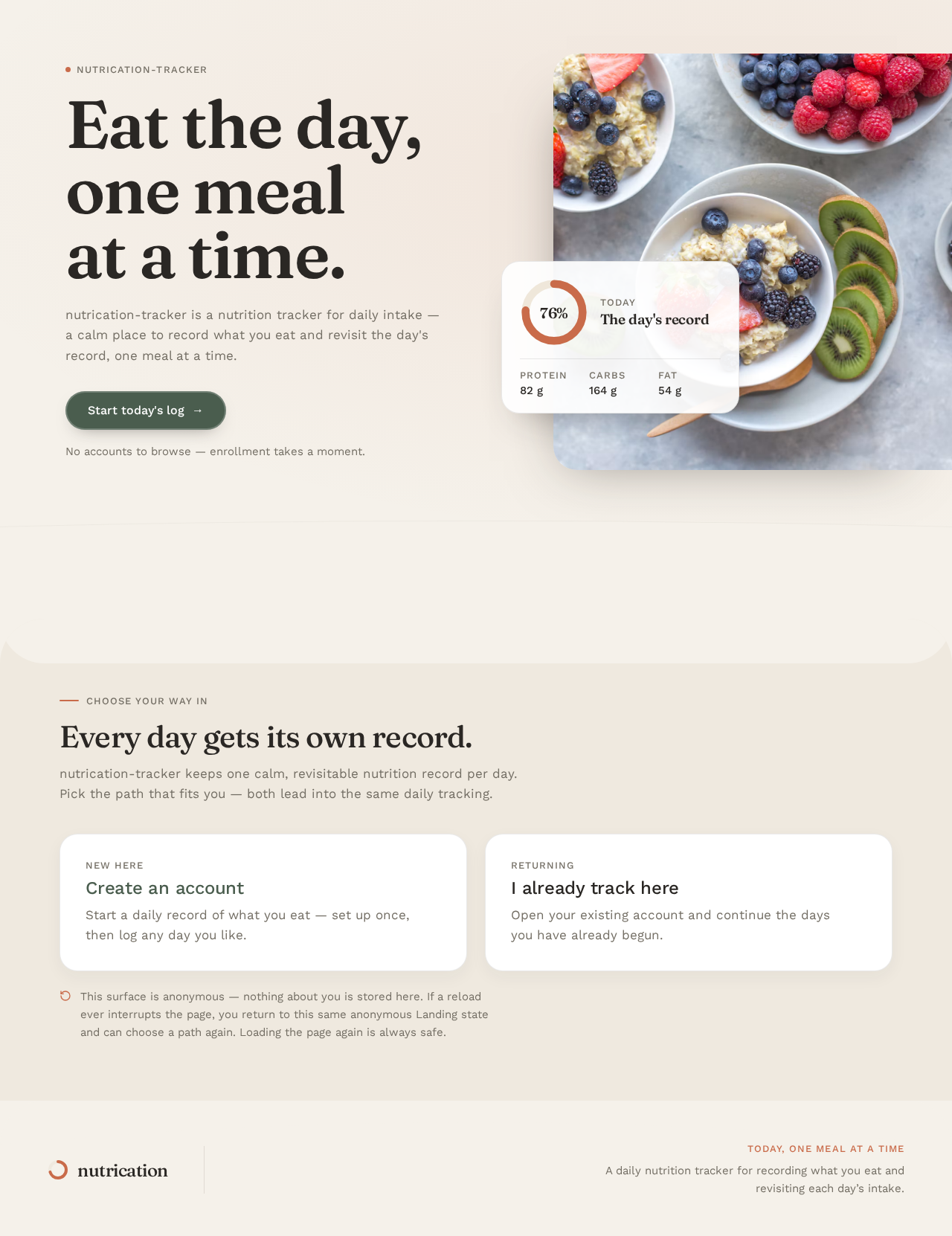
- Component responsibilities: Hero composition (oversized headline, subline, single capsule CTA); macro-ring signature object; entry links to Sign Up and Login.
- States: Loading (initial paint of hero and ring); empty (no user data — anonymous); success (surface rendered, entry actions available); error (surface fails to render — retry); recovery (reload returns to the anonymous Landing state).
Sign Up
- Information/state: Anonymous identity-access surface for first-use enrollment. Collects the information needed to create an account so durable daily nutrition records can be owned and revisited.
- Primary action: Create the account (self-service enrollment).
- Supporting actions: Navigate to Login for an existing account; return to Landing.
- Domain entities: User identity (created); durable daily nutrition records become owned by the new identity.
- Component responsibilities: Enrollment form; submit control; validation feedback; link to Login.
- States: Loading (submitting enrollment); empty (no fields completed); success (identity established, proceed to Daily Log); error (invalid or incomplete enrollment input — inline validation, correct and resubmit); recovery (failed submission preserves entered values and allows retry).
Login
- Information/state: Anonymous identity-access surface for returning verification. Verifies a returning Nutrition Tracker User so their durable daily nutrition records can be accessed.
- Primary action: Verify identity and enter the product.
- Supporting actions: Navigate to Sign Up for a new account; return to Landing.
- Domain entities: User identity (verified); durable daily nutrition records (made accessible).
- Component responsibilities: Verification form; submit control; validation feedback; link to Sign Up.
- States: Loading (verifying); empty (no fields completed); success (identity verified, proceed to Daily Log); error (verification fails — clear message, allow correction and retry); recovery (failed verification preserves entered values and returns to a usable form).
Daily Log
- Information/state: Protected recurring surface. Owns the independently revisitable view of tracked nutrition for a given day and the continuation of daily tracking over durable records. Shows the selected day's tracked entries and the day's macro summary.
- Primary action: Review the day's tracked nutrition.
- Supporting actions: Select/change the day being viewed; open Log Entry to add a nutrition entry for the day; return to the day's record on subsequent visits.
- Domain entities: Day record; nutrition entries for the day; macro summary (protein, carbohydrate, fat) for the day; day completion state.
- Component responsibilities: Sticky "today" capsule showing the date and the day's completion percentage, expanding into the full macro strip; macro summary panel (sticky rounded panel on desktop, horizontal scroll strip on mobile); vertical meal timeline of full-width meal rows, each with a circular thumbnail, item list, and horizontal macro bar; empty-state illustration; entry point to Log Entry.
- States: Loading (fetching the day's records); empty (no entries for the day — illustrated empty state with a path to Log Entry); success (entries and macro summary rendered); error (day records fail to load — retry); recovery (retry reloads the day; previously saved entries remain intact).
Log Entry
- Information/state: Protected focused surface. Owns the creation and saving of nutrition entries for a given day, separate from the daily review context. Shows the day the entry belongs to and the fields being recorded.
- Primary action: Save the nutrition entry to the day.
- Supporting actions: Cancel and return to Daily Log without saving; adjust entered values before saving.
- Domain entities: Nutrition entry (created and saved); day record (entry attached to the correct day); macro contribution of the entry.
- Component responsibilities: Entry form (item and nutrition values); day context indicator; save control; cancel control; validation feedback.
- States: Loading (saving the entry); empty (no values entered); success (entry saved to the day, return to Daily Log with the entry visible); error (save fails or input invalid — inline feedback, values preserved); recovery (retry save without re-entering values).
3. Functional Requirements
FR-1 — Build a nutrition tracker application (explicit) As a Nutrition Tracker User, I should have a working nutrition tracker application so that I can track my nutrition.
- Trigger/input: The user opens the application.
- Observable result: The application is available and presents its public entry surface.
- Access state: Anonymous entry available; protected tracking requires established identity.
- Failure/recovery: If the application fails to load, the user can retry.
- Continuation: From the entry surface the user proceeds to enrollment, verification, or daily tracking.
FR-2 — Track nutrition on a daily basis, for every day (explicit) As a Nutrition Tracker User, I should be able to track my nutrition for each day so that every day has its own record.
- Trigger/input: The user selects a day and records nutrition for it.
- Observable result: The day's tracked nutrition is recorded and visible for that day.
- Access state: Requires established identity (protected).
- Failure/recovery: If a day's record fails to load or save, the user can retry without losing previously saved entries.
- Continuation: The user can return to any day's record and continue tracking on subsequent days.
FR-3 — Self-service enrollment for a first-time Nutrition Tracker User (required_inference) As a first-time Nutrition Tracker User, I should be able to enroll myself so that I can own and revisit my durable daily nutrition records.
- Trigger/input: The user chooses to start from the public entry surface and submits enrollment information.
- Observable result: An account is created and the user enters the product with their own durable daily records.
- Access state: Anonymous entry; enrollment establishes identity.
- Failure/recovery: Invalid or incomplete input is reported inline; entered values are preserved and the user can correct and resubmit.
- Continuation: On success the user proceeds to the Daily Log.
FR-4 — Returning verification for a Nutrition Tracker User with existing durable daily records (required_inference) As a returning Nutrition Tracker User, I should be able to verify my identity so that I can access my existing durable daily nutrition records.
- Trigger/input: The user chooses to return from the public entry surface and submits verification information.
- Observable result: Identity is verified and the user's existing daily records become accessible.
- Access state: Anonymous entry; verification establishes identity.
- Failure/recovery: Failed verification shows a clear message, preserves entered values, and allows retry.
- Continuation: On success the user proceeds to the Daily Log.
FR-5 — Review a given day's tracked nutrition (required_inference) As a Nutrition Tracker User, I should be able to review a given day's tracked nutrition so that I can see what I have recorded for that day.
- Trigger/input: The user opens the Daily Log and selects a day.
- Observable result: The day's entries and macro summary are displayed for that day.
- Access state: Requires established identity (protected).
- Failure/recovery: If the day's records fail to load, the user can retry; saved entries remain intact.
- Continuation: The user can change the day, add an entry, or return later to the same day.
FR-6 — Create and save a nutrition entry for a given day (required_inference) As a Nutrition Tracker User, I should be able to create and save a nutrition entry for a given day so that the day's record reflects what I ate.
- Trigger/input: The user opens Log Entry for a day and submits the entry's values.
- Observable result: The entry is saved to that day and appears in the day's record.
- Access state: Requires established identity (protected).
- Failure/recovery: If the save fails or input is invalid, inline feedback is shown, entered values are preserved, and the user can retry.
- Continuation: On success the user returns to the Daily Log with the new entry visible in the day's record.
4. User Personas
Nutrition Tracker User
- Product context: An adult who wants a calm, non-judgmental record of what they eat, used every day in domestic contexts. They are the sole supported human role in nutrication-tracker.
- Primary goal: Track nutrition intake for every day, so that each day has a complete and usable record.
- Distinct accepted responsibilities:
- Enroll themselves on first use so their daily records are owned and revisitable.
- Verify their identity on return so their existing durable daily records are accessible.
- Review a given day's tracked nutrition on the Daily Log.
- Create and save nutrition entries for a given day on Log Entry.
- Continue daily tracking across days, returning to any day's record.
- Relevant inputs or decisions: Which day to track or review; what nutrition values to record for an entry; whether to save or cancel an entry; whether to enroll or verify.
- Interactions with other accepted participants: The Nutrition Tracker User is the only accepted human participant. Their work is supported by the application backend, which owns durable daily nutrition records and identity continuity; there is no other human counterparty in the current scope.
- Observable success: Each day's record exists, contains the entries the user saved, shows the day's macro summary, and can be reopened on a later visit.
5. Core User Flows
Flow A — First-time enrollment and first day of tracking
- The Nutrition Tracker User opens nutrication-tracker and lands on the anonymous Landing surface, which states that the product is a nutrition tracker for daily intake.
- The user chooses to start and proceeds to Sign Up.
- On Sign Up, the user enters the information needed to create an account and submits.
- If input is invalid or incomplete, Sign Up reports it inline, preserves the entered values, and the user corrects and resubmits.
- On success, identity is established and the user enters the protected Daily Log for the current day.
- The Daily Log shows the day with no entries yet and an illustrated empty state with a path to add an entry.
- The user opens Log Entry for that day.
- On Log Entry, the user enters the entry's nutrition values and saves.
- If the save fails or input is invalid, Log Entry shows inline feedback, preserves the values, and the user retries.
- On success, the entry is saved to the day and the user returns to the Daily Log, where the entry appears in the day's meal timeline and the day's macro summary updates.
- The user can repeat steps 7–10 for further entries, or leave and return later to the same day's record.
Flow B — Returning verification and continuation of daily tracking
- The returning Nutrition Tracker User opens nutrication-tracker and lands on the anonymous Landing surface.
- The user chooses to return and proceeds to Login.
- On Login, the user submits their verification information.
- If verification fails, Login shows a clear message, preserves the entered values, and the user corrects and retries.
- On success, identity is verified and the user's existing durable daily records become accessible on the protected Daily Log.
- The Daily Log loads the selected day's entries and macro summary.
- If the day's records fail to load, the user retries; previously saved entries remain intact.
- The user reviews the day's tracked nutrition, changes the day being viewed if desired, or opens Log Entry to add another entry for the day.
- Any entry saved through Log Entry appears in the day's record on return to the Daily Log, and the user can continue tracking on subsequent days.
6. Visuals Colors and Theme
Muse: Yves Béhar. Headline direction: "Eat the day, one meal at a time." — humane nutrition tracking: warm materials, soft forms, wellbeing first.
Color tokens (light mode):
| Role | Hex |
|---|---|
| Background (warm oat) | #F5F1EA |
| Surface (cards) | #FFFFFF |
| Text | #2A2724 |
| Primary (deep sage) | #4A5D4E |
| Accent (terracotta) | #C96B4A |
| Muted (stone) | #8A8378 |
- Warm oat
#F5F1EAis the dominant field; white#FFFFFFcards are the primary working surface. - Deep sage
#4A5D4Ecarries the brand and primary actions — a natural, non-clinical green that reads as nourishment rather than health-tech. - Terracotta
#C96B4Ais the single hot accent: macro rings, the day's completion marker, hover states. - Muted stone
#8A8378for metadata, labels, and secondary text. - No blue anywhere; no gradients beyond a single subtle warm wash behind the hero.
Typography:
- Headings: Fraunces at optical size 72–144 with the soft-wonky axis engaged, weight 500–600, tight tracking (-0.02em). Headlines are sentence case, generous, and feel hand-set rather than corporate.
- Body: Work Sans at 400/500, roomy 1.6 line-height, no letterspacing games.
- Scale: 1.333 modular — 64 / 48 / 36 / 24 / 17 / 15.
- Display headline
clamp(44px, 7vw, 112px); section headingsclamp(28px, 3.2vw, 44px); body 17px desktop / 16px mobile; micro labels 13px uppercase with 0.08em tracking.
Shape language: Soft organic-modern. Cards and panels use 20–28px continuous radii (superellipse feel, not pill). Buttons are capsule-shaped with a 2px inner highlight. Progress rings are thick-stroked circles with rounded caps. Section boundaries are gently curved — a 60px-radius arc separates hero from the daily log rather than a hard rule. No sharp corners anywhere except data table hairlines.
Spacing rhythm: Generous 96px section padding on desktop, 48px on mobile. Single-column reading measure of 720px for editorial copy, opening to a 12-column grid for the daily log dashboard.
Imagery style: Warm natural-light photography of real food on ceramic and linen — top-down plates, a hand holding a mug, an open notebook. Soft shadows, oat and terracotta tones. Occasional flat illustration of simple kitchen objects (a bowl, a spoon, a lemon) in the same palette for empty states. No stock people smiling at salads, no 3D blobs, no isometric dashboards.
7. Signature Design Concept
The public entry is a split hero on a warm oat ground (#F5F1EA).
- Left 55%: an oversized Fraunces headline — "Eat the day, one meal at a time." — set at
clamp(44px, 7vw, 112px), stacked across four lines, with a 17px Work Sans subline beneath and a single capsule CTA in deep sage (#4A5D4E) labelled "Start today's log". - Right 45%: a full-bleed-to-the-edge photograph of a ceramic bowl on linen, cropped tight so it bleeds off the right viewport edge, with a floating white rounded card overlapping its lower-left corner showing today's macro ring (terracotta stroke on oat track) and three tiny labelled figures in Work Sans.
- A 60px-radius arc curves the bottom of the hero into the next section.
No centred stack, no gradient blob, no blue button. The thick-stroked terracotta macro ring is the product's hero object and the day's progress signature; the curved-section transition makes the page read as one continuous soft surface rather than stacked rectangles. The CTA leads only to accepted behavior: enrollment or verification, then the day's log.
8. Interaction Model & Motion Direction
Interaction Model: Animated Motion Tempo: restrained Hero Dimensionality: layered_2d
Landing Hero Motion Brief
- Focal subject: the ceramic bowl on linen bleeding off the right viewport edge, with the floating white macro card overlapping its lower-left corner.
- Input → transformation → outcome thesis: on first paint, the terracotta macro ring's stroke animates from empty to the day's progress while the headline and subline settle into place; the outcome is a calm, complete first frame that presents the product as a daily nutrition tracker and offers the single sage capsule CTA.
- Motion vocabulary: breathing, slow easing
cubic-bezier(0.22, 1, 0.36, 1), 400–600ms; macro rings animate their stroke on first paint of the day; log rows fade-and-lift 8px on entry, staggered 40ms; hovering a meal row softly deepens its shadow and slides a terracotta chevron in from the right. No bounces, no particles, no gradient drift. - Composed first frame: oat ground, oversized Fraunces headline left, bowl photograph right bleeding off-edge, white macro card overlapping its lower-left corner, single sage capsule CTA.
- Reduced-motion state: rings appear filled, rows appear in place, no stagger; the hero renders as a static composed arrangement with all readable text and controls whole.
9. Non-Functional Requirements
- Durable daily records (required_inference): Daily nutrition records must persist durably and remain bound to the correct Nutrition Tracker User, so that each day's record is revisitable across sessions and days. Rationale: the accepted requirement to track nutrition for every day depends on records surviving between visits.
- Identity continuity (required_inference): The application must maintain identity continuity so that a returning user reaches their own durable daily records and no other user's. Rationale: durable daily records must remain bound to the correct participant.
- Protected tracking surfaces (required_inference): Daily Log and Log Entry must not expose protected daily records before identity is established. Rationale: durable, user-owned daily records require an access boundary.
- Readable text and controls at every viewport (explicit): Headlines, wordmarks, labels, numbers, and cards' text and controls must stay entirely inside the viewport and their container at 375px, 768px, and 1280px, wrapping or scaling (for example
font-size: clamp(...)with its mobile size) to fit, with no other element covering any part of them. Imagery, decoration, and motion may be cropped, bled off an edge, rotated, overlapped, or cut as the creative direction asks, as long as they cover no readable text or control. - Reduced-motion support (explicit): With
prefers-reduced-motion, provide a usable static arrangement: rings appear filled, rows appear in place, no stagger; horizontally scrollable content wraps into rows or scrolls so each item can be brought fully into view. - No blue or indigo (explicit): Blue or indigo must not appear anywhere in the palette; the generic indigo/blue-on-white SaaS template is forbidden for this project.
10. Tech Stack
- Frontend: React (web application with custom UI).
- Backend: Python / FastAPI, extending a single shared backend process for identity and daily nutrition record APIs.
- Storage: A durable datastore appropriate for user-owned daily nutrition records and identity continuity.
- Deployment: Docker / docker-compose for the frontend and backend services.
No separate queue worker, additional container, or Kubernetes deployment is required by the accepted current scope.
11. Assumptions and Constraints
- Assumption (required_inference): Application-owned identity is required because durable daily nutrition records must be privately owned and resumed by the correct Nutrition Tracker User. Enrollment is self-service and returning access is verified; no invitation, provisioning, or deployment bootstrap is established.
- Assumption (required_inference): The Landing surface is anonymously reachable and does not itself establish access to protected tracking work; Sign Up and Login are the anonymous entry interactions that establish identity.
- Constraint (explicit): Tracking is daily — each day has its own record, and tracking continues for every day.
- Constraint (explicit): The palette, typography, shape language, layout, motion, and imagery follow the supplied creative direction; blue and indigo are excluded and the generic indigo/blue-on-white SaaS template is forbidden.
- Constraint (explicit): Readable text and controls remain whole at 375px, 768px, and 1280px; imagery and decoration may bleed or be cropped instead.
- Constraint (explicit): No additional human roles, permission tiers, or role-based visibility are established; the Nutrition Tracker User is the sole supported human role.
- Constraint (explicit): No social, sharing, coaching, clinical, or provider-owned surfaces are established in the current scope.
- Constraint (explicit): Future-horizon capabilities are not part of current pages or acceptance.
12. Glossary
- Nutrition Tracker User: The sole supported human role — someone who tracks their nutrition intake for every day.
- Daily Log: The protected, recurring surface that owns the independently revisitable view of tracked nutrition for a given day and the continuation of daily tracking over durable records.
- Log Entry: The protected, focused surface that owns the creation and saving of nutrition entries for a given day, separate from the daily review context.
- Day record: The durable, user-owned record of tracked nutrition for one specific day.
- Nutrition entry: A single saved item of nutrition information attached to a day record.
- Macro summary: The day's aggregate protein, carbohydrate, and fat figures shown on the Daily Log.
- Macro ring: The thick-stroked terracotta progress ring that serves as the product's hero object and the day's progress signature.
- Day completion: The day's progress state, shown as a percentage in the sticky "today" capsule and as the macro ring's stroke.
- Durable daily records: User-owned daily nutrition records that persist and remain bound to the correct Nutrition Tracker User across sessions and days.
nutrication-tracker
Eat the day,one mealat a time.
nutrication-tracker is a nutrition tracker for daily intake — a calm place to record what you eat and revisit the day's record, one meal at a time.

Today
The day's record
Choose your way in
Every day gets its own record.
nutrication-tracker keeps one calm, revisitable nutrition record per day. Pick the path that fits you — both lead into the same daily tracking.
This surface is anonymous — nothing about you is stored here. If a reload ever interrupts the page, you return to this same anonymous Landing state and can choose a path again. Loading the page again is always safe.
nutrication-tracker
Eat the day,one mealat a time.
nutrication-tracker is a nutrition tracker for daily intake — a calm place to record what you eat and revisit the day's record, one meal at a time.
Today
The day's record
Choose your way in
Every day gets its own record.
nutrication-tracker keeps one calm, revisitable nutrition record per day. Pick the path that fits you — both lead into the same daily tracking.
This surface is anonymous — nothing about you is stored here. If a reload ever interrupts the page, you return to this same anonymous Landing state and can choose a path again. Loading the page again is always safe.
No comments yet. Be the first!