nils-loan-type
open an nils loan website for australia. getting inspo from the photo above and design. loan type. should inclide, non interest loan, car loan, household supplies, grocery support voucher, housing essential. LOAN amount $500 to $5000. personal information. NAME, ADDRESS, EMAIL, PHONE NUMBER, EMPLOYEMENT STATUS. SERVIVE AUSTALIA BENEFIT LIST, CENTRELINK BENEFITS AND PAYMENTS MASTER LIST 1. JOB SEEKERS & EMPLOYMENT SUPPORT - JobSeeker Payment: Income support for people aged 22 to Age Pension age looking for work or temporarily unable to work. - Youth Allowance for Job Seekers: Financial aid for young job seekers aged 16 to 21. - Farm Household Allowance: Relief for farming families experiencing financial hardship. - Mobility Allowance: Help with travel costs for people with a disability who cannot use public transport. 2. FAMILIES, PARENTS & GUARDIANS - Family Tax Benefit Part A: A per-child payment to help with the cost of raising children. - Family Tax Benefit Part B: Extra support for single parents, non-parent carers, and couple families with one main income. - Parenting Payment: Income support for the principal carer of a child (under 14 for single parents, under 6 for partnered parents). - Parental Leave Pay: Financial support for up to 20 weeks while taking time off to care for a newborn or newly adopted child. - Child Care Subsidy (CCS): Assistance to help cover the cost of approved childcare. - Additional Child Care Subsidy: Extra childcare fee assistance for vulnerable families, transition to work, or financial hardship. - Double Orphan Pension: Help for individuals raising children who are orphaned or whose parents cannot care for them. 3. STUDENTS, TRAINEES & APPRENTICES - Youth Allowance for Students and Apprentices: Financial help for full-time students and apprentices aged 16 to 24. - Austudy: Financial assistance for full-time students and apprentices aged 25 or older. - ABSTUDY: Dedicated support for Aboriginal and Torres Strait Islander students and apprentices. - Student Start-up Loan: A voluntary loan for higher education students to help cover study expenses. - Relocation Scholarship: Assistance for regional students who must move away from home to study. 4. OLDER AUSTRALIANS & RETIREES - Age Pension: Regular income support and concession perks for eligible Australians aged 67 or older. - Pension Bonus Scheme: A tax-free lump sum for older Australians who deferred claiming the Age Pension and kept working (closed to new registrations). - Commonwealth Seniors Health Card: Discounts on medicines and healthcare for self-funded retirees of Age Pension age. 5. PEOPLE WITH DISABILITY & CARERS - Disability Support Pension (DSP): Financial aid for individuals with a permanent physical, intellectual, or psychiatric condition that prevents working. - Carer Payment: Income support for individuals who provide constant daily care to someone with a severe disability or medical condition. - Carer Allowance: An additional supplementary payment for those providing daily care to a person with a disability or medical condition. - Carer Supplement: An annual lump-sum payment to help carers with the cost of caring. - Child Disability Assistance Payment: An annual payment for parents receiving Carer Allowance for a child under 16. 6. SUPPLEMENTS & EXTRA ASSISTANCE - Rent Assistance: An automated regular extra payment if you pay rent in the private market while on a Centrelink payment. - Energy Supplement: An ongoing payment to help clear power and energy bills. - Pharmaceutical Allowance: Extra help to cover prescription costs under the PBS. - Telephone Allowance: Help with the cost of maintaining a phone and internet service for eligible cardholders. - Remote Area Allowance: Extra help for people living in designated remote areas to offset higher living costs. - Pensioner Concession Card: Grants cheaper healthcare, medicine, and household discounts for pension recipients. - Health Care Card: Concession card for lower-income earners and job seekers to access cheaper medical services. 7. EMERGENCY & CRISIS PAYMENTS - Crisis Payment: A one-off emergency payment for people in severe financial hardship due to extreme, unforeseen circumstances (e.g., domestic violence, natural disasters, exiting prison). - Special Benefit: Discretionary financial help for people in severe hardship who are not eligible for any other Centrelink payment.


Comments (0)
Sign in to leave a comment
System Requirements
System Requirements Document for NILS Loan
1. Introduction
NILS Loan is an Australian website for exploring and applying for no-interest loans of $500–$5,000 for essential needs. It presents the accepted loan uses, collects the applicant’s requested personal and employment information, and provides the supplied Services Australia and Centrelink benefits and payments list for applicants to review and select.
This document specifies the product requirements, page coverage, user journeys, and delivery boundaries for the NILS Loan website.
Success criteria
- Applicants can review the accepted loan uses and $500–$5,000 amount range.
- Applicants can review the supplied benefits and payments list, select a benefit, and submit an application with the requested information.
- Applicants can establish or verify their identity before the website stores or retrieves their application.
2. System Overview
NILS Loan is a custom Australian website with four contracted pages: Landing, Benefits, Application, and Sign Up. Its sole active human persona is the Loan applicant. The website presents no-interest loans for car needs, household supplies, grocery support vouchers, and housing essentials; the amount range is $500–$5,000. Applicants provide their name, address, email, phone number, employment status, selected loan type, requested amount, and selected benefit.
The website includes the complete supplied benefits and payments list. Listing or selecting a benefit is not an eligibility guarantee, and the website must not imply that Services Australia or Centrelink provides or endorses NILS Loan.
The provisioned services are a React frontend, a shared FastAPI backend for application APIs and domain modules, and MariaDB for application-owned persistent data. Application identity is required before storing or retrieving an application. No loan approval, disbursement, repayment schedule, eligibility assessment, or external government-service integration is specified.
2a. Product Interpretation and Delivery Boundary
The four-page inventory and its access contract are fixed. Landing, Benefits, Application, and Sign Up are application-owned custom pages, each with access requirement none. The Sign Up page is the anonymous identity-entry surface; applicants enroll or verify their identity before the site stores or retrieves application data. Application data is protected by this identity requirement. The other pages remain accessible without identity.
The uploaded flyer is an inspiration-only visual reference. Its friendly colour, simple icons, and approachable style inform the design; its other loan categories, eligibility rules, exclusions, claims, and contact details are not product requirements. The supplied benefits list is presented as provided, without implying that it determines loan eligibility.
Current scope ends at collecting and storing an application and making its submitted state observable to the applicant. No staff, lender, government-service, or other human participant workflow is specified. No future product capabilities are defined.
2c. Page Content and Component Coverage
Landing
- Information and state: Explain the Australian no-interest loan offer, accepted uses, and $500–$5,000 range. Use the approved hero copy:
- Headline: “No-interest loans for essentials”
- Subline: “Explore Australian loans from $500 to $5,000 for cars, household supplies, groceries, and housing essentials.”
- Call to action: “Explore loans”
- Primary and supporting actions: The “Explore loans” action takes the visitor to Benefits. Clear navigation provides access to Benefits and Sign Up.
- Entities and components: Loan-use categories; amount range; hero headline and subline; four outlined essentials icons for cars, household supplies, groceries, and housing; navigation; CTA.
- States: Initial content is available without identity. Loading or error states must not obscure the offer or navigation; provide a retry or a way to continue to another public page if content fails to load. Success is the visitor reaching Benefits or Sign Up.
Benefits
- Information and state: Present all seven categories and every named benefit and description in the Source Content Inventory below. Applicants can review and select a benefit for their application. State clearly that benefit information is not a loan eligibility guarantee and does not imply Services Australia or Centrelink endorsement.
- Primary and supporting actions: Browse the list and select one benefit; continue to Application with the selection carried forward. Provide navigation back to Landing and to Sign Up.
- Entities and components: Benefit category, benefit name, supplied description, selected benefit; readable grouped list and selection controls.
- States: Loading, empty, and error states must be distinguishable. On load failure, offer retry and preserve a route back to Landing. On successful selection, show the selected benefit and continue to Application. If no benefit is selected, allow the applicant to select one before continuing.
Application
- Information and state: Collect the selected loan type, requested amount, applicant name, address, email, phone number, employment status, and selected Services Australia/Centrelink benefit. Loan types are non-interest loan, car loan, household supplies, grocery support voucher, and housing essential. The requested amount must be between $500 and $5,000 inclusive.
- Primary and supporting actions: An identity-verified applicant enters or reviews the requested information, corrects invalid or missing values, and submits the application. The applicant can return to Benefits to change the selected benefit.
- Entities and components: Application; loan type; requested amount; name; address; email; phone number; employment status; selected benefit; form fields, validation feedback, submission action, and submission result.
- Access: The page is listed with access requirement
none; however, application data cannot be stored or retrieved until the applicant has enrolled or verified identity through Sign Up. An unauthenticated visitor may reach the page but must establish identity before accessing or submitting protected application state. - States: Show loading while retrieving or submitting data. Identify missing required fields and amounts outside the inclusive range; retain entered values for correction. On submission failure, explain that the application was not confirmed, preserve entered information where possible, and allow retry. On success, show that the application was submitted and provide a continuation back to Landing or Benefits.
Sign Up
- Information and state: Provide the anonymous entry point for applicant identity enrollment or returning identity verification. Identity must be established before the site stores or retrieves application data.
- Primary and supporting actions: A new applicant enrolls; a returning applicant verifies identity. After success, continue to Application. Provide a route back to Landing and Benefits.
- Entities and components: Applicant identity and verification state; identity-entry and verification controls; status and error feedback.
- States: Show progress during enrollment or verification. On failure, explain that identity was not established and allow retry without exposing protected application data. On success, confirm access and continue to Application.
3. Functional Requirements
-
As a Loan applicant, I should be able to understand the Australian no-interest loan offer and its accepted uses.
Provenance: explicit; Landing ownership is required_inference.
Lifecycle and acceptance: A visitor opens Landing without identity and sees that the service is for Australia, that loans are no-interest, that accepted uses are car needs, household supplies, grocery support vouchers, and housing essentials, and that the amount range is $500–$5,000. The page does not imply government provision or endorsement. If content fails to load, the visitor receives a recoverable error and can retry or navigate to another public page. -
As a Loan applicant, I should be able to review and select from the supplied Services Australia and Centrelink benefits and payments list.
Provenance: explicit; page ownership is required_inference.
Lifecycle and acceptance: The applicant opens Benefits without identity, reviews all seven categories and every supplied item and description, selects a benefit, and continues to Application with that selection. The page states that the list is not an eligibility guarantee and does not imply government endorsement. If loading fails, the applicant can retry; if no benefit is selected, the applicant can select one before continuing. -
As a Loan applicant, I should be able to establish or verify my identity before the website stores or retrieves my application.
Provenance: required_inference.
Lifecycle and acceptance: From the anonymous Sign Up page, a new applicant enrolls or a returning applicant verifies identity. Success establishes access to the applicant’s application and continues to Application. Failure leaves protected application data unavailable and offers retry. No additional account-management capability is implied.
- As a Loan applicant, I should be able to enter and submit an application for an accepted loan type and amount.
Provenance: explicit; identity-gated storage and retrieval are required_inference.
Lifecycle and acceptance: The applicant selects one of non-interest loan, car loan, household supplies, grocery support voucher, or housing essential; enters an amount from $500 through $5,000 inclusive; and provides name, address, email, phone number, employment status, and a selected benefit. The applicant submits the application. Missing required information or an out-of-range amount is identified for correction, with entered values retained where possible. Submission failure is visible and recoverable by retry; success is confirmed to the applicant. Application data is not stored or retrieved until identity is established. No approval or disbursement outcome is represented.
4. User Personas
Loan applicant
Provenance: required_inference from the accepted application and identity-continuity requirements.
The Loan applicant is a person in Australia exploring a no-interest loan for an accepted essential need. Their goal is to understand the offer, review the supplied benefits list, and submit an application for $500–$5,000. They choose a loan type and benefit, provide their name, address, email, phone number, and employment status, and establish or verify identity before application data is stored or retrieved. Their observable success is a confirmed application submission; the website does not represent that submission as approval or payment.
5. Core User Flows
1. Explore the offer
- The Loan applicant opens Landing without identity.
- They review the no-interest offer, accepted uses, and $500–$5,000 range.
- They choose “Explore loans” and arrive at Benefits.
- If Landing content fails to load, they retry or use available navigation to continue to another public page.
2. Review and select a benefit
- The Loan applicant opens Benefits without identity.
- They browse the seven categories and the complete supplied benefit list and descriptions.
- They select a benefit. The page makes clear that selection is not an eligibility guarantee and does not imply Services Australia or Centrelink endorsement.
- They continue to Application with the selected benefit.
- If the list fails to load, they retry. If they have not selected a benefit, they select one before continuing.
3. Establish identity
- A new Loan applicant opens Sign Up anonymously and enrolls; a returning applicant opens the same page and verifies identity.
- During the attempt, protected application data remains unavailable.
- On success, the applicant sees confirmation and continues to Application.
- On failure, the applicant sees that identity was not established and can retry; protected application data remains unavailable.
4. Complete and submit an application
- The Loan applicant reaches Application. If identity has not been established, they go to Sign Up and return after successful enrollment or verification.
- They choose one accepted loan type: non-interest loan, car loan, household supplies, grocery support voucher, or housing essential.
- They enter a requested amount from $500 to $5,000 inclusive.
- They provide their name, address, email, phone number, and employment status, and confirm or select a benefit from the supplied list.
- They submit the application.
- If required information is missing or the amount is outside the range, the page identifies what needs correction and retains entered information where possible.
- If submission fails, the applicant sees that submission was not confirmed and can retry. If it succeeds, the applicant sees confirmation that the application was submitted. The confirmation does not imply approval or disbursement.
- The applicant can continue to Landing or Benefits.
6. Visuals Colors and Theme
Muse: Pablo Stanley. The visual direction is warm, clear support for essential needs: direct, human, and reassuring. Use the flyer as inspiration for friendly colour, simple icons, and plain language, without copying its page structure or importing its unsupported loan terms, eligibility rules, exclusions, or claims.
- Light-mode palette: background
#FFF9FC; surface and large blocks#F1D5E8; text#45283F; primary#BD69A8; accent and key notices#D92F48; muted text#805E79. - Typography: Nunito for bold, rounded headings with close tracking; DM Sans for readable labels and body text.
- Type scale: 48px mobile to 88px desktop for the hero; then 32px, 24px, 18px, and 16px. Scale or wrap text to keep it fully readable.
- Shape and components: Rounded functional panels, simple line icons, and soft circular icon grounds. Avoid decorative blobs and rows of identical hover-lift cards.
- Layout: Flyer-inspired asymmetrical hero with a large mauve text block and a compact essentials icon row. Keep navigation clear and stack sections at mobile widths. Use pale pink page backgrounds, mauve large blocks, and red for key notices.
- Imagery: Simple line icons for household goods, cars, groceries, and housing. Do not add unrelated photos.
- Responsive readability: At 375px, 768px, and 1280px, keep all readable text, labels, numbers, cards, and controls fully within their viewport and containers. Wrap or scale content as needed; no element may cover readable text or controls.
7. Signature Design Concept
On Landing, place the headline “No-interest loans for essentials” in a large mauve block at the upper left, with the four outlined essentials icons—cars, household supplies, groceries, and housing—on the right. Set the headline at 48px on mobile and 88px on desktop, scaling or wrapping to remain fully readable. Place the subline beneath it and show “$500–$5,000” as a bold, high-contrast label nearby. A red pill-shaped “Explore loans” CTA sits below the headline on the pale pink ground. This composition uses only the accepted offer, loan uses, amount range, and navigation action.
8. Interaction Model & Motion Direction
Interaction Model: Animated
Motion Tempo: restrained
Hero Dimensionality: layered_2d
Landing Hero Motion Brief
- Focal subject: The mauve headline block and the four outlined essentials icons.
- Input → transformation → outcome: The visitor activates “Explore loans” → the site navigates to Benefits → the visitor can review and select a supplied benefit.
- Motion vocabulary: Restrained section-entry fades and short, gentle button feedback. Keep all content usable without motion.
- Composed first frame: Show the headline block, essentials icon row, amount range, and red CTA in the flyer-inspired asymmetrical layout.
- Reduced-motion state: Use a static arrangement with all content and controls available; remove nonessential movement and preserve readable, usable layout.
9. Non-Functional Requirements
- Responsive readability — explicit design constraint: At 375px, 768px, and 1280px, readable text and controls must remain whole within the viewport and their containers, with no overlap covering them. Wrap or scale as needed.
- Reduced motion — explicit design constraint: All content and controls remain usable without motion; provide a static arrangement when reduced motion is preferred.
- Application data continuity — required_inference: Application data must be stored and retrieved only after applicant identity is established, so an applicant can resume their own application. Identity continuity does not establish differentiated permissions or role-based access.
- Government relationship clarity — explicit design constraint: Do not imply that Services Australia or Centrelink provides or endorses these loans. Do not present benefit information as a loan eligibility guarantee.
10. Tech Stack
- Frontend: React application UI, as provisioned.
- Backend: Shared FastAPI process for application APIs and domain modules, as provisioned. Reuse this process for application and identity-related APIs; no separate service is specified.
- Database: MariaDB for application-owned persistent data, as provisioned.
- Additional infrastructure: None specified.
11. Assumptions and Constraints
- The website is for Australia and offers no-interest loans; both are explicit constraints.
- The loan amount range is $500–$5,000 inclusive.
- The accepted loan types are non-interest loan, car loan, household supplies, grocery support voucher, and housing essential.
- The supplied benefits and payments list is presented with its supplied descriptions. No independent verification, eligibility determination, or government integration is specified.
- Identity enrollment or verification is required before storing or retrieving an application. No additional account-management features are implied.
- Application submission is not an approval, loan disbursement, or repayment commitment.
- The versioned page contract fixes the page names, order, and access requirements: Landing (
none), Benefits (none), Application (none), Sign Up (none).
12. Glossary
- NILS: No Interest Loan Scheme; in this document, the Australian no-interest loan website described by the accepted requirements.
- Services Australia: The named source context for the supplied benefits and payments list; no integration or endorsement is implied.
- Centrelink: The named source context for the supplied benefits and payments list; no integration or endorsement is implied.
- Application: The applicant’s submitted request containing the selected loan type, requested amount, personal and employment information, and selected benefit.
Appendix A. Supplied Services Australia and Centrelink Benefits and Payments List
The following categories, benefit names, and descriptions are included as supplied. Their presence does not guarantee loan eligibility and does not imply that Services Australia or Centrelink provides or endorses NILS Loan.
1. JOB SEEKERS & EMPLOYMENT SUPPORT
- JobSeeker Payment: Income support for people aged 22 to Age Pension age looking for work or temporarily unable to work.
- Youth Allowance for Job Seekers: Financial aid for young job seekers aged 16 to 21.
- Farm Household Allowance: Relief for farming families experiencing financial hardship.
- Mobility Allowance: Help with travel costs for people with a disability who cannot use public transport.
2. FAMILIES, PARENTS & GUARDIANS
- Family Tax Benefit Part A: A per-child payment to help with the cost of raising children.
- Family Tax Benefit Part B: Extra support for single parents, non-parent carers, and couple families with one main income.
- Parenting Payment: Income support for the principal carer of a child (under 14 for single parents, under 6 for partnered parents).
- Parental Leave Pay: Financial support for up to 20 weeks while taking time off to care for a newborn or newly adopted child.
- Child Care Subsidy (CCS): Assistance to help cover the cost of approved childcare.
- Additional Child Care Subsidy: Extra childcare fee assistance for vulnerable families, transition to work, or financial hardship.
- Double Orphan Pension: Help for individuals raising children who are orphaned or whose parents cannot care for them.
3. STUDENTS, TRAINEES & APPRENTICES
- Youth Allowance for Students and Apprentices: Financial help for full-time students and apprentices aged 16 to 24.
- Austudy: Financial assistance for full-time students and apprentices aged 25 or older.
- ABSTUDY: Dedicated support for Aboriginal and Torres Strait Islander students and apprentices.
- Student Start-up Loan: A voluntary loan for higher education students to help cover study expenses.
- Relocation Scholarship: Assistance for regional students who must move away from home to study.
4. OLDER AUSTRALIANS & RETIREES
- Age Pension: Regular income support and concession perks for eligible Australians aged 67 or older.
- Pension Bonus Scheme: A tax-free lump sum for older Australians who deferred claiming the Age Pension and kept working (closed to new registrations).
- Commonwealth Seniors Health Card: Discounts on medicines and healthcare for self-funded retirees of Age Pension age.
5. PEOPLE WITH DISABILITY & CARERS
- Disability Support Pension (DSP): Financial aid for individuals with a permanent physical, intellectual, or psychiatric condition that prevents working.
- Carer Payment: Income support for individuals who provide constant daily care to someone with a severe disability or medical condition.
- Carer Allowance: An additional supplementary payment for those providing daily care to a person with a disability or medical condition.
- Carer Supplement: An annual lump-sum payment to help carers with the cost of caring.
- Child Disability Assistance Payment: An annual payment for parents receiving Carer Allowance for a child under 16.
6. SUPPLEMENTS & EXTRA ASSISTANCE
- Rent Assistance: An automated regular extra payment if you pay rent in the private market while on a Centrelink payment.
- Energy Supplement: An ongoing payment to help clear power and energy bills.
- Pharmaceutical Allowance: Extra help to cover prescription costs under the PBS.
- Telephone Allowance: Help with the cost of maintaining a phone and internet service for eligible cardholders.
- Remote Area Allowance: Extra help for people living in designated remote areas to offset higher living costs.
- Pensioner Concession Card: Grants cheaper healthcare, medicine, and household discounts for pension recipients.
- Health Care Card: Concession card for lower-income earners and job seekers to access cheaper medical services.
7. EMERGENCY & CRISIS PAYMENTS
- Crisis Payment: A one-off emergency payment for people in severe financial hardship due to extreme, unforeseen circumstances (e.g., domestic violence, natural disasters, exiting prison).
- Special Benefit: Discretionary financial help for people in severe hardship who are not eligible for any other Centrelink payment.
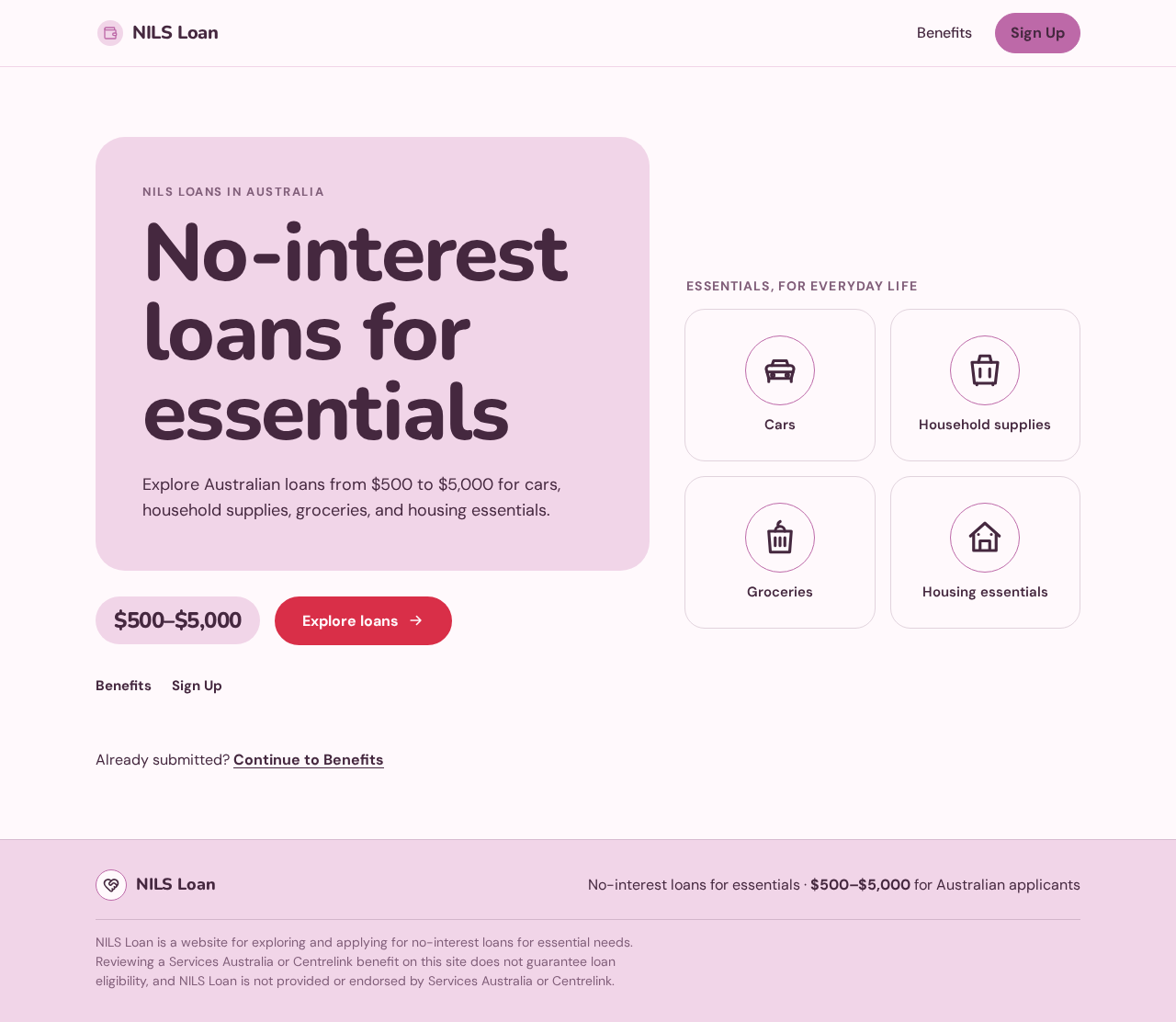
NILS loans in Australia
No-interest loans for essentials
Explore Australian loans from $500 to $5,000 for cars, household supplies, groceries, and housing essentials.
Already submitted? Continue to Benefits
Essentials, for everyday life
NILS loans in Australia
No-interest loans for essentials
Explore Australian loans from $500 to $5,000 for cars, household supplies, groceries, and housing essentials.
Already submitted? Continue to Benefits
Essentials, for everyday life
No comments yet. Be the first!