neon-production
 John Mcabee
Build a production ready, federally compliant and all 50 state legal document creator

Comments (0)
Sign in to leave a comment
System Requirements
System Requirements Document (SRD) for neon-production
1. Introduction
The neon-production project aims to create a production-ready, federally compliant, and legally valid document creation platform that serves users across all 50 states in the United States. This platform is designed to be the comprehensive go-to source for lawyers, small businesses, and families seeking to create, manage, and store legal documents. By focusing on compliance, usability, and security, neon-production will empower users to confidently handle their legal needs in a streamlined and efficient manner.
This document outlines the system requirements for neon-production, including functional and non-functional requirements, user personas, design concepts, and technical specifications. The goal is to ensure that the platform meets the needs of its diverse user base while maintaining the highest standards of legal compliance and user experience.
2. System Overview
neon-production is a web-based platform designed to simplify the creation of legal documents for lawyers, small businesses, and families. The system will provide customizable templates, compliance checks, e-signature integration, and secure document storage. It will ensure that all documents are federally compliant and valid across all 50 states, making it a trusted resource for legal professionals and everyday users alike.
Key features include:
- A library of customizable legal document templates.
- Automated compliance checks for federal and state-specific regulations.
- Secure document storage and management.
- E-signature integration for seamless execution of documents.
- User-friendly interfaces tailored to the needs of lawyers, small businesses, and families.
The platform will prioritize security, scalability, and ease of use, ensuring that users can confidently create and manage their legal documents.
3. Functional Requirements
- As a Lawyer, I should be able to access a library of legal document templates tailored to my practice areas.
- As a Lawyer, I should be able to customize templates to meet specific client needs.
- As a Lawyer, I should be able to perform compliance checks for federal and state-specific regulations.
- As a Small Business Owner, I should be able to create contracts, NDAs, and other business-related documents.
- As a Small Business Owner, I should be able to securely store and manage my documents on the platform.
- As a Family User, I should be able to create wills, power of attorney forms, and other family-related legal documents.
- As a Family User, I should be able to access guidance on which documents are necessary for my situation.
- As a User, I should be able to electronically sign documents directly on the platform.
- As a User, I should be able to save my progress and return to incomplete documents.
- As an Admin, I should be able to manage user accounts and monitor platform usage.
4. User Personas
4.1 Lawyer
- Description: Legal professionals specializing in various practice areas.
- Goals: Access customizable templates, ensure compliance, and streamline document creation for clients.
- Pain Points: Time-consuming compliance checks, lack of reliable templates, and inefficient document management.
4.2 Small Business Owner
- Description: Entrepreneurs and small business managers handling legal documentation for their businesses.
- Goals: Create contracts, NDAs, and other business documents quickly and securely.
- Pain Points: Limited legal knowledge, need for compliance, and secure document storage.
4.3 Family User
- Description: Individuals and families managing personal legal needs.
- Goals: Create wills, power of attorney forms, and other family-related documents with ease.
- Pain Points: Uncertainty about legal requirements and lack of accessible guidance.
5. Visuals Colors and Theme
The visual identity of neon-production will reflect professionalism, trust, and modernity. Below is the unique color palette for the platform:
- Background: #F5F8FA (Soft Cloud White)
- Surface: #FFFFFF (Pure White)
- Text: #2C3E50 (Deep Charcoal)
- Accent: #1ABC9C (Vivid Teal)
- Muted: #BDC3C7 (Light Silver)
This palette ensures a clean, professional appearance while incorporating a touch of vibrancy to make the platform approachable and user-friendly.
6. Signature Design Concept
The homepage of neon-production will feature an interactive "Legal Universe" concept. Users will be greeted by a dynamic, animated galaxy where each star represents a type of legal document or feature.
Key Features:
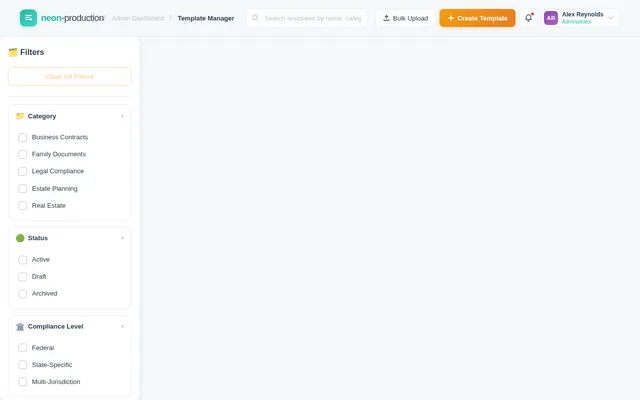
- Interactive Galaxy Map: Users can hover over stars to reveal document categories (e.g., "Business Contracts," "Family Wills," "Legal Compliance").
- Smooth Animations: Stars will gently pulse and connect with constellation-like lines, creating a sense of interconnectedness.
- Guided Navigation: Clicking on a star zooms into a specific category, transitioning seamlessly to a list of templates or features.
- Dynamic Background: The galaxy's colors will subtly shift based on the time of day, transitioning from a sunrise palette in the morning to a deep, starry night theme in the evening.
- Micro-Interactions: Hover effects, subtle sound cues, and smooth transitions will enhance the user experience.
This bold and unforgettable design will make neon-production stand out as a modern, innovative platform while maintaining a professional tone.
7. Non-Functional Requirements
- Performance: The platform must handle up to 10,000 concurrent users without performance degradation.
- Security: All user data must be encrypted in transit and at rest. The platform must comply with federal and state data protection regulations.
- Scalability: The system must be scalable to accommodate future growth in user base and features.
- Accessibility: The platform must meet WCAG 2.1 AA standards for accessibility.
- Availability: The system must maintain 99.9% uptime.
8. Tech Stack
Frontend
- React for Web
Backend
- Python
- FastAPI
Database
- MySQL (with Alembic for migrations)
AI Models
- GPT 5.4 for user-friendly responses
- Claude 4.6 Opas for academic or coding work
- Gemini 3.1 Pro for friendly responses
AI Tools
- Langchain
- Litellm for LLM Routing
Local Orchestration
- Docker
- docker-compose
Server-Side Orchestration
- Kubernetes
9. Assumptions and Constraints
- The platform will initially target users in the United States.
- All legal document templates will be reviewed by legal experts to ensure compliance.
- The system will require users to create accounts for document storage and management.
- The platform will integrate with third-party e-signature providers for document execution.
- Development will prioritize web-based access, with mobile app support planned for future phases.
10. Glossary
- Compliance Check: A process to ensure that a document adheres to federal and state-specific legal requirements.
- E-Signature: An electronic method of signing documents that is legally binding.
- WCAG: Web Content Accessibility Guidelines, a set of standards for making web content accessible to people with disabilities.
- LLM: Large Language Model, an AI model trained to understand and generate human-like text.

Legal Documents Made Simple
Federally Compliant Templates for Lawyers, Businesses & Families
Everything You Need for Legal Documents
From customizable templates to automated compliance and e-signatures, neon-production streamlines your entire legal document workflow.
Customizable Templates
Access a comprehensive library of legal document templates tailored for lawyers, businesses, and families. Customize every detail to meet your specific needs across all 50 states.
Browse templatesCompliance Checks
Automated federal and state-specific regulation checks ensure every document you create is legally valid. Stay confident with built-in compliance verification at every step.
Learn about complianceE-Signature Ready
Seamlessly sign and execute documents directly on the platform. Our integrated e-signature solution is legally binding and works across all devices for fast turnaround.
Try e-signaturesExplore the Legal Universe
Navigate through document categories like stars in a galaxy. Each constellation represents a world of professionally crafted, federally compliant templates.
Business Contracts
Professionally crafted contract templates for partnerships, services, and vendor agreements.
Explore templates →Family Wills
Comprehensive estate planning documents including last wills, trusts, and beneficiary forms.
Explore templates →Legal Compliance
Federal and state-specific compliance documents ensuring regulatory adherence across all 50 states.
Explore templates →NDAs & Agreements
Non-disclosure agreements, confidentiality clauses, and mutual agreement templates for businesses.
Explore templates →Power of Attorney
Durable, healthcare, and financial power of attorney forms valid in every jurisdiction.
Explore templates →Built for the Way You Work
Whether you are a legal professional, running a business, or managing family matters, neon-production adapts to your unique needs.
- Access customizable templates tailored to your practice areas
- Run automated compliance checks for federal and state regulations
- Streamline document creation and client workflows
- Create contracts, NDAs, and business documents quickly
- Securely store and manage all your legal documents
- Ensure compliance without needing legal expertise
- Create wills, power of attorney, and family legal documents
- Get step-by-step guidance on which documents you need
- Simple, accessible tools designed for everyday users
Ready-to-Use Legal Templates
Professionally drafted, federally compliant document templates for lawyers, businesses, and families.
Non-Disclosure Agreement
Protect confidential information with a federally compliant NDA template.
Last Will & Testament
Create a legally binding will with state-specific provisions and guidance.
Service Agreement
Professional service contract template for freelancers and businesses.
Power of Attorney
Designate a trusted agent to act on your behalf with full legal authority.
Employment Contract
Comprehensive employment agreement covering terms, benefits, and obligations.
HIPAA Compliance Policy
Ensure healthcare data handling meets federal HIPAA requirements.
Create Legal Documents in 4 Simple Steps
From template selection to secure storage, our streamlined process ensures every document is compliant, customized, and ready for execution.
Choose Your Category
Browse our library of legal document templates organized by practice area. Select from business contracts, family wills, NDAs, power of attorney, and more - all federally compliant across 50 states.
Customize Your Document
Tailor every detail to your specific needs with our guided editor. Fill in parties, terms, clauses, and provisions with smart suggestions and clause libraries built for lawyers, businesses, and families.
Automated Compliance Check
Our system automatically reviews your document against federal and state-specific regulations. Get instant feedback on required clauses, legal language, and jurisdiction-specific requirements.
Sign & Securely Store
Execute your document with integrated e-signatures and store it securely on the platform. Access your documents anytime, share with stakeholders, and maintain a complete audit trail.
Trusted by Legal Professionals Nationwide
See how lawyers, businesses, and families rely on neon-production for their legal documents
“neon-production has completely transformed how I draft documents for clients. The compliance checks across all 50 states save me hours of research every single week.”
“As a small business owner, I needed reliable contracts and NDAs without hiring expensive legal counsel. This platform made it incredibly simple and affordable.”
“Creating a will and power of attorney for my family was seamless. The guided recommendations helped me understand exactly which documents we needed.”
“The customizable templates are exceptional. I can tailor every document to my clients' specific needs while knowing it meets federal and state compliance standards.”
“The e-signature integration alone has cut our contract turnaround time in half. Combined with secure storage, it's become essential to our operations.”
“I was overwhelmed by legal jargon until I found this platform. The guidance center walked me through every step of setting up our family trust documents.”
Simple, Transparent Pricing
Choose the plan that fits your legal document needs. No hidden fees, cancel anytime.
Starter
Perfect for families managing personal legal needs
per user / month
What's included
- ✓Up to 5 documents per month
- ✓Family document templates
- ✓Wills & power of attorney
- ✓E-signature integration
- ✓Secure cloud storage (1 GB)
- ✓Basic guidance center
- ✕Compliance checks
- ✕Priority support
Professional
Ideal for small businesses and growing teams
per user / month
What's included
- ✓Unlimited documents
- ✓All business templates
- ✓Contracts, NDAs & agreements
- ✓E-signature integration
- ✓Secure cloud storage (25 GB)
- ✓Federal compliance checks
- ✓State-specific validation
- ✓Priority email support
Enterprise
Built for law firms and legal teams at scale
Tailored to your firm's needs
What's included
- ✓Everything in Professional
- ✓Custom template builder
- ✓Multi-user collaboration
- ✓Advanced compliance engine
- ✓Unlimited secure storage
- ✓50-state regulation coverage
- ✓Dedicated account manager
- ✓SSO & admin controls
30-day money-back guarantee — All plans include encrypted storage, 99.9% uptime, and full federal compliance.
Start Creating Legal Documents Today
Join thousands of lawyers, businesses, and families who trust neon-production to create federally compliant legal documents across all 50 states.
No credit card required. Free plan includes 3 documents per month. Your data is encrypted and protected.
No comments yet. Be the first!