neon-metro
 Dev Kalyani
make me a metro booking app make 4 pages

Comments (0)
Sign in to leave a comment
System Requirements
System Requirements Document for neon-metro
1. Introduction
neon-metro is a metro booking application for everyday city riders and for booking managers who reserve metro travel on behalf of other people. The product lets a person find a metro route or trip, choose a suitable option, complete a reservation, and obtain a confirmed ticket — and then return later to review the bookings they have made.
The audience is two-fold. The Metro Rider books metro travel for themselves and needs to find and reserve a route quickly and trust that the ticket is correct. The Booking Manager arranges travel for other travelers — family, colleagues, or other passengers — and needs line-by-line clarity when issuing tickets for people who are not themselves.
The product is deliberately small and exact: exactly four pages — Landing, Search, Booking, and Bookings. It is a wayfinding product at heart, and its visual language is the sober, civic, slightly nocturnal confidence of a transit system: a near-black ground, one exact acid-yellow signal colour, ruled tables instead of cards, and a diagrammatic metro map that is both the hero artwork and the navigation.
2. System Overview
neon-metro is delivered as a first-party web application with a custom user interface and an application-owned identity. It consists of four pages:
- Landing — the anonymous public entry surface. It explains the metro booking app, presents the network diagram, and directs visitors into route search or into access.
- Search — searches metro routes or trips and displays matching travel options as a ruled table.
- Booking — lets an actor select a metro option, complete the reservation, and obtain a confirmed ticket.
- Bookings — provides a revisitable list of existing bookings and their booking details.
Two accepted human personas act in the product: the Metro Rider and the Booking Manager. Both may search, book, and review bookings; the Booking Manager additionally arranges travel on behalf of other travelers, so booking creation and booking-history visibility are role-aware.
The application owns durable state: routes and trips, bookings, tickets, and the identity that binds a booking to the correct participant. A backend service provides route/trip search, booking creation and confirmation, and booking-history retrieval. Identity is established on first use and verified on return before protected booking workflows are reached.
Narrow exclusions. This document does not add payment processing, seat-map selection, loyalty or rewards, refunds and cancellation workflows beyond the disruption/cancellation display code described in the visual system, notifications, or any account-management capability beyond first-use identity establishment and returning verification. No page beyond the four named above is in scope.
2a. Product Interpretation and Delivery Boundary
Delivery ownership. neon-metro is a first-party application. All four pages are custom application surfaces owned by the product; there is no provider-owned or external-only surface in the current scope, and no headless-only delivery. The backend that serves route search, booking creation, and booking history is part of the same application and is reached only through these four pages.
Access ownership. The Landing page is anonymously reachable — it is the public entry surface and carries no access requirement. Search, Booking, and Bookings are protected: a visitor must establish identity before reaching them. Because a protected destination cannot own the interaction that establishes access to itself, first-use identity establishment and returning verification are treated as an anonymous entry interaction that precedes protected work; the protected state itself remains unavailable until identity is established. Booking creation and booking-history visibility are role-aware, so what a Booking Manager can do on behalf of other travelers is distinguished from what a Metro Rider does for themselves.
Current vs. future boundary. Everything described in this document is current. No future-horizon requirements were accepted in the authoritative thread; the only forward-looking statement is the four-page limit itself, which is a current hard constraint rather than a deferred feature.
2b. Source Content Inventory
Not applicable. No reference directive in this project declares a content_source, so no verified factual inventory is carried into this document.
2c. Page Content and Component Coverage
Landing
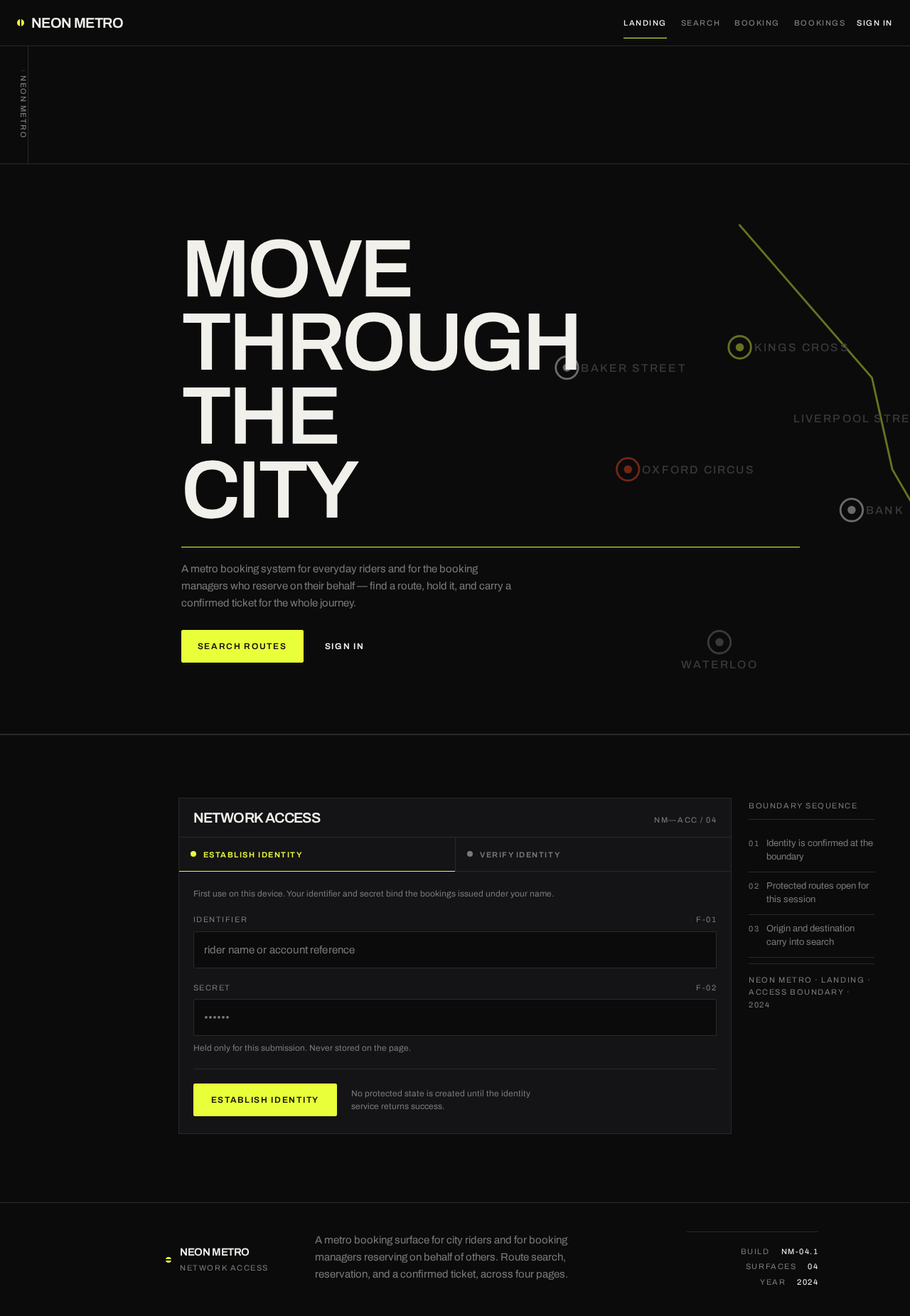
- Information and state. Anonymous public entry. Presents the product identity and the network: an oversized uppercase headline block, a single line of supporting grey text, and the diagrammatic metro map cropped by the viewport edge. A persistent left metadata rail carries catalogue-style labels (page name, date, rider ID, active line code). No booking state is shown here; the page is stateless apart from the visitor's own navigation choices.
- Primary actions.
SEARCH ROUTES— a solid acid-yellow button with black text that moves the visitor toward route search.SIGN IN— a bare text link that begins the access interaction. - Supporting actions. Interchange stations on the network diagram are clickable and set the origin/destination that the search form will use.
- Domain entities. Network, line, station, interchange, origin, destination.
- Component responsibilities. Metadata rail (full page height on desktop, collapsed to a horizontal strip above content at 375px); hero type block (flush left, stacked, tight leading); full-width 1px acid-yellow rule; supporting text line; action pair; SVG network diagram with 2px lines, 8px station dots, and interchange rings, bleeding off the right and bottom edges, with one acid-yellow line drawn across it.
- States. Loading: the network diagram's active line draws itself once over 900ms; with reduced motion the diagram is shown fully drawn. Empty: not applicable — the page has no collection. Success: the visitor has either entered route search or begun the access interaction. Error: if the network diagram fails to render, the headline, supporting text, and both actions remain fully usable and the diagram area degrades to the black ground with its hairline rules. Recovery: the visitor can retry the diagram by reloading, or proceed directly through either action without it.
Search
- Information and state. Protected. Shows the search form (origin, destination, and travel parameters) and the resulting set of matching metro routes or trips. Results are a ruled table, not a card grid: each route is a row with origin, destination, time, fare, and a line-colour dot, aligned on tabular numerals. A single acid-yellow highlight bar marks the selected row. The metadata rail shows the rider ID and the active line code.
- Primary actions. Submit a search for metro routes or trips; select a route row to carry it forward into booking.
- Supporting actions. Set origin and destination from the network diagram's interchange stations; clear or revise the search inputs; re-run a search.
- Domain entities. Route, trip, origin station, destination station, departure time, fare, line, line colour, platform.
- Component responsibilities. Search form with 2px-radius inputs; ruled results table with full-bleed 1px hairlines and line-colour dots at the row start; sliding acid-yellow selection highlight; metadata rail; at 375px each row reflows into a stacked label/value block with the same rules.
- States. Loading: the results region shows a pending state while the search is in flight; the form remains editable. Empty: when no routes or trips match, the table area shows an explicit no-matching-routes state with the submitted origin and destination restated and a prompt to revise the search. Success: matching routes are listed as ruled rows and one can be selected. Error: if the search request fails, the table area shows a failure state with the submitted inputs preserved and a retry action; the form is not cleared. Recovery: the actor revises inputs or retries; a failed search never discards the entered origin and destination.
Booking
- Information and state. Protected and role-restricted. Shows the selected metro option in detail — origin, destination, departure time, platform, fare, and line — together with the passenger details required to issue the ticket, and, on completion, the confirmed ticket. The confirmed ticket is rendered as a printed artefact: a black panel with a 1px border, a real barcode/QR block, tabular departure time and platform, and a perforated hairline. It is the only element in the product with a 2px radius. The metadata rail shows the rider ID and the active line code.
- Primary actions. Confirm the reservation and obtain the confirmed ticket. For a Booking Manager, enter the details of the traveler or travelers the booking is being made for.
- Supporting actions. Review the selected option before committing; return to Search to choose a different option; view the issued ticket's barcode/QR block.
- Domain entities. Booking, ticket, passenger, traveler, fare, departure time, platform, line, barcode/QR block, booking status.
- Component responsibilities. Selected-option summary; passenger/traveler detail entry; confirmation control; printed-ticket panel with barcode/QR block and perforated hairline; metadata rail.
- States. Loading: while the reservation is being created, the confirmation control shows a pending state and the selected option remains visible. Empty: if the page is reached without a selected metro option, it shows an explicit state directing the actor back to Search rather than presenting an empty form. Success: the confirmed ticket appears as the printed artefact with its barcode/QR block, departure time, and platform. Error: if the reservation fails, the selected option and entered passenger details are preserved and a retry action is offered; no ticket is shown. Recovery: the actor retries the reservation, corrects passenger details, or returns to Search; a failed reservation never produces a partial or ambiguous ticket. A cancelled ticket, where it exists, is marked with the vermilion disruption code so it is legible at a glance on the black ground.
Bookings
- Information and state. Protected and role-restricted. Provides a revisitable list of existing bookings and their booking details, presented as a ruled table with full-bleed 1px hairlines, tabular numerals, and line-colour dots at the row start. A single acid-yellow highlight bar marks the selected row. The metadata rail shows the rider ID and the active line code.
- Primary actions. Review the list of existing bookings; open a booking's details.
- Supporting actions. Distinguish confirmed bookings from cancelled ones by the acid-yellow confirmed code and the vermilion cancellation code; for a Booking Manager, distinguish bookings made on behalf of other travelers.
- Domain entities. Booking, ticket, passenger, traveler, departure time, platform, line, booking status.
- Component responsibilities. Ruled bookings table; sliding acid-yellow selection highlight; booking-detail view; status coding; metadata rail; at 375px each row reflows into a stacked label/value block with the same rules.
- States. Loading: the list region shows a pending state. Empty: when the actor has no bookings, an explicit empty state explains that no bookings exist yet and offers a route into Search. Success: bookings are listed as ruled rows with their details available. Error: if the list cannot be retrieved, a failure state with a retry action is shown instead of an empty list, so an error is never mistaken for "no bookings". Recovery: the actor retries retrieval; the page remains revisitable and the list is restored on success.
3. Functional Requirements
FR-1 — Anonymous entry to the product (explicit) As a visitor, I should arrive at the Landing page without any access requirement, so that I can understand what neon-metro is and decide how to proceed.
- Trigger/input: navigating to the application.
- Observable result: the Landing page renders with its headline, supporting text, network diagram, and both actions.
- Access state: anonymous; no identity required.
- Failure/recovery: if the network diagram fails to render, the headline, supporting text, and both actions remain usable.
- Continuation: the visitor proceeds to route search or to the access interaction.
FR-2 — Enter route search from the public entry (explicit) As a visitor, I should be able to start searching metro routes from the Landing page, so that I can look for travel without first reading anything else.
- Trigger/input: activating
SEARCH ROUTES. - Observable result: the visitor is taken toward route search; because Search is protected, the access interaction is presented before protected search state is reached.
- Access state: anonymous entry, protected destination.
- Failure/recovery: if the access interaction is abandoned, the visitor returns to Landing with no partial protected state.
- Continuation: after identity is established, the visitor reaches Search.
FR-3 — Set origin and destination from the network diagram (explicit) As a visitor or actor, I should be able to click an interchange station on the network diagram to set the origin or destination, so that the map itself is the navigation.
- Trigger/input: clicking an interchange station on the Landing page's SVG network diagram.
- Observable result: the clicked station is set as the origin or destination that the search form will use.
- Access state: anonymous on Landing; the value carries into the protected Search page once identity is established.
- Failure/recovery: if the diagram is unavailable, origin and destination can still be entered directly in the Search form.
- Continuation: the actor submits a search with the pre-set origin and destination.
FR-4 — First-use identity establishment (required_inference) As a first-time rider or booking manager, I should be able to establish my own identity for the application, so that my bookings remain bound to me and I can return to them.
- Trigger/input: choosing to proceed from Landing into protected work, or activating
SIGN INon first use. - Observable result: an application-owned identity is created for the actor and the actor is admitted to the protected destinations.
- Access state: the entry interaction is anonymous; protected state remains unavailable until identity is established.
- Failure/recovery: if establishment fails or is abandoned, no protected state is created and the actor remains on the anonymous entry.
- Continuation: the actor reaches Search, Booking, or Bookings.
FR-5 — Returning verification (required_inference) As a returning rider or booking manager, I should be able to verify my identity before reaching protected booking workflows, so that my existing bookings and history stay private to me.
- Trigger/input: returning to the application and proceeding into protected work.
- Observable result: the actor's identity is verified and the protected destinations become available with the actor's own bookings.
- Access state: anonymous entry, protected destinations.
- Failure/recovery: if verification fails, the actor remains on the anonymous entry and no protected state is exposed.
- Continuation: the actor resumes their own bookings and history.
FR-6 — Search metro routes or trips (explicit) As a Metro Rider or Booking Manager, I should be able to search metro routes or trips, so that I can find a suitable option for the journey I need.
- Trigger/input: entering origin, destination, and travel parameters on Search and submitting.
- Observable result: matching travel options are displayed as a ruled table of rows, each with origin, destination, time, fare, and a line-colour dot, aligned on tabular numerals.
- Access state: protected; identity required.
- Failure/recovery: if the search request fails, the submitted inputs are preserved and a retry action is offered; the form is not cleared.
- Continuation: the actor selects a route row to carry into Booking, or revises the search.
FR-7 — No matching routes (explicit) As a Metro Rider or Booking Manager, I should be told clearly when no routes or trips match my search, so that I can revise my inputs rather than assume the app is broken.
- Trigger/input: a search that returns no matching routes or trips.
- Observable result: the results area shows an explicit no-matching-routes state restating the submitted origin and destination and prompting a revision.
- Access state: protected; identity required.
- Failure/recovery: the actor revises origin, destination, or travel parameters and re-runs the search.
- Continuation: a revised search returns matching rows.
FR-8 — Select a metro option (explicit) As a Metro Rider or Booking Manager, I should be able to select one of the matching routes, so that I can proceed to reserve it.
- Trigger/input: selecting a row in the ruled results table.
- Observable result: a single acid-yellow highlight bar marks the selected row and the option is carried forward into Booking.
- Access state: protected; identity required.
- Failure/recovery: selecting a different row moves the highlight; the previous selection is discarded cleanly.
- Continuation: the actor arrives at Booking with the selected option shown.
FR-9 — Complete a reservation and obtain a confirmed ticket (explicit) As a Metro Rider, I should be able to complete the reservation for the selected metro option and obtain a confirmed ticket, so that I have proof of travel.
- Trigger/input: confirming the reservation on Booking for the selected option.
- Observable result: a confirmed ticket is issued and rendered as a printed artefact — a black panel with a 1px border, a real barcode/QR block, tabular departure time and platform, and a perforated hairline.
- Access state: protected and role-restricted; identity required.
- Failure/recovery: if the reservation fails, the selected option and any entered details are preserved, a retry action is offered, and no ticket is shown; a failed reservation never produces a partial or ambiguous ticket.
- Continuation: the actor can review the ticket on Booking or find it later in Bookings.
FR-10 — Book on behalf of other travelers (required_inference) As a Booking Manager, I should be able to enter the details of the traveler or travelers a booking is being made for, so that correctly issued tickets reach the intended passengers.
- Trigger/input: entering passenger/traveler details on Booking before confirming.
- Observable result: the booking is created for the intended travelers and the issued ticket identifies them; the booking is distinguishable in Bookings as one made on behalf of others.
- Access state: protected and role-restricted; identity required.
- Failure/recovery: if the reservation fails, the entered traveler details are preserved and a retry action is offered.
- Continuation: the Booking Manager reviews the issued tickets in Bookings.
FR-11 — Review existing bookings (explicit) As a Metro Rider or Booking Manager, I should be able to revisit a list of my existing bookings and their details, so that I can check what I have reserved.
- Trigger/input: opening Bookings.
- Observable result: existing bookings are listed as a ruled table with full-bleed 1px hairlines, tabular numerals, and line-colour dots at the row start, with a single acid-yellow highlight bar on the selected row.
- Access state: protected and role-restricted; identity required; the list shows the actor's own bookings.
- Failure/recovery: if the list cannot be retrieved, a failure state with a retry action is shown instead of an empty list, so an error is never mistaken for "no bookings".
- Continuation: the actor opens a booking's details or returns to Search.
FR-12 — No bookings yet (explicit) As a Metro Rider or Booking Manager with no bookings, I should see an explicit empty state, so that I understand there is nothing to show and know how to start.
- Trigger/input: opening Bookings when the actor has no bookings.
- Observable result: an explicit empty state explains that no bookings exist yet and offers a route into Search.
- Access state: protected; identity required.
- Failure/recovery: distinct from the retrieval-failure state, which shows a retry action instead.
- Continuation: the actor moves into Search to make a booking.
FR-13 — Role-aware booking creation and history visibility (required_inference) As the application, I should distinguish booking creation and booking-history visibility by role, so that a Booking Manager's bookings for other travelers and a Metro Rider's own bookings are each handled correctly.
- Trigger/input: an actor reaching Booking or Bookings.
- Observable result: Booking and Bookings are role-restricted; the actor sees and acts on the bookings that belong to their role and identity.
- Access state: protected and role-restricted; identity required.
- Failure/recovery: an actor without the required role for a protected action is not shown that action and no unauthorized booking state is created.
- Continuation: the actor continues with the actions available to their role.
FR-14 — Exactly four pages (explicit) As the product owner, I should have the application contain exactly four pages — Landing, Search, Booking, and Bookings — so that the scope stays as requested.
- Trigger/input: navigating the application.
- Observable result: exactly these four pages exist, with no additional page added.
- Access state: Landing is anonymous; Search, Booking, and Bookings are protected.
- Failure/recovery: not applicable.
- Continuation: all accepted behavior is reachable within these four pages.
4. User Personas
Metro Rider
Product context. The Metro Rider is the primary human actor in neon-metro. They travel the city by metro and use the app to find and reserve their own travel. They are usually in motion or about to be — deciding on a route, checking a departure time and platform, and wanting the answer to be exact the first time. The interface they want is legible under pressure: a ruled table of routes, tabular numerals, and one clear signal colour telling them what is selected and what is confirmed.
Primary goal. Find a suitable metro route or trip and complete a booking so that they hold a confirmed ticket for their own travel.
Distinct accepted responsibilities. The Metro Rider searches metro routes or trips (FR-6), reads and revises the results when nothing matches (FR-7), selects one option (FR-8), completes the reservation for themselves and obtains a confirmed ticket (FR-9), and revisits their existing bookings and their details (FR-11), including seeing an explicit empty state when they have none (FR-12).
Relevant inputs and decisions. Origin and destination — which they may set by clicking an interchange station on the network diagram (FR-3) or by typing into the search form — plus travel parameters, the choice among matching routes, and the decision to confirm the reservation.
Interactions with other accepted participants. The Metro Rider interacts with the application's identity boundary: they establish their own identity on first use (FR-4) and verify it on return (FR-5) so that their bookings stay bound to them. They do not act on behalf of others; that is the Booking Manager's distinct responsibility.
Observable success. A confirmed ticket rendered as a printed artefact with a barcode/QR block, departure time, and platform; and, on return, their own bookings listed as ruled rows with their details available.
Booking Manager
Product context. The Booking Manager arranges metro travel on behalf of other people — family, colleagues, or other passengers. Their work is not a single journey but a set of journeys belonging to someone else, and their failure mode is a ticket issued to the wrong person or a booking they cannot later account for. They need line-by-line clarity: which traveler, which route, which departure, which platform, and which bookings are theirs to manage.
Primary goal. Create and keep track of bookings made for other travelers, with the outcome that correctly issued tickets reach the intended passengers.
Distinct accepted responsibilities. The Booking Manager searches metro routes or trips (FR-6), selects an option (FR-8), enters the details of the traveler or travelers the booking is being made for and completes the reservation (FR-10), and reviews the resulting bookings and their details (FR-11), distinguishing bookings made on behalf of others.
Relevant inputs and decisions. Origin, destination, and travel parameters; the choice among matching routes; and — the decision that distinguishes this role — which travelers the booking is for and whether the entered traveler details are correct before committing.
Interactions with other accepted participants. The Booking Manager interacts with the application's identity boundary on their own behalf (FR-4, FR-5), and their bookings are bound to the travelers they name, who are the materially affected parties of the booking. The Booking Manager's role is what makes booking creation and booking-history visibility role-aware (FR-13).
Observable success. Correctly issued tickets for the intended passengers, each rendered as a printed artefact identifying its traveler, and a Bookings list in which those bookings are distinguishable from the manager's own travel.
5. Core User Flows
Flow A — Metro Rider: find and reserve travel for themselves
- The Metro Rider arrives at the Landing page anonymously. The page presents the oversized headline block, one line of supporting grey text, and the SVG network diagram cropped by the viewport edge, with one acid-yellow line drawn across it.
- They click an interchange station on the network diagram to set their origin (FR-3). The clicked station is recorded as the origin the search form will use.
- They activate
SEARCH ROUTES. Because Search is protected, the access interaction is presented before any protected search state is reached (FR-2). - Being a first-time user, they establish their own application identity (FR-4). On success they are admitted to Search; had establishment failed or been abandoned, no protected state would have been created and they would have remained on the anonymous entry.
- On Search, they complete the destination and travel parameters and submit (FR-6). The results appear as a ruled table — one row per route, each with origin, destination, time, fare, and a line-colour dot, aligned on tabular numerals.
- If no routes match, the results area shows an explicit no-matching-routes state restating their origin and destination, and they revise their inputs and re-run the search (FR-7). If the search request itself fails, their submitted inputs are preserved and a retry action is offered; the form is not cleared.
- They select a route row (FR-8). A single acid-yellow highlight bar slides to that row and the option is carried forward.
- On Booking, the selected option is shown in detail — origin, destination, departure time, platform, fare, and line. They confirm the reservation (FR-9).
- On success, the confirmed ticket appears as a printed artefact: a black panel with a 1px border, a real barcode/QR block, tabular departure time and platform, and a perforated hairline. This is the only element in the product with a 2px radius.
- If the reservation fails, the selected option and any entered details are preserved, a retry action is offered, and no ticket is shown — a failed reservation never produces a partial or ambiguous ticket. They retry, or return to Search to choose a different option.
- Later, they open Bookings and see their existing bookings as a ruled table with full-bleed 1px hairlines, tabular numerals, and line-colour dots at the row start (FR-11). They open a booking's details to check the departure time and platform.
- If they have no bookings, the page shows an explicit empty state explaining that no bookings exist yet and offering a route into Search (FR-12). If the list cannot be retrieved, a failure state with a retry action is shown instead — an error is never mistaken for "no bookings".
Flow B — Metro Rider: return and check an existing booking
- The Metro Rider returns to the application and proceeds into protected work.
- They verify their identity (FR-5). On success, the protected destinations become available with their own bookings; on failure, they remain on the anonymous entry and no protected state is exposed.
- They open Bookings and find their booking in the ruled list, marked with the acid-yellow confirmed code (FR-11).
- They open the booking's details and read the tabular departure time and platform.
- If the booking has been cancelled, it is marked with the vermilion disruption code, legible at a glance on the black ground.
- They continue by returning to Search to look for another route, or leave the application.
Flow C — Booking Manager: reserve travel on behalf of other travelers
- The Booking Manager arrives at the Landing page anonymously and activates
SIGN IN, or proceeds directly into route search (FR-2). - They verify their identity as a returning user (FR-5), or establish it on first use (FR-4). On success they reach the protected destinations with their own bookings available.
- On Search, they enter origin, destination, and travel parameters and submit (FR-6). Matching routes appear as a ruled table with line-colour dots and tabular numerals.
- If nothing matches, the explicit no-matching-routes state restates their inputs and they revise and re-run the search (FR-7).
- They select the route that suits the travelers they are booking for (FR-8). The acid-yellow highlight bar marks the selected row.
- On Booking, the selected option is shown in detail. They enter the details of the traveler or travelers the booking is being made for (FR-10) — the step that distinguishes their work from a rider booking for themselves.
- They confirm the reservation. On success, a confirmed ticket is issued for each intended traveler, rendered as a printed artefact with its barcode/QR block, tabular departure time, and platform, identifying its traveler.
- If the reservation fails, the selected option and the entered traveler details are preserved and a retry action is offered; no ticket is shown. They correct the traveler details or retry.
- They open Bookings and review the bookings they have made, distinguishing those made on behalf of other travelers from their own travel (FR-11, FR-13).
- If the list cannot be retrieved, a failure state with a retry action is shown instead of an empty list; they retry and the list is restored.
- They continue by returning to Search to arrange further travel, or leave the application.
Flow D — Access boundary: establishing and verifying identity
- A visitor on Landing activates
SIGN IN, or activatesSEARCH ROUTESand is met by the access interaction because Search is protected (FR-2). - The access interaction is anonymous — it is the entry boundary, not a protected destination, so it does not require identity to reach.
- A first-time actor establishes their own application identity (FR-4). A returning actor verifies their identity (FR-5).
- On success, the protected destinations — Search, Booking, and Bookings — become available, and the actor's own bookings are bound to that identity.
- On failure or abandonment, no protected state is created or exposed and the actor remains on the anonymous entry.
- The actor continues into Search, Booking, or Bookings according to their role (FR-13).
6. Visuals, Colors and Theme
Muse and headline. Peter Saville. The identity is carried by one exact colour code on a near-black ground, treated like a printed record sleeve rather than a SaaS dashboard — monochrome plus one exact spot colour, small precise type in a lot of silence. The project name neon-metro gives the spot colour permission to be electric rather than heritage.
Colour tokens (dark mode).
| Role | Hex | Use |
|---|---|---|
| Background | #0B0B0C | Near-black ground; carries ~70% of every screen — the gallery wall |
| Surface | #141416 | Panels, sitting on the ground with 1px #2A2A2C hairlines, never shadows |
| Text | #F2F0EB | Warm off-white type, never pure white |
| Primary | #E8FF3A | Acid yellow — the network code: active line, selected fare, confirmed ticket, the one link that matters |
| Accent | #FF4B23 | Vermilion — a second, rarer code used only for disruption, cancellation, and destructive actions, never decoratively |
| Muted | #7A7A78 | Metadata blocks, timestamps, platform numbers, all secondary labels |
| Hairline | #2A2A2C | 1px panel borders and full-bleed section rules |
No gradients anywhere; every colour is a flat printed ink. Any blue, indigo, or violet accent is forbidden.
Typography. Headings and body both use Archivo — a condensed-feeling neo-grotesque. Headings are set very tight at -0.03em and very large, uppercase for station names and network words, sentence case for editorial statements, weight 500–600 only, with no black weights. Display sizes are allowed to be enormous because the type is the image. Small metadata is set in uppercase Archivo at 11–12px with +0.14em tracking, like catalogue numbers on a sleeve. Scale is 1.5 modular: 40/28/20/15/12, with hero clamp(40px, 9vw, 128px), section heads clamp(24px, 4vw, 44px), body 15–17px/1.6, metadata 11px/1.4 uppercase. Tabular numerals are used for all times, fares, and platform numbers. Inter, Roboto, Poppins, and any rounded geometric sans are forbidden for headings and body.
Shape language. Almost no radius: 2px on inputs and buttons, 0 on panels and images. Everything is a rectangle with a hairline. The only circular forms are the transit roundel — a filled spot-colour disc with a cut bar — and line-colour dots in the network diagram. Rules are 1px and always horizontal; verticals exist only as grid column edges.
Layout. A 12-column grid with a visible left metadata rail (40px wide on desktop, collapsed to a top strip on mobile) running the full page height and carrying catalogue-style labels: page name, date, rider ID, line code. Content lives in columns 3–11 on desktop, single column at 375px. Sections are separated by full-bleed 1px hairlines, never by cards. Search results and bookings are ruled tables, not card grids — each route or booking is a row with origin, destination, time, fare, and a line-colour dot, aligned on tabular numerals.
Imagery. No photography of people, no stock city skylines. The imagery is the network itself: a diagrammatic metro map drawn as SVG with 2px lines, 8px station dots, and interchange rings, rendered in the line colours on the black ground. Secondary imagery is scientific-diagram-like — a ticketing barcode, a QR block, a topographic contour of the fare zones, a timetable grid. All artwork is line and flat fill; nothing is rendered or photographed. Illustration with personality or mascots is forbidden.
Readable text and controls. Headlines, wordmarks, labels, numbers, table text, and controls stay entirely inside the viewport and their container at 375px, 768px, and 1280px, wrapping or scaling (for example font-size: clamp(...) with its mobile size) to fit, and no other element covers any part of them. Imagery, decoration, and motion may be cropped, bled off an edge, rotated, overlapped, or cut exactly as the direction asks, as long as they cover no readable text or control.
7. Signature Design Concept
The first screen is a printed record sleeve, not a SaaS hero.
The Landing page is composed as a catalogue artefact. A full-height metadata rail occupies the left third in 11px uppercase grey — NEON METRO / NETWORK ACCESS / 04 SURFACES / 2024 — running the entire page height and reading like the spine text of a sleeve. The right two-thirds carries an oversized uppercase Archivo headline, MOVE THROUGH THE CITY, set at clamp(40px, 9vw, 128px) in #F2F0EB, stacked over four lines, flush left, with tight leading so the block fills the viewport height. The dominant element is the type block; there is no centred stack, no gradient, no illustration, and no floating cards.
Beneath the type block, one acid-yellow 1px rule spans the full content width. Under the rule sits a single line of 15px grey text and two flush-left actions: a solid #E8FF3A button with black text reading SEARCH ROUTES, and a bare text link reading SIGN IN.
Behind and to the right, the SVG network diagram is cropped by the viewport edge — 2px lines and 8px station dots bleeding off the right and bottom, with one acid-yellow line drawn across it. The diagram is not decoration: its interchange stations are clickable and set the origin/destination in the search form, so the hero artwork is also the navigation. This is the signature move of the whole product — a wayfinding diagram that is simultaneously the identity, the image, and the first input.
The concept recomposes only accepted content, states, and controls: the headline, the supporting line, the two actions, the metadata rail, and the network diagram with its clickable interchanges. It introduces no new behaviour, page, or destination.
8. Interaction Model & Motion Direction
Interaction Model: Static (direction) Motion Tempo: still Hero Dimensionality: flat
Landing Hero Motion Brief.
- Focal subject: the SVG network diagram — 2px lines, 8px station dots, interchange rings — cropped by the viewport edge, with one acid-yellow line drawn across it. The oversized uppercase Archivo type block is the dominant static element.
- Input → transformation → outcome thesis: on load, the network diagram's active line draws itself once over 900ms and then sits still; the visitor's click on an interchange station transforms that station into the origin or destination carried into the search form. The outcome is a composed, still first frame in which the network is both the image and the first input.
- Motion vocabulary: very little, and precise. The one permitted loop is the network diagram's active line — a 2px acid-yellow stroke that draws itself once on load over 900ms and then sits still. Page transitions are 180ms opacity fades. Selection states snap in at 120ms with no easing flourish. Scroll reveals are 200ms upward fades of sections, staggered 60ms, with no parallax. No decorative motion, bouncy easing, marquees, or parallax on the hero type.
- Composed first frame: the metadata rail at left in 11px uppercase grey; the four-line uppercase headline flush left filling the viewport height; the full-width acid-yellow 1px rule; the single grey supporting line; the
SEARCH ROUTESbutton andSIGN INtext link flush left; the network diagram bleeding off the right and bottom edges with its acid-yellow line fully drawn. - Reduced-motion state: with
prefers-reduced-motion, everything appears instantly and the diagram is shown fully drawn. The first frame is identical to the composed first frame above, with no draw-on and no fades.
9. Non-Functional Requirements
NFR-1 — Exact page count (explicit) The application must contain exactly four pages: Landing, Search, Booking, and Bookings. No additional page may be added. Rationale: the authoritative thread states "make 4 pages" and the planning scope records an exact page-count constraint of 4.
NFR-2 — Durable state (required_inference) The application must persist routes and trips, bookings, tickets, and the identity that binds a booking to the correct participant, so that a booking made in one session is revisitable in another. Rationale: Bookings is a revisitable list of existing bookings and their details; without durable state the accepted journey cannot complete.
NFR-3 — Application-owned identity (required_inference) Identity must be owned by the application, with first-use establishment and returning verification, so that a booking remains bound to the correct participant and each actor sees their own bookings. Rationale: the accepted journeys require continuity of actor-specific booking state across sessions.
NFR-4 — Role-aware authorization (required_inference) Booking creation and booking-history visibility must be role-aware, distinguishing a Booking Manager's bookings for other travelers from a Metro Rider's own bookings. Rationale: the Booking Manager's accepted responsibility is arranging travel on behalf of others, which requires differentiated control over booking creation and history visibility.
NFR-5 — Legibility under pressure (explicit) All times, fares, and platform numbers must be set in tabular numerals, and search results and bookings must be presented as ruled tables rather than card grids. Rationale: the creative direction requires that a cancelled ticket be legible from across the room on the black ground and that results align on tabular numerals.
NFR-6 — Responsive integrity (explicit) Readable text and controls must stay whole and entirely inside the viewport and their container at 375px, 768px, and 1280px. At 375px the metadata rail collapses to a single horizontal strip above the content, and each table row reflows into a stacked label/value block with the same rules. Rationale: the creative direction's readable-text-and-controls rule.
NFR-7 — Reduced motion (explicit)
With prefers-reduced-motion, everything must appear instantly and the network diagram must be shown fully drawn. Rationale: the creative direction's motion specification.
NFR-8 — No gradients, no shadows (explicit) No gradients may be used anywhere; every colour is a flat printed ink. Panels sit on the ground with 1px hairlines and never shadows. Rationale: the creative direction's palette and shape language.
NFR-9 — Backend integration (required_inference) Route/trip search, booking creation and confirmation, and booking-history retrieval must be served by the application's backend, reached only through the four pages. Rationale: the accepted journeys require server-side search and durable booking state.
10. Tech Stack
- Frontend: React, with the four pages rendered as custom application surfaces.
[Default — not specified by user] - Backend: Python with FastAPI, serving route/trip search, booking creation and confirmation, and booking-history retrieval from a single shared backend process.
[Default — not specified by user] - Storage: A relational database for routes, trips, bookings, tickets, and application-owned identity.
[Default — not specified by user] - Containerization: Docker with docker-compose, defining the frontend, the backend, and the database as the runnable services.
[Default — not specified by user] - Kubernetes: Not included. Deployment does not require it at this scope.
[Default — not specified by user]
No source-specified technology choices were given in the authoritative thread, so the above are labeled defaults and carry no product behavior.
11. Assumptions and Constraints
Constraints (binding).
- The application must contain exactly 4 pages: Landing, Search, Booking, and Bookings. This is an explicit hard constraint from the authoritative thread.
- The Landing page is anonymously reachable; Search, Booking, and Bookings are protected.
- Booking creation and booking-history visibility are role-restricted.
- The visual system is fixed by the creative direction: near-black ground
#0B0B0C, surface#141416, text#F2F0EB, primary#E8FF3A, accent#FF4B23, muted#7A7A78; Archivo for headings and body; 2px radius on inputs and buttons and 0 on panels; no gradients; no blue, indigo, or violet accent; no stock photography; no centred hero stack; no cards with drop shadows or hover-lift. - The generic indigo/blue-on-white SaaS template is forbidden for this project.
Assumptions (narrow, labeled).
- Assumption 1: The four pages are the complete information architecture, and all accepted behavior is reachable within them. Any capability that would require a fifth page is out of scope.
- Assumption 2: The access interaction that establishes and verifies identity is an anonymous entry boundary preceding the protected destinations, not a fifth page. It is embedded in the anonymous entry context rather than given its own destination, because the exact four-page constraint forbids an additional page.
- Assumption 3: "Role-aware" means the application distinguishes booking creation and booking-history visibility between the Metro Rider and the Booking Manager. It does not establish a general permission system, and no other differentiated visibility is assumed.
- Assumption 4: The travelers a Booking Manager books for are the materially affected parties of a booking; they are not active users of the application and have no page or persona of their own.
- Assumption 5: Payment processing, seat-map selection, loyalty or rewards, notifications, and refund workflows are outside the accepted scope and are not implemented.
- Assumption 6: The vermilion
#FF4B23code is used only to display disruption or cancellation status where such a status exists; it does not imply a cancellation or refund workflow.
12. Glossary
- Metro Rider — The accepted persona who searches for and reserves metro travel for themselves.
- Booking Manager — The accepted persona who arranges metro travel on behalf of other travelers and keeps track of those bookings.
- Landing — The anonymous public entry page; the first of the four pages.
- Search — The protected page that searches metro routes or trips and displays matching travel options as a ruled table.
- Booking — The protected, role-restricted page where an actor selects a metro option, completes the reservation, and obtains a confirmed ticket.
- Bookings — The protected, role-restricted page providing a revisitable list of existing bookings and their details.
- Route / Trip — A metro service between an origin and a destination, with a departure time, fare, line, and platform.
- Interchange — A station where lines meet; on the network diagram its ring is clickable and sets the origin or destination in the search form.
- Line colour dot — The small coloured disc at the start of a table row identifying the metro line.
- Confirmed ticket — The printed-artefact panel issued on successful reservation, carrying a barcode/QR block, tabular departure time and platform, and a perforated hairline.
- Metadata rail — The persistent left rail (40px on desktop, a horizontal strip at 375px) carrying 11px uppercase grey catalogue labels: page name, date, rider ID, line code.
- Network diagram — The SVG metro map with 2px lines, 8px station dots, and interchange rings that serves as both the hero artwork and the navigation.
- Spot colour — Acid yellow
#E8FF3A, the single exact colour code marking active, selected, and confirmed states.
- Disruption code — Vermilion
#FF4B23, used only for disruption, cancellation, and destructive actions. - Ruled table — The results and bookings presentation: full-bleed 1px hairlines, tabular numerals, line-colour dots at the row start, and a single acid-yellow highlight bar on the selected row.
Network diagram / set origin & destination
Origin — / Destination —
Choose one interchange for the origin, then a second for the destination.
MOVETHROUGHTHECITY
A metro booking system for everyday riders and for the booking managers who reserve on their behalf — find a route, hold it, and carry a confirmed ticket for the whole journey.
Network Access
NM—ACC / 04First use on this device. Your identifier and secret bind the bookings issued under your name.
Held only for this submission. Never stored on the page.
No protected state is created until the identity service returns success.
Network diagram / set origin & destination
Origin — / Destination —
Choose one interchange for the origin, then a second for the destination.
MOVETHROUGHTHECITY
A metro booking system for everyday riders and for the booking managers who reserve on their behalf — find a route, hold it, and carry a confirmed ticket for the whole journey.
Network Access
NM—ACC / 04First use on this device. Your identifier and secret bind the bookings issued under your name.
Held only for this submission. Never stored on the page.
No protected state is created until the identity service returns success.
No comments yet. Be the first!