neon-app
 Haha Nah
Make me a app on the Syrian civil war in 2020 and let me see live updates on the map and create more like hay at Tahrir al sham and I want this small thing in the corner where I can submit my actions by tipping them but let others have actions I mean other countries do actions and I can still war other countries and a thing above that I can sim time with

Comments (0)
Sign in to leave a comment
System Requirements
System Requirements Document (SRD) for neon-app
1. Introduction
The neon-app is an interactive application designed to simulate and explore the dynamics of the Syrian civil war in 2020. This app provides users with a Google Maps-style live map, strategic decision-making capabilities, real-time faction/country activity feeds, and time simulation features. Users can immerse themselves in the historical context by playing as both factions and countries simultaneously, reshaping events and outcomes through their actions. This document outlines the system requirements for the development of the neon-app, tailored to the vision of Haha Nah, based in AE.
2. System Overview
The neon-app aims to blend education, strategy simulation, and real-time engagement into a single platform. The app will feature:
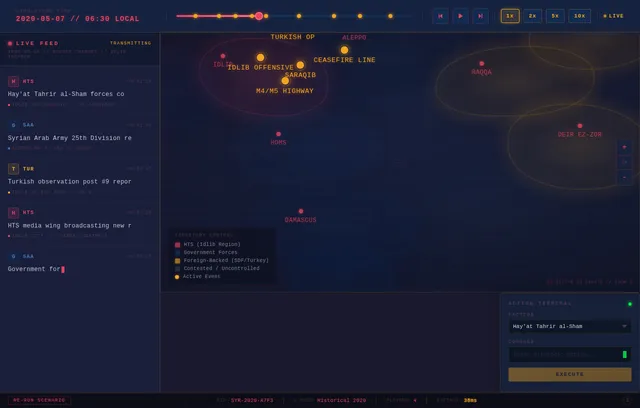
- A Google Maps-style zoomable map displaying territorial changes and key events during the Syrian civil war in 2020.
- Real-time live updates showing what other factions (e.g., Hay'at Tahrir al-Sham) and countries are doing at any given moment.
- Strategic gameplay where users can take actions as factions or countries involved in the conflict — without any real battle mechanics.
- A time simulation feature allowing users to fast-forward events and outcomes based on their decisions.
- Alternate history scenarios where players can reshape the course of events.
- A selective re-run system that allows users to trigger regeneration of specific scenarios or SRD sections without restarting the full simulation.
The app will cater to users interested in historical analysis, strategy games, and geopolitical simulations, providing a unique and immersive experience.
3. Functional Requirements
User Stories:
-
As a User, I should be able to view a Google Maps-style zoomable map showing territorial control zones, key locations, and faction movements during the Syrian civil war in 2020.
-
As a User, I should be able to receive live updates on what other factions and countries are doing in real time, including changes in control zones, alliances, and resource shifts.
-
As a User, I should be able to play as both factions (e.g., Hay'at Tahrir al-Sham) and countries simultaneously, making strategic decisions to influence the outcome of the conflict.
-
As a User, I should be able to submit my own strategic actions through a compact action input panel displayed in the corner of the screen.
-
As a User, I should be able to simulate time using a time slider above the action panel to fast-forward events and observe the outcomes of my decisions.
-
As a User, I should be able to interact with alternate history scenarios where my actions reshape the course of events.
-
As a User, I should be able to trigger a selective re-run of a specific scenario or simulation segment without restarting the entire session.
-
As a User, I should be able to choose whether AI-driven factions and countries act based on historical 2020 data or dynamic unpredictable AI-generated decisions.
-
As an Admin, I should be able to manage faction and country data, including adding, editing, or removing entities from the simulation.
-
As an Admin, I should be able to monitor live simulation sessions and intervene or reset scenarios when necessary.
-
As an Admin, I should be able to trigger a full or selective SRD regeneration from the admin dashboard.
-
As a Guest, I should be able to view the live map and faction updates in read-only mode without creating an account.
-
As a Guest, I should be able to explore the map, zoom in and out, and read event descriptions without participating in the simulation.
4. User Personas
Persona 1: History Enthusiast
- Description: Interested in learning about historical events and analyzing geopolitical dynamics.
- Goals: Understand the Syrian civil war in 2020 and explore alternate outcomes through simulation.
- Needs: Accurate historical data, engaging visuals, and intuitive controls.
Persona 2: Strategy Gamer
- Description: Enjoys strategy games and simulations with complex decision-making.
- Goals: Take actions as factions or countries to influence the conflict and explore alternate history scenarios.
- Needs: Dynamic gameplay, responsive controls, and immersive features.
Persona 3: Educator / Researcher
- Description: Uses the app as a tool for teaching or researching historical events.
- Goals: Present accurate data and scenarios to students or colleagues.
- Needs: Reliable historical data, clear visuals, and customizable simulation options.
Persona 4: Admin / Simulation Operator
- Description: Manages the backend of the simulation, including faction data, scenario configurations, and live session monitoring.
- Goals: Ensure the simulation runs accurately and smoothly, with the ability to intervene or regenerate scenarios as needed.
- Needs: Admin dashboard, session controls, selective re-run triggers, and data management tools.
Persona 5: Guest / Casual Viewer
- Description: A visitor who wants to explore the map and observe faction activity without committing to a full simulation session.
- Goals: Browse the live map and read event updates passively.
- Needs: Read-only access, no login required, clean and intuitive UI.
5. Visuals Colors and Theme
Color Palette:
- Background:
#1A1A2E(Deep Midnight Blue) – Represents the seriousness and gravity of the conflict. - Surface:
#16213E(Dark Navy) – Provides a subtle contrast for map and interface elements. - Text:
#E94560(Crimson Red) – Highlights key information and alerts. - Accent:
#0F3460(Steel Blue) – Used for interactive elements and buttons. - Muted Tones:
#53354A(Muted Plum) – Adds depth to secondary elements. - Live Update Highlight:
#F5A623(Amber Orange) – Used specifically for live update notifications and real-time activity indicators. - Faction Neutral:
#2E4057(Slate Grey-Blue) – Used for uncontrolled or contested territory zones on the map.
The theme is designed to evoke a sense of urgency and realism while maintaining a professional and immersive aesthetic. The palette leans into a dark, intelligence-briefing aesthetic — like viewing classified satellite imagery at night.
6. Signature Design Concept
The War Room: A Living Intelligence Briefing
The homepage of neon-app is designed to feel like you've just walked into a classified military intelligence operations room — dark, tense, and alive with information.
What the user sees on load: The screen fades in from black. A Google Maps-style satellite view of Syria slowly materializes, rendered in desaturated dark tones with a subtle scanline overlay — as if viewed through a military-grade monitor. Faction territory boundaries pulse with a faint neon glow in their respective faction colors (crimson for HTS, steel blue for government forces, amber for foreign-backed groups). The map breathes — territories subtly shimmer and shift as live updates arrive.
The Action Corner (bottom-right): A compact, frosted-glass panel sits in the bottom-right corner. It looks like a field commander's terminal — monospaced font, a blinking cursor, and a subtle green phosphor glow. Users type their strategic actions here. When submitted, the action ripples outward on the map as a shockwave animation — a circular pulse that fades from the user's controlled zone.
The Time Simulation Bar (top of screen):
A sleek, horizontal timeline scrubber stretches across the top of the screen. It resembles a film editing timeline with event markers — small glowing dots representing key historical moments. Dragging the scrubber forward causes the map to animate: territory colors bleed and shift like ink in water, faction labels fade in and out, and a date counter ticks forward in the top-left corner in a military timestamp format (2020-03-14 // 06:42 LOCAL).
Live Update Feed (left sidebar): A vertical scrolling feed on the left side displays real-time faction and country actions. Each entry appears with a typewriter animation — text types itself in, line by line, as if being transmitted over a secure channel. Entries are color-coded by faction. Hovering over an entry highlights the corresponding region on the map with a glowing border.
Selective Re-Run Button: A subtle but powerful **"RE-RUN SCENARIO

Reshape History, Shape Strategy
Explore the Syrian Civil War through interactive simulation and strategic gameplay. Play as factions and countries, make critical decisions, and witness alternate outcomes unfold.
Interactive War Map Preview
Explore Syria’s territorial dynamics with toggleable faction layers, conflict zones, and historical event overlays
Built for Strategic Depth
Every tool designed to bring the complexity of geopolitical simulation to your fingertips.
Dynamic Territory Control
Watch faction boundaries shift in real time as you command forces across the Syrian landscape. Every strategic decision reshapes the map, from Idlib to Deir ez-Zor.
Interactive Map→Real-Time Decision Making
Command factions and countries simultaneously. Deploy resources, forge alliances, and respond to evolving battlefield conditions with strategic precision.
Strategy Engine→Alternate History Scenarios
Reshape the course of the 2020 Syrian conflict. Explore branching narratives where your choices create entirely new geopolitical outcomes and timelines.
Branching Narratives→Built for Every Perspective
Whether you study history, craft strategies, educate minds, or analyze power dynamics — neon-app adapts to your mission.
History Enthusiast
HistorianInterested in learning about historical events and analyzing geopolitical dynamics.
- Understand the Syrian civil war in 2020 through interactive exploration
- Explore alternate outcomes and counterfactual scenarios
- Trace territorial shifts and faction movements over time
- Accurate historical data and verified event timelines
- Engaging visuals with layered map interactions
- Intuitive controls for navigating complex events
Strategy Gamer
StrategistEnjoys strategy games and simulations with complex decision-making.
- Take actions as factions or countries to influence the conflict
- Explore alternate history through branching decision trees
- Compete and compare outcomes with other players
- Dynamic gameplay with responsive real-time controls
- Immersive features including sound and visual feedback
- Meaningful consequences for every strategic choice
Educator / Researcher
AcademicUses the app as a tool for teaching or researching historical events.
- Present accurate data and scenarios to students or colleagues
- Build customized lesson plans around simulation outputs
- Analyze cause-and-effect chains in geopolitical events
- Reliable historical data with source references
- Clear, exportable visuals and simulation summaries
- Customizable simulation options for classroom use
Geopolitical Analyst
AnalystFocuses on strategic forecasting and understanding multi-faction power dynamics.
- Model complex multi-actor scenarios and power balances
- Evaluate faction strategies and resource allocation impacts
- Generate data-driven insights from simulation results
- Granular control over simulation parameters and variables
- Detailed analytics dashboards with exportable data
- Multi-layer map views showing overlapping influence zones
Fast-forward time,
witness outcomes,
reshape history.
Take command of the timeline. Our simulation core lets you accelerate through months of conflict, observe cascading consequences of every strategic decision, and explore divergent paths history never took.
Time Acceleration
Compress weeks into seconds. Scrub through the 2020 timeline and watch territorial boundaries shift in real time as factions respond to your decisions.
Cascading Outcomes
Every action triggers a chain reaction. Diplomatic moves, military operations, and supply line changes ripple across the entire conflict landscape.
Alternate History Branches
What if the ceasefire held? What if alliances shifted? Fork the timeline at any decision point and explore scenarios that never happened.
Turkish-Russian agreement halts major offensive operations
Hay'at Tahrir al-Sham consolidates control in northwest
Experience Every Interaction
From hover tooltips revealing live stats to expanding detail regions, every element responds with purpose and precision.
Tooltip Stats Preview
Hover over any territory on the map to reveal real-time faction statistics, troop counts, and control percentages.
onHover: (region) => showStats(region.factionData)
Expand Region Detail
Click any region to expand an animated detail panel showing conflict data, historical events, and strategic options.
onClick: (region) => expandPanel(region.id)
Built with Modern Tech
The neon-app leverages cutting-edge technologies across AI, full-stack development, and cloud orchestration to deliver real-time geopolitical simulations.
Frontend
Modern frameworks powering the interactive map and simulation UI.
Backend
High-performance APIs driving real-time simulation logic.
Database
Dual-database architecture for structured and document data.
AI Models
State-of-the-art language models for scenario generation and analysis.
AI Tools
Orchestration frameworks connecting models to simulation pipelines.
Orchestration
Containerized deployment for scalable, resilient infrastructure.
Ready to Reshape History?
Start your simulation today. Play as factions and countries, fast-forward time, and explore alternate outcomes of the Syrian civil war.
No spam. Get notified about new scenarios, features, and simulation updates.
Frequently Asked Questions
Everything you need to know about the neon-app simulation platform and how to get started.
Still have questions? We're here to help.Get in touch →
No comments yet. Be the first!