Scholarship30 Sept 2026
Google Africa Scholarship 2026
Fully funded scholarship support for Nigerian students pursuing tech-focused study tracks, with mentorship built into the award.
Build a modern Nigerian student and opportunity platform where students can discover scholarships, jobs, internships, SIWES opportunities, AI tools, student resources and educational guides. Include a searchable opportunity directory, categories, individual article pages, newsletter signup, responsive mobile design, SEO-friendly pages, an admin/content management area, and monetization spaces for advertisements and sponsored listings.


Sign in to leave a comment
Naijanext is a modern platform designed for Nigerian students to discover opportunities such as scholarships, jobs, internships, SIWES opportunities, AI tools, student resources, and educational guides. The platform aims to empower students by providing a comprehensive, user-friendly, and vibrant interface that supports their educational and career pursuits.
Naijanext is a web-based platform that serves as a hub for Nigerian students to access various opportunities and resources. It features a searchable opportunity directory, categorized content, individual article pages, newsletter signup, responsive mobile design, SEO-friendly pages, and an admin/content management area. The platform also includes monetization spaces for advertisements and sponsored listings.
The platform is focused on Nigerian students and opportunities, ensuring a responsive mobile experience and SEO-friendly pages. It includes a protected admin/content management area requiring invitation or provisioning for access. The platform supports application-owned identity for content management, while student interactions remain publicly accessible without login requirements.
Not applicable as no content source directive was provided.
The Landing page will feature a full-width vibrant banner with large, friendly typography and an illustration of diverse students exploring opportunities. The design will include a cream background with orange and yellow accent elements, integrating a call-to-action button within the text.
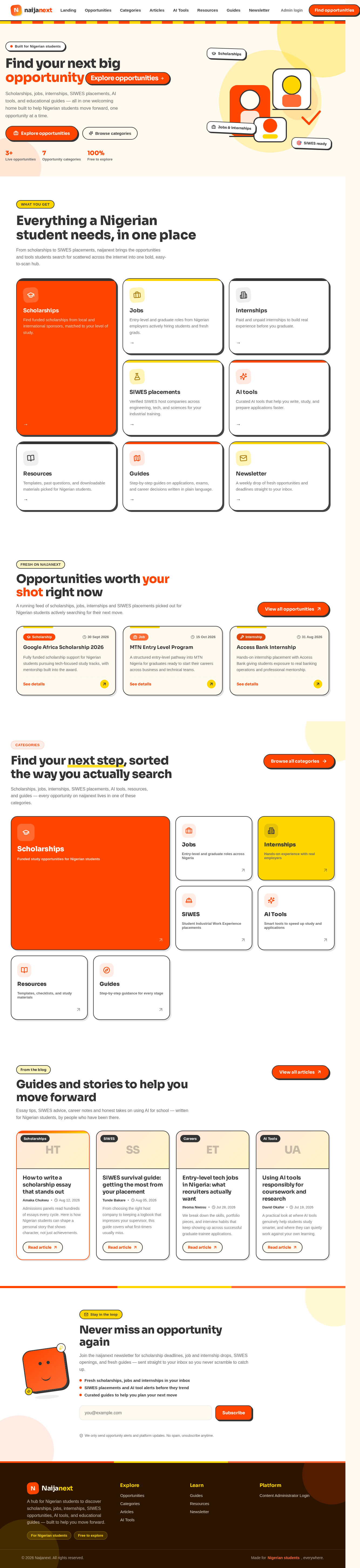
Scholarships, jobs, internships, SIWES placements, AI tools, and educational guides — all in one welcoming home built to help Nigerian students move forward, one opportunity at a time.
From scholarships to SIWES placements, naijanext brings the opportunities and tools students search for scattered across the internet into one bold, easy-to-scan hub.
Find funded scholarships from local and international sponsors, matched to your level of study.
Entry-level and graduate roles from Nigerian employers actively hiring students and fresh grads.
Paid and unpaid internships to build real experience before you graduate.
Verified SIWES host companies across engineering, tech, and sciences for your industrial training.
Curated AI tools that help you write, study, and prepare applications faster.
Templates, past questions, and downloadable materials picked for Nigerian students.
Step-by-step guides on applications, exams, and career decisions written in plain language.
A weekly drop of fresh opportunities and deadlines straight to your inbox.
A running feed of scholarships, jobs, internships and SIWES placements picked out for Nigerian students actively searching for their next move.
Fully funded scholarship support for Nigerian students pursuing tech-focused study tracks, with mentorship built into the award.
A structured entry-level pathway into MTN Nigeria for graduates ready to start their careers across business and technical teams.
Hands-on internship placement with Access Bank giving students exposure to real banking operations and professional mentorship.
Scholarships, jobs, internships, SIWES placements, AI tools, resources, and guides — every opportunity on naijanext lives in one of these categories.
Funded study opportunities for Nigerian students
Tap in to see what's currently open under scholarships.
Entry-level and graduate roles across Nigeria
Tap in to see what's currently open under jobs.
Hands-on experience with real employers
Tap in to see what's currently open under internships.
Student Industrial Work Experience placements
Tap in to see what's currently open under siwes.
Smart tools to speed up study and applications
Tap in to see what's currently open under ai tools.
Templates, checklists, and study materials
Tap in to see what's currently open under resources.
Step-by-step guidance for every stage
Tap in to see what's currently open under guides.
Essay tips, SIWES advice, career notes and honest takes on using AI for school — written for Nigerian students, by people who have been there.
Admissions panels read hundreds of essays every cycle. Here is how Nigerian students can shape a personal story that shows character, not just achievements.
Read articleFrom choosing the right host company to keeping a logbook that impresses your supervisor, this guide covers what first-timers usually miss.
Read articleWe break down the skills, portfolio pieces, and interview habits that keep showing up across successful graduate-trainee applications.
Read articleA practical look at where AI tools genuinely help students study smarter, and where they can quietly work against your own learning.
Read articleScholarships, jobs, internships, SIWES placements, AI tools, and educational guides — all in one welcoming home built to help Nigerian students move forward, one opportunity at a time.
From scholarships to SIWES placements, naijanext brings the opportunities and tools students search for scattered across the internet into one bold, easy-to-scan hub.
Find funded scholarships from local and international sponsors, matched to your level of study.
Entry-level and graduate roles from Nigerian employers actively hiring students and fresh grads.
Paid and unpaid internships to build real experience before you graduate.
Verified SIWES host companies across engineering, tech, and sciences for your industrial training.
Curated AI tools that help you write, study, and prepare applications faster.
Templates, past questions, and downloadable materials picked for Nigerian students.
Step-by-step guides on applications, exams, and career decisions written in plain language.
A weekly drop of fresh opportunities and deadlines straight to your inbox.
A running feed of scholarships, jobs, internships and SIWES placements picked out for Nigerian students actively searching for their next move.
Fully funded scholarship support for Nigerian students pursuing tech-focused study tracks, with mentorship built into the award.
A structured entry-level pathway into MTN Nigeria for graduates ready to start their careers across business and technical teams.
Hands-on internship placement with Access Bank giving students exposure to real banking operations and professional mentorship.
Scholarships, jobs, internships, SIWES placements, AI tools, resources, and guides — every opportunity on naijanext lives in one of these categories.
Funded study opportunities for Nigerian students
Tap in to see what's currently open under scholarships.
Entry-level and graduate roles across Nigeria
Tap in to see what's currently open under jobs.
Hands-on experience with real employers
Tap in to see what's currently open under internships.
Student Industrial Work Experience placements
Tap in to see what's currently open under siwes.
Smart tools to speed up study and applications
Tap in to see what's currently open under ai tools.
Templates, checklists, and study materials
Tap in to see what's currently open under resources.
Step-by-step guidance for every stage
Tap in to see what's currently open under guides.
Essay tips, SIWES advice, career notes and honest takes on using AI for school — written for Nigerian students, by people who have been there.
Admissions panels read hundreds of essays every cycle. Here is how Nigerian students can shape a personal story that shows character, not just achievements.
Read articleFrom choosing the right host company to keeping a logbook that impresses your supervisor, this guide covers what first-timers usually miss.
Read articleWe break down the skills, portfolio pieces, and interview habits that keep showing up across successful graduate-trainee applications.
Read articleA practical look at where AI tools genuinely help students study smarter, and where they can quietly work against your own learning.
Read article
No comments yet. Be the first!