
my-portfolio

byakhilesh akhilesh

convert given resume into portfolio website

HomeLoginCertificationsProjectsAchievements
Home

Comments (0)

No comments yet. Be the first!

System Requirements

System Requirement Document
Page 1 of 4

System Requirements Document

1. Introduction

This document outlines the system requirements for converting a resume into a portfolio website for Akash Ailapuram, a Computer Science Engineering student with a focus on Data Analytics and Data Science. The portfolio website will showcase Akash's skills, projects, education, and professional achievements.

2. System Overview

The portfolio website will serve as an online representation of Akash Ailapuram's professional profile, highlighting his technical skills, projects, education, certifications, and achievements. The website will be designed to attract potential employers and collaborators by providing a comprehensive view of his capabilities and interests in data analytics and data science.

Page 2 of 4

3. Functional Requirements

  • As a visitor, I want to view Akash's professional summary so that I can understand his background and career objectives.
  • As a visitor, I want to see Akash's educational qualifications to assess his academic background and relevant coursework.
  • As a visitor, I want to explore Akash's technical skills to evaluate his proficiency in programming, data analytics, machine learning, and tools.
  • As a visitor, I want to review Akash's projects to understand his practical experience and problem-solving capabilities.
  • As a visitor, I want to access Akash's certifications to verify his formal training in relevant areas.
  • As a visitor, I want to learn about Akash's soft skills to gauge his interpersonal and professional abilities.
  • As a visitor, I want to view Akash's achievements to recognize his accomplishments and contributions to the field.
  • As a visitor, I want to contact Akash via email or LinkedIn to discuss potential opportunities or collaborations.
  • As a visitor, I want to access Akash's GitHub profile to explore his code repositories and contributions.
  • As a visitor, I want to view Akash's portfolio link to see additional work samples or projects.
  • As a visitor, I want to know Akash's language proficiencies to understand his communication capabilities.
  • As a visitor, I want to know Akash's career interests and availability to determine his suitability for potential roles.
  • As a visitor, I want to understand Akash's analytical thinking skills to evaluate his ability to analyze and interpret data.
  • As a visitor, I want to see examples of Akash's dashboard development to assess his ability to create data visualizations and business intelligence tools.
  • As a visitor, I want to know about Akash's knowledge in data structures and algorithms to understand his foundational computer science skills.
  • As a visitor, I want to learn about Akash's experience with management systems to evaluate his understanding of database and information systems.
  • As a visitor, I want to see Akash's proficiency in Python programming to assess his coding skills and ability to implement data science solutions.

4. User Personas

  • Visitor/Employer: Individuals or organizations interested in Akash's skills and projects for potential employment or collaboration.
  • Akash Ailapuram: The owner of the portfolio, responsible for maintaining and updating the content.

5. Core User Flows

Page 3 of 4

Visitor/Employer Flow

  1. Access the portfolio website.
  2. Navigate through sections: Professional Summary, Education, Technical Skills, Projects, Certifications, Soft Skills, Achievements, Contact Information.
  3. View detailed information in each section.
  4. Use contact links to reach out to Akash via email or LinkedIn.

Akash Ailapuram Flow

  1. Update portfolio content as needed.
  2. Ensure contact information and links are current.
  3. Add new projects, certifications, or achievements to the website.

6. Visuals Colors and Theme

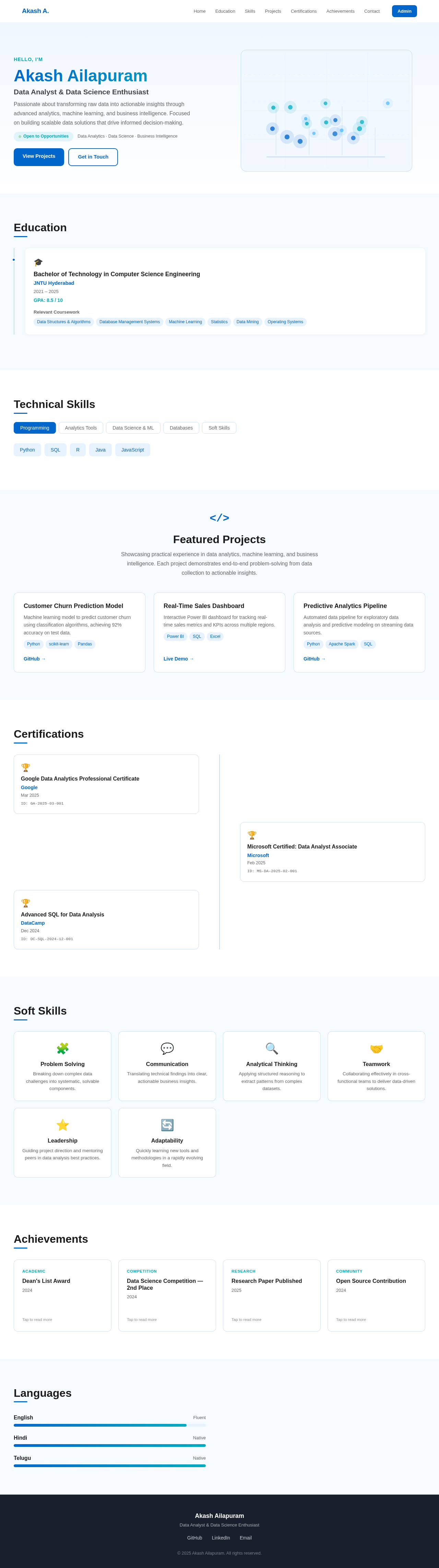
  • Color Theme: Professional blues and teals to convey a sense of trust and expertise.
  • Typography: Clean and modern fonts for readability and professionalism.

7. Signature Design Concept

  • Layout: A clean, single-page design with smooth scrolling and easy navigation.
  • Visual Elements: Use of icons and graphics to enhance the presentation of skills and projects.

8. Interaction Model & Motion Direction

  • Interaction Model: Responsive design for optimal viewing on both desktop and mobile devices.
  • Motion Direction: Subtle animations for transitions between sections to maintain user engagement.
Page 4 of 4

9. Non-Functional Requirements

  • Performance: The website should load quickly and efficiently on all devices.
  • Accessibility: Ensure the website is accessible to users with disabilities.
  • Security: Protect contact information and links from spam and misuse.

10. Tech Stack

  • Frontend: React.js for a dynamic and responsive user interface.
  • Backend: Not applicable as the portfolio is a static site.
  • Database: Not applicable as the portfolio is a static site.

11. Assumptions and Constraints

  • The portfolio will be a static website with no backend processing.
  • Akash will provide all necessary content and updates for the website.
  • The website will be hosted on a platform that supports static sites.

12. Glossary

  • EDA: Exploratory Data Analysis
  • KPI: Key Performance Indicator
  • BI: Business Intelligence
  • SQL: Structured Query Language
  • GitHub: A platform for version control and collaboration
  • Power BI: A business analytics service by Microsoft
Home design preview
Login: Sign In
Dashboard: View Content
Dashboard: Edit Summary
Education: Update Details
Skills: Manage Skills
Projects: Add Project
Projects: Edit Project
Certifications: Add Certification
Achievements: Add Achievement
Contact: Update Links
Contact: Verify GitHub Link
Dashboard: Publish Changes
Home design preview
Login: Sign In
Dashboard: View Content
Dashboard: Edit Summary
Education: Update Details
Skills: Manage Skills
Projects: Add Project
Projects: Edit Project
Certifications: Add Certification
Achievements: Add Achievement
Contact: Update Links
Contact: Verify GitHub Link
Dashboard: Publish Changes