music thoughts
 2da BeatYall
anylize this and make it right for production then complete in phases front to back with no pauses no questions asked PROJECT: AI Music Co-Producer Platform Build a standalone AI-powered music production system inspired by Output Co-Producer (Output Co-Producer plugin), designed for producers, beatmakers, and songwriters. NOT a DJ app. NOT a full DAW replacement. FORM FACTOR: - Standalone desktop application - VST3 / AU plugin - iOS & Android companion app CORE FEATURES: 1. AI AUDIO ANALYSIS - Analyze 4–8 bar loops in real time - Detect BPM, key, scale, groove, genre, energy - Identify harmonic density + rhythmic complexity - Map arrangement structure (intro, verse, drop, etc.) 2. AI PROMPT ENGINE - Text prompts (e.g., “dark trap drums”, “smooth R&B vocals”) - Audio-based prompts (analyze uploaded loop) - Hybrid mode (audio + text combined) 3. SEMANTIC SAMPLE SEARCH - Vector-based search engine - Match samples by mood, key, BPM, groove, and energy - Returns drums, melodies, vocals, basslines, FX, textures 4. SMART PREVIEW SYSTEM - Auto BPM sync - Auto key matching - Instant auditioning inside project 5. DRAG & DROP EXPORT - Export WAV + MIDI - Direct integration with DAWs: FL Studio, Ableton Live, Logic Pro, Pro Tools 6. RE-IMAGINE ENGINE - AI generates variations of any sample - Modes: subtle / moderate / extreme transformation - Produces legally distinct audio outputs 7. SAMPLER MODE (OPTIONAL) - Slice, chop, pad triggering - Granular playback - Inspired by Output Arcade-style workflow GOAL: A fast, intelligent AI co-producer that speeds up music creation, generates ideas instantly, and integrates seamlessly into existing DAW workflows.


Comments (0)
Sign in to leave a comment
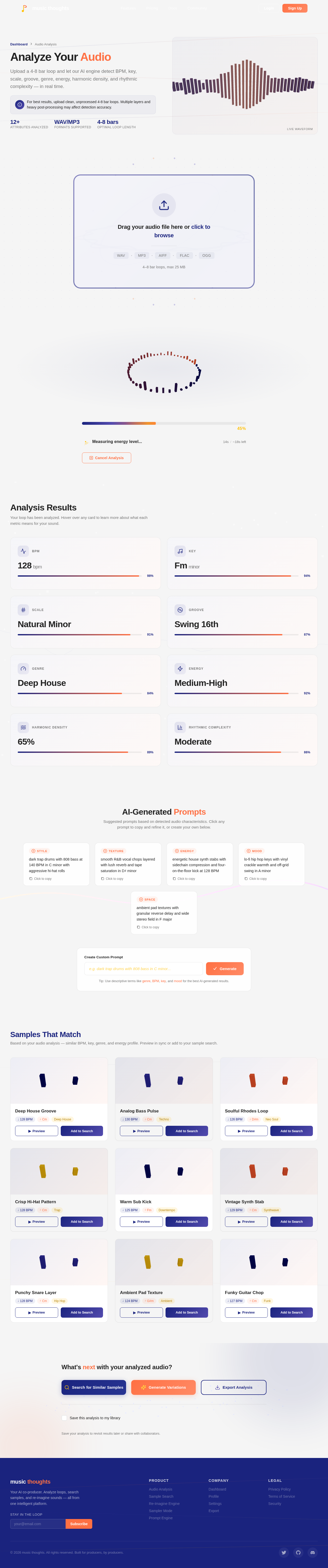
Analyze Your Audio
Upload a 4-8 bar loop and let our AI engine detect BPM, key, scale, groove, genre, energy, harmonic density, and rhythmic complexity — in real time.
For best results, upload clean, unprocessed 4-8 bar loops. Multiple layers and heavy post-processing may affect detection accuracy.
Drag your audio file here or click to browse
4–8 bar loops, max 25 MB
Analysis Results
Your loop has been analyzed. Hover over any card to learn more about what each metric means for your sound.
Beats Per Minute — the tempo of the loop. 128 BPM places this squarely in house/electronic territory.
The detected tonal center. F minor gives this loop a dark, moody character often found in deep house and hip-hop.
The scale type detected. Natural minor (Aeolian) provides a soulful, melancholic foundation for melodic elements.
The rhythmic feel. Swing 16th notes add shuffle and bounce — a hallmark of classic drum machine programming.
AI-predicted genre based on spectral and rhythmic features. Deep house is characterized by lush chords and rolling basslines.
Perceived energy level from 0 (ambient) to 10 (peak-time). Medium-High suggests a driving club track with breathing room.
How harmonically rich the loop is. 65% indicates layered chords and melodic content without overcrowding the mix.
How intricate the rhythmic patterns are. Moderate complexity balances groove with clarity — ideal for sample layering.
AI-Generated Prompts
Suggested prompts based on detected audio characteristics. Click any prompt to copy and refine it, or create your own below.
dark trap drums with 808 bass at 140 BPM in C minor with aggressive hi-hat rolls
smooth R&B vocal chops layered with lush reverb and tape saturation in D♯ minor
energetic house synth stabs with sidechain compression and four-on-the-floor kick at 128 BPM
lo-fi hip hop keys with vinyl crackle warmth and off-grid swing in A minor
ambient pad textures with granular reverse delay and wide stereo field in F major
Tip: Use descriptive terms like genre, BPM, key, and mood for the best AI-generated results.
No comments yet. Be the first!