Page 1 of 11
System Requirements Document for multisport-landing-page
1. Introduction
Product intent. multisport-landing-page is a design-led, multi-section landing experience for a multisport booking platform. It exists to make a multisport venue network feel like a place — a Saturday-morning sports centre with floodlights, painted court lines and a scoreboard — rather than a dashboard. The landing experience presents the platform's vocabulary (sport names, venue names, district names, times) as the hero itself, and routes everyday athletes from discovery into a real booking of a sports location available near them.
The product is delivered as a design-only landing experience with multiple section pages, in a unique design that follows the supplied creative direction (Paula Scher poster language: oversized Anton type, flat colour blocks, hard edges, no gradients). A related platform exists that holds the bookable sports locations and their availability; this landing experience surfaces that platform's locations and carries the participant into booking through it.
Audience. Everyday athletes booking five-a-side football, badminton, tennis, swimming and padel — frequently on phones, frequently in a hurry, frequently coordinating inside a group chat. The booking journey must stay legible and fast even while the landing page is allowed to shout.
Delivery sequencing constraint. End-to-end research and development (RND) must be completed before design work begins. Design is the last stage, not the first.
Page 2 of 11
2. System Overview
The current delivery is a first-party, custom-UI landing experience composed of three pages — Landing, Locations, and Booking — plus the integration boundary to the related platform that owns location and availability data.
Actors.
- Sports Participant (human, active) — browses the multisport landing experience and its multiple section pages, discovers sports locations available nearby, and completes a booking.
- Platform Operator (human, active) — maintains the location and availability information that the landing experience surfaces and that bookings depend on.
- Related platform (non-persona system actor) — the external system that owns bookable sports locations and their availability, and that performs the booking transaction.
Accepted behavior in scope.
- A uniquely designed multisport landing page with multiple section pages.
- Discovery of sports locations available near the participant.
- Booking of those sports locations through the related platform.
- End-to-end RND completed before design work starts.
Ownership boundary. The related platform owns location records, availability, and the booking transaction itself. This product owns the landing experience, the discovery surface, the booking entry surface, and the presentation of platform-supplied location and availability facts. This product does not own venue inventory, pricing authority, or the reservation record of truth.
Narrow exclusions. No gradient, gradient blob, or soft glow anywhere. No rounded corners, pill buttons, glassmorphism, or frosted panels. No grid of identical hover-lift location cards. No blue-indigo primary on white (#0057FF, #2563EB, #6366F1 family). No Inter, Roboto, Poppins, or DM Sans for headings — Anton only. No centred headline + subtext + rounded CTA hero composition. No stock photography of smiling athletes in the hero or as section openers. No letter-spaced, mixed-case, or shadowed Anton headlines. The generic indigo/blue-on-white SaaS template is forbidden for this project.
Page 3 of 11
2a. Product Interpretation and Delivery Boundary
This is a design-only deliverable: the value produced is the landing experience itself — its structure, its typography, its colour wayfinding, and its booking path — not a new booking engine. The related platform already exists and already holds the bookable sports locations; this product is the front door that makes those locations findable and bookable.
Access ownership. The Landing and Locations pages are anonymously reachable — a participant can read the poster, understand the sports on offer, and browse nearby locations without establishing identity. The Booking page is protected: a participant must be signed in before the booking surface is usable, because a reservation is a commitment that must remain bound to the correct participant and must be resumable. The interaction that establishes that identity is an anonymous entry boundary, not a protected page owning its own access.
Current vs. future. Everything in Sections 3–5 is current. Anything not stated in the authoritative requirement thread — venue-owner tooling, payment processing beyond the platform's own booking flow, social features, membership tiers — is out of current scope and is not implied by this document.
2b. Source Content Inventory
Not applicable. No reference directive in this project declares content_source authority, so no source content inventory is rendered.
2c. Page Content and Component Coverage
Page 4 of 11
Landing
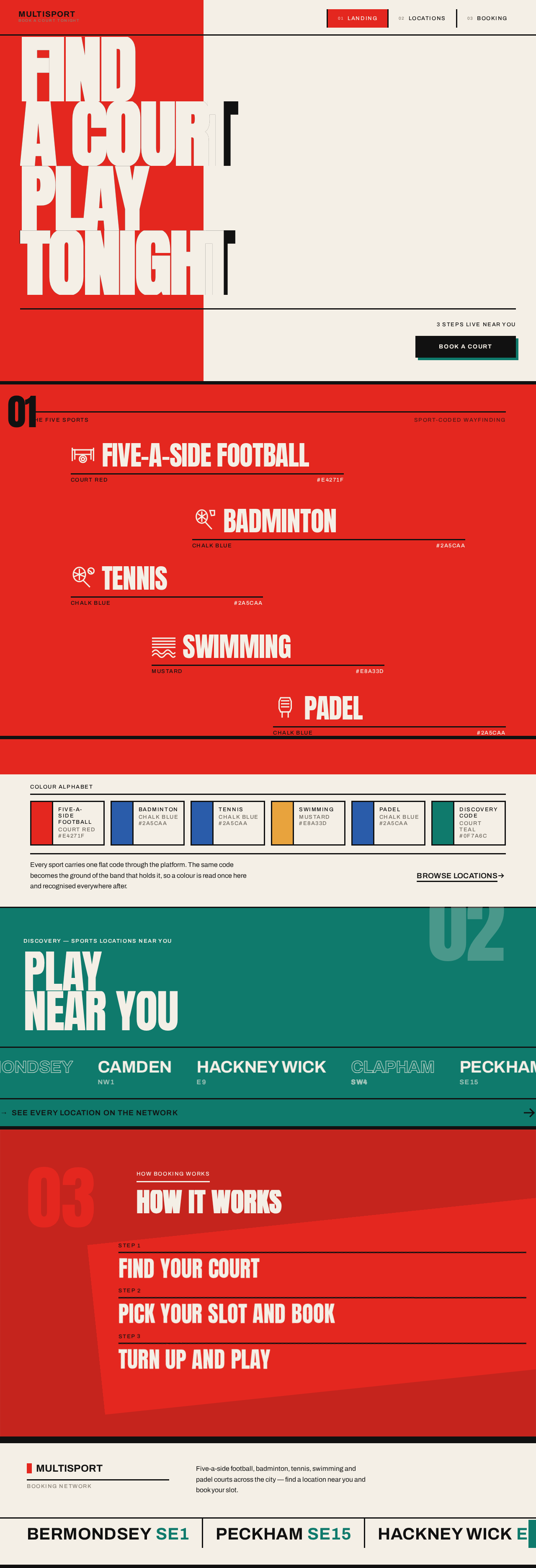
Information and state. The anonymous public entry surface. A full-viewport poster composition: cream ground #F4EFE6; a Court Red #E4271F block occupying the left 38% of the screen edge-to-edge top to bottom; the Anton headline spanning the full viewport width in four stacked lines — FIND / A COURT / PLAY / TONIGHT — at clamp(4rem, 14vw, 15rem), leading 0.86, physically crossing over the red block and inverting colour where the letters overlap it (cream on red, black on cream). Below the hero, the page continues as multiple sections, each anchored by a giant Anton number in the outer margin (01, 02, 03) and separated by 8px black rules, alternating ground: cream → Court Red full-bleed → cream → Court Teal full-bleed → black → cream.
Primary actions.
- Enter the booking path via the single hard-edged rectangle Book CTA (black fill, cream type, Court Teal offset shadow) at bottom-right of the hero.
- Navigate to the four top-level destinations via the horizontal nav of four Archivo caps links separated by 3px vertical rules at top-right.
- Scroll through the numbered sections to read the multisport proposition.
Supporting actions.
- Read the live label
247 COURTS LIVE NEAR YOU in Archivo 13px uppercase +0.12em tracking, carried on a 3px full-width rule above the Book CTA.
- Read the small black wordmark in Archivo 700 caps at top-left.
- Follow the -6deg diagonal colour band carrying the three-step "How booking works" explainer, with steps typeset as stacked Anton words rather than numbered cards.
- Read the full-bleed action crop behind the black "How it works" band at 35% opacity under the type, duotone-treated in Court Red/black or Court Teal/black.
Domain entities. Sport category (football, badminton, tennis, swimming, padel), venue, district, availability count, booking step.
Component responsibilities.
- Hero stack — renders the four Anton lines with per-word colour inversion across the red block boundary.
- Colour-block band system — full-bleed flat bands, no gradients, no shadows, no opacity tricks.
- Section number margin device — giant Anton numerals in the outer margin.
- Diagonal band explainer — -6deg band carrying the three booking steps.
- Book CTA — solid rectangle, 3px black border, hard offset shadow
6px 6px 0 #111111 snapping to 2px 2px 0 on press.
- Top nav — four Archivo caps links with 3px vertical rule separators.
- Sport pictograms — thick-line 2.5px stroke icons drawn on the same grid as the type.
States.
- Loading — hero type wipes up from behind a colour-block mask, 420ms
cubic-bezier(0.2, 0.8, 0.2, 1), staggered 60ms by word.
- Empty — not applicable; the landing content is static editorial content.
- Success — the participant reaches the Book CTA or the Locations destination.
- Error — if the live availability label cannot be resolved from the related platform, the label is withheld rather than showing a fabricated count; the rest of the poster renders normally.
- Recovery — the participant can still proceed to Locations and Booking; the availability label repopulates on the next successful read.
Page 5 of 11
Locations
Information and state. The anonymous discovery surface for sports locations available near the participant. Rendered as a poster grid of sport tiles: each tile is a flat colour block with the sport name in Anton set vertically along the left edge, venue name in Archivo caps, and distance and price as tabular figures. The section is grounded in Court Teal #0F7A6C as the sport-coded partner to red, with Mustard #E8A33D for swimming/aquatics and Chalk Blue #2A5CAA for racket sports completing the wayfinding alphabet. A tight duotone-treated crop of a court line, net, or chalk mark appears in this section. District names and postcodes are treated as graphic elements, set large in Archivo caps.
Primary actions.
- Browse the poster grid of sport tiles.
- Select a location to carry into the booking path.
Supporting actions.
- Read distance and price per tile as tabular figures.
- Read the coded sport colour to identify the sport category at a glance.
- Read district and postcode as graphic wayfinding elements.
Domain entities. Location, venue, sport category, coded sport colour, distance from the participant, price, district, postcode, availability.
Component responsibilities.
- Sport tile — flat colour block, vertical Anton sport name on the left edge, Archivo caps venue name, tabular distance and price.
- Tile hover state — flips background to the coded colour and inverts the text, instantly at 120ms with no fade.
- Availability read — pulls current location and availability facts from the related platform.
- Duotone image crop — high-contrast court-line/net/chalk-mark crop in Court Red/black or Court Teal/black.
States.
- Loading — tiles render as flat colour blocks with the sport name in place; venue, distance and price resolve when the related platform responds.
- Empty — when no locations are available near the participant, the grid is replaced by a flat colour block carrying an Anton statement that no locations are currently available nearby, plus a route back to the Landing sections.
- Success — the grid is populated with bookable locations and their distances and prices.
- Error — if the related platform cannot be reached, the grid shows a flat error block in Court Red with an Archivo caps message and a retry control; no fabricated locations are shown.
- Recovery — retry re-issues the availability read; on success the grid populates normally.
Page 6 of 11
Booking
Information and state. The protected reservation destination for booking an available sports location through the related platform. Laid out as a two-column split: the left column is a black panel with the venue name in Anton at 96px and the coded sport colour as a bar; the right column is the form on cream with hard-bordered inputs. All corners are 0px radius; inputs carry 3px black borders. The participant must be signed in before this surface is usable, because the reservation is a commitment bound to the correct participant and must be resumable.
Primary actions.
- Confirm the booking of the selected location through the related platform.
- Complete any verification required by the related platform before the booking is accepted.
Supporting actions.
- Review the venue name, coded sport colour, and booking details before committing.
- Enter the required booking details into the hard-bordered form.
- Return to Locations to choose a different venue.
Domain entities. Booking, venue, sport category, coded sport colour, participant identity, booking details, platform verification state, confirmation reference.
Component responsibilities.
- Venue panel — black panel, Anton venue name at 96px, coded sport colour bar.
- Booking form — cream ground, hard-bordered inputs, 0px radius, 3px black borders.
- Identity gate — anonymous entry boundary that establishes the participant's identity before the protected booking state becomes available.
- Platform handoff — submits the booking to the related platform and surfaces the platform's verification requirement.
- Confirmation display — shows the observable booking result returned by the related platform.
States.
- Loading — the venue panel renders immediately from the selected location; the form resolves once identity and platform availability are confirmed.
- Empty — if no location has been selected, the page routes the participant back to Locations rather than presenting an empty form.
- Success — the related platform returns a confirmed booking; the confirmation is displayed with its reference and the coded sport colour.
- Error — if the related platform rejects the booking (slot no longer available, verification incomplete, or platform unreachable), the failure is shown in a flat Court Red block with an Archivo caps message and the specific recovery action.
- Recovery — an unavailable slot routes back to Locations to choose another; incomplete verification returns the participant to the verification step; an unreachable platform offers retry without losing the entered booking details.
Page 7 of 11
3. Functional Requirements
FR-1 — Uniquely designed multisport landing page. (explicit)
As a Sports Participant, I should land on a uniquely designed multisport landing page so that the platform reads as a distinct place rather than a generic template.
- Trigger/input: the participant opens the product's public entry.
- Observable result: the Landing page renders the poster composition — cream ground, full-height Court Red block, oversized Anton headline crossing it with inverted colour where the letters overlap, hard-edged Book CTA with offset shadow, top-left wordmark, top-right nav of four Archivo caps links.
- Access state: anonymous; no identity required.
- Failure/recovery: if the live availability label cannot be resolved, the label is withheld and the poster renders without it.
- Continuation: the participant scrolls the numbered sections or proceeds to Locations or Booking.
FR-2 — Multiple section pages. (explicit)
As a Sports Participant, I should move through multiple section pages so that I can read the multisport proposition in distinct, navigable parts.
- Trigger/input: the participant uses the top-right nav or scrolls the numbered sections.
- Observable result: the Landing page presents multiple sections, each anchored by a giant Anton number in the outer margin and separated by 8px black rules, alternating ground cream → Court Red → cream → Court Teal → black → cream; the participant can reach the Locations and Booking destinations.
- Access state: anonymous for Landing and Locations; Booking requires sign-in.
- Failure/recovery: if a destination is unreachable, the participant remains on the current section and can retry navigation.
- Continuation: the participant continues to the next section or destination.
FR-3 — Related platform provides bookable sports locations. (explicit)
As a Sports Participant, I should see locations drawn from the related platform so that what I browse reflects real, bookable inventory.
- Trigger/input: the participant opens Locations, or the Landing page reads the live availability label.
- Observable result: location, venue, sport category, distance, price and availability facts are read from the related platform and rendered in the poster grid.
- Access state: anonymous.
- Failure/recovery: if the related platform cannot be reached, a flat Court Red error block with an Archivo caps message and a retry control is shown; no fabricated locations appear.
- Continuation: retry repopulates the grid on success.
FR-4 — Find sports locations available near the participant. (explicit)
As a Sports Participant, I should find sports locations available near me so that I can choose a venue I can actually get to.
- Trigger/input: the participant opens Locations.
- Observable result: a poster grid of flat colour-coded sport tiles, each with the sport name in Anton set vertically along the left edge, venue name in Archivo caps, and distance and price as tabular figures; tiles flip to the coded colour and invert text instantly on hover at 120ms.
- Access state: anonymous.
- Failure/recovery: if no locations are available nearby, the grid is replaced by a flat colour block with an Anton statement and a route back to the Landing sections.
- Continuation: the participant selects a location to carry into Booking.
FR-5 — Book those sports locations. (explicit)
As a Sports Participant, I should book a sports location so that I secure the court or facility I chose.
- Trigger/input: the participant selects a location and confirms the booking on the Booking page.
- Observable result: the related platform returns a confirmed booking, displayed with its reference and the coded sport colour; the left black panel shows the venue name in Anton at 96px with the coded sport colour bar.
- Access state: protected — the participant must be signed in before the booking surface is usable.
- Failure/recovery: an unavailable slot routes back to Locations to choose another; incomplete verification returns the participant to the verification step; an unreachable platform offers retry without losing entered booking details.
- Continuation: the participant holds a confirmed reservation and can return to Locations for another booking.
FR-6 — End-to-end RND before design. (explicit)
As a Platform Operator, I should have end-to-end research and development completed before design work begins so that the design is built on a settled understanding of the platform, its data, and its booking path.
- Trigger/input: the project enters its delivery sequence.
- Observable result: RND is completed and its findings are settled before any design work starts; design is the final stage.
- Access state: not applicable to participants.
- Failure/recovery: if RND is incomplete, design work does not begin.
- Continuation: design proceeds on the completed RND.
FR-7 — Use the related platform for current availability. (required_inference)
As a Sports Participant, I should see current availability sourced from the related platform so that I am not shown stale or invented slots.
- Trigger/input: the participant opens Locations or the Landing page reads its live availability label.
- Observable result: availability facts are read from the related platform at the time of the request and rendered as the live label and per-tile availability.
- Access state: anonymous.
- Failure/recovery: if the read fails, the label is withheld and the grid shows the error block with retry.
- Continuation: the next successful read repopulates availability.
FR-8 — Complete any verification required by the related platform before booking. (required_inference)
As a Sports Participant, I should complete any verification the related platform requires before my booking is accepted so that my reservation is valid.
- Trigger/input: the participant confirms a booking on the Booking page.
- Observable result: if the related platform requires verification, the participant is taken through that step and the booking is only accepted once verification is satisfied.
- Access state: protected — reached from the signed-in Booking surface.
- Failure/recovery: incomplete verification returns the participant to the verification step with entered booking details preserved.
- Continuation: on satisfied verification, the booking proceeds to confirmation.
FR-9 — Maintain accurate location and availability information. (required_inference)
As a Platform Operator, I should maintain the location and availability information that the landing experience surfaces so that participants can book what is actually available.
- Trigger/input: the operator updates location or availability records in the related platform.
- Observable result: the Landing live label and the Locations grid reflect the updated facts on the next read.
- Access state: operator-side; not a participant-facing surface.
- Failure/recovery: if records are inaccurate, participants see the error or empty states rather than fabricated data.
- Continuation: corrected records restore accurate discovery and booking.
Page 8 of 11
4. User Personas
Page 9 of 11
Sports Participant
Product context. An everyday athlete who plays one or more of five-a-side football, badminton, tennis, swimming and padel. They arrive on a phone, often in a hurry, often coordinating inside a group chat, and they need to know quickly whether there is a court near them tonight and what it costs.
Primary goal. Find a sports location available near them and complete a booking for it.
Distinct accepted responsibilities.
- Read the multisport landing experience and its multiple section pages to understand what the platform offers.
- Browse the poster grid of sport tiles on Locations and judge distance and price at a glance.
- Select a location and carry it into the booking path.
- Sign in when the booking surface requires it, because the reservation must be bound to them and resumable.
- Complete any verification the related platform requires before the booking is accepted.
- Confirm the booking and hold the resulting confirmation.
Relevant inputs and decisions. Which sport they want; how far they are willing to travel; what price they will pay; which venue and slot to take; whether to complete the platform's verification step.
Interactions with other accepted participants. The Sports Participant is the sole human initiator of discovery and booking. They depend on the Platform Operator's maintained location and availability records being accurate, and on the related platform accepting and confirming the reservation. They never interact with the Platform Operator directly.
Observable success. A confirmed booking for a nearby sports location, displayed with its reference and the coded sport colour for that sport.
What makes this role distinct. The Sports Participant is a consumer of the poster and of the booking path — they read, choose, commit and hold a reservation. They never author location or availability data, and their entire experience is designed to be legible at a glance on a phone.
Page 10 of 11
Platform Operator
Product context. The role responsible for the location and availability information that the landing experience surfaces and that bookings depend on. This role works on the related platform's data, not on the participant-facing poster.
Primary goal. Keep listed locations and their availability accurate so that participants can book what is genuinely available.
Distinct accepted responsibilities.
- Maintain location records — venue, sport category, district, postcode, price.
- Maintain availability so that the Landing live label and the Locations grid reflect reality.
- Ensure the related platform's verification requirements are correctly configured so that bookings are accepted only when valid.
Relevant inputs and decisions. Which venues are listed; which sports each venue supports; what the price and availability are; what verification the related platform requires before a booking is accepted.
Interactions with other accepted participants. The Platform Operator does not interact with the Sports Participant directly. Their work is observed indirectly: accurate records produce a populated, bookable Locations grid; inaccurate records produce the empty or error states.
Observable success. Listed locations and availability stay accurate, and participants are able to complete bookings against them.
What makes this role distinct. The Platform Operator is a maintainer of authoritative inventory facts, not a browser or booker. Their success is measured by the accuracy of what participants see, not by any action they take inside the landing experience.
5. Core User Flows
Page 11 of 11
Flow 1 — Sports Participant discovers the multisport platform (Landing)
- Starting context. The Sports Participant opens the product's public entry on a phone. They are anonymous; no identity has been established.
- The Landing page renders the poster composition: cream ground
#F4EFE6, a Court Red #E4271F block occupying the left 38% of the screen edge-to-edge top to bottom, and the Anton headline FIND / A COURT / PLAY / TONIGHT spanning the full viewport width in four stacked lines at clamp(4rem, 14vw, 15rem), leading 0.86.
- The headline words physically cross over the red block and invert colour where they overlap it — cream on red, black on cream. The participant reads the proposition without a subheadline paragraph and without a centred CTA.
- The hero type wipes up from behind a colour-block mask, 420ms
cubic-bezier(0.2, 0.8, 0.2, 1), staggered 60ms by word. The participant sees the poster assemble.
- The participant reads the small black wordmark in Archivo 700 caps at top-left and the horizontal nav of four Archivo caps links separated by 3px vertical rules at top-right.
- The participant scrolls. Each section is anchored by a giant Anton number in the outer margin (
01, 02, 03) and separated by 8px black rules, alternating ground cream → Court Red → cream → Court Teal → black → cream. Section headers do a single hard colour-block wipe left-to-right on scroll into view.
- The participant reaches the -6deg diagonal colour band carrying the three-step "How booking works" explainer, with the steps typeset as stacked Anton words rather than numbered cards. The band drifts 12px on scroll for parallax.
- Observable result. The participant understands the multisport proposition and the three-step booking path.
- Continuation. The participant either taps the Book CTA at bottom-right — a single hard-edged rectangle in black with cream type and a Court Teal offset shadow, whose shadow snaps from
6px 6px 0 #111111 to 2px 2px 0 on press — or navigates to Locations.
- Failure/recovery. If the live availability label
247 COURTS LIVE NEAR YOU cannot be resolved from the related platform, the label is withheld rather than showing a fabricated count; the rest of the poster renders normally and the participant can still proceed.
Flow 2 — Sports Participant finds sports locations available nearby (Locations)
- Starting context. The Sports Participant has arrived at Locations from the Landing nav or the Book CTA. They are still anonymous.
- The Locations section renders on Court Teal
#0F7A6C as the sport-coded partner to red, with Mustard #E8A33D for swimming/aquatics and Chalk Blue #2A5CAA for racket sports completing the wayfinding alphabet.
- The page reads current location and availability facts from the related platform.
- Loading state. Tiles render as flat colour blocks with the sport name in place; venue, distance and price resolve when the related platform responds.
- Success state. The participant sees a poster grid of flat colour-coded sport tiles. Each tile carries the sport name in Anton set vertically along the left edge, the venue name in Archivo caps, and distance and price as tabular figures. A tight duotone-treated crop of a court line, net, or chalk mark appears in the section, high-contrast in Court Red/black or Court Teal/black. District names and postcodes are set large in Archivo caps as graphic wayfinding elements.
- The participant hovers or taps a tile. The tile flips its background to the coded sport colour and inverts the text, instantly at 120ms with no fade.
- The participant compares distance and price across tiles and decides which venue to take.
- Observable result. The participant has identified a specific sports location available near them, with its sport, venue, distance and price.
- Continuation. The participant selects that location, which carries it into the booking path.
- Failure/recovery — empty. If no locations are available near the participant, the grid is replaced by a flat colour block carrying an Anton statement that no locations are currently available nearby, plus a route back to the Landing sections.
- Failure/recovery — error. If the related platform cannot be reached, the grid shows
 sandeep decodeage

No comments yet. Be the first!