mossy-authentication
 Dev Barai
USER AUTHENTICATION: Login using Google and phone number Each user must have a unique ID Store user data separately in Firestore WARDROBE MANAGEMENT: Users can add clothing items Each item should include: Type (shirt, pant, etc.) Color Image (optional) Store data under: users/{userId}/wardrobe/ OUTFIT MATCHING SYSTEM: When user selects a clothing item (e.g., black shirt) Suggest matching items from their wardrobe Use color matching logic: Black → white, grey, blue Pink → white, black, blue Only suggest items that exist in user's wardrobe OUTFIT SUGGESTION SCREEN: Show list of matching outfits Add labels like: "Best Match" "Casual" "Formal" VIRTUAL TRY-ON (OPTIONAL MVP): User uploads a photo Generate preview image of user wearing selected outfit Use AI models (like VITON or Stable Diffusion) MAKEUP RECOMMENDATION: Suggest makeup based on outfit colors Example: Black outfit → red/nude lipstick Pink outfit → soft pink/peach UI FLOW: Login Screen Home Screen (Wardrobe) Add Item Screen Wardrobe List Screen Outfit Suggestion Screen Try-On Result Screen DESIGN: Clean, modern UI Minimal colors (white, black, pastel tones) OUTPUT REQUIREMENTS: Provide complete Flutter code Use clean architecture (services, models, screens) Include Firebase integration Add comments in code for clarity GOAL: Create a working MVP version of the app with scalable architecture.

Comments (0)
Sign in to leave a comment
System Requirements
System Requirements Document (SRD)
mossy-authentication
1. Introduction
The mossy-authentication project is a user-centric application designed to simplify wardrobe management, outfit matching, and virtual try-ons. This document outlines the system requirements for the project, ensuring a clear roadmap for development and implementation.
The primary goal is to create a scalable MVP (Minimum Viable Product) that prioritizes virtual outfit try-ons and wardrobe management while maintaining makeup recommendations as a distinct, secondary feature.
This document has been tailored for Dev Barai in India, considering locale-specific defaults like time zones (IST) and user preferences for modern, minimalistic design.
2. System Overview
The mossy-authentication system will provide users with a seamless experience for managing their wardrobe, matching outfits, and virtually trying on clothing. The system will include:
- User Authentication: Secure login via Google and phone number.
- Wardrobe Management: Users can add, view, and manage clothing items.
- Outfit Matching System: Suggests matching items based on color logic and user preferences.
- Virtual Try-On: Allows users to upload photos and preview selected outfits using AI models.
- Makeup Recommendations: Suggests complementary makeup options based on outfit colors, displayed as a separate feature.
The system will be built with scalability in mind, leveraging modern technologies like Firebase, AI models, and clean architecture principles.
3. Functional Requirements
User Authentication
- As a User, I should be able to log in using Google or my phone number.
- As a System, I must ensure that each user has a unique ID.
- As a System, I must store user data securely in Firestore.
Wardrobe Management
- As a User, I should be able to add clothing items to my wardrobe.
- As a User, I should be able to specify the type, color, and optionally upload an image for each item.
- As a System, I must store wardrobe data under the structure
users/{userId}/wardrobe/.
Outfit Matching System
- As a User, I should be able to select a clothing item and see matching suggestions from my wardrobe.
- As a System, I must use color-matching logic to suggest items (e.g., black → white, grey, blue).
- As a System, I must only suggest items that exist in the user's wardrobe.
Outfit Suggestion Screen
- As a User, I should see a list of matching outfits with labels like "Best Match," "Casual," and "Formal."
Virtual Try-On
- As a User, I should be able to upload a photo of myself.
- As a System, I must generate a preview image of the user wearing the selected outfit using AI models like VITON or Stable Diffusion.
Makeup Recommendations
- As a User, I should receive makeup suggestions based on my outfit colors.
- As a System, I must display makeup recommendations separately from the wardrobe and outfit matching features.
4. User Personas
-
User:
- Primary user of the app.
- Can log in, manage wardrobe, view outfit suggestions, and use the virtual try-on feature.
- Receives makeup recommendations as an optional feature.
-
Admin (Future Scope):
- Manages backend operations, monitors user activity, and ensures system integrity.
5. Visuals Colors and Theme
Unique Color Palette for mossy-authentication:
- Background: #F5F7FA (Soft Mist White)
- Surface: #FFFFFF (Pure White)
- Text: #2C2E3E (Deep Slate)
- Accent: #6C63FF (Violet Glow)
- Muted Tones: #A3A3A3 (Soft Gray)
This palette reflects a clean, modern aesthetic with a focus on simplicity and usability.
6. Signature Design Concept
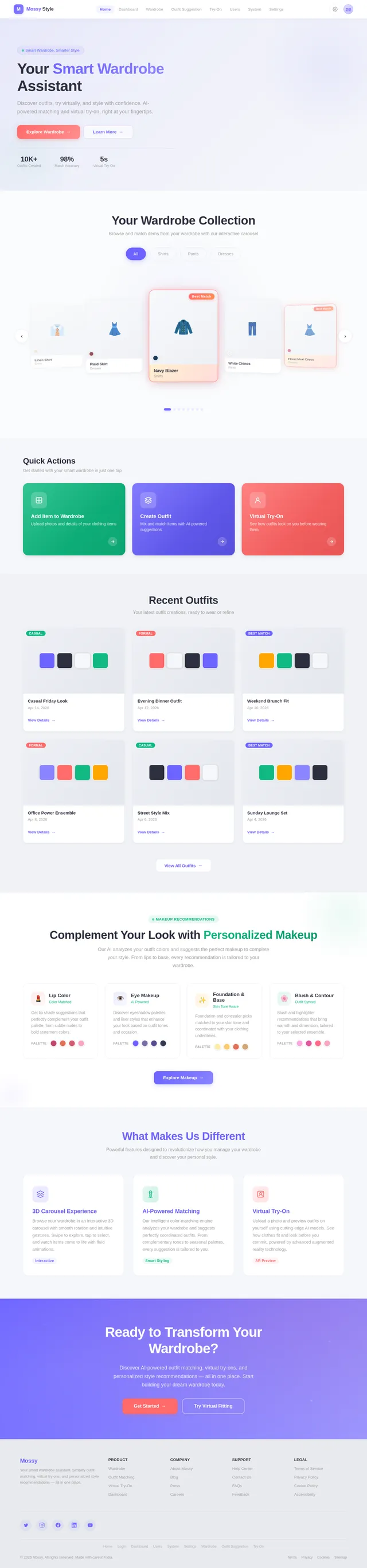
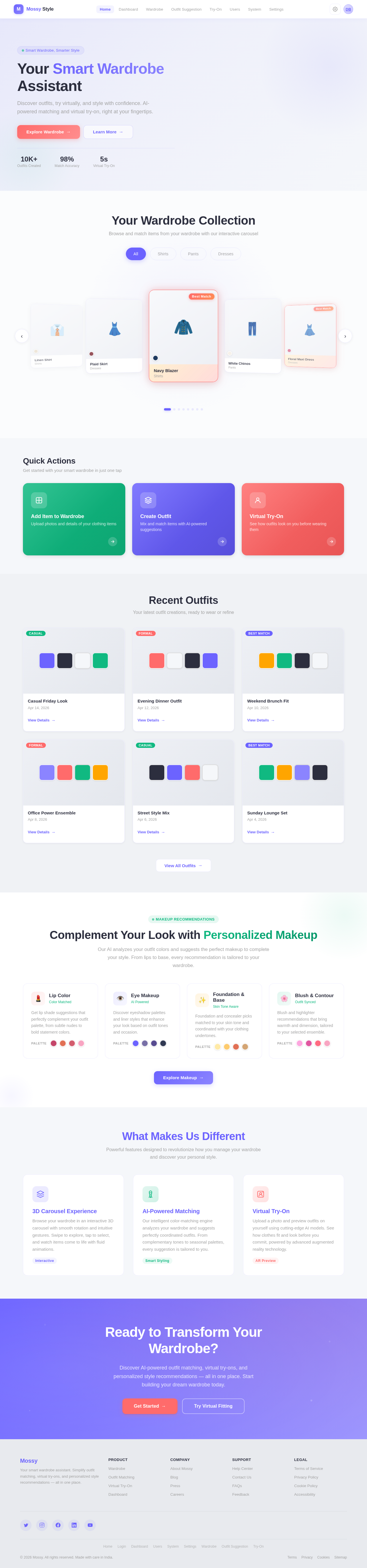
Interactive Wardrobe Carousel
The homepage will feature an Interactive Wardrobe Carousel as its centerpiece. Users will see a rotating 3D carousel of their wardrobe items, categorized by type (e.g., shirts, pants, dresses).
-
Animations:
- Items will smoothly rotate in 3D as users swipe left or right.
- Hovering over an item will enlarge it slightly, revealing details like type, color, and an optional image.
-
Transitions:
- Clicking on an item will trigger a zoom-in animation, transitioning to the outfit suggestion screen.
-
Micro-Interactions:
- Subtle haptic feedback on mobile devices when selecting or swiping items.
- A glowing outline around the "Best Match" items in the carousel.
This bold, dynamic design will make the app feel engaging and intuitive, leaving a lasting impression on users.
7. Non-Functional Requirements
- Performance: The app must load within 2 seconds on a standard 4G connection.
- Scalability: The system must support up to 1 million users without performance degradation.
- Security: User data must be encrypted both in transit and at rest.
- Accessibility: The app must comply with WCAG 2.1 Level AA standards.
- Localization: Default to English (India) with support for additional languages in the future.
8. Tech Stack
-
Frontend:
- React for Web
- React Native for Mobile
-
Backend:
- Python
- FastAPI
-
Database:
- Firestore for user and wardrobe data
- MySQL for structured data (future scalability)
-
AI Models:
- VITON or Stable Diffusion for virtual try-on
- GPT 5.4 for user-friendly responses
-
AI Tools:
- Litellm for LLM Routing
- Langchain
-
Orchestration:
- Docker and docker-compose for local development
- Kubernetes for server-side orchestration
9. Assumptions and Constraints
Assumptions
- Users will have access to a stable internet connection.
- Users will upload high-quality images for the virtual try-on feature.
- The app will initially target Android and iOS platforms.
Constraints
- Virtual try-on accuracy depends on the quality of AI models and user-uploaded images.
- Firebase Firestore will be used for MVP, with potential migration to MySQL for scalability.
10. Glossary
- MVP: Minimum Viable Product.
- Firestore: A NoSQL cloud database by Firebase.
- VITON: Virtual Try-On Network, an AI model for generating outfit previews.
- WCAG: Web Content Accessibility Guidelines.
- LLM: Large Language Model.
Your Smart Wardrobe Assistant
Discover outfits, try virtually, and style with confidence. AI-powered matching and virtual try-on, right at your fingertips.
Your Wardrobe Collection
Browse and match items from your wardrobe with our interactive carousel
Quick Actions
Get started with your smart wardrobe in just one tap
Recent Outfits
Your latest outfit creations, ready to wear or refine
Casual Friday Look
Apr 14, 2026
Evening Dinner Outfit
Apr 12, 2026
Weekend Brunch Fit
Apr 10, 2026
Office Power Ensemble
Apr 8, 2026
Street Style Mix
Apr 6, 2026
Sunday Lounge Set
Apr 4, 2026
Complement Your Look with Personalized Makeup
Our AI analyzes your outfit colors and suggests the perfect makeup to complete your style. From lips to base, every recommendation is tailored to your wardrobe.
Lip Color
Color MatchedGet lip shade suggestions that perfectly complement your outfit palette, from subtle nudes to bold statement colors.
Eye Makeup
AI PoweredDiscover eyeshadow palettes and liner styles that enhance your look based on outfit tones and occasion.
Foundation & Base
Skin Tone AwareFoundation and concealer picks matched to your skin tone and coordinated with your clothing undertones.
Blush & Contour
Outfit SyncedBlush and highlighter recommendations that bring warmth and dimension, tailored to your selected ensemble.
What Makes Us Different
Powerful features designed to revolutionize how you manage your wardrobe and discover your personal style.
Ready to Transform Your Wardrobe?
Discover AI-powered outfit matching, virtual try-ons, and personalized style recommendations — all in one place. Start building your dream wardrobe today.
No comments yet. Be the first!