mossy-app
 Raja Kumar
Create a mobile app for an online coaching institute named "Expert Science Classes". Target audience: Students of Class 11 and Class 12 (Science stream). App structure and features: 1. Home Screen: - Display app logo and name - Buttons for Class 11 and Class 12 - Latest announcements section 2. Class Sections: - Separate sections for Class 11 and Class 12 - Subjects inside each class: Physics, Chemistry, Mathematics, Biology 3. Content Sections (inside each subject): - PDF Notes (chapter-wise) - Video Lectures (recorded) - Practice Tests / Quizzes (MCQ based) 4. Live Classes: - Add a "Join Live Class" button - Integrate external links for live classes (Google Meet or Zoom) 5. Recorded Videos: - Embed videos using YouTube links (unlisted or private) 6. Student Features: - Login and Signup system - Simple and clean dashboard 7. Notifications: - Send updates about classes, tests, and announcements 8. Doubt Support: - Add a button to contact via WhatsApp or chat Design requirements: - Clean, simple, student-friendly UI - Fast loading and easy navigation - Use a blue and white color theme Important: - Admin should be able to upload PDFs, videos, and tests manually
Comments (0)
Sign in to leave a comment
System Requirements
System Requirements Document (SRD)
Project Name: mossy-app
1. Introduction
The mossy-app is a mobile application designed for Expert Science Classes, an online coaching institute catering to students of Class 11 and Class 12 (Science stream). The app aims to provide a seamless and interactive learning experience by offering features such as PDF notes, video lectures, practice tests, live classes, and doubt support. The app is tailored to meet the needs of Indian students, ensuring a clean, student-friendly interface with fast loading times and easy navigation.
This document outlines the system requirements for the development of the mossy-app, ensuring alignment with the goals and expectations of Raja Kumar and his team.
2. System Overview
The mossy-app will serve as a comprehensive learning platform for students preparing for science subjects in Classes 11 and 12. It will include:
- Class-specific content: Separate sections for Class 11 and Class 12, with subject-wise organization (Physics, Chemistry, Mathematics, Biology).
- Content delivery: Chapter-wise PDF notes, recorded video lectures (via YouTube), and MCQ-based practice tests.
- Live classes: Integration with Google Meet or Zoom for real-time learning.
- Student engagement: Push notifications for updates, a WhatsApp/chat-based doubt resolution system, and a clean, intuitive dashboard.
- Admin control: A robust content management system for uploading PDFs, videos, and tests.
The app will prioritize a blue-and-white theme for a clean and professional look, ensuring a distraction-free learning environment.
3. Functional Requirements
As a Student:
- I should be able to view the app logo and name on the home screen.
- I should be able to navigate to Class 11 or Class 12 sections from the home screen.
- I should be able to view the latest announcements on the home screen.
- I should be able to access subject-specific content (Physics, Chemistry, Mathematics, Biology) within my class section.
- I should be able to download chapter-wise PDF notes for each subject.
- I should be able to watch recorded video lectures embedded via YouTube.
- I should be able to attempt MCQ-based practice tests and quizzes.
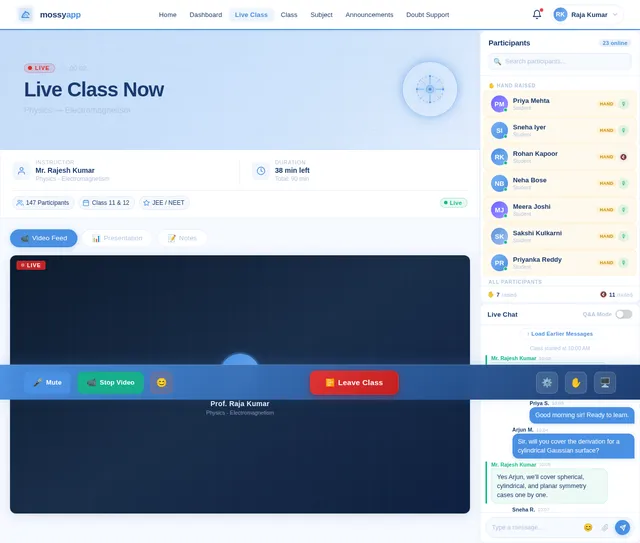
- I should be able to join live classes via external links (Google Meet or Zoom).
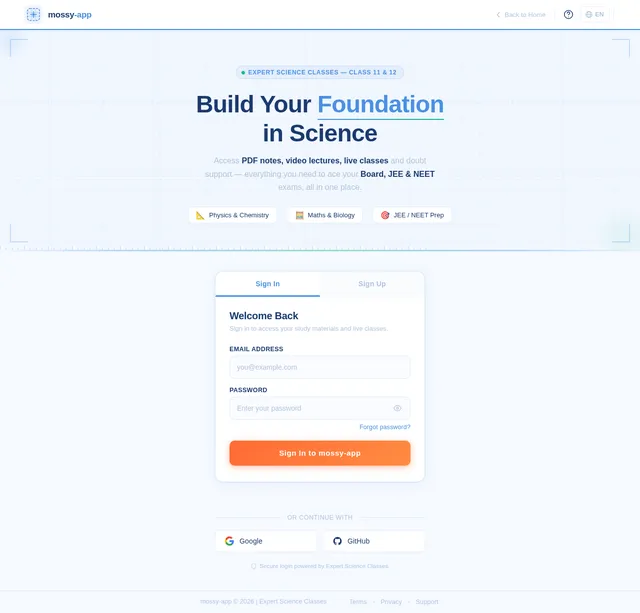
- I should be able to log in or sign up to access the app.
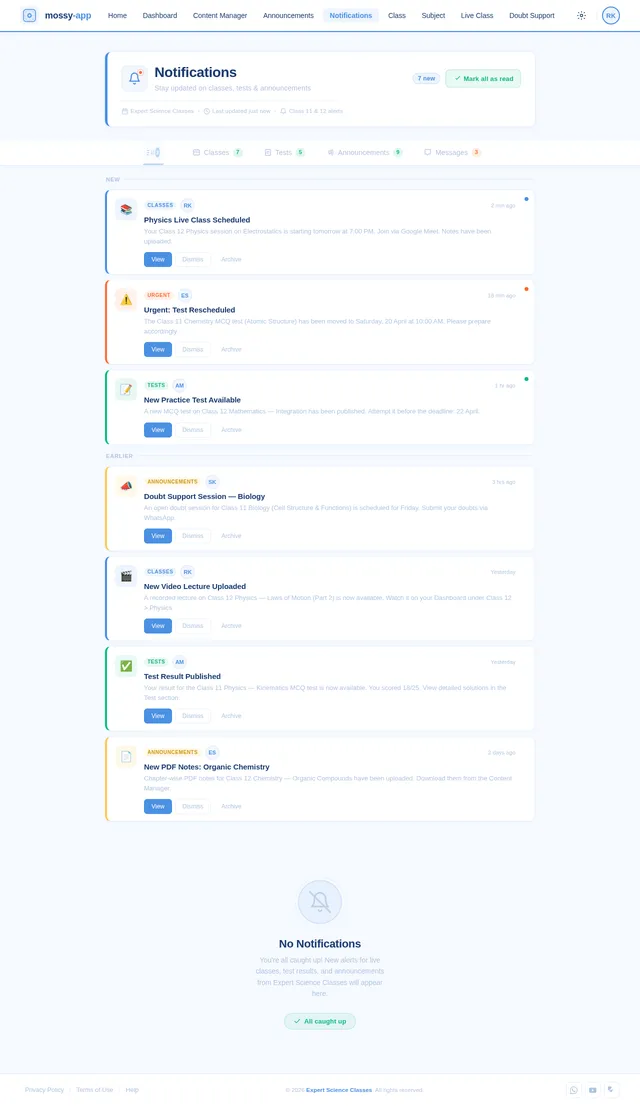
- I should be able to receive notifications about classes, tests, and announcements.
- I should be able to contact the institute for doubt resolution via WhatsApp or chat.
As an Admin:
- I should be able to upload PDFs, videos, and tests manually.
- I should be able to send push notifications to students.
- I should be able to manage announcements displayed on the home screen.
4. User Personas
1. Student
- Description: A Class 11 or Class 12 science student preparing for board exams and competitive exams like JEE/NEET.
- Goals: Access study materials, attend live classes, and clarify doubts.
- Pain Points: Limited time, need for organized content, and quick doubt resolution.
2. Admin
- Description: A faculty member or administrator managing content for Expert Science Classes.
- Goals: Upload and organize study materials, schedule live classes, and communicate with students.
- Pain Points: Efficient content management and timely communication with students.
5. Visuals Colors and Theme
The mossy-app will feature a unique blue-and-white color palette to create a clean and professional aesthetic.
- Background:
#F5F9FF(soft blue-white) - Surface:
#FFFFFF(pure white) - Text:
#1A3A6F(deep navy blue) - Accent:
#4A90E2(vibrant blue) - Muted Tones:
#B0C4DE(light steel blue)
This palette ensures a calm and focused environment for students, aligning with the app's educational purpose.
6. Signature Design Concept
Interactive Blueprint Landing Page
The home screen of the mossy-app will resemble a blueprint-style design, symbolizing the foundation of knowledge.
-
Visual Elements:
- The app logo will appear as a glowing neon blueprint sketch at the top.
- Buttons for Class 11 and Class 12 will be styled as architectural blocks, with subtle animations when hovered or tapped.
- The latest announcements section will appear as a scrolling ticker at the bottom, mimicking a drafting ruler.
-
Animations:
- When a user selects a class, the screen will transition with a blueprint fade effect, where the content "draws itself" into view.
- Subject icons will have hover effects that simulate a pencil sketch being filled with color.
-
Micro-interactions:
- Tapping on a subject will cause the subject card to "flip" like a page, revealing the content sections (PDFs, videos, quizzes).
- Notifications will appear as sticky notes pinned to the blueprint, with a subtle paper-rustling animation.
This design will make the app visually engaging and memorable, while maintaining a professional and educational tone.
7. Non-Functional Requirements
- Performance: The app should load within 3 seconds on a standard 4G connection.
- Scalability: Support up to 10,000 concurrent users.
- Security: Implement secure login/signup with encrypted passwords and data.
- Compatibility: Support Android (version 8.0 and above) and iOS (version 12.0 and above).
- Localization: Default to English, with support for Hindi if required in the future.
8. Tech Stack
Frontend:
- React Native for mobile app development.
Backend:
- Python with FastAPI for API development.
Database:
- MySQL for structured data (e.g., user accounts, announcements).
- MongoDB for unstructured data (e.g., chat logs).
AI Tools:
- Litellm for routing AI-based doubt support.
Orchestration:
- Docker and docker-compose for local development.
- Kubernetes for server-side orchestration.
9. Assumptions and Constraints
-
Assumptions:
- Students will have access to stable internet for live classes and video streaming.
- Admins will upload content in standard formats (PDF, YouTube links).
-
Constraints:
- Limited to Android and iOS platforms.
- External tools (Google Meet, Zoom, YouTube) must be integrated seamlessly.
10. Glossary
- PDF Notes: Digital documents containing study material.
- MCQ: Multiple Choice Questions.
- Push Notifications: Alerts sent to users' devices for updates.
- Blueprint Design: A visual style resembling architectural blueprints.
This document provides a comprehensive blueprint for the mossy-app, ensuring it meets the needs of students and admins alike. Let me know if you'd like to refine or expand any section, Raja!
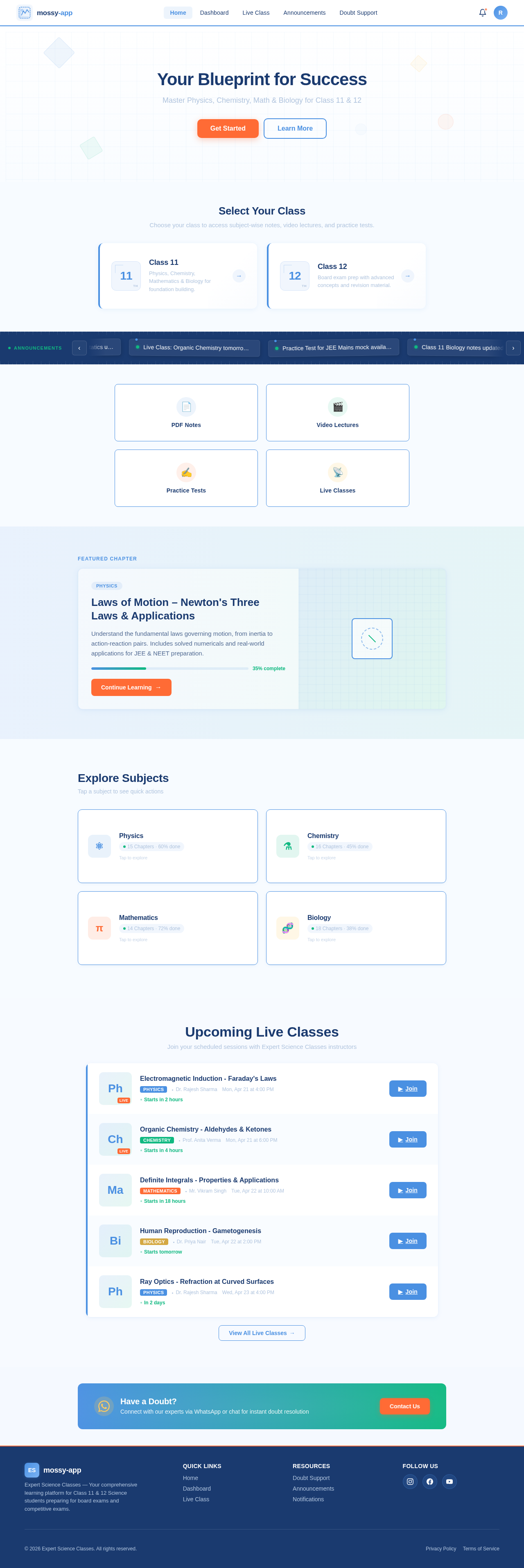
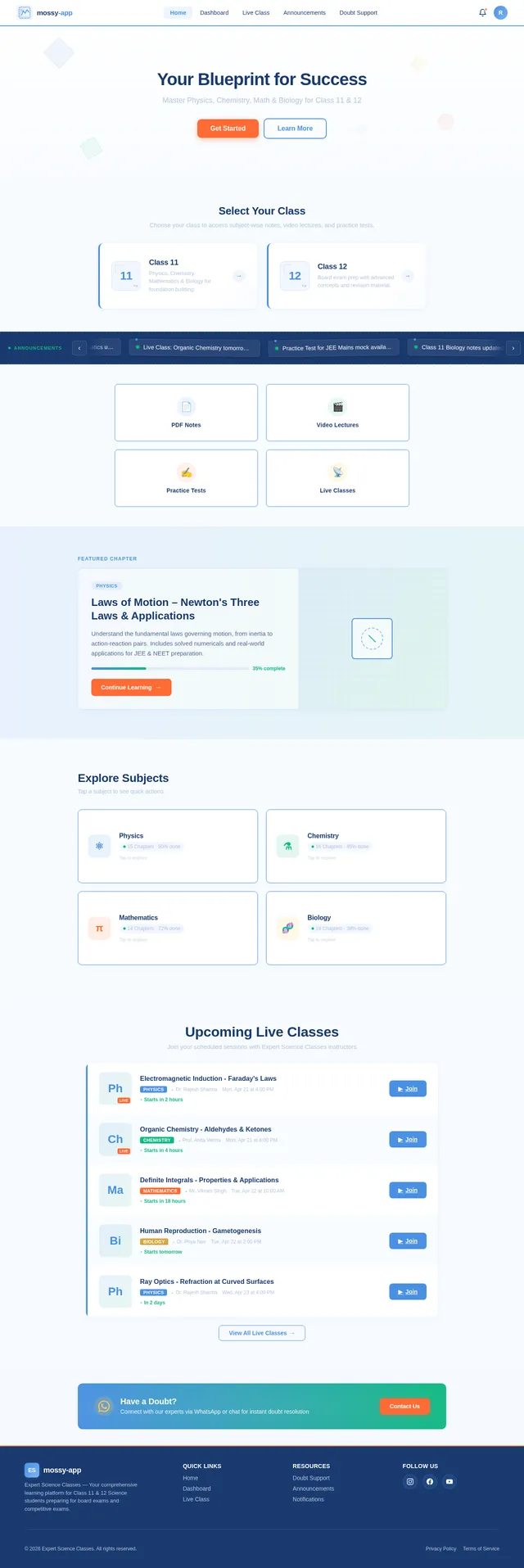
Your Blueprint for Success
Master Physics, Chemistry, Math & Biology for Class 11 & 12
Select Your Class
Choose your class to access subject-wise notes, video lectures, and practice tests.
Laws of Motion – Newton's Three Laws & Applications
Understand the fundamental laws governing motion, from inertia to action-reaction pairs. Includes solved numericals and real-world applications for JEE & NEET preparation.
Explore Subjects
Tap a subject to see quick actions
Upcoming Live Classes
Join your scheduled sessions with Expert Science Classes instructors
Your Blueprint for Success
Master Physics, Chemistry, Math & Biology for Class 11 & 12
Select Your Class
Choose your class to access subject-wise notes, video lectures, and practice tests.
Laws of Motion – Newton's Three Laws & Applications
Understand the fundamental laws governing motion, from inertia to action-reaction pairs. Includes solved numericals and real-world applications for JEE & NEET preparation.
Explore Subjects
Tap a subject to see quick actions
Upcoming Live Classes
Join your scheduled sessions with Expert Science Classes instructors
No comments yet. Be the first!