moon-saas
 Vivek Koranampatty
build a saas usermanagement, billing, subscription and all the boilerplate needed for SaaS


Comments (0)
Sign in to leave a comment
System Requirements
System Requirements Document for moon-saas
1. Introduction
The moon-saas project aims to build a foundational SaaS platform that includes user management, billing, subscription management, and the necessary boilerplate for a SaaS application. This document outlines the system requirements for the platform, focusing on these foundational elements while explicitly excluding product-specific functionalities.
2. System Overview
The moon-saas platform is designed to provide a comprehensive foundation for SaaS applications, focusing on user management, billing, and subscription management. The platform will include capabilities for user enrollment, identity verification, account management, billing processes, and subscription lifecycle management. It will integrate with payment gateways and third-party services to support these operations. The system excludes any product-specific functionalities, focusing solely on the SaaS boilerplate.
2a. Product Interpretation and Delivery Boundary
The platform will deliver a SaaS foundation with custom UI and application-owned identity management. It will support anonymous access to the Landing page, with identity establishment through Sign Up and Login pages. Authenticated users will access the Dashboard for account management. The system will include administrator capabilities for user and billing management, as well as integration with external services for billing and subscriptions. The scope is limited to foundational capabilities, excluding product-specific features.
2b. Source Content Inventory
Not applicable as no content_source directive was provided.
2c. Page Content and Component Coverage
Landing
- Purpose: Introduce the SaaS platform, its capabilities, and intended users.
- Components:
- Overview of user management, billing, and subscription features.
- Call-to-action for Sign Up or Login.
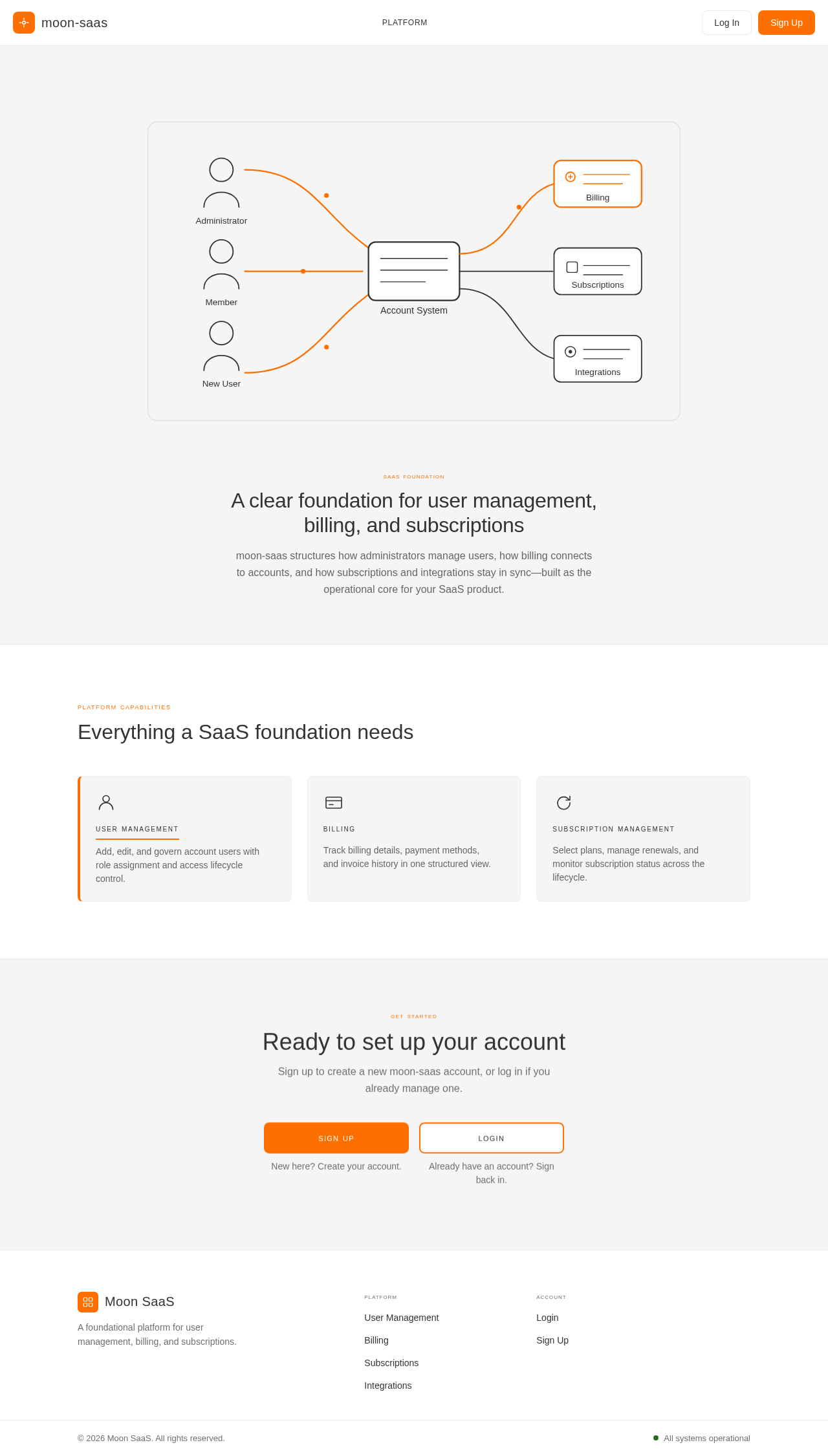
- Diagrammatic hero section illustrating user and data flow.
Login
- Purpose: Allow returning users to verify their identity.
- Components:
- Username and password fields.
- "Forgot Password" link.
- Login button with instant feedback on success or failure.
Sign Up
- Purpose: Enable new users to enroll in the platform.
- Components:
- Registration form with fields for user details.
- Terms and conditions acceptance.
- Sign Up button with confirmation feedback.
Dashboard
- Purpose: Provide an overview of account status and access to workflows.
- Components:
- Summary of user account status.
- Navigation to Users, Billing, Subscriptions, and Integrations.
- Alerts or notifications for account-related actions.
Users
- Purpose: Manage account users and their lifecycle.
- Components:
- List of current users with roles and statuses.
- Add/Edit user functionality.
- Role assignment and access control.
User Details
- Purpose: Edit individual user information and access.
- Components:
- User profile details.
- Access lifecycle management.
- Save changes with instant feedback.
Profile
- Purpose: Allow users to manage their own identity and access details.
- Components:
- Editable personal information.
- Password change option.
- Save changes with confirmation.
Billing
- Purpose: Manage billing information and processes.
- Components:
- Current billing details and history.
- Payment method management.
- Billing cycle and invoice overview.
Subscriptions
- Purpose: Manage subscription plans and lifecycle.
- Components:
- Current subscription details.
- Plan selection and changes.
- Subscription status and renewal options.
Integrations
- Purpose: Manage connections with payment gateways and third-party services.
- Components:
- List of available integrations.
- Setup and configuration options.
- Status and troubleshooting information.
3. Functional Requirements
-
As a SaaS Account Administrator, I should be able to manage account users and their access lifecycle.
Provenance: explicit
Observable Result: User management actions are reflected in the Users and User Details pages.
Access: role_restricted -
As a SaaS Account Administrator, I should be able to manage billing information and processes.
Provenance: explicit
Observable Result: Billing actions are reflected in the Billing page.
Access: role_restricted -
As a SaaS Account Administrator, I should be able to manage subscription plans and lifecycle.
Provenance: explicit
Observable Result: Subscription actions are reflected in the Subscriptions page.
Access: role_restricted -
As a SaaS Account Administrator, I should be able to manage integrations with payment gateways and third-party services.
Provenance: explicit
Observable Result: Integration actions are reflected in the Integrations page.
Access: role_restricted -
As a SaaS Account Member, I should be able to manage my own identity and access-related details.
Provenance: explicit
Observable Result: Profile changes are reflected in the Profile page.
Access: login -
As a new user, I should be able to self-enroll through the Sign Up page.
Provenance: required_inference
Observable Result: Successful enrollment leads to access to the Dashboard.
Access: none -
As a returning user, I should be able to verify my identity through the Login page.
Provenance: required_inference
Observable Result: Successful login leads to access to the Dashboard.
Access: none
4. User Personas
- SaaS Account Administrator: Manages account users, billing, and subscription administration. Responsible for configuring integrations and overseeing account operations.
- SaaS Account Member: Uses the shared SaaS account, manages personal identity, and participates in account access governed by user management.
5. Core User Flows
New User Enrollment
- User visits the Landing page.
- User selects "Sign Up" and completes the registration form.
- User submits the form and receives confirmation.
- User is redirected to the Dashboard.
Returning User Login
- User visits the Landing page.
- User selects "Login" and enters credentials.
- User submits the login form.
- Upon successful authentication, user is redirected to the Dashboard.
User Management by Administrator
- Administrator logs in and accesses the Dashboard.
- Administrator navigates to the Users page.
- Administrator adds or edits user details.
- Changes are saved and reflected in the user list.
Billing Management by Administrator
- Administrator logs in and accesses the Dashboard.
- Administrator navigates to the Billing page.
- Administrator updates billing information or reviews invoices.
- Changes are saved and reflected in the billing history.
Subscription Management by Administrator
- Administrator logs in and accesses the Dashboard.
- Administrator navigates to the Subscriptions page.
- Administrator selects or changes subscription plans.
- Changes are saved and reflected in the subscription details.
Integration Management by Administrator
- Administrator logs in and accesses the Dashboard.
- Administrator navigates to the Integrations page.
- Administrator configures or updates integrations.
- Changes are saved and reflected in the integration status.
6. Visuals Colors and Theme
- Muse: Dieter Rams
- Palette:
- Background: #F5F5F5
- Surface: #FFFFFF
- Text: #333333
- Primary: #FF6F00
- Accent: #33691E
- Muted: #BDBDBD
- Typography:
- Headings: Saira, Medium weight, small caps
- Body: Fira Sans
- Scale: 1.25 modular, 48/32/24/16/14
- Shape Language: Modular grid with rounded-rectangle controls
- Layout: Strict grid layout with clear content and navigation divisions
- Imagery: Diagrammatic line art and product silhouettes
7. Signature Design Concept
The Landing page will feature a diagrammatic hero section that illustrates the user and data flow within the SaaS platform. The design will use a 12-column grid with clear divisions and rounded-rectangle controls. The signal orange accent will highlight primary actions, ensuring functional clarity and hierarchy.
8. Interaction Model & Motion Direction
- Interaction Model: Static
- Motion Tempo: Restrained
- Hero Dimensionality: Flat
- Landing Hero Motion Brief: The hero section will feature a static diagrammatic representation of the platform's user and data flow, with key actions highlighted in orange. The design will focus on clarity and simplicity, with instant feedback for user interactions.
9. Non-Functional Requirements
- Performance: The system should handle concurrent user access without degradation in performance.
- Security: User data must be protected through encryption and secure authentication mechanisms.
- Scalability: The platform should support scaling to accommodate a growing number of users and transactions.
- Usability: The interface should be intuitive and easy to navigate for both administrators and members.
10. Tech Stack
- Frontend: React
- Backend: Python/FastAPI
- Database: PostgreSQL
- Containerization: Docker
- Orchestration: Kubernetes (if required for deployment)
11. Assumptions and Constraints
- The platform will not include any product-specific functionalities.
- The system will integrate with existing payment gateways and third-party services for billing and subscriptions.
- User management, billing, and subscription features are the primary focus, with no additional features outside the SaaS boilerplate.
12. Glossary
- SaaS: Software as a Service
- Boilerplate: Standardized pieces of code or setup used as a foundation for a project
- User Management: Processes related to managing user accounts and access
- Billing: Processes related to charging users for services
- Subscription Management: Processes related to managing user subscriptions to services
- Integration: Connecting with external services or systems to enhance functionality
SaaS Foundation
A clear foundation for user management, billing, and subscriptions
moon-saas structures how administrators manage users, how billing connects to accounts, and how subscriptions and integrations stay in sync—built as the operational core for your SaaS product.
Platform Capabilities
Everything a SaaS foundation needs
User Management
Add, edit, and govern account users with role assignment and access lifecycle control.
Billing
Track billing details, payment methods, and invoice history in one structured view.
Subscription Management
Select plans, manage renewals, and monitor subscription status across the lifecycle.
SaaS Foundation
A clear foundation for user management, billing, and subscriptions
moon-saas structures how administrators manage users, how billing connects to accounts, and how subscriptions and integrations stay in sync—built as the operational core for your SaaS product.
Platform Capabilities
Everything a SaaS foundation needs
User Management
Add, edit, and govern account users with role assignment and access lifecycle control.
Billing
Track billing details, payment methods, and invoice history in one structured view.
Subscription Management
Select plans, manage renewals, and monitor subscription status across the lifecycle.
No comments yet. Be the first!