moon-bot

byTest

create a project to build a simple single page design of todo application

Home
Home

Comments (0)

No comments yet. Be the first!

System Requirements

System Requirement Document
Page 1 of 4

Moon-Bot System Requirements Document

Introduction

The Moon-Bot project aims to develop a simple single-page application (SPA) for a to-do application. This document outlines the system requirements necessary to achieve the project's objectives.

System Overview

Moon-Bot is designed to be a lightweight, user-friendly to-do application that allows users to manage their tasks efficiently on a single-page interface. The application will focus on simplicity and ease of use, ensuring that users can quickly add, edit, and delete tasks without navigating through multiple pages.

Functional Requirements

  • As a User, I should be able to add a new task to my to-do list.
  • As a User, I should be able to edit an existing task.
  • As a User, I should be able to delete a task from my to-do list.
  • As a User, I should be able to mark a task as completed.
  • As a User, I should be able to view all tasks in a single-page interface.

User Personas

  • User: The primary user of the application who manages their personal to-do list.
Page 2 of 4

Core User Flows

  • User opens the application -> User adds a new task -> User edits or deletes tasks as needed -> User marks tasks as completed.

Visuals Colors and Theme

  • primary: #4A90E2 (a calming blue for the main interface)
  • primary_light: #A6C8F0 (a lighter tint of blue for hover states)
  • secondary: #F5A623 (a warm orange for emphasis and links)
  • accent: #50E3C2 (a vibrant mint for call-to-action buttons)
  • highlight: #F8E71C (a bright yellow for notifications and active indicators)
  • bg: #FFFFFF (a clean white for the background)
  • surface: rgba(255, 255, 255, 0.9) (a slightly opaque white for cards/panels)
  • text: #333333 (a dark grey for primary text)
  • text_muted: #9B9B9B (a soft grey for secondary text)
  • border: rgba(74, 144, 226, 0.2) (a subtle blue for borders)

Signature Design Concept

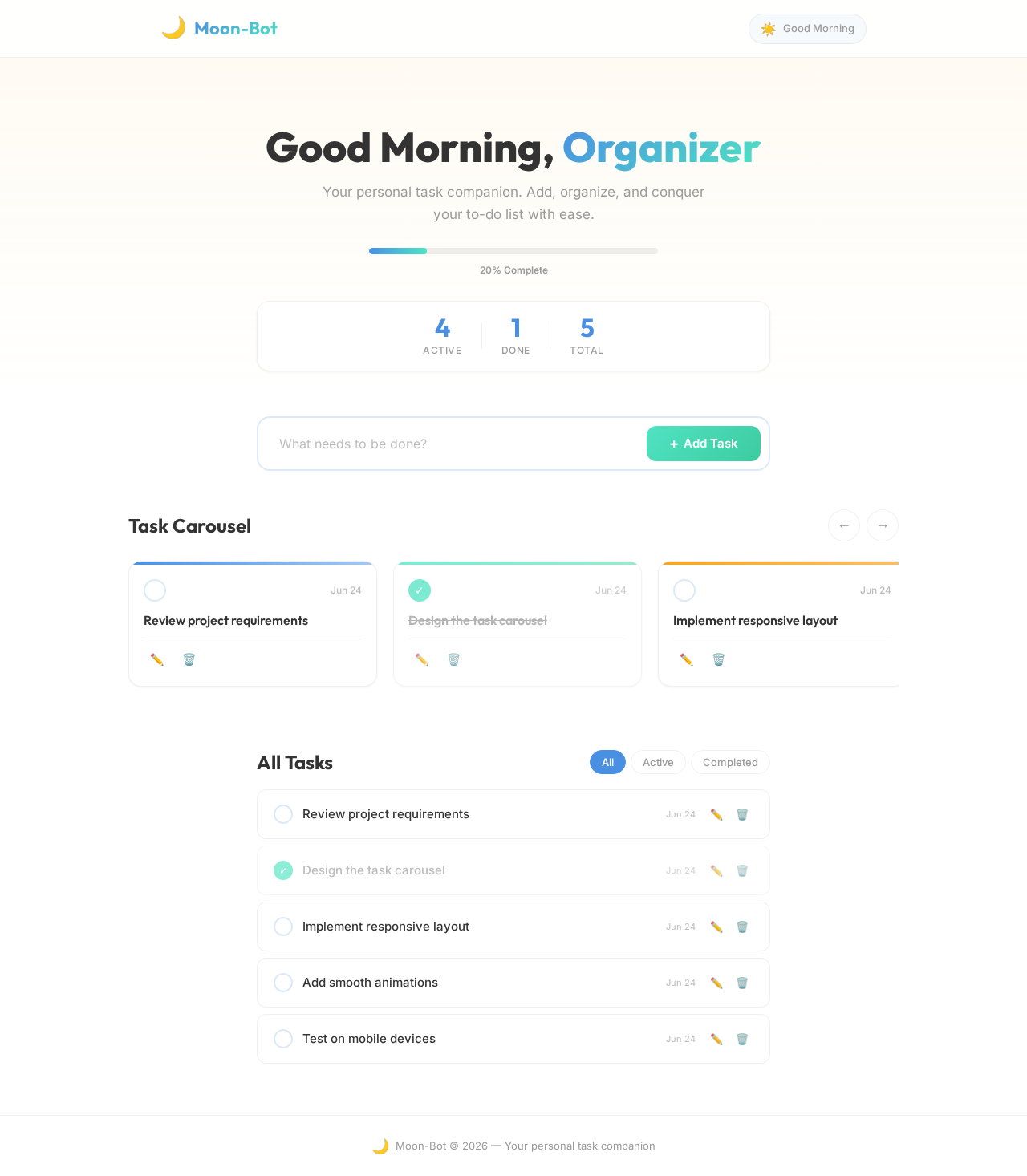
The Moon-Bot application will feature an interactive "Task Carousel" on the home page. Users can swipe through their tasks as if flipping through a carousel of cards. Each card represents a task, and users can tap to edit or swipe to delete. The carousel will have smooth animations using framer-motion for a seamless user experience. The background will subtly change colors based on the time of day, providing a dynamic and engaging interface.

Page 3 of 4

Interaction Model & Motion Direction

The landing page will utilize an "animated" interaction model. The application will feature moderate scroll-triggered reveals and hover transitions, enhancing the user experience without overwhelming the simplicity of the design.

Non-Functional Requirements

  • The application should load quickly and efficiently on all modern web browsers.
  • The design should be responsive and adapt to various screen sizes, including mobile devices.
  • The application should maintain a high level of accessibility, ensuring usability for all users.

Tech Stack

  • Frontend: React for Web
  • Backend: Not applicable for a single-page design
  • Database: Not applicable for a single-page design
  • AI Models: Not applicable
  • Local orchestration: Not applicable
  • Server-side orchestration: Not applicable

Assumptions and Constraints

  • The application will be developed as a single-page application, focusing on client-side functionality.
  • No server-side processing or database integration is required for this version.
  • The application will be designed for personal use and not for collaborative task management.
Page 4 of 4

Glossary

  • SPA: Single-Page Application
  • Task Carousel: An interactive feature allowing users to navigate through tasks in a carousel format.
  • Framer-motion: A library for creating animations in React applications.
Home design preview
Home: Open App
Home: View Tasks
Home: Add Task
Home: View Updated List
Home: Edit Task
Home: Save Changes
Home: Mark Complete
Home: View Completed
Home: Delete Task
Home: View Updated List
Home: Browse Carousel