montreaux
 Hello Mcdonald
build a simple 3 page loan website with name Montreaux


Comments (0)
Sign in to leave a comment
System Requirements
System Requirements Document for montreaux
1. Introduction
Montreaux is a simple three-page loan website. A visitor arrives at the site, reads what Montreaux is and what loan information it offers, reviews the loan information on the Loans page, and sends a loan application on the Apply page. The product intent is a calm, human, trustworthy consumer loan service for everyday applicants — not a cold corporate bank template.
The audience is the everyday loan applicant: a visitor who wants to understand Montreaux's loan offering and submit a loan request without an account, sign-in, or multi-step onboarding. The site is public and anonymous throughout; no identity, login, or account management is part of the current product.
The site is exactly three pages — Landing, Loans, and Apply — and that page count is a hard constraint.
2. System Overview
2a. Product Interpretation and Delivery Boundary
Montreaux is delivered as a first-party web application with a React frontend, a shared FastAPI backend, and a MariaDB database. All three pages are public and anonymously reachable: a visitor can open the Landing page, read the Loans page, and submit an application on the Apply page without establishing an identity. There is no login, registration, account, or session-bound private state in the current product.
The backend owns the durable record of each submitted loan application so that a submission is not lost when the visitor leaves the page. The database stores those application records. The frontend owns all reading and form interaction. No provider surface, external destination, or third-party loan origination system is part of the current scope.
Current scope is limited to: presenting Montreaux and its loan information, and accepting and durably recording a loan application. Future or adjacent capabilities — applicant accounts, application status tracking, underwriting decisions, document upload, payments, and loan servicing — are not part of this delivery.
2b. Source Content Inventory
No content_source reference directive was supplied, so no source content inventory is included.
2c. Page Content and Component Coverage
Landing
- Information and state: The public entry surface. Presents the Montreaux name and wordmark, a short statement of what Montreaux is (a simple loan service for everyday applicants), and a pointer to the loan information and the application. No visitor-specific state; the page is identical for every visitor.
- Primary action: Navigate to the Loans page to read loan information. A tomato-red capsule apply button also leads to the Apply page.
- Supporting actions: Navigate to Apply directly; navigate to Loans from the header or section foot.
- Domain entities: None persisted. The page reads only static product copy.
- Component responsibilities:
- Site header with the Montreaux wordmark and navigation to Landing, Loans, and Apply.
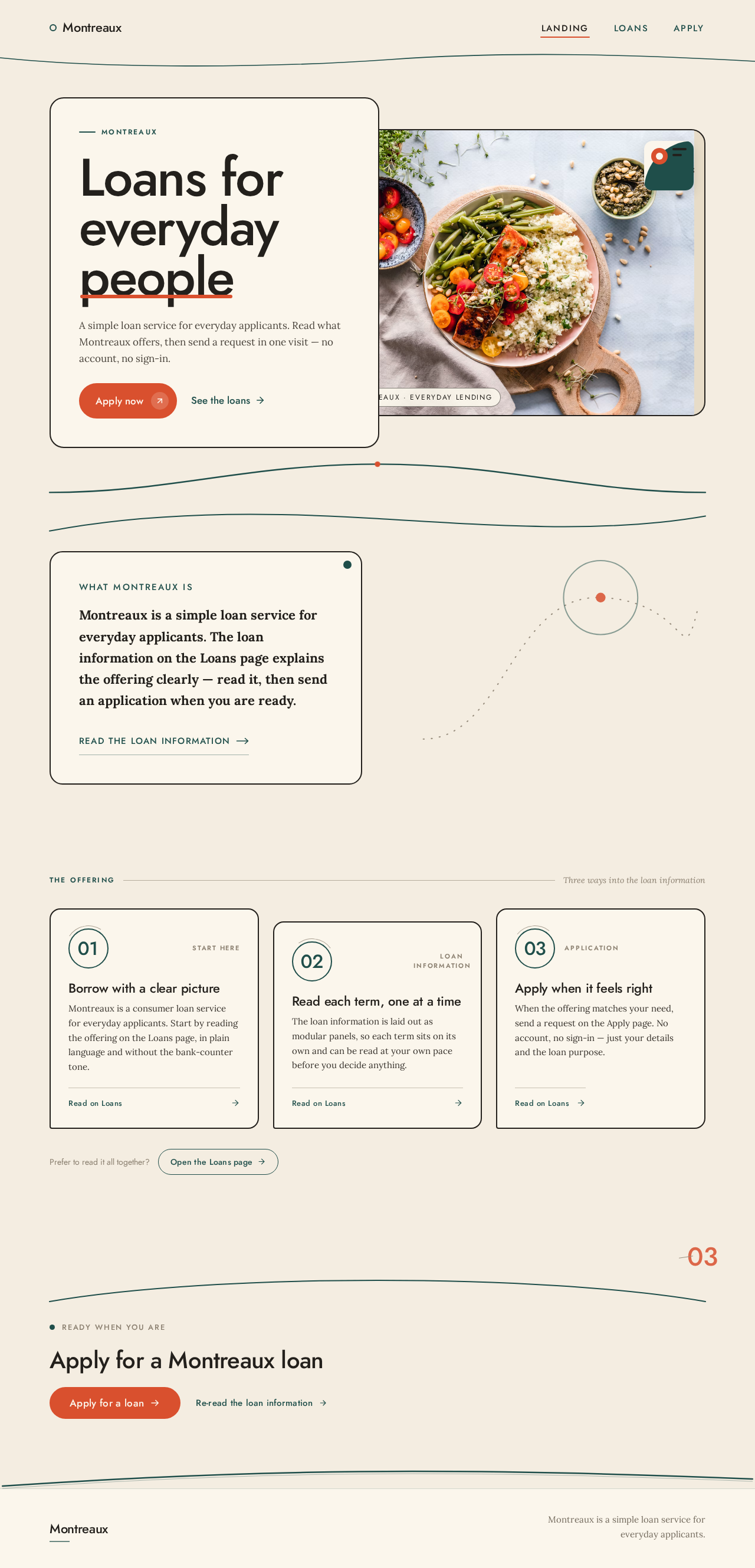
- Hero: full-bleed warm photograph on the right seven columns; cream panel on the left holding a stacked oversized Jost headline and a tomato-red capsule apply button.
- A short "what Montreaux is" panel in Lora body text.
- A modular panel row introducing the loan offering with numbered teal circles, each linking to the Loans page.
- A section-foot tomato-red capsule apply button.
- Hand-drawn arc rule dividing sections.
- States:
- Loading: static content; no data fetch, so no loading state is required beyond the initial page load.
- Empty: not applicable — the page has no collection.
- Success: the page renders fully; navigation links resolve.
- Error: if the frontend cannot reach the backend, the page still renders its static content; navigation to Loans and Apply remains available.
- Recovery: reload the page.
Loans
- Information and state: The public loan information surface. Presents Montreaux's loan offering as modular Eames-style panels with numbered teal circles, each panel describing one loan term or product fact. Read-only; no visitor input.
- Primary action: Navigate to the Apply page to send a loan application.
- Supporting actions: Return to Landing; open Apply from any panel's section foot.
- Domain entities: None persisted. Loan information is static product copy served by the frontend.
- Component responsibilities:
- Site header with navigation.
- Page title in Jost.
- A gallery-like sequence of loan-term panels, each with a numbered teal circle, a Jost panel heading, and Lora body copy.
- A tomato-red capsule apply button repeated at each section foot.
- Hand-drawn arc rules between panel groups.
- States:
- Loading: static content; no data fetch.
- Empty: not applicable.
- Success: all loan panels render and the apply buttons navigate to Apply.
- Error: if the backend is unreachable, static loan copy still renders; the apply button still navigates to Apply.
- Recovery: reload the page.
Apply
- Information and state: The public loan application surface. Holds a form the visitor fills in and submits. On submit, the form enters a submitting state, then a success state confirming the application was received, or an error state if submission fails. The submitted application is durably recorded by the backend.
- Primary action: Send the loan application.
- Supporting actions: Return to Loans to re-read loan information; return to Landing.
- Domain entities:
- Loan application: a record created when the visitor submits the form. Fields: applicant full name, email address, phone number, requested loan amount, loan purpose, and submission timestamp. Each submission creates one durable record.
- Component responsibilities:
- Site header with navigation.
- Page title and a short Lora introduction.
- Application form with labeled inputs for full name, email, phone, requested amount, and loan purpose, plus a submit control styled as the tomato-red capsule.
- Inline field validation messages.
- Submitting state on the submit control.
- Success confirmation panel naming the applicant and confirming receipt.
- Error panel with a retry action that preserves the entered values.
- States:
- Loading: the form renders immediately; the submit control shows a submitting state while the request is in flight.
- Empty: the form starts empty with placeholder guidance; submitting an empty form surfaces required-field validation.
- Success: a confirmation panel replaces or sits above the form, confirming the application was received.
- Error: a validation error marks the offending fields; a submission error shows a retry panel and keeps the entered values.
- Recovery: correct the marked fields and resubmit, or retry the failed submission without re-entering data.
3. Functional Requirements
FR-1 — Three-page loan website named Montreaux (explicit) As a Loan applicant, I should see a loan website named Montreaux with exactly three pages — Landing, Loans, and Apply — so that I can understand the offering and apply in one place.
- Trigger: the visitor opens the site.
- Observable result: the site presents the Montreaux name and exactly three navigable pages.
- Access: public, anonymous.
- Failure/recovery: if a page fails to load, the visitor can navigate to another of the three pages from the header.
- Continuation: the visitor moves between the three pages via the header.
FR-2 — Open the Landing page (required_inference) As a Loan applicant, I should open the Montreaux website at the Landing page so that I can learn what Montreaux is and where to go next.
- Trigger: the visitor navigates to the site root.
- Observable result: the Landing page renders with the Montreaux wordmark, a short statement of what Montreaux is, and links to Loans and Apply.
- Access: public, anonymous.
- Failure/recovery: if the page fails to load, the visitor reloads; the static content requires no backend.
- Continuation: the visitor selects Loans or Apply.
FR-3 — Read loan information on the Loans page (required_inference) As a Loan applicant, I should read the loan information on the Loans page so that I understand the offering before applying.
- Trigger: the visitor selects Loans from the header or a Landing panel.
- Observable result: the Loans page renders the loan-term panels with numbered teal circles and Lora body copy.
- Access: public, anonymous.
- Failure/recovery: if the page fails to load, the visitor reloads or returns to Landing.
- Continuation: the visitor selects the apply button to go to Apply.
FR-4 — Send a loan application on the Apply page (required_inference) As a Loan applicant, I should send a loan application on the Apply page so that Montreaux receives my loan request.
- Trigger: the visitor fills in the application form and activates the submit control.
- Input: full name, email address, phone number, requested loan amount, and loan purpose.
- Observable result: the backend durably records one loan application; the Apply page shows a success confirmation naming the applicant.
- Access: public, anonymous.
- Failure/recovery: missing or invalid fields are marked inline and submission is blocked; a failed submission shows a retry panel that preserves entered values.
- Continuation: after success, the visitor can return to Loans or Landing.
FR-5 — Durable record of each submitted application (required_inference) As a Loan applicant, I should have my submitted application durably recorded so that my loan request is not lost when I leave the page.
- Trigger: a successful form submission on Apply.
- Observable result: one loan application record is persisted in the database with the submitted fields and a submission timestamp.
- Access: public, anonymous submission; the record is written by the backend.
- Failure/recovery: if persistence fails, the Apply page shows the error panel and the visitor retries.
- Continuation: the visitor sees the success confirmation only after the record is persisted.
4. User Personas
Loan applicant
- Product context: An everyday person considering a consumer loan who has arrived at the Montreaux website. They are anonymous — no account, no sign-in — and expect to understand the offering and submit a request in a single visit.
- Primary goal: Understand what Montreaux lends and send a loan application.
- Distinct accepted responsibilities:
- Open the Landing page and read what Montreaux is.
- Read the loan information on the Loans page.
- Fill in and send a loan application on the Apply page.
- Relevant inputs or decisions: Whether the loan information matches their need; the values they enter into the application form (full name, email, phone, requested amount, loan purpose); whether to submit or return to Loans.
- Interactions with other accepted participants: None beyond the site itself. The applicant is the only active human persona; the backend and database act on their behalf without a human counterpart.
- Observable success: The applicant reaches the Apply page, submits the form, and sees a confirmation that the application was received.
5. Core User Flows
Flow A — Understand Montreaux and read the loan information
- The Loan applicant opens the Montreaux website at the Landing page.
- The Landing page renders the Montreaux wordmark, a short statement of what Montreaux is, and a modular panel row introducing the loan offering with numbered teal circles.
- The applicant selects Loans from the header or from a Landing panel.
- The Loans page renders the loan-term panels with numbered teal circles and Lora body copy.
- The applicant reads the loan information.
- Continuation: the applicant selects the tomato-red capsule apply button at a section foot to go to Apply, or returns to Landing.
- Failure/recovery: if a page fails to load, the applicant reloads or navigates to another of the three pages from the header; static content does not depend on the backend.
Flow B — Send a loan application
- The Loan applicant is on the Loans page (or Landing) and selects the tomato-red capsule apply button.
- The Apply page renders the application form with labeled inputs for full name, email address, phone number, requested loan amount, and loan purpose.
- The applicant fills in each field.
- The applicant activates the submit control.
- Validation: if a required field is missing or invalid, the Apply page marks the offending fields inline and blocks submission; the applicant corrects them and resubmits.
- Commitment: the submit control shows a submitting state while the backend records the application.
- Observable result: the backend persists one loan application record with the submitted fields and a submission timestamp; the Apply page shows a success confirmation naming the applicant.
- Continuation: the applicant can return to Loans to re-read the offering or to Landing.
- Failure/recovery: if the submission fails, the Apply page shows an error panel with a retry action that preserves the entered values; the applicant retries without re-entering data.
6. Visuals Colors and Theme
Muse and headline: Charles & Ray Eames — Warm modernism for Montreaux loans. The Eames language gives warm order and honest materials, making a loan site feel humane and clear rather than like a bank template.
Mode: Light mode only.
Colour tokens (exact hex by role):
- Background:
#F4EDE1(cream ground) - Surface:
#FBF6EC(panel surface) - Text:
#23201C(walnut-black) - Primary:
#1F4E4A(teal — headers and rules) - Accent:
#D9502E(tomato red — apply action and key numbers only) - Muted:
#8A7F6F(secondary text and thin rules)
Typography:
- Headings: Jost, geometric mid-century sans, medium weight, tight tracking, sentence case.
- Body: Lora, 1.65 line-height.
- Scale: 1.25 modular — display
clamp(40px, 7vw, 96px); body sizes 48 / 32 / 22 / 17 / 15 px.
Shape language: Organic-modern — soft capsule buttons, rounded panels with 2px ink borders, thin walnut rules, and simple geometric arcs.
Layout: Gallery-like sequence of modular panels on a 12-column grid; asymmetric image-and-text pairs; wide cream margins; hard section breaks.
Imagery: Warm natural-light photography of people and homes, mid-century pattern blocks, hand-drawn arrows and numerals.
Avoid: Blue or indigo gradients; identical hover-lift card grids; stock corporate handshake photos; sharp black SaaS chrome; the generic indigo/blue-on-white SaaS template.
Readability constraint: Headlines, wordmarks, labels, numbers, and card text and controls stay entirely inside the viewport and their container at 375px, 768px, and 1280px, wrapping or scaling (for example font-size: clamp(...) with its mobile size) to fit. Imagery and decoration may crop, bleed, rotate, or overlap as the direction asks, but never cover readable text or controls.
7. Signature Design Concept
The public entry — the Landing page — is composed as an Eames-style gallery wall. A full-bleed warm photograph of a family at a kitchen table fills the right seven columns. A cream panel (#FBF6EC, 2px ink border, rounded corners) overlaps the photograph on the left, holding a stacked 96px Jost headline in walnut-black (#23201C) at sentence case. Directly beneath the headline sits a tomato-red (#D9502E) capsule apply button. A hand-drawn arc rule in teal (#1F4E4A) divides the hero from the modular panel row below, where the loan offering is introduced as numbered teal circles. The tomato-red capsule apply button repeats at the section foot. The composition recomposes only the accepted Landing content — wordmark, statement of what Montreaux is, loan-offering panels, and navigation to Loans and Apply — and introduces no new behaviour or destination.
8. Interaction Model & Motion Direction
Interaction Model: Animated Motion Tempo: restrained Hero Dimensionality: layered_2d
Landing Hero Motion Brief
- Focal subject: the full-bleed warm photograph of a family at a kitchen table on the right seven columns, with the cream headline panel overlapping it on the left.
- Input → transformation → outcome thesis: as the Landing page loads, the photograph fades in with a slow, gentle pan while the cream headline panel and its tomato-red capsule button settle into place; the outcome is a composed first frame in which the headline, wordmark, and apply button are fully readable and the photograph is fully present.
- Motion vocabulary: gentle film-like fades and slow image pans; one reveal per section; no bounce.
- Composed first frame: cream ground
#F4EDE1; photograph occupying the right seven columns; cream panel with 2px ink border overlapping on the left; stacked 96px Jost headline in#23201C; tomato-red capsule apply button beneath it; teal arc rule below. - Reduced-motion state: with
prefers-reduced-motion, the photograph and panel render in their final positions with no fade or pan; all text and controls remain fully readable and the apply button remains available.
9. Non-Functional Requirements
- Page count (explicit): the website has exactly three pages — Landing, Loans, and Apply. No additional pages, routes, or destinations are part of the current product.
- Simplicity (explicit): the site is a simple loan website; no account, login, registration, or multi-step onboarding is part of the current product.
- Public anonymous access (required_inference): all three pages are reachable without identity; no protected destination exists.
- Durable application record (required_inference): each submitted application is persisted in MariaDB by the shared FastAPI backend before the success confirmation is shown, so a submission is not lost when the visitor leaves the page.
- Readability at every viewport (creative direction): readable text and controls stay whole at 375px, 768px, and 1280px; imagery and decoration may crop or overlap but never cover readable text or controls.
- Reduced motion (creative direction): with
prefers-reduced-motion, a usable static arrangement is provided. - Palette and typography fidelity (creative direction): the exact hex tokens and Jost/Lora families in Section 6 are preserved; the generic indigo/blue-on-white SaaS template is forbidden.
10. Tech Stack
- Frontend: React application UI.
- Backend: shared FastAPI process for application APIs and domain modules, including the loan application submission endpoint.
- Database: MariaDB for application-owned persistent data — the loan application records.
- Infrastructure: docker-compose with the
frontend,backend, anddatabaseservices; the backend is reused for the application API rather than adding a separate service.
11. Assumptions and Constraints
- Assumption (narrow): the loan information shown on the Loans page is static product copy authored for Montreaux; no external loan-rate feed or provider integration is part of the current product.
- Assumption (narrow): the application form collects full name, email address, phone number, requested loan amount, and loan purpose — the minimum fields needed to make the accepted "send a loan application" journey usable. No underwriting, decision, or status-tracking capability is implied.
- Constraint (explicit): exactly three pages; no additional destinations.
- Constraint (explicit): the site is simple; no accounts, login, or registration.
- Constraint (creative direction): the palette, fonts, shape language, layout, motion tempo, and readability rules in Sections 6–8 are binding.
12. Glossary
- Montreaux: the name of the loan website and the product.
- Loan applicant: the anonymous visitor who reads loan information and sends a loan application.
- Landing: the public entry page presenting what Montreaux is.
- Loans: the page presenting Montreaux's loan information as modular panels.
- Apply: the page holding the loan application form.
- Loan application: the durable record created when a visitor submits the Apply form, holding full name, email, phone, requested amount, loan purpose, and submission timestamp.
- Capsule button: the soft, fully rounded button shape used for the tomato-red apply action.

Montreaux
Loans foreverydaypeople
A simple loan service for everyday applicants. Read what Montreaux offers, then send a request in one visit — no account, no sign-in.
What Montreaux is
Montreaux is a simple loan service for everyday applicants. The loan information on the Loans page explains the offering clearly — read it, then send an application when you are ready.
Read the loan informationWhat Montreaux lends
- Start here
Borrow with a clear picture
Montreaux is a consumer loan service for everyday applicants. Start by reading the offering on the Loans page, in plain language and without the bank-counter tone.
Read on Loans - Loan information
Read each term, one at a time
The loan information is laid out as modular panels, so each term sits on its own and can be read at your own pace before you decide anything.
Read on Loans - Application
Apply when it feels right
When the offering matches your need, send a request on the Apply page. No account, no sign-in — just your details and the loan purpose.
Read on Loans
Prefer to read it all together?Open the Loans page
Montreaux
Loans foreverydaypeople
A simple loan service for everyday applicants. Read what Montreaux offers, then send a request in one visit — no account, no sign-in.
What Montreaux is
Montreaux is a simple loan service for everyday applicants. The loan information on the Loans page explains the offering clearly — read it, then send an application when you are ready.
Read the loan informationWhat Montreaux lends
- Start here
Borrow with a clear picture
Montreaux is a consumer loan service for everyday applicants. Start by reading the offering on the Loans page, in plain language and without the bank-counter tone.
Read on Loans - Loan information
Read each term, one at a time
The loan information is laid out as modular panels, so each term sits on its own and can be read at your own pace before you decide anything.
Read on Loans - Application
Apply when it feels right
When the offering matches your need, send a request on the Apply page. No account, no sign-in — just your details and the loan purpose.
Read on Loans
Prefer to read it all together?Open the Loans page
No comments yet. Be the first!