model-rambut-frenscrop
 chopper_ vtwin606
tolong edit model rambut menjadi frenscrop, tanpa merubah wajah, ekspresi, 100% mirip dengan foto saya

Comments (0)
Sign in to leave a comment
System Requirements
System Requirements Document for model-rambut-frenscrop
1. Introduction
model-rambut-frenscrop is a mobile-first photo-editing utility for changing the hairstyle in a user’s own photo to a French crop. Its defining requirement is to change only the hair while preserving the user’s face and expression and keeping the result 100% similar to the original photo. The user requests that the edited image be created.
The product is for a person editing their own photo. Its interface and instructions are in Indonesian. The supplied photo is the user’s input for the edit.
2. System Overview
The application provides four custom pages: Landing, Upload, Editor, and Result. A user can begin without an account, provide their photo, apply the French crop edit, and view the resulting image. The pages are anonymously accessible; no application identity or account workflow is required by the accepted scope.
The current product is limited to the requested photo transformation and its necessary input, editing, and result presentation. The edit must be limited to the hair: the face and expression must not be changed, and the result must remain 100% similar to the user’s photo. No other editing styles or image-editing capabilities are in scope.
2a. Product Interpretation and Delivery Boundary
The application owns the four named pages and the user-facing edit journey. The user supplies their own photo and receives an edited image to view. The supplied photo is the visual subject of the editing experience; it is not a request to reproduce the reference image’s unrelated scene or to add other imagery.
The latest visual reference is the user’s own portrait photo. It is used as optional visual context for the portrait treatment and product context, not as a request to copy a website or its structure. The product’s accepted behavior and the authoritative creative direction remain the basis for the interface. No provider-owned or external user workflow is specified.
2c. Page Content and Component Coverage
Landing
- Information and state: Introduces the hair-only French crop transformation and its face- and expression-preservation promise. Anonymous entry; no user photo is required to view this page.
- Primary action: “MULAI — UNGGAH FOTO” starts the photo-input journey and opens Upload.
- Supporting content: The micro-label “HANYA RAMBUT YANG DIUBAH” reinforces the edit boundary. The hero uses the specified Indonesian headline: “RAMBUT BARU. / WAJAH YANG / SAMA.”
- Components: Editorial headline, one primary action, hairline rule, and a portrait-led visual treatment. The supplied user photo may inform the portrait context; do not substitute unrelated stock imagery.
- States: Loading is not required for the static entry content. If the page cannot be displayed, show a recoverable error and allow the user to retry or leave the page. Success is the user reaching Upload.
Upload
- Information and state: Presents the photo-input step and its oversized step number. The user provides their own photo as the input required for the edit.
- Primary action: Select or provide a photo to continue to Editor.
- Components: One drop rectangle with a vermilion dashed hairline, step number, concise Indonesian instruction, and a single primary action at a time.
- States: Empty before a photo is provided; loading while the input is being prepared; success when the photo is available to the edit journey. If the photo cannot be provided or prepared, explain the failure and let the user retry. Do not proceed to editing without an input photo.
Editor
- Information and state: Shows the provided photo and the requested French crop style. The edit is constrained to the hair; the face and expression remain unchanged, and the result must be 100% similar to the original photo.
- Primary action: Apply the French crop edit and proceed to Result.
- Components: A dominant photo, a 1px line-drawn French crop silhouette diagram showing short fringe, tapered sides, and cropped top, the “French crop” style label, and a vermilion active-style marker. The hair-region outline must not cover the face.
- States: Loading while the edit is being produced; success when the edited image is ready and Result can be opened. If editing fails, show an error and allow the user to retry from the provided photo. Do not present a failed or incomplete edit as a successful result.
Result
- Information and state: Displays the edited image for the user to view, with the original available for comparison. The edited image has a French crop and preserves the face and expression; the result must be 100% similar to the original photo.
- Primary action: View the completed image and compare it with the original using the before/after divider.
- Components: A hard-edged split between original and edited images, a 1px vertical divider with a small “GESER” label, and the hair-region outline. The divider tracks the user’s drag directly at 1:1.
- States: Loading while the result is being presented; success when the edited image is visible. If the result cannot be displayed, show a recoverable error and allow the user to return to Editor to retry. The user’s observable completion is viewing the edited image.
3. Functional Requirements
FR-1 — Introduce the hair-only edit
As a Pengguna yang mengedit rambut pada foto sendiri, I should be able to understand that the product changes only my hair to a French crop while keeping my face and expression unchanged.
- Provenance:
required_inferencefor the anonymous entry page; the hair-only French crop request and face/expression constraints areexplicit. - Lifecycle: The user opens Landing without an account and sees the edit promise and the action to begin.
- Acceptance: The page communicates the French crop, hair-only edit, and face/expression preservation. The user can continue to Upload. If the page fails to load, the user receives a recoverable error.
FR-2 — Provide the user’s photo
As a Pengguna yang mengedit rambut pada foto sendiri, I should be able to provide my own photo as the input for the edit.
- Provenance:
required_inference. - Lifecycle: The user starts from Landing, opens Upload, and provides their photo. The photo becomes the input for Editor.
- Acceptance: Editing cannot proceed without a provided photo. If the photo cannot be provided or prepared, the user sees an error and can retry. On success, the user continues to Editor.
FR-3 — Apply the French crop edit without changing the face or expression
As a Pengguna yang mengedit rambut pada foto sendiri, I should be able to request a French crop edit that changes only the hair and leaves my face and expression unchanged.
- Provenance: The French crop request and face/expression constraints are
explicit; applying the edit to the provided photo isrequired_inference. - Lifecycle: The user sees their photo and the French crop style in Editor, then initiates the edit. The system produces an edited image for the user.
- Acceptance: The edit is limited to the hair and uses the French crop style. The face and expression are not changed, and the result must be 100% similar to the user’s photo. If editing fails, the user sees an error and can retry from the provided photo. On success, the user continues to Result.
FR-4 — View the edited image
As a Pengguna yang mengedit rambut pada foto sendiri, I should be able to view the image produced by the French crop edit.
- Provenance:
explicitfor generating the requested edited image;required_inferencefor presenting it to the user. - Lifecycle: After a successful edit, the user opens Result and views the edited image alongside the original for comparison.
- Acceptance: The result is visible and can be compared with the original using the divider. If the result cannot be displayed, the user sees a recoverable error and can return to Editor to retry.
4. User Personas
Pengguna yang mengedit rambut pada foto sendiri
- Provenance:
required_inference; the accepted persona catalog contains this persona only. - Product context: A person using their own photo for a specific hairstyle transformation. The request is personal and depends on preserving the identity and expression shown in the photo.
- Primary goal: Obtain an image of themselves with a French crop hairstyle while keeping the face and expression unchanged and the result 100% similar to the original photo.
- Responsibilities: Provide their photo, request the French crop edit, and view the resulting image.
- Inputs and decisions: Supplies the photo and initiates the requested edit. No additional style choice is in scope.
- Interactions with other participants: No other accepted human participant is involved. The application processes the requested edit and presents the result.
- Observable success: The user can view an edited image with a French crop, with the face and expression unchanged and the result 100% similar to their photo.
5. Core User Flows
Flow 1 — Start the edit
- The user opens Landing anonymously.
- The user reads the French crop and hair-only edit promise, including that the face and expression will remain unchanged.
- The user selects “MULAI — UNGGAH FOTO.”
- Observable result: Upload opens. If the entry page fails, the user sees an error and can retry.
Flow 2 — Provide a photo
- From Upload, the user provides their own photo.
- The application prepares the photo as the input for the edit.
- Observable result: The photo is available in Editor. If it cannot be provided or prepared, the user sees an error and can retry from Upload.
Flow 3 — Request and receive the French crop edit
- In Editor, the user sees their photo and the French crop silhouette and label.
- The user initiates the French crop edit.
- The application produces an edited image, changing only the hair while preserving the face and expression and maintaining 100% similarity to the original photo.
- On success, the user continues to Result and views the edited image.
- The user compares the original and edited images by dragging the divider; the divider follows the drag at 1:1.
- Observable result: The user sees the French crop edit and can compare it with the original. If editing fails, the user sees an error and can retry from Editor using the provided photo. If the result cannot be displayed, the user can return to Editor to retry.
6. Visuals Colors and Theme
The authoritative creative direction is Editorial swagger for a single, exacting portrait transformation, with Tobias van Schneider as its named muse. The visual tone is a serious, precise atelier for a personal portrait edit, not a playful filter app. Use Indonesian-language copy and a mobile-first layout.
Color tokens
Use the specified dark-mode palette:
- Background:
#0B0B0B - Surface behind the photo:
#161514 - Primary text and primary action fill:
#F4F1EA - Text on primary action:
#0B0B0B - Accent:
#E8452C - Muted text and metadata:
#8A857C - Hairline rules:
#2A2724
The intended balance is approximately 80% black, 15% off-white, and 5% vermilion. Do not use blue, gradients, or a generic indigo/blue-on-white SaaS treatment.
Typography
- Headings: Playfair Display, weight 700–900, very large, tight leading (
-0.03em) and slight negative tracking. Use for the wordmark, hero statement, and section openers. - Functional text and body: Archivo, weights 400/500/700.
- Micro-labels: Archivo, 11–12px, uppercase,
0.14emletter spacing. - Type scale on a 16px base with a 1.414 modular ratio: 16 / 22 / 32 / 45 / 64 / 90 / 128px.
- Hero statement:
clamp(48px, 12vw, 128px). - Section openers:
clamp(32px, 6vw, 64px). - Step numbers:
clamp(56px, 10vw, 90px). - Body text must not be below 16px; helper text must not be below 14px.
Shape, layout, and imagery
- Use sharp corners: 0px radius on cards, buttons, inputs, and image frames. The only curves are the circular hair-region crop marker and round progress ring.
- Use 1px hairline rules in
#2A2724; use a 2px vermilion rule for the active style. - Buttons are full-width rectangles with off-white fill and black text, or a 1px off-white outline on black. No shadows, glass, or rounded pills.
- On desktop, use an asymmetric 12-column editorial grid: the photo occupies columns 1–7 and bleeds off the left and bottom edges; type and controls occupy a narrow right rail in columns 9–12.
- On mobile, stack the display headline, photo, and controls in that order.
- Each screen has one dominant image, one line of very large type, and one action; never show more than two actions at once.
- Use full-bleed type bands with hairline rules for section transitions.
- The upload screen uses a single drop rectangle with a vermilion dashed hairline and a large step number.
- The result screen uses a hard-edged split between original and edited images, a 1px vertical divider, and a draggable divider handle.
- Use the user’s own uploaded photo as the portrait subject. Other imagery is limited to typographic or diagrammatic treatment, including a 1px line diagram of the French crop silhouette (short fringe, tapered sides, cropped top) and monochrome before/after crops. Do not use stock people, 3D renders, or illustration.
- The hair-region outline is vermilion and must not cover the face.
Responsive readability
At viewport widths of 375px, 768px, and 1280px, all readable text and controls must remain fully inside the viewport and their containers, wrapping or scaling as needed. Imagery and decoration may bleed or crop as directed, but must not cover readable text or controls. With reduced motion, provide a usable static arrangement. Any moving or scrollable content must allow each item to become fully readable as it passes or is brought into view.
7. Signature Design Concept
On Landing, use a black full-bleed field and the specified three-line editorial statement: “RAMBUT BARU. / WAJAH YANG / SAMA.” Set it in large Playfair Display, with “SAMA” in vermilion. Keep the text fully readable within the viewport; preserve the oversized editorial character through scale and composition rather than clipping readable text.
Place the user’s portrait as the single large image behind and to the right of the headline, desaturated toward monochrome, with a thin vermilion outline around the hair region that does not cover the face. Beneath the headline, place the single rectangular off-white “MULAI — UNGGAH FOTO” action, a hairline rule, and the muted all-caps label “HANYA RAMBUT YANG DIUBAH.” The composition should read as an editorial portrait and precise promise, not as a centered hero stack or a collection of cards.
8. Interaction Model & Motion Direction
Interaction Model: Animated
Motion Tempo: restrained
Hero Dimensionality: flat
Landing Hero Motion Brief
- Focal subject: The user’s own portrait, treated as editorial photography, with the hair region marked by a thin vermilion outline.
- Input → transformation → outcome thesis: The user begins by choosing to provide their photo; the product’s accepted transformation changes only the hair to a French crop and presents the edited image while preserving the face and expression.
- Motion vocabulary: Restrained 400–600ms crossfades; type reveals with a 12px upward translate and no bounce. The hair-region mask outline draws once over 900ms when the edit completes. No parallax, particles, springy easing, or hover-lift behavior.
- Composed first frame: Black field, oversized but fully readable three-line headline, portrait, and one primary action. The portrait may bleed off edges as directed, but must not cover text or controls.
- Reduced-motion state: Keep the same content and controls in a usable static arrangement; do not rely on animation to communicate the edit or its result.
9. Non-Functional Requirements
- NFR-1 — Face and expression preservation: The face and expression must not be changed by the edit. Provenance:
explicit. This is a hard product constraint. - NFR-2 — Similarity: The edited result must be 100% similar to the user’s photo, with the requested hair change as the only alteration. Provenance:
explicit. This is a hard product constraint. - NFR-3 — Responsive readability: At 375px, 768px, and 1280px, readable text and controls must remain fully visible within the viewport and their containers. Provenance: explicit creative-direction constraint.
- NFR-4 — Reduced motion: The interface must remain usable in a static arrangement when reduced motion is preferred. Provenance: explicit creative-direction constraint.
- NFR-5 — Visual restraint: Do not use blue, gradients, rounded corners, shadows, glass, stock people, 3D renders, illustration, playful bounce, or decorative elements that compete with the portrait. Provenance: explicit creative-direction constraint.
10. Tech Stack
- Presentation: React.
[Default — not specified by user] - Image-editing implementation: Not specified by the user; the implementation must satisfy the explicit hair-only, face-preservation, expression-preservation, and similarity requirements.
- Storage and deployment: Not specified by the user. No storage or deployment technology is mandated by the accepted requirements.
11. Assumptions and Constraints
- The user provides their own photo as the edit input. Provenance:
required_inference. - The accepted style is French crop only; no additional hairstyle choices or editing controls are included.
- The four-page inventory and anonymous access are fixed by the versioned Planning Scope contract.
- The latest uploaded photo is optional visual context and the user’s portrait subject; it does not change the accepted edit requirements or authorize unrelated image content.
- No future requirements were supplied.
12. Glossary
- French crop: The requested hairstyle, represented in the interface by a line-drawn silhouette with short fringe, tapered sides, and cropped top.
- Hair-region outline: The thin vermilion outline marking the hair area for the edit; it must not cover the face.
- Before/after divider: The 1px vertical rule separating the original and edited images, dragged directly by the user for comparison.
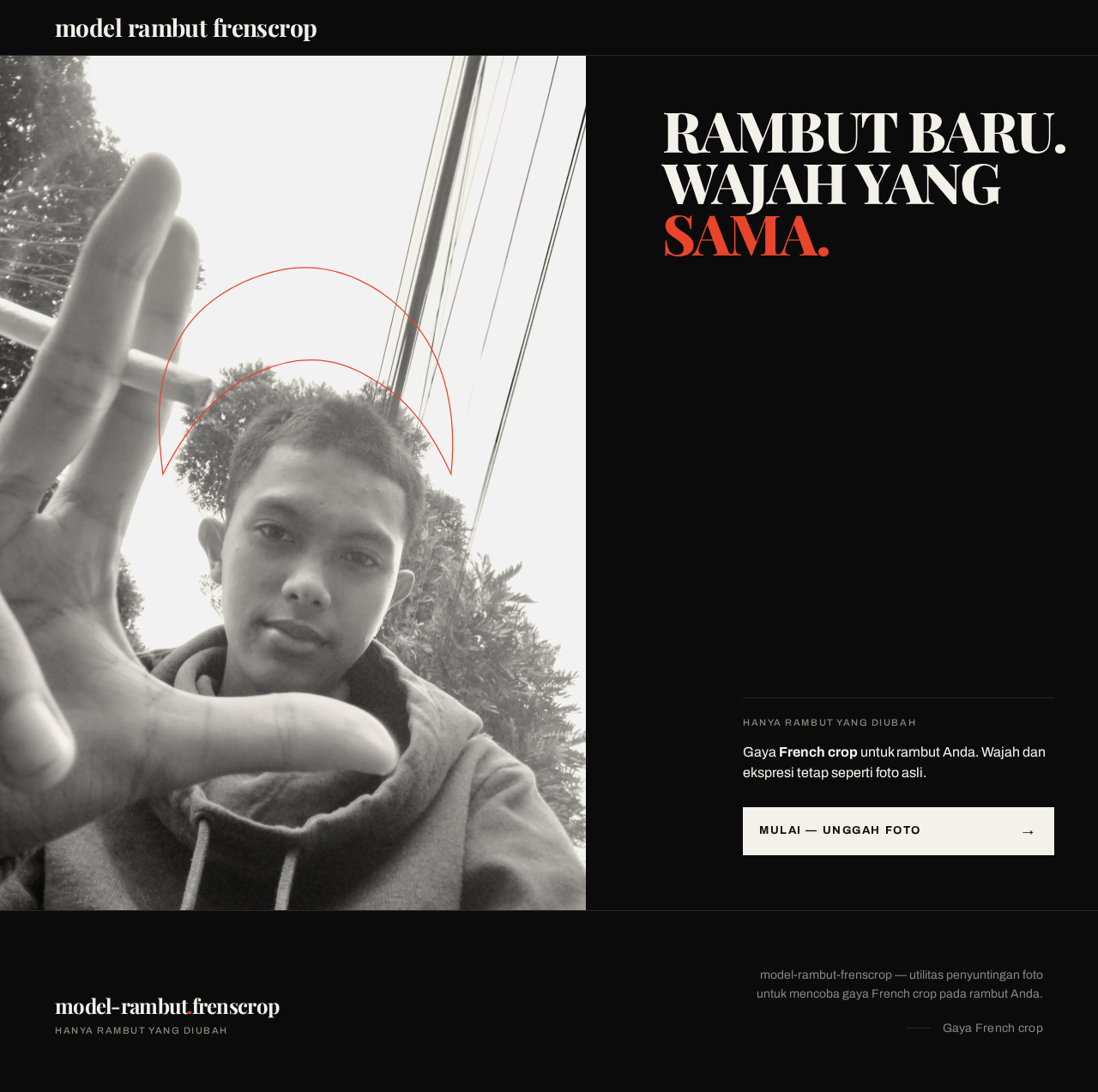
RAMBUT BARU.WAJAH YANGSAMA.

HANYA RAMBUT YANG DIUBAH
Gaya French crop untuk rambut Anda. Wajah dan ekspresi tetap seperti foto asli.
MULAI — UNGGAH FOTORAMBUT BARU.WAJAH YANGSAMA.
HANYA RAMBUT YANG DIUBAH
Gaya French crop untuk rambut Anda. Wajah dan ekspresi tetap seperti foto asli.
MULAI — UNGGAH FOTO
No comments yet. Be the first!