mobile-shop
 Hussain Bekhushi
create multi page website for mobile shop


Comments (0)
Sign in to leave a comment
System Requirements
System Requirements Document for Mobile Shop
1. Introduction
Mobile Shop is a multi-page website for a mobile phone shop. It exists so that everyday shoppers can browse mobile phones, view the details and price of a single phone, compare models and prices, and place an order for the phone they choose — and so that the shop owner can keep the phone catalog and its prices current.
The product intent is calm, honest and easy to trust: a shop that sells objects people hold every day, presented with quiet order rather than hype. The audience is everyday shoppers comparing models and prices, plus the shop owner who maintains what the shop shows.
The site-wide theme is Deep Indigo (#4F46E5) and Dark Slate (#0F172A), applied on every page. Section layouts are revised across all pages, and every button and metric card carries a smooth hover elevation effect. The site header is redesigned on every page, and a new, more creative logo — a custom-drawn mark rather than a plain wordmark — appears in both the header and the footer of every page.
This document is the System Requirements Document for the project named Mobile Shop, requested by Hussain Bekhushi.
2. System Overview
2a. Product Interpretation and Delivery Boundary
Mobile Shop is delivered as a first-party, application-owned multi-page website with a shared backend and application-owned persistent data. The website must have multiple pages; each page below is a separately navigable destination. Every page shares one redesigned site header and one shared footer, and both carry the same new creative logo mark.
Public, anonymous access. Landing, Phones, Phone Details, Sign Up and Login are reachable without an existing account. Landing explains the shop before any protected work. Phones and Phone Details let a shopper browse the catalog with prices and compare one phone and its price. Sign Up is where a new shopper establishes an account; Login is where a returning shopper or the shop owner verifies identity.
Protected access. Checkout is restricted to a signed-in shopper, because an order is a durable commitment that must remain bound to the correct shopper. Catalog Management is restricted to the shop owner's provisioned role, because it changes the shared catalog that every shopper sees. A protected destination cannot establish access to itself: a shopper who reaches Checkout without an account is directed to Sign Up, and a returning shopper or the shop owner is directed to Login; after identity is established they continue to the protected work they intended.
Current and future boundary. Everything described in this document is current. No future-horizon capabilities are accepted; nothing outside the accepted catalog, comparison, ordering, identity and catalog-maintenance behavior is in scope.
2c. Page Content and Component Coverage
Landing
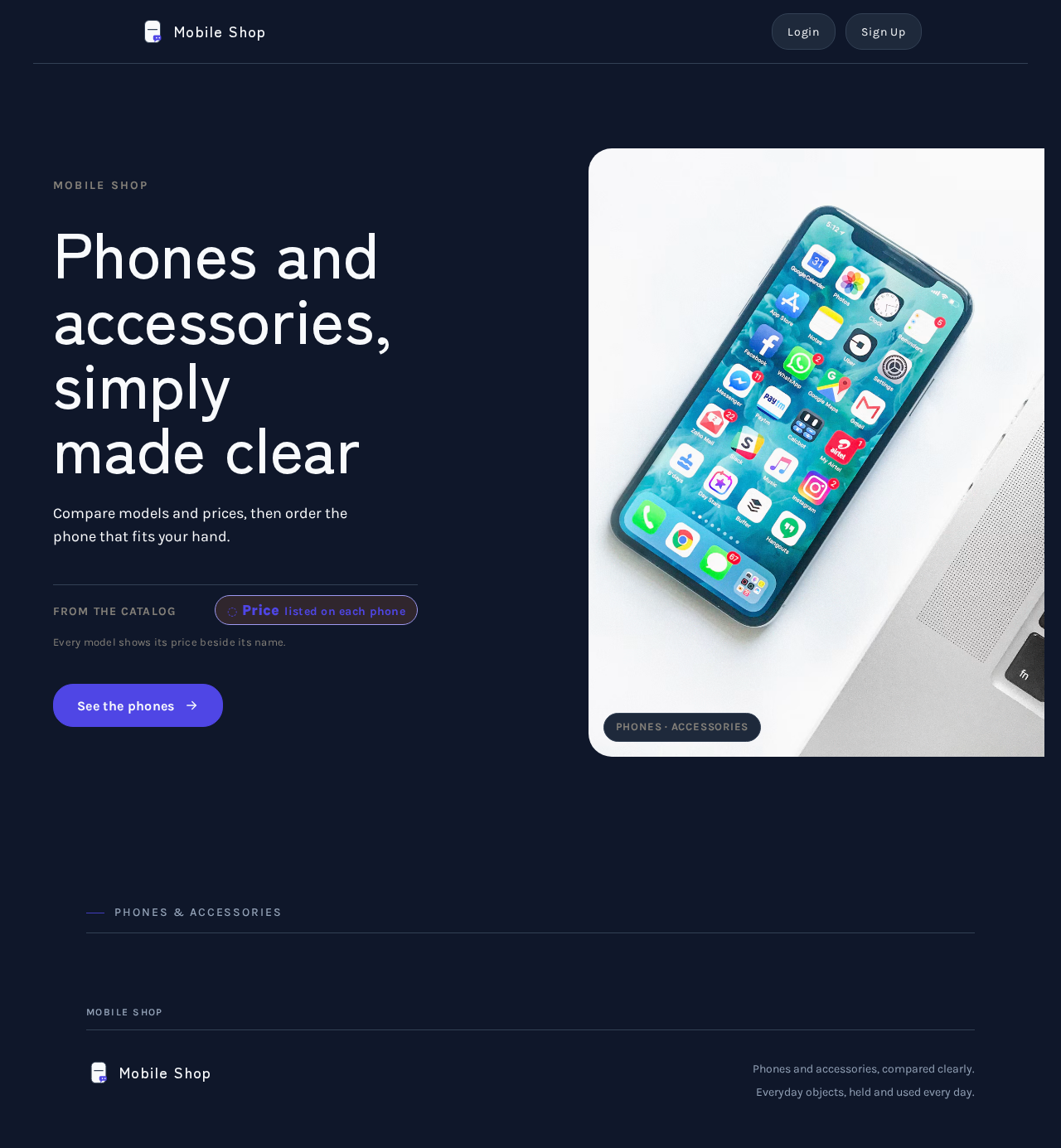
- Information and state: Anonymous public entry. The hero presents the shop's purpose — phones and accessories, compared clearly — with the entry hero copy: headline "Phones and accessories, simply made clear", subline "Compare models and prices, then order the phone that fits your hand.", call to action "See the phones". A thin rule and a price label balance the left column; one softly lit phone still life sits at the right. The page uses the Deep Indigo (
#4F46E5) and Dark Slate (#0F172A) theme. - Primary action: "See the phones" navigates to Phones.
- Supporting actions: Navigate to Login and Sign Up from the redesigned site header; reach the footer from the bottom of the page.
- Domain entities: Phone (name, price) shown as a representative still life and price label only.
- Component responsibilities: Hero block (headline, subline, primary button, thin rule, price label, still-life image); redesigned site header (see the shared header and logo specification below); shared site footer carrying the same logo mark; section openers using a thin full-width rule with a small caps label. The hero section layout is revised: the left copy column and the right still life are re-composed on the 12-column desktop grid and stack into one calm column on mobile, with the headline, subline, rule, price label and button kept whole.
- States: Loading — hero image fades in once with a slow ease. Empty — not applicable (static entry content). Success — hero fully composed. Error — if the still-life image fails, the Dark Slate field and all text and controls remain intact. Recovery — image retried on next visit; no readable text or control is ever covered or cropped.
- Hover elevation: the "See the phones" button and every metric card on the page lift smoothly on hover (a soft shadow and a small upward translate with a smooth ease), returning to rest on leave; the effect never moves or covers readable text or controls.
Phones
- Information and state: The phone catalog with prices, listed as product cards. Each card shows the phone name and its price in a label-and-value row with a 1px rule, plus a small Deep Indigo price tag at the corner of the block. The page uses the Deep Indigo (
#4F46E5) and Dark Slate (#0F172A) theme. - Primary action: Select a phone to open its Phone Details.
- Supporting actions: Navigate to Login and Sign Up from the redesigned site header; reach the footer from the bottom of the page.
- Domain entities: Phone (name, price, identifying detail).
- Component responsibilities: Catalog list; product card (name, price row, Deep Indigo price tag); section opener with small caps label and thin rule; redesigned site header and shared footer with the new logo mark. The catalog section layout is revised: cards are re-composed on the 12-column desktop grid with wide margins and stack into one calm column on mobile.
- States: Loading — cards fade in once on scroll with a slow ease. Empty — a plain message that no phones are listed yet, with the header navigation intact. Success — all catalog phones with prices shown. Error — a plain message that the catalog could not be loaded, with a retry action. Recovery — retry reloads the catalog; the shopper can continue browsing once it loads.
- Hover elevation: every button and every product/metric card lifts smoothly on hover (soft shadow plus a small upward translate with a smooth ease) and returns to rest on leave; the lift never covers or crops readable text or controls.
Phone Details
- Information and state: One phone with its price and the details a shopper needs to compare it before a purchase, presented as clear label-and-value pairs. The page uses the Deep Indigo (
#4F46E5) and Dark Slate (#0F172A) theme. - Primary action: Proceed to Checkout with this phone.
- Supporting actions: Return to Phones to compare another model; navigate to Login and Sign Up from the redesigned site header; reach the footer from the bottom of the page.
- Domain entities: Phone (name, price, detail fields).
- Component responsibilities: Detail header (name, Deep Indigo price tag); label-and-value detail rows with 1px rules; primary order button; back-to-catalog link; redesigned site header and shared footer with the new logo mark. The detail section layout is revised: the detail header and the label-and-value rows are re-composed on the desktop grid and stack into one calm column on mobile.
- States: Loading — detail block fades in once. Empty — not applicable (a phone is always selected). Success — phone and price shown with the order action. Error — plain message that this phone could not be loaded, with a link back to Phones. Recovery — return to Phones and select again.
- Hover elevation: the order button and every metric card lift smoothly on hover and return to rest on leave; the lift never covers or crops readable text or controls.
Checkout
- Information and state: Protected; requires a signed-in shopper. Shows the selected phone, its price, and the shopper's order details for confirmation. A shopper who is not signed in is directed to Sign Up or Login before any order is placed. The page uses the Deep Indigo (
#4F46E5) and Dark Slate (#0F172A) theme. - Primary action: Place the order for the selected phone.
- Supporting actions: Return to Phone Details to review the phone; sign in via Login if not yet verified; reach the footer from the bottom of the page.
- Domain entities: Order (selected phone, price, shopper, placed state); Phone.
- Component responsibilities: Order summary (phone name, price row, Deep Indigo price tag); order form; place-order button; identity prompt when unauthenticated; redesigned site header and shared footer with the new logo mark. The checkout section layout is revised: the order summary and the order form are re-composed on the desktop grid and stack into one calm column on mobile.
- States: Loading — order summary loads. Empty — no phone selected: a plain message with a link to Phones. Success — order confirmation showing the ordered phone and price, bound to the signed-in shopper. Error — plain message that the order could not be placed, with a retry action and the selection preserved. Recovery — retry places the order; if identity has lapsed, the shopper is sent to Login and returned to Checkout.
- Hover elevation: the place-order button and every metric card lift smoothly on hover and return to rest on leave; the lift never covers or crops readable text or controls.
Sign Up
- Information and state: Anonymous identity-access surface where a new shopper establishes an account so an order can be placed and remain bound to them. The page uses the Deep Indigo (
#4F46E5) and Dark Slate (#0F172A) theme. - Primary action: Create the shopper account.
- Supporting actions: Go to Login if the shopper already has an account; reach the footer from the bottom of the page.
- Domain entities: Shopper account (identity established for order continuity).
- Component responsibilities: Enrollment form; submit control; link to Login; redesigned site header and shared footer with the new logo mark. The section layout is revised: the form is re-composed on the desktop grid with wide margins and stacks into one calm column on mobile.
- States: Loading — submit in progress with the control disabled. Empty — blank form. Success — account established and the shopper continues to the protected work they intended (Checkout). Error — plain message identifying what needs correction, with entered values preserved. Recovery — correct and resubmit; or switch to Login.
- Hover elevation: the submit button and every metric card lift smoothly on hover and return to rest on leave; the lift never covers or crops readable text or controls.
Catalog Management
- Information and state: Protected; requires the shop owner's provisioned role. Lists the phones currently in the catalog with their prices and details, and shows the state of each entry. The page uses the Deep Indigo (
#4F46E5) and Dark Slate (#0F172A) theme. - Primary action: Add a phone to the catalog with its price and details.
- Supporting actions: Update an existing phone's price or details; remove a phone from the catalog; reach the footer from the bottom of the page.
- Domain entities: Phone (name, price, detail fields).
- Component responsibilities: Catalog table with label-and-value rows and 1px rules; add/edit form; save and remove controls; section opener with small caps label; redesigned site header and shared footer with the new logo mark. The section layout is revised: the catalog table and the add/edit form are re-composed on the desktop grid and stack into one calm column on mobile.
- States: Loading — catalog table loads. Empty — plain message that no phones are listed, with the add action available. Success — saved change reflected in the table and visible to shoppers on Phones. Error — plain message that the change could not be saved, with the entered values preserved. Recovery — retry the save; if the owner's session has lapsed, they are sent to Login and returned to Catalog Management.
- Hover elevation: the save and remove buttons and every metric card lift smoothly on hover and return to rest on leave; the lift never covers or crops readable text or controls.
Login
- Information and state: Anonymous identity-access surface where a returning shopper or the shop owner verifies identity for protected work. The page uses the Deep Indigo (
#4F46E5) and Dark Slate (#0F172A) theme. - Primary action: Verify identity and continue to the intended protected destination (Checkout for a shopper, Catalog Management for the shop owner).
- Supporting actions: Go to Sign Up if the visitor is a new shopper; reach the footer from the bottom of the page.
- Domain entities: Shopper account; shop owner role.
- Component responsibilities: Verification form; submit control; link to Sign Up; redesigned site header and shared footer with the new logo mark. The section layout is revised: the form is re-composed on the desktop grid with wide margins and stacks into one calm column on mobile.
- States: Loading — submit in progress with the control disabled. Empty — blank form. Success — identity verified and the visitor continues to the protected work they intended. Error — plain message that verification failed, with entered values preserved. Recovery — retry verification; or use Sign Up for a new account.
- Hover elevation: the submit button and every metric card lift smoothly on hover and return to rest on leave; the lift never covers or crops readable text or controls.
Shared Site Header and Logo (all pages)
- Information and state: One shared header component is rendered at the top of every accepted page (Landing, Phones, Phone Details, Checkout, Sign Up, Catalog Management, Login). The header is redesigned: it is a calm, low, full-width bar on the Dark Slate ground (
#0F172A) with a 1px bottom rule in#334155, wide desktop margins matching the 12-column grid, and a single row that holds the new logo mark and wordmark at the left and the identity links at the right. The header is not a floating pill, not a glass panel and not a heavy bordered box; it reads as a quiet shelf above the page. - Logo mark (creative, custom-drawn): the logo is no longer a plain wordmark. It is a custom-drawn mark built from the shop's own subject: a rounded phone silhouette whose screen is cut by a single thin horizontal rule, with a small Deep Indigo (
#4F46E5) price-tag notch at its lower-right corner — the shop's "phone plus price" idea reduced to two soft shapes. The mark is drawn as inline SVG so it stays crisp at every size, uses only the theme tokens (#4F46E5mark accent,#F8FAFCmark body,#334155hairline), and is paired with the "Mobile Shop" wordmark set in Zen Kaku Gothic New, Medium weight, wide tracking, sentence case, in#F8FAFC. - Primary action: the logo mark plus wordmark is a link to Landing from every page.
- Supporting actions: the header's identity links navigate to Login and Sign Up; on a page where the visitor is already signed in, the header shows the identity state instead of the Sign Up link.
- Domain entities: none beyond the shop identity itself.
- Component responsibilities: shared header component (logo mark, wordmark, identity links, 1px bottom rule); shared footer component (the same logo mark and wordmark, plus the shop's plain footer text and identity links); the logo mark is one reusable component consumed by both header and footer, never duplicated as a local variant.
- States: Loading — the header renders immediately with the logo mark and links; the mark is inline SVG so it never waits on a network image. Empty — not applicable. Success — header and footer both show the same logo mark and wordmark. Error — if the wordmark font fails to load, the fallback stack renders the wordmark in the same size and colour and the mark stays intact. Recovery — the header remains usable and every link still works.
- Responsive behavior: at 1280px the header is one row with wide margins; at 768px the row tightens but stays one row; at 375px the logo mark and wordmark stay whole on the left and the identity links collapse into a compact menu control that opens the same links. The logo mark, wordmark and every link stay entirely inside the viewport and their container at 375px, 768px and 1280px, wrapping or scaling (for example
font-size: clamp(...)) to fit; nothing covers them. - Hover elevation: the header's identity links and the footer's links use the same smooth hover elevation as every button (soft shadow plus a small upward translate with a smooth ease, returning to rest on leave); the logo mark itself keeps a quiet hover state without lift so the wordmark never shifts or crops. With
prefers-reduced-motion, the hover state is shown without animated elevation.
3. Functional Requirements
FR-1 — Multi-page website. As a visitor, I should move between the shop's separate pages (Landing, Phones, Phone Details, Checkout, Sign Up, Catalog Management, Login) so that each job has its own place. Provenance: explicit. Lifecycle: trigger — visitor selects a navigation link; result — the requested page loads; failure — a page that cannot load shows a plain message and the header navigation remains usable; continuation — the visitor moves on from the header. Acceptance: the site has multiple distinct pages and every page is reachable through navigation.
FR-2 — Browse the phone catalog with prices. As a Shopper, I should browse the shop's phone catalog with prices on Phones so that I can see what is available. Provenance: explicit. Lifecycle: trigger — the shopper opens Phones or selects "See the phones" on Landing; input — none; result — the catalog of phones with prices is shown as product cards; failure — a plain message with a retry action if the catalog cannot be loaded; continuation — the shopper selects a phone. Acceptance: every listed phone shows its name and price.
FR-3 — View phone details. As a Shopper, I should open one phone's details and price on Phone Details so that I can judge it before a purchase. Provenance: explicit. Lifecycle: trigger — the shopper selects a phone on Phones; result — that phone's details and price are shown; failure — a plain message with a link back to Phones; continuation — the shopper proceeds to Checkout or returns to compare another model. Acceptance: the selected phone's name, price and details are shown.
FR-4 — Compare phones and prices. As a Shopper, I should compare phones and their prices across Phones and Phone Details so that I can choose the model that fits. Provenance: explicit. Lifecycle: trigger — the shopper moves between the catalog and individual phone details; result — prices and details are presented in consistent label-and-value rows so models can be compared; failure — if a phone's details cannot load, the shopper returns to Phones and selects another; continuation — the shopper settles on a phone and proceeds to Checkout. Acceptance: prices are visible on the catalog and on each phone's details, in a consistent presentation.
FR-5 — Place an order for a phone. As a Shopper, I should place an order for the selected phone on Checkout so that I can buy it. Provenance: explicit. Lifecycle: trigger — the shopper selects the order action on Phone Details while signed in; input — the selected phone and its price; result — an order is recorded and a confirmation shows the ordered phone and price; failure — a plain message that the order could not be placed, with a retry action and the selection preserved; continuation — the shopper sees the confirmation. Acceptance: a signed-in shopper can complete an order for a selected phone and receives an observable confirmation.
FR-6 — Self-service enrollment before a protected order. As a new Shopper, I should create an account on Sign Up before placing an order so that my order remains bound to me. Provenance: required_inference. Lifecycle: trigger — the shopper reaches Checkout without an account, or chooses Sign Up; input — enrollment details; result — the account is established and the shopper continues to Checkout; failure — a plain message identifying what needs correction with entered values preserved; continuation — resubmit, or switch to Login. Acceptance: a new shopper can establish an account and then reach Checkout.
FR-7 — Verification at Login. As a returning Shopper or the Shop owner, I should verify my identity on Login so that I can reach protected work. Provenance: required_inference. Lifecycle: trigger — the visitor opens Login or is directed there from a protected destination; input — verification details; result — identity verified and the visitor continues to the intended protected destination; failure — a plain message that verification failed with entered values preserved; continuation — retry, or use Sign Up. Acceptance: a verified shopper reaches Checkout and a verified shop owner reaches Catalog Management.
FR-8 — Provisioned shop owner role for Catalog Management. As the Shop owner, I should hold a provisioned role that grants Catalog Management so that only I change the shared catalog. Provenance: required_inference. Lifecycle: trigger — the shop owner verifies at Login; result — Catalog Management is available to the owner and not to shoppers; failure — a visitor without the role is not granted Catalog Management; continuation — the owner proceeds to maintain the catalog. Acceptance: Catalog Management is reachable only by the shop owner's provisioned role.
FR-9 — Maintain the phone catalog and prices. As the Shop owner, I should add, update and remove phones with their prices and details on Catalog Management so that shoppers see current models and prices. Provenance: required_inference. Lifecycle: trigger — the owner selects add, edit or remove; input — phone name, price and details; result — the change is saved and reflected on Phones and Phone Details; failure — a plain message that the change could not be saved with entered values preserved; continuation — retry the save, or continue with another entry. Acceptance: a saved change is visible to shoppers on the catalog.
FR-10 — Site-wide Deep Indigo and Dark Slate theme. As a visitor, I should see the same Deep Indigo (#4F46E5) and Dark Slate (#0F172A) theme on every page so that the shop reads as one coherent place. Provenance: explicit. Lifecycle: trigger — any accepted page loads; result — the page renders with the Deep Indigo and Dark Slate theme applied to its ground, surfaces, text, actions and price accents; failure — if a themed asset fails, the page still renders readable text and usable controls in the theme's base colours; continuation — the visitor moves on through the header. Acceptance: Landing, Phones, Phone Details, Checkout, Sign Up, Catalog Management and Login all use the Deep Indigo and Dark Slate theme.
FR-11 — Revised section layout on every page. As a visitor, I should see the revised section layout on every page so that each section reads in a clear, calm order. Provenance: explicit. Lifecycle: trigger — any accepted page loads; result — each section is composed in the revised layout (one calm column on mobile; the desktop grid with wide margins on larger viewports), with label-and-value rows kept consistent; failure — if the layout cannot be applied, content still renders in a readable single column; continuation — the visitor continues within the section. Acceptance: every accepted page presents its sections in the revised layout, and no readable text or control is cropped or covered at 375px, 768px or 1280px.
FR-12 — Smooth hover elevation on buttons and metric cards. As a visitor, I should see buttons and metric cards lift smoothly on hover so that interactive surfaces feel responsive. Provenance: explicit. Lifecycle: trigger — the pointer hovers a button or a metric card; result — the element elevates smoothly (soft shadow plus a small upward translate with a smooth ease) and returns to rest on leave; failure — if motion is unavailable, the element keeps a clear hover state without elevation; continuation — the visitor activates the control. Acceptance: every button and every metric card on every accepted page shows a smooth hover elevation, and the effect never covers or crops readable text or controls; with prefers-reduced-motion, the hover state is shown without animated elevation.
FR-13 — Redesigned shared header on every page. As a visitor, I should see the redesigned header at the top of every page so that the shop reads as one coherent place and I can always reach identity links. Provenance: explicit. Lifecycle: trigger — any accepted page loads; result — the shared header renders as a calm full-width bar on the Dark Slate ground with a 1px bottom rule, the logo mark and wordmark at the left and the identity links at the right; failure — if the wordmark font fails to load, the fallback stack renders the wordmark at the same size and colour and the header links stay usable; continuation — the visitor uses the header to move to Landing, Login or Sign Up. Acceptance: Landing, Phones, Phone Details, Checkout, Sign Up, Catalog Management and Login all render the same redesigned header, and the logo mark, wordmark and every link stay entirely inside the viewport and their container at 375px, 768px and 1280px.
FR-14 — Creative logo mark in the header and footer on every page. As a visitor, I should see a more creative logo than a plain wordmark, in both the header and the footer of every page, so that the shop is recognizable and feels considered. Provenance: explicit. Lifecycle: trigger — any accepted page loads; result — the custom-drawn logo mark (a rounded phone silhouette with a single thin screen rule and a small Deep Indigo price-tag notch) is rendered as inline SVG beside the "Mobile Shop" wordmark in the header and again in the shared footer, using only the theme tokens; failure — if the mark cannot render, the wordmark still shows in #F8FAFC and the header and footer links stay usable; continuation — the visitor selects the logo to return to Landing. Acceptance: the same logo mark appears in the header and the footer of all seven accepted pages, is drawn from the shop's own phone-and-price subject rather than a plain wordmark, and never covers or crops readable text or controls.
4. User Personas
Shopper
- Product context: An everyday shopper looking at mobile phones and accessories, comparing models and prices before deciding. The shopper arrives anonymously and may browse the whole catalog before committing.
- Primary goal: Find the phone that fits and place an order for it.
- Distinct accepted responsibilities: Browsing the phone catalog with prices (Phones); opening one phone's details and price (Phone Details); comparing models and prices across both; establishing an account (Sign Up) when ready to order; verifying identity on return (Login); placing the order (Checkout).
- Relevant inputs and decisions: Which phone to open, which models to compare, whether the price and details fit, and the decision to commit to an order.
- Interactions with other accepted participants: The shopper sees the catalog the Shop owner maintains; a price or detail the owner changes appears in the shopper's browsing. The shopper's order is bound to the shopper's own account.
- Observable success: The shopper sees the phone and price, completes an order, and receives a confirmation showing the ordered phone and price.
Shop owner
- Product context: The person responsible for what the shop shows. The owner holds a provisioned role and works in the protected Catalog Management area rather than browsing as a customer.
- Primary goal: Keep the phone catalog and its prices current so shoppers see accurate models and prices.
- Distinct accepted responsibilities: Verifying identity at Login; adding phones with prices and details; updating an existing phone's price or details; removing a phone from the catalog.
- Relevant inputs and decisions: Phone name, price and detail values; which entries to add, change or remove.
- Interactions with other accepted participants: Every saved change becomes what Shoppers see on Phones and Phone Details.
- Observable success: A saved change appears in the Catalog Management table and is visible to shoppers on the catalog.
5. Core User Flows
Flow A — Shopper browses and compares phones
- The Shopper opens Landing anonymously, sees the redesigned header with the new logo mark and wordmark, and reads the hero: "Phones and accessories, simply made clear" with the subline and the "See the phones" button.
- The Shopper selects See the phones and arrives at Phones.
- Phones shows the catalog as product cards, each with the phone name and price in a label-and-value row and a small terracotta price tag.
- The Shopper selects a phone and arrives at Phone Details, which shows that phone's name, price and details in label-and-value rows.
- To compare another model, the Shopper returns to Phones and opens a different phone. Prices and details are presented consistently so models can be compared.
- Failure/recovery: if the catalog or a phone's details cannot load, a plain message appears with a retry action or a link back to Phones; the Shopper retries or selects another model.
- Continuation: the Shopper settles on a phone and selects the order action on Phone Details.
Flow B — New Shopper enrolls and places an order
- On Phone Details, the Shopper selects the order action and is taken to Checkout.
- Checkout is protected; because the Shopper is not signed in, the Shopper is directed to Sign Up.
- On Sign Up, the Shopper enters enrollment details and submits. The submit control is disabled while the request is in progress.
- Failure/recovery: if enrollment cannot be completed, a plain message identifies what needs correction and the entered values are preserved; the Shopper corrects and resubmits, or switches to Login.
- On success, the Shopper's account is established and the Shopper continues to Checkout.
- Checkout shows the selected phone, its price and the order details. The Shopper confirms and places the order.
- Failure/recovery: if the order cannot be placed, a plain message appears with a retry action and the selection is preserved; if identity has lapsed, the Shopper is sent to Login and returned to Checkout. The redesigned header and the footer with the same logo mark stay present on every page in this flow.
- Observable result: a confirmation shows the ordered phone and price, bound to the Shopper's account.
Flow C — Returning Shopper verifies and orders
- The returning Shopper opens Login (or is directed there from Checkout).
- The Shopper enters verification details and submits; the submit control is disabled while verification runs.
- Failure/recovery: if verification fails, a plain message appears and the entered values are preserved; the Shopper retries, or uses Sign Up if the account is new.
- On success, the Shopper continues to the intended protected destination, Checkout.
- The Shopper reviews the selected phone and price and places the order, receiving the confirmation.
Flow D — Shop owner maintains the catalog
- The Shop owner opens Login and verifies identity.
- On success, the owner continues to Catalog Management, which is available only to the owner's provisioned role.
- Catalog Management lists the current phones with prices and details in label-and-value rows.
- The owner adds a phone with its name, price and details, or updates an existing phone's price or details, or removes a phone.
- Failure/recovery: if a change cannot be saved, a plain message appears and the entered values are preserved; the owner retries. If the owner's session has lapsed, the owner is sent to Login and returned to Catalog Management.
- Observable result: the saved change appears in the Catalog Management table and is visible to Shoppers on Phones and Phone Details.
6. Visuals Colors and Theme
The creative direction is authoritative: Super normal calm for a phone and accessory shop, muse Naoto Fukasawa, headline idea "Phones and accessories, simply made clear." The user's latest refinement sets the site-wide theme to Deep Indigo (#4F46E5) and Dark Slate (#0F172A) on every page, revises the section layout, adds smooth hover elevation to all buttons and metric cards, redesigns the site header, and replaces the plain wordmark with a more creative logo mark used in both the header and the footer of every page.
Colour tokens (Deep Indigo and Dark Slate theme, applied on every page):
| Role | Hex |
|---|---|
| Background (Dark Slate ground) | #0F172A |
| Surface (product cards, panels) | #1E293B |
| Surface border (thin 1px rules) | #334155 |
| Text (primary) | #F8FAFC |
| Muted (labels, secondary text) | #94A3B8 |
| Primary (Deep Indigo, actions) | #4F46E5 |
| Accent (Deep Indigo, price and focus only) | #4F46E5 |
| Metric value | #38BDF8 |
| Status — active/safe | #16A34A |
| Status — warning | #FACC15 |
| Status — critical | #EF4444 |
Typography: Headings — Zen Kaku Gothic New, Medium weight, wide tracking, large sizes, sentence case, soft and plain. Body — Karla. Modular scale 1.25: display 44/64/96, section 28/32/36, body 18, label 14. Mobile display starts at 40px.
Shape language: Soft rounded blocks with 20px to 28px radii. Thin 1px rules in #334155. No sharp corners, no heavy borders.
Layout (revised on every page): One calm column on mobile; a 12-column grid on desktop with wide margins. Each section is re-composed in the revised layout: the section opener (small caps label above a thin full-width rule) leads, the primary content block follows, and supporting blocks sit beside it on desktop and stack beneath it on mobile. Product rows use clear label and value pairs.
Hover elevation: every button and every metric card lifts smoothly on hover — a soft shadow plus a small upward translate with a smooth ease — and returns to rest on leave. The lift never covers or crops readable text or controls, and with prefers-reduced-motion the hover state is shown without animated elevation.
Header and logo: the shared header is a calm, low, full-width bar on the Dark Slate ground (#0F172A) with a 1px bottom rule in #334155 and wide desktop margins matching the 12-column grid — not a floating pill, not a glass panel, not a heavy bordered box. The logo is a custom-drawn inline-SVG mark: a rounded phone silhouette whose screen is cut by a single thin horizontal rule, with a small Deep Indigo (#4F46E5) price-tag notch at its lower-right corner, drawn in #F8FAFC with a #334155 hairline and paired with the "Mobile Shop" wordmark in Zen Kaku Gothic New, Medium weight, wide tracking, sentence case, in #F8FAFC. The same mark and wordmark appear in the shared footer on every page. The mark is one reusable component, never a per-page variant.
Imagery: Softly lit still lifes of phones and accessories on plain Dark Slate grounds; close detail shots showing material and edges.
Accessibility of text and controls: Headlines, wordmarks, labels, numbers, cards' text and controls stay entirely inside the viewport and their container at 375px, 768px and 1280px, wrapping or scaling (for example font-size: clamp(...) with its mobile size) to fit. No element covers any part of them. Imagery and decoration may bleed, crop or overlap as the direction asks, but never over readable text or controls.
Avoid: Gradient blobs and glass panels; neon or saturated colour fields; bouncy or playful motion; identical hover-lift card grids. The generic indigo/blue-on-white SaaS template is forbidden; Deep Indigo is used here only as the user-requested action and accent colour on the Dark Slate ground, never as a light-mode template.
7. Signature Design Concept
The public entry (Landing) is a wide Dark Slate field (#0F172A) holding one large, softly lit phone still life at the right that bleeds off the right edge of the hero. A 64px to 96px headline in #F8FAFC sits flush left on two lines — "Phones and accessories, simply made clear" — with the subline beneath it in Karla in #94A3B8. A Deep Indigo button (#4F46E5) reading "See the phones" sits under the headline and lifts smoothly on hover. A thin 1px rule in #334155 and a small Deep Indigo price label (#4F46E5) balance the left column. Above the hero, the redesigned header sits as a quiet shelf: the custom logo mark — a rounded phone silhouette with a single thin screen rule and a small Deep Indigo price-tag notch — beside the "Mobile Shop" wordmark at the left, identity links at the right, and a 1px bottom rule in #334155. The same mark closes the page in the shared footer. Section openers below use a thin full-width rule with a small caps label above, and each section is composed in the revised layout. The gesture of the still life bleeding off the edge is carried entirely by imagery; all readable text, the logo mark, the wordmark and the button remain whole at every viewport.
8. Interaction Model & Motion Direction
Interaction Model: Static (direction) Motion Tempo: still Hero Dimensionality: flat
Landing Hero Motion Brief
- Focal subject: the single softly lit phone still life at the right of the hero, bleeding off the right edge; the custom logo mark in the header above it is the still, quiet anchor of the frame.
- Thesis: the visitor arrives on a composed, still frame; the still life fades in once with a slow ease (input: page load → transformation: single slow opacity fade → outcome: the hero settles into its final composed state with the headline, subline, rule, price label and "See the phones" button fully readable).
- Motion vocabulary: almost still — one slow fade on scroll/load for products and the hero image; a short press feedback on buttons; a smooth hover elevation on every button and metric card (soft shadow plus a small upward translate, smooth ease, returning to rest on leave); no bounce.
- Composed first frame: Dark Slate field (
#0F172A), oversized left-aligned headline on two lines in#F8FAFC, subline in#94A3B8, Deep Indigo button (#4F46E5), thin rule in#334155and Deep Indigo price label on the left; still life at the right. - Reduced-motion state: with
prefers-reduced-motion, the hero and product cards appear immediately in their final arrangement with no fade, and hover elevation is shown as a static hover state without animated lift; all text and controls remain whole and readable.
9. Non-Functional Requirements
- Multi-page navigation (explicit): the website must have multiple pages; each accepted page is a separately navigable destination.
- Readable text and controls (direction, binding): headlines, wordmarks, labels, numbers, cards' text and controls stay entirely inside the viewport and their container at 375px, 768px and 1280px; no element covers any part of them.
- Reduced motion (direction, binding): with
prefers-reduced-motion, a usable static arrangement is provided; content that fades in appears immediately, and hover elevation is shown as a static hover state without animated lift. - Site-wide theme (explicit): every accepted page uses the Deep Indigo (
#4F46E5) and Dark Slate (#0F172A) theme for its ground, surfaces, text, actions and price accents. - Revised section layout (explicit): every accepted page presents its sections in the revised layout — one calm column on mobile, the desktop grid with wide margins on larger viewports — with label-and-value rows kept consistent.
- Hover elevation (explicit): every button and every metric card lifts smoothly on hover (soft shadow plus a small upward translate with a smooth ease) and returns to rest on leave, without covering or cropping readable text or controls.
- Redesigned shared header (explicit): every accepted page renders the same redesigned header — a calm full-width bar on the Dark Slate ground with a 1px bottom rule, the logo mark and wordmark at the left and identity links at the right — and the header's logo mark, wordmark and links stay entirely inside the viewport and their container at 375px, 768px and 1280px.
- Creative logo in header and footer (explicit): a custom-drawn logo mark, more creative than a plain wordmark, appears in both the header and the shared footer of every accepted page as one reusable component, drawn from the shop's phone-and-price subject and using only the theme tokens.
- Identity continuity (required_inference): orders are bound to the signed-in shopper's account; Catalog Management is bound to the shop owner's provisioned role. A protected destination never establishes access to itself.
- Data durability (required_inference): the catalog and placed orders persist in application-owned storage so that a returning shopper and the shop owner see consistent state.
- Plain failure messaging (required_inference): every non-static requirement surfaces a plain, readable error message with a recovery action and preserves entered values where applicable.
10. Tech Stack
- Frontend: React application UI (multi-page navigation across the seven accepted pages).
- Backend: shared FastAPI process for application APIs and domain modules (catalog, orders, identity).
- Database: MariaDB for application-owned persistent data (phones, prices, orders, shopper accounts, shop owner role).
- Runtime: Docker / docker-compose with the provisioned services —
frontend,backend,database.
11. Assumptions and Constraints
- Constraint (explicit): the website must have multiple pages.
- Assumption: the shop owner's role is provisioned rather than self-service; shoppers cannot grant themselves Catalog Management.
- Assumption: a shopper account is required only to place an order; browsing Landing, Phones and Phone Details needs no account.
- Assumption: prices are shown as the shop's listed price; no payment-provider integration is accepted by the source, so placing an order records the order and its confirmation.
- Assumption: the catalog is the shop's own phone catalog; accessories are part of the shop's offering as presented in the hero copy, and the accepted catalog pages present phones with prices.
- Constraint (explicit): the theme colour scheme is Deep Indigo (
#4F46E5) and Dark Slate (#0F172A) on all pages. - Constraint (explicit): the layout of the section changes on all pages.
- Constraint (explicit): all buttons and metric cards get smooth hover elevation effects.
- Constraint (explicit): the header design is updated on all pages.
- Constraint (explicit): the logo is more creative than the current simple logo, and the new logo appears in the header and the footer on all pages.
12. Glossary
- Phone: a mobile phone listed in the shop catalog with a name, price and detail fields.
- Catalog: the set of phones with prices shown on Phones and maintained on Catalog Management.
- Shopper: an everyday visitor who browses, compares and orders phones.
- Shop owner: the provisioned role that maintains the catalog and prices.
- Order: the shopper's recorded commitment to buy a selected phone at its listed price, bound to the shopper's account.
- Protected destination: a page (Checkout, Catalog Management) reachable only after identity is established.
- Label-and-value row: the product presentation pattern of a clear label paired with its value, separated by a 1px rule.
- Metric card: a rounded surface block presenting a labelled value (for example a price or a count) that lifts smoothly on hover.
- Hover elevation: the smooth lift applied to every button and metric card on hover — a soft shadow plus a small upward translate with a smooth ease, returning to rest on leave.
- Site header: the shared, redesigned top bar rendered on every accepted page, holding the logo mark and wordmark at the left and the identity links at the right above a 1px bottom rule.
- Logo mark: the custom-drawn inline-SVG shop mark — a rounded phone silhouette with a single thin screen rule and a small Deep Indigo price-tag notch — shown beside the "Mobile Shop" wordmark in both the header and the shared footer.
Mobile shop
Phones andaccessories,simply made clear
Compare models and prices, then order the phone that fits your hand.
Every model shows its price beside its name.

Phones · Accessories
Phones & accessories
Mobile shop
Phones andaccessories,simply made clear
Compare models and prices, then order the phone that fits your hand.
Every model shows its price beside its name.
Phones · Accessories
Phones & accessories
No comments yet. Be the first!