mixbux-daw
 Gabriel Haynes
Make a game where you make music and make it so it’s a DAW that looks really really really compromised and make it look like it’s really professional make it look impossible to use make it usable. Don’t make it too impossible to make it kind of impressive and makes the UI look really cool and make it. Make it so it has a make it so it has his own plug-ins and make it so there’s templates that have trapped EDM and all the other genres and like cinematic and make it so sample packs and loops and stuff and make it so you can have a really really really really cool. Piano roll.

Comments (0)
Sign in to leave a comment
System Requirements
System Requirements Document for mixbux-daw
1. Introduction
The mixbux-daw project aims to create an interactive digital audio workstation (DAW) that doubles as a game for music creation. The product is designed to present a deliberately compromised-looking interface that remains highly professional, visually impressive, and usable. It includes first-party plug-ins, music-production templates across various genres, sample packs, loops, and a sophisticated piano roll for music editing. The target audience is music creators who seek a unique and challenging environment for music production.
2. System Overview
The mixbux-daw is a digital audio workstation with a unique interface that combines elements of a game with professional music production tools. The system is designed to be visually intriguing and complex, yet functional and impressive. It includes features such as custom plug-ins, genre-specific templates, sample packs, loops, and an advanced piano roll. The DAW is accessible to music creators who can self-enroll and return to their projects through a login system. The interface is designed to evoke a compromised or corrupted system while maintaining professionalism and usability.
2a. Product Interpretation and Delivery Boundary
The mixbux-daw is delivered as a custom application with app-owned identity management, allowing music creators to establish and resume their projects. The interface is intentionally designed to appear compromised yet professional, aligning with the creative direction of cinematic future tech. The product includes several pages, each serving a specific function within the DAW, and requires backend integration to persist project data.
2b. Source Content Inventory
Not applicable as no explicit content_source directive is provided.
2c. Page Content and Component Coverage
Landing
- Information/State: Introduction to the DAW, its unique interface, and its capabilities.
- Primary Actions: Explore the DAW features, initiate self-enrollment.
- Components: Full-bleed cinematic hero, floating glass panels with information.
- States: Loading, success, error.
Login
- Information/State: User authentication for returning music creators.
- Primary Actions: Login, password recovery.
- Components: Login form, error messages.
- States: Loading, success, error.
Projects
- Information/State: Workspace for creating, arranging, saving, and editing music.
- Primary Actions: Create new project, save project, edit project.
- Components: Project timeline, editing tools, save options.
- States: Loading, empty, success, error.
Templates
- Information/State: Library of genre-specific templates.
- Primary Actions: Browse templates, select template, start project.
- Components: Template gallery, selection controls.
- States: Loading, empty, success, error.
Samples
- Information/State: Library of sample packs and loops.
- Primary Actions: Browse samples, add to project.
- Components: Sample browser, preview player.
- States: Loading, empty, success, error.
Plug-ins
- Information/State: Library of first-party plug-ins.
- Primary Actions: Browse plug-ins, add to project.
- Components: Plug-in browser, installation controls.
- States: Loading, empty, success, error.
Piano Roll
- Information/State: Workspace for note composition and editing.
- Primary Actions: Edit notes, play composition.
- Components: Piano roll interface, editing tools.
- States: Loading, empty, success, error.
3. Functional Requirements
- As a Music Creator, I should be able to self-enroll before first use to access the DAW. (
required_inference) - As a Music Creator, I should be able to log in to resume my projects and access my production assets. (
required_inference) - As a Music Creator, I should be able to create, arrange, save, and edit music projects within the DAW. (
required_inference) - As a Music Creator, I should be able to use first-party plug-ins in my music projects. (
explicit) - As a Music Creator, I should be able to start projects using genre-specific templates. (
explicit) - As a Music Creator, I should be able to browse and use sample packs and loops in my projects. (
explicit) - As a Music Creator, I should be able to compose and edit music using a sophisticated piano roll. (
explicit)
4. User Personas
- Music Creator: Responsible for creating music within the DAW, using templates, arranging samples and loops, utilizing plug-ins, and editing notes in the piano roll.
5. Core User Flows
-
Self-Enrollment and Login
- The Music Creator accesses the Landing page and initiates self-enrollment.
- Upon successful enrollment, the Music Creator can log in via the Login page.
- The Music Creator resumes their projects and accesses production assets.
-
Project Creation and Management
- The Music Creator navigates to the Projects page.
- They create a new project, arrange tracks, and save their work.
- The Music Creator can return to edit or continue their project.
-
Using Templates
- The Music Creator accesses the Templates page.
- They browse available templates and select one to start a new project.
- The selected template is loaded into the Projects workspace.
-
Sample and Loop Integration
- The Music Creator visits the Samples page.
- They browse sample packs and loops, previewing and selecting items to add to their project.
- The selected samples are integrated into the project timeline.
-
Plug-in Utilization
- The Music Creator navigates to the Plug-ins page.
- They browse available plug-ins and add desired ones to their project.
- The plug-ins are activated and used within the project.
-
Piano Roll Editing
- The Music Creator accesses the Piano Roll page.
- They compose and edit notes using the piano roll interface.
- The composition is played back and adjusted as needed.
6. Visuals Colors and Theme
- Muse: Gleb Kuznetsov
- Palette:
- Background: #000022
- Surface: #0A0A23
- Text: #FFFFFF
- Primary: #00FFFF
- Accent: #FF00FF
- Muted: #555577
- Typography:
- Headings: Space Grotesk
- Body: Orbitron
- Scale: 1.5 modular (60/40/24/16)
- Shape Language: Full-bleed 3D scenes, floating glass panels, thin luminous strokes
- Layout: Radial layouts with floating glass panels
- Motion: Continuous slow orbit, light sweeps, data streams
7. Signature Design Concept
The Landing page will feature a full-bleed cinematic hero with a glowing 3D object at the center, utilizing electric cyan and magenta as dominant colors. Floating glass panels will present key information and actions, with interactive glowing elements enhancing the futuristic aesthetic.
8. Interaction Model & Motion Direction
- Interaction Model: Animated
- Motion Tempo: Cinematic
- Hero Dimensionality: WebGL
- Landing Hero Motion Brief:
- Focal Subject: A glowing 3D object at the center of the hero section.
- Input → Transformation → Outcome: User hovers over elements, triggering light sweeps and data streams that reveal more information.
- Motion Vocabulary: Slow orbiting effects, parallax background motion.
- First Frame: A static view of the 3D object with subtle glowing effects.
- Reduced-Motion State: Static hero with no orbiting effects.
9. Non-Functional Requirements
- The interface must evoke a compromised or corrupted system while remaining professional and usable. (
explicit) - The interface should be impressive without becoming too difficult to use. (
explicit)
10. Tech Stack
- Frontend: React
- Backend: Python/FastAPI
- Storage: Appropriate database for project and asset persistence
- Containerization: Docker/docker-compose
- Deployment: Kubernetes (if required)
11. Assumptions and Constraints
- The DAW must maintain a balance between a compromised appearance and usability.
- The interface should not become genuinely unusable despite its complex appearance.
- Music creators must be able to self-enroll and log in to manage their projects.
12. Glossary
- DAW: Digital Audio Workstation, a software platform for music production.
- Plug-in: A software component that adds specific capabilities to a larger software application.
- Piano Roll: A feature in DAWs that allows users to compose and edit music using a graphical representation of notes.
- Sample Pack: A collection of audio samples used in music production.
- Template: Pre-configured project setups for specific music genres.
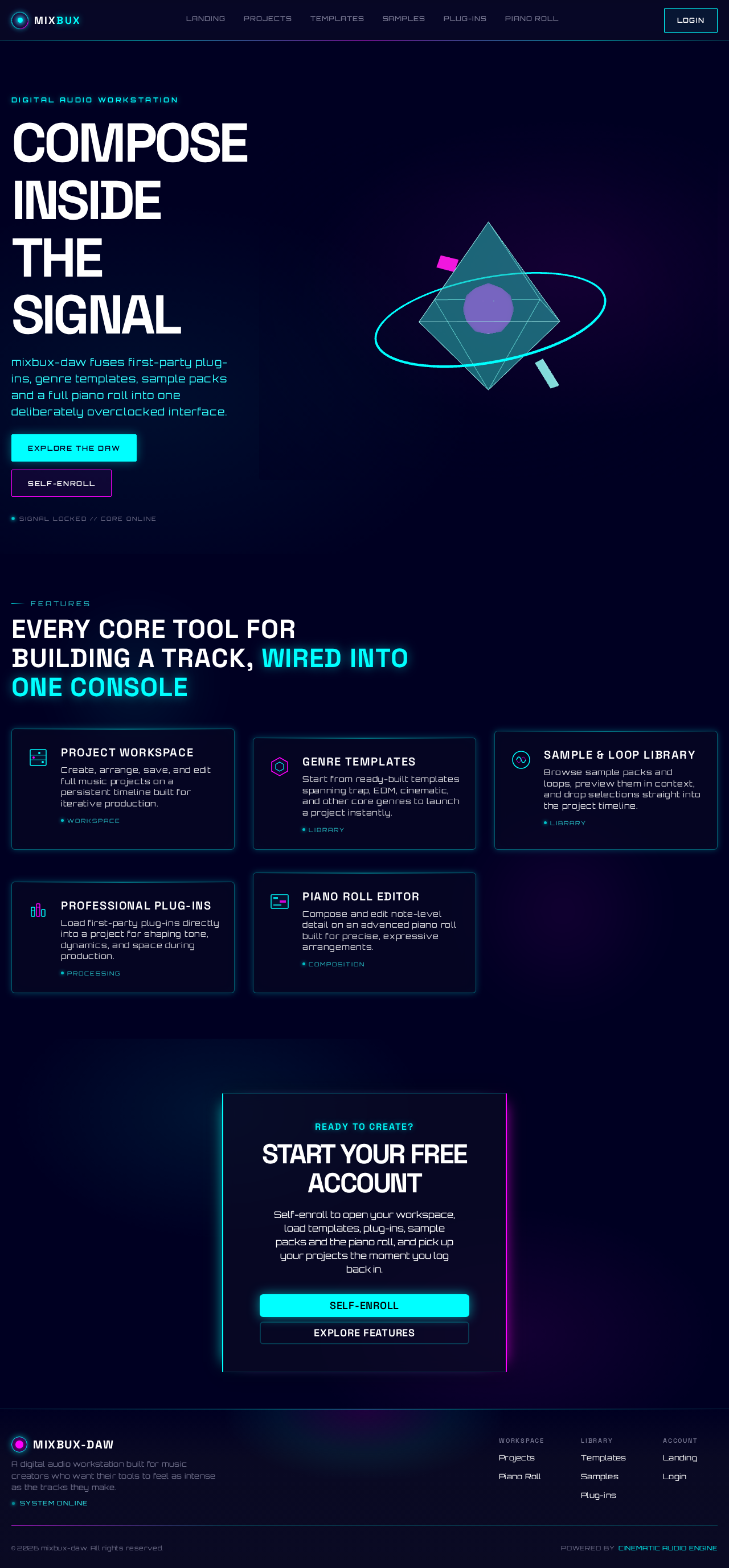
Compose Inside
The Signal
mixbux-daw fuses first-party plug-ins, genre templates, sample packs and a full piano roll into one deliberately overclocked interface.
Every core tool for building a track, wired into one console
Project Workspace
Create, arrange, save, and edit full music projects on a persistent timeline built for iterative production.
WorkspaceGenre Templates
Start from ready-built templates spanning trap, EDM, cinematic, and other core genres to launch a project instantly.
LibrarySample & Loop Library
Browse sample packs and loops, preview them in context, and drop selections straight into the project timeline.
LibraryProfessional Plug-ins
Load first-party plug-ins directly into a project for shaping tone, dynamics, and space during production.
ProcessingPiano Roll Editor
Compose and edit note-level detail on an advanced piano roll built for precise, expressive arrangements.
CompositionReady to create?
Start Your Free Account
Self-enroll to open your workspace, load templates, plug-ins, sample packs and the piano roll, and pick up your projects the moment you log back in.
Compose Inside
The Signal
mixbux-daw fuses first-party plug-ins, genre templates, sample packs and a full piano roll into one deliberately overclocked interface.
Every core tool for building a track, wired into one console
Project Workspace
Create, arrange, save, and edit full music projects on a persistent timeline built for iterative production.
WorkspaceGenre Templates
Start from ready-built templates spanning trap, EDM, cinematic, and other core genres to launch a project instantly.
LibrarySample & Loop Library
Browse sample packs and loops, preview them in context, and drop selections straight into the project timeline.
LibraryProfessional Plug-ins
Load first-party plug-ins directly into a project for shaping tone, dynamics, and space during production.
ProcessingPiano Roll Editor
Compose and edit note-level detail on an advanced piano roll built for precise, expressive arrangements.
CompositionReady to create?
Start Your Free Account
Self-enroll to open your workspace, load templates, plug-ins, sample packs and the piano roll, and pick up your projects the moment you log back in.
No comments yet. Be the first!