misty-calculator
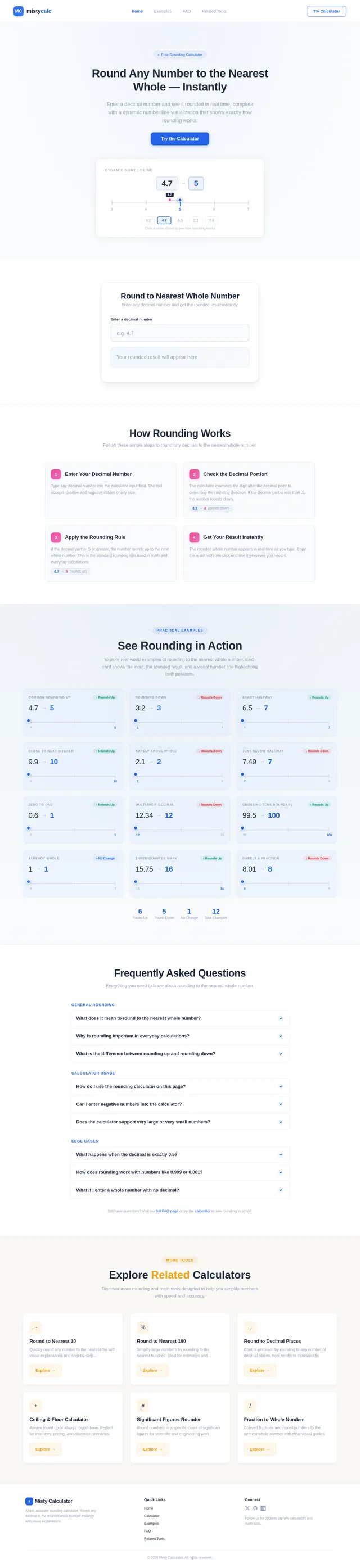
Create a high-converting, SEO-optimized single page website for Blogger platform focused on "Round to the Nearest Whole Number Calculator" keyword. REQUIREMENTS: 1. PAGE STRUCTURE (All sections must be editable in Blogger Layout): - Header Section: Logo + Navigation - Hero Section: Main calculator with H1 title - Features Section: 4 key features with icons - How It Works Section: Step-by-step guide - Examples Section: 10+ practical examples with visual number line - FAQ Section: 8-10 accordion FAQs - Related Calculators Section: Links to other rounding tools - Footer Section: Copyright + Links 2. CALCULATOR FUNCTIONALITY: - Input field for decimal numbers - Real-time rounding calculation - Display result with explanation - Support for positive/negative numbers - Visual indicator (up/down arrow) - Copy result button 3. SEO REQUIREMENTS: - Title: "Round to the Nearest Whole Number Calculator | Free Online Tool" - Meta Description: 150-160 characters with primary keyword - H1: "Round to the Nearest Whole Number Calculator" - H2s for each section - Schema.org Calculator markup - Fast loading (< 3 seconds) - Mobile responsive 4. DESIGN: - Clean, modern UI - Primary color: Blue (#2563eb) - White background with subtle gray sections - Card-based layout - Smooth animations 5. BLOGGER COMPATIBILITY: - All CSS in <style> tags - All JS in <script> tags - No external dependencies - Section comments for easy editing

Comments (0)
Sign in to leave a comment
System Requirements
System Requirements Document (SRD)
misty-calculator
1. Introduction
The misty-calculator project aims to create a high-converting, SEO-optimized single-page website for the Blogger platform. The primary focus of this website is to provide a "Round to the Nearest Whole Number Calculator" tool that is user-friendly, visually appealing, and optimized for search engines. This document outlines the functional and non-functional requirements, design considerations, and technical specifications necessary to achieve the project's goals.
The target audience includes students, educators, professionals, and anyone needing a quick and accurate rounding tool. The website will be designed with a clean, modern UI and will adhere to Blogger platform constraints to ensure compatibility and ease of customization.
2. System Overview
The misty-calculator website will serve as a single-page application hosted on the Blogger platform. It will feature a real-time rounding calculator, practical examples, and related tools to enhance user engagement. The website will be optimized for fast loading, mobile responsiveness, and SEO best practices.
Key features include:
- A real-time calculator for rounding decimal numbers to the nearest whole number.
- A visually engaging interface with dynamic elements like a number line and visual indicators.
- SEO-optimized content structure, including schema markup and meta descriptions.
- Fully editable sections via Blogger Layout for easy updates and customization.
The website will cater to users in the US, adhering to locale-specific defaults such as decimal formatting and timezone considerations.
3. Functional Requirements
As a User:
- I should be able to input decimal numbers into the calculator.
- I should see the rounded result in real-time.
- I should be able to view an explanation of the rounding process.
- I should see a visual indicator (up/down arrow) showing the rounding direction.
- I should be able to copy the rounded result with a single click.
- I should be able to view a step-by-step guide on how the calculator works.
- I should be able to explore 10+ practical examples with a visual number line.
- I should be able to read FAQs addressing common questions about rounding.
- I should be able to access links to related calculators for other rounding needs.
As an Admin:
- I should be able to edit all sections of the page via Blogger Layout.
- I should be able to update the meta title, description, and keywords for SEO.
- I should be able to add or modify examples and FAQs.
4. User Personas
-
General User:
- Description: Individuals seeking a quick and accurate tool for rounding numbers.
- Goals: To perform rounding calculations effortlessly and understand the process.
- Pain Points: Lack of clarity in rounding explanations and slow-loading tools.
-
Admin:
- Description: The website owner or manager responsible for maintaining content.
- Goals: To easily update content and ensure the website remains SEO-optimized.
- Pain Points: Difficulty in editing sections or updating SEO metadata.
5. Visuals Colors and Theme
The misty-calculator website will feature a unique, modern color palette designed to enhance usability and aesthetic appeal:
- Background: #f9fbfd (soft off-white)
- Surface: #ffffff (pure white for cards and sections)
- Text: #1e293b (dark slate for readability)
- Accent: #2563eb (vivid blue for buttons and highlights)
- Muted: #94a3b8 (subtle gray for secondary text and borders)
This palette ensures a clean, professional look while maintaining a user-friendly interface.
6. Signature Design Concept
Dynamic Number Line Visualization
The homepage will feature an interactive number line that dynamically updates based on the user's input. As users type a decimal number into the calculator, the number line will visually highlight the input value and the nearest whole number it rounds to.
- Animation: Smooth transitions as the number line adjusts to the input. The rounded number will "snap" into place with a subtle bounce effect.
- Color Shifts: The number line will use the accent blue (#2563eb) for the rounded number and a muted gray (#94a3b8) for other numbers.
- Micro-interactions: Hovering over the number line will display tooltips explaining the rounding process.
- Hero Section Integration: The number line will be prominently displayed in the hero section, making it the focal point of the page.
This feature will make the website visually engaging and provide an intuitive understanding of the rounding process.
7. Non-Functional Requirements
- The website must load in under 3 seconds on both desktop and mobile devices.
- The design must be fully responsive and compatible with all modern browsers.
- All CSS and JavaScript must be embedded within
<style>and<script>tags to comply with Blogger platform constraints. - The website must adhere to accessibility standards (WCAG 2.1).
- The calculator must handle edge cases, such as very large or very small numbers, without errors.
8. Tech Stack
-
Frontend:
- HTML, CSS, JavaScript (embedded within Blogger templates)
-
Backend:
- Not applicable (Blogger platform does not support server-side scripting)
-
Database:
- Not applicable (all data will be static or calculated client-side)
-
AI Tools:
- Not applicable
-
Local Orchestration:
- Not applicable
-
Server-Side Orchestration:
- Not applicable
9. Assumptions and Constraints
- The website will be hosted on the Blogger platform, which limits the use of external dependencies and server-side scripting.
- All functionality must be implemented using client-side technologies.
- The website will primarily target users in the US, using locale-specific formatting (e.g., decimal points).
- The design must be simple enough for non-technical admins to update via Blogger Layout.
10. Glossary
- Blogger Platform: A free blogging platform by Google that allows users to create and manage blogs.
- SEO: Search Engine Optimization, the practice of optimizing content to rank higher in search engine results.
- Schema Markup: A form of microdata that creates an enhanced description (or rich snippet) for search engines.
- Number Line: A visual representation of numbers on a straight line, used to illustrate rounding concepts.
- WCAG: Web Content Accessibility Guidelines, a set of standards for making web content accessible to people with disabilities.
No comments yet. Be the first!