mint-you
 Het Patel
You are a senior software architect, UI/UX designer, backend engineer, DevOps engineer, and product manager. I want you to build a production-quality SaaS called "ChaiOS". Do not generate demo code or placeholder pages. Everything should be modular, scalable, reusable, and production-ready. ======================================================== PROJECT OVERVIEW Product Name: ChaiOS Tagline: The Operating System for Cafés & Tea Shops. Purpose: ChaiOS is a SaaS platform that helps cafés, tea shops, bakeries, and small restaurants manage their business from one dashboard. The software should replace notebooks, Excel sheets, and WhatsApp-based management. The target audience includes: • Tea Shops • Cafés • Coffee Shops • Bakeries • Juice Shops • Small Restaurants The platform should feel modern like: • Shopify • Stripe Dashboard • Linear • Notion • Vercel Dashboard Minimal Fast Premium Professional ======================================================== TECH STACK Frontend React TypeScript Vite Tailwind CSS shadcn/ui React Router Backend Supabase Use Supabase Auth Supabase Database Supabase Storage Supabase Edge Functions where necessary Deployment Vercel ======================================================== DESIGN SYSTEM Design Language Modern SaaS Rounded corners Large spacing Soft shadows Responsive Dark mode ready Use shadcn/ui Lucide Icons Cards Dialogs Dropdowns Tables Badges Skeleton loaders Toast notifications Everything should be reusable. Create: components/ layouts/ hooks/ services/ types/ utils/ ======================================================== AUTHENTICATION Owner Login Email Password Forgot Password Remember Me Protected Routes Logout Session Persistence ======================================================== MULTI TENANT Every café has its own workspace. Each owner only sees: Products Orders Customers Inventory Staff Analytics Settings belonging to their café. Never expose another café's data. ======================================================== DATABASE Design a scalable relational database. Tables should include: profiles cafes employees products categories customers orders order_items inventory ingredients recipes suppliers purchases expenses payments loyalty_transactions coupons notifications audit_logs subscriptions Each table should include


Comments (0)
Sign in to leave a comment
System Requirements
System Requirements Document for mint-you
1. Introduction
mint-you is the working project name for ChaiOS — The Operating System for Cafés & Tea Shops, a production-quality multi-tenant SaaS platform that lets cafés, tea shops, coffee shops, bakeries, juice shops, and small restaurants run their business from one dashboard. ChaiOS exists to replace notebooks, Excel sheets, and WhatsApp-based management with a single, fast, premium, professional workspace per café.
The product is built for independent operators who run their business from a phone between rushes and from a laptop after close. They are not designers, but they live inside Shopify, Stripe Dashboard, Linear, Notion, and Vercel Dashboard, so they read craft as trust. The interface must therefore feel minimal, fast, premium, and professional — dense enough for power use, warm enough that a chai shop owner feels it was made for them.
This document is the System Requirements Document for the product. It specifies the current delivery: owner authentication, per-café multi-tenant workspaces, and the owner's management of products, orders, customers, inventory, staff, analytics, finance, and settings — all scoped so that no café's data is ever exposed to another café.
Audience. Café owners (the primary, explicit persona) and the staff/employees who work inside a café's workspace (an accepted inferred persona). The document is also the engineering contract for the frontend, backend, and deployment work.
1.1 Success Criteria
- An owner can sign up, sign in, recover a forgotten password, stay signed in across sessions, and sign out — with protected routes that never render café data to an unauthenticated visitor.
- Every café has its own workspace, and every product, order, customer, inventory record, staff record, analytics view, and setting an owner sees belongs to that owner's café only. No cross-café data is ever exposed in tables, charts, or the café switcher.
- The owner can manage products, orders, customers, inventory, staff, analytics, finance, and settings from one dashboard, replacing notebooks, spreadsheets, and WhatsApp threads.
- The relational schema covers profiles, cafes, employees, products, categories, customers, orders, order_items, inventory, ingredients, recipes, suppliers, purchases, expenses, payments, loyalty_transactions, coupons, notifications, audit_logs, and subscriptions.
- The product ships as modular, scalable, reusable, production-ready code — no demo code, no placeholder pages.
2. System Overview
ChaiOS is a React + TypeScript + Vite single-page application (Tailwind CSS, shadcn/ui, React Router) backed by Supabase (Auth, Database, Storage, Edge Functions where necessary) and deployed on Vercel. The provisioned runtime inventory is a shared FastAPI backend process for application APIs and domain modules, a MariaDB database for application-owned persistent data, and a React frontend. Feature APIs are added as routes and modules inside the shared backend rather than as new services.
Actors. The closed active-human persona set is:
- Café Owner — signs in with email and password, works inside their own café workspace, and manages products, orders, customers, inventory, staff, analytics, finance, and settings.
- Staff / Employee — works inside their café's workspace recording sales and stock activity so the owner's dashboard reflects reality.
Accepted behavior. Owner authentication (email/password login, forgot password, remember me, protected routes, logout, session persistence); per-café multi-tenant isolation; owner management of products and categories, orders and order items, customers, inventory (ingredients, recipes, suppliers, purchases), staff (employees), analytics, finance (expenses, payments, loyalty transactions, coupons, notifications, audit logs, subscriptions), and settings; a dashboard that summarizes the business and routes into each area.
Ownership. All human-facing work is owned by first-party application pages. Supabase Auth owns credential verification and session issuance; Supabase Database owns tenant-scoped persistence; Supabase Edge Functions own server-side work where necessary; Vercel owns hosting and delivery.
Narrow exclusions. No demo code and no placeholder pages. No cross-café data exposure. No customer-facing storefront, no POS hardware integration, and no payment-processor integration are specified by the source and are therefore out of current scope.
Removed from scope
- None — no concept was explicitly removed by the user thread.
2a. Product Interpretation and Delivery Boundary
ChaiOS is delivered as a first-party web application. Anonymous visitors reach the Landing page and the Login and Account Recovery surfaces. Once an owner establishes identity, all workspace destinations (Dashboard, Products, Orders, Customers, Inventory, Staff, Analytics, Finance, Settings) are protected and render only the signed-in owner's café data.
Identity is application-owned and established through Supabase Auth. First use is self-service enrollment with email and password; returning owners verify with email and password, optionally with remember-me session persistence. Password recovery runs through the forgot-password flow. Logout terminates the session and returns the owner to the public entry. These are journey prerequisites, not a separate account-management product.
Tenant isolation is a hard delivery boundary: every record is scoped to the owner's café, and no surface — including the café switcher, tables, and charts — may expose another café's data. The current delivery horizon covers everything described in this document. No future-horizon features are specified by the source.
2b. Source Content Inventory
Not applicable — no reference directive declares content_source. The visual-inspiration reference (Shopify, Stripe Dashboard, Linear, Notion, Vercel Dashboard) supplies feel only and contributes no product facts, copy, or capabilities.
2c. Page Content and Component Coverage
Landing
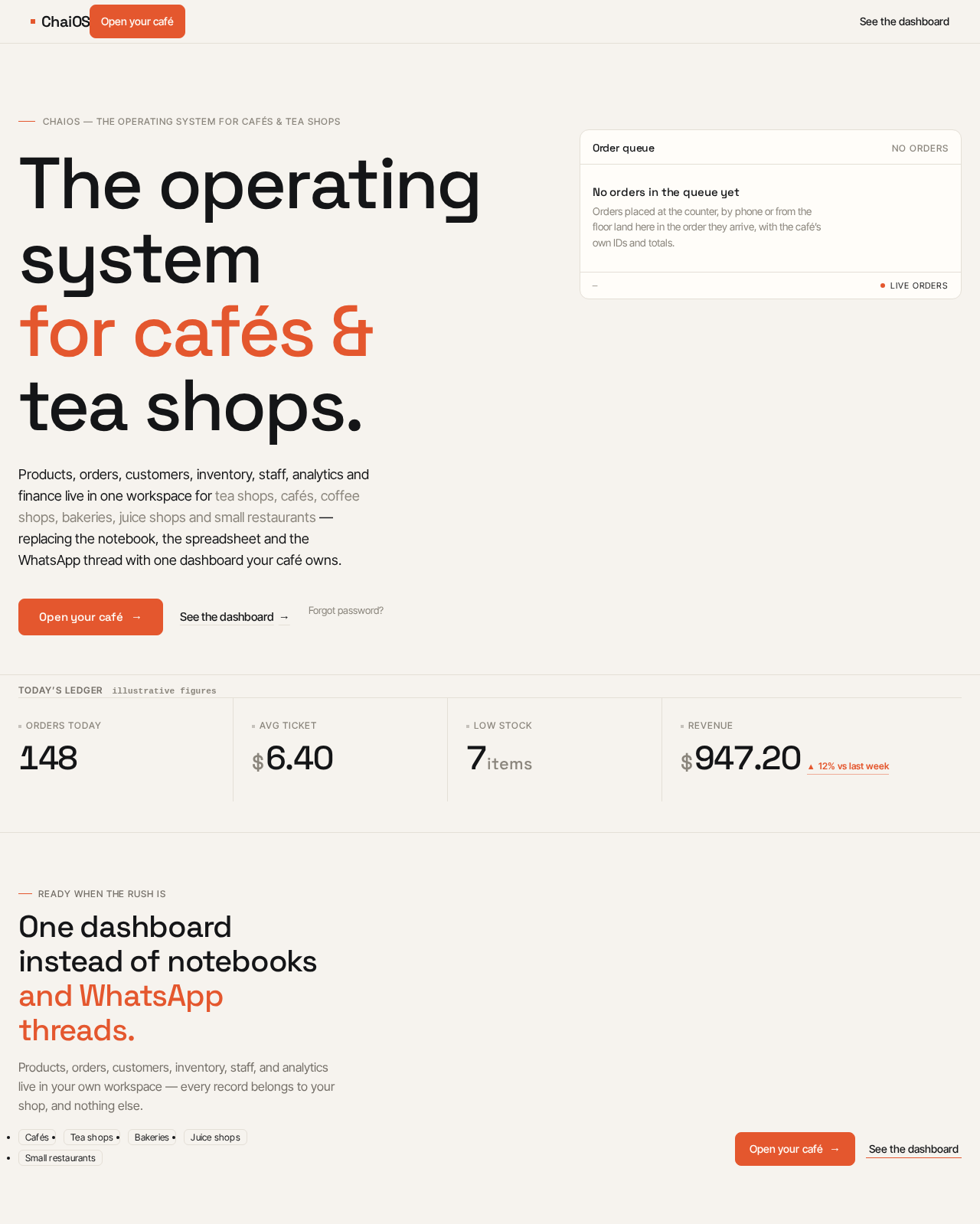
- Information/state: Anonymous public entry. Product name ChaiOS, tagline "The Operating System for Cafés & Tea Shops", the audience (tea shops, cafés, coffee shops, bakeries, juice shops, small restaurants), and the dashboard-based value proposition. A live product panel showing a real order-queue table with hairline rules, tabular numerals, status dots, and a settled badge. A KPI strip of four figures (orders today, avg ticket, low stock, revenue) on the hairline rule.
- Primary actions: "Open your café" (tangerine primary button) → Login/enrollment; "See the dashboard" (text link) → Login.
- Supporting actions: Navigate to Login and Account Recovery.
- Domain entities: None persisted; the panel is a presentation of order-queue and KPI concepts.
- Component responsibilities: Editorial hero (7-column type block, 5-column product panel), instrument-style KPI strip, primary button, text link, hairline rules.
- States: Loading (skeleton for the product panel), empty (panel placeholder when no live data), success (panel renders), error (panel falls back to a static schematic), recovery (retry).
Login
- Information/state: Email field, password field, remember-me control, forgot-password link, submit control. Anonymous access.
- Primary actions: Sign in with email and password; toggle remember me.
- Supporting actions: Navigate to Account Recovery; navigate to Landing.
- Domain entities: profiles, cafes (session resolution).
- Component responsibilities: Auth form, validation, toast notifications, skeleton while session resolves.
- States: Loading (submit in progress), empty (blank form), success (redirect to Dashboard with persisted session), error (invalid credentials toast, field-level validation), recovery (retry, forgot-password link).
Account Recovery
- Information/state: Email field for password reset request; confirmation state.
- Primary actions: Request password reset for the owner's email.
- Supporting actions: Return to Login.
- Domain entities: profiles (identity lookup via Supabase Auth).
- Component responsibilities: Recovery form, validation, toast notifications.
- States: Loading (request in progress), empty (blank form), success (confirmation message), error (unknown email handled without leaking account existence; network error toast), recovery (retry).
Dashboard
- Information/state: Protected. Instrument header (screen title left, café switcher and date range right, hairline rule beneath). Summary of the owner's café business with KPI numerals and routes into each area.
- Primary actions: Open Products, Orders, Customers, Inventory, Staff, Analytics, Finance, Settings.
- Supporting actions: Switch café (only cafés the owner belongs to), change date range, open command palette (\xe2\x8c\x98K), logout.
- Domain entities: cafes, orders, products, inventory, customers, payments.
- Component responsibilities: Left nav rail with tangerine active marker, top command bar, KPI cards, instrument header, skeleton loaders.
- States: Loading (skeleton KPI cards), empty (no orders yet — guidance to add products), success (KPIs render), error (per-card error with retry), recovery (retry).
Products
- Information/state: Protected. Table of the café's products with categories, SKUs, prices, and status badges.
- Primary actions: Create, edit, archive a product; assign a category.
- Supporting actions: Filter and search, manage categories, open product dialog.
- Domain entities: products, categories.
- Component responsibilities: Hairline table with sticky header, dialogs, dropdowns, badges, toasts, skeletons.
- States: Loading (skeleton rows), empty (no products — create prompt), success (row appears), error (toast, retry), recovery (retry).
Orders
- Information/state: Protected. Table of the café's orders with monospace order IDs, line items, status, and a pulsing tangerine dot for live orders.
- Primary actions: Create an order with order items; update order status; record payment.
- Supporting actions: Filter by status and date, open order detail dialog.
- Domain entities: orders, order_items, payments, customers.
- Component responsibilities: Hairline table, status badges, live-order pulse dot, dialogs, toasts, skeletons.
- States: Loading (skeleton rows), empty (no orders — create prompt), success (order row appears), error (toast, retry), recovery (retry).
Customers
- Information/state: Protected. Table of the café's customers with contact details and loyalty context.
- Primary actions: Create, edit, view a customer.
- Supporting actions: Search, filter, open customer detail.
- Domain entities: customers, loyalty_transactions.
- Component responsibilities: Hairline table, dialogs, badges, toasts, skeletons.
- States: Loading (skeleton rows), empty (no customers — create prompt), success (row appears), error (toast, retry), recovery (retry).
Inventory
- Information/state: Protected. Inventory levels, ingredients, recipes, suppliers, and purchases for the café.
- Primary actions: Adjust stock, manage ingredients, define recipes, manage suppliers, record purchases.
- Supporting actions: Filter, search, open dialogs.
- Domain entities: inventory, ingredients, recipes, suppliers, purchases.
- Component responsibilities: Hairline tables, stock-health badges, dialogs, toasts, skeletons.
- States: Loading (skeleton rows), empty (no inventory — add prompt), success (row appears), error (toast, retry), recovery (retry).
Staff
- Information/state: Protected. Table of the café's employees with roles and status.
- Primary actions: Add, edit, deactivate an employee.
- Supporting actions: Search, filter, open employee dialog.
- Domain entities: employees, profiles.
- Component responsibilities: Hairline table, dialogs, badges, toasts, skeletons.
- States: Loading (skeleton rows), empty (no staff — add prompt), success (row appears), error (toast, retry), recovery (retry).
Analytics
- Information/state: Protected. Business analytics for the owner's café only.
- Primary actions: Review revenue, order, and stock analytics over a selected date range.
- Supporting actions: Change date range, switch café.
- Domain entities: orders, payments, products, inventory.
- Component responsibilities: Instrument header, KPI numerals, charts, skeletons.
- States: Loading (skeleton charts), empty (no data for range — guidance), success (charts render), error (per-chart error with retry), recovery (retry).
Finance
- Information/state: Protected. Expenses, payments, loyalty transactions, coupons, notifications, audit logs, and subscriptions for the café.
- Primary actions: Record an expense, record a payment, issue a coupon, review loyalty transactions, review notifications and audit logs, view subscription.
- Supporting actions: Filter, search, open dialogs.
- Domain entities: expenses, payments, loyalty_transactions, coupons, notifications, audit_logs, subscriptions.
- Component responsibilities: Hairline tables, monospace audit-log rows, badges, dialogs, toasts, skeletons.
- States: Loading (skeleton rows), empty (no records — add prompt), success (row appears), error (toast, retry), recovery (retry).
Settings
- Information/state: Protected. Configuration of the café's workspace settings.
- Primary actions: Update café profile and workspace settings; save.
- Supporting actions: Switch café, logout.
- Domain entities: cafes, profiles, subscriptions.
- Component responsibilities: Form sections, instrument header, toasts, skeletons.
- States: Loading (skeleton form), empty (defaults), success (save toast), error (validation and save error toast), recovery (retry).
3. Functional Requirements
FR-1 — Owner self-service enrollment (required_inference) As a Café Owner, I should be able to enroll with my email and password before first workspace access, so that I can establish my identity and reach my café workspace.
- Trigger/input: email and password on the Login surface.
- Observable result: account created via Supabase Auth; owner is routed to their workspace.
- Access state: anonymous entry.
- Failure/recovery: invalid or taken email shows a field error; retry.
- Continuation: proceed to workspace provisioning (FR-4).
FR-2 — Owner login with email and password (explicit) As a Café Owner, I should log in with my email and password, so that I can access my café workspace.
- Trigger/input: email and password on Login.
- Observable result: authenticated session; redirect to Dashboard.
- Access state: anonymous entry.
- Failure/recovery: invalid credentials toast; retry.
- Continuation: Dashboard.
FR-3 — Remember me and session persistence (explicit) As a Café Owner, I should be able to choose "Remember Me" and have my session persist, so that I do not re-enter credentials on every visit.
- Trigger/input: remember-me toggle at login.
- Observable result: session persists across visits when selected; otherwise session ends per Supabase Auth defaults.
- Access state: authenticated.
- Failure/recovery: expired session redirects to Login.
- Continuation: protected routes remain accessible while the session is valid.
FR-4 — Café workspace provisioning and tenant scoping (required_inference) As a Café Owner, I should have my own café workspace, so that every record I see belongs to my café and never to another café.
- Trigger/input: first authenticated access.
- Observable result: a café workspace is bound to the owner; all queries are scoped to that café.
- Access state: authenticated.
- Failure/recovery: provisioning failure shows an error with retry.
- Continuation: Dashboard.
FR-5 — Forgot password (explicit) As a Café Owner, I should be able to recover a forgotten password, so that I can regain access to my account.
- Trigger/input: email on Account Recovery.
- Observable result: password reset requested via Supabase Auth; confirmation shown.
- Access state: anonymous entry.
- Failure/recovery: unknown email handled without leaking account existence; network error toast; retry.
- Continuation: return to Login.
FR-6 — Protected routes (explicit) As a Café Owner, I should be blocked from workspace pages until I am authenticated, so that my café data is never shown to an unauthenticated visitor.
- Trigger/input: navigation to a protected route.
- Observable result: unauthenticated visitors are redirected to Login; authenticated owners see the page.
- Access state: authenticated.
- Failure/recovery: redirect to Login.
- Continuation: Login.
FR-7 — Logout and session termination (required_inference) As a Café Owner, I should be able to log out, so that my session ends and I return to the public entry.
- Trigger/input: logout control.
- Observable result: session terminated; redirect to Landing.
- Access state: authenticated → anonymous.
- Failure/recovery: logout error toast; retry.
- Continuation: Landing.
FR-8 — Manage products and categories (explicit) As a Café Owner, I should manage my café's products and categories, so that my menu is accurate.
- Trigger/input: create/edit/archive on Products.
- Observable result: product and category records scoped to my café.
- Access state: authenticated.
- Failure/recovery: validation and save error toasts; retry.
- Continuation: Products list.
FR-9 — Manage orders and order items (explicit) As a Café Owner, I should review and manage my café's orders and order items, so that sales are recorded accurately.
- Trigger/input: create order, update status, record payment on Orders.
- Observable result: order and order-item records scoped to my café.
- Access state: authenticated.
- Failure/recovery: error toast; retry.
- Continuation: Orders list.
FR-10 — Manage customers (explicit) As a Café Owner, I should browse and manage my café's customer records, so that I know who I serve.
- Trigger/input: create/edit on Customers.
- Observable result: customer records scoped to my café.
- Access state: authenticated.
- Failure/recovery: error toast; retry.
- Continuation: Customers list.
FR-11 — Manage inventory, ingredients, recipes, suppliers, and purchases (explicit) As a Café Owner, I should manage inventory, ingredients, recipes, suppliers, and purchases, so that stock stays accurate.
- Trigger/input: adjust stock, define recipes, record purchases on Inventory.
- Observable result: inventory-related records scoped to my café.
- Access state: authenticated.
- Failure/recovery: error toast; retry.
- Continuation: Inventory.
FR-12 — Manage staff (explicit) As a Café Owner, I should manage my café's employees, so that my team roster is current.
- Trigger/input: add/edit/deactivate on Staff.
- Observable result: employee records scoped to my café.
- Access state: authenticated.
- Failure/recovery: error toast; retry.
- Continuation: Staff list.
FR-13 — Review analytics (explicit) As a Café Owner, I should review analytics for my own café, so that I can make informed decisions.
- Trigger/input: select date range on Analytics.
- Observable result: analytics computed only from my café's data.
- Access state: authenticated.
- Failure/recovery: per-chart error with retry.
- Continuation: Analytics.
FR-14 — Manage finance records (explicit) As a Café Owner, I should manage expenses, payments, loyalty transactions, coupons, notifications, audit logs, and subscriptions for my café, so that money and records are tracked.
- Trigger/input: record expense/payment, issue coupon, review logs on Finance.
- Observable result: finance records scoped to my café.
- Access state: authenticated.
- Failure/recovery: error toast; retry.
- Continuation: Finance.
FR-15 — Configure settings (explicit) As a Café Owner, I should configure my café's workspace settings, so that the workspace reflects my business.
- Trigger/input: edit and save on Settings.
- Observable result: café settings updated.
- Access state: authenticated.
- Failure/recovery: validation and save error toasts; retry.
- Continuation: Settings.
FR-16 — Staff records sales and stock activity (required_inference) As a Staff / Employee, I should record sales and stock activity within my café's workspace, so that the owner's dashboard reflects reality.
- Trigger/input: create order and adjust stock within the café workspace.
- Observable result: records scoped to the café; owner's dashboard reflects them.
- Access state: authenticated within the café workspace.
- Failure/recovery: error toast; retry.
- Continuation: Orders / Inventory.
FR-17 — Tenant isolation guarantee (explicit) As a Café Owner, I should never see another café's data, so that my business information stays private.
- Trigger/input: any read or write across the workspace.
- Observable result: all data is filtered by café; the café switcher lists only cafés the owner belongs to.
- Access state: authenticated.
- Failure/recovery: unauthorized access is denied.
- Continuation: current page.
4. User Personas
Café Owner
- Product context: Runs an independent café, tea shop, coffee shop, bakery, juice shop, or small restaurant. Currently manages with notebooks, Excel sheets, and WhatsApp. Works from a phone between rushes and a laptop after close.
- Primary goal: Run the whole business from one dashboard instead of scattered tools.
- Distinct responsibilities: Signs in with email and password (with forgot-password, remember-me, and session persistence); works inside their own café workspace; manages products, orders, customers, inventory, staff, analytics, finance, and settings for their café; must never see another café's data.
- Inputs/decisions: Menu and pricing decisions, order status decisions, stock adjustments, staff roster changes, date-range selections for analytics, finance record entries, workspace settings.
- Interactions with other participants: Relies on Staff/Employee to record sales and stock activity accurately; reviews the resulting orders, inventory, and analytics.
- Observable success: The dashboard reflects the real business; no cross-café data is ever visible; the owner stops using notebooks, spreadsheets, and WhatsApp for management.
Staff / Employee
- Product context: Works day-to-day in the café, handling orders and inventory within the café's workspace.
- Primary goal: Record sales and stock activity accurately so the owner's dashboard reflects reality.
- Distinct responsibilities: Creates orders with order items and adjusts stock within the café workspace.
- Inputs/decisions: Which items were sold, quantities, stock movements.
- Interactions with other participants: Their recorded activity feeds the owner's Orders, Inventory, and Analytics views.
- Observable success: Orders and stock changes appear correctly in the café workspace and are visible to the owner.
5. Core User Flows
Flow A — First-time owner enrollment and workspace access
- Anonymous visitor lands on Landing and selects "Open your café".
- On Login, the owner enters email and password to enroll (FR-1).
- Supabase Auth creates the account; the owner is routed into workspace provisioning (FR-4).
- The owner's café workspace is bound; the Dashboard renders with the owner's café data only.
- Failure: invalid or taken email shows a field error; the owner corrects and retries.
Flow B — Returning owner login with remember me
- Owner opens Login and enters email and password, toggling "Remember Me" (FR-2, FR-3).
- Supabase Auth verifies credentials and issues a persisted session.
- Owner is redirected to Dashboard; protected routes now render (FR-6).
- Failure: invalid credentials toast; retry. Expired session redirects to Login.
Flow C — Forgot password recovery
- Owner opens Account Recovery from Login and submits their email (FR-5).
- Supabase Auth processes the reset request; a confirmation is shown without revealing whether the account exists.
- Owner returns to Login and signs in with the new password.
- Failure: network error toast; retry.
Flow D — Owner manages products
- Owner opens Products from the Dashboard.
- Owner creates or edits a product and assigns a category (FR-8).
- The product row appears in the café-scoped table; a success toast confirms.
- Failure: validation or save error toast; retry. Continuation: Products list.
Flow E — Owner reviews and manages orders
- Owner opens Orders.
- Owner creates an order with order items, updates status, and records payment (FR-9).
- The order row appears with a monospace order ID; live orders show a pulsing tangerine dot.
- Failure: error toast; retry. Continuation: Orders list.
Flow F — Owner manages customers
- Owner opens Customers and creates or edits a customer (FR-10).
- The customer row appears in the café-scoped table.
- Failure: error toast; retry.
Flow G — Owner manages inventory
- Owner opens Inventory and adjusts stock, manages ingredients, defines recipes, manages suppliers, or records purchases (FR-11).
- Updated stock-health badges and rows reflect the change.
- Failure: error toast; retry.
Flow H — Owner manages staff
- Owner opens Staff and adds, edits, or deactivates an employee (FR-12).
- The employee row updates in the café-scoped table.
- Failure: error toast; retry.
Flow I — Owner reviews analytics
- Owner opens Analytics and selects a date range (FR-13).
- Charts and KPI numerals render from the owner's café data only.
- Failure: per-chart error with retry. Empty range shows guidance.
Flow J — Owner manages finance
- Owner opens Finance and records an expense or payment, issues a coupon, or reviews loyalty transactions, notifications, audit logs, and subscription (FR-14).
- Records appear in café-scoped tables; audit-log rows render in monospace.
- Failure: error toast; retry.
Flow K — Owner configures settings
- Owner opens Settings and updates café profile and workspace settings (FR-15).
- Save succeeds with a toast; settings persist.
- Failure: validation or save error toast; retry.
Flow L — Staff records sales and stock activity
- Staff/Employee signs in and enters the café workspace.
- Staff creates an order with order items on Orders and adjusts stock on Inventory (FR-16).
- The records appear in the café workspace and feed the owner's Dashboard, Orders, Inventory, and Analytics.
- Failure: error toast; retry.
Flow M — Owner logs out
- Owner selects logout from the command bar or Settings (FR-7).
- Supabase Auth terminates the session; the owner is redirected to Landing.
- Protected routes now redirect to Login (FR-6).
6. Visuals Colors and Theme
Muse: Rasmus Andersson. Headline: Warm-paper product craft with one hot tangerine signal.
Light mode tokens
- Background (page ground):
#F6F3EE(warm paper) - Surface (cards/panels):
#FFFDF9 - Hairline border:
#E4DFD6 - Text (ink):
#141517 - Primary (single hot signal):
#E4572E(tangerine, under 8% of any screen) - Accent (secondary semantic):
#1F7A5C(deep tea green — success, settled payments, stock-healthy) - Muted (labels, timestamps, captions):
#8A857C - Hover row tint:
#FBF8F2
Dark mode tokens
- Background:
#141517 - Surface:
#1C1E21 - Hairline:
#2A2D31 - Text:
#F6F3EE - Primary:
#E4572E(unchanged) - Accent:
#3FA37E(lifted green for contrast) - Muted:
#8A857C
Typography
- Headings: Space Grotesk, 500–600 weight, tight
-0.03emtracking, sentence case, tabular-numeral figures as display objects. - Body: Inter Tight.
- Scale: 1.25 modular for UI, 1.5 for marketing — 12 / 13 / 14 / 16 / 20 / 25 / 32 / 48 / 72.
- Display:
clamp(40px, 6.2vw, 84px)for the landing hero; section headsclamp(28px, 3.2vw, 40px); dashboard KPI numeralsclamp(32px, 3.4vw, 44px); table body 14px; labels 12px uppercase0.08emtracking. - Monospace voice: JetBrains Mono for order IDs, SKUs, timestamps, and audit-log rows.
- KPI numerals: Space Grotesk at 1.15 line-height with the currency glyph dropped to 60% size and muted.
Shape language
- Compact, precise, hairline-led. 4/8-pt spacing scale.
- Radii: 8px controls, 12px cards, 6px badges and chips, 0 on data-table cell dividers.
- Borders: 1px
#E4DFD6(light) /#2A2D31(dark). - Shadows reserved for two objects only — the command palette and the toast stack — as
0 8px 24px rgba(20,21,23,0.08). - No pill buttons, no blobs, no rounded-everything.
- Focus ring: 2px tangerine outline offset 2px — the product's keyboard-first visual signature.
Layout
- Persistent 240px left nav rail with a 3px tangerine active marker.
- 56px top command bar.
- 12-column content grid with 24px gutters at 1280px, collapsing to a single column with a bottom tab bar at 375px.
- Landing: 12-column editorial grid — 7-column type block against a 5-column live product panel, with an asymmetric KPI strip.
- Every dashboard screen opens with an "instrument header": screen title left, date-range and café-switcher right, hairline rule beneath.
- Tables are the hero component: sticky header, zebra-free, hairline row rules, right-aligned tabular numerals, hover row tint
#FBF8F2.
Imagery
- The interface is the imagery: real screenshots of the ChaiOS dashboard, order tables, and KPI strips on warm paper with hairline frames and a single tangerine annotation line.
- Supporting visuals are schematic — an isometric line diagram of the multi-tenant data model, a monospace audit-log excerpt, a receipt-like column of order line items.
- No stock photography of baristas, no lifestyle café shots, no 3D blobs. Where a human touch is needed, a single warm-toned photograph of a chai glass on paper, cropped to the grid and desaturated, never in the hero.
Avoid: Any blue or indigo primary; Inter, Roboto, Arial, Helvetica, Open Sans, Lato, Poppins, or system-ui as heading or body fonts; gradient-blob heroes, glassmorphism, rows of identical hover-lift cards; pill-shaped buttons; stock photography of smiling baristas or latte-art close-ups in the hero; decorative looping animation, bouncy easing, or particles; exposing any cross-café data in tables, charts, or the café switcher; treating dark mode as an afterthought.
7. Signature Design Concept
The landing first screen is a 12-column warm-paper editorial spread, not a centred SaaS hero.
- Left, 7-column stack: "ChaiOS" set in Space Grotesk at
clamp(40px, 6.2vw, 84px)across three tight lines — "The operating system / for cafés & / tea shops." — with the second line in tangerine#E4572Eand the rest in ink#141517. Beneath it a 46ch subline in Inter Tight 18px and a single tangerine primary button "Open your café" inline with a text link "See the dashboard". - Right, 5-column floating product panel: a real order-queue table with hairline rules, tabular numerals, two tangerine status dots, and a green "settled" badge — tilted 0 degrees but dropped 24px below the type baseline so the composition is asymmetric, not mirrored.
- Full-bleed hairline under the whole hero, with a KPI strip of four figures (orders today, avg ticket, low stock, revenue) sitting on the rule like a ledger footer.
- No gradient, no glow, no blob.
The concept recomposes only accepted content and controls: the product name, tagline, audience, the "Open your café" and "See the dashboard" actions, and the order/KPI concepts already accepted.
8. Interaction Model & Motion Direction
Interaction Model: Static Motion Tempo: restrained Hero Dimensionality: flat
Landing Hero Motion Brief
- Focal subject: the live order-queue product panel on the right, dropped below the type baseline.
- Input → transformation → outcome thesis: on load, the order-queue rows settle into place and the KPI numerals tick once on mount; the tangerine status dots pulse at 2s; the outcome is a calm, legible ledger-like first frame that reads as a real product.
- Motion vocabulary: 140ms ease-out for hovers, 180ms for panel and dialog entrances, 120ms for button press; number counters tick once on mount; the command palette opens with a 160ms scale-from-0.98 fade; live order rows flash a single tangerine dot rather than animating; nothing bounces, nothing loops decoratively; the only continuous motion is the live-orders pulse dot at 2s and the dark-mode crossfade at 200ms.
- Composed first frame: the three-line headline with one tangerine line on the left, the order-queue panel on the right, the full-bleed hairline and four-figure KPI strip beneath.
- Reduced-motion state: all transitions collapse to instant state changes and the pulse dot becomes static.
9. Non-Functional Requirements
- Tenant isolation (explicit): Every café has its own workspace; each owner only sees products, orders, customers, inventory, staff, analytics, and settings belonging to their café. Another café's data is never exposed. Enforced at the database and API layer.
- Production quality (explicit): No demo code and no placeholder pages. Everything is modular, scalable, reusable, and production-ready, with
components/,layouts/,hooks/,services/,types/, andutils/structure. - Design system (explicit): Modern SaaS with rounded corners, large spacing, soft shadows, responsive layout, dark mode readiness, shadcn/ui, Lucide icons, cards, dialogs, dropdowns, tables, badges, skeleton loaders, and toast notifications — all reusable.
- Performance (explicit): Minimal and fast; skeleton loaders on every data surface; 140–180ms transitions.
- Accessibility (required_inference): Readable text and controls stay whole at 375px, 768px, and 1280px; keyboard-first focus ring; reduced-motion support.
- Security (explicit): Supabase Auth for credentials and sessions; protected routes; tenant-scoped queries; audit logs recorded per café.
- Deployment (explicit): Vercel hosting; Supabase Auth, Database, Storage, and Edge Functions where necessary.
10. Tech Stack
- Frontend: React, TypeScript, Vite, Tailwind CSS, shadcn/ui, React Router.
- Backend: Supabase — Supabase Auth, Supabase Database, Supabase Storage, Supabase Edge Functions where necessary. A shared FastAPI backend process hosts application APIs and domain modules; feature APIs are added as routes and modules inside it.
- Database: MariaDB for application-owned persistent data, with the relational schema covering profiles, cafes, employees, products, categories, customers, orders, order_items, inventory, ingredients, recipes, suppliers, purchases, expenses, payments, loyalty_transactions, coupons, notifications, audit_logs, and subscriptions.
- Deployment: Vercel.
- Runtime inventory: backend (shared FastAPI process), database (MariaDB), frontend (React application UI).
11. Assumptions and Constraints
- Assumption: The project name "mint-you" is the working name; the product is ChaiOS.
- Assumption: Identity is application-owned via Supabase Auth; first use is self-service enrollment.
- Assumption: Staff/Employee access is within the café workspace; no differentiated permission model is specified by the source.
- Constraint: No demo code or placeholder pages.
- Constraint: Everything is modular, scalable, reusable, and production-ready.
- Constraint: Each owner only sees their café's data; another café's data is never exposed.
- Constraint: Use Supabase Auth, Database, Storage, and Edge Functions where necessary.
- Constraint: Deploy on Vercel.
- Constraint: Design language is minimal, fast, premium, professional, modern SaaS with rounded corners, large spacing, soft shadows, responsive, dark mode ready.
12. Glossary
- ChaiOS: The product — the operating system for cafés and tea shops.
- Café workspace: The tenant-scoped environment containing one café's products, orders, customers, inventory, staff, analytics, finance, and settings.
- Multi-tenant: Architecture where each café's data is isolated from every other café's data.
- Instrument header: The recurring dashboard screen header — title left, café switcher and date range right, hairline rule beneath.
- KPI strip: The four-figure ledger footer on the landing hero (orders today, avg ticket, low stock, revenue).
- Command palette: The\x20\xe2\x8c\x98K keyboard-first surface that opens with a 160ms scale-from-0.98 fade.
- Live-order pulse dot: The single tangerine dot that pulses at 2s to mark live orders.
- Tenant isolation: The guarantee that no café's data is ever exposed to another café.
ChaiOS — The Operating System for Cafés & Tea Shops
The operating systemfor cafés &tea shops.
Products, orders, customers, inventory, staff, analytics and finance live in one workspace for tea shops, cafés, coffee shops, bakeries, juice shops and small restaurants — replacing the notebook, the spreadsheet and the WhatsApp thread with one dashboard your café owns.
Order queue
no ordersNo orders in the queue yet
Orders placed at the counter, by phone or from the floor land here in the order they arrive, with the café’s own IDs and totals.
Today’s ledgerillustrative figures
Orders today
0
Avg ticket
0.00
Low stock
0items
Revenue
0.0012% vs last week
Ready when the rush is
One dashboard instead of notebooks and WhatsApp threads.
Products, orders, customers, inventory, staff, and analytics live in your own workspace — every record belongs to your shop, and nothing else.
- Cafés
- Tea shops
- Bakeries
- Juice shops
- Small restaurants
ChaiOS — The Operating System for Cafés & Tea Shops
The operating systemfor cafés &tea shops.
Products, orders, customers, inventory, staff, analytics and finance live in one workspace for tea shops, cafés, coffee shops, bakeries, juice shops and small restaurants — replacing the notebook, the spreadsheet and the WhatsApp thread with one dashboard your café owns.
Order queue
no ordersNo orders in the queue yet
Orders placed at the counter, by phone or from the floor land here in the order they arrive, with the café’s own IDs and totals.
Today’s ledgerillustrative figures
Orders today
0
Avg ticket
0.00
Low stock
0items
Revenue
0.0012% vs last week
Ready when the rush is
One dashboard instead of notebooks and WhatsApp threads.
Products, orders, customers, inventory, staff, and analytics live in your own workspace — every record belongs to your shop, and nothing else.
- Cafés
- Tea shops
- Bakeries
- Juice shops
- Small restaurants
No comments yet. Be the first!