mint-website
 Côté comm
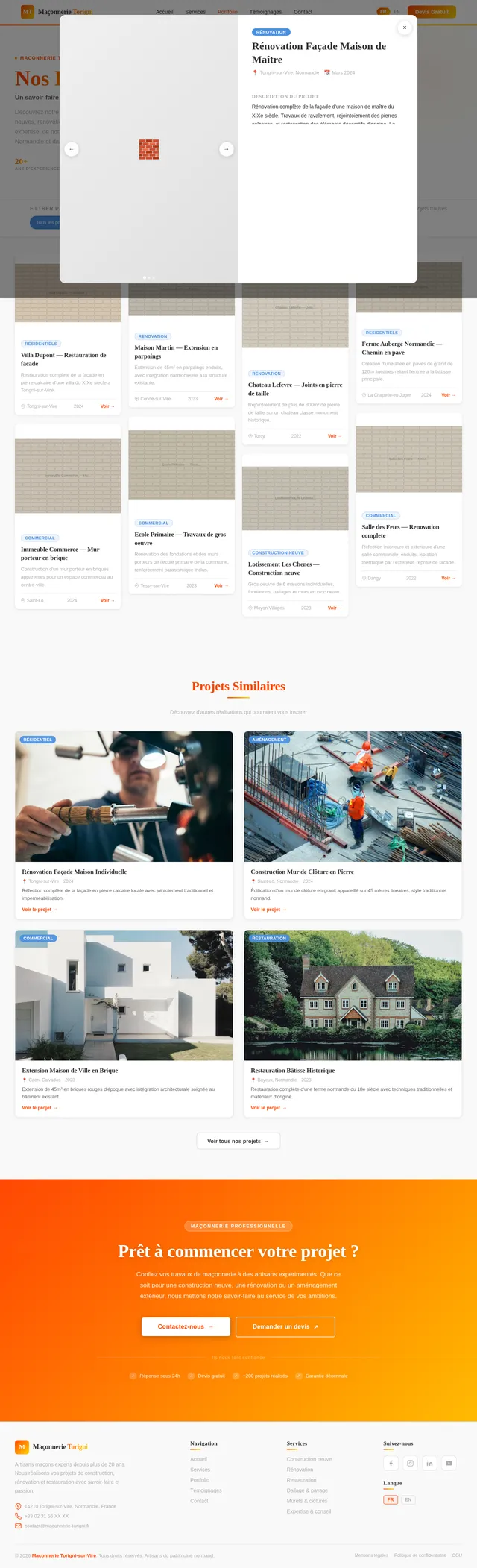
Website for a masonry company, in white and gray colors, with a logo in a red-to-light yellow gradient; modern and simple.

Comments (0)
Sign in to leave a comment
System Requirements
System Requirements Document (SRD)
Project Name: mint-website
1. Introduction
The mint-website project aims to design and develop a modern, user-friendly website for a masonry company based in France. The website will serve as a digital showcase for the company's services, portfolio, and contact information, while reflecting a clean, professional aesthetic with a modern white and gray theme. The branding will be enhanced with a striking red-to-light yellow gradient logo, ensuring a memorable and visually appealing user experience.
This document outlines the system requirements for the mint-website project, including functional and non-functional requirements, user personas, visual design elements, and technical specifications.
2. System Overview
The mint-website will replace the existing website at https://www.maconnerie-torignisurvire.fr/ with a refreshed design and enhanced functionality. The new website will:
- Highlight the company's masonry services and expertise.
- Provide an intuitive navigation experience for users.
- Feature a modern, clean design with a white and gray color palette, complemented by the company's red-to-light yellow gradient logo.
- Include essential sections such as services, portfolio, testimonials, and contact information.
- Be optimized for both desktop and mobile devices.
The website will be developed using modern web technologies to ensure scalability, performance, and ease of maintenance.
3. Functional Requirements
- As a User, I should be able to view the company's masonry services.
- As a User, I should be able to browse a portfolio of completed projects.
- As a User, I should be able to read customer testimonials.
- As a User, I should be able to contact the company via a contact form.
- As a User, I should be able to access the website on both desktop and mobile devices.
- As an Admin, I should be able to update the portfolio with new projects.
- As an Admin, I should be able to manage customer testimonials.
4. User Personas
4.1 Homeowner
- Description: A homeowner looking for masonry services for renovations or new construction projects.
- Goals: To find a reliable masonry company, view examples of past work, and contact the company for a quote.
4.2 Contractor
- Description: A contractor seeking a masonry partner for a construction project.
- Goals: To evaluate the company's expertise and portfolio and establish a professional relationship.
4.3 Admin
- Description: A company representative responsible for maintaining the website.
- Goals: To update the portfolio, manage testimonials, and ensure the website content is accurate and up-to-date.
5. Visuals Colors and Theme
Color Palette
The website will use the following unique color palette to align with the company's branding:
- Background: #F9F9F9 (light gray)
- Surface: #FFFFFF (white)
- Text: #333333 (dark gray)
- Accent: #FF4500 (red-orange gradient start) to #FFD700 (light yellow gradient end)
- Muted Tones: #B0B0B0 (soft gray)
Typography
- Primary Font: Open Sans (clean and modern)
- Secondary Font: Roboto Slab (for headings and emphasis)
6. Signature Design Concept
Interactive Masonry Wall Landing Page
The homepage will feature an interactive masonry wall design. Users will be greeted with a dynamic, grid-like layout resembling a masonry wall, where each "brick" represents a key section of the website (e.g., Services, Portfolio, Testimonials, Contact).
- Hover Effects: When users hover over a brick, it will subtly "pop out" with a shadow effect and display a brief description of the section.
- Click Interaction: Clicking on a brick will smoothly transition the user to the corresponding section of the website.
- Gradient Animation: The red-to-light yellow gradient from the logo will animate across the bricks when the user scrolls, creating a visually engaging effect.
- Responsive Design: On mobile devices, the masonry wall will adapt into a stacked layout for easy navigation.
This bold, memorable design will immediately capture the user's attention and reinforce the company's identity as a modern, innovative masonry service provider.
7. Non-Functional Requirements
- The website must load within 3 seconds on a standard broadband connection.
- The website must be responsive and function seamlessly on devices with screen sizes ranging from 320px to 1920px.
- The website must comply with GDPR regulations for user data privacy.
- The website must support both French and English languages.
8. Tech Stack
Frontend
- React for Web
Backend
- Python
- FastAPI
Database
- MySQL (with Alembic for migrations)
AI Tools
- Litellm for potential future LLM routing
Orchestration
- Docker
- Docker Compose
9. Assumptions and Constraints
- The website will primarily target users in France, so the default language will be French, with an option for English.
- The website will use the existing domain: https://www.maconnerie-torignisurvire.fr/.
- The company will provide all content, including text, images, and testimonials.
- The project timeline assumes a 3-month development period.
10. Glossary
- GDPR: General Data Protection Regulation, a legal framework for data protection and privacy in the European Union.
- Responsive Design: A design approach that ensures a website functions well on devices of all sizes.
- Frontend: The part of the website that users interact with directly.
- Backend: The server-side logic and database management of the website.
- LLM: Large Language Model, a type of AI model used for natural language processing.

Modern Masonry Excellence
Transforming spaces with precision craftsmanship and timeless stone work. From residential renovations to commercial projects, we bring decades of expertise to every brick we lay.
Explore Our Expertise
Navigate through the pillars of our masonry company. Each brick leads you to discover what makes us the trusted choice for your next project.
Our Services
From residential builds to commercial projects, explore our full range of expert masonry services tailored to your needs.
Explore ServicesPortfolio
Browse our gallery of completed masonry projects showcasing craftsmanship and attention to detail across France.
View ProjectsTestimonials
Hear from satisfied homeowners and contractors who trusted us with their masonry vision.
Read ReviewsContact Us
Ready to start your project? Reach out for a free consultation and personalized quote.
Get in TouchAbout Our Company
Over 20 years of masonry expertise, licensed professionals, and a commitment to exceeding expectations.
Learn MoreQuality Guarantee
Every project backed by our satisfaction guarantee. We use premium materials and proven techniques for lasting results.
Our StandardsOur Masonry Services
With over 20 years of experience, we deliver expert masonry solutions for residential and commercial projects across France.
Residential Masonry
From custom fireplaces to elegant stone facades, we bring expert craftsmanship to every home project. Our residential services cover new builds, extensions, and renovations with meticulous attention to detail.
Learn More→Commercial Projects
Large-scale masonry solutions for commercial buildings, retail spaces, and industrial facilities. We deliver on time and on budget with professional project management throughout.
Learn More→Restoration Work
Preserving architectural heritage through expert stone and brick restoration. We specialize in historic building conservation, repointing, and structural repair using traditional techniques.
Learn More→Stone Cladding
Transform any surface with premium natural and engineered stone cladding. We offer a wide selection of materials and finishes to enhance both interior and exterior spaces.
Learn More→Structural Reinforcement
Strengthen foundations, load-bearing walls, and structural elements with proven masonry reinforcement methods. Our engineers ensure safety and longevity for every structure.
Learn More→Outdoor Living Spaces
Create stunning patios, retaining walls, garden features, and outdoor kitchens. We design and build beautiful outdoor spaces that extend your living area with lasting quality.
Learn More→Completed Projects
Browse our portfolio of masonry projects across Normandy — from heritage restorations to modern commercial builds, each crafted with precision and care.
Villa Saint-Lô Renovation
Complete stone facade restoration for a historic villa, blending traditional craftsmanship with modern insulation.
Commercial Office Complex
Modern brick cladding for a new commercial development in downtown Torigni-sur-Vire.
Heritage Church Restoration
Delicate restoration of 17th-century church stonework preserving historical character.
Granite Garden Walls
Bespoke granite retaining walls and terracing for a hillside property.
Modern Farmhouse Extension
Contemporary stone and render extension seamlessly connecting to an existing farmhouse.
Retail Storefront Facade
Eye-catching stone veneer facade for a boutique retail space in the town center.
Manor House Chimney Rebuild
Structural rebuild of four ornamental chimneys on a listed manor house.
Limestone Feature Wall
Interior limestone accent wall transforming a modern living space with natural warmth.
Pool House & Terrace
Luxury pool house with natural stone flooring and decorative masonry columns.
What Our Clients Say
Trusted by homeowners, contractors, and architects across Normandy for over 20 years of masonry excellence.
“We hired them for a complete stone wall restoration on our 19th-century farmhouse. The craftsmanship was extraordinary — every joint, every stone placed with precision. They truly respect traditional masonry techniques while delivering modern quality standards.”
“As a contractor, I need masonry partners I can rely on. This team consistently delivers on time, on budget, and with impeccable quality. Their commercial project work on the Caen business complex exceeded every expectation.”
“Their attention to detail on our stone cladding project was remarkable. They understood the architectural vision perfectly and brought it to life with beautiful natural stone work. I recommend them to all my clients without hesitation.”
“From the initial consultation to the final walkthrough, the experience was seamless. They completed a full residential masonry build with outstanding structural integrity and aesthetic finish. Truly the best in Normandy.”
Built on Trust, Crafted with Care
From foundation to finish, we bring the skill, reliability, and attention to detail that your project deserves. Here is what sets us apart.
20+
Decades of Expertise
Over two decades of masonry excellence serving residential and commercial clients across France with unwavering dedication.
100%
Fully Certified
Complete licensing, insurance, and compliance with all French building codes and safety standards for your total peace of mind.
98%
Client-First Approach
Our commitment to exceeding expectations has earned us a 98% satisfaction rate and lasting relationships with our clients.
500+
Expert Craftsmanship
Every brick, every stone, every detail is placed with precision. We combine traditional techniques with modern innovation.
150+
Trusted Partnerships
Homeowners and contractors alike return to us project after project, a testament to the quality and reliability we deliver.
Ready to Transform Your Space?
From residential renovations to commercial projects, our expert masons bring decades of craftsmanship to every build. Get started today with a free, no-obligation consultation.
Licensed & Insured · 20+ Years Experience · 100% Satisfaction Guaranteed
Contact
Parlons de Votre Projet
Que vous ayez un projet de construction, de rénovation ou de restauration, notre équipe est à votre écoute pour vous accompagner.
Nos Coordonnées
Zone Artisanale, 50160 Torigni-sur-Vire, France
🕓 Horaires d'ouverture
Envoyez-nous un Message
Remplissez le formulaire ci-dessous et nous vous répondrons dans les meilleurs délais.
No comments yet. Be the first!