mint-start
 Diya Trivedi
start a project to build a simple single page design of todo

Comments (0)
Sign in to leave a comment
System Requirements
System Requirements Document for mint-start
1. Introduction
mint-start is a simple, single-page todo design: one warm, well-crafted page where a person captures the tasks that matter today and sees them in one place. The product intent is deliberately narrow — a single page that lets the user add todo items and view their todo items, with no navigation, no secondary screens, and no surrounding application shell.
The audience is a single everyday person (the Todo User) who wants a calm, legible place to jot down and review tasks. The page should feel like a well-made object on a desk: warm, tactile, quietly optimistic, and immediately usable as a working tool rather than a marketing landing page.
2. System Overview
mint-start is delivered as a single custom page, Todo, which serves as both the public entry surface and the working todo surface. There is no separate landing page, no sign-in, and no account concept: the page is openly reachable and the todo list is used directly on it.
Current accepted behavior:
- The product is a simple single-page todo design (explicit).
- Users can add todo items (explicit).
- Users can view their todo items on the single page (explicit).
- The design is limited to a single page (explicit hard constraint; exact page count of one).
Actors:
- Todo User — the one active human persona. They add todo items and review the current list on the single page, succeeding when their tasks are visible and manageable in that one view.
- Application backend — a shared FastAPI process that stores and returns todo items for the page.
- Database — MariaDB holding the application-owned todo records.
Ownership: all human-facing behavior lives on the single Todo page. The backend and database support that page; they are not separate destinations and expose no user-facing surface of their own.
Provisioned infrastructure (authoritative inventory): a shared FastAPI backend, a MariaDB database, and a React frontend. The frontend calls the backend for todo data; the backend reads and writes the database.
Removed from scope
- None. No concept has been explicitly removed by the user.
2a. Product Interpretation and Delivery Boundary
mint-start is a first-party, single-page web tool. The one page, Todo, is anonymously reachable — there is no identity establishment, sign-in, invitation, or account management, because the accepted requirements describe a simple personal todo page with no continuity, commitment, or value transfer that would require application-owned identity. The page opens directly into its working state: the wordmark masthead, the composer for adding a task, the filter row, and the task list.
Everything the user does happens on this one page. Adding a task and viewing tasks are the complete current scope. There is no future-horizon requirement recorded in the authoritative thread; anything beyond adding and viewing tasks on the single page is out of current scope and is not planned here.
The backend and database exist only to persist and return the todo items the page displays. They add no product capability, no additional page, and no access boundary.
2c. Page Content and Component Coverage
Todo
The single page of mint-start. It is the public entry surface and the working todo surface at once, openly reachable with no sign-in.
Information and state
- The wordmark
mint-startset large and flush-left, with a small mustard baseline dot and a thin walnut hairline rule spanning the content width. - A single warm serif line beneath the wordmark: "One list. Everything that matters today."
- The current todo list, each item showing its task title and a muted timestamp.
- A live count of tasks in small-caps uppercase labels.
- The currently selected filter (All / Active / Done).
- Page-level states: loading (list being fetched), empty (no tasks), populated (one or more tasks), and error (list could not be loaded or a task could not be added).
Primary actions
- Type a task title into the composer input and submit via the teal capsule Add task button (or pressing Enter in the input).
- Select a filter chip (All / Active / Done) to change which tasks are shown.
Supporting actions and controls
- Circular checkbox on each task row to mark a task complete or incomplete, with the completed state rendered as a struck-through, lower-contrast row.
- Filter chips as capsule pills with a live small-caps count; the active chip fills solid teal with cream text.
Domain entities
- Todo item — a task with a title, a created timestamp, and a completion state (active or done). The backend persists these in MariaDB and returns them to the page.
Component responsibilities
- Masthead — renders the oversized Jost wordmark, the mustard dot, and the walnut rule; purely presentational.
- Composer — a wide rounded paper card holding the inset text input and the teal capsule Add task button; owns the in-progress task title, validates that the title is non-empty, submits the new task to the backend, and clears the input on success. Stacks to full width on mobile.
- Filter row — renders the All / Active / Done capsule chips with the live count; owns the selected filter and drives which tasks the list displays.
- Task list — renders ruled ledger rows, each with a circular checkbox, the task title in Literata, and a muted timestamp on the right; completed rows collapse to a lower-contrast struck-through state. Renders the empty state (with the hand-drawn Eames geometric mark) when there are no tasks to show.
- Footer — a single thin rule with a quiet line of copy and the Eames geometric mark.
States
- Loading — while the initial task list is being fetched, the list area shows a quiet placeholder; the composer remains usable.
- Empty — when there are no tasks (or the selected filter yields none), the list area shows the empty-state sentence in Literata beside the hand-drawn geometric mark.
- Success — a newly added task appears at the top of the list with a gentle slide-in and settles; the input clears; the live count updates.
- Error — if the list fails to load, the page shows a quiet inline message with a retry action; if adding a task fails, the composer keeps the typed title and shows an inline message so the user can retry without retyping.
- Recovery — retry re-fetches the list; a failed add can be resubmitted from the retained input.
3. Functional Requirements
FR-1 — Single-page todo design (explicit) As a Todo User, I should use the entire product on one simple page, so that capturing and reviewing tasks never requires navigating anywhere else.
- Trigger: opening mint-start.
- Observable result: the Todo page renders the masthead, composer, filter row, and task list; there are no other pages, routes, or navigation destinations.
- Constraint: the design is limited to a single page (exact page count of one).
- Failure/recovery: not applicable — the page is the whole product.
- Continuation: the user proceeds directly to adding or viewing tasks.
FR-2 — Add a todo item (explicit) As a Todo User, I should add a todo item from the composer on the Todo page, so that a task I need to do is captured.
- Trigger: the user types a task title into the composer input and activates Add task (or presses Enter).
- Input: a non-empty task title.
- Observable result: the new task appears in the task list with its title and a timestamp, the live count updates, and the input clears.
- Access state: anonymous; no sign-in required.
- Failure/recovery: if the title is empty, the composer does not submit and indicates a title is needed; if the backend call fails, the typed title is retained and an inline message offers retry.
- Continuation: the user can immediately add another task or review the list.
FR-3 — View todo items on the single page (explicit) As a Todo User, I should see my todo items on the Todo page, so that I can review what I have captured in one view.
- Trigger: opening the page or returning to it after adding a task.
- Observable result: the task list shows each todo item's title, timestamp, and completion state; the live count reflects the current set.
- Access state: anonymous; no sign-in required.
- Failure/recovery: if the list cannot be loaded, an inline message with a retry action is shown; retry re-fetches the list.
- Continuation: the user can add another task or change the filter.
FR-4 — Filter the visible tasks (required_inference) As a Todo User, I should switch the task list between All, Active, and Done, so that I can focus on what remains or review what is finished.
- Trigger: the user selects a filter chip.
- Observable result: the active chip fills solid teal with cream text; the list crossfades to the matching subset; the live count reflects the selected view.
- Access state: anonymous.
- Failure/recovery: if the selected filter yields no tasks, the empty state is shown for that view.
- Continuation: the user can switch filters again or add a task.
- Rationale: the accepted single-page design includes a filter row with All / Active / Done chips and a live count; this is the indispensable control that makes the completed-task state and the count meaningful on the one page.
FR-5 — Mark a task complete or incomplete (required_inference) As a Todo User, I should check or uncheck a task's circular checkbox, so that the list honestly reflects what is done.
- Trigger: the user activates a task row's circular checkbox.
- Observable result: the strike-through animates left-to-right and the row fades to muted walnut-grey when completed; unchecking restores the active row; the live count updates.
- Access state: anonymous.
- Failure/recovery: if the update fails, the row reverts to its prior state and an inline message offers retry.
- Continuation: the user can continue reviewing or adding tasks.
- Rationale: the accepted design specifies circular checkboxes, a left-to-right strike-through animation, and completed rows fading to walnut-grey; the completion state is the indispensable state that makes those accepted visuals meaningful.
4. User Personas
Todo User
Product context. The Todo User is one person using mint-start as a personal, everyday capture tool. They open a single page, not an application suite, and expect it to behave like a well-made object on a desk: warm, legible, and immediately usable.
Primary goal. Capture the tasks that matter today and see them all in one place, without ceremony.
Distinct accepted responsibilities.
- Add todo items through the composer on the Todo page.
- View the current todo items on that same page.
- Switch the visible list between All, Active, and Done to focus or review.
- Mark tasks complete or incomplete via the circular checkbox.
Relevant inputs and decisions. The task title they type; whether to submit it; which filter view they want; whether a task is done.
Interactions with other participants. The Todo User is the only human participant. Their actions are served by the application backend and MariaDB, which persist and return todo items; these are supporting systems, not counterparties.
Observable success. Their tasks are visible and manageable in the one view: a newly added task appears immediately, the list reflects completion honestly, and the count matches what is shown.
5. Core User Flows
Flow 1 — Add a todo item
- The Todo User opens mint-start and lands on the Todo page. The masthead, composer, filter row, and task list are visible; the list loads from the backend.
- The user clicks into the composer input and types a task title in Literata.
- The user activates the teal capsule Add task button (or presses Enter).
- The composer validates the title is non-empty and sends the new task to the backend, which stores it in MariaDB.
- On success, the new task slides in from 12px below with a 240ms ease-out and a soft warm shadow that settles; the input clears; the live count updates.
- Failure/recovery: if the title is empty, the composer does not submit and indicates a title is needed. If the backend call fails, the typed title stays in the input and an inline message offers retry; the user resubmits without retyping.
- Continuation: the user can add another task or move on to reviewing the list.
Flow 2 — View todo items
- The Todo User opens or returns to the Todo page.
- The page fetches the current todo items from the backend and renders them as ruled ledger rows: circular checkbox, task title in Literata, muted timestamp on the right.
- The live count in small caps reflects the current set.
- Empty state: if there are no tasks, the list area shows the empty-state sentence in Literata beside the hand-drawn Eames geometric mark.
- Failure/recovery: if the list cannot be loaded, an inline message with a retry action appears; the user activates retry and the list re-fetches.
- Continuation: the user can add a task or change the filter.
Flow 3 — Filter the visible tasks
- From the Todo page, the Todo User selects a filter chip: All, Active, or Done.
- The selected chip fills solid teal with cream text; the list crossfades to the matching subset in 180ms; the live count reflects the selected view.
- Empty state: if the selected view has no tasks, the empty state is shown for that view.
- Continuation: the user can switch filters again or add a task.
Flow 4 — Mark a task complete or incomplete
- From the Todo page, the Todo User activates a task row's circular checkbox.
- The strike-through animates left-to-right over 200ms and the row fades to muted walnut-grey; the live count updates. Unchecking restores the active row.
- Failure/recovery: if the update fails, the row reverts to its prior state and an inline message offers retry.
- Continuation: the user continues reviewing or adding tasks.
6. Visuals Colors and Theme
Muse and headline. Charles & Ray Eames — warm modernism for a one-page todo: honest materials, joyful order. The register is calm, everyday, humane: a well-made object on a desk, warm and tactile, quietly optimistic.
Mode. Light mode only.
Colour tokens (exact hex by role).
| Role | Hex | Use |
|---|---|---|
| Background | #F4EDE1 | Cream paper ground filling the page |
| Surface | #FBF6EC | Cards and the composer, on a 1px walnut hairline |
| Text | #2B2622 | Deep ink for all reading text |
| Primary | #3F6E63 | Teal structural voice: wordmark, add button, checked-item rules, active chip fill |
| Accent | #D2452E | Tomato red, reserved for one signal only: the active/overdue task marker and the focus ring |
| Muted | #8A7E6E | Walnut-grey for secondary metadata and completed tasks |
| Highlight | #E3A82B | Mustard, sparingly: small dot on the header rule |
| Hairline | #D9CBB6 | 1px walnut borders |
Typography.
- Headings: Jost, 500–600 weight, geometric and Futura-like, tight tracking (-0.02em) for the wordmark and section titles; small-caps uppercase Jost at 11px / 0.14em for labels like "TODAY" and task counts.
- Body: Literata, a warm readable serif, for body copy, task titles, and the empty-state sentence at 17–18px with 1.6 line-height.
- Scale: 1.333 modular — 72 / 54 / 40 / 28 / 20 / 17 / 13. Display wordmark
clamp(40px, 8vw, 96px); section titlesclamp(24px, 4vw, 40px); task titles 18px; labels 11px uppercase.
Shape language. Organic-modern: soft rounded rectangles (12–16px radii) for cards and the composer; capsule pills for the add button and filter chips; a single gentle arc under the header rule echoing Eames molded-plywood curves. Hairline 1px walnut borders rather than heavy shadows; shadows are soft and warm-tinted, never grey-blue.
Layout. Single-column, gallery-like sequence on a 12-column grid with generous margins. Top band: the wordmark mint-start set large and flush-left with a small mustard dot and a thin horizontal rule spanning the content width. Below it, a two-zone composer: a wide rounded input on the left and a teal capsule Add task button pinned to the right, stacking to full-width on mobile. Then a filter row of chips (All / Active / Done) with a live count in small caps. Then the task list as ruled rows: circular checkbox on the left, task title in Literata, muted timestamp on the right; completed tasks collapse to a lower-contrast, struck-through state. The footer is a single thin rule with a quiet line of copy.
Imagery. No photography in the hero. One hand-drawn Eames-style accent: a small flat vector of a bent-plywood chair silhouette or a stack of coloured geometric shapes (a teal circle, a mustard square, a tomato arc) used as a quiet mark beside the empty state and in the footer. Texture is a very subtle paper grain on the background at 3% opacity.
Avoid. White or near-white background; blue/indigo primary or accent; Inter, Roboto, Arial, Helvetica, Poppins, or system-ui fonts; gradient-blob heroes or floating glass cards; a grid of identical hover-lift cards; stock photography or 3D renders in the hero; bouncy or springy micro-interactions; presenting or linking to any planning document or spec.
Readability rule. Readable text and controls stay whole at every viewport: headlines, wordmarks, labels, numbers, cards' text and controls stay entirely inside the viewport and their container at 375px, 768px, and 1280px, wrapping or scaling (for example font-size: clamp(...) with its mobile size) to fit, and no other element covers any part of them. Imagery, decoration, and motion may be cropped, bled off an edge, rotated, overlapped, or cut as the direction asks, as long as they cover no readable text or control. With prefers-reduced-motion, provide a usable static arrangement.
7. Signature Design Concept
The first screen is a left-aligned editorial opening, not a centred SaaS hero. The wordmark mint-start is set huge in Jost (clamp(40px, 8vw, 96px)) flush to the left margin, with a small mustard dot on its baseline and a thin walnut rule running to the right edge — a typographic masthead, not a nav bar. Directly beneath, a single warm serif line in Literata ("One list. Everything that matters today.") at 20px, then the composer card — the wide rounded input and teal capsule Add task button — sitting immediately below as the dominant interactive element, occupying the full content width. The task list begins directly under it, its first rows visible above the fold so the page reads as a working tool, not a landing page. Cream ground, no gradient, no blob.
The composer is the hero: a wide rounded paper card with an inset input and a teal capsule button, styled like a physical card on a desk with a warm soft shadow. Task rows read as ruled ledger lines with circular checkboxes whose check fills with a left-to-right strike-through animation, completed rows fading to walnut-grey. The hand-drawn Eames geometric mark (teal circle, mustard square, tomato arc) appears beside the empty state and in the footer as the only illustration. Filter chips are capsule pills with a live small-caps count, and the active chip fills solid teal with cream text.
This concept only recomposes accepted content, states, and controls on the single Todo page.
8. Interaction Model & Motion Direction
Interaction Model: Animated Motion Tempo: restrained Hero Dimensionality: flat
Landing Hero Motion Brief
- Focal subject: the composer card — the wide rounded input and teal capsule Add task button — beneath the oversized flush-left Jost wordmark with its mustard baseline dot and walnut rule.
- Input → transformation → outcome thesis: the user types a task title into the composer and activates Add task; the new task slides in from 12px below with a 240ms ease-out and a soft warm shadow that settles into the ruled ledger list; the input clears and the live count updates. The motion is the act of capture made visible.
- Motion vocabulary: gentle, film-like, restrained. New tasks slide in from 12px below with a 240ms ease-out and a soft warm shadow that settles; checking a task animates the strike-through left-to-right over 200ms and fades the row to muted; filter chips crossfade the list in 180ms. No bounce, no particles, no parallax.
- Composed first frame: cream
#F4EDE1ground with 3% paper grain; the wordmarkmint-startflush-left in Jost with the mustard dot and walnut rule; the Literata line beneath; the composer card on#FBF6ECwith a warm soft shadow; the first task rows visible above the fold. - Reduced-motion state: with
prefers-reduced-motion, all transitions become instant state changes and the list simply re-renders.
9. Non-Functional Requirements
- Single-page constraint (explicit): the product is limited to exactly one page; no additional routes, navigation destinations, or secondary screens may be introduced.
- Simplicity (explicit): the design is a simple single-page todo; the interface stays to the masthead, composer, filter row, task list, and footer.
- Readable text and controls (explicit, from design constraints): headlines, wordmarks, labels, numbers, cards' text and controls stay entirely inside the viewport and their container at 375px, 768px, and 1280px, wrapping or scaling to fit; no other element covers any part of them.
- Reduced motion (explicit, from design constraints): with
prefers-reduced-motion, all transitions become instant state changes and the list simply re-renders. - Access (required_inference): the Todo page is anonymously reachable with no sign-in, because the accepted requirements describe a simple personal todo page with no continuity, commitment, or value transfer requiring application-owned identity.
- Persistence (required_inference): todo items are stored in the provisioned MariaDB database through the shared FastAPI backend so that viewing the list reflects what was added.
10. Tech Stack
- Frontend: React application UI (provisioned), rendering the single Todo page with the Jost and Literata typefaces and the specified palette.
- Backend: shared FastAPI process (provisioned) providing the todo API used by the page; new todo routes and modules extend this existing process, port, and deployment.
- Database: MariaDB (provisioned) for application-owned persistent todo records.
- Orchestration: Docker / docker-compose for the frontend, backend, and database services.
11. Assumptions and Constraints
- Single page (explicit): the product is exactly one page, Todo; no other pages exist.
- Anonymous access (required_inference): no sign-in, account, or identity establishment is required to use the page.
- Single user (required_inference): the Todo User is the only human persona; there is no sharing, collaboration, or multi-user visibility.
- Persistence (required_inference): todo items persist in MariaDB via the backend so the list survives reloads.
- Task fields (required_inference): a todo item has a title, a created timestamp, and a completion state; no other fields are required by the accepted requirements.
- No future horizon: the authoritative thread records no future-horizon requirements; anything beyond adding and viewing tasks on the single page is out of current scope.
12. Glossary
- Todo page — the single page of mint-start; the public entry surface and the working todo surface.
- Todo item — a task with a title, a created timestamp, and a completion state (active or done).
- Composer — the card holding the task input and the teal capsule Add task button.
- Filter chip — a capsule pill (All / Active / Done) that selects which tasks the list shows.
- Live count — the small-caps uppercase number reflecting the tasks in the current view.
- Todo User — the single active human persona who adds and views tasks on the Todo page.
- Eames geometric mark — the hand-drawn flat vector (teal circle, mustard square, tomato arc) used beside the empty state and in the footer.
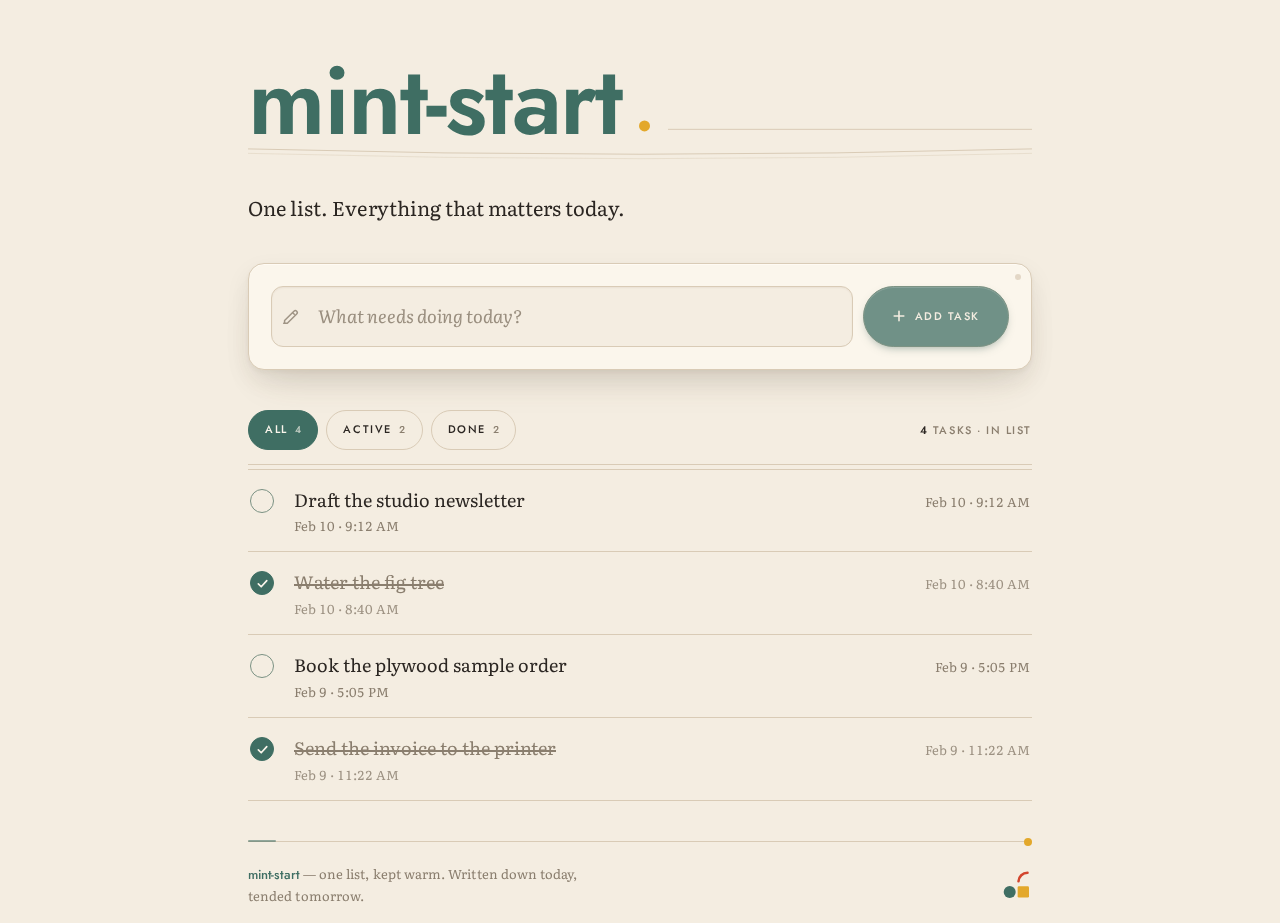
mint-start
One list. Everything that matters today.
Task ledger
4 tasks · in list
- Draft the studio newsletterFeb 10 · 9:12 AM
- Water the fig treeFeb 10 · 8:40 AM
- Book the plywood sample orderFeb 9 · 5:05 PM
- Send the invoice to the printerFeb 9 · 11:22 AM
mint-start
One list. Everything that matters today.
Task ledger
4 tasks · in list
- Draft the studio newsletterFeb 10 · 9:12 AM
- Water the fig treeFeb 10 · 8:40 AM
- Book the plywood sample orderFeb 9 · 5:05 PM
- Send the invoice to the printerFeb 9 · 11:22 AM
No comments yet. Be the first!