mint-dashboard

byChristopher West

🔹 OVERVIEW Build a full-stack delivery management system consisting of: Admin Dashboard (Web App) Driver Portal (Mobile-Optimized App) The system must support: Order entry Route creation & optimization Real-time GPS tracking Electronic Proof of Delivery (ePOD) Customer notifications Live status updates 🔹 SECTION 1: ADMIN DASHBOARD 1️⃣ Order Management Page Create a form that allows the admin to input: Order Number (unique ID) Business Name Delivery Address (Google Maps integrated) Contact Name Contact Phone Contact Email Line Items (dynamic list allowing multiple goods) Item Name Quantity Special Delivery Notes Delivery Status (Pending / Routed / Out for Delivery / Delivered) Orders should be: Editable Searchable Filterable Stored in database Displayed in a table view 2️⃣ Route Creation Page Admin can: Click “Create New Route” Select a date Tick/select which pending orders to include System automatically calculates: Most efficient route Starting point: Depot address (fixed setting in system settings) Ending point: Depot Use route optimization API (Google Maps / Mapbox / OpenRouteService) Display: Map with route plotted Stop order list Estimated delivery times Total distance Estimated duration Admin can: Assign route to a specific driver Send route to driver's mobile app Mark route as “Dispatched” 3️⃣ Live Tracking Dashboard Admin must be able to: View live driver location on map See: Current stop Completed stops Remaining stops Click on a stop to view: Delivery details ePOD information (once submitted) See route progress percentage Receive real-time updates (WebSockets or Firebase real-time sync) 🔹 SECTION 2: DRIVER PORTAL (Mobile View) Driver logs in and sees: 1️⃣ Assigned Route Route summary: Total stops Distance Estimated duration Map view “Start Route” button When started: GPS tracking begins Location updates every 10–20 seconds 2️⃣ Stop-by-Stop Navigation For each stop: Show: Business Name Address Contact Details Delivery items & quantities Special notes Button: “Navigate” (opens Google Maps / in-app navigation) 3️⃣ ePOD (Electronic Proof of Delivery) At each stop driver must: Capture customer signature (touch screen signature pad) Take delivery photograph Add optional notes Confirm delivered quantities (allow partial delivery input if needed) Tap “Complete Delivery” Upon completion: POD uploads instantly to database Delivery status updates to “Delivered” Timestamp recorded GPS location captured Automatic email/SMS notification sent to customer with: Delivery confirmation Signature Photo attachment Timestamp 🔹 REAL-TIME FEATURES Admin dashboard updates instantly when: Driver changes stop status POD is uploaded Driver location changes Use: Firebase / Supabase / WebSockets for real-time sync 🔹 SYSTEM SETTINGS Include: Depot address (editable) Driver management (add/edit/remove drivers) Notification settings (SMS & Email integration) Company branding (logo on POD confirmation) 🔹 TECHNICAL REQUIREMENTS Build using modern stack: Frontend: React / Next.js (Admin) React Native or Flutter (Driver mobile) Backend: Node.js / Express OR Supabase backend Database: PostgreSQL Integrations: Google Maps API (Routing + Geocoding) Route Optimization API Twilio (SMS) SendGrid (Email) Cloud storage for POD images Authentication: Role-based authentication (Admin vs Driver) Hosting: Cloud hosted (AWS / Vercel / Supabase) 🔹 UI/UX REQUIREMENTS Admin Dashboard: Clean logistics-style UI Map-focused route page Table-based order management Driver App: Large buttons Simple workflow Minimal distractions Offline mode with auto-sync when back online 🔹 OPTIONAL ADVANCED FEATURES If possible include: Route re-optimization mid-route Failed delivery reason logging Customer live tracking link Delivery time window management Analytics dashboard (delivery performance, on-time rate) 🔹 END GOAL The system must function like a simplified version of: Route4Me Onfleet Circuit for Teams But custom-built for internal business use. The application must be scalable and production-ready.
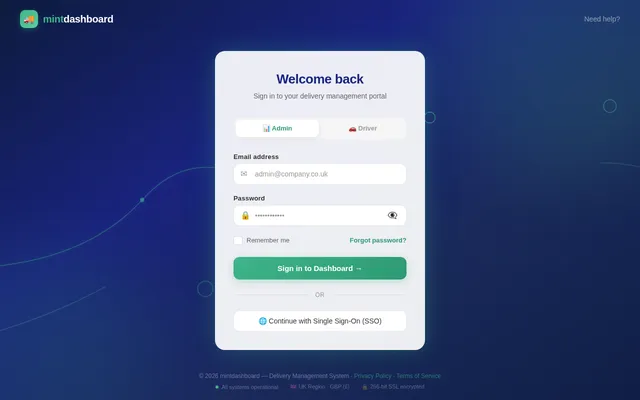
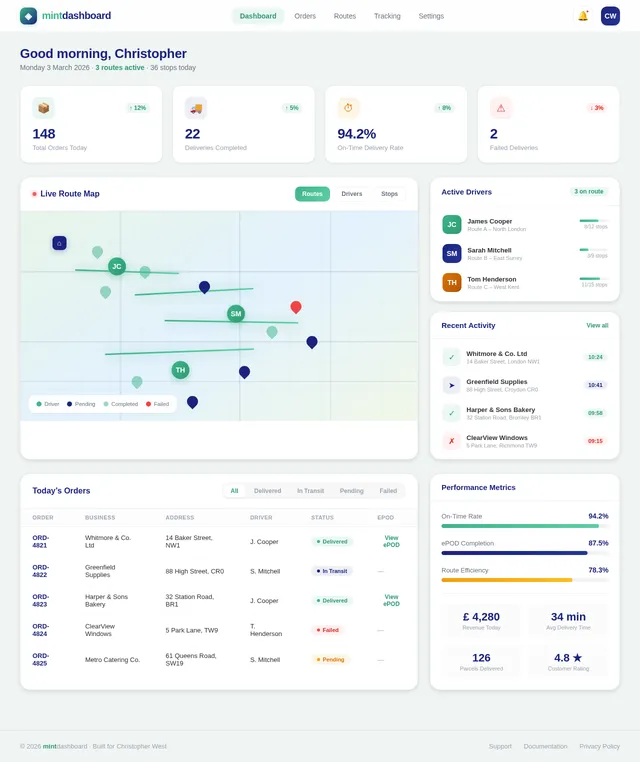
LoginDashboard
Login

Comments (0)

No comments yet. Be the first!

System Requirements

System Requirement Document
Page 1 of 6

System Requirements Document (SRD)

Project Name: mint-dashboard

1. Introduction

The mint-dashboard is a full-stack delivery management system designed to streamline logistics operations for businesses. It includes an Admin Dashboard (web application) and a Driver Portal (mobile-optimized app) to manage orders, optimize routes, track deliveries in real-time, and provide electronic proof of delivery (ePOD).

This document outlines the functional and non-functional requirements, user personas, visual design concepts, and technical specifications for the mint-dashboard project. The system is tailored for Christopher West's business needs in the UK, with locale-specific defaults such as GBP (£) currency, UK time zones, and address formatting.

2. System Overview

The mint-dashboard system consists of two main components:

  1. Admin Dashboard: A web-based application for managing orders, creating optimized delivery routes, tracking driver progress, and monitoring delivery statuses.
  2. Driver Portal: A mobile-optimized application for drivers to view assigned routes, navigate stops, capture ePOD, and update delivery statuses in real-time.

The system supports:

  • Order entry and management
  • Route creation and optimization using APIs (e.g., Google Maps, Mapbox, OpenRouteService)
  • Real-time GPS tracking of drivers
  • Electronic Proof of Delivery (ePOD) with photo, signature, and timestamp capture
  • Customer notifications via SMS and email
  • Live status updates for admins and customers
  • Advanced features such as route re-optimization, failed delivery logging, live customer tracking, delivery time window management, and analytics dashboards.

3. Functional Requirements

Page 2 of 6

Admin Dashboard

  • As Admin, I should be able to input and manage orders with details such as order number, business name, delivery address, contact information, line items, and delivery status.
  • As Admin, I should be able to search, edit, and filter orders in a table view.
  • As Admin, I should be able to create optimized delivery routes by selecting pending orders and assigning them to drivers.
  • As Admin, I should be able to view live driver locations on a map, including current, completed, and remaining stops.
  • As Admin, I should be able to click on a stop to view delivery details and ePOD information.
  • As Admin, I should be able to receive real-time updates when a driver changes stop status or uploads ePOD.
  • As Admin, I should be able to re-optimize routes mid-route if needed.
  • As Admin, I should be able to log failed delivery reasons for each stop.
  • As Admin, I should be able to generate and view analytics dashboards for delivery performance, on-time rates, and other key metrics.

Driver Portal

  • As Driver, I should be able to log in and view my assigned route, including total stops, distance, estimated duration, and a map view.
  • As Driver, I should be able to start my route, enabling GPS tracking and location updates every 10–20 seconds.
  • As Driver, I should be able to view stop-by-stop navigation details, including business name, address, contact details, delivery items, and special notes.
  • As Driver, I should be able to capture ePOD by taking a photo, collecting a signature, and confirming delivered quantities.
  • As Driver, I should be able to mark a stop as complete, triggering an automatic update to the admin dashboard and customer notifications.
  • As Driver, I should be able to log failed delivery reasons (e.g., customer unavailable, incorrect address).

Real-Time Features

  • As Admin, I should see real-time updates on the dashboard when drivers update stop statuses or upload ePOD.
  • As Customer, I should receive instant SMS/email notifications with delivery confirmation, timestamp, and ePOD details.
  • As Customer, I should be able to track my delivery live via a tracking link.

System Settings

  • As Admin, I should be able to configure depot address, manage drivers, set notification preferences, upload company branding, and define delivery time windows for orders.
Page 3 of 6

4. User Personas

  1. Admin:

    • Role: Logistics manager responsible for overseeing delivery operations.
    • Goals: Efficiently manage orders, optimize routes, monitor delivery progress, and analyze performance metrics.
    • Needs: A clean, intuitive dashboard with real-time updates, robust search/filter capabilities, and advanced analytics.
  2. Driver:

    • Role: Delivery personnel executing assigned routes.
    • Goals: Complete deliveries efficiently and accurately while providing ePOD.
    • Needs: A simple, mobile-friendly app with clear navigation, offline functionality, and the ability to log delivery issues.
  3. Customer:

    • Role: Recipient of deliveries.
    • Goals: Receive accurate delivery updates and confirmations.
    • Needs: Timely notifications with proof of delivery and live tracking of their delivery.

5. Visuals Colors and Theme

The mint-dashboard will feature a professional and modern logistics-style UI with the following color scheme:

  • Primary Color: Mint Green (#3EB489) – Represents freshness and efficiency.
  • Secondary Color: Navy Blue (#1A237E) – Conveys trust and reliability.
  • Accent Color: Light Grey (#F5F5F5) – For clean and minimal backgrounds.
  • Text Color: Dark Charcoal (#333333) – For readability.

The design will prioritize clarity and usability, with a focus on map-based interfaces and table views for the admin dashboard and large, touch-friendly buttons for the driver portal.

Page 4 of 6

6. Signature Design Concept

Interactive Route Map with Dynamic Animations and Live Customer Tracking
The homepage of the admin dashboard will feature a live, interactive map as its centerpiece. This map will display all active routes, driver locations, and delivery statuses in real-time.

  • Dynamic Animations:

    • Routes will animate as they are created, with a glowing path tracing the optimized delivery route.
    • Driver icons will move smoothly along the route, updating every 10 seconds to reflect real-time GPS data.
    • Completed stops will fade out with a subtle checkmark animation, while pending stops will pulse gently to indicate action is needed.
  • Micro-Interactions:

    • Hovering over a stop will display a pop-up card with delivery details and ePOD status.
    • Clicking on a driver icon will zoom into their route and display a progress bar.
  • Customer Live Tracking:

    • Customers will receive a live tracking link that opens a simplified version of the map, showing the driver’s current location and estimated arrival time.
  • Color Shifts:

    • The map background will subtly shift from light to dark based on the time of day, creating a visually engaging experience.

This bold, interactive design will make the admin dashboard not only functional but also visually captivating, leaving a lasting impression on users.

7. Non-Functional Requirements

  • Performance: The system must handle up to 1,000 concurrent users with minimal latency.
  • Scalability: The architecture should support future expansion, including additional features and increased user load.
  • Security: Implement role-based authentication and secure data storage for sensitive information.
  • Availability: Ensure 99.9% uptime with robust error handling and recovery mechanisms.
  • Localization: Support UK-specific settings, including GBP currency, time zones, and address formatting.

8. Tech Stack

Frontend

  • Admin Dashboard: React with Next.js
  • Driver Portal: React Native or Flutter
Page 5 of 6

Backend

  • Python with FastAPI OR Node.js with Express OR Supabase backend

Database

  • Primary: PostgreSQL
  • Migrations: Alembic

Integrations

  • Google Maps API, Mapbox, or OpenRouteService (Routing + Geocoding)
  • Twilio (SMS)
  • SendGrid (Email)
  • Cloud storage for ePOD images

Real-Time Features

  • Firebase, Supabase, or WebSockets for real-time sync

Deployment

  • Docker and Kubernetes for containerization and orchestration
  • Hosted on AWS, Vercel, or Supabase

9. Assumptions and Constraints

  • The system will primarily serve businesses in the UK.
  • Drivers will have access to smartphones with GPS capabilities.
  • Internet connectivity may be intermittent; the driver app must support offline mode.
  • Route optimization will rely on third-party APIs, which may have usage limits.
Page 6 of 6

10. Glossary

  • ePOD: Electronic Proof of Delivery, including photo, signature, and timestamp.
  • Route Optimization API: A service that calculates the most efficient delivery route.
  • Depot: The starting and ending location for delivery routes.
  • Real-Time Sync: Instant updates between the driver app and admin dashboard.
  • Live Tracking Link: A URL provided to customers to track their delivery in real-time.

This document provides a comprehensive foundation for the development of the mint-dashboard. Let’s bring this vision to life, Christopher! 🚀
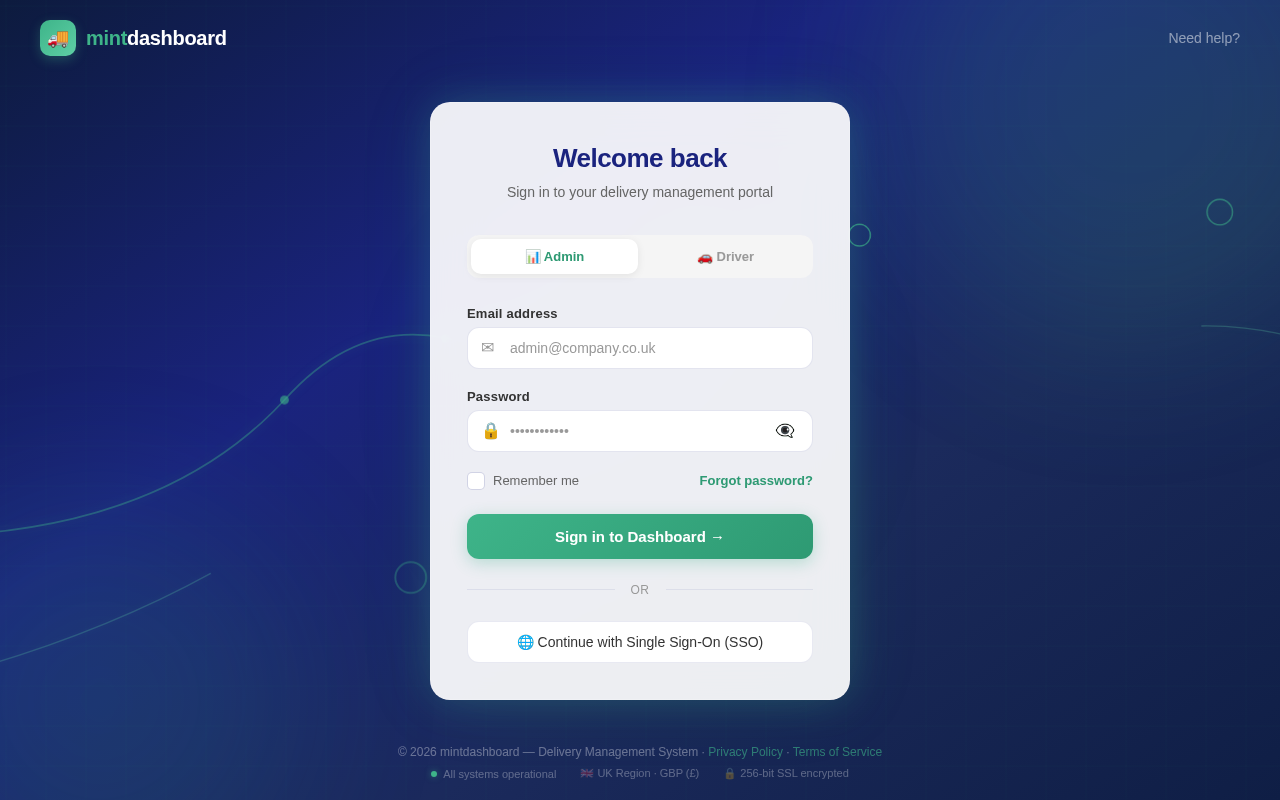
No page designs yet.

The Design Agent will generate JSX pages automatically after user flows are created.

No user flows yet.

The User Flow Agent will generate per-persona navigation diagrams after SRD updates.