mint-ai
 Rudra
Rudrabuild ai mock interview web app

Comments (0)
Sign in to leave a comment
System Requirements
System Requirements Document (SRD)
Project Name: mint-ai
1. Introduction
The mint-ai project is an AI-driven mock interview web application designed to assist users in preparing for job interviews. Developed as a college project by Rudra in India, the platform aims to provide essential features for interview practice, including real-time feedback, scoring, and basic question customization. By leveraging AI technology, mint-ai offers a lightweight yet effective solution for students, professionals, and anyone preparing for interviews.
2. System Overview
The mint-ai application will simulate mock interviews using AI models to generate questions, evaluate responses, and provide feedback. The system will cater to users across various industries and experience levels, offering a streamlined interface for easy navigation. Key features include:
- AI-generated interview questions tailored to general and role-specific categories.
- Real-time scoring and feedback to help users improve their performance.
- A simple and intuitive user interface for seamless interaction.
The application will be built using modern technologies, ensuring scalability and responsiveness while maintaining simplicity for a college project scope.
3. Functional Requirements
Story Points:
- As a User, I should be able to register and log in to the platform.
- As a User, I should be able to select an interview category (e.g., technical, HR, or general).
- As a User, I should be able to start a mock interview session with AI-generated questions.
- As a User, I should receive real-time feedback and scoring based on my responses.
- As a User, I should be able to view my performance summary after completing the interview.
- As a User, I should be able to access basic question customization options (e.g., difficulty level).
4. User Personas
1. Student
- Description: College students preparing for campus placements or internships.
- Goals: Practice interview questions, improve confidence, and receive constructive feedback.
2. Professional
- Description: Working professionals seeking new job opportunities or career advancement.
- Goals: Refine interview skills, prepare for role-specific questions, and assess performance.
3. General User
- Description: Anyone preparing for interviews, regardless of industry or experience level.
- Goals: Gain exposure to interview scenarios, receive scoring, and improve responses.
5. Visuals Colors and Theme
Color Palette:
- Background:
#F5F7FA(Soft Cloud White) - Surface:
#E8EDF3(Light Steel Blue) - Text:
#2C3E50(Deep Navy) - Accent:
#3498DB(Bright Sky Blue) - Muted Tones:
#95A5A6(Muted Gray)
Theme:
The visual theme will be clean, professional, and approachable, reflecting the purpose of the app as a tool for interview preparation. The design will emphasize simplicity and clarity, ensuring users can focus on their practice sessions without distractions.
6. Signature Design Concept
Concept: Interactive AI Interview Room
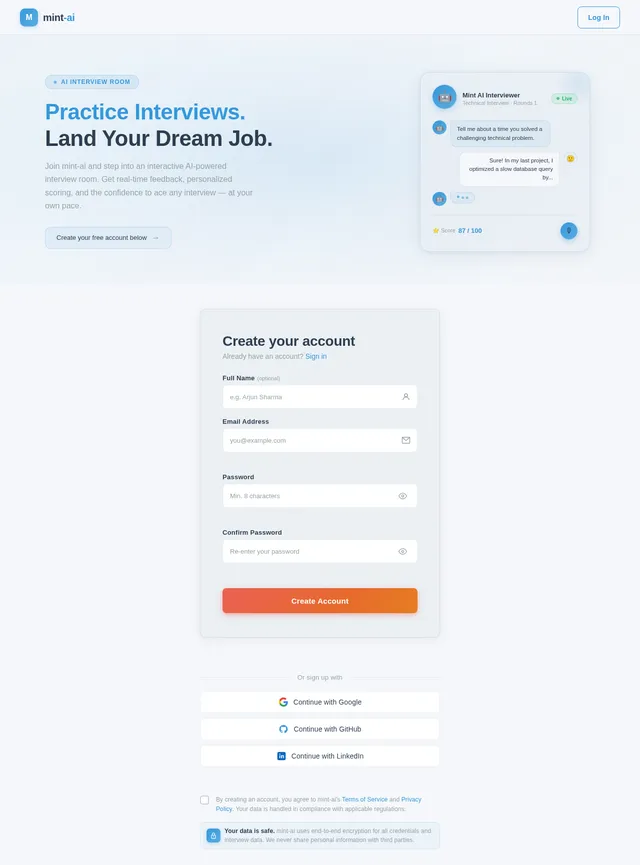
The homepage will feature an immersive AI interview room design. Upon entering, users will see a virtual desk with a holographic AI interviewer avatar sitting across from them. The avatar will animate subtly, mimicking realistic gestures like nodding or smiling during the session.
Key elements:
- Dynamic Background: A gradient background that shifts colors based on the time of day (e.g., warm tones in the morning, cool tones at night).
- Interactive Elements: Users can click on objects in the room (e.g., a notepad for tips or a clock for session timing).
- Micro-Interactions: Buttons and icons will have hover effects, such as glowing or pulsing, to enhance engagement.
- Transitions: Smooth page transitions with fade-ins and slide animations to maintain a polished experience.
This design will make the app memorable and engaging, setting it apart from generic mock interview platforms.
7. Non-Functional Requirements
- Performance: The system should handle up to 500 concurrent users without degradation.
- Scalability: The architecture should allow for future expansion to include advanced features.
- Security: User data, including login credentials and performance summaries, must be encrypted.
- Accessibility: The platform should comply with WCAG 2.1 standards to ensure usability for all users.
- Localization: Default settings will cater to Indian users, including IST timezone and INR currency.
8. Tech Stack
Frontend:
- React for Web
Backend:
- Python
- FastAPI
Database:
- MySQL (with Alembic for migrations)
AI Models:
- GPT 5.4 for user-friendly responses
- Claude 4.6 Opas for coding-related interview questions
- Gemini 3.1 Pro for friendly and conversational feedback
AI Tools:
- Litellm for LLM Routing
- Langchain
Local Orchestration:
- Docker
- docker-compose
Server-Side Orchestration:
- Kubernetes
9. Assumptions and Constraints
Assumptions:
- Users will have basic familiarity with web applications.
- The platform will primarily target Indian users but remain accessible globally.
- The scope is limited to essential features due to its college project nature.
Constraints:
- Limited budget and resources for development.
- No advanced customization or industry-specific features.
- The system must be lightweight and easy to deploy.
10. Glossary
- AI: Artificial Intelligence, used to simulate interview scenarios and provide feedback.
- Mock Interview: A simulated interview designed to help users practice and improve their skills.
- Real-Time Feedback: Immediate evaluation and suggestions provided during the interview session.
- Scoring: Numerical assessment of user performance based on predefined criteria.
- Customization: Basic options for tailoring interview questions, such as difficulty level.

Master Your Interview
AI-powered mock interviews with real-time feedback. Practice with adaptive questions, get instant scoring, and build the confidence to ace any interview.
Why Choose mint-ai?
Everything you need to prepare confidently and perform your best in any interview setting.
Real-time Feedback
Get instant, actionable insights on your answers as you speak. Our AI analyzes tone, content, and structure to help you improve on the spot.
AI-Powered Questions
Experience intelligent, adaptive questions tailored to your chosen role and difficulty level. Each session feels like a real interview scenario.
Personalized Scoring
Receive detailed performance scores across multiple dimensions. Track your progress over time and identify exactly where to focus your preparation.
Choose Your Interview Path
Select a category that matches your preparation goals and start practicing with AI-powered mock interviews.
Practice coding, system design, and technical problem-solving questions tailored to your role.
Prepare for human resources rounds including salary negotiation, culture fit, and company-specific queries.
Master STAR-method responses for leadership, teamwork, and situational judgment scenarios.
All-purpose interview practice covering introductions, strengths, weaknesses, and common questions.
Powerful Features That Set You Apart
mint-ai combines cutting-edge AI with intuitive design to give you the most effective interview preparation experience available.
Adaptive Question Generation
Our AI engine dynamically tailors interview questions based on your selected category, difficulty level, and past performance, ensuring every session challenges you in the right areas.
- Role-specific questions for Technical, HR, and Behavioral interviews
- Difficulty scales automatically as your skills improve
- Covers real-world scenarios drawn from industry patterns
- Supports custom topic preferences for targeted practice
Instant Scoring & Feedback
Receive real-time evaluation of your answers with detailed scoring breakdowns, helping you understand exactly where you excelled and where to focus next.
- Scores delivered immediately after each response
- Detailed breakdown across clarity, relevance, and depth
- Constructive suggestions to refine your answers
- Track improvement across multiple sessions
Performance Analytics
Visualize your interview readiness with comprehensive analytics that track your progress over time, highlighting strengths and pinpointing areas for improvement.
- Interactive charts showing performance trends over time
- Category-wise breakdown of strengths and weaknesses
- Session history with detailed score comparisons
- Personalized recommendations to boost weak areas
How It Works
Get started in four simple steps and ace your next interview
Designed for Everyone
Whether you are a student, professional, or just getting started, mint-ai adapts to your unique interview preparation needs.
Student
College students preparing for campus placements or internships who want structured practice.
Goals
- Practice common interview questions with AI feedback
- Build confidence through repeated mock sessions
- Receive constructive scoring to track improvement
Professional
Working professionals seeking new job opportunities or aiming for career advancement.
Goals
- Refine answers for role-specific technical questions
- Prepare for senior-level behavioral interviews
- Benchmark performance against industry standards
General User
Anyone preparing for interviews, regardless of industry or experience level.
Goals
- Gain exposure to realistic interview scenarios
- Receive instant scoring and actionable feedback
- Improve response quality across all categories
Trusted by Aspiring Professionals
Join hundreds of students and professionals who have improved their interview skills with mint-ai.
Ready to Ace Your Interview?
Join hundreds of students and professionals already sharpening their interview skills with AI-powered mock sessions, real-time feedback, and personalized scoring.
Common Questions
Everything you need to know about mint-ai and how it helps you prepare for interviews.
Still have questions? Create a free account and explore mint-ai for yourself.
No comments yet. Be the first!