minecraft-multiplayer
 CJ
build me a identical twin to Minecraft 1.12.2 make it multiplayer and everything

Comments (0)
Sign in to leave a comment
System Requirements
System Requirements Document for minecraft-multiplayer
1. Introduction
This document specifies minecraft-multiplayer, a multiplayer game intended to be an identical twin of Minecraft 1.12.2, including the full set of game capabilities implied by that reference. It is for players who explore, build, craft, and survive together, and for server operators who host and manage multiplayer worlds.
The supplied Minecraft landscape image is visual inspiration for a block-built world with forested hills, pink blossom trees, stone peaks, and a blue waterfall. It does not define additional game capabilities.
2. System Overview
The product is a multiplayer block-building game. Players explore worlds, gather, place, and break blocks, craft items, build or survive, and join multiplayer worlds to play together. Server operators host and manage multiplayer worlds. Durable player and server state must remain associated with the correct person across visits.
The current delivery includes a public entry, game and multiplayer destinations, server management, and identity verification. The game reference defines the intended breadth of the experience; this document does not enumerate or narrow the full Minecraft 1.12.2 capability set.
2a. Product Interpretation and Delivery Boundary
The ordered current page and access contract is: Landing (public, no identity required), World (Player, role-restricted), Crafting (Player, role-restricted), Multiplayer (Player, role-restricted), Servers (Server operator, role-restricted), and Login (public, no identity required). These names and access assignments are retained as supplied.
Players and server operators establish application identity before saving durable game state or managing servers, respectively, and verify identity when returning. Login is the public identity-access surface; protected work remains unavailable until identity is established and verified. Identity continuity does not itself define additional role permissions or shared-state visibility rules.
The application uses a React frontend, a shared FastAPI backend for application APIs and domain modules, MariaDB for application-owned persistent data, and Redis for the accepted shared caching, state, queue, or coordination need. These provisioned services support the accepted workflows; they do not add product capabilities.
2c. Page Content and Component Coverage
Landing
- Information and state: Public introduction to the block-building game and multiplayer play; game title and entry actions. No identity is required to view this page.
- Primary actions: Navigate to World, Crafting, Multiplayer, or Servers. Protected destinations require the appropriate identity to be established before their accepted work can begin.
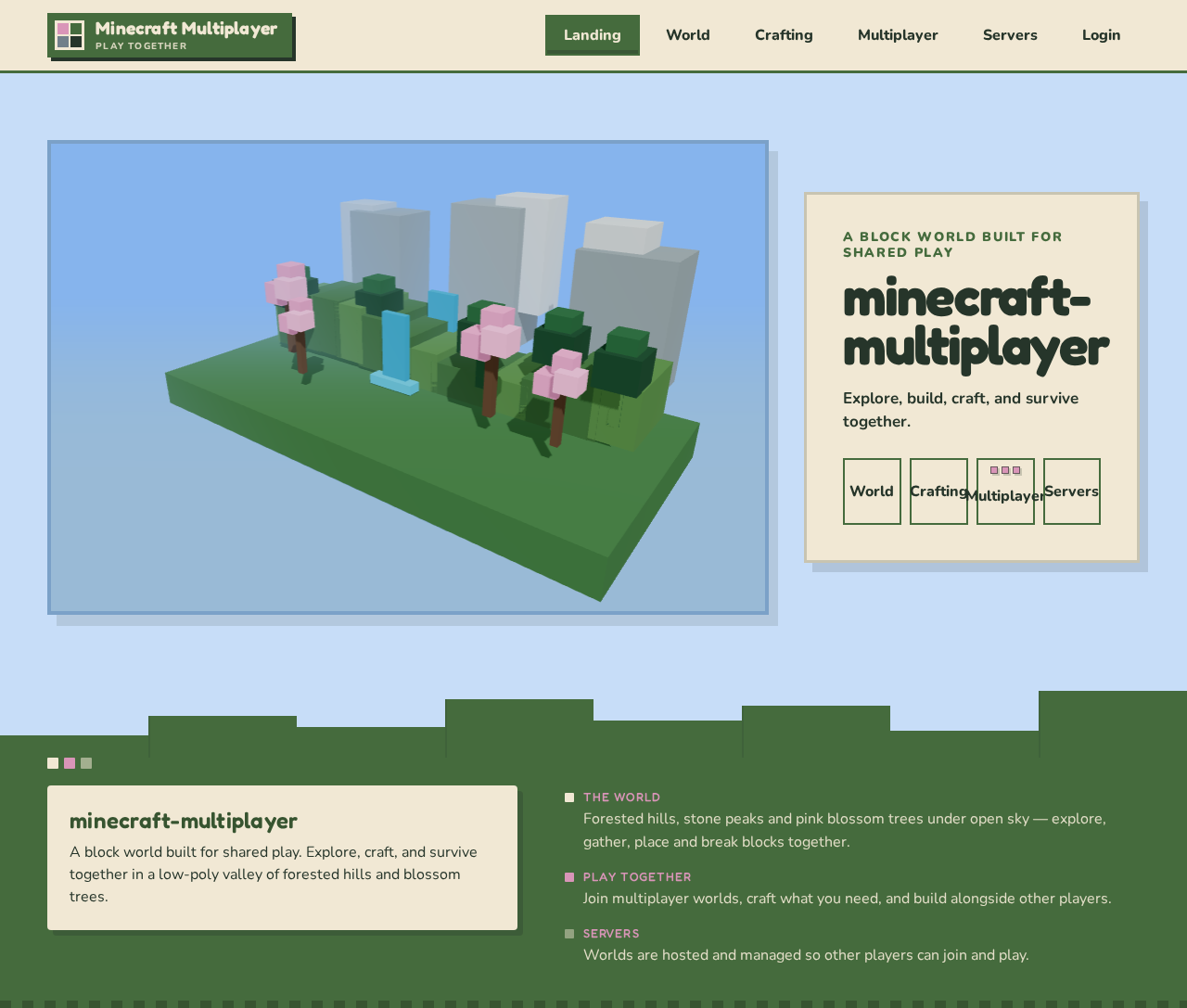
- Supporting components: A low-poly mountain-valley hero with forested hills, pink blossom trees, stone peaks, blue waterfall, and blue sky; title on a cream block; compact square labeled controls; small block-shaped markers indicating player presence on the multiplayer entry.
- States: Initial scene loading; loaded public entry; loading failure with a clear retry or navigation path. No product data is required for the public introduction.
World
- Information and state: The player’s active world and its observable terrain and block state, including changes made by gathering, placing, and breaking blocks.
- Primary actions: Explore the world; gather, place, and break blocks.
- Supporting components: World view and the controls needed to perform the accepted in-world actions; visible player/world state and action feedback.
- Access: Player identity is required for protected play and durable state.
- States: World loading; active world; visible result of a successful action; recoverable failure when world state or an action cannot be loaded or applied, with a retry or return path. Continue exploring or proceed to Crafting or Multiplayer.
Crafting
- Information and state: Crafting context and the resulting items available for building or survival.
- Primary actions: Craft items and use them to build or survive in the game.
- Supporting components: Crafting interaction and visible result feedback, connected to the player’s game state.
- Access: Player identity is required for protected play and durable state.
- States: Crafting context loading; available crafting interaction; successful item result; recoverable failure with retry or return to World. Continue playing with the resulting items.
Multiplayer
- Information and state: Multiplayer worlds and the player’s participation in shared play.
- Primary actions: Join a multiplayer world and play together with other players.
- Supporting components: Multiplayer-world selection/join interaction, shared-play state, and visible player presence.
- Access: Player identity is required for protected multiplayer participation and durable state.
- States: Multiplayer context loading; available world/join state; successful participation with other players; recoverable join or connection failure with a retry or return path. Continue playing together or return to World.
Servers
- Information and state: Multiplayer worlds hosted and managed by the server operator.
- Primary actions: Host and manage multiplayer worlds so players can join and play together.
- Supporting components: Server/world management interaction and observable hosting or management result.
- Access: Server operator identity is required before server management and for returning to durable server state.
- States: Server context loading; available management state; successful hosting or management result; recoverable failure with retry or return path. Continue managing the world or make it available for players to join.
Login
- Information and state: Public identity establishment and returning identity verification for Players and Server operators.
- Primary actions: Establish identity on first use; verify identity on return.
- Supporting components: Identity-entry and verification interaction, with clear success or failure feedback.
- Access: Public entry; protected game and server state remains unavailable until identity is established and verified.
- States: Initial identity interaction; verification in progress; successful access continuation to the requested protected destination; recoverable verification failure with an opportunity to retry. This page does not add account-management capabilities beyond the identity continuity required for accepted work.
3. Functional Requirements
Provenance labels: explicit means directly accepted from the user’s request; required_inference means indispensable mechanics specified by the Planning Scope to make that request usable. Acceptance statements describe observable outcomes without narrowing the full game capability set implied by Minecraft 1.12.2.
-
As a Player, I should be able to explore a world.
Provenance: explicit. Owner: World.
Lifecycle and access: After establishing identity and verifying it when returning, the Player enters a world and explores its terrain.
Acceptance: The Player can observe and move through the world; the resulting world context is available for continued play. If the world cannot be loaded, the Player receives a recoverable failure and can retry or return to the game entry. -
As a Player, I should be able to gather blocks.
Provenance: explicit. Owner: World.
Lifecycle and access: In an active world, the Player performs a gathering action; the world and player-visible result reflect the action.
Acceptance: A successful action produces an observable result and the Player can continue exploring, building, or crafting. If the action cannot be applied, the Player receives failure feedback and can retry or continue in the world.
-
As a Player, I should be able to place blocks.
Provenance: explicit. Owner: World.
Lifecycle and access: In an active world, the Player chooses to place a block; the world reflects the resulting placement.
Acceptance: Successful placement is visible in the world and play can continue. If placement fails, the Player receives feedback and can retry or continue. -
As a Player, I should be able to break blocks.
Provenance: explicit. Owner: World.
Lifecycle and access: In an active world, the Player performs a block-breaking action; the world reflects the result.
Acceptance: Successful breaking is visible and the Player can continue playing. If the action fails, the Player receives feedback and can retry or continue. -
As a Player, I should be able to craft items and use them to build or survive.
Provenance: explicit. Owner: Crafting.
Lifecycle and access: The Player uses the crafting interaction in the context of game state; a successful craft produces an observable item result that can be used in play.
Acceptance: The Player can see the crafting result and continue to World to build or survive. If crafting cannot complete, the Player receives failure feedback and can retry or return to World.
-
As a Player, I should be able to join multiplayer worlds and play together with other players.
Provenance: explicit. Owner: Multiplayer.
Lifecycle and access: The Player enters Multiplayer, chooses a multiplayer world, and joins it. Other participating Players see and interact with the shared play outcome in that world.
Acceptance: A successful join results in shared play with other players and visible participation; each participating Player can continue playing. If joining or connection fails, the affected Player receives feedback and can retry or return to the multiplayer entry. -
As a Server operator, I should be able to host and manage multiplayer worlds so Players can join and play together.
Provenance: explicit. Owner: Servers.
Lifecycle and access: The operator establishes identity and verifies it on return, then hosts or manages a multiplayer world. Players use Multiplayer to join and play together; the operator can observe the resulting hosted-world state.
Acceptance: A successful hosting or management action produces an observable world state that supports player participation. If the operation fails, the operator receives feedback and can retry or continue managing servers. Players receive a usable join outcome when the world is available, or a recoverable join failure when it is not.
-
As a Player, I should establish identity before saving durable game state and verify identity when I return.
Provenance: required_inference. Owner: Login.
Lifecycle and access: On first use, the Player establishes application identity before saving durable game state. On return, the Player verifies identity before resuming protected game work.
Acceptance: Successful establishment or verification permits continuation to the requested protected destination and keeps durable player state associated with that Player. Failure is visible and retryable; protected state remains unavailable until verification succeeds. -
As a Server operator, I should establish identity before managing servers and verify identity when I return.
Provenance: required_inference. Owner: Login.
Lifecycle and access: On first use, the operator establishes application identity before server management. On return, the operator verifies identity before resuming protected server state.
Acceptance: Successful establishment or verification permits continuation to Servers and keeps durable server state associated with that operator. Failure is visible and retryable; protected server state remains unavailable until verification succeeds.
4. User Personas
Player
Provenance: required_inference, as defined by the accepted Planning Scope. The Player’s product context is a block-based world shared with other players. The Player’s goal is to explore, gather and place or break blocks, craft items, and build or survive, including in multiplayer play. The Player makes in-world and crafting decisions, joins multiplayer worlds, and participates in shared play with other Players. Success is observable through continued world play, visible block and crafting results, and successful participation with others. The Player establishes identity before saving durable game state and verifies identity on return.
Server operator
Provenance: required_inference, as defined by the accepted Planning Scope. The Server operator’s product context is hosting and managing multiplayer worlds. The operator’s goal is to make worlds available so Players can join and play together. The operator acts on server/world management state; Players provide the corresponding join and play interaction, and the operator can observe the hosted-world outcome. Success is a hosted or managed world that supports player participation. The operator establishes identity before managing servers and verifies identity on return.
5. Core User Flows
Player: Establish identity and enter protected play
- From Landing, the Player selects a protected game destination.
- If identity has not been established, the Player is directed to Login, establishes identity, and receives a success result.
- On return, the Player verifies identity in Login. If verification fails, protected state remains unavailable and the Player can retry.
- On success, the Player continues to the requested destination: World, Crafting, or Multiplayer.
Player: Explore and change a world
- From World, the Player enters an active world and observes its terrain.
- The Player explores, gathers blocks, places blocks, or breaks blocks. Each action has its own visible world result.
- If an action fails, the Player receives feedback and can retry or continue exploring.
- The Player continues in the world or proceeds to Crafting or Multiplayer.
Player: Craft and use items
- From Crafting, the Player performs a crafting action in the game context.
- On success, the Player observes the resulting item.
- The Player uses the item to build or survive and continues play in World.
- If crafting fails, the Player receives feedback and can retry or return to World.
Player: Join and play in a multiplayer world
- From Multiplayer, the Player chooses a multiplayer world and requests to join.
- On success, the Player enters shared play. Other participating Players see and interact with the shared world outcome.
- Each Player continues playing together; the Player may continue in the shared world.
- If joining or connection fails, the affected Player receives feedback and can retry or return to Multiplayer.
Server operator: Host and manage a multiplayer world
- From Landing, the operator selects Servers. If identity is not established, the operator establishes it in Login first.
- On return, the operator verifies identity in Login; failure is visible and retryable, and protected server state remains unavailable until success.
- In Servers, the operator hosts or manages a multiplayer world and observes the resulting server/world state.
- Players use Multiplayer to join an available world and play together. The operator can observe the hosted-world outcome.
- If hosting or management fails, the operator receives feedback and can retry or continue managing servers. If a Player cannot join, that Player receives a recoverable failure and can retry.
6. Visuals Colors and Theme
Muse: Bruno Simon. Headline: A block world built for shared play.
- Palette (light mode): background
#C7DDF8; surface#F1E8D4; text#26352A; primary#456B3D; accent#D995B8; muted#71808A. - Color roles: Sky blue is the ground/background, cream is used for panels, forest green for the world, and blossom pink for key actions.
- Typography: Fredoka for bold, rounded headings; Nunito for calm, readable body text.
- Type scale: 1.25 scale; display type from 48px on mobile to 104px on desktop, then 32px, 24px, 18px, and 16px.
- Shape language: Block-built terrain, square edges, stepped silhouettes, and a few rounded controls. Keep labels and controls fully inside their containers.
- Layout: On desktop, place a large world scene beside the main game actions. On mobile, stack the scene and actions, with clear paths to World, Crafting, Multiplayer, and Servers.
- Imagery: A crafted low-poly block world with forested hills, pink blossom trees, stone peaks, and a blue waterfall, matching the supplied landscape image’s mood.
- Responsive readability: At 375px, 768px, and 1280px, readable text, labels, numbers, and controls remain fully within the viewport and their containers. Wrap or scale text to fit; no element covers readable content. Imagery and decoration may crop or overlap only where they do not obscure readable text or controls.
- Avoid: Generic centered SaaS hero layouts, gradient decoration, glass panels, identical hover-lift cards, photos, or unrelated imagery in place of the block-world scene.
7. Signature Design Concept
Build the public Landing hero around a wide, low-poly mountain valley spanning the first screen: forest-green terrain, pink blossom trees, stone peaks, and a blue waterfall beneath a blue sky. Set the game title in large Fredoka type on a cream block beside the scene. Place the square, labeled World, Crafting, Multiplayer, and Servers controls in a compact row below the title, keeping every label and control fully visible at all supported viewport sizes. Use small block-shaped markers to show player presence on the multiplayer entry. The scene and controls present only accepted game destinations and multiplayer presence; they do not add behavior.
8. Interaction Model & Motion Direction
Interaction Model: Animated
Motion Tempo: expressive
Hero Dimensionality: webgl
Landing Hero Motion Brief
- Focal subject: A crafted low-poly block-built mountain valley with forested hills, pink blossom trees, stone peaks, and a blue waterfall.
- Input → transformation → outcome thesis: The visitor chooses one of the accepted game destinations; the block-world scene provides a playful visual introduction to the shared game, while the selected destination begins its accepted journey.
- Motion vocabulary: Slow camera drift and small block movements. Keep controls steady.
- Composed first frame: An immersive valley spans the hero, with the title on a cream block beside the scene and the four labeled destination controls visible below it. Player-presence markers appear on the multiplayer entry.
- Reduced-motion state: Provide a usable static arrangement of the same scene and controls. Keep all readable content whole; wrap items into rows or allow horizontal scrolling so each item can be brought fully into view.
Landing Hero 3D Scene Brief — DIRECTION-DERIVED
Create a real-time WebGL/R3F hero scene of the block-built mountain valley: forested hills, pink blossom trees, stone peaks, and a blue waterfall. Compose the scene as the first-screen landscape with the title and controls beside it, not behind readable content. Use slow camera drift and small block movements; keep controls steady. With reduced motion enabled, present a usable static arrangement. The scene visualizes the accepted game world and adds no new game behavior.
9. Non-Functional Requirements
- Durable state and identity continuity — required_inference: Player durable game state and operator server state must remain associated with the correct identity across return visits, as required by the accepted Planning Scope.
- Multiplayer shared outcome — explicit: Multiplayer play must support Players playing together in shared worlds, and server hosting/management must support Players joining those worlds.
- Responsive readability — explicit creative direction: At 375px, 768px, and 1280px, readable text and controls remain fully visible within their viewport and containers. Imagery and decoration may crop only without obscuring readable content or controls.
- Reduced motion — explicit creative direction: When reduced motion is enabled, provide a usable static arrangement of the hero scene and controls.
- Service inventory — provisioned infrastructure: Use the supplied React frontend, shared FastAPI backend, MariaDB, and Redis. Reuse the shared backend for application APIs and domain modules.
10. Tech Stack
- Frontend: React application UI.
- Backend: Shared FastAPI process for application APIs and domain modules.
- Persistent application data: MariaDB.
- Shared caching, state, queue, or coordination need: Redis.
- Hero rendering: WebGL/R3F for the direction-derived real-time 3D hero scene.
11. Assumptions and Constraints
- The user’s request for an identical twin of Minecraft 1.12.2 with multiplayer and everything is the current product commitment. The reference defines the intended breadth; this document does not substitute a narrower feature list.
- The supplied image is visual inspiration for the block-world landscape, not a separate content source or a source of additional game requirements.
- The ordered page names and access assignments in Product Interpretation and Delivery Boundary are the supplied versioned contract and are retained exactly.
- Identity establishment and return verification are required inferences for durable player state and server management. No additional account-management behavior is specified.
- The provisioned service inventory is authoritative for runnable services. Application APIs and domain modules use the shared backend; no additional service process is specified.
- The document does not infer differentiated permissions from identity or persona labels.
12. Glossary
- Block: A world element that can be gathered, placed, or broken during play.
- Multiplayer world: A world in which multiple Players can join and play together.
- Server operator: The accepted human persona who hosts and manages multiplayer worlds.
- Durable game state: Player game state that must remain associated with the Player across return visits.
A block world built for shared play
minecraft-
multiplayer
Explore, build, craft, and survive together.
A block world built for shared play
minecraft-
multiplayer
Explore, build, craft, and survive together.
No comments yet. Be the first!