minecraft-eagler-craft

byRiley Musgrave

Build a server for a Minecraft and eagler craft and all other games that requires a server

LandingLogin
Landing

Comments (0)

No comments yet. Be the first!

System Requirements

System Requirements Document for minecraft-eagler-craft

1. Introduction

minecraft-eagler-craft is a self-hosted game server platform. Its product intent is to provide a server that hosts Minecraft, Eaglercraft, and other games that require a server, and to let players connect to those hosted games. The audience is two kinds of people: the Server Operator who sets up and runs the hosted game server and keeps it available, and the Player who connects to the hosted server to join a supported game and play.

The product is a playable, toy-box-flavoured web experience rather than an enterprise infrastructure console. It owns its own identity so that a Server Operator's control of the server and a Player's connection to it remain bound to the correct person across visits.

Page 1 of 21

2. System Overview

minecraft-eagler-craft is delivered as a first-party web application with a shared backend. The backend hosts and runs the game server(s) for Minecraft, Eaglercraft, and other games that require a server, and exposes the state needed for the Server Operator to start and run the server and for Players to connect to it.

Current actors:

  • Server Operator (active human persona) — enrolls, verifies, and uses the Server Console to start and run the hosted game server so it stays available for connections.
  • Player (active human persona) — enrolls, verifies, and uses the Connect surface to connect to the hosted server and join a supported game.
  • Hosted game server (system process) — the running game server process that accepts player connections once started by the Server Operator.
  • Application backend (system process) — owns identity, durable server state, and the start/run lifecycle of the hosted game server.

Accepted behavior in scope:

  • Hosting Minecraft, Eaglercraft, and other games that require a server.
  • Supporting players connecting to the hosted games.
  • Self-service enrollment for first-time Server Operator and Player access.
  • Returning verification before protected server control or player connection.
  • The Server Operator starting the hosted game server before Players can connect.
Page 2 of 21

Narrow exclusions: no adjacent account-management capabilities (password reset flows, profile editing, social features), no billing, no moderation tooling, and no game-content authoring are established by the source and are not part of this document.

2a. Product Interpretation and Delivery Boundary

The product is a first-party application that both hosts the game server and provides the human surfaces for operating and joining it. Identity is application-owned: a person enrolls once, verifies on return, and then either controls the server (Server Operator) or connects to it (Player). The Server Console is restricted to the Server Operator; the Connect surface is restricted to the Player. Landing, Login, and Sign Up are anonymously reachable entry surfaces.

The current delivery horizon covers hosting, enrollment, verification, server start/run, and player connection. Nothing in the source establishes future features; no future section is asserted.

2b. Source Content Inventory

Not applicable — no reference directive declares a content_source.

2c. Page Content and Component Coverage

Page 3 of 21

Landing

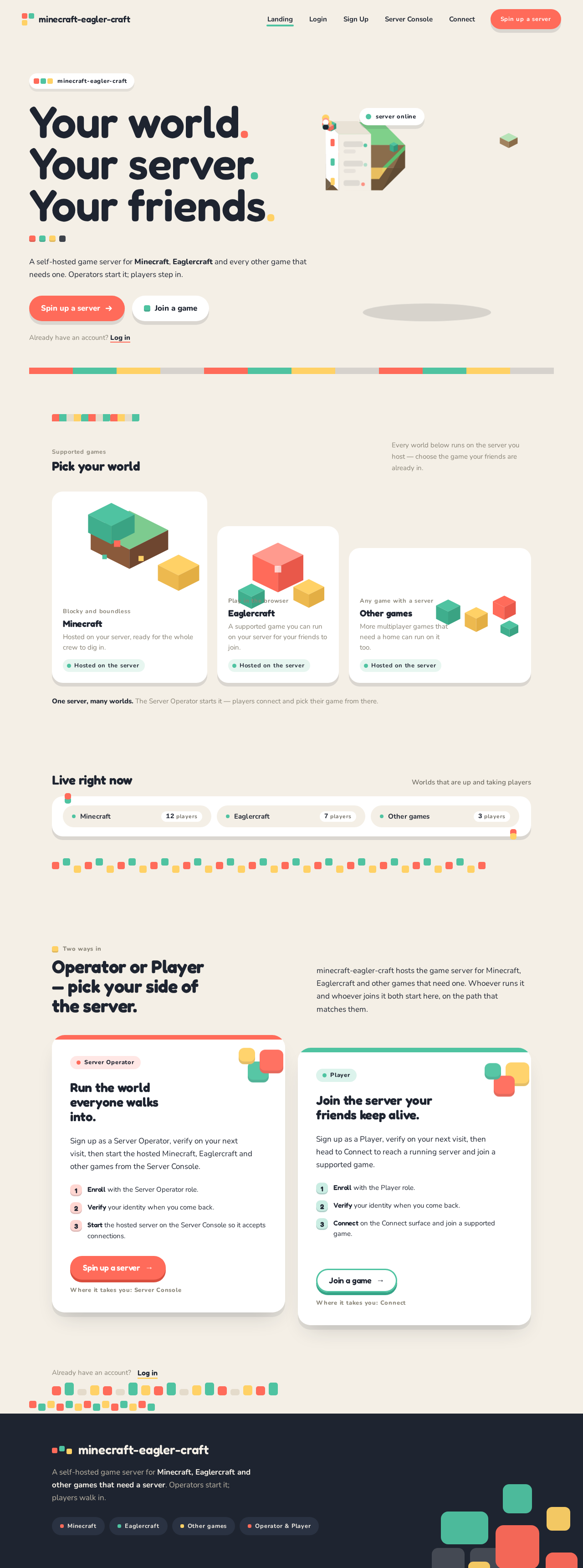
  • Information/state: Anonymous public entry explaining that the product hosts Minecraft, Eaglercraft, and other games that require a server, and who it serves (Server Operator and Player). Full-bleed sand-paper stage with a stacked three-line Fredoka headline "YOUR WORLD. / YOUR SERVER. / YOUR FRIENDS.", a coral pill CTA "Spin up a server", a mint ghost CTA "Join a game", a floating low-poly island scene bleeding off the right and bottom edges, and a small white status chip reading "server online".
  • Primary actions: "Spin up a server" → Sign Up (Server Operator path); "Join a game" → Sign Up (Player path). Returning users reach Login.
  • Supporting actions: Navigate to Login.
  • Domain entities: Hosted game server (name, supported games, online state), supported game catalog (Minecraft, Eaglercraft, Other games).
  • Component responsibilities: Hero type block; CTA pair; low-poly island illustration; status chip; "pick your world" 3-up unequal game tiles (Minecraft tallest, Eaglercraft medium, Other games widest); live server status strip of rounded pills with pulsing mint pips and player counts (horizontally scrollable on mobile); two-column Operator vs Player path split; stepped block dividers between sections.
  • States: Loading (status strip fetching live servers — skeleton pills); empty (no live servers — strip shows a friendly "no servers running yet" pill); success (status strip populated); error (status strip fetch fails — inline retry control); recovery (retry re-fetches).
Page 4 of 21

Login

  • Information/state: Anonymous returning-verification surface for Server Operator and Player. Fields for the credentials established at Sign Up.
  • Primary actions: Submit credentials to verify identity and continue to the destination appropriate to the verified role (Server Console for Server Operator, Connect for Player).
  • Supporting actions: Link to Sign Up for first-time users; link back to Landing.
  • Domain entities: Account (identity, role: Server Operator or Player).
  • Component responsibilities: Credential form; submit button; inline validation; error banner.
  • States: Loading (submit in progress); empty (blank form); success (redirect to role-appropriate destination); error (invalid credentials — inline message, form retained); recovery (correct and resubmit).

Sign Up

  • Information/state: Anonymous self-service first-use enrollment for Server Operator and Player. Collects the identity fields needed to establish an account and its role.
  • Primary actions: Create account and proceed to the role-appropriate destination (Server Console for Server Operator, Connect for Player).
  • Supporting actions: Link to Login for returning users; link back to Landing.
  • Domain entities: Account (identity, role).
  • Component responsibilities: Enrollment form; role selection (Server Operator or Player); submit button; inline validation; error banner.
  • States: Loading (submit in progress); empty (blank form); success (account created, redirected); error (validation or duplicate-identity failure — inline message, form retained); recovery (correct and resubmit).
Page 5 of 21

Server Console

  • Information/state: Server Operator-only surface showing the hosted game server's current state (stopped, starting, running, error) and the supported games it hosts (Minecraft, Eaglercraft, other games requiring a server). Running state is marked with mint pips.
  • Primary actions: Start the hosted game server; observe it transition to running so Players can connect.
  • Supporting actions: View current server state and supported games; retry a failed start.
  • Domain entities: Hosted game server (state, supported games, start time), Server Operator account.
  • Component responsibilities: Server state panel; Start button (toy-brick pill with collapsing offset shadow); state indicator with mint pip; error panel with retry.
  • States: Loading (fetching server state); empty (server not yet started — Start button prominent); success (running — mint pip, "server online"); error (start failed — error panel with retry); recovery (retry start).
Page 6 of 21

Connect

  • Information/state: Player-only surface showing the hosted server's connection details and whether it is running and joinable, plus the supported games a Player can join.
  • Primary actions: Connect to the hosted server and join a supported game (Minecraft, Eaglercraft, or another supported game).
  • Supporting actions: View connection details; retry when the server is not yet running.
  • Domain entities: Hosted game server (connection details, running state), supported game, Player account, game session.
  • Component responsibilities: Connection details panel; Join button (toy-brick pill); running-state indicator; not-running notice with guidance to wait for the Server Operator; error panel with retry.
  • States: Loading (fetching server state); empty (server not running — notice that the Server Operator must start it); success (joined a running game session); error (connection failed — error panel with retry); recovery (retry connect).
Page 7 of 21

3. Functional Requirements

FR-1 — Host the games. As a Server Operator I should have a server that hosts Minecraft, Eaglercraft, and other games that require a server, so that those games are available to play on it. (explicit)

  • Lifecycle: The Server Operator reaches the Server Console; the backend provisions the hosted game server for the supported games; the Server Operator observes the server's state.
  • Observable acceptance: The Server Console lists Minecraft, Eaglercraft, and other supported games as hosted by the server.
  • Failure/recovery: If the server state cannot be loaded, the Server Console shows an error with retry.
  • Continuation: The Server Operator proceeds to start the server (FR-5).

FR-2 — Support player connections. As a Player I should be able to connect to the hosted games, so that I can play on the server. (explicit)

  • Lifecycle: The Player reaches Connect; the backend reports the server's running state and connection details; the Player connects and joins a supported game.
  • Observable acceptance: A Player who connects to a running server joins a game session.
  • Failure/recovery: If the server is not running, Connect shows a notice that the Server Operator must start it; the Player can retry.
  • Continuation: The Player retries once the server is running.
Page 8 of 21

FR-3 — Self-service enrollment. As a first-time Server Operator or Player I should be able to enroll myself, so that I can access the server without an invitation. (required_inference)

  • Lifecycle: Anonymous visitor reaches Sign Up from Landing; selects role (Server Operator or Player); submits identity fields; account is created; the visitor is taken to the role-appropriate destination.
  • Observable acceptance: A new account exists with the chosen role and the person lands on Server Console (Server Operator) or Connect (Player).
  • Failure/recovery: Validation or duplicate-identity errors are shown inline with the form retained; the person corrects and resubmits.
  • Continuation: The person proceeds to their role's destination.

FR-4 — Returning verification. As a returning Server Operator or Player I should verify my identity before protected server control or player connection, so that my server control and connection remain mine. (required_inference)

  • Lifecycle: Returning person reaches Login; submits credentials; on success is routed to Server Console (Server Operator) or Connect (Player).
  • Observable acceptance: Verified identity reaches the correct role-restricted destination; unverified access to Server Console or Connect is refused.
  • Failure/recovery: Invalid credentials show an inline error with the form retained; the person corrects and resubmits.
  • Continuation: The person proceeds to their role's destination.
Page 9 of 21

FR-5 — Start the hosted game server. As a Server Operator I should start the hosted game server before Players can connect, so that the server is available for connections. (required_inference)

  • Lifecycle: Verified Server Operator on Server Console presses Start; the backend starts the hosted game server; the console shows the running state with a mint pip; Players can then connect.
  • Observable acceptance: The Server Console shows the server running; Connect reports the server as joinable.
  • Failure/recovery: A failed start shows an error panel with retry; the Server Operator retries.
  • Continuation: Once running, the Server Operator leaves the server available; Players connect (FR-2).

FR-6 — Join a supported game. As a Player I should join a supported game on the running server, so that I can play. (explicit, via FR-2)

  • Lifecycle: Verified Player on Connect sees the running server and connection details; presses Join; joins a game session for a supported game.
  • Observable acceptance: The Player is in a game session on the hosted server.
  • Failure/recovery: A failed connection shows an error panel with retry.
  • Continuation: The Player retries or returns later.

4. User Personas

Page 10 of 21

Server Operator

  • Product context: The person who wants a server that hosts Minecraft, Eaglercraft, and other games that require a server, and who is responsible for keeping it available so others can connect.
  • Primary goal: Get the hosted game server running and keep it available for player connections.
  • Distinct accepted responsibilities: Enrolls via Sign Up as a Server Operator; verifies on return via Login; uses the Server Console to start and run the hosted game server; observes its running state; recovers from failed starts.
  • Relevant inputs or decisions: Identity fields at enrollment; credentials at login; the decision to start the server; retry decisions on failure.
  • Interactions with other accepted participants: The Server Operator's start action is the prerequisite for the Player's connection — Players cannot connect until the Server Operator has started the server.
  • Observable success: The Server Console shows the server running (mint pip, "server online") and Players are able to connect.
Page 11 of 21

Player

  • Product context: A person who wants to play Minecraft, Eaglercraft, or another supported game on the hosted server.
  • Primary goal: Connect to the hosted server and join a running game session.
  • Distinct accepted responsibilities: Enrolls via Sign Up as a Player; verifies on return via Login; uses Connect to view connection details and join a supported game; recovers from a not-yet-running server or a failed connection.
  • Relevant inputs or decisions: Identity fields at enrollment; credentials at login; the decision to join; retry decisions.
  • Interactions with other accepted participants: Depends on the Server Operator having started the server; when it is not running, the Player is told to wait and can retry.
  • Observable success: The Player is in a game session on the hosted server.

5. Core User Flows

Page 12 of 21

Flow A — Server Operator enrolls, verifies, and starts the server

  1. Anonymous visitor lands on Landing and reads that the product hosts Minecraft, Eaglercraft, and other games that require a server.
  2. The visitor presses "Spin up a server" and arrives at Sign Up.
  3. The visitor selects the Server Operator role, fills in identity fields, and submits.
  4. On success, an account is created and the Server Operator lands on Server Console, which shows the hosted server in a stopped state with the supported games listed.
  5. The Server Operator presses Start. The console shows a starting state, then running with a mint pip and "server online".
  6. If the start fails, the console shows an error panel with Retry; the Server Operator retries until running.
  7. On a later visit, the Server Operator goes to Login, submits credentials, and is routed back to Server Console to confirm the server is still running.
Page 13 of 21

Flow B — Player enrolls, verifies, and joins a game

  1. Anonymous visitor lands on Landing and presses "Join a game", arriving at Sign Up.
  2. The visitor selects the Player role, fills in identity fields, and submits.
  3. On success, the Player lands on Connect, which shows the server's running state and connection details.
  4. If the server is not running, Connect shows a notice that the Server Operator must start it; the Player can retry later.
  5. Once the server is running, the Player presses Join and enters a game session for a supported game (Minecraft, Eaglercraft, or another supported game).
  6. If the connection fails, Connect shows an error panel with Retry; the Player retries.
  7. On a later visit, the Player goes to Login, submits credentials, and is routed back to Connect to join again.

Flow C — Returning verification for either role

  1. A returning person opens Login from Landing.
  2. They submit their credentials.
  3. On success they are routed by role: Server Console for a Server Operator, Connect for a Player.
  4. On invalid credentials, an inline error is shown and the form is retained; they correct and resubmit.
Page 14 of 21

6. Visuals Colors and Theme

Muse: Bruno Simon — "Playable worlds after Bruno Simon". Headline: YOUR WORLD. / YOUR SERVER. / YOUR FRIENDS.

Mode: Light.

Colour tokens (exact hex by role):

RoleHexUse
Background#F4EFE6Warm sand-paper ground for every page
Surface#FFFFFFCards, panels, status chips
Text#1E2430All text (dark ink)
Primary#FF6B5ACoral action colour — Start server, Join game, primary CTAs
Accent#4FC3A1Mint — live/running state, server pips, ghost CTA
Muted#8A8578Metadata, secondary labels
Badge/decoration#FFD166Lemon — badges and block decoration only

No blue anywhere. Cards are pure white with soft shadow; no hairline borders.

Typography:

  • Headings: Fredoka (SemiBold/Bold), rounded terminals, tracking -0.01em, sentence case, never all-caps. Hero clamp(44px, 9vw, 112px); section heads 28px.
  • Body: Nunito, 17px, line-height 1.65.
  • Scale (1.333 modular): 112 / 84 / 56 / 40 / 28 / 20 / 17 / 15.
  • Labels: 13px Nunito Bold, 0.06em tracking.
Page 15 of 21

Shape language: Chunky rounded blocks — 20–28px radii on cards and buttons, fully pill CTAs, isometric low-poly cubes and stepped block shapes as decoration, soft offset shadows 0 8px 0 rgba(30,36,48,0.12) that make buttons feel like pressable toy bricks. No hairline borders; edges are soft shadow or solid colour.

Layout: Single-column, 96px section rhythm at desktop, 24px gutters at 375px. Hero is a full-bleed pastel scene with the headline stacked left over a low-poly world illustration bleeding off the right edge. Below: a 3-up "pick your world" row of unequal game tiles (Minecraft tallest, Eaglercraft medium, Other games widest), a horizontal live-server status strip, then a two-column Operator vs Player split.

Imagery: Low-poly 3D-style illustration built in CSS/SVG — grassy block islands, a coral-and-mint cube cluster, a floating server rack of stacked blocks, tiny rounded avatars. No stock photography, no gradient blobs. Game tiles use flat illustrated block motifs.

Accessibility: Readable text and controls stay whole at 375px, 768px, and 1280px, wrapping or scaling to fit; decoration may bleed but never covers text or controls.

Page 16 of 21

7. Signature Design Concept

The public entry (Landing) is a full-bleed sand-paper stage. On the left, a stacked three-line Fredoka headline — YOUR WORLD. / YOUR SERVER. / YOUR FRIENDS. — at clamp(44px, 9vw, 112px) in ink, with a coral pill CTA "Spin up a server" and a mint ghost CTA "Join a game" pinned beneath the type block. On the right, a floating low-poly island scene (CSS 3D cubes, layered_2d parallax) bleeds off the right and bottom edges, with a small white status chip reading "server online" floating above it. No centred text, no gradient blob. The signature moves carry through the page: unequal chunky game tiles with pressed-brick shadows, toy-brick pill buttons whose 6px offset shadow collapses on press, a live server status strip of rounded pills with pulsing mint pips and monospace-ish player counts (horizontally scrollable on mobile), and stepped block dividers (alternating coral/mint/sand squares) between sections.

Page 17 of 21

8. Interaction Model & Motion Direction

Interaction Model: Animated Motion Tempo: expressive Hero Dimensionality: layered_2d

Landing Hero Motion Brief

  • Focal subject: The floating low-poly island scene on the right — grassy block islands, a coral-and-mint cube cluster, and a stacked-block server rack — with the white "server online" status chip above it.
  • Input → transformation → outcome thesis: As the visitor moves the pointer or scrolls, the layered island cubes shift at slightly different depths (layered_2d parallax), the status chip's mint pip pulses, and the hero cubes bob with gentle spring easing — presenting the server as a place you step into, without changing any accepted behavior.
  • Motion vocabulary: Gentle spring bobbing of hero cubes; pulsing mint status pips; buttons press down 4px on hover with the shadow collapsing; section entrances pop in with a slight overshoot; stepped block dividers.
  • Composed first frame: Sand-paper ground; three-line Fredoka headline stacked left; coral pill "Spin up a server" and mint ghost "Join a game" beneath; low-poly island bleeding off the right and bottom; white "server online" chip floating above the island.
  • Reduced-motion state: All bobbing, pulsing, overshoot, and parallax freeze to a static arrangement; the status strip wraps or scrolls so every item can be brought fully into view; buttons remain pressable without motion.
Page 18 of 21

9. Non-Functional Requirements

  • NFR-1 — Durable state. Server state (running/stopped), accounts, and roles must persist across sessions so a returning Server Operator finds the server as left and a returning Player can reconnect. (required_inference; rationale: durable_state_required)
  • NFR-2 — Access control. Server Console is reachable only by a verified Server Operator; Connect is reachable only by a verified Player; Landing, Login, and Sign Up are anonymously reachable. (required_inference; rationale: authorization_change_required)
  • NFR-3 — Readability at every viewport. Headlines, labels, numbers, cards' text and controls stay entirely inside the viewport and their container at 375px, 768px, and 1280px; decoration may bleed but never covers readable text or controls. (explicit, creative direction)
  • NFR-4 — Reduced motion. All motion respects prefers-reduced-motion, freezing to a usable static arrangement. (explicit, creative direction)
  • NFR-5 — No blue. No blue or indigo accents appear anywhere in the interface. (explicit, creative direction)

10. Tech Stack

  • Frontend: React (web) — single-page application with the five pages above.
  • Backend: Python / FastAPI — shared backend owning identity, durable server state, and the hosted game server lifecycle.
  • Storage: Relational database for accounts, roles, and server state.
  • Hosting: Docker / docker-compose for the application backend and the hosted game server process.
  • Kubernetes: Not required by the source; omitted.
Page 19 of 21

11. Assumptions and Constraints

  • A-1: The Server Operator and Player are distinct roles on the same application-owned identity system; a person enrolls once and is routed by role. (required_inference)
  • A-2: The hosted game server is a single server instance hosting Minecraft, Eaglercraft, and other supported games; the source does not establish multiple independent server instances. (required_inference)
  • A-3: "Other games that require a server" is represented as a supported-game category on the server; the source does not enumerate specific additional titles. (explicit, kept unspecified)
  • A-4: No invitation or provisioning boundary is established; enrollment is self-service. (required_inference)
  • A-5: No future features are asserted by the source; the current delivery horizon is the whole scope.
Page 20 of 21

12. Glossary

  • Server Operator — the accepted persona who enrolls, verifies, and uses the Server Console to start and run the hosted game server.
  • Player — the accepted persona who enrolls, verifies, and uses Connect to join a supported game on the hosted server.
  • Hosted game server — the running game server process that hosts Minecraft, Eaglercraft, and other games that require a server, and accepts player connections once started.
  • Supported game — Minecraft, Eaglercraft, or another game that requires a server and is hosted by the product.
  • Server Console — the Server Operator-only surface for starting and observing the hosted game server.
  • Connect — the Player-only surface for viewing connection details and joining a supported game.
  • Game session — a running instance of a supported game that a Player joins on the hosted server.
Page 21 of 21
Landing design preview
Landing: Read hosting overview
Sign Up: Join a game
Sign Up: Select Player role
Sign Up: 1. Submit identity fields
Sign Up: 2. Correct validation errors
Connect: View connection details
Connect: Wait for server start
Connect: Retry connection
Connect: 1. Join supported game
Connect: 2. Retry failed connection
Landing: Navigate to Login
Login: 1. Submit credentials
Login: 2. Correct invalid credentials
Connect: Join game again
Landing design preview
Landing: Read hosting overview
Sign Up: Join a game
Sign Up: Select Player role
Sign Up: 1. Submit identity fields
Sign Up: 2. Correct validation errors
Connect: View connection details
Connect: Wait for server start
Connect: Retry connection
Connect: 1. Join supported game
Connect: 2. Retry failed connection
Landing: Navigate to Login
Login: 1. Submit credentials
Login: 2. Correct invalid credentials
Connect: Join game again