micro-track-saas
 Daksh Shah
Shopify tracking diagnostics Analyzify, focused on accurate ecommerce analytics tracking, reportedly reached $12K+ MRR with 350+ stores. Monitor server-side tracking breakage after theme/app/checkout changes, then generate a client-ready “what broke and how to fix it” report for agencies. Shopify agencies and larger merchants; $79–$399/month, perhaps per managed store. Build an entire micro saas


Comments (0)
Sign in to leave a comment
System Requirements
System Requirements Document for micro-track-saas
1. Introduction
The micro-track-saas project is designed to provide Shopify agencies and larger merchants with a tool for monitoring server-side tracking breakage after theme, app, or checkout changes. The system generates client-ready reports detailing what broke and how to fix it, ensuring accurate ecommerce analytics tracking. The target audience includes Shopify agencies and larger merchants, with a pricing model ranging from $79 to $399 per month, potentially per managed store.
2. System Overview
This document outlines the requirements for a micro SaaS application focused on Shopify tracking diagnostics. The application will monitor server-side tracking issues and generate actionable reports for agencies and merchants. The system is designed to be user-friendly, reliable, and professional, aligning with Dieter Rams' design principles of functional clarity.
2a. Product Interpretation and Delivery Boundary
The product is delivered as a micro SaaS application with custom UI, provider-managed surfaces, background automation, and generated documents. It requires application-owned identity for user access and interaction. The system supports Shopify store connections and permissions, enabling diagnostics and reporting functionalities. The application is intended for Shopify agencies and larger merchants, with reports being client-ready for external delivery.
2b. Source Content Inventory
Not applicable as no explicit content_source directive was provided.
2c. Page Content and Component Coverage
Landing
- Information: Overview of Shopify tracking diagnostics, target users, and client-ready reporting.
- Primary Actions: Navigate to Sign Up or Login.
- Components: Introductory text, call-to-action buttons.
- States: Loading, success, error.
Sign Up
- Information: Enrollment form for new users.
- Primary Actions: Submit enrollment details.
- Components: Form fields (name, email, password), submit button.
- States: Loading, success, error.
Login
- Information: User authentication form.
- Primary Actions: Submit login credentials.
- Components: Form fields (email, password), login button.
- States: Loading, success, error.
Dashboard
- Information: Overview of diagnostics across managed stores.
- Primary Actions: Access store-specific diagnostics, view reports.
- Components: Store list, diagnostics summary.
- States: Loading, success, error.
Stores
- Information: Manage Shopify store connections and configurations.
- Primary Actions: Connect new store, configure settings.
- Components: Store connection form, configuration options.
- States: Loading, success, error.
Monitoring
- Information: Monitor server-side tracking after changes.
- Primary Actions: Start monitoring, view results.
- Components: Monitoring status, result logs.
- States: Loading, success, error.
Diagnostics
- Information: Review detected tracking breakage and analytics impact.
- Primary Actions: Analyze breakage, view impact.
- Components: Breakage details, impact analysis.
- States: Loading, success, error.
Reports
- Information: Generate client-ready reports.
- Primary Actions: Create report, download.
- Components: Report generation form, download link.
- States: Loading, success, error.
Share Report
- Information: Share or deliver reports to clients.
- Primary Actions: Send report, share link.
- Components: Sharing options, recipient details.
- States: Loading, success, error.
3. Functional Requirements
- As a Shopify agency or merchant operator, I should be able to monitor server-side tracking breakage after theme, app, or checkout changes to ensure accurate analytics. (explicit)
- As a Shopify agency or merchant operator, I should be able to generate a client-ready report explaining what broke and how to fix it for agency or merchant clients. (explicit)
- As a Shopify agency or merchant operator, I should be able to enroll or create an application identity to access the system. (required_inference)
- As a Shopify agency or merchant operator, I should be able to verify my identity upon returning to access protected diagnostics. (required_inference)
- As a Shopify agency or merchant operator, I should be able to establish a Shopify store connection and required permissions before monitoring can run. (required_inference)
- As a Shopify agency or merchant operator, I should be able to configure background monitoring and change-triggered diagnostics. (required_inference)
- As a Shopify agency or merchant operator, I should be able to access generated reports before sharing or external delivery. (required_inference)
4. User Personas
- Agency or Merchant Operator: Responsible for monitoring server-side tracking, generating reports, and managing store diagnostics.
- Client Report Recipient: Receives client-ready reports for review and action.
5. Core User Flows
-
Agency or Merchant Operator Enrollment
- Navigate to the Sign Up page.
- Complete and submit the enrollment form.
- Receive confirmation and access the Dashboard.
-
Login and Access Diagnostics
- Navigate to the Login page.
- Enter credentials and submit.
- Access the Dashboard to manage diagnostics.
-
Store Connection and Configuration
- Access the Stores page from the Dashboard.
- Connect a new Shopify store and configure settings.
- Save configurations and return to the Dashboard.
-
Monitoring and Diagnostics
- Access the Monitoring page from the Dashboard.
- Start monitoring server-side tracking.
- Review results on the Diagnostics page.
-
Report Generation and Sharing
- Navigate to the Reports page.
- Generate a client-ready report.
- Share the report via the Share Report page.
6. Visuals Colors and Theme
- Palette: Background #F5F5F5, Surface #FFFFFF, Text #333333, Primary #FF5722, Accent #4CAF50, Muted #BDBDBD.
- Typography: Headings Archivo (Medium, all caps), Body Source Sans Pro.
- Shape Language: Rounded rectangles for controls and inputs.
- Layout: Dense, ordered, modular grid.
- Imagery: Diagrammatic line art for explanations.
7. Signature Design Concept
A full-width split-screen hero on the Landing page, showcasing a diagnostic process on one side and a live monitoring dashboard on the other. Rounded rectangle buttons with clear iconography and labels are used throughout, with a strictly organized information hierarchy.
8. Interaction Model & Motion Direction
- Interaction Model: Static
- Motion Tempo: Restrained
- Hero Dimensionality: Flat
- Landing Hero Motion Brief: A composed central diagram illustrating the tracking process with modular interface elements. Instant, mechanical feedback on interactions.
9. Non-Functional Requirements
- The system must provide reliable and accurate diagnostics for ecommerce analytics tracking. (explicit)
- The application should maintain a professional and straightforward user interface. (explicit)
- The system must support multiple Shopify store connections. (required_inference)
10. Tech Stack
- Frontend: React
- Backend: Python/FastAPI
- Storage: Appropriate database solution
- Deployment: Docker/docker-compose
11. Assumptions and Constraints
- The product is focused on accurate ecommerce analytics tracking for Shopify agencies and larger merchants. (explicit)
- Pricing is set between $79 and $399 per month, potentially per managed store. (explicit)
- Reports must be client-ready and suitable for external delivery. (explicit)
12. Glossary
- Shopify: An ecommerce platform for online stores and retail point-of-sale systems.
- Diagnostics: The process of identifying and resolving issues in server-side tracking.
- Client-ready Report: A report formatted and detailed for client understanding and action.
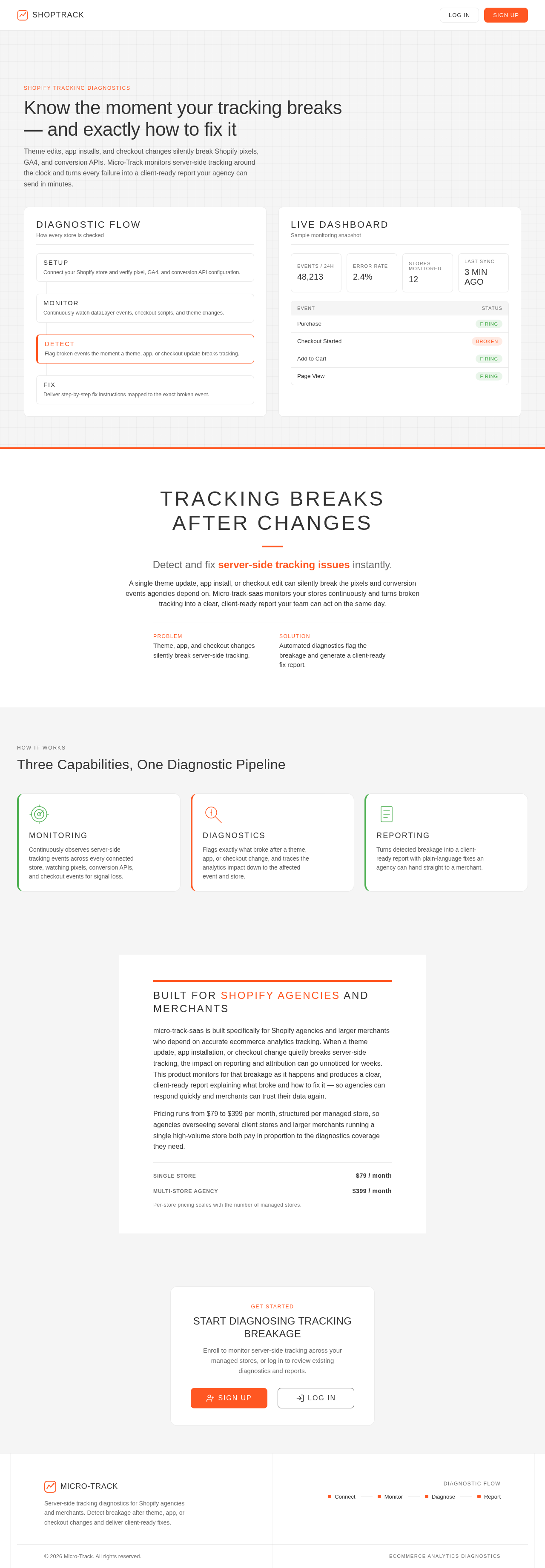
Know the moment your tracking breaks — and exactly how to fix it
Theme edits, app installs, and checkout changes silently break Shopify pixels, GA4, and conversion APIs. Micro-Track monitors server-side tracking around the clock and turns every failure into a client-ready report your agency can send in minutes.
Connect your Shopify store and verify pixel, GA4, and conversion API configuration.
Continuously watch dataLayer events, checkout scripts, and theme changes.
Flag broken events the moment a theme, app, or checkout update breaks tracking.
Deliver step-by-step fix instructions mapped to the exact broken event.
Tracking Breaks After Changes
Detect and fix server-side tracking issues instantly.
A single theme update, app install, or checkout edit can silently break the pixels and conversion events agencies depend on. Micro-track-saas monitors your stores continuously and turns broken tracking into a clear, client-ready report your team can act on the same day.
- PROBLEM
- Theme, app, and checkout changes silently break server-side tracking.
- SOLUTION
- Automated diagnostics flag the breakage and generate a client-ready fix report.
Three Capabilities, One Diagnostic Pipeline
MONITORING
Continuously observes server-side tracking events across every connected store, watching pixels, conversion APIs, and checkout events for signal loss.
DIAGNOSTICS
Flags exactly what broke after a theme, app, or checkout change, and traces the analytics impact down to the affected event and store.
REPORTING
Turns detected breakage into a client-ready report with plain-language fixes an agency can hand straight to a merchant.
Built for Shopify agencies and merchants
micro-track-saas is built specifically for Shopify agencies and larger merchants who depend on accurate ecommerce analytics tracking. When a theme update, app installation, or checkout change quietly breaks server-side tracking, the impact on reporting and attribution can go unnoticed for weeks. This product monitors for that breakage as it happens and produces a clear, client-ready report explaining what broke and how to fix it — so agencies can respond quickly and merchants can trust their data again.
Pricing runs from $79 to $399 per month, structured per managed store, so agencies overseeing several client stores and larger merchants running a single high-volume store both pay in proportion to the diagnostics coverage they need.
Per-store pricing scales with the number of managed stores.
Know the moment your tracking breaks — and exactly how to fix it
Theme edits, app installs, and checkout changes silently break Shopify pixels, GA4, and conversion APIs. Micro-Track monitors server-side tracking around the clock and turns every failure into a client-ready report your agency can send in minutes.
Connect your Shopify store and verify pixel, GA4, and conversion API configuration.
Continuously watch dataLayer events, checkout scripts, and theme changes.
Flag broken events the moment a theme, app, or checkout update breaks tracking.
Deliver step-by-step fix instructions mapped to the exact broken event.
Tracking Breaks After Changes
Detect and fix server-side tracking issues instantly.
A single theme update, app install, or checkout edit can silently break the pixels and conversion events agencies depend on. Micro-track-saas monitors your stores continuously and turns broken tracking into a clear, client-ready report your team can act on the same day.
- PROBLEM
- Theme, app, and checkout changes silently break server-side tracking.
- SOLUTION
- Automated diagnostics flag the breakage and generate a client-ready fix report.
Three Capabilities, One Diagnostic Pipeline
MONITORING
Continuously observes server-side tracking events across every connected store, watching pixels, conversion APIs, and checkout events for signal loss.
DIAGNOSTICS
Flags exactly what broke after a theme, app, or checkout change, and traces the analytics impact down to the affected event and store.
REPORTING
Turns detected breakage into a client-ready report with plain-language fixes an agency can hand straight to a merchant.
Built for Shopify agencies and merchants
micro-track-saas is built specifically for Shopify agencies and larger merchants who depend on accurate ecommerce analytics tracking. When a theme update, app installation, or checkout change quietly breaks server-side tracking, the impact on reporting and attribution can go unnoticed for weeks. This product monitors for that breakage as it happens and produces a clear, client-ready report explaining what broke and how to fix it — so agencies can respond quickly and merchants can trust their data again.
Pricing runs from $79 to $399 per month, structured per managed store, so agencies overseeing several client stores and larger merchants running a single high-volume store both pay in proportion to the diagnostics coverage they need.
Per-store pricing scales with the number of managed stores.
No comments yet. Be the first!