micro-mastery
 AR Creations
Build a modern, cross-platform Progressive Web App (PWA) called "MicroHabit" (or similar) designed to teach users micro-skills in 5 to 20 days through daily 5-minute actionable practice sessions. ### 1. CORE CONCEPT & VALUE PROPOSITION - **Micro-skills:** Skills that take between 5 to 20 days to learn (e.g., How to Journal Clearly, Card Shuffling, Breathwork, Speed Reading Basics, Touch Typing, Public Speaking Warmups). - **Daily Structure:** Each skill is broken down into sequential 5-minute daily guided practice sessions based on evidence-backed learning frameworks (Spaced Repetition, Micro-learning, Active Recall). - **Distinctive Color Themes:** Every individual skill must dynamically assign and apply a unique, dedicated color palette across its entire UI workflow (cards, timers, progress rings, callouts). --- ### 2. CORE FEATURES & KEY MODULES #### A. Micro-Skill Discovery & Library - Library of categorized micro-skills with filters (e.g., Mindset, Dexterity, Productivity, Communication). - Skill Cards showing: Skill Title, Estimated Days (5–20 days), Dynamic Skill Color, Difficulty, and "Proven Framework" badge. - Detail View: Web-approved, scientifically backed method breakdown (e.g., "The Feynman Technique for Journaling") and curriculum overview. #### B. Daily 5-Minute Guided Practice Engine (Interactive Session) - Full-screen distraction-free player for the daily 5-minute session. - **Stage 1 (Minute 1):** Quick Learning Concept / Web-approved technique (Text + visual/gif/video demo). - **Stage 2 (Minutes 2-4):** Interactive Active Practice (Live 3-minute timer with progress ring, ambient sound toggle, and step-by-step checklist). - **Stage 3 (Minute 5):** Daily Reflection & Log (Quick note/journaling box or check-in prompt). - **Completion State:** Confetti animation, updated streak, and shareable progress card. #### C. Dynamic Color-Coding System - Database schema supports `theme_color` (hex value/CSS variables) per skill. - When entering a skill context, CSS variables (`--primary-skill-color`, `--accent-skill-color`) update seamlessly across headers, buttons, timers, and progress indicators. --- ### 3. USER FLOWS & UX SPECIFICATION #### Flow 1: Onboarding 1. **Welcome Screen:** High-impact value proposition. 2. **Goal Selection:** User selects 1–2 initial categories of interest. 3. **First Skill Pick:** Prompt user to select their first 5-day or 10-day micro-skill. 4. **Schedule Set:** Set daily reminder notification time. 5. **Account Creation:** Auth via Google/Apple or Email (Clerk / Supabase Auth). #### Flow 2: Dashboard & Daily Hub - **Active Skill Hero Card:** Large hero card in the skill's specific color displaying current day (e.g., "Day 3 of 7"), remaining minutes, and a prominent "Start Today's 5-Min Session" CTA button. - **Streak Tracker:** Flame icon with current active days, heat map grid, and total skills mastered. - **Skill Library:** Grid of other locked/unlocked micro-skills. #### Flow 3: Monetization & Payments - **Freemium Model:** - Free Tier: Access to 3 starter micro-skills, basic streak tracking. - Pro Tier ($4.99/mo or $39.99/yr): Unlimited skills, AI personalized skill generator, custom reminders, offline mode. - **Paywall Triggers:** Unlocking premium skills or attempting to start a second simultaneous skill. --- ### 4. MODERN UI/UX DESIGN SYSTEM & PRINCIPLES - **Design Style:** Clean, minimalist, modern SaaS aesthetic with dark/light mode toggle. - **Visuals:** High-contrast typography (Inter/Geist font), smooth micro-interactions (Framer Motion), soft rounded corners (`rounded-2xl`). - **Mobile-First Responsive Layout:** Bottom navigation bar on mobile (Home, Discover, Progress, Profile) and side drawer on desktop. --- ### 5. RECOMMENDED TECH STACK (FOR LONG-TERM SCALABILITY) Generate the codebase structured for the following modern stack: - **Frontend Framework:** Next.js 14+ (App Router, React 18, TypeScript) or React Native with Expo (if mobile-first). - **Styling & UI:** Tailwind CSS, Shadcn/UI, Lucide Icons, Framer Motion. - **Backend & Database:** Supabase (PostgreSQL for user data, skill schemas, active enrollment, and completion logs) with Row Level Security (RLS). - **Authentication:** Clerk or Supabase Auth (OAuth + Passwordless Magic Link). - **State & Data Fetching:** TanStack React Query + Zustand (for active timer states). - **Payments:** Stripe Checkout / RevenueCat (for mobile in-app subscriptions). - **Automations & Emails:** Resend (daily reminder emails) + n8n or Supabase Cron (scheduled notification triggers). - **Analytics:** PostHog (event tracking for daily session completion rates). --- ### 6. DATABASE SCHEMA SPECIFICATION (SUPABASE POSTGRES) Provide implementation logic and database tables for: 1. `profiles`: `id`, `email`, `streak_count`, `last_active_date`, `is_pro` 2. `skills`: `id`, `title`, `description`, `duration_days`, `category`, `color_hex`, `proven_method_source` 3. `skill_days`: `id`, `skill_id`, `day_number`, `instruction_text`, `practice_prompt`, `timer_seconds` 4. `user_skill_progress`: `id`, `user_id`, `skill_id`, `current_day`, `completed_at`, `status` (`in_progress`, `completed`) Build out the initial React components for the Dashboard, Daily Session Player with Timer, and Skill Discovery page with working Tailwind CSS styling.


Comments (0)
Sign in to leave a comment
System Requirements
System Requirements Document for micro-mastery
1. Introduction
Micro-mastery is a modern, cross-platform Progressive Web App (PWA) designed to teach users micro-skills in 5 to 20 days through daily 5-minute actionable practice sessions. The app, named "MicroHabit," aims to provide users with a structured and engaging way to learn new skills using evidence-backed learning frameworks such as Spaced Repetition, Micro-learning, and Active Recall.
2. System Overview
Micro-mastery offers a dynamic and interactive learning experience through a PWA that supports both mobile and desktop platforms. The app features a library of categorized micro-skills, a daily guided practice engine, and a freemium monetization model. Users can explore skills, engage in daily practice sessions, and track their progress. The app employs a distinctive color-coding system to enhance the user experience and maintain engagement.
2a. Product Interpretation and Delivery Boundary
Micro-mastery is delivered as a Progressive Web App, ensuring cross-platform compatibility and a mobile-first responsive design. The app supports anonymous entry through a Welcome Screen, with identity establishment required for accessing personalized features. The app's backend is integrated with Supabase for data management, and it utilizes third-party services for authentication and payment processing. The app's design follows a modern SaaS aesthetic with a focus on clean, minimalist visuals and interactive elements.
2b. Source Content Inventory
Not applicable as no content source directive was provided.
2c. Page Content and Component Coverage
Welcome Screen
- Information/State: Introduction to MicroHabit's value proposition.
- Primary Actions: Proceed to Goal Selection.
- Components: High-impact value proposition display.
Goal Selection
- Information/State: Categories of interest selection.
- Primary Actions: Select categories, proceed to First Skill Pick.
- Components: Category selection interface.
First Skill Pick
- Information/State: Available micro-skills for initial selection.
- Primary Actions: Select a micro-skill, proceed to Schedule Set.
- Components: Skill selection cards.
Schedule Set
- Information/State: Daily reminder notification setup.
- Primary Actions: Set reminder time, proceed to Account Creation.
- Components: Time selection interface.
Account Creation
- Information/State: User authentication and account setup.
- Primary Actions: Authenticate via Google/Apple/Email.
- Components: Authentication interface.
Home
- Information/State: Active skill status, streaks, mastered totals.
- Primary Actions: Start today's session, view streaks.
- Components: Active Skill Hero Card, Streak Tracker.
Discover
- Information/State: Categorized, filtered micro-skill discovery.
- Primary Actions: Explore skills, view Skill Details.
- Components: Skill Library grid.
Skill Details
- Information/State: Proven method and curriculum overview.
- Primary Actions: View details, select skill for practice.
- Components: Detailed skill information display.
Session Player
- Information/State: Daily guided lesson, timer, checklist.
- Primary Actions: Engage in practice session, complete reflection.
- Components: Interactive session player, ambient sound toggle.
Session Complete
- Information/State: Session completion feedback, updated streak.
- Primary Actions: Share progress card, return to Home.
- Components: Confetti animation, shareable progress card.
Progress
- Information/State: Learner progress and streak history.
- Primary Actions: View detailed progress.
- Components: Progress tracking interface.
Profile
- Information/State: Learner preferences, display mode, account context.
- Primary Actions: Update preferences, view account details.
- Components: Profile management interface.
Paywall
- Information/State: Premium access decisions, upgrade options.
- Primary Actions: Upgrade to Pro tier, unlock premium skills.
- Components: Paywall interface.
3. Functional Requirements
- As a Learner, I should be able to discover and filter micro-skills to find skills that match my interests and learning goals. (explicit)
- As a Learner, I should be able to engage in daily 5-minute guided practice sessions that include a learning concept, active practice, and reflection. (explicit)
- As a Learner, I should receive feedback upon session completion with a confetti animation, updated streak, and a shareable progress card. (explicit)
- As a Learner, I should be able to select and apply a unique color theme for each skill to enhance my learning experience. (explicit)
- As a Learner, I should be able to onboard with category selection, skill pick, and reminder setup to personalize my learning journey. (explicit)
- As a Learner, I should be able to track my progress and streaks through a dashboard that displays active skills, streaks, and mastered totals. (explicit)
- As a Learner, I should be able to access a freemium model with basic features in the free tier and advanced features in the Pro tier. (explicit)
- As a Learner, I should encounter a paywall when attempting to unlock premium skills or start a second simultaneous skill. (explicit)
4. User Personas
Learner
- Product Context: The primary user of MicroHabit, seeking to learn new micro-skills through structured daily practice.
- Primary Goal: To acquire new skills efficiently and track progress over time.
- Distinct Responsibilities: Discovering skills, engaging in daily practice, setting reminders, and tracking progress.
- Relevant Inputs/Decisions: Selecting skills, setting reminder times, and choosing to upgrade to the Pro tier.
- Interactions with Other Participants: None specified; primarily interacts with the app interface.
- Observable Success: Successful skill acquisition, maintained streaks, and progression through skill levels.
5. Core User Flows
5.1 Onboarding Flow
- Start at Welcome Screen: User sees the high-impact value proposition.
- Proceed to Goal Selection: User selects 1–2 categories of interest.
- Move to First Skill Pick: User selects their first micro-skill.
- Advance to Schedule Set: User sets a daily reminder notification time.
- Complete Account Creation: User authenticates via Google/Apple/Email.
5.2 Daily Practice Flow
- Start from Home: User views the Active Skill Hero Card.
- Engage in Session Player: User completes the 5-minute guided practice session.
- Finish at Session Complete: User sees confetti animation, updated streak, and shareable progress card.
5.3 Monetization Flow
- Trigger Paywall: User attempts to unlock a premium skill or start a second skill.
- Upgrade Decision: User decides to upgrade to the Pro tier.
- Complete Payment: User completes the payment process via Stripe Checkout/RevenueCat.
6. Visuals Colors and Theme
- Muse: Michal Malewicz
- Palette (Light Mode):
- Background: #F3F4F6
- Surface: #FFFFFF
- Text: #111827
- Primary: #FF6B6B
- Accent: #FFD93D
- Muted: #94A3B8
- Typography:
- Headings: Plus Jakarta Sans
- Body: Manrope
- Scale: 1.25 modular (48/32/24/18/16)
- Shape Language: Generous radii with floating glass-like elements and frosted panels.
- Layout: Responsive grid with dynamic color-coded cards and full-bleed section headers.
- Motion: Gentle float interactions and hover-lift effects with blur transitions.
7. Signature Design Concept
A full-bleed color-coded hero with a frosted glass overlay and a prominent CTA button, utilizing the skill's specific color theme. The design incorporates dynamic color-coded skill cards with a frosted glass effect and a full-screen interactive session player with an ambient sound toggle.
8. Interaction Model & Motion Direction
- Interaction Model: Animated
- Motion Tempo: Expressive
- Hero Dimensionality: Layered_2d
- Landing Hero Motion Brief: The hero section features a full-bleed color-coded background with a frosted glass overlay. Upon user interaction, the hero transforms to reveal the skill's specific color theme, with smooth transitions and hover-lift effects. In reduced-motion settings, transitions are simplified to fade-ins and outs.
9. Non-Functional Requirements
- Performance: The app must load quickly and perform smoothly across all supported devices.
- Accessibility: The app must be accessible to users with disabilities, following WCAG 2.1 guidelines.
- Security: User data must be securely stored and transmitted, with authentication and authorization managed through secure protocols.
10. Tech Stack
- Frontend Framework: Next.js 14+ or React Native with Expo
- Styling & UI: Tailwind CSS, Shadcn/UI, Lucide Icons, Framer Motion
- Backend & Database: Supabase (PostgreSQL with RLS)
- Authentication: Clerk or Supabase Auth
- State & Data Fetching: TanStack React Query + Zustand
- Payments: Stripe Checkout / RevenueCat
- Automations & Emails: Resend + n8n or Supabase Cron
- Analytics: PostHog
11. Assumptions and Constraints
- Assumptions:
- Users have access to devices capable of running a PWA.
- Users are familiar with basic app navigation and interaction patterns.
- Constraints:
- The app must adhere to the specified design and tech stack.
- The app must support the specified freemium model and paywall triggers.
12. Glossary
- Micro-skill: A skill that can be learned in 5 to 20 days through short, daily practice sessions.
- PWA (Progressive Web App): A type of application software delivered through the web, built using common web technologies including HTML, CSS, and JavaScript.
- Freemium Model: A pricing strategy where the basic features of a product are provided free of charge, while more advanced features must be paid for.
- Streak: A consecutive series of days a user engages in a specific activity, used as a motivational tool.
micro-mastery
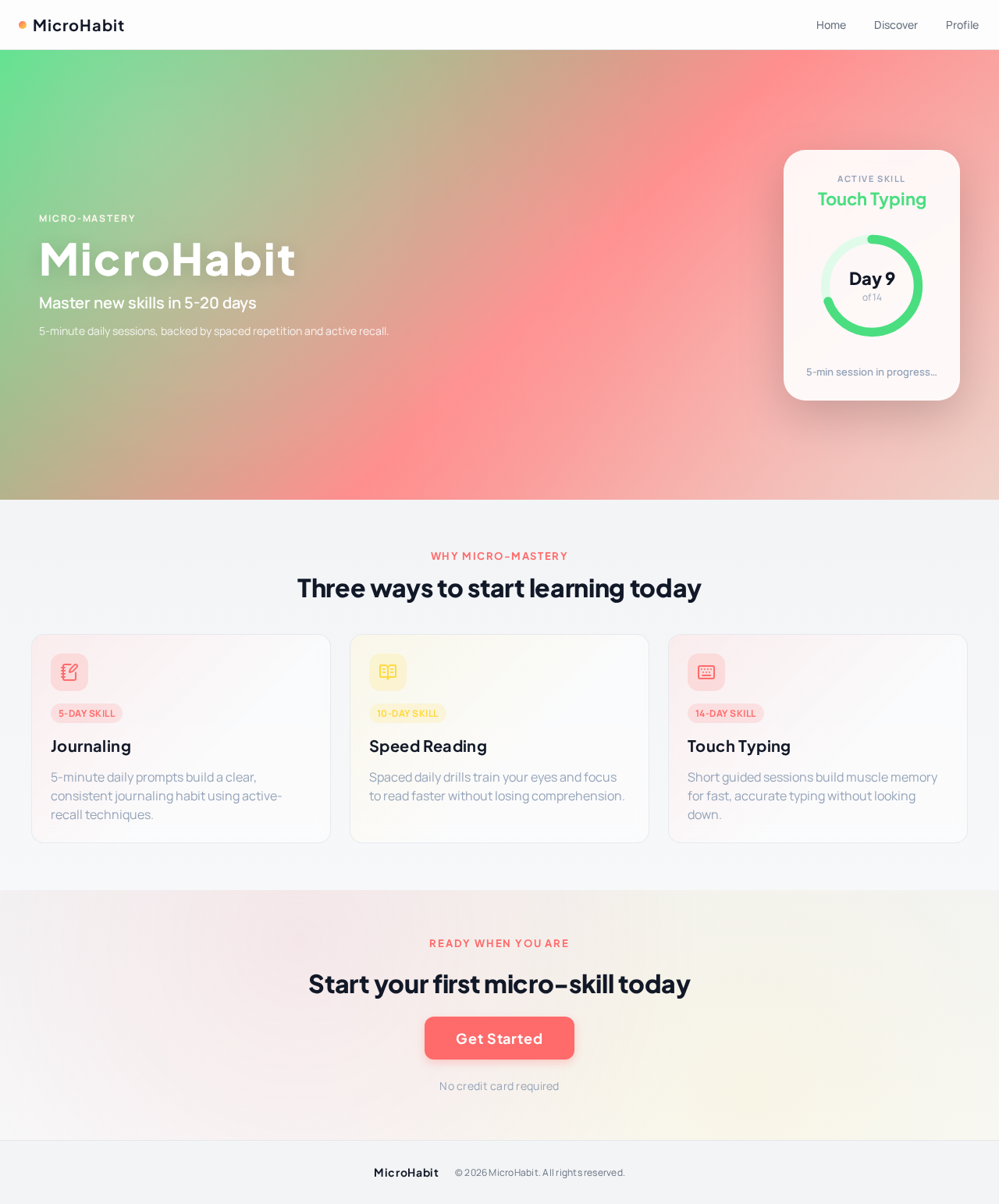
MicroHabit
Master new skills in 5-20 days
5-minute daily sessions, backed by spaced repetition and active recall.
Three ways to start learning today
Journaling
5-minute daily prompts build a clear, consistent journaling habit using active-recall techniques.
Speed Reading
Spaced daily drills train your eyes and focus to read faster without losing comprehension.
Touch Typing
Short guided sessions build muscle memory for fast, accurate typing without looking down.
Ready when you are
Start your first micro-skill today
No credit card required
micro-mastery
MicroHabit
Master new skills in 5-20 days
5-minute daily sessions, backed by spaced repetition and active recall.
Three ways to start learning today
Journaling
5-minute daily prompts build a clear, consistent journaling habit using active-recall techniques.
Speed Reading
Spaced daily drills train your eyes and focus to read faster without losing comprehension.
Touch Typing
Short guided sessions build muscle memory for fast, accurate typing without looking down.
Ready when you are
Start your first micro-skill today
No credit card required
No comments yet. Be the first!