meteor-application
 Thumbnail Creator
Mujhe ek aisa application bnake do jo thumbnail bna skta ho free me background remove karta ho jisme outfits change ho or quality enhance ho jaise PicsArt application h

Comments (0)
Sign in to leave a comment
System Requirements
System Requirements Document (SRD) for Meteor-Application
1. Introduction
The Meteor-Application is a cutting-edge platform designed to empower users with seamless thumbnail creation capabilities. Tailored for creators and influencers, this application offers advanced features such as background removal, outfit changes, and quality enhancement. Inspired by the functionality of PicsArt but optimized specifically for thumbnails, Meteor-Application aims to provide both manual and AI-driven tools for a flexible and user-friendly editing experience. This document outlines the system requirements for the development and deployment of the Meteor-Application.
2. System Overview
Meteor-Application is a free-to-use thumbnail creation platform that combines manual editing tools with AI-powered automation to cater to a diverse user base. The application is designed to provide high-quality outputs while maintaining an intuitive and accessible interface. Users can remove backgrounds, change outfits, and enhance image quality with minimal effort. The system will support two modes of operation:
- Manual Mode: For users who prefer complete control over their edits.
- AI Mode: For users who value speed and automated suggestions.
The application will be localized for the Indian market (IN), ensuring compatibility with local preferences, time zones (IST), and cultural nuances.
3. Functional Requirements as Story Points
- As a User, I should be able to create thumbnails for free.
- As a User, I should be able to remove the background of an image.
- As a User, I should be able to change outfits in an image.
- As a User, I should be able to enhance the quality of an image.
- As a User, I should be able to choose between manual editing tools and AI-powered suggestions.
- As a User, I should be able to save and download my edited thumbnails.
- As a User, I should be able to preview my edits in real-time.
- As a User, I should be able to access tutorials or guides for using the application.
4. User Personas
4.1 Free User
- Description: Users who access the application without any subscription.
- Capabilities: Access to all features, but with limited export resolutions and occasional ads.
4.2 Premium User
- Description: Users who subscribe to a premium plan for additional benefits.
- Capabilities: Ad-free experience, higher export resolutions, priority access to new features, and advanced AI tools.
5. Visuals Colors and Theme
The Meteor-Application will feature a vibrant and modern color palette to appeal to creators and influencers. The theme will emphasize creativity, energy, and professionalism.
- Background: #F5F7FA (Soft Cloud White)
- Surface: #FFFFFF (Pure White)
- Text: #2C2E3E (Charcoal Gray)
- Accent: #FF6F61 (Coral Red)
- Muted Tones: #A3A8B8 (Cool Gray)
This palette ensures a clean and professional look while maintaining a creative and approachable vibe.
6. Signature Design Concept
Interactive Canvas with Dynamic AI Suggestions
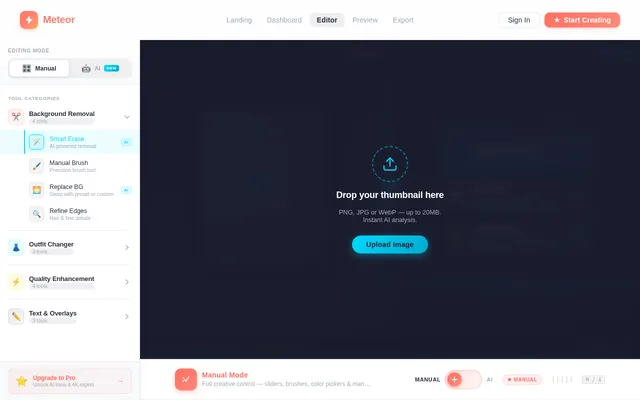
The homepage of Meteor-Application will feature an interactive canvas that immediately engages users. Upon uploading an image, the canvas will display a split-screen view:
- Left Side: Manual editing tools, including sliders, brushes, and color pickers.
- Right Side: AI-generated suggestions, such as background removal, outfit swaps, and quality enhancements.
The transition between manual and AI modes will be seamless, with smooth animations. For example:
- When switching to AI mode, the canvas will "morph" into a futuristic grid, highlighting areas being edited in real-time.
- Micro-interactions such as glowing buttons, hover effects, and subtle sound cues will enhance the user experience.
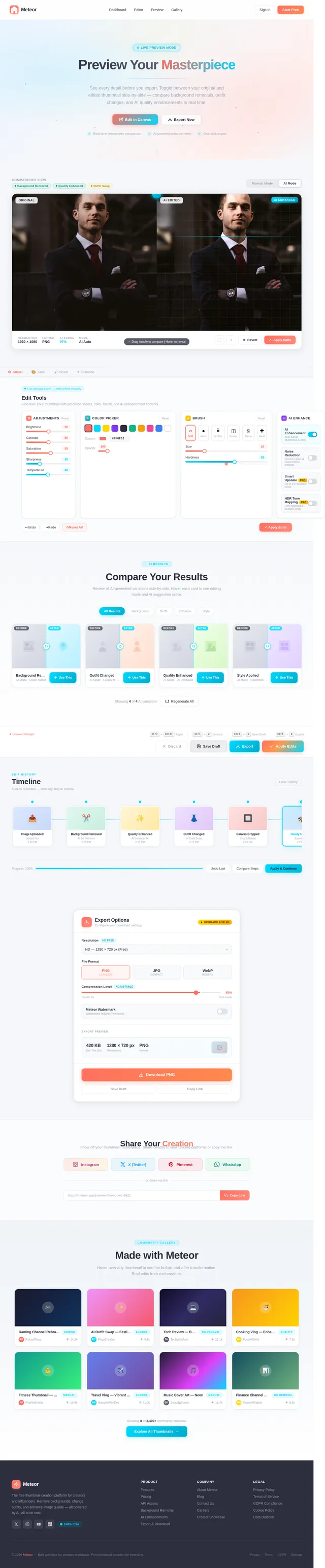
The landing page will also feature a live gallery showcasing user-created thumbnails, with a "hover to reveal before/after" effect. This will inspire new users and demonstrate the app's capabilities.
7. Non-Functional Requirements
- The application must load within 3 seconds on a standard 4G connection.
- The system should support high-resolution images up to 4K.
- The application must comply with data privacy regulations, including GDPR and Indian IT Act.
- The system should handle at least 10,000 concurrent users without performance degradation.
- The application must be mobile-responsive and optimized for both Android and iOS platforms.
8. Tech Stack
Frontend
- React for Web
- React Native for Mobile App
Backend
- Python
- FastAPI
Database
- MySQL (with Alembic for migrations)
AI Models
- GPT 5.4 for user-friendly responses
- Google Nano Banana for image generation
AI Tools
- Litellm for LLM Routing
- LangChain
Local Orchestration
- Docker
- docker-compose
Server-Side Orchestration
- Kubernetes
9. Assumptions and Constraints
Assumptions
- Users will primarily access the application from India, so the default timezone will be IST.
- The application will be free to use, with an optional premium subscription for advanced features.
- Users will have access to stable internet connections for optimal performance.
Constraints
- The system must be scalable to accommodate a growing user base.
- The application must support both manual and AI-driven editing options.
- The AI models used must be optimized for real-time performance.
10. Glossary
- Thumbnail: A small, optimized image used as a preview or cover for videos, articles, or other content.
- AI Mode: A feature where artificial intelligence automates editing tasks.
- Manual Mode: A feature where users manually edit images using tools provided by the application.
- IST: Indian Standard Time.
- GDPR: General Data Protection Regulation, a data privacy law in the European Union.

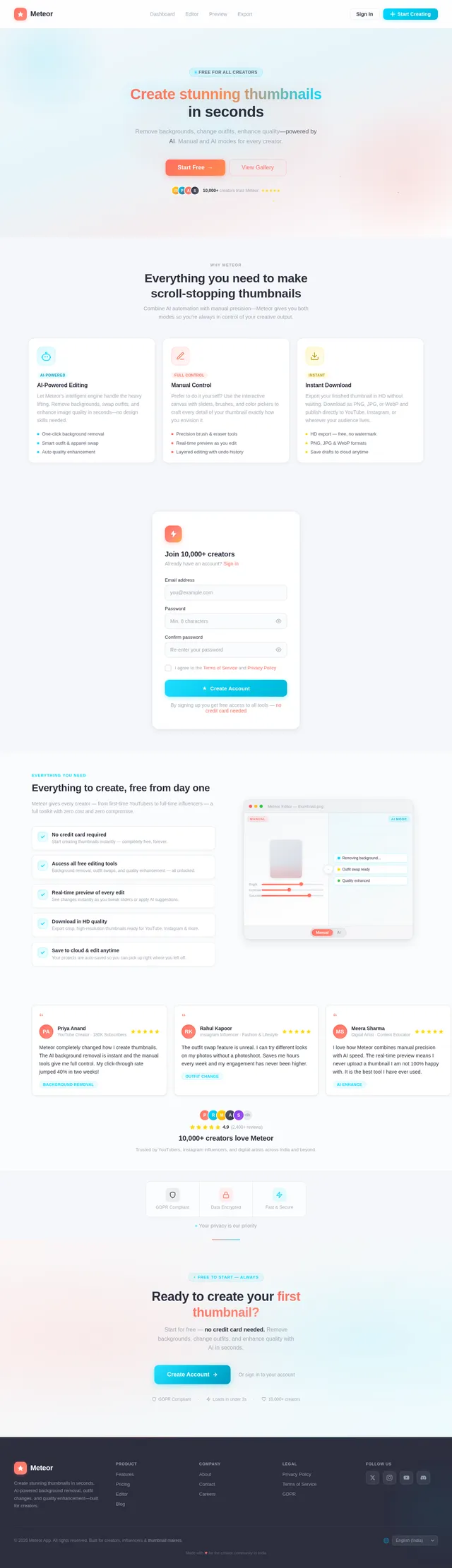
Create Stunning Thumbnails
in Seconds
AI-powered background removal, outfit changes, and quality enhancement—all for free.
Everything You Need to Create
Powerful AI tools designed for creators. Remove backgrounds, swap outfits, and enhance quality—all in one place.
Background Removal
Instantly remove and replace backgrounds with AI precision. One click to isolate your subject cleanly.
Learn more→Outfit Changes
Swap outfits on any subject effortlessly. Choose from styles or upload your own for perfect thumbnails.
Learn more→AI Enhancement
Upscale resolution, fix lighting, and sharpen details automatically. Make every thumbnail look professional.
Learn more→Interactive Canvas with Dynamic AI
Experience the dual-mode editor that combines precision manual tools with intelligent AI suggestions — all in one seamless workspace.
From Upload to Download in 4 Simple Steps
Create professional thumbnails in minutes—no design skills required. Our streamlined workflow makes it effortless.
Upload Image
Drag and drop your photo or snap one directly. We support JPG, PNG, and WebP up to 25 MB.
Choose Mode
Pick Manual for full creative control, or let AI Mode handle background removal, outfit swaps, and enhancements automatically.
Edit & Preview
Fine-tune every detail in real-time with our split-screen editor. See changes instantly before committing.
Download HD
Export your polished thumbnail in up to 4K resolution—watermark-free, ready to publish anywhere.
See What Creators Built
Real thumbnails made by real creators using Meteor. Hover over any card to see the transformation.
Loved by Creators Worldwide
See why thousands of creators trust Meteor for their thumbnails
Choose Your Plan
Start creating stunning thumbnails for free, or unlock the full power of Meteor with Premium.
Access all core editing features with no subscription required. Perfect for creators just getting started.
- Background removal on all images
- Outfit change with basic templates
- AI-powered quality enhancement
- Manual & AI editing modes
- Real-time preview of edits
- Save & download thumbnails
- Access to tutorials & guides
- Standard resolution export
Unlock advanced AI tools, 4K exports, and an ad-free experience. Built for serious creators and influencers.
- Everything in Free, plus:
- Ad-free editing experience
- 4K ultra-high resolution export
- Priority access to new features
- Advanced AI tools & suggestions
- Unlimited outfit templates
- Premium background library
- Priority customer support
Cancel anytime. No hidden fees. 7-day money-back guarantee.
Ready to Create?
Join thousands of creators making stunning thumbnails for free. Powered by AI, designed for you.
No comments yet. Be the first!