meta-micro
 Mole Fact
Build me this micro SaaS:- 1. Coaching-centre automation This is probably the best fit for Patna because you can sell directly to local institutes instead of competing globally. Start with one painful workflow: automatic fee reminders and parent updates through WhatsApp. A basic product could include: Student and batch management. Monthly fee-due dashboard. Attendance recording. Test-score reports. WhatsApp reminders. Hindi and English message templates. Example economics: 20 institutes paying ₹1,499/month produces ₹29,980 in monthly recurring revenue. You could initially provide setup and data import manually, then automate the repeated parts.


Comments (0)
Sign in to leave a comment
System Requirements
System Requirements Document for meta-micro
1. Introduction
The meta-micro project aims to develop a micro SaaS solution for automating coaching-centre operations, specifically targeting local institutes in Patna. The primary focus is on streamlining administrative tasks such as student and batch management, fee reminders, attendance recording, and test-score reporting. The solution will leverage WhatsApp for communication, supporting bilingual message templates in Hindi and English.
2. System Overview
The system is designed to automate key workflows for coaching centers, reducing manual effort and improving communication with parents. It includes features for managing students and batches, monitoring monthly fees, recording attendance, and generating test-score reports. The system will send automatic fee reminders and parent updates via WhatsApp, using predefined templates. The initial setup and data import can be handled manually, with automation introduced for repetitive tasks.
2a. Product Interpretation and Delivery Boundary
The product is intended for local coaching institutes in Patna, with a focus on automating fee reminders and parent updates through WhatsApp. The system supports bilingual message templates and allows for manual setup and data import initially. The application will manage its own identity and access control, requiring institute administrators to enroll or accept provisioning before using the system. Teachers will receive invitations or provisioning to access the system.
2b. Source Content Inventory
Not applicable as no content source directive was provided.
2c. Page Content and Component Coverage
Landing
- Purpose: Introduce the coaching-centre automation solution.
- Components:
- Overview of features: fee reminders, attendance, scores, WhatsApp workflows.
- Call-to-action for sign-up.
- Language selection for Hindi/English.
Login
- Purpose: Authenticate returning users.
- Components:
- Username and password fields.
- Forgot password link.
- Language selection.
Sign Up
- Purpose: Register new institute administrators.
- Components:
- Registration form with institute details.
- Language selection.
Students
- Purpose: Manage student records.
- Components:
- List of students with search and filter options.
- Add new student button.
Student Details
- Purpose: View and edit individual student information.
- Components:
- Student profile fields.
- Save and cancel buttons.
Batches
- Purpose: Manage student batches.
- Components:
- List of batches with search and filter options.
- Add new batch button.
Batch Details
- Purpose: View and edit batch information.
- Components:
- Batch profile fields.
- Save and cancel buttons.
Fees
- Purpose: Monitor monthly fee dues.
- Components:
- Dashboard showing outstanding fees.
- Filter by batch or student.
Attendance
- Purpose: Record student attendance.
- Components:
- Attendance sheet by batch or session.
- Submit attendance button.
Test Scores
- Purpose: Enter and review test scores.
- Components:
- Score entry fields.
- Generate report button.
Templates
- Purpose: Manage message templates.
- Components:
- List of templates with edit options.
- Add new template button.
Fee Reminders
- Purpose: Send fee reminders via WhatsApp.
- Components:
- Select recipients and template.
- Send reminder button.
Parent Updates
- Purpose: Send updates to parents via WhatsApp.
- Components:
- Select recipients and template.
- Send update button.
Automations
- Purpose: Manage recurring workflows.
- Components:
- Schedule settings for reminders and updates.
- Enable/disable automation toggle.
Setup
- Purpose: Initial setup and data import.
- Components:
- Step-by-step setup guide.
- Data import options.
3. Functional Requirements
- As a Coaching-centre administrator, I should be able to manage students and batches to keep records organized. (explicit)
- As a Coaching-centre administrator, I should have access to a monthly fee-due dashboard to monitor outstanding obligations. (explicit)
- As a Teacher, I should be able to record attendance to track student participation. (explicit)
- As a Teacher, I should be able to enter test scores to generate reports. (explicit)
- As a Coaching-centre administrator, I should be able to send automatic fee reminders and parent updates through WhatsApp to ensure timely communication. (explicit)
- As a Coaching-centre administrator, I should be able to use Hindi and English message templates for communication. (explicit)
- As a Coaching-centre administrator, I should be able to complete initial setup and data import manually to start using the system. (explicit)
4. User Personas
- Coaching-centre administrator: Manages students and batches, monitors fees, records attendance, generates test-score reports, and sends parent updates.
- Teacher: Records attendance and test scores.
5. Core User Flows
-
Administrator Enrollment and Setup
- Administrator visits the Sign Up page.
- Completes registration form with institute details.
- Proceeds to the Setup page for initial configuration and data import.
- Completes setup to access the system.
-
Teacher Access and Attendance Recording
- Teacher receives an invitation and logs in via the Login page.
- Navigates to the Attendance page.
- Records attendance for the assigned batch or session.
-
Fee Reminder Automation
- Administrator configures templates on the Templates page.
- Sets up automation schedules on the Automations page.
- System sends reminders via WhatsApp based on the schedule.
-
Test Score Entry and Reporting
- Teacher logs in and navigates to the Test Scores page.
- Enters scores for students.
- Generates a report for review.
6. Visuals Colors and Theme
- Muse: Haraldur Thorleifsson
- Palette:
- Background: #FAF3E0
- Surface: #FFFFFF
- Text: #333333
- Primary: #FF6F61
- Accent: #FFD700
- Muted: #E0E0E0
- Typography:
- Headings: Sora — Bold, large, with loose tracking, sentence case.
- Body: Outfit
- Scale: 1.414 modular, 48/34/24/18/16
- Shape Language: Chunky rounded cards and color-blocked sections.
- Layout: Grid layout with bold color blocks and ample whitespace.
- Imagery: Custom character and spot illustrations, bold iconography.
7. Signature Design Concept
The Landing page will feature a large character illustration occupying half the screen, with bold text and a coral CTA button on a cream background. This design will embody the big-hearted boldness of Haraldur Thorleifsson's style, creating an inviting first impression for users.
8. Interaction Model & Motion Direction
- Interaction Model: Animated
- Motion Tempo: Expressive
- Hero Dimensionality: Layered_2d
- Landing Hero Motion Brief: The hero section will feature a large character illustration with lively entrance animations. The focal subject will be the character, transforming into a welcoming gesture as the user scrolls, with hover pops on interactive elements. A reduced-motion state will simplify animations for accessibility.
9. Non-Functional Requirements
- The system must support both Hindi and English languages for all user-facing text and templates. (explicit)
- The system must ensure secure data handling and user authentication. (required_inference)
- The system should be optimized for performance to handle multiple institutes simultaneously. (required_inference)
10. Tech Stack
- Frontend: React
- Backend: Python/FastAPI
- Database: PostgreSQL
- Messaging: WhatsApp API integration
- Deployment: Docker, Kubernetes (if required for scaling)
11. Assumptions and Constraints
- The product is specifically targeted at local coaching institutes in Patna.
- Initial setup and data import will be handled manually before automation.
- WhatsApp connectivity and recipient contact data are prerequisites for message delivery.
12. Glossary
- Coaching-centre administrator: A user responsible for managing the institute's operations.
- Teacher: A user responsible for recording attendance and test scores.
- WhatsApp API: An interface for sending messages through WhatsApp.
- Bilingual templates: Message templates available in both Hindi and English.
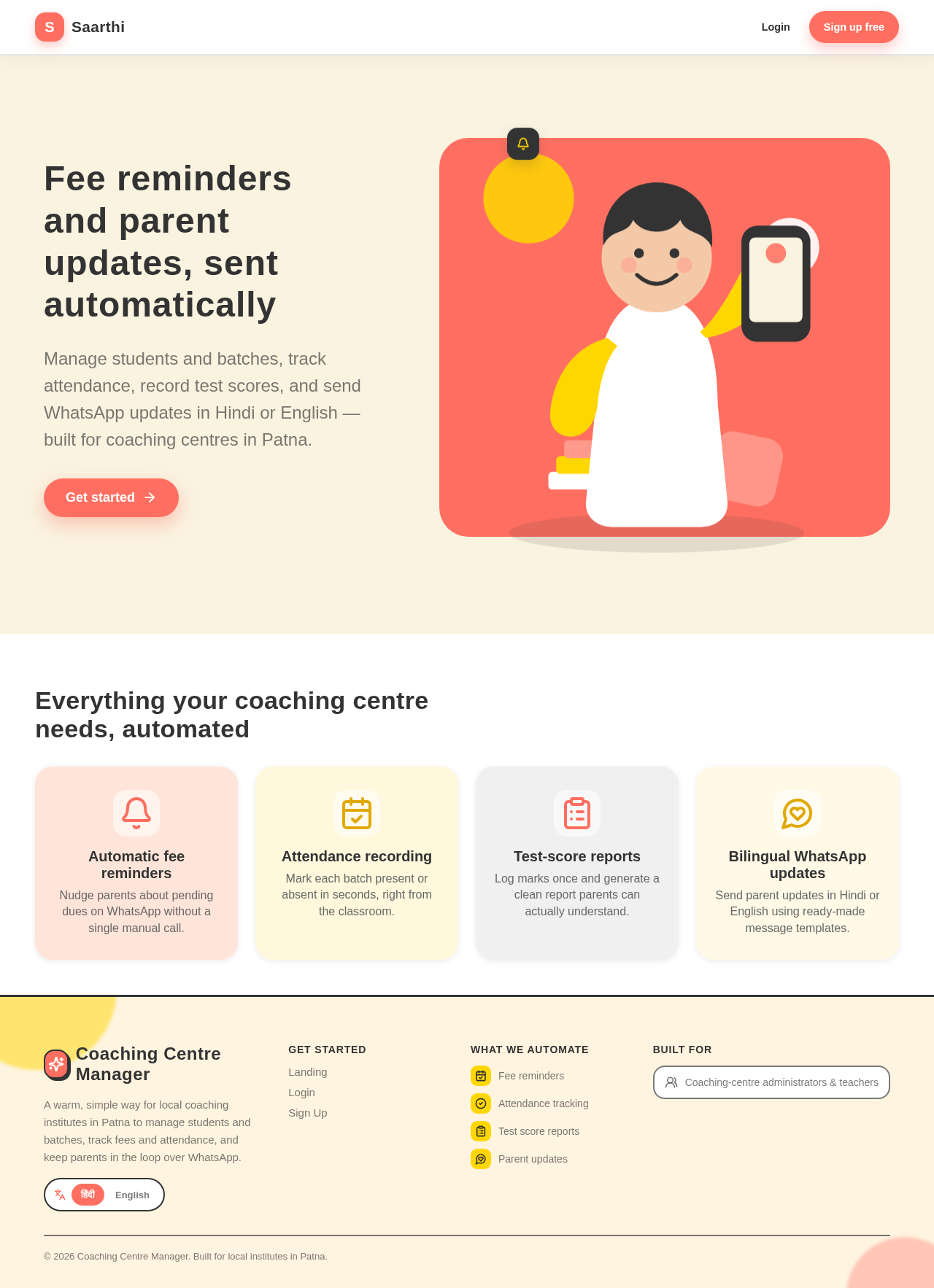
Fee reminders and parent updates, sent automatically
Manage students and batches, track attendance, record test scores, and send WhatsApp updates in Hindi or English — built for coaching centres in Patna.
Everything your coaching centre needs, automated
Automatic fee reminders
Nudge parents about pending dues on WhatsApp without a single manual call.
Attendance recording
Mark each batch present or absent in seconds, right from the classroom.
Test-score reports
Log marks once and generate a clean report parents can actually understand.
Bilingual WhatsApp updates
Send parent updates in Hindi or English using ready-made message templates.
Fee reminders and parent updates, sent automatically
Manage students and batches, track attendance, record test scores, and send WhatsApp updates in Hindi or English — built for coaching centres in Patna.
Everything your coaching centre needs, automated
Automatic fee reminders
Nudge parents about pending dues on WhatsApp without a single manual call.
Attendance recording
Mark each batch present or absent in seconds, right from the classroom.
Test-score reports
Log marks once and generate a clean report parents can actually understand.
Bilingual WhatsApp updates
Send parent updates in Hindi or English using ready-made message templates.
No comments yet. Be the first!